Psychoacoustic Models in MP3 and AAC Encoding


Free Download Mp4Gain
picture

Psychoacoustic Models in MP3 and AAC Encoding

Psychoacoustic Models in MP3 and AAC Encoding

Let’s talk about Psychoacoustic Models in MP3 and AAC Encoding

When it comes to digital audio compression, especially in MP3 and AAC formats, psychoacoustic models are the secret sauce that makes it all work. These models allow us to shrink large audio files into much smaller sizes without a noticeable loss in sound quality. In my years of working with audio encoding, I’ve seen how these models have revolutionized the way we perceive sound after compression. The core idea is simple: we don’t hear all sounds equally. Some frequencies and nuances are more noticeable than others, and psychoacoustic models exploit this fact to make compression more efficient.

Think of it like this: imagine you’re at a concert, and a loud bass guitar is playing alongside a softer violin. Your attention is drawn to the bass because it’s much louder, and the violin’s subtle details get masked. This is exactly what psychoacoustic models do—they remove or reduce sounds that are unlikely to be heard due to masking effects. In this article, I’ll walk you through how psychoacoustic models in MP3 and AAC encoding work and why they matter for audio quality and file size.

Understanding the Basics of Psychoacoustic Models

Psychoacoustic models are based on the science of how our ears and brain perceive sound. They take into account how different sounds mask each other, which frequencies we are most sensitive to, and how we interpret sound in different contexts. MP3 and AAC encoding use these models to compress audio by identifying and removing information that won’t be noticeable to the listener.

A simple analogy would be taking a photograph with a high-resolution camera and then reducing its size by removing some pixels. You won’t notice much difference in the quality of the image because you can’t see all the pixels. Similarly, these audio encoders remove frequencies or audio details that the human ear won’t detect, making the audio file smaller without compromising its perceived quality.

Frequency Masking

  • Frequency masking happens when a louder sound in one frequency range makes a softer sound in a nearby frequency range inaudible.
  • Psychoacoustic models use this to discard or reduce the quieter, masked sounds, optimizing compression.
  • For example, if a heavy guitar is playing at a loud volume, the model might remove the higher-pitched background notes that are masked by the louder guitar.

Temporal Masking

  • Temporal masking occurs when one sound, like a sharp drum hit, can mask a quieter sound that occurs immediately after it.
  • This type of masking is crucial for determining which transient sounds can be removed in compression.
  • For instance, a loud snare hit can mask a subtle violin note that comes milliseconds after, making it unnecessary to keep all the data for that note.

The Role of Psychoacoustic Models in MP3 Encoding

In MP3 encoding, psychoacoustic models play a critical role in reducing the file size while maintaining an acceptable level of sound quality. The MP3 codec was one of the first to use psychoacoustic models to exploit human hearing limitations, and it was revolutionary when it was introduced in the 1990s. The encoder divides audio into different frequency bands and applies masking principles to decide which data can be discarded.

What’s fascinating is that MP3 uses a hybrid of time-domain and frequency-domain processing. It first splits the audio into small segments and then performs a frequency analysis. Using this information, the encoder decides which frequencies can be reduced or eliminated entirely. By doing this, the model allows the MP3 format to achieve relatively small file sizes while preserving the overall listening experience.

MP3 and the Trade-off Between Compression and Quality

  • MP3 encoding sacrifices some of the finer audio details to reduce file size.
  • The trade-off is more noticeable at lower bitrates, where artifacts like compression noise or a “tinny” sound may become audible.
  • Higher bitrates, like 192 kbps or 256 kbps, provide better sound quality, though the file size increases.

AAC: The Next Generation of Psychoacoustic Modeling

While MP3 revolutionized audio compression, AAC (Advanced Audio Codec) takes things a step further. As a more advanced codec, AAC uses a refined psychoacoustic model that performs better at lower bitrates, providing higher-quality audio with less data. This is especially important for modern audio streaming services, which need to balance high-quality sound with efficient bandwidth usage.

The AAC psychoacoustic model is more sophisticated, taking into account additional factors like stereo imaging and spatial effects. It’s also more adept at handling complex audio, such as orchestral music or tracks with a wide range of dynamics. From my experience, AAC does a better job than MP3 in preserving the subtleties of sound, especially at lower bitrates, which is why I recommend it over MP3 when available.

Why AAC Outperforms MP3

  • AAC uses more advanced psychoacoustic techniques, making it more efficient at lower bitrates.
  • It better preserves transient sounds and complex audio elements, like the reverberations of a piano or the nuances of a singer’s voice.
  • With AAC, you can get excellent sound quality at 128 kbps, whereas MP3 may require 192 kbps or higher for a similar result.

How Psychoacoustic Models Help with Audio Quality at Low Bitrates

One of the most remarkable aspects of psychoacoustic models is how they enable high-quality audio at low bitrates. At lower bitrates, many codecs, including MP3 and AAC, might introduce artifacts such as distortion or loss of clarity. However, psychoacoustic models allow the encoder to focus on the most important elements of the sound—those that we are most likely to notice—while discarding the less important parts.

This is especially noticeable in AAC, where the advanced psychoacoustic model ensures that even at low bitrates, the encoding still captures essential auditory information, such as pitch, rhythm, and timbre. I’ve personally found that with AAC, even at 128 kbps, I can enjoy clear vocals and instruments without the harsh artifacts that often accompany MP3 at the same bitrate.

Latest Words on Psychoacoustic Models in MP3 and AAC Encoding

Psychoacoustic models are an integral part of both MP3 and AAC encoding, helping us achieve smaller file sizes while preserving audio quality. These models allow the encoder to reduce the file size by removing sounds that are less perceptible to the human ear, making the audio more efficient without sacrificing what matters most to the listener. While MP3 was groundbreaking in its time, AAC offers superior compression and better handling of complex audio, making it the better choice for modern audio applications.

As I’ve discussed throughout this article, these psychoacoustic models are crucial in ensuring that we can enjoy high-quality audio, even with file sizes that fit comfortably on our devices and bandwidth constraints. Whether you’re listening to your favorite album or streaming a podcast, psychoacoustic models are working behind the scenes to make your audio experience better. As the technology continues to improve, we can only expect even better performance in the future.

Frequently Asked Questions

What are psychoacoustic models in MP3 and AAC encoding?

Psychoacoustic models in MP3 and AAC encoding are based on the way humans perceive sound. These models analyze how different frequencies mask each other, allowing the codecs to remove or reduce the data for sounds that are less noticeable to the human ear. This process helps reduce file size without sacrificing audio quality. Essentially, psychoacoustic models optimize compression by focusing on the most important sounds in an audio file.

How do psychoacoustic models improve audio compression?

Psychoacoustic models improve audio compression by eliminating or reducing sounds that the human ear is less sensitive to. For example, louder sounds can mask softer ones, so the encoder can discard those quieter sounds, saving space without impacting the perceived quality of the audio. This makes it possible to compress audio files into smaller sizes while still delivering high-quality sound, especially in formats like MP3 and AAC.

What is the difference between MP3 and AAC in terms of psychoacoustic models?

The main difference between MP3 and AAC lies in the sophistication of their psychoacoustic models. AAC has a more advanced model that better handles complex audio, such as classical music or tracks with subtle dynamic changes. It also performs better at lower bitrates compared to MP3, providing higher sound quality at the same compression level. In short, AAC offers superior compression efficiency, especially when dealing with modern audio formats and streaming.

Why does AAC sound better than MP3 at lower bitrates?

AAC sounds better than MP3 at lower bitrates because it uses a more efficient psychoacoustic model. The AAC codec is designed to optimize the way it removes or reduces sounds, prioritizing the frequencies that are most important for human perception. This allows it to achieve a better balance between file size and audio quality, especially at bitrates like 128 kbps, where MP3 might begin to show noticeable artifacts.

How does temporal masking affect audio compression?

Temporal masking occurs when a loud sound at one moment in time masks a softer sound that follows it almost immediately. This effect is important for audio compression because it allows the encoder to discard these masked sounds without the listener noticing. This type of masking helps improve compression efficiency, especially in formats like MP3 and AAC, where transient sounds, like a snare hit or cymbal crash, may cover quieter background elements.

Can psychoacoustic models cause distortion in compressed audio?

While psychoacoustic models aim to reduce file size without degrading sound quality, they can sometimes introduce distortion, particularly at lower bitrates. This happens when the codec removes too much data, resulting in noticeable artifacts such as a “tinny” or metallic sound. However, with modern codecs like AAC, these artifacts are much less common, even at lower bitrates, thanks to more advanced psychoacoustic modeling.

Comments:

Wow, I had no idea how much science goes into these audio codecs. Your explanation about frequency and temporal masking really helped me understand why AAC sounds better at lower bitrates. Great article! – AudioFan77

I’ve always been a fan of MP3, but now I’m definitely considering switching to AAC for my music collection. The way you described the differences in psychoacoustic models makes it so much clearer! Thanks! – MusicJunkie88

This article is awesome! The real-life examples helped me visualize how psychoacoustic models work. I never understood how my music could sound so good at a low bitrate, but now I get it. Thanks for the great info! – SoundLover42

Can you talk more about how AAC handles high-frequency sounds compared to MP3? I’d love to know more about that! Great article though, very informative. – HighFreqFan

I didn’t realize how important these psychoacoustic models were in compressing audio. I always wondered how audio streaming services maintain such high-quality sound at lower bitrates. Now I know! – DeeJayDave

This is one of the most detailed articles on this topic I’ve found! I’ve been using AAC for a while now, but this article really made me appreciate how much better it is than MP3, especially for complex audio. – SoundEngineerX

Excellent breakdown of the differences between MP3 and AAC. I always assumed MP3 was “good enough” but now I realize AAC is the better choice, especially for lower bitrates. Thanks for clearing that up! – TechieTom

Great read, but I wish you would’ve gone deeper into how these psychoacoustic models impact the experience for listeners with hearing impairments. Any chance you can dive into that next? – ClearSound76

As a musician, I’ve always been picky about sound quality. After reading this, I’m convinced that AAC is worth the switch for my music files. Thanks for sharing your expertise! – MusicMaker24

I had no idea that psychoacoustic models were so important for compression. I always assumed audio codecs just “squished” the data and that was it! – CuriousGeorge

Very well-written article! I didn’t know much about psychoacoustics before, but now I understand why AAC sounds better at lower bitrates. Thanks for breaking it down so clearly! – TuneInExpert


Free Download Mp4Gain
picture


Mp4Gain Main Window
picture


Mp4Gain Features
picture


Free Download Mp4Gain
picture

Low-Pass Filtering in MP3 Compression

Low-Pass Filtering in MP3 Compression

Low-Pass Filtering in MP3 Compression

Let’s talk about low-pass filtering in MP3 compression

Low-pass filtering is an essential part of MP3 compression, letting us reduce file sizes without sacrificing too much sound quality. It works by cutting off high frequencies that aren’t as noticeable to our ears, which keeps the sound clearer while making the data much lighter. From my experience, low-pass filtering in MP3s is like removing extra details from a painting. If you look from far away, you wouldn’t notice the tiny strokes missing; instead, you still see the full picture. This article will explain how low-pass filtering works, why it’s so effective, and how it impacts what we hear.

Understanding Low-Pass Filtering

Low-pass filtering removes the high-frequency sounds that the human ear often can’t detect well, especially in a noisy environment or at lower volume. In MP3s, this helps cut down on file sizes since we’re only encoding the sound details that matter most. Imagine you’re listening to music in a crowded place – you’re likely focusing on the bass or vocals rather than tiny, high-pitched sounds in the background. MP3 compression replicates this effect, removing unimportant details so the file is efficient.

How Low-Pass Filtering Works in MP3 Compression

Low-pass filtering works by setting a specific cutoff frequency, often around 16 kHz or lower in MP3 compression, and removing sounds above it. These frequencies aren’t vital for a song’s core experience, so cutting them out helps compress the audio without major quality loss. Think of it like simplifying a picture by using fewer colors or shades; the main parts of the image are still clear, but with less detail. This process saves storage and allows faster streaming, which is especially handy on mobile devices.

The Role of Psychoacoustics in Low-Pass Filtering

Psychoacoustics is the science of how we perceive sound, and it’s central to MP3 compression. Certain sounds are masked by others, and higher frequencies can be covered by more dominant tones. By using psychoacoustic principles, MP3 compression focuses on frequencies that listeners pay the most attention to, allowing high-frequency sounds to be removed without a noticeable impact. This technique makes MP3s much more efficient because it only keeps the parts of sound that our brain cares about.

Benefits of Low-Pass Filtering in MP3 Compression

Low-pass filtering offers multiple benefits that help make MP3s one of the most popular audio formats. These advantages include smaller file sizes, faster downloads, and better streaming quality. For example:

  • Reduced File Size: By cutting high frequencies, MP3 files become smaller and easier to store.
  • Faster Streaming: Lower data requirements mean songs load and play quicker online.
  • Enhanced Compatibility: Smaller files are easier for various devices to play, making MP3s widely accessible.

Impact on Audio Quality

Some people might worry that low-pass filtering removes too much sound, but most listeners won’t notice the missing high frequencies. High-quality headphones or audio systems may reveal a difference, but for everyday use, the effect is minimal. In my experience, casual listeners rarely detect the filtering, especially if the bitrate is high. However, if you’re an audiophile or using high-end equipment, you may notice a slight reduction in brightness or clarity.

Low-Pass Filtering Frequency Choices

The cutoff frequency in MP3 compression is typically adjustable, letting engineers decide how much detail to keep. Lower bitrates often use lower cutoffs to save more space, while higher bitrates may retain frequencies up to 20 kHz. This flexibility is one reason why MP3s can range from decent to near-CD quality, depending on the chosen compression settings. Adjusting the cutoff can make a big difference – at a lower cutoff, you save more space, but at the expense of some audio clarity.

Differences Between Low-Pass Filtering and Other Filters

Unlike high-pass or band-pass filters, low-pass filters are specifically used to remove high frequencies. High-pass filters do the opposite, cutting off lower frequencies to focus on treble sounds. Band-pass filters allow a specific range of frequencies through while blocking everything outside it. Low-pass filtering is the best option for MP3 compression because high frequencies are less crucial for sound recognition and perception.

Challenges of Using Low-Pass Filtering in MP3s

While low-pass filtering is effective, it comes with its challenges. One downside is that high-end detail can be lost, especially at low bitrates. In my experience, some listeners may feel that certain musical instruments, like cymbals or flutes, lack their “crispness” after compression. Managing these trade-offs is essential in achieving a balance between file size and quality.

Why Low-Pass Filtering Works Well with MP3’s Lossy Compression

Low-pass filtering aligns well with MP3’s lossy compression because both approaches aim to reduce file size while preserving key audio details. Lossy compression works by discarding sounds our ears are unlikely to miss, so low-pass filtering is a natural match. It allows MP3s to achieve high levels of compression without making the audio sound hollow or incomplete.

Examples of Low-Pass Filtering in Everyday Life

Low-pass filtering isn’t just for MP3s; it’s used in various fields, from radio transmission to photography. For instance, walkie-talkies often use low-pass filtering to eliminate background noise, making conversations clearer. Similarly, some digital cameras use filters to remove excessive color details that could affect image quality. These examples show how filtering focuses on essential information, leaving out unnecessary noise or detail.

Optimizing Low-Pass Filtering for Different Bitrates

The efficiency of low-pass filtering depends on bitrate. Higher bitrates preserve more high frequencies, which can enhance sound quality, especially on detailed audio systems. Lower bitrates prioritize data savings, which may result in a lower cutoff frequency. When I’m optimizing for quality, I often choose a higher bitrate to preserve more detail, but for mobile or streaming, a lower bitrate works fine.

Comparing Low-Pass Filtering in MP3 and Other Audio Formats

Different audio formats handle frequencies in various ways. For example, AAC and OGG Vorbis use advanced psychoacoustic models, which sometimes retain higher frequencies better than MP3s. However, MP3 remains the most universal format due to its balance of compatibility, size, and acceptable quality. Comparing MP3 to lossless formats like FLAC shows the limits of lossy compression, but for casual listening, MP3 with low-pass filtering is usually enough.

Latest words on low-pass filtering in MP3 compression

Low-pass filtering is a powerful tool in MP3 compression, keeping files light without cutting down on the most important sounds. It effectively reduces unnecessary data, making MP3s smaller and more accessible while keeping music enjoyable. From my perspective, low-pass filtering is the reason why MP3s continue to be relevant today. While other formats offer higher quality, the balance of size, compatibility, and efficiency keeps MP3 in the mainstream. For anyone looking to make their music files more manageable, tools like Mp4Gain can provide a simple solution to adjust quality and compression settings, ensuring the best listening experience.

Comments:

Awesome article! I never understood how MP3 compression worked until now. The whole concept of low-pass filtering is so cool. Thanks for breaking it down!

Wait, so does this mean high frequencies are basically “cut out” to save space? That’s insane. I always wondered why some MP3s sounded flat compared to CDs. Great explanation!

Nice read! I’m not super tech-savvy, but this helped me understand why MP3s are so popular despite the newer formats. It’s like a tiny miracle how they can compress so much.

Interesting stuff! But does this mean that higher bitrates don’t need low-pass filtering? Would love to read more about that!

This is super helpful! I’ve been compressing my audio files, but didn’t realize how important low-pass filtering is for file size. Thanks!

I love music production and this made so much sense! Low-pass filtering for compression is like mixing where you cut out unneeded frequencies. Really good stuff here.

Good explanation, but I’d like a bit more info on how low-pass compares in different audio formats. Maybe a follow-up?

I get it now! It’s like simplifying an image by removing colors you wouldn’t even see from far away. Such a helpful analogy!

Didn’t know that MP3 files cut out high frequencies! This might explain why some of my music doesn’t sound as “bright” as CDs. Great article!

I think I finally understand the tech behind MP3s. It’s really amazing what can be done to reduce file size without losing too much quality

. Very clear explanation.

Thanks for the breakdown! It’s amazing how far compression has come. I’m always looking for ways to make my files smaller, and this definitely helps.

This is gold! I’m studying audio engineering and low-pass filtering was a bit of a mystery. Thanks for making it easy to understand.

Interesting article. I wonder how this affects streaming quality. Might have to do more reading about it. Thanks for the intro!

Psychoacoustic Modeling in MP3 Encoding

Psychoacoustic Modeling in MP3 Encoding

Psychoacoustic Modeling in MP3 Encoding

Let’s talk about Psychoacoustic Modeling in MP3 Encoding

Psychoacoustic modeling is at the heart of how MP3 encoding achieves its impressive compression without compromising the sound quality listeners expect. As a specialist in audio processing, I often dive into the fascinating relationship between human hearing and digital encoding methods. At its core, psychoacoustic modeling is a technique that removes sounds that listeners likely won’t hear, freeing up space without noticeable loss. Picture it like filtering out background noise in a crowded room; you retain what matters, discarding the rest. Let’s break down how psychoacoustic modeling enables MP3 encoding to reduce file sizes while keeping the music enjoyable and clear.

What is Psychoacoustic Modeling in Audio Encoding?

Psychoacoustic modeling, simply put, utilizes principles of human auditory perception to create efficient digital audio files. Rather than storing every tiny sound detail, it stores only what our ears can reasonably detect. It’s like reducing a high-definition image down to a manageable size without losing the essential picture quality. This process allows MP3 files to capture and convey musical elements that matter most to our ears, without holding onto excess sound data. As someone who frequently works with audio processing, I appreciate the balance of quality and file size that psychoacoustic modeling provides in MP3 encoding.

How Human Hearing Influences MP3 Encoding

When we look at how MP3 encoding handles audio, it’s all about the way human hearing works. The ear doesn’t perceive all sounds equally; some frequencies and volumes dominate our perception, while others slip by almost unnoticed. Psychoacoustic modeling cleverly eliminates or reduces these less perceptible sounds. For example, sounds above 16,000 Hz are often inaudible to most people, especially in the presence of louder, lower frequencies. It’s much like focusing on a favorite melody while ignoring background noise at a concert.

The Role of Frequency Masking in Psychoacoustic Models

One of the main principles in psychoacoustic modeling is frequency masking, where stronger sounds can mask weaker ones, making them harder to hear. Imagine standing beside a roaring waterfall; you’re unlikely to hear someone whispering nearby. MP3 encoding leverages this concept by reducing the data assigned to “masked” sounds, which won’t be missed by the human ear. This smart approach allows MP3 files to cut down on unnecessary audio information, achieving efficient compression.

Temporal Masking and Its Impact on MP3 Quality

Temporal masking is another vital part of psychoacoustic modeling, involving how sounds can mask other sounds that occur closely in time. For instance, if a loud drum beat is immediately followed by a quieter note, the latter may go unnoticed. MP3 encoding uses this to selectively reduce details around louder, more prominent sounds, ensuring that the auditory experience remains rich without holding onto insignificant data. I find this process mirrors how we naturally overlook brief, quiet noises in a bustling environment.

Quantization and Bit Allocation in MP3 Encoding

Quantization refers to rounding off sound values to fit within a manageable range, a process that directly affects file size. In MP3 encoding, bit allocation determines how many bits are given to various sound details based on psychoacoustic analysis. High-priority sounds receive more bits for clarity, while lower-priority ones are stored with less. Think of it like budgeting for a party: spend most on the essentials, while the little things take up less. This efficient allocation keeps MP3 files both compact and high-quality.

How Psychoacoustic Models Balance Compression and Sound Quality

Achieving the right balance between compression and sound quality is a core aim of psychoacoustic models. As someone who’s seen various encoding approaches over the years, I know this balance is key to a good MP3. By retaining perceptually significant sounds and discarding what won’t be missed, MP3 encoding hits a sweet spot of clarity and efficiency. Imagine reducing the weight of a suitcase by only packing the essentials, leaving out items that don’t add real value. This is how MP3 encoding achieves such remarkable compression.

Examples of Psychoacoustic Models in Action

There are several prominent psychoacoustic models used in MP3 encoding. The most widely known is the Model I from MPEG-1 Layer III, which focuses on frequency and temporal masking. For instance, think of an orchestra: MP3 encoding gives priority to the lead violin while reducing data for background noise that listeners won’t notice. Each model is tuned to prioritize sounds based on human auditory characteristics, making MP3 an optimal format for casual listening.

Why MP3 Encoding Uses Psychoacoustic Models

MP3 encoding heavily relies on psychoacoustic models because they offer a realistic way to reduce file sizes without making music sound low-quality. Think about an artist painting a detailed portrait; they use their skills to add meaningful details while avoiding unnecessary strokes. Likewise, psychoacoustic models filter out audio “noise” we wouldn’t miss, creating manageable, shareable files that still deliver great listening experiences.

Comparing Psychoacoustic Models Across Audio Formats

MP3 isn’t the only format that uses psychoacoustic modeling; AAC and OGG also incorporate similar principles, each with its nuances. While MP3 prioritizes compatibility, AAC provides higher fidelity at similar bit rates, and OGG offers an open-source alternative. It’s like comparing various types of camera lenses, where each is suited for a particular scenario. Understanding these models helps us choose the right format for different audio needs, from streaming to high-quality recordings.

Advantages of Psychoacoustic Modeling in MP3 Files

Psychoacoustic modeling has several advantages for MP3 files. It enables significant compression without noticeable loss, makes sharing and streaming efficient, and preserves key elements of audio that listeners enjoy. For instance, it’s like packing a travel bag with only the essentials but keeping items that create a great travel experience. This streamlined, effective approach is why MP3 remains popular for digital music.

Limitations of Psychoacoustic Models in MP3 Encoding

Despite its strengths, psychoacoustic modeling in MP3 has limitations. When audio files are compressed too much, some details are inevitably lost, which audiophiles might notice. It’s similar to shrinking an image too far and losing clarity. While MP3 is excellent for everyday use, those seeking higher audio fidelity may notice subtle differences compared to lossless formats like FLAC. These limitations remind us that psychoacoustic modeling is powerful, but not perfect.

Real-World Applications of Psychoacoustic Models

From streaming music to sharing files online, psychoacoustic models make MP3 an excellent choice for many real-world uses. For instance, music streaming services rely on these models to provide clear audio without overwhelming data demands. Imagine listening to your favorite playlist on a road trip—psychoacoustic models ensure the songs sound great without consuming excessive storage or bandwidth. These models are why MP3 remains a go-to for versatile audio use.

Choosing the Right Bitrate for MP3 Compression

Selecting the right bitrate is crucial to balancing quality and file size in MP3 encoding. Higher bitrates retain more detail, but increase file size, while lower bitrates save space but may reduce quality. It’s like choosing resolution for a video; higher quality takes more data. Finding a balance, often around 128-320 kbps, ensures an optimal experience without excessive file size, especially with the efficiency of psychoacoustic modeling.

Latest Words on Psychoacoustic Modeling in MP3 Encoding

Psychoacoustic modeling plays a transformative role in MP3 encoding, allowing for efficient file compression without sacrificing the sound quality that listeners cherish. By understanding human hearing, MP3 encoding eliminates non-essential sounds, ensuring that the audio remains clear, enjoyable, and compact. This approach, with its reliance on frequency and temporal masking, bit allocation, and quantization, revolutionizes how digital audio files are shared and enjoyed. For anyone looking to manage their audio files without compromising on sound, an app like Mp4Gain can be a reliable tool to further optimize and normalize audio quality in various formats, including MP3.

Comments:

This was super helpful! I always wondered how MP3s keep the quality but shrink the file size so much.

Wish there were even more examples on bitrates. But still, great info here!

I didn’t realize that MP3 used human hearing principles to save space. Pretty cool concept!

This article is a gem. Finally, someone explains psychoacoustics in plain English. Thanks!

Could you do a similar article on FLAC? I’m curious about lossless formats too.

I use MP3s a lot and never knew about psychoacoustics. Makes me appreciate the format more.

This is the best breakdown I’ve found so far. Got a better understanding of MP3 encoding now.

I’m a bit confused about temporal masking. Would love more detail there!

Glad to finally understand why higher bitrates matter. Helpful read!

Any tips on choosing the right bitrate? I’d love a guide for that specifically.

Pretty amazing how they compress sound. Learned something new here today.

This was a solid article. Appreciate the straightforward language.

Would have liked more about psychoacoustic models in other formats like OGG, but still a great read.

Perceptual Entropy in an MP3 File

How to Measure the Perceptual Entropy in an MP3 File?

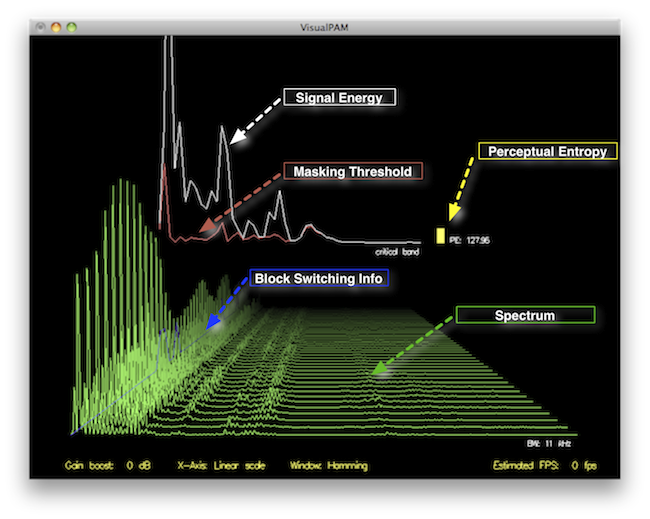
Perceptual Entropy
Perceptual Entropy

Introduction to Perceptual Entropy in an Mp3

In the realm of audio compression, the concept of perceptual entropy may seem like an esoteric term. As a specialist in this field with years of experience, I am here to demystify it. Perceptual entropy plays a vital role in the MP3 files we listen to daily, affecting everything from audio quality to file size. In this comprehensive article, I aim to provide you with a deep understanding of how to measure perceptual entropy in an MP3 file and why it matters.

Understanding Perceptual Entropy

Definition of Perceptual Entropy

Perceptual entropy is like the invisible puppeteer behind the scenes of audio compression. Imagine you have a favorite storybook with many repetitive sentences. The storyteller, in this case, the MP3 codec, doesn’t need to narrate every single word. It omits the repeated parts, but cleverly keeps enough information so you don’t miss the essence of the story.

Importance in Audio Compression

The significance of perceptual entropy in audio compression is akin to sorting out your wardrobe. You don’t need to keep every single pair of socks. You retain a representative selection while saving space. Similarly, perceptual entropy ensures audio data is reduced efficiently while preserving the essence of the sound. It’s all about maintaining quality while optimizing storage.

Measuring Perceptual Entropy</h2

Methods for Measurement

The tools used to measure perceptual entropy are like detectives scrutinizing every page of your storybook. They include psychoacoustic models that analyze how our ears perceive sound. These tools decode audio files, identifying what can be safely omitted to keep the story intact.

Tools and Software

Consider these tools like a set of magic glasses that allow you to see the hidden patterns in your storybook. Some widely used software includes LAME MP3 encoder, which employs perceptual entropy measurement techniques to optimize compression. Others, like FFmpeg, offer valuable insights into perceptual entropy.

The Role of Bit Rate

Think of bit rate as the quality slider for your audio file. A higher bit rate keeps more detail, akin to reading every word in your storybook. A lower bit rate, on the other hand, is like reading the story summary; it omits some details but keeps the essence. Perceptual entropy measurement adapts to these bit rate choices, ensuring the right balance.

Significance of Perceptual Entropy in Audio Compression</h2

Effect on Compression Efficiency

Imagine you have a suitcase, and you want to pack it efficiently. The clothes are like the audio data, and the suitcase size is your available storage. Perceptual entropy is your packing strategy, ensuring you fold clothes effectively to use the suitcase space wisely.

Impact on Audio Quality

When you send a letter, you want it to be both light and readable. Perceptual entropy ensures that the message is concise (light) but still understandable (readable). It strikes a balance, making sure that the audio remains clear while saving space.

Real-world Examples

To illustrate perceptual entropy, think of a colorful painting. Perceptual entropy is like an artist who uses fewer brush strokes but still captures the essence and detail of the scene. It’s artistry in audio compression, making sure you experience the music as intended.

Evaluating Audio Quality</h2

Criteria for Audio Quality

Audio quality assessment is similar to a taste test. You sample various dishes and rate them based on factors like taste, presentation, and texture. Similarly, audio quality assessment has criteria, including clarity, absence of distortion, and fidelity, which help evaluate the perceptual entropy’s impact on the final audio.

Striking a Balance

It’s like baking a cake; you need the right ingredients in the right proportions. Perceptual entropy is one of those ingredients. Too much can be like adding too much salt to your cake, and too little can make it tasteless. Striking the right balance is the key to maintaining audio quality.

Tools for Evaluation

To assess audio quality, experts employ tools like spectrograms, waveform comparisons, and listening tests. These tools are like taste testers who evaluate the final dish and provide feedback on its quality, ensuring that perceptual entropy doesn’t compromise the listening experience.

Practical Applications</h2

Music Production

In the world of music production, perceptual entropy is like a sound engineer’s palette of colors. It allows them to maintain high-quality audio while conserving space. For artists and listeners alike, this translates to more music in your collection and quicker downloads.

Streaming Services

Streaming services optimize audio files for efficient delivery. Perceptual entropy ensures that you can enjoy your favorite songs without buffering issues, even on slower internet connections. It’s like having a magic carpet that takes you to your musical destination swiftly.

Industry Insights

To provide insight from industry professionals, it’s as if we’re sitting with renowned chefs to discuss their culinary secrets. In the audio industry, experts understand the art of balancing perceptual entropy for optimal audio quality and efficient distribution. It’s the heart of what makes your listening experience exceptional.

Last Words about Perceptual Entropy Measurement in MP3 Files

In concluding our exploration of perceptual entropy in MP3 files, it’s essential to remember that this invisible force has a profound impact on the way we experience audio. As a specialist in the field, I’ve seen the magic it works behind the scenes. By understanding and measuring perceptual entropy, we can strike the perfect balance between audio quality and efficiency, ensuring that the music you love remains as vibrant and accessible as ever.