Lossless vs. lossy audio compression in MP4


Free Download Mp4Gain
picture

Lossless vs. lossy audio compression in MP4

Lossless vs. lossy audio compression in MP4

Let’s talk about lossless vs. lossy audio compression in MP4

When we talk about MP4 audio compression, understanding the difference between lossless and lossy formats is crucial. These two types of compression determine the quality and size of your audio files. I’ve spent years working with audio encoding, and the choice between these two methods often depends on the purpose and the limitations you’re dealing with.

Lossy compression, like AAC or MP3, removes audio data deemed less important to human hearing to reduce file size. Think of it like packing a suitcase: you leave behind items you believe you won’t need. On the other hand, lossless compression preserves every bit of the original audio data. Imagine vacuum-sealing your belongings so everything fits without removing anything.

Both methods have their place in MP4 files, which can handle both. If you’re streaming music, lossy compression is more practical, while for archival purposes, lossless compression is non-negotiable.

What is lossy audio compression in MP4?

Lossy audio compression in MP4 focuses on saving space by reducing audio fidelity. The result is smaller files with slightly degraded audio quality, often imperceptible to the average listener.

Take AAC, for example. It uses perceptual encoding, which means it targets audio frequencies that our ears are less sensitive to. It’s like when you’re talking to someone in a noisy room and can tune out the background chatter—it prioritizes what’s important. This efficiency makes lossy formats ideal for streaming services, where bandwidth is at a premium.

However, lossy compression isn’t perfect. If you’ve ever listened to old MP3 files with a “hollow” sound, that’s compression at work. For high-fidelity audiophiles, this trade-off is unacceptable, but for everyday listening, it’s a compromise most can live with.

What is lossless audio compression in MP4?

Lossless audio compression retains every detail of the original audio file, offering perfect reproduction. It’s like photocopying a document without losing a single word or letter. Formats like ALAC (Apple Lossless) or FLAC can compress audio without sacrificing quality.

In MP4, lossless compression plays a significant role for users who demand pristine sound. This is particularly important in professional audio production, where every nuance matters. When I work with lossless audio, I always marvel at how every subtlety—like the resonance of a piano or the breath of a vocalist—remains intact.

The drawback? Lossless files are significantly larger than their lossy counterparts. For casual listeners, these files might not justify their size. However, for archivists or professionals, the trade-off is worthwhile.

Key differences between lossless and lossy audio compression

When comparing lossless and lossy audio compression, several key differences stand out. These distinctions can help you choose the right approach for your MP4 audio files.

  • Lossless retains every bit of original data; lossy sacrifices data for smaller file sizes.
  • Lossless formats are larger and require more storage space.
  • Lossy formats are more compatible with streaming and mobile devices.
  • Lossless is ideal for professional use; lossy suits casual listening.
  • Lossy compression may result in artifacts at lower bitrates.

Each option serves a purpose, but understanding the trade-offs is essential to making an informed decision. If you’re creating an MP4 for streaming, lossy is often sufficient. However, for a music archive or studio project, lossless is a must.

How MP4 supports both lossless and lossy audio

The MP4 container format is incredibly versatile, allowing you to mix and match audio types. This adaptability is one reason MP4 remains a go-to choice for multimedia.

In practical terms, MP4 can house lossy audio like AAC alongside lossless formats like ALAC. I’ve worked on projects where this flexibility saved time and effort. For instance, you can include high-quality audio for critical segments while using compressed audio for less important parts. It’s like creating a multi-layered cake where each layer serves a specific purpose.

This versatility also simplifies streaming and playback compatibility, making MP4 an excellent format for diverse needs.

Why lossy compression dominates streaming platforms

Streaming platforms rely heavily on lossy compression to deliver content efficiently. Without this, services like Spotify or YouTube would struggle to stream millions of songs and videos daily.

Lossy formats like AAC are highly optimized for streaming. They strike a balance between quality and file size, ensuring smooth playback even on slower connections. Think of it like condensing a story into a summary—still enjoyable but quicker to read.

However, the trade-off is noticeable for high-end audio equipment. I’ve tested tracks on studio monitors, and the difference is clear. Lossy formats sometimes lack the depth and richness that lossless files deliver.

When to use lossless compression in MP4

Lossless compression is essential when quality cannot be compromised. This is often the case in professional settings, such as music production or archival purposes.

For example, I once worked on an audio restoration project where every detail mattered. Lossy compression would have destroyed the integrity of the original recording. Lossless formats allowed us to preserve the audio while reducing file size just enough for practical use.

If you’re creating MP4 files for personal enjoyment and have storage space to spare, lossless is a great choice. For casual sharing or streaming, however, lossy remains more practical.

Advanced considerations in audio compression

Choosing between lossless and lossy formats often requires a deeper understanding of encoding techniques. The choice isn’t just about quality but also efficiency and compatibility.

Variable bitrate (VBR) encoding is one example of how lossy formats can optimize performance. It adjusts the bitrate depending on the complexity of the audio, like saving money by turning off lights in unused rooms. Meanwhile, constant bitrate (CBR) ensures consistent quality, which some users prefer for predictability.

With lossless compression, understanding bit depth and sampling rates becomes critical. A higher sampling rate captures more detail, much like using a high-resolution camera.

Latest words on lossless vs. lossy audio compression in MP4

The choice between lossless and lossy audio compression in MP4 ultimately depends on your needs. Both methods have their strengths and weaknesses, and understanding these can guide your decisions.

Whether you’re streaming music or archiving your favorite tracks, MP4’s ability to handle both lossless and lossy audio makes it a versatile choice. For a balanced solution that ensures consistency and quality, tools like Mp4Gain can help optimize your audio for any scenario.

FAQ about Lossless vs. lossy audio compression in MP4

What is the difference between lossless and lossy audio compression?

Lossless compression preserves all original audio data, while lossy removes some data to reduce file size.

Why is lossy compression used in MP4 files?

Lossy compression reduces file size, making it ideal for streaming and mobile devices with limited storage.

Which formats in MP4 support lossless audio?

Formats like ALAC and FLAC are common for lossless audio in MP4 files.

Can MP4 files combine lossless and lossy audio?

Yes, MP4 supports mixing both lossless and lossy audio streams within a single file.

How does AAC differ from ALAC in MP4?

AAC is a lossy format optimized for streaming, while ALAC is a lossless format designed for high-fidelity playback.

Why is lossless audio important in MP4 for professionals?

Professionals require lossless audio to preserve every nuance and detail in recordings and productions.

What are common use cases for lossy audio in MP4?

Lossy audio is widely used for streaming, casual listening, and mobile device playback.

Is lossless audio always better than lossy audio?

Not necessarily. Lossless audio offers better quality, but lossy audio is sufficient for many casual listening scenarios.

Comments:

I’ve always wondered about this! Thanks for explaining

the difference so clearly. I never realized why streaming services prefer lossy compression.

Lossless is the way to go for my home audio system. You can really tell the difference with high-quality headphones.

This is super helpful. I didn’t know MP4 could support both types of audio. It’s good to know I can mix them depending on what I need.

I don’t get why anyone would bother with lossless for everyday listening. Storage space is too expensive!

I found the part about variable bitrate interesting. Would love to know more about how that works in MP4 files.

Honestly, I’ve been using lossy compression for years, and it sounds fine to me. Maybe I just don’t have the ears for lossless quality.

Great article! This really helped me understand why lossy is better for streaming but lossless is better for archival purposes.

This makes me think I should start converting my collection to lossless. Any advice on what software to use?


Free Download Mp4Gain
picture


Mp4Gain Main Window
picture


Mp4Gain Features
picture


Free Download Mp4Gain
picture

MP3 Layer III Filter Bank Analysis

MP3 Layer III Filter Bank Analysis

MP3 Layer III Filter Bank Analysis

Let’s talk about MP3 Layer III filter bank analysis

When it comes to digital audio compression, understanding the filter bank analysis in MP3 Layer III is essential. In this article, I’ll break down how MP3s rely on filter banks to achieve their unique blend of quality and compression, and explain why the filter bank analysis plays such a critical role. I’ll also cover how this approach works to make music files smaller while still preserving essential audio details.

Understanding MP3 Layer III and Filter Banks

Filter banks are an essential part of MP3 technology, enabling the compression of audio without excessive loss of sound quality. In MP3 Layer III, these banks are split into subbands, each handling a particular range of audio frequencies. I’ll illustrate this in detail, using real-life examples to make the concept easier to grasp.

How MP3 Filter Banks Work

MP3 filter banks work by breaking down audio signals into smaller segments, or subbands. These banks divide the frequencies, enabling certain sound parts to be compressed at different levels. Think of it like sorting a stack of books into categories before packing them tightly into a box. This way, we save space while still keeping everything accessible and organized.

Role of Subband Coding in MP3 Compression

Subband coding is one of the vital steps in the MP3 encoding process. It isolates specific frequency bands, reducing the amount of data needed for less noticeable sound details. Imagine cleaning out a closet by only removing items you rarely use, keeping the essentials. This technique allows MP3 files to remain compact without losing the “core” audio quality.

Why the Hybrid Filter Bank is Essential in MP3 Layer III

The hybrid filter bank is crucial to MP3 compression efficiency. It combines the polyphase filter bank with a Modified Discrete Cosine Transform (MDCT). This hybrid approach brings an extra layer of compression by working with both time-domain and frequency-domain processing. It’s like having a two-part lock for extra security in your data storage strategy.

Polyphase Filter Bank Explained

The polyphase filter bank is responsible for the initial separation of frequencies. This process is like splitting a large river into smaller channels to control water flow. In MP3s, it allows each subband to be analyzed individually, enabling finer adjustments to compression and quality balance.

Modified Discrete Cosine Transform (MDCT) and Its Purpose

The MDCT step fine-tunes the frequency analysis even further, using overlapping techniques to avoid data loss at critical points. Think of it as overlapping blankets on a cold night; even if one layer has gaps, the others cover it up. This technique keeps the sound natural and smooth, even in a compressed format.

Analysis of Long and Short Blocks in MP3

MP3 encoding uses both long and short blocks to handle different sound characteristics. Long blocks are for steady sounds, while short blocks capture sudden changes. Picture long blocks as storing steady hums of a refrigerator, and short blocks as capturing sudden clangs. Both are essential to recreate the full audio spectrum in MP3 format.

Perceptual Coding and Its Importance in MP3 Filter Bank Analysis

Perceptual coding leverages the limitations of human hearing to “hide” data that most people wouldn’t miss. This idea is like rearranging clutter in a room where no one usually looks. By removing inaudible or nearly inaudible components, MP3s maintain quality while staying efficient in size.

Benefits of Using Filter Banks in MP3 Compression

  • Reduces file size while maintaining quality.
  • Isolates specific frequencies for targeted compression.
  • Balances sound fidelity with data efficiency.

Challenges in MP3 Filter Bank Analysis

Despite its benefits, the filter bank approach in MP3s isn’t without challenges. Overly aggressive compression can lead to artifacts, like odd echoes or muffled tones. Imagine squeezing an image too small; the fine details blur. Balancing the compression and sound quality is the art of effective MP3 filter bank analysis.

Comparing MP3 Filter Banks to Other Audio Compression Methods

Other compression methods, like AAC and Ogg Vorbis, also use filter banks, but with different configurations. MP3 stands out because of its hybrid filter bank. Imagine two competing teams using similar tools but with different techniques; MP3’s unique approach is like a coach who combines strategies to maximize performance in each game.

Latest words on MP3 Layer III filter bank analysis

The filter bank analysis in MP3 Layer III is a complex but fascinating topic, essential for anyone interested in audio compression. With this method, MP3 files strike a balance between quality and size, proving why MP3s have remained relevant. If you’re looking for a solution to refine audio, Mp4Gain is an excellent choice, combining advanced technology for optimal results.

What is MP3 Layer III filter bank analysis?

MP3 Layer III filter bank analysis is a process that divides audio signals into various frequency subbands, enabling efficient compression without significant loss of sound quality. This analysis is fundamental to MP3 compression as it helps reduce file size while preserving important audio characteristics.

Frequently Asked Questions about MP3 Layer III Filter Bank Analysis

What is MP3 Layer III filter bank analysis?

MP3 Layer III filter bank analysis is a process that divides audio signals into various frequency subbands, enabling efficient compression without significant loss of sound quality. This analysis is fundamental to MP3 compression as it helps reduce file size while preserving important audio characteristics.

How do filter banks work in MP3 encoding?

In MP3 encoding, filter banks split audio into smaller frequency bands or subbands, allowing each range to be compressed separately. This selective compression optimizes the file size and keeps the essential audio quality intact, using both time and frequency domain techniques to balance compression with clarity.

Why is the hybrid filter bank important in MP3 compression?

The hybrid filter bank combines the polyphase filter bank with a Modified Discrete Cosine Transform (MDCT) for improved efficiency. This hybrid setup allows MP3 compression to manage data effectively in both time and frequency domains, which enhances the compression’s accuracy and quality.

What is the role of subband coding in MP3 Layer III?

Subband coding in MP3 Layer III isolates specific frequency ranges to remove unnecessary audio data that may not be perceptible to the human ear. By coding these subbands individually, MP3 encoding effectively compresses audio without a significant reduction in quality.

What is perceptual coding in MP3 compression?

Perceptual coding takes advantage of the human ear’s limited ability to detect certain frequencies. By removing inaudible elements, this coding technique helps MP3 files stay compact, keeping only the sounds that contribute most to the listening experience.

What challenges do filter banks face in MP3 encoding?

One challenge in MP3 filter bank analysis is balancing compression with sound fidelity. Aggressive compression can lead to artifacts or distortions. Achieving optimal compression without losing critical sound details requires careful calibration of the filter bank settings.

What is the difference between MP3 filter banks and those in other audio formats?

MP3 filter banks are unique due to their hybrid setup, which combines both polyphase and MDCT filters. Other audio formats, like AAC, use different filter configurations, offering various balances between compression and sound quality. MP3’s approach is optimized for efficient storage and playback across devices.

How do long and short blocks function in MP3 encoding?

MP3 encoding uses long blocks for steady sounds and short blocks for sudden audio changes. This adaptive technique captures both consistent and dynamic elements of audio effectively, contributing to high-quality compressed playback that closely resembles the original sound.

Why does MP3 remain popular despite newer formats?

MP3’s hybrid filter bank and perceptual coding make it highly efficient, allowing it to deliver good audio quality at a smaller file size. Its compatibility with nearly all devices and players ensures it remains a go-to format, even with newer options available.

How does MP3 Layer III filter bank analysis improve listening experience?

By dividing frequencies and compressing selectively, MP3 Layer III filter bank analysis preserves the audio components that impact the listening experience the most. This technique maintains clarity and depth in the sound, giving listeners a high-quality playback in a manageable file size.

Comments:

SoundGuy88: This article was a great read! I never really understood how filter banks worked in MP3s until now. Very informative.

LisaJ: I didn’t know MP3s used both polyphase and MDCT. Really interesting to see how this technology works behind the scenes.

TommyB: Excellent breakdown! The analogies made complex concepts easier to understand. Would love more examples like this.

SarahTech: Learned so much from this! Never thought about how MP3s manage compression in this way. Thanks for explaining it so well.

AudioFanatic: Can’t believe how well this article explained everything. This is exactly what I’ve been looking for. Keep it up!

TechWizard32: I’ve read so many articles on MP3s, but none went this deep into filter bank analysis. Great job on the details!

YasmineL: I love how this article used real-life examples. Made it a lot more relatable and easier to follow.

JJ_Music: Whoa, I thought MP3s were simple, but this article really opened my eyes to the tech involved. Kudos!

MarkD: This breakdown of filter banks was excellent! Makes me appreciate MP3s even more. Thanks for the insights!

GinaSoundWave: So glad I came across this. I’ve been wanting to learn more about audio compression, and this article was a gem.

Low-Pass Filtering in MP3 Compression

Low-Pass Filtering in MP3 Compression

Low-Pass Filtering in MP3 Compression

Let’s talk about low-pass filtering in MP3 compression

Low-pass filtering is an essential part of MP3 compression, letting us reduce file sizes without sacrificing too much sound quality. It works by cutting off high frequencies that aren’t as noticeable to our ears, which keeps the sound clearer while making the data much lighter. From my experience, low-pass filtering in MP3s is like removing extra details from a painting. If you look from far away, you wouldn’t notice the tiny strokes missing; instead, you still see the full picture. This article will explain how low-pass filtering works, why it’s so effective, and how it impacts what we hear.

Understanding Low-Pass Filtering

Low-pass filtering removes the high-frequency sounds that the human ear often can’t detect well, especially in a noisy environment or at lower volume. In MP3s, this helps cut down on file sizes since we’re only encoding the sound details that matter most. Imagine you’re listening to music in a crowded place – you’re likely focusing on the bass or vocals rather than tiny, high-pitched sounds in the background. MP3 compression replicates this effect, removing unimportant details so the file is efficient.

How Low-Pass Filtering Works in MP3 Compression

Low-pass filtering works by setting a specific cutoff frequency, often around 16 kHz or lower in MP3 compression, and removing sounds above it. These frequencies aren’t vital for a song’s core experience, so cutting them out helps compress the audio without major quality loss. Think of it like simplifying a picture by using fewer colors or shades; the main parts of the image are still clear, but with less detail. This process saves storage and allows faster streaming, which is especially handy on mobile devices.

The Role of Psychoacoustics in Low-Pass Filtering

Psychoacoustics is the science of how we perceive sound, and it’s central to MP3 compression. Certain sounds are masked by others, and higher frequencies can be covered by more dominant tones. By using psychoacoustic principles, MP3 compression focuses on frequencies that listeners pay the most attention to, allowing high-frequency sounds to be removed without a noticeable impact. This technique makes MP3s much more efficient because it only keeps the parts of sound that our brain cares about.

Benefits of Low-Pass Filtering in MP3 Compression

Low-pass filtering offers multiple benefits that help make MP3s one of the most popular audio formats. These advantages include smaller file sizes, faster downloads, and better streaming quality. For example:

  • Reduced File Size: By cutting high frequencies, MP3 files become smaller and easier to store.
  • Faster Streaming: Lower data requirements mean songs load and play quicker online.
  • Enhanced Compatibility: Smaller files are easier for various devices to play, making MP3s widely accessible.

Impact on Audio Quality

Some people might worry that low-pass filtering removes too much sound, but most listeners won’t notice the missing high frequencies. High-quality headphones or audio systems may reveal a difference, but for everyday use, the effect is minimal. In my experience, casual listeners rarely detect the filtering, especially if the bitrate is high. However, if you’re an audiophile or using high-end equipment, you may notice a slight reduction in brightness or clarity.

Low-Pass Filtering Frequency Choices

The cutoff frequency in MP3 compression is typically adjustable, letting engineers decide how much detail to keep. Lower bitrates often use lower cutoffs to save more space, while higher bitrates may retain frequencies up to 20 kHz. This flexibility is one reason why MP3s can range from decent to near-CD quality, depending on the chosen compression settings. Adjusting the cutoff can make a big difference – at a lower cutoff, you save more space, but at the expense of some audio clarity.

Differences Between Low-Pass Filtering and Other Filters

Unlike high-pass or band-pass filters, low-pass filters are specifically used to remove high frequencies. High-pass filters do the opposite, cutting off lower frequencies to focus on treble sounds. Band-pass filters allow a specific range of frequencies through while blocking everything outside it. Low-pass filtering is the best option for MP3 compression because high frequencies are less crucial for sound recognition and perception.

Challenges of Using Low-Pass Filtering in MP3s

While low-pass filtering is effective, it comes with its challenges. One downside is that high-end detail can be lost, especially at low bitrates. In my experience, some listeners may feel that certain musical instruments, like cymbals or flutes, lack their “crispness” after compression. Managing these trade-offs is essential in achieving a balance between file size and quality.

Why Low-Pass Filtering Works Well with MP3’s Lossy Compression

Low-pass filtering aligns well with MP3’s lossy compression because both approaches aim to reduce file size while preserving key audio details. Lossy compression works by discarding sounds our ears are unlikely to miss, so low-pass filtering is a natural match. It allows MP3s to achieve high levels of compression without making the audio sound hollow or incomplete.

Examples of Low-Pass Filtering in Everyday Life

Low-pass filtering isn’t just for MP3s; it’s used in various fields, from radio transmission to photography. For instance, walkie-talkies often use low-pass filtering to eliminate background noise, making conversations clearer. Similarly, some digital cameras use filters to remove excessive color details that could affect image quality. These examples show how filtering focuses on essential information, leaving out unnecessary noise or detail.

Optimizing Low-Pass Filtering for Different Bitrates

The efficiency of low-pass filtering depends on bitrate. Higher bitrates preserve more high frequencies, which can enhance sound quality, especially on detailed audio systems. Lower bitrates prioritize data savings, which may result in a lower cutoff frequency. When I’m optimizing for quality, I often choose a higher bitrate to preserve more detail, but for mobile or streaming, a lower bitrate works fine.

Comparing Low-Pass Filtering in MP3 and Other Audio Formats

Different audio formats handle frequencies in various ways. For example, AAC and OGG Vorbis use advanced psychoacoustic models, which sometimes retain higher frequencies better than MP3s. However, MP3 remains the most universal format due to its balance of compatibility, size, and acceptable quality. Comparing MP3 to lossless formats like FLAC shows the limits of lossy compression, but for casual listening, MP3 with low-pass filtering is usually enough.

Latest words on low-pass filtering in MP3 compression

Low-pass filtering is a powerful tool in MP3 compression, keeping files light without cutting down on the most important sounds. It effectively reduces unnecessary data, making MP3s smaller and more accessible while keeping music enjoyable. From my perspective, low-pass filtering is the reason why MP3s continue to be relevant today. While other formats offer higher quality, the balance of size, compatibility, and efficiency keeps MP3 in the mainstream. For anyone looking to make their music files more manageable, tools like Mp4Gain can provide a simple solution to adjust quality and compression settings, ensuring the best listening experience.

Comments:

Awesome article! I never understood how MP3 compression worked until now. The whole concept of low-pass filtering is so cool. Thanks for breaking it down!

Wait, so does this mean high frequencies are basically “cut out” to save space? That’s insane. I always wondered why some MP3s sounded flat compared to CDs. Great explanation!

Nice read! I’m not super tech-savvy, but this helped me understand why MP3s are so popular despite the newer formats. It’s like a tiny miracle how they can compress so much.

Interesting stuff! But does this mean that higher bitrates don’t need low-pass filtering? Would love to read more about that!

This is super helpful! I’ve been compressing my audio files, but didn’t realize how important low-pass filtering is for file size. Thanks!

I love music production and this made so much sense! Low-pass filtering for compression is like mixing where you cut out unneeded frequencies. Really good stuff here.

Good explanation, but I’d like a bit more info on how low-pass compares in different audio formats. Maybe a follow-up?

I get it now! It’s like simplifying an image by removing colors you wouldn’t even see from far away. Such a helpful analogy!

Didn’t know that MP3 files cut out high frequencies! This might explain why some of my music doesn’t sound as “bright” as CDs. Great article!

I think I finally understand the tech behind MP3s. It’s really amazing what can be done to reduce file size without losing too much quality

. Very clear explanation.

Thanks for the breakdown! It’s amazing how far compression has come. I’m always looking for ways to make my files smaller, and this definitely helps.

This is gold! I’m studying audio engineering and low-pass filtering was a bit of a mystery. Thanks for making it easy to understand.

Interesting article. I wonder how this affects streaming quality. Might have to do more reading about it. Thanks for the intro!

Digital Bit Depth in Audio

Digital Bit Depth in Audio

Digital Bit Depth in Audio

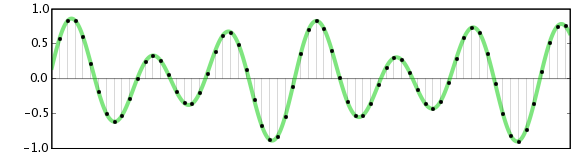
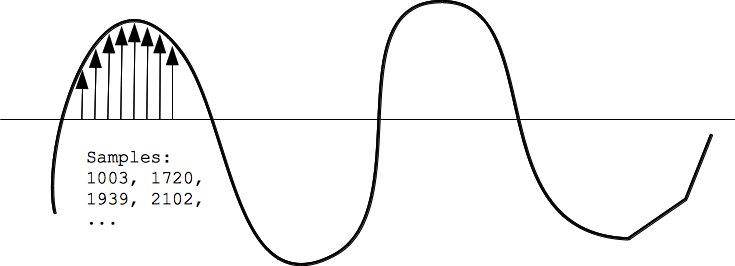
Digital bit depth in audio is a fundamental concept that impacts the quality and fidelity of digital sound. Bit depth, also known as audio resolution, refers to the number of bits used to represent the amplitude of an audio signal at a specific point in time. It essentially quantifies how finely audio samples are taken in the digital domain.

To put it simply, the bit depth determines the precision with which sound is captured and stored digitally. Common bit depths in digital audio are 16-bit, 24-bit, and 32-bit, with higher numbers providing greater precision.

Audio Bit Depth Explained

Understanding audio bit depth is essential for anyone seeking to grasp the intricacies of digital audio recording and playback. At its core, audio bit depth is a measure of how accurately an analog sound wave’s amplitude is captured and converted into a digital signal.

In practical terms, a higher bit depth signifies that the digital representation of an audio waveform closely mirrors the original analog signal, resulting in reduced quantization error or “noise.” Quantization error occurs when an analog value is approximated to the nearest digital value, and lower bit depths can make this error more noticeable, especially in quieter sections of audio.

Bit Depth and Audio Quality

Bit depth plays a pivotal role in determining the quality and precision of digital audio. The relationship between bit depth and audio quality is akin to an artist’s palette of colors. A higher bit depth provides a broader spectrum of shades and nuances, making the digital representation of sound more faithful to the original analog source.

For example, a 16-bit system offers 65,536 discrete amplitude levels, whereas a 24-bit system provides an astonishing 16,777,216 levels. This heightened precision results in smoother and more detailed audio representation, particularly in the subtle and quiet passages of a recording.

Digital Audio Resolution

Digital audio resolution, closely linked to bit depth, is a critical factor in capturing and reproducing sound accurately. It refers to the level of detail and clarity in digital audio. The greater the bit depth, the higher the resolution, and the finer the nuances that can be captured.

In the realm of audio production, higher digital audio resolution means that the subtle nuances, such as the intricacies of a singer’s voice or the delicate harmonics of a musical instrument, are preserved with remarkable fidelity.

Bit Depth in Music Recording

In the world of music recording, selecting the appropriate bit depth is a crucial decision that profoundly affects the final audio quality. Musicians and producers carefully consider bit depth when recording to ensure that the nuances and dynamics of their performances are accurately captured.

In practice, 24-bit recording is a popular choice among music professionals. This bit depth provides an ideal balance between precision and file size, allowing for the capture of subtle details while minimizing the risk of bit-depth noise in quieter sections of the recording.

Audio Signal Precision

Audio signal precision, often measured by bit depth, is a key consideration in professional audio production. It relates to how faithfully an audio system can reproduce the original sound. The higher the bit depth, the greater the precision in representing the analog signal, resulting in cleaner and more accurate audio playback.

For audio engineers and producers, achieving optimal audio signal precision is paramount. It ensures that the music they create is heard as intended, with all the intricacies and subtleties faithfully reproduced.

Bit Depth in Analog-to-Digital Conversion

Understanding how bit depth influences analog-to-digital conversion is essential for maintaining audio fidelity. Analog-to-digital conversion is the process of transforming continuous analog signals into discrete digital values. Bit depth determines the number of discrete values that can represent the amplitude of the analog signal during this conversion.

In essence, higher bit depth means that the analog-to-digital conversion process captures more precise details from the analog signal. This is particularly critical when working with high-quality audio sources where preserving every nuance is paramount.

Sound Fidelity and Bit Depth

Sound fidelity, the faithfulness with which audio is reproduced, is intricately linked to bit depth. A higher bit depth generally results in better audio fidelity, as it allows for the accurate representation of both subtle nuances and powerful crescendos in music.

Consider classical music or jazz, where dynamics play a significant role. With a higher bit depth, the audio system can faithfully reproduce the full range of soft and loud passages, ensuring that the listener experiences the music as intended by the performers and composers.

Impact of Bit Depth on Audio Playback

The impact of bit depth on audio playback is a critical factor in delivering a high-quality listening experience. When you listen to digital audio, the bit depth of the source file significantly affects what you hear.

In simple terms, higher bit depth in the source audio file results in a more faithful and detailed listening experience. This becomes especially noticeable in acoustic instruments, where the subtle nuances of a violin’s bowing or a pianist’s touch can be lost in lower bit depth recordings.

How Does Bit Depth Affect the Quality of Digital Audio?

Exploring how bit depth affects the quality of digital audio is crucial for audiophiles and audio professionals alike. It’s the bit depth that determines how accurately the audio signal is captured and reproduced, ultimately influencing the overall audio quality.

A higher bit depth translates to a more faithful representation of the original sound, with fewer imperfections or noise introduced during the recording and playback processes. This improvement in audio quality is particularly noticeable in genres that require a wide dynamic range and high levels of detail.

What Is the Role of Bit Depth in Recording Music Digitally?

The role of bit depth in recording music digitally is a multifaceted aspect of audio production. When musicians and engineers step into the studio, they must make critical decisions about bit depth to ensure that their recordings capture the essence of the music.

Choosing the appropriate bit depth is a balancing act. While higher bit depths provide greater precision and fidelity, they also result in larger file sizes. Musicians often opt for 24-bit recordings as they strike a harmonious balance between capturing subtle details and managing storage requirements.

How Is Audio Fidelity Influenced by Digital Bit Depth?

Understanding how digital bit depth influences audio fidelity is key to achieving top-tier sound quality. Audio fidelity, often described as the faithfulness of audio reproduction to the original source, is a critical consideration for audio professionals and enthusiasts.

With a higher bit depth, audio fidelity is enhanced because the digital representation of the sound is more detailed and accurate. This is especially crucial in professional audio production, where maintaining the highest possible fidelity is paramount.

Can You Explain the Importance of Bit Depth in Analog-to-Digital Conversion for Audio?

Explaining the importance of bit depth in analog-to-digital conversion sheds light on the intricacies of audio processing. Analog-to-digital conversion is the bridge that allows analog sound to be translated into a digital format that can be manipulated and stored. Bit depth plays a pivotal role in this process.

Higher bit depths ensure that the analog-to-digital conversion process captures more fine-grained details from the original analog signal. This is essential for preserving the richness and subtleties of audio, whether it’s a soaring vocal performance, the resonance of a musical instrument, or the ambiance of a recording environment.

What Is the Relationship Between Bit Depth and Dynamic Range in Digital Audio?

The relationship between bit depth and dynamic range in digital audio is a crucial one to understand. Dynamic range refers to the difference between the softest and loudest sounds that an audio system can reproduce. Bit depth plays a pivotal role in defining this dynamic range.

Higher bit depths translate to a wider dynamic range, allowing for the faithful reproduction of both subtle nuances and powerful crescendos in music. This is essential for maintaining audio fidelity, especially in genres with a wide range of dynamics, such as classical music and jazz.

How Does Bit Depth Impact the Accuracy of Audio Playback?

The impact of bit depth on the accuracy of audio playback cannot be overstated. When you listen to music or any digital audio content, the bit depth of the source file has a profound influence on what you hear.

Higher bit depth in the source audio file means that the playback faithfully represents the original recording. It allows for the subtlest details and nuances to shine through, creating a more immersive and engaging listening experience. In essence, higher bit depth contributes to the accuracy and realism of audio playback.

Are There Industry Standards for Bit Depth in Digital Audio Recording?

In the world of professional audio recording, industry standards play a vital role in guiding the use of bit depth. While there’s flexibility in choosing bit depths based on specific requirements, certain standards are commonly followed.

For instance, most audio CDs use 16-bit resolution, which offers high-quality playback suitable for the majority of consumers. However, in the realm of studio recording and mastering, 24-bit and even 32-bit formats are commonly employed to ensure the highest level of fidelity.

What Are the Advantages of Using Higher Bit Depth in Audio Processing?

Using higher bit depth in audio processing offers several distinct advantages. These advantages extend to both recording and post-production stages, and they significantly impact the overall quality of audio content.

Enhanced Audio Fidelity

One of the primary advantages is enhanced audio fidelity. Higher bit depths provide more precision in capturing and reproducing audio, resulting in recordings that faithfully preserve the original sound. This is particularly important in professional music production and critical listening environments.

Greater Dynamic Range

Higher bit depths also grant a greater dynamic range, allowing for the faithful representation of a wide range of sound intensities. This is particularly beneficial in genres of music or audio content with stark differences in volume, as it ensures that both delicate subtleties and powerful peaks are accurately reproduced.

How Can I Optimize Bit Depth for Better Audio Resolution?

For those involved in audio production or seeking the best listening experience, optimizing bit depth is crucial. It’s not just about using the highest available bit depth but also considering the entire audio workflow and ensuring that bit depth aligns with specific needs.

Matching Bit Depth to Audio Source

When recording audio, it’s essential to match the bit depth to the dynamic range of the audio source. For instance, a live jazz performance with wide dynamic swings benefits from 24-bit recording, while a podcast with a more consistent volume may suffice with 16-bit. This approach minimizes bit-depth noise while preserving audio quality.

Post-Production Considerations

During post-production, maintaining a high bit depth throughout the editing and mixing process is advisable. Only when preparing the final distribution format, such as a CD or streaming file, should the audio be converted to a lower bit depth to match the destination format.

The Benefits of Greater Bit Depth in Digital Audio Systems

As technology advances, digital audio systems are offering higher bit depths as an option. But what are the practical advantages of embracing these extended bit depths?

Future-Proofing Audio

One significant advantage is future-proofing your audio recordings. With higher bit depths, your recordings are better equipped to stand the test of time. As playback systems and formats improve, your high-bit-depth recordings will continue to sound exceptional, ensuring that your music or audio content remains relevant for years to come.

Editing Flexibility

Greater bit depths also provide increased editing flexibility. Audio engineers can apply effects and processing without worrying as much about introducing quantization errors or compromising audio quality. This freedom allows for more creative experimentation during the mixing and mastering stages, ultimately leading to more polished and refined audio content.

In conclusion, digital bit depth is a critical factor in the world of audio, influencing both recording and playback quality. Understanding its importance, selecting the appropriate bit depth for various scenarios, and embracing higher bit depths when possible can lead to an audio experience that is richer, more immersive, and of the highest fidelity. Whether you’re a musician, audio engineer, or simply a music enthusiast, appreciating the role of bit depth can elevate your audio journey to new heights.