Variable bitrate (VBR) encoding in M4A files is a game-changer for audio quality and file efficiency. I often find that when we’re talking about getting high-quality sound without oversized files, VBR encoding is the best solution. Unlike constant bitrate (CBR), which holds the data rate steady throughout a file, VBR dynamically adjusts. This flexibility means that audio can be compressed differently depending on the complexity of the sound at any given moment, resulting in great sound quality where it’s needed and data-saving where it’s not. Using real-life examples, think of it like a hose: VBR adjusts the “flow” depending on the music’s demands.
How VBR Encoding Differs from Constant Bitrate in M4A
One way I like to explain VBR versus CBR in M4A files is to imagine driving a car. With CBR, you’re holding a constant speed regardless of the road conditions, even if there’s traffic or clear roads. In contrast, VBR is like adjusting speed based on traffic; it slows down in complex audio sections and speeds up when it’s simpler. This approach can capture detailed, high-fidelity audio, while CBR might miss out on some of that nuance. VBR encoding allows M4A files to efficiently adapt the bitrate, creating an optimal balance between sound quality and file size.
VBR encoding in M4A doesn’t just save space; it also prioritizes sound quality. In my experience, this difference becomes clear with high-energy music like classical or electronic, where subtle audio dynamics are crucial. VBR lets the M4A file devote more data to complex passages, capturing every detail. So, if you’ve ever felt like your favorite tracks sounded “compressed” or “flat,” switching to VBR M4A can make a noticeable difference. It’s like upgrading your audio experience without increasing the file size.
Technical Aspects of VBR Encoding in M4A Files
The technical workings behind VBR can get complex, but let’s break it down simply. VBR in M4A adjusts data allocation based on the audio’s dynamic range. More data is used during complex parts, while simpler sections use less. This dynamic allocation means that an M4A file will rarely waste data on silence or simplicity. As a result, files retain clarity and depth without excessive data. Think of it as only paying for a full tank when you’re on a long road trip – it’s efficient and smart.
Benefits of Using VBR Encoding in M4A
Using VBR in M4A comes with several perks. From my experience, here are some top advantages:
Improved Sound Quality
VBR encodes audio based on complexity, leading to clear sound in all types of music.
Efficient File Size
VBR reduces data use where audio is simpler, making it storage-friendly without compromising quality.
Dynamic Audio Capture
Complex segments retain detail, while quieter parts save on data usage.
For those of us who care about quality and storage, VBR encoding in M4A hits the sweet spot between high-fidelity sound and efficient file size.
VBR Encoding vs. CBR Encoding in M4A
I often get asked why VBR is preferred over CBR in M4A files. It’s simple: VBR offers flexibility that CBR can’t match. While CBR might seem stable, it’s inefficient because it doesn’t adjust based on audio needs. In M4A files, VBR ensures that complex parts get more focus, unlike CBR, which applies the same rate to all parts. Imagine you’re in a bookstore where every book costs the same; with VBR, you pay only for the quality you want, which is why it’s so efficient.
Audio Compression in M4A with VBR
Audio compression in M4A VBR files is like packing a suitcase – you only take what’s needed. VBR helps prevent audio quality loss during compression, making the format excellent for those who prioritize quality over quantity. The difference in quality between compressed VBR and regular CBR audio can be surprising, especially in files with high dynamic range like orchestral pieces. With VBR, every aspect of a song can be heard without feeling over-compressed.
Optimizing File Size and Quality with VBR Encoding
One of my favorite things about VBR encoding is its ability to optimize both size and quality. We don’t always have space to spare on our devices, yet no one wants to compromise on sound. Using VBR in M4A files ensures that you don’t have to make that choice. You get a leaner file that sounds great without eating up unnecessary storage, making it ideal for large music libraries or mobile devices.
Limitations of VBR Encoding in M4A Files
While VBR encoding is effective, it’s not perfect. One challenge is that VBR encoding requires a bit more processing power during playback. This is rarely noticeable with modern devices but could pose a challenge on older hardware. Moreover, not every device or software supports VBR optimally, so there could be some compatibility issues. However, these limitations are minimal compared to the benefits of using VBR for high-quality M4A files.
Real-World Applications of VBR Encoding in M4A
When I’m traveling or out for a run, I often rely on M4A VBR files for music – I get quality without filling up my phone’s storage. For audiobooks or podcasts, VBR is equally efficient, as it doesn’t waste space on silence or long pauses. This application means you can carry more files without needing to sacrifice quality or storage. It’s a practical solution for those of us who enjoy high-quality audio on the go.
How VBR Encoding Adapts to Audio Complexity
VBR encoding’s ability to adjust bitrate based on audio complexity is a defining feature. Think of it like shading in a painting: the encoder decides where more detail is necessary. Quiet passages in M4A files don’t need as much data, while loud, complex segments get more. This flexibility provides a detailed sound that can capture nuances missed by other encoding methods. This is why, especially in music, VBR M4A files offer an experience that feels full and rich.
Latest Words on Variable Bitrate Encoding in M4A
When it comes to getting the best audio experience, Variable Bitrate Encoding in M4A is a top choice. It’s adaptable, offering excellent sound quality while managing file size. Unlike constant bitrate encoding, VBR doesn’t waste data on simple sections, which makes it efficient. For those looking for high-quality audio without massive files, M4A with VBR is a practical choice. And for those who want a powerful tool to optimize their audio experience, Mp4Gain can help you get the most out of your M4A files.
Comments:
Wow, this really helped me understand VBR better! I always thought one bitrate fit all, but now I get why adjusting makes a difference.
I tried switching to VBR on my M4A files, and I can already hear the improvement in sound quality, especially on complex tracks.
This article was really informative, but I wish there were more examples of VBR in real-life applications. Still, it was helpful!
Been using CBR all my life because I didn’t know there was a difference. Going to try VBR now, thanks!
I was so confused about bitrate settings before this. Now I’m excited to re-encode my music in VBR!
Never realized there was an option like VBR for M4A files. Makes so much sense to adjust bitrate based on the music. Thanks for this!
Great read! I think I’ll switch my whole library to M4A with VBR encoding to save on space. Thanks for the tips!
Wish there was more on the limitations of VBR – I think some older devices might struggle with it. But I’ll give it a go on my phone.
VBR encoding really makes the music sound better, like the difference between a regular camera and HD! Appreciate the detail here.
Always wondered if VBR was worth it over CBR. This article convinced me to make the switch. Loving the clarity in sound!
I like that you explain this in a simple way – makes it easier for non-tech folks like me to understand the value of VBR!
This article helped a lot, but I’d love
to know how VBR works with other formats, like MP3.
Been looking for a good VBR guide, and this hit the spot. Can’t wait to re-encode my favorite songs and hear the difference.
VBR sounds like the right choice for people who care about audio quality. Thanks for breaking down the technical side!
When it comes to audio quality assessment, it’s all about ensuring that the sound you hear is as clear and crisp as possible. As someone deeply involved in the world of audio, I can’t emphasize enough how crucial this aspect is. From evaluating audio equipment to optimizing sound for various applications, audio quality assessment plays a pivotal role in the audio industry. In this article, I’ll provide you with insights, expertise, and answers to common questions surrounding this essential subject.
Understanding Audio Quality Assessment
Audio quality assessment, in a nutshell, is the process of evaluating and quantifying the fidelity and clarity of audio signals. It’s like having a magnifying glass for your ears. The aim is to identify imperfections, distortions, or issues that might affect the overall listening experience. Think about it as your audio system’s annual check-up, where you assess its health and determine if any improvements or repairs are needed.
Imagine listening to your favorite song. You want to hear each instrument and vocal with utmost clarity, without any unwanted noise or distortion. Audio quality assessment ensures that this happens consistently. It involves using various techniques and measurements to evaluate sound quality objectively, rather than relying solely on personal preferences.
Measuring Sound Quality
A common question that arises is, “How do you measure sound quality?” Well, this process is multi-faceted. To start, sound quality assessment involves the analysis of various factors, including frequency response, distortion, dynamic range, signal-to-noise ratio, and more. These metrics help us gauge the performance of audio equipment like speakers, headphones, or amplifiers.
For example, a speaker’s frequency response measurement shows how accurately it reproduces different frequencies. If a speaker is meant for home theater, it should have a broad and flat frequency response to deliver a balanced sound across low, mid, and high frequencies. Evaluating these parameters is like examining an athlete’s performance statistics to determine their strengths and weaknesses.
Factors Affecting Audio Fidelity
As an audio expert, I often encounter the question, “What factors affect audio fidelity?” Audio fidelity, or how accurately sound is reproduced, can be influenced by a variety of elements. These include the quality of the source material, the capabilities of playback equipment, the acoustics of the listening environment, and even the quality of the cables used in your setup.
Consider the analogy of a chef preparing a gourmet meal. The quality of the ingredients, the kitchen equipment, and the cooking environment all play a role in the final dish’s taste. Similarly, when assessing audio fidelity, we need to take into account the entire audio chain, from the source to the listener’s ears, to pinpoint potential areas of improvement.
Importance of Audio Performance Evaluation
Lastly, let’s address the significance of audio performance evaluation. Why is it important? Well, imagine you’re watching a blockbuster movie or listening to a podcast, and the audio quality is subpar. It can greatly detract from the overall experience. In the professional audio world, ensuring high-quality audio is paramount for content creators, musicians, and sound engineers.
Picture yourself at a live concert where the sound quality is impeccable. It enhances your emotional connection to the music and elevates the entire experience. This is why evaluating audio performance is essential, whether it’s for personal enjoyment or professional use. By understanding and optimizing audio quality, you can immerse yourself in the richness of sound and appreciate it to the fullest.
Last Words about Audio Quality Assessment
In conclusion, audio quality assessment is the compass that guides us toward exceptional sound experiences. It enables us to objectively evaluate and enhance audio quality, ensuring that every note, every word, and every sound is delivered with clarity and precision. As an audio enthusiast and expert, I encourage you to explore the world of audio quality assessment, as it can truly transform the way you listen and appreciate the beauty of sound.
Digital Bit Depth in AudioDigital Bit Depth in Audio
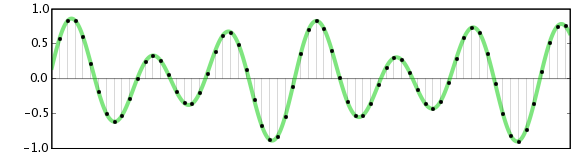
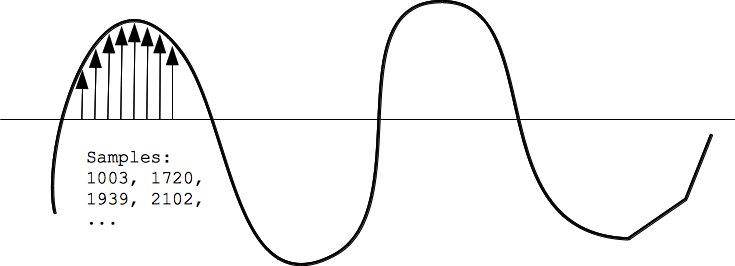
Digital bit depth in audio is a fundamental concept that impacts the quality and fidelity of digital sound. Bit depth, also known as audio resolution, refers to the number of bits used to represent the amplitude of an audio signal at a specific point in time. It essentially quantifies how finely audio samples are taken in the digital domain.
To put it simply, the bit depth determines the precision with which sound is captured and stored digitally. Common bit depths in digital audio are 16-bit, 24-bit, and 32-bit, with higher numbers providing greater precision.
Audio Bit Depth Explained
Understanding audio bit depth is essential for anyone seeking to grasp the intricacies of digital audio recording and playback. At its core, audio bit depth is a measure of how accurately an analog sound wave’s amplitude is captured and converted into a digital signal.
In practical terms, a higher bit depth signifies that the digital representation of an audio waveform closely mirrors the original analog signal, resulting in reduced quantization error or “noise.” Quantization error occurs when an analog value is approximated to the nearest digital value, and lower bit depths can make this error more noticeable, especially in quieter sections of audio.
Bit Depth and Audio Quality
Bit depth plays a pivotal role in determining the quality and precision of digital audio. The relationship between bit depth and audio quality is akin to an artist’s palette of colors. A higher bit depth provides a broader spectrum of shades and nuances, making the digital representation of sound more faithful to the original analog source.
For example, a 16-bit system offers 65,536 discrete amplitude levels, whereas a 24-bit system provides an astonishing 16,777,216 levels. This heightened precision results in smoother and more detailed audio representation, particularly in the subtle and quiet passages of a recording.
Digital Audio Resolution
Digital audio resolution, closely linked to bit depth, is a critical factor in capturing and reproducing sound accurately. It refers to the level of detail and clarity in digital audio. The greater the bit depth, the higher the resolution, and the finer the nuances that can be captured.
In the realm of audio production, higher digital audio resolution means that the subtle nuances, such as the intricacies of a singer’s voice or the delicate harmonics of a musical instrument, are preserved with remarkable fidelity.
Bit Depth in Music Recording
In the world of music recording, selecting the appropriate bit depth is a crucial decision that profoundly affects the final audio quality. Musicians and producers carefully consider bit depth when recording to ensure that the nuances and dynamics of their performances are accurately captured.
In practice, 24-bit recording is a popular choice among music professionals. This bit depth provides an ideal balance between precision and file size, allowing for the capture of subtle details while minimizing the risk of bit-depth noise in quieter sections of the recording.
Audio Signal Precision
Audio signal precision, often measured by bit depth, is a key consideration in professional audio production. It relates to how faithfully an audio system can reproduce the original sound. The higher the bit depth, the greater the precision in representing the analog signal, resulting in cleaner and more accurate audio playback.
For audio engineers and producers, achieving optimal audio signal precision is paramount. It ensures that the music they create is heard as intended, with all the intricacies and subtleties faithfully reproduced.
Bit Depth in Analog-to-Digital Conversion
Understanding how bit depth influences analog-to-digital conversion is essential for maintaining audio fidelity. Analog-to-digital conversion is the process of transforming continuous analog signals into discrete digital values. Bit depth determines the number of discrete values that can represent the amplitude of the analog signal during this conversion.
In essence, higher bit depth means that the analog-to-digital conversion process captures more precise details from the analog signal. This is particularly critical when working with high-quality audio sources where preserving every nuance is paramount.
Sound Fidelity and Bit Depth
Sound fidelity, the faithfulness with which audio is reproduced, is intricately linked to bit depth. A higher bit depth generally results in better audio fidelity, as it allows for the accurate representation of both subtle nuances and powerful crescendos in music.
Consider classical music or jazz, where dynamics play a significant role. With a higher bit depth, the audio system can faithfully reproduce the full range of soft and loud passages, ensuring that the listener experiences the music as intended by the performers and composers.
Impact of Bit Depth on Audio Playback
The impact of bit depth on audio playback is a critical factor in delivering a high-quality listening experience. When you listen to digital audio, the bit depth of the source file significantly affects what you hear.
In simple terms, higher bit depth in the source audio file results in a more faithful and detailed listening experience. This becomes especially noticeable in acoustic instruments, where the subtle nuances of a violin’s bowing or a pianist’s touch can be lost in lower bit depth recordings.
How Does Bit Depth Affect the Quality of Digital Audio?
Exploring how bit depth affects the quality of digital audio is crucial for audiophiles and audio professionals alike. It’s the bit depth that determines how accurately the audio signal is captured and reproduced, ultimately influencing the overall audio quality.
A higher bit depth translates to a more faithful representation of the original sound, with fewer imperfections or noise introduced during the recording and playback processes. This improvement in audio quality is particularly noticeable in genres that require a wide dynamic range and high levels of detail.
What Is the Role of Bit Depth in Recording Music Digitally?
The role of bit depth in recording music digitally is a multifaceted aspect of audio production. When musicians and engineers step into the studio, they must make critical decisions about bit depth to ensure that their recordings capture the essence of the music.
Choosing the appropriate bit depth is a balancing act. While higher bit depths provide greater precision and fidelity, they also result in larger file sizes. Musicians often opt for 24-bit recordings as they strike a harmonious balance between capturing subtle details and managing storage requirements.
How Is Audio Fidelity Influenced by Digital Bit Depth?
Understanding how digital bit depth influences audio fidelity is key to achieving top-tier sound quality. Audio fidelity, often described as the faithfulness of audio reproduction to the original source, is a critical consideration for audio professionals and enthusiasts.
With a higher bit depth, audio fidelity is enhanced because the digital representation of the sound is more detailed and accurate. This is especially crucial in professional audio production, where maintaining the highest possible fidelity is paramount.
Can You Explain the Importance of Bit Depth in Analog-to-Digital Conversion for Audio?
Explaining the importance of bit depth in analog-to-digital conversion sheds light on the intricacies of audio processing. Analog-to-digital conversion is the bridge that allows analog sound to be translated into a digital format that can be manipulated and stored. Bit depth plays a pivotal role in this process.
Higher bit depths ensure that the analog-to-digital conversion process captures more fine-grained details from the original analog signal. This is essential for preserving the richness and subtleties of audio, whether it’s a soaring vocal performance, the resonance of a musical instrument, or the ambiance of a recording environment.
What Is the Relationship Between Bit Depth and Dynamic Range in Digital Audio?
The relationship between bit depth and dynamic range in digital audio is a crucial one to understand. Dynamic range refers to the difference between the softest and loudest sounds that an audio system can reproduce. Bit depth plays a pivotal role in defining this dynamic range.
Higher bit depths translate to a wider dynamic range, allowing for the faithful reproduction of both subtle nuances and powerful crescendos in music. This is essential for maintaining audio fidelity, especially in genres with a wide range of dynamics, such as classical music and jazz.
How Does Bit Depth Impact the Accuracy of Audio Playback?
The impact of bit depth on the accuracy of audio playback cannot be overstated. When you listen to music or any digital audio content, the bit depth of the source file has a profound influence on what you hear.
Higher bit depth in the source audio file means that the playback faithfully represents the original recording. It allows for the subtlest details and nuances to shine through, creating a more immersive and engaging listening experience. In essence, higher bit depth contributes to the accuracy and realism of audio playback.
Are There Industry Standards for Bit Depth in Digital Audio Recording?
In the world of professional audio recording, industry standards play a vital role in guiding the use of bit depth. While there’s flexibility in choosing bit depths based on specific requirements, certain standards are commonly followed.
For instance, most audio CDs use 16-bit resolution, which offers high-quality playback suitable for the majority of consumers. However, in the realm of studio recording and mastering, 24-bit and even 32-bit formats are commonly employed to ensure the highest level of fidelity.
What Are the Advantages of Using Higher Bit Depth in Audio Processing?
Using higher bit depth in audio processing offers several distinct advantages. These advantages extend to both recording and post-production stages, and they significantly impact the overall quality of audio content.
Enhanced Audio Fidelity
One of the primary advantages is enhanced audio fidelity. Higher bit depths provide more precision in capturing and reproducing audio, resulting in recordings that faithfully preserve the original sound. This is particularly important in professional music production and critical listening environments.
Greater Dynamic Range
Higher bit depths also grant a greater dynamic range, allowing for the faithful representation of a wide range of sound intensities. This is particularly beneficial in genres of music or audio content with stark differences in volume, as it ensures that both delicate subtleties and powerful peaks are accurately reproduced.
How Can I Optimize Bit Depth for Better Audio Resolution?
For those involved in audio production or seeking the best listening experience, optimizing bit depth is crucial. It’s not just about using the highest available bit depth but also considering the entire audio workflow and ensuring that bit depth aligns with specific needs.
Matching Bit Depth to Audio Source
When recording audio, it’s essential to match the bit depth to the dynamic range of the audio source. For instance, a live jazz performance with wide dynamic swings benefits from 24-bit recording, while a podcast with a more consistent volume may suffice with 16-bit. This approach minimizes bit-depth noise while preserving audio quality.
Post-Production Considerations
During post-production, maintaining a high bit depth throughout the editing and mixing process is advisable. Only when preparing the final distribution format, such as a CD or streaming file, should the audio be converted to a lower bit depth to match the destination format.
The Benefits of Greater Bit Depth in Digital Audio Systems
As technology advances, digital audio systems are offering higher bit depths as an option. But what are the practical advantages of embracing these extended bit depths?
Future-Proofing Audio
One significant advantage is future-proofing your audio recordings. With higher bit depths, your recordings are better equipped to stand the test of time. As playback systems and formats improve, your high-bit-depth recordings will continue to sound exceptional, ensuring that your music or audio content remains relevant for years to come.
Editing Flexibility
Greater bit depths also provide increased editing flexibility. Audio engineers can apply effects and processing without worrying as much about introducing quantization errors or compromising audio quality. This freedom allows for more creative experimentation during the mixing and mastering stages, ultimately leading to more polished and refined audio content.
In conclusion, digital bit depth is a critical factor in the world of audio, influencing both recording and playback quality. Understanding its importance, selecting the appropriate bit depth for various scenarios, and embracing higher bit depths when possible can lead to an audio experience that is richer, more immersive, and of the highest fidelity. Whether you’re a musician, audio engineer, or simply a music enthusiast, appreciating the role of bit depth can elevate your audio journey to new heights.



Comments:
Wow, this really helped me understand VBR better! I always thought one bitrate fit all, but now I get why adjusting makes a difference.
I tried switching to VBR on my M4A files, and I can already hear the improvement in sound quality, especially on complex tracks.
This article was really informative, but I wish there were more examples of VBR in real-life applications. Still, it was helpful!
Been using CBR all my life because I didn’t know there was a difference. Going to try VBR now, thanks!
I was so confused about bitrate settings before this. Now I’m excited to re-encode my music in VBR!
Never realized there was an option like VBR for M4A files. Makes so much sense to adjust bitrate based on the music. Thanks for this!
Great read! I think I’ll switch my whole library to M4A with VBR encoding to save on space. Thanks for the tips!
Wish there was more on the limitations of VBR – I think some older devices might struggle with it. But I’ll give it a go on my phone.
VBR encoding really makes the music sound better, like the difference between a regular camera and HD! Appreciate the detail here.
Always wondered if VBR was worth it over CBR. This article convinced me to make the switch. Loving the clarity in sound!
I like that you explain this in a simple way – makes it easier for non-tech folks like me to understand the value of VBR!
This article helped a lot, but I’d love
to know how VBR works with other formats, like MP3.
Been looking for a good VBR guide, and this hit the spot. Can’t wait to re-encode my favorite songs and hear the difference.
VBR sounds like the right choice for people who care about audio quality. Thanks for breaking down the technical side!