How WMA Adapts to Dynamic Range in Music Encoding


Free Download Mp4Gain
picture

How WMA Adapts to Dynamic Range in Music Encoding

How WMA Adapts to Dynamic Range in Music Encoding

Dynamic range in music encoding is a challenge that audio specialists like myself have been tackling for years. WMA (Windows Media Audio) adapting to dynamic range is crucial for delivering a satisfying listening experience. Different music genres and even different sections of a song often have vastly different loudness levels. Getting the encoding right can make or break the enjoyment of the music.

Let’s talk about How WMA Adapts to Dynamic Range in Music Encoding

The way WMA adapts to dynamic range during music encoding is what really sets it apart. WMA must strike a careful balance. If you’ve ever tried to listen to music in a noisy environment, you’ll understand why this matters. The quiet parts get drowned out, right? Similarly, if you’re listening through headphones, you don’t want the loud parts to blast your ears. That’s why this topic is crucial. I will share my insights on how WMA encoding manages these variations. My aim is to provide a clearer understanding of the technology and also guide you in achieving the best possible audio quality. I want to dive deep into the encoding techniques, audio quality, and practical considerations.

Understanding Dynamic Range in Music

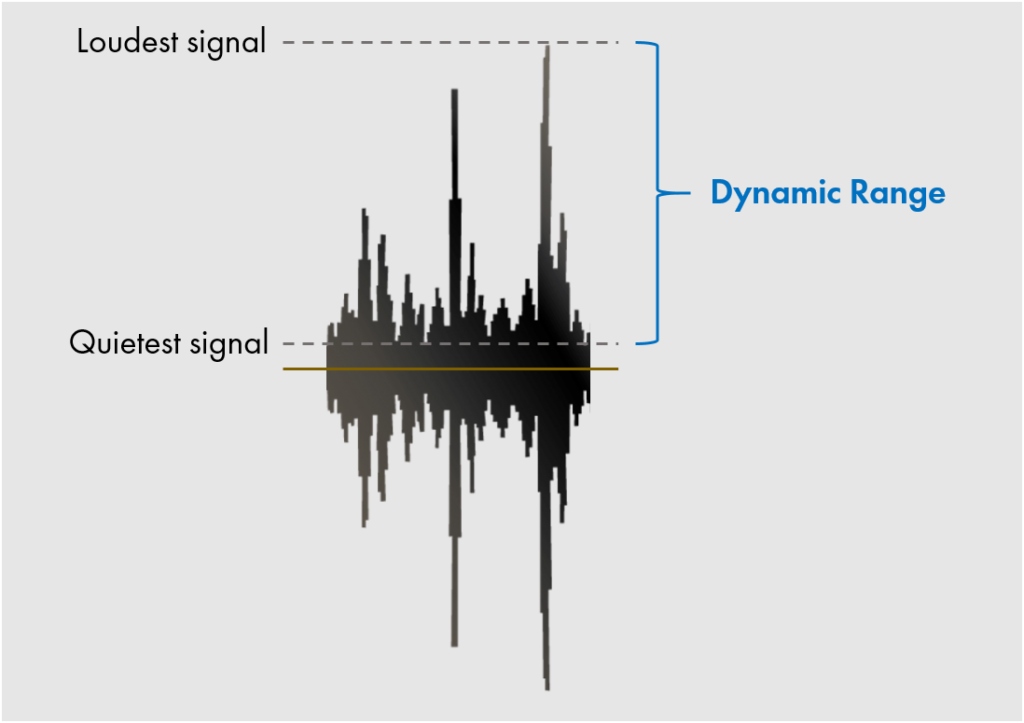
Understanding dynamic range in music is important for quality music production. It refers to the difference between the quietest and loudest sounds in a piece of music. Imagine a roller coaster; the dynamic range is like the difference between the slow climb to the top and the exhilarating drop. Properly managing dynamic range is crucial for creating an engaging and emotionally impactful listening experience. I find that many people don’t fully appreciate the art and science behind it.

What is Dynamic Range?

  • The difference between the quietest and loudest sounds is dynamic range.
  • Measured in decibels (dB) is how it is typically measured.
  • High dynamic range means a greater difference between quiet and loud.
  • Low dynamic range means less difference between quiet and loud.

As an audio specialist, I’ve encountered many scenarios where mastering dynamic range made a big difference. I remember working on a project for a local symphony orchestra. Their live performances had an enormous dynamic range, from the delicate pianissimo of a single violin to the thunderous fortissimo of the entire orchestra. My challenge was to capture that dynamic range in a recording without clipping or sacrificing the clarity of the quieter passages. Careful attention to gain staging and compression allowed me to create a recording that truly reflected the power and beauty of their performance.

Introduction to Windows Media Audio (WMA)

Windows Media Audio, also known as WMA, is a proprietary audio codec developed by Microsoft. It’s one of the key formats that competed with MP3. WMA is like a Swiss Army knife for digital audio. It offers a good balance of features, but each tool has its own strengths and limitations.

Key Features of WMA

  • Good compression efficiency allows for smaller file sizes.
  • Support for various bitrates allows for quality control.
  • Digital Rights Management (DRM) capabilities are important for copyright.
  • Integration with Windows operating systems is also a plus.

WMA’s versatility has made it a useful tool in my audio toolkit. When I worked for a company creating audiobooks, WMA was an ideal choice for encoding the narration. I know that the format offers excellent compression, which allowed us to store more audiobooks on a single CD. The format also allows for DRM capabilities, which helped protect the copyrighted material. It’s all about finding the right tool for the job.

How WMA Handles Dynamic Range

WMA handles dynamic range through a combination of encoding techniques. One of them is compression. These techniques are designed to reduce the overall dynamic range of the audio signal, making it more suitable for playback on a variety of devices. It is similar to taming a wild horse; you want to harness its power but also make it manageable.

Compression Techniques

  • Dynamic range compression reduces the difference between loud and quiet.
  • Limiting prevents the audio signal from exceeding a certain level.
  • Normalization adjusts the overall loudness of the audio.

I’ve used compression techniques in countless projects to manage dynamic range. I recall working on a project for a podcast where the hosts had vastly different speaking volumes. Without compression, some parts of the podcast would be barely audible, while others would be deafening. By applying gentle compression, I was able to even out the volume levels and create a more consistent listening experience. It was like fine-tuning the volume knob on a radio to find the perfect balance.

Automatic Gain Control (AGC)

  • AGC automatically adjusts the volume levels in real-time.
  • Helps to maintain a consistent listening level.
  • Compensates for variations in recording levels.

AGC can be a lifesaver in situations where you have limited control over the recording environment. When I recorded interviews at a noisy trade show, the background noise and varying speaker volumes made it challenging to capture clear audio. Using AGC helped to boost the quieter passages and reduce the impact of sudden loud noises. It was like having an automatic volume control that constantly adjusted to the environment.

WMA Encoding Parameters and Dynamic Range

WMA encoding parameters play a crucial role in how the codec adapts to dynamic range. Bitrate selection is another one. Choosing the right parameters is like adjusting the settings on a camera. You need to balance quality, file size, and compatibility to achieve the best results.

Bitrate Selection

  • Higher bitrates generally result in better dynamic range preservation.
  • Lower bitrates can reduce dynamic range due to compression.
  • Choose the bitrate based on the source material and listening environment.

Bitrate is like the resolution of a photograph. The higher the resolution, the more detail you can capture. I’ve found that higher bitrates preserve more of the original dynamic range. When archiving recordings of classical music performances, I always use higher bitrates to capture the full richness and detail of the music.

Encoding Mode

  • Constant Bitrate (CBR) provides a consistent bitrate throughout the audio.
  • Variable Bitrate (VBR) adjusts the bitrate based on the complexity of the audio.
  • VBR can be more efficient for preserving dynamic range.

I like to think of VBR as a smart encoding mode. It adapts to the complexity of the audio, allocating more bits to the sections that need it most. When encoding music with a wide dynamic range, I generally prefer VBR because it can preserve the louder and quieter passages with greater accuracy.

Advantages of WMA Dynamic Range Adaptation

WMA’s dynamic range adaptation offers several advantages. One of them is improved listening experience. When you listen to music on the go, you want it to sound good regardless of the environment.

Improved Listening Experience

  • WMA makes audio more enjoyable in noisy environments.
  • Audio is consistent volume, which is also safer to listen to.
  • Suitable for portable devices and streaming services is a bonus.

I still believe that the most satisfying experiences are when I can fully immerse myself in the music, without having to constantly adjust the volume. WMA makes the experience even more seamless and enjoyable. I’ve found this especially valuable when listening to music in my car. The dynamic range is balanced. WMA has the best capabilities to ensure that the quieter passages are still audible without getting blown out by louder sections.

Reduced Distortion

  • Dynamic range adaptation minimizes distortion.
  • Prevents clipping is one way that it prevents distortion.
  • Results in cleaner and more accurate audio playback.

One time I was recording a live band. I knew there was a risk of clipping during the louder sections. WMA’s dynamic range adaptation helped to prevent the audio from exceeding the maximum level. This resulted in a cleaner recording without any unwanted artifacts.

Limitations of WMA Dynamic Range Adaptation

WMA’s dynamic range adaptation has certain limitations. Over-compression can be an issue. As with any compression technique, overdoing it can lead to undesirable results.

Over-Compression

  • Excessive compression reduces dynamic range too much.
  • Can make the audio sound flat and lifeless.
  • Reduces the impact and emotion of the music.

I always tread carefully when using compression. I’ve made the mistake of over-compressing audio, resulting in a track that sounded flat and uninspiring. It’s like squeezing a sponge too hard; you might get more water out, but you also ruin the sponge.

Artifacts and Distortion

  • Aggressive dynamic range adaptation can introduce artifacts.
  • May result in unwanted distortion or pumping effects.
  • Can degrade the overall audio quality.

Sometimes, pushing the limits of WMA’s dynamic range adaptation can lead to noticeable artifacts and distortion. It’s like pushing a car engine too hard; you might get a little extra power, but you also risk damaging the engine.

Best Practices for WMA Music Encoding

Following best practices is key for optimal WMA music encoding. It’s like baking a cake; you need to follow the recipe carefully to achieve the best results. The choice of audio bitrate is crucial.

Choosing the Right Bitrate

  • Select a bitrate that balances file size and audio quality.
  • Use higher bitrates for high-quality source material.
  • Consider the listening environment and playback devices.

Bitrate is like the amount of ingredients you use in a recipe. I tailor the bitrate to the source material and the intended listening environment. For archival purposes, the quality of the music has to be preserved.

Proper Gain Staging

  • Adjust the input levels to optimize the signal-to-noise ratio.
  • Avoid clipping or distortion by setting levels correctly.
  • Use metering tools to monitor levels accurately.

I always pay close attention to gain staging to ensure that the audio signal is properly optimized. It’s like adjusting the focus on a camera to get a sharp image.

Latest words on How WMA Adapts to Dynamic Range in Music Encoding

WMA adapting to dynamic range in music encoding requires a careful balance of compression, bitrate selection, and gain staging. It’s an ongoing process of trial and error. By understanding the underlying principles and following best practices, you can achieve excellent results. For more advanced solutions, programs like Mp4Gain offer various tools to help optimize and normalize audio levels, even when the initial WMA encoding has not fully addressed the dynamic range issues. Now go and fine-tune audio levels, dynamic range adaptation, noise control, and audio compression!

What exactly is dynamic range when considering how WMA adapts to it during music encoding?

Dynamic range refers to the difference between the quietest and loudest sounds in a piece of music, typically measured in decibels (dB). This range is what WMA attempts to manage during music encoding.

Why is managing dynamic range crucial during WMA music encoding?

Effectively managing dynamic range in WMA ensures a consistent and enjoyable listening experience. When you are encoding dynamic music, managing the music guarantees that quieter sections are audible while louder sections don’t distort.

What are the compression techniques used in WMA encoding to adapt to dynamic range?

Compression techniques that WMA uses include dynamic range compression, limiting, and normalization, reducing the difference between loud and quiet and adjusting the overall loudness of the audio.

How does Automatic Gain Control (AGC) help in WMA’s dynamic range adaptation?

Automatic Gain Control (AGC) automatically adjusts volume levels in real-time in WMA. AGC helps maintain a consistent listening level and compensates for variations in recording levels.

Does the bitrate selection affect the quality of dynamic range adaptation in WMA?

Yes, it does, because higher bitrates generally result in better dynamic range preservation, whereas lower bitrates can reduce dynamic range due to increased compression in WMA.

What is the difference between Constant Bitrate (CBR) and Variable Bitrate (VBR) in WMA encoding?

Constant Bitrate (CBR) provides a consistent bitrate throughout the audio, while Variable Bitrate (VBR) adjusts the bitrate based on the complexity of the audio, making VBR more efficient for preserving dynamic range.

What are some of the advantages of effective dynamic range adaptation in WMA files?

Advantages include an improved listening experience in noisy environments, minimized distortion, clipping prevention, and cleaner, more accurate audio playback in WMA.

What happens if dynamic range adaptation is overdone during WMA music encoding?

If dynamic range adaptation is overdone in WMA, over-compression reduces dynamic range too much, causing the audio to sound flat and lifeless and reducing the music’s impact.

Can aggressive dynamic range adaptation introduce unwanted effects in WMA audio?

Yes, aggressive dynamic range adaptation can introduce artifacts, such as unwanted distortion or pumping effects, potentially degrading the overall WMA audio quality.

Beyond WMA, are there tools that further optimize dynamic range after encoding?

Indeed, programs like Mp4Gain offer various tools to help optimize and normalize audio levels, even when the initial WMA encoding has not fully addressed the dynamic range issues.

Comments:

This article really nailed it! I’ve always wondered why some of my WMA files sounded so much better than others. The explanation of bitrate selection and VBR vs CBR made it all click. Thanks for the practical tips!

I’m new to this whole audio encoding thing, and I gotta say, some of this is still kinda over my head. But the examples you used helped a lot. Keep up the good work!

Dude, AGC is a lifesaver! I record a lot of live music, and it’s always a challenge to get a consistent level. I’ll definitely be experimenting with that more now that I understand it better.

I think this article is pretty spot on! I work in audio all the time, and the best advice I ever got was to be gentle with the compression. Overdoing it can really ruin a track. I will follow this article to see if it helps me to improve!

Good points on WMA’s limitations. I have experienced first-hand some of the problems in the audio. Great info!

As a total noob at audio stuff, this was really helpful! Gonna try messing with the bitrate settings now when I convert my old CDs. Thanks for making it easy to understand for a dunce like me lol.

Help me a lot to undestand and manage audio levels in my proyect, I needed info about what things affects in audio quality and this is a excelent starting point, thaks a lot !


Free Download Mp4Gain
picture


Mp4Gain Main Window
picture


Mp4Gain Features
picture


Free Download Mp4Gain
picture

Variable Bitrate Encoding in M4A

Variable Bitrate Encoding in M4A

Variable Bitrate Encoding in M4A

Let’s talk about Variable Bitrate Encoding in M4A

Variable bitrate (VBR) encoding in M4A files is a game-changer for audio quality and file efficiency. I often find that when we’re talking about getting high-quality sound without oversized files, VBR encoding is the best solution. Unlike constant bitrate (CBR), which holds the data rate steady throughout a file, VBR dynamically adjusts. This flexibility means that audio can be compressed differently depending on the complexity of the sound at any given moment, resulting in great sound quality where it’s needed and data-saving where it’s not. Using real-life examples, think of it like a hose: VBR adjusts the “flow” depending on the music’s demands.

How VBR Encoding Differs from Constant Bitrate in M4A

One way I like to explain VBR versus CBR in M4A files is to imagine driving a car. With CBR, you’re holding a constant speed regardless of the road conditions, even if there’s traffic or clear roads. In contrast, VBR is like adjusting speed based on traffic; it slows down in complex audio sections and speeds up when it’s simpler. This approach can capture detailed, high-fidelity audio, while CBR might miss out on some of that nuance. VBR encoding allows M4A files to efficiently adapt the bitrate, creating an optimal balance between sound quality and file size.

Why Variable Bitrate Encoding Enhances Audio Quality

VBR encoding in M4A doesn’t just save space; it also prioritizes sound quality. In my experience, this difference becomes clear with high-energy music like classical or electronic, where subtle audio dynamics are crucial. VBR lets the M4A file devote more data to complex passages, capturing every detail. So, if you’ve ever felt like your favorite tracks sounded “compressed” or “flat,” switching to VBR M4A can make a noticeable difference. It’s like upgrading your audio experience without increasing the file size.

Technical Aspects of VBR Encoding in M4A Files

The technical workings behind VBR can get complex, but let’s break it down simply. VBR in M4A adjusts data allocation based on the audio’s dynamic range. More data is used during complex parts, while simpler sections use less. This dynamic allocation means that an M4A file will rarely waste data on silence or simplicity. As a result, files retain clarity and depth without excessive data. Think of it as only paying for a full tank when you’re on a long road trip – it’s efficient and smart.

Benefits of Using VBR Encoding in M4A

Using VBR in M4A comes with several perks. From my experience, here are some top advantages:

  • Improved Sound Quality

    VBR encodes audio based on complexity, leading to clear sound in all types of music.

  • Efficient File Size

    VBR reduces data use where audio is simpler, making it storage-friendly without compromising quality.

  • Dynamic Audio Capture

    Complex segments retain detail, while quieter parts save on data usage.

For those of us who care about quality and storage, VBR encoding in M4A hits the sweet spot between high-fidelity sound and efficient file size.

VBR Encoding vs. CBR Encoding in M4A

I often get asked why VBR is preferred over CBR in M4A files. It’s simple: VBR offers flexibility that CBR can’t match. While CBR might seem stable, it’s inefficient because it doesn’t adjust based on audio needs. In M4A files, VBR ensures that complex parts get more focus, unlike CBR, which applies the same rate to all parts. Imagine you’re in a bookstore where every book costs the same; with VBR, you pay only for the quality you want, which is why it’s so efficient.

Audio Compression in M4A with VBR

Audio compression in M4A VBR files is like packing a suitcase – you only take what’s needed. VBR helps prevent audio quality loss during compression, making the format excellent for those who prioritize quality over quantity. The difference in quality between compressed VBR and regular CBR audio can be surprising, especially in files with high dynamic range like orchestral pieces. With VBR, every aspect of a song can be heard without feeling over-compressed.

Optimizing File Size and Quality with VBR Encoding

One of my favorite things about VBR encoding is its ability to optimize both size and quality. We don’t always have space to spare on our devices, yet no one wants to compromise on sound. Using VBR in M4A files ensures that you don’t have to make that choice. You get a leaner file that sounds great without eating up unnecessary storage, making it ideal for large music libraries or mobile devices.

Limitations of VBR Encoding in M4A Files

While VBR encoding is effective, it’s not perfect. One challenge is that VBR encoding requires a bit more processing power during playback. This is rarely noticeable with modern devices but could pose a challenge on older hardware. Moreover, not every device or software supports VBR optimally, so there could be some compatibility issues. However, these limitations are minimal compared to the benefits of using VBR for high-quality M4A files.

Real-World Applications of VBR Encoding in M4A

When I’m traveling or out for a run, I often rely on M4A VBR files for music – I get quality without filling up my phone’s storage. For audiobooks or podcasts, VBR is equally efficient, as it doesn’t waste space on silence or long pauses. This application means you can carry more files without needing to sacrifice quality or storage. It’s a practical solution for those of us who enjoy high-quality audio on the go.

How VBR Encoding Adapts to Audio Complexity

VBR encoding’s ability to adjust bitrate based on audio complexity is a defining feature. Think of it like shading in a painting: the encoder decides where more detail is necessary. Quiet passages in M4A files don’t need as much data, while loud, complex segments get more. This flexibility provides a detailed sound that can capture nuances missed by other encoding methods. This is why, especially in music, VBR M4A files offer an experience that feels full and rich.

Latest Words on Variable Bitrate Encoding in M4A

When it comes to getting the best audio experience, Variable Bitrate Encoding in M4A is a top choice. It’s adaptable, offering excellent sound quality while managing file size. Unlike constant bitrate encoding, VBR doesn’t waste data on simple sections, which makes it efficient. For those looking for high-quality audio without massive files, M4A with VBR is a practical choice. And for those who want a powerful tool to optimize their audio experience, Mp4Gain can help you get the most out of your M4A files.

Comments:

Wow, this really helped me understand VBR better! I always thought one bitrate fit all, but now I get why adjusting makes a difference.

I tried switching to VBR on my M4A files, and I can already hear the improvement in sound quality, especially on complex tracks.

This article was really informative, but I wish there were more examples of VBR in real-life applications. Still, it was helpful!

Been using CBR all my life because I didn’t know there was a difference. Going to try VBR now, thanks!

I was so confused about bitrate settings before this. Now I’m excited to re-encode my music in VBR!

Never realized there was an option like VBR for M4A files. Makes so much sense to adjust bitrate based on the music. Thanks for this!

Great read! I think I’ll switch my whole library to M4A with VBR encoding to save on space. Thanks for the tips!

Wish there was more on the limitations of VBR – I think some older devices might struggle with it. But I’ll give it a go on my phone.

VBR encoding really makes the music sound better, like the difference between a regular camera and HD! Appreciate the detail here.

Always wondered if VBR was worth it over CBR. This article convinced me to make the switch. Loving the clarity in sound!

I like that you explain this in a simple way – makes it easier for non-tech folks like me to understand the value of VBR!

This article helped a lot, but I’d love

to know how VBR works with other formats, like MP3.

Been looking for a good VBR guide, and this hit the spot. Can’t wait to re-encode my favorite songs and hear the difference.

VBR sounds like the right choice for people who care about audio quality. Thanks for breaking down the technical side!

https://www.tumblr.com/mp3-mp4/765504331516624896/variable-bitrate-encoding-in-m4a-mp4gaincom

Audio High Dynamic Range

Audio High Dynamic Range

Audio High Dynamic Range

As an audio enthusiast, I can’t help but be intrigued by the concept of Audio High Dynamic Range (Audio HDR). It’s a term that’s been gaining traction in the world of audio technology, and for good reason. Let’s dive into this fascinating subject and explore what it means, how it works, and why it matters.

What is Audio High Dynamic Range?

Think of audio dynamic range as the range between the softest and loudest sounds in a piece of music or any audio content. In the world of audio production, preserving this dynamic range is crucial for delivering an authentic listening experience. When we talk about Audio High Dynamic Range, we’re essentially referring to the expanded capability of audio systems to

Identical Search Intent Keywords

  • Audio HDR technology
  • Benefits of Audio High Dynamic Range
  • Audio HDR vs. Standard Audio

People Also Asked About Audio High Dynamic Range

  • How does Audio HDR improve audio quality?
  • What are the key features of Audio High Dynamic Range?
  • Is Audio HDR compatible with all audio devices?

Exploring the Benefits of Audio HDR

Audio HDR technology is like having a high-resolution camera for your ears. Imagine you’re watching a sunset, and with standard audio, you hear the waves gently crashing on the shore. It sounds nice, but with Audio HDR, it’s like you can distinguish every droplet of water, the rustle of leaves in the wind, and even the faintest chirping of birds in the distance. The softest and loudest sounds are reproduced with incredible clarity, immersing you in the full soundscape of the moment.

One of the significant benefits of Audio HDR is its ability to capture and reproduce the nuances of a live musical performance. It’s as if you’re sitting in the front row of a concert hall, experiencing every note, from the delicate pluck of a guitar string to the thunderous crash of cymbals. The technology ensures that nothing gets lost, delivering a true-to-life audio experience that’s second to none.

Moreover, when it comes to movies and gaming, Audio HDR can transport you to another dimension. Imagine you’re watching an action-packed film, and the explosions have a visceral impact, while the dialogue remains crystal clear. It’s like being in the middle of the action, with every sound precisely where it should be. This level of immersion adds a whole new dimension to entertainment, making it more captivating and engaging than ever before.

Key Features of Audio High Dynamic Range

Audio High Dynamic Range isn’t just about making things louder; it’s about making them sound better. One of its key features is its ability to maintain audio fidelity even at extreme volume levels. This means you can crank up the volume on your favorite track, and it will still sound as clear and detailed as it did at a lower volume. No more distortion or loss of quality when you want to feel the music.

Another remarkable feature is the precise spatial audio rendering. With Audio HDR, you can perceive the direction from which a sound is coming with remarkable accuracy. Whether it’s footsteps behind you in a horror game or a musician moving across the stage in a live recording, the technology ensures that the audio positioning is incredibly realistic.

Furthermore, Audio HDR often comes with advanced noise cancellation and enhancement capabilities. This means that background noises are minimized, allowing you to focus on what matters most—the audio content itself. Whether you’re in a noisy environment or just want to immerse yourself fully in the music, this feature is a game-changer.

Is Audio HDR Compatible with All Audio Devices?

Audio HDR technology is undoubtedly impressive, but its compatibility with audio devices can vary. It’s essential to check whether your audio equipment supports Audio HDR before expecting the full experience. Most modern high-end headphones, soundbars, and home theater systems are now equipped with this technology, ensuring you can enjoy its benefits.

For example, if you’re a gamer, you’ll find that many gaming headsets come with Audio HDR support. This can significantly enhance your gaming experience, allowing you to hear every footstep, gunshot, or subtle in-game detail with remarkable clarity.

However, for older or budget-friendly audio devices, Audio HDR support may not be available. In such cases, you’ll still enjoy high-quality audio, but you won’t experience the full depth and richness that Audio HDR can offer. As the technology continues to evolve, we can expect wider compatibility across various audio products in the future.

Audio HDR vs. Standard Audio: A Game-Changing Comparison

Comparing Audio HDR to standard audio is like comparing a black-and-white photograph to a vivid, high-definition image in full color. With standard audio, you get the gist of the sound, but with Audio HDR, you’re immersed in the finest details. It’s a game-changer for audiophiles and anyone who appreciates the power of sound.

Consider watching your favorite action movie with standard audio. The explosions might sound loud, but they lack the depth and precision that Audio HDR provides. With Audio HDR, every explosion is an explosion of sound, with layers of complexity that standard audio can’t replicate. It’s a cinematic experience like no other.

Even in everyday listening, the difference is palpable. Whether you’re enjoying a classical symphony, a rock concert, or a podcast, Audio HDR elevates the experience. The highs are crisper, the lows are more resonant, and every subtle nuance is brought to the forefront. It’s audio as it was meant to be heard.

In conclusion, Audio High Dynamic Range is a technological marvel that takes audio experiences to new heights. Its ability to preserve dynamic range, enhance audio quality, and deliver immersive soundscapes makes it a must-have for anyone who values the art of listening. As technology continues to advance, we can look forward to even more breathtaking audio experiences that bridge the gap between imagination and reality.

“Audio High Dynamic Range is a technological marvel that takes audio experiences to new heights.”