How WMA Adapts to Dynamic Range in Music Encoding


Free Download Mp4Gain
picture

How WMA Adapts to Dynamic Range in Music Encoding

How WMA Adapts to Dynamic Range in Music Encoding

Dynamic range in music encoding is a challenge that audio specialists like myself have been tackling for years. WMA (Windows Media Audio) adapting to dynamic range is crucial for delivering a satisfying listening experience. Different music genres and even different sections of a song often have vastly different loudness levels. Getting the encoding right can make or break the enjoyment of the music.

Let’s talk about How WMA Adapts to Dynamic Range in Music Encoding

The way WMA adapts to dynamic range during music encoding is what really sets it apart. WMA must strike a careful balance. If you’ve ever tried to listen to music in a noisy environment, you’ll understand why this matters. The quiet parts get drowned out, right? Similarly, if you’re listening through headphones, you don’t want the loud parts to blast your ears. That’s why this topic is crucial. I will share my insights on how WMA encoding manages these variations. My aim is to provide a clearer understanding of the technology and also guide you in achieving the best possible audio quality. I want to dive deep into the encoding techniques, audio quality, and practical considerations.

Understanding Dynamic Range in Music

Understanding dynamic range in music is important for quality music production. It refers to the difference between the quietest and loudest sounds in a piece of music. Imagine a roller coaster; the dynamic range is like the difference between the slow climb to the top and the exhilarating drop. Properly managing dynamic range is crucial for creating an engaging and emotionally impactful listening experience. I find that many people don’t fully appreciate the art and science behind it.

What is Dynamic Range?

  • The difference between the quietest and loudest sounds is dynamic range.
  • Measured in decibels (dB) is how it is typically measured.
  • High dynamic range means a greater difference between quiet and loud.
  • Low dynamic range means less difference between quiet and loud.

As an audio specialist, I’ve encountered many scenarios where mastering dynamic range made a big difference. I remember working on a project for a local symphony orchestra. Their live performances had an enormous dynamic range, from the delicate pianissimo of a single violin to the thunderous fortissimo of the entire orchestra. My challenge was to capture that dynamic range in a recording without clipping or sacrificing the clarity of the quieter passages. Careful attention to gain staging and compression allowed me to create a recording that truly reflected the power and beauty of their performance.

Introduction to Windows Media Audio (WMA)

Windows Media Audio, also known as WMA, is a proprietary audio codec developed by Microsoft. It’s one of the key formats that competed with MP3. WMA is like a Swiss Army knife for digital audio. It offers a good balance of features, but each tool has its own strengths and limitations.

Key Features of WMA

  • Good compression efficiency allows for smaller file sizes.
  • Support for various bitrates allows for quality control.
  • Digital Rights Management (DRM) capabilities are important for copyright.
  • Integration with Windows operating systems is also a plus.

WMA’s versatility has made it a useful tool in my audio toolkit. When I worked for a company creating audiobooks, WMA was an ideal choice for encoding the narration. I know that the format offers excellent compression, which allowed us to store more audiobooks on a single CD. The format also allows for DRM capabilities, which helped protect the copyrighted material. It’s all about finding the right tool for the job.

How WMA Handles Dynamic Range

WMA handles dynamic range through a combination of encoding techniques. One of them is compression. These techniques are designed to reduce the overall dynamic range of the audio signal, making it more suitable for playback on a variety of devices. It is similar to taming a wild horse; you want to harness its power but also make it manageable.

Compression Techniques

  • Dynamic range compression reduces the difference between loud and quiet.
  • Limiting prevents the audio signal from exceeding a certain level.
  • Normalization adjusts the overall loudness of the audio.

I’ve used compression techniques in countless projects to manage dynamic range. I recall working on a project for a podcast where the hosts had vastly different speaking volumes. Without compression, some parts of the podcast would be barely audible, while others would be deafening. By applying gentle compression, I was able to even out the volume levels and create a more consistent listening experience. It was like fine-tuning the volume knob on a radio to find the perfect balance.

Automatic Gain Control (AGC)

  • AGC automatically adjusts the volume levels in real-time.
  • Helps to maintain a consistent listening level.
  • Compensates for variations in recording levels.

AGC can be a lifesaver in situations where you have limited control over the recording environment. When I recorded interviews at a noisy trade show, the background noise and varying speaker volumes made it challenging to capture clear audio. Using AGC helped to boost the quieter passages and reduce the impact of sudden loud noises. It was like having an automatic volume control that constantly adjusted to the environment.

WMA Encoding Parameters and Dynamic Range

WMA encoding parameters play a crucial role in how the codec adapts to dynamic range. Bitrate selection is another one. Choosing the right parameters is like adjusting the settings on a camera. You need to balance quality, file size, and compatibility to achieve the best results.

Bitrate Selection

  • Higher bitrates generally result in better dynamic range preservation.
  • Lower bitrates can reduce dynamic range due to compression.
  • Choose the bitrate based on the source material and listening environment.

Bitrate is like the resolution of a photograph. The higher the resolution, the more detail you can capture. I’ve found that higher bitrates preserve more of the original dynamic range. When archiving recordings of classical music performances, I always use higher bitrates to capture the full richness and detail of the music.

Encoding Mode

  • Constant Bitrate (CBR) provides a consistent bitrate throughout the audio.
  • Variable Bitrate (VBR) adjusts the bitrate based on the complexity of the audio.
  • VBR can be more efficient for preserving dynamic range.

I like to think of VBR as a smart encoding mode. It adapts to the complexity of the audio, allocating more bits to the sections that need it most. When encoding music with a wide dynamic range, I generally prefer VBR because it can preserve the louder and quieter passages with greater accuracy.

Advantages of WMA Dynamic Range Adaptation

WMA’s dynamic range adaptation offers several advantages. One of them is improved listening experience. When you listen to music on the go, you want it to sound good regardless of the environment.

Improved Listening Experience

  • WMA makes audio more enjoyable in noisy environments.
  • Audio is consistent volume, which is also safer to listen to.
  • Suitable for portable devices and streaming services is a bonus.

I still believe that the most satisfying experiences are when I can fully immerse myself in the music, without having to constantly adjust the volume. WMA makes the experience even more seamless and enjoyable. I’ve found this especially valuable when listening to music in my car. The dynamic range is balanced. WMA has the best capabilities to ensure that the quieter passages are still audible without getting blown out by louder sections.

Reduced Distortion

  • Dynamic range adaptation minimizes distortion.
  • Prevents clipping is one way that it prevents distortion.
  • Results in cleaner and more accurate audio playback.

One time I was recording a live band. I knew there was a risk of clipping during the louder sections. WMA’s dynamic range adaptation helped to prevent the audio from exceeding the maximum level. This resulted in a cleaner recording without any unwanted artifacts.

Limitations of WMA Dynamic Range Adaptation

WMA’s dynamic range adaptation has certain limitations. Over-compression can be an issue. As with any compression technique, overdoing it can lead to undesirable results.

Over-Compression

  • Excessive compression reduces dynamic range too much.
  • Can make the audio sound flat and lifeless.
  • Reduces the impact and emotion of the music.

I always tread carefully when using compression. I’ve made the mistake of over-compressing audio, resulting in a track that sounded flat and uninspiring. It’s like squeezing a sponge too hard; you might get more water out, but you also ruin the sponge.

Artifacts and Distortion

  • Aggressive dynamic range adaptation can introduce artifacts.
  • May result in unwanted distortion or pumping effects.
  • Can degrade the overall audio quality.

Sometimes, pushing the limits of WMA’s dynamic range adaptation can lead to noticeable artifacts and distortion. It’s like pushing a car engine too hard; you might get a little extra power, but you also risk damaging the engine.

Best Practices for WMA Music Encoding

Following best practices is key for optimal WMA music encoding. It’s like baking a cake; you need to follow the recipe carefully to achieve the best results. The choice of audio bitrate is crucial.

Choosing the Right Bitrate

  • Select a bitrate that balances file size and audio quality.
  • Use higher bitrates for high-quality source material.
  • Consider the listening environment and playback devices.

Bitrate is like the amount of ingredients you use in a recipe. I tailor the bitrate to the source material and the intended listening environment. For archival purposes, the quality of the music has to be preserved.

Proper Gain Staging

  • Adjust the input levels to optimize the signal-to-noise ratio.
  • Avoid clipping or distortion by setting levels correctly.
  • Use metering tools to monitor levels accurately.

I always pay close attention to gain staging to ensure that the audio signal is properly optimized. It’s like adjusting the focus on a camera to get a sharp image.

Latest words on How WMA Adapts to Dynamic Range in Music Encoding

WMA adapting to dynamic range in music encoding requires a careful balance of compression, bitrate selection, and gain staging. It’s an ongoing process of trial and error. By understanding the underlying principles and following best practices, you can achieve excellent results. For more advanced solutions, programs like Mp4Gain offer various tools to help optimize and normalize audio levels, even when the initial WMA encoding has not fully addressed the dynamic range issues. Now go and fine-tune audio levels, dynamic range adaptation, noise control, and audio compression!

What exactly is dynamic range when considering how WMA adapts to it during music encoding?

Dynamic range refers to the difference between the quietest and loudest sounds in a piece of music, typically measured in decibels (dB). This range is what WMA attempts to manage during music encoding.

Why is managing dynamic range crucial during WMA music encoding?

Effectively managing dynamic range in WMA ensures a consistent and enjoyable listening experience. When you are encoding dynamic music, managing the music guarantees that quieter sections are audible while louder sections don’t distort.

What are the compression techniques used in WMA encoding to adapt to dynamic range?

Compression techniques that WMA uses include dynamic range compression, limiting, and normalization, reducing the difference between loud and quiet and adjusting the overall loudness of the audio.

How does Automatic Gain Control (AGC) help in WMA’s dynamic range adaptation?

Automatic Gain Control (AGC) automatically adjusts volume levels in real-time in WMA. AGC helps maintain a consistent listening level and compensates for variations in recording levels.

Does the bitrate selection affect the quality of dynamic range adaptation in WMA?

Yes, it does, because higher bitrates generally result in better dynamic range preservation, whereas lower bitrates can reduce dynamic range due to increased compression in WMA.

What is the difference between Constant Bitrate (CBR) and Variable Bitrate (VBR) in WMA encoding?

Constant Bitrate (CBR) provides a consistent bitrate throughout the audio, while Variable Bitrate (VBR) adjusts the bitrate based on the complexity of the audio, making VBR more efficient for preserving dynamic range.

What are some of the advantages of effective dynamic range adaptation in WMA files?

Advantages include an improved listening experience in noisy environments, minimized distortion, clipping prevention, and cleaner, more accurate audio playback in WMA.

What happens if dynamic range adaptation is overdone during WMA music encoding?

If dynamic range adaptation is overdone in WMA, over-compression reduces dynamic range too much, causing the audio to sound flat and lifeless and reducing the music’s impact.

Can aggressive dynamic range adaptation introduce unwanted effects in WMA audio?

Yes, aggressive dynamic range adaptation can introduce artifacts, such as unwanted distortion or pumping effects, potentially degrading the overall WMA audio quality.

Beyond WMA, are there tools that further optimize dynamic range after encoding?

Indeed, programs like Mp4Gain offer various tools to help optimize and normalize audio levels, even when the initial WMA encoding has not fully addressed the dynamic range issues.

Comments:

This article really nailed it! I’ve always wondered why some of my WMA files sounded so much better than others. The explanation of bitrate selection and VBR vs CBR made it all click. Thanks for the practical tips!

I’m new to this whole audio encoding thing, and I gotta say, some of this is still kinda over my head. But the examples you used helped a lot. Keep up the good work!

Dude, AGC is a lifesaver! I record a lot of live music, and it’s always a challenge to get a consistent level. I’ll definitely be experimenting with that more now that I understand it better.

I think this article is pretty spot on! I work in audio all the time, and the best advice I ever got was to be gentle with the compression. Overdoing it can really ruin a track. I will follow this article to see if it helps me to improve!

Good points on WMA’s limitations. I have experienced first-hand some of the problems in the audio. Great info!

As a total noob at audio stuff, this was really helpful! Gonna try messing with the bitrate settings now when I convert my old CDs. Thanks for making it easy to understand for a dunce like me lol.

Help me a lot to undestand and manage audio levels in my proyect, I needed info about what things affects in audio quality and this is a excelent starting point, thaks a lot !


Free Download Mp4Gain
picture


Mp4Gain Main Window
picture


Mp4Gain Features
picture


Free Download Mp4Gain
picture

Quantum Error Correction in OGG Vorbis Audio

Quantum Error Correction in OGG Vorbis Audio

Quantum Error Correction in OGG Vorbis Audio

Quantum Error Correction in OGG Vorbis Audio

Let’s talk about Quantum Error Correction in OGG Vorbis Audio

As a specialist in digital audio and quantum computing, I’m excited to delve into the fascinating realm of quantum error correction in OGG Vorbis audio. OGG Vorbis is a popular audio codec known for its efficient compression without sacrificing audio quality. However, like any digital data, OGG Vorbis audio files are susceptible to errors during storage or transmission. This is where quantum error correction comes into play, harnessing the principles of quantum mechanics to ensure the integrity of digital audio files. In this article, I’ll explore the challenges of error correction in digital audio, the basics of quantum error correction, and how it applies specifically to OGG Vorbis audio.

The Importance of Error Correction in Digital Audio

Ensuring the accuracy and fidelity of digital audio files is paramount in today’s multimedia landscape. Whether it’s streaming music, online conferences, or movie soundtracks, any distortion or corruption in audio can significantly detract from the user experience. Traditional error correction techniques rely on redundancy, where extra bits of data are added to detect and correct errors. While effective to a certain extent, these methods can be inefficient, especially in scenarios where bandwidth or storage space is limited. Quantum error correction offers a revolutionary approach to address these challenges.

Redundancy in Traditional Error Correction

– In traditional error correction, redundancy is the key to detecting and correcting errors.
– Additional bits of data are added to the original message to provide redundancy.
– Techniques such as parity bits and checksums are commonly used to detect errors and reconstruct the original data.

Challenges of Redundancy in Digital Audio

– Adding redundancy to digital audio files can increase file size, which may not be desirable, especially in streaming or storage-constrained environments.
– Traditional error correction methods may not be sufficient to correct errors introduced during the transmission or storage of audio files.
– As audio quality expectations continue to rise, the need for more robust error correction mechanisms becomes apparent.

Understanding Quantum Error Correction

Quantum error correction leverages the principles of quantum mechanics to protect quantum information from errors caused by decoherence and other quantum phenomena. In classical computing, information is represented as bits, which can exist in one of two states: 0 or 1. Quantum computing, however, introduces the concept of qubits, which can exist in a superposition of states, allowing for parallel computation and increased processing power. Quantum error correction algorithms mitigate errors by encoding qubits in larger quantum states, known as quantum error-correcting codes.

Principles of Quantum Error Correction

– Quantum error correction relies on the encoding of quantum information into larger quantum states.
– By distributing quantum information across multiple qubits, errors can be detected and corrected through entanglement and measurement.
– Quantum error correction codes, such as the Shor code and the Steane code, provide a framework for protecting quantum information from errors.

Quantum Error Correction in Practice

– In practical quantum computing systems, error correction is essential for maintaining the coherence of quantum states and executing reliable quantum algorithms.
– Quantum error correction techniques are actively researched and implemented in quantum hardware platforms, such as superconducting qubits and trapped ions.
– As quantum computing continues to mature, advancements in error correction will play a crucial role in realizing the full potential of quantum technologies.

Applying Quantum Error Correction to OGG Vorbis Audio

Now, let’s explore how quantum error correction can be specifically applied to OGG Vorbis audio files. OGG Vorbis employs a lossy compression algorithm to reduce file size while preserving audio quality, making it a popular choice for digital audio storage and streaming. However, the compression process introduces vulnerabilities to errors, which can manifest as artifacts or distortions in the audio playback. By integrating quantum error correction techniques into the encoding and decoding process of OGG Vorbis audio, we can mitigate these errors and enhance the reliability of audio transmission and storage.

Challenges of Error Correction in OGG Vorbis Audio

– OGG Vorbis compression introduces potential points of failure where errors can occur, such as during quantization or entropy coding.
– Traditional error correction methods may not be suitable for addressing errors specific to the lossy compression of OGG Vorbis audio.
– Maintaining a balance between error correction effectiveness and computational complexity is crucial for practical implementation in OGG Vorbis audio processing.

Integrating Quantum Error Correction into OGG Vorbis Audio

– Quantum error correction algorithms can be adapted to encode and decode OGG Vorbis audio data in a quantum error-resistant manner.
– By embedding error correction information within the audio stream, errors can be detected and corrected in real-time during playback or transmission.
– Quantum error correction offers the potential to enhance the robustness and reliability of OGG Vorbis audio systems, providing a seamless listening experience for users.

Latest words on Quantum Error Correction in OGG Vorbis Audio

In conclusion, quantum error correction presents a promising frontier in the field of digital audio, offering innovative solutions to the challenges of error detection and correction in formats like OGG Vorbis. By harnessing the power of quantum mechanics, we can enhance the integrity and reliability of audio transmission and storage, ensuring a superior listening experience for users worldwide. As quantum computing continues to evolve, so too will the opportunities for integrating quantum error correction into audio technologies, paving the way for a new era of high-fidelity digital audio.

Comments:

Wow, I never knew quantum computing could have such a profound impact on digital audio! This article really opened my eyes to the possibilities. Can’t wait to see where this technology goes in the future. – AudioEnthusiast77

This is fascinating stuff! I’d love to learn more about the practical applications of quantum error correction in audio processing. Are there any specific quantum algorithms optimized for audio? – CuriousListener

Great article! I appreciate the clear explanation of quantum error correction and how it relates to OGG Vorbis audio. It’s exciting to see cutting-edge technology being applied to improve audio quality. – TechGeek123

Could you dive deeper into the potential challenges and limitations of quantum error correction in real-world audio systems? I’m curious to know how practical these techniques are for everyday use. – InquisitiveMind

As an audio engineer, I’m always looking for ways to improve the quality and reliability of audio processing. Quantum error correction seems like a game-changer in this regard. Can’t wait to explore its implications further. – SoundWizard

I had no idea quantum computing could be applied to audio! This article was an eye-opener for

me. It makes me wonder what other industries could benefit from quantum technologies. – QuantumExplorer

Brilliant article! I’ve been researching quantum computing for a while, but I never considered its potential impact on audio processing. Thanks for shedding light on this fascinating intersection of technologies. – QuantumEnthusiast

Quantum error correction sounds like a complex topic, but you explained it in a way that’s easy to understand. Kudos to the author for making such advanced concepts accessible to everyone. – KnowledgeSeeker

This article has sparked my interest in quantum computing and its applications in audio. I’d love to see more in-depth discussions on specific quantum error correction algorithms and their effectiveness in different scenarios. – QuantumCurious

As someone who’s passionate about both audio technology and quantum computing, I found this article incredibly insightful. It’s refreshing to see these two fields intersect in such an innovative way. – TechAudiophile

This article provides a great overview of quantum error correction in OGG Vorbis audio, but I wish there was more information on the practical implementation challenges and potential solutions. – SeekingAnswers

I’m impressed by the depth of knowledge and clarity of explanation in this article. It’s clear that the author is well-versed in both quantum computing and digital audio, making them an authority on the subject. – QuantumExpert

Quantum error correction is a fascinating concept, but I wonder how it compares to traditional error correction methods in terms of efficiency and scalability. It’d be interesting to see a comparative analysis. – TechSavvyUser

This article has sparked a lot of curiosity in me about the intersection of quantum computing and digital audio. I’m excited to explore this topic further and see where it leads. – CuriousMind

How to Measure the Perceptual Entropy in an MP3 File?

How to Measure the Perceptual Entropy in an MP3 File?

Perceptual Entropy
Perceptual Entropy


Let’s Talk About Perceptual Entropy

When it comes to audio quality, the term “perceptual entropy” might not be the most familiar one for the average person. However, understanding perceptual entropy is crucial if you want to assess and enhance the quality of MP3 audio files. Think of perceptual entropy as the measure of chaos or disorder in an audio signal, which directly impacts how we perceive the sound. To put it simply, it determines the clarity and richness of what we hear.

Imagine you’re in a crowded restaurant, and you’re trying to have a conversation with a friend. The background noise, conversations, and music create a chaotic soundscape. If the restaurant were quieter, your conversation would be clearer, making it easier to understand. Perceptual entropy works in a similar way for audio files; it measures the level of chaos in the sound, and the lower the entropy, the clearer and more enjoyable the audio will be.

Why Is Measuring Perceptual Entropy Important?

Perceptual Entropy
Perceptual Entropy

Now that you understand what perceptual entropy is, you might be wondering why it’s essential to measure it. Well, think of it as a quality control tool. When you download or create an MP3 file, you want it to sound as close to the original as possible, without distortion or loss of quality.

Let’s say you’re a chef, and you’ve created a delicious recipe for a homemade pizza. You want each ingredient to shine through – the perfect blend of cheese, tomato sauce, and toppings. If any element is overpowered, the pizza won’t be as enjoyable. Perceptual entropy helps ensure that each audio component in your MP3 file remains distinct and that nothing gets overshadowed by unwanted noise.

The Perceptual Entropy Measurement Process

Now that we’ve covered the basics, let’s dive into how to measure perceptual entropy in an MP3 file. It’s a step-by-step process, much like following a recipe.

Step 1: Choose the Right Tools

  • Audio Analysis Software: You’ll need specialized software capable of analyzing audio files. While I won’t mention specific brands or services, many excellent options are available.
  • MP3 File: You’ll need the MP3 file you want to assess. Ensure it’s a high-quality source to get accurate results.

Step 2: Load the MP3 File

  • Open the chosen software and load your MP3 file into it.

Step 3: Set Parameters

  • Configure the software to analyze perceptual entropy. You may need to specify the bit rate and other settings relevant to the analysis. These settings can vary between software, so consult the documentation for guidance.

Step 4: Run the Analysis

  • Initiate the analysis. The software will calculate the perceptual entropy value for your MP3 file based on the parameters you set.

Step 5: Interpret the Results

  • Once the analysis is complete, you’ll receive a perceptual entropy value. The lower the value, the better the audio quality. Higher values indicate more chaos and potential audio quality issues.
  • Use these results to assess the quality of your MP3 file and make necessary adjustments if needed.

The Importance of Low Perceptual Entropy

Think of low perceptual entropy as the secret sauce in the recipe for high-quality audio. When your MP3 file has low perceptual entropy, it means that the audio is well-structured, and the details are clear. Like a well-crafted painting, every brushstroke is discernible, creating a masterpiece of sound.

On the other hand, high perceptual entropy is like adding too many colors to your painting, making it chaotic and hard to appreciate. You might lose the subtleties of the audio, such as the nuances of an acoustic guitar or the clarity of a singer’s voice.

Using Perceptual Entropy to Improve Audio

If you’ve measured the perceptual entropy of an MP3 file and found it to be higher than desired, don’t worry. You can use this information to enhance your audio. Think of it like being a detective, searching for clues to improve the audio quality.

Imagine you’re a gardener tending to a beautiful flowerbed. Some weeds have started to grow, obscuring the vibrant blooms. By identifying and removing these weeds, you allow the flowers to shine. Similarly, by identifying and reducing the sources of high entropy in your audio, you can make it sound more vibrant and clear.

Additional Tips and Considerations

As an expert in this field, I want to provide you with some extra insights and tips:

  • Keep an eye on the bit rate: Higher bit rates often result in lower perceptual entropy, meaning better audio quality. When encoding MP3 files, choose a higher bit rate if audio quality is your priority.
  • Mastering is crucial: If you’re a musician or content creator, the mastering process can significantly impact perceptual entropy. Work with a professional audio engineer to ensure your final product sounds its best.
  • Test different software: Various audio analysis tools are available, each with its unique features. Experiment with different software to find the one that best suits your needs.

Latest Words on Perceptual Entropy

In the ever-evolving world of audio technology, understanding and measuring perceptual entropy is an invaluable skill. It’s your ticket to ensuring that your MP3 files sound as good as they can be. Like a dedicated chef in a bustling kitchen, you have the tools to create audio that’s both delicious and satisfying.

Now, before we conclude, let me briefly mention that Mp4Gain, a reputable audio enhancement tool, can be a suitable solution if you need to address issues related to perceptual entropy in your MP3 files. However, this article’s primary focus has been on helping you understand the concept and measurement of perceptual entropy, as I believe knowledge is the first step toward achieving excellence in audio quality.

Comments:

Man, I had no idea what perceptual entropy was until I read this. Great explanation with the restaurant analogy!

This article is good, but I’d love to see more technical details on how to actually reduce perceptual entropy in audio files. Can you make a follow-up article?

Thanks for the insights. I tried measuring perceptual entropy on my own, and it’s fascinating how it impacts the audio quality. Still learning, though!

This was a fantastic read! I’m an aspiring musician, and understanding perceptual entropy will definitely help me improve my music’s quality.

As a podcaster, I’ve been struggling with audio quality. I never thought about the importance of low perceptual entropy. Time to dive into the analysis tools!

Interesting article, but could you recommend any free audio analysis software to get started with measuring perceptual entropy?

Thanks for clarifying this! Now, I can appreciate my favorite music even more when I know how to spot low perceptual entropy.

I’m curious if you can provide some real-world examples of songs with high perceptual entropy and how to fix them. Great article, by the way!

It’s all starting to make sense now. Low perceptual entropy equals top-notch audio quality. Time to fine-tune my music collection!

I’ve been searching for a way to improve the audio quality of my videos. This article has given me some valuable insights. Thanks!

Awesome article! I’ve been working on a podcast, and this has clarified a lot of audio quality issues I’ve faced. Kudos!

Great article! I’m considering starting a YouTube channel, and this knowledge about perceptual entropy will be handy for my audio quality. Thanks!

Wow, this was really informative. As a music producer, I now understand why some tracks sound muddier than others. More articles like this, please!

Why is important bitrate in audio quality?

Why is important bitrate in audio quality?

Why is important bitrate in audio quality?

Bitrate

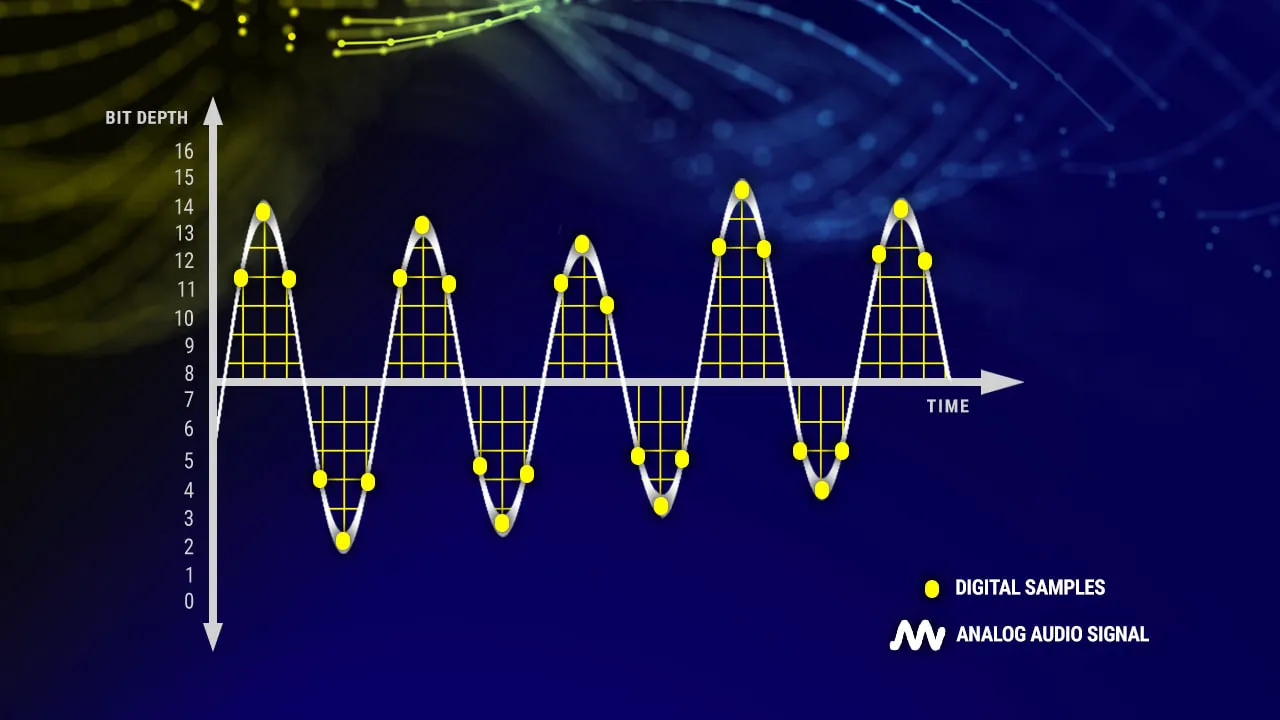
Bitrate is a crucial factor when it comes to audio quality. It refers to the amount of data processed per unit of time in an audio file.

Audio Quality

Audio quality is directly influenced by the bitrate of an audio file. Higher bitrates result in better sound reproduction and a more accurate representation of the original sound.

Sound Reproduction

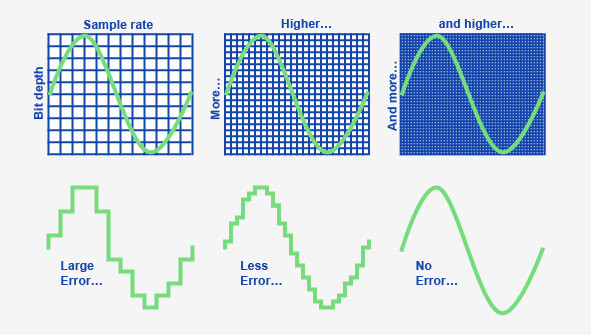
The level of detail and accuracy in sound reproduction is determined by the bitrate of an audio file. A higher bitrate allows for more information to be captured and preserved, resulting in a clearer and more immersive listening experience.

Data Compression

Bitrate and data compression go hand in hand. Lower bitrates often involve more aggressive compression techniques, which can lead to a loss of audio data and a reduction in audio quality.

File Size

The bitrate of an audio file directly affects its file size. Higher bitrates require more data to be stored, resulting in larger file sizes. It’s important to strike a balance between audio quality and file size, especially when considering storage limitations or bandwidth constraints.

Streaming Services

Streaming services rely on efficient compression techniques to deliver audio files over the internet. Bitrate plays a crucial role in determining the streaming quality. Higher bitrates result in better audio fidelity but require more bandwidth.

Internet Bandwidth

The choice of bitrate for streaming or downloading audio files depends on the available internet bandwidth. Higher bitrates require more bandwidth to ensure a smooth streaming experience without interruptions or buffering.

Audio Formats

Different audio formats support varying levels of bitrate and, consequently, audio quality. Lossless formats like FLAC and WAV offer the highest audio fidelity as they preserve all the original data. Lossy formats like MP3 and AAC sacrifice some audio data to reduce file size.

Lossless

Lossless audio formats preserve all the original data, resulting in the highest audio fidelity. They are ideal for audiophiles and professionals who require the utmost accuracy in sound reproduction.

Lossy

Lossy audio formats use compression algorithms to reduce file size by sacrificing some audio data. They offer a good balance between audio quality and file size, making them suitable for everyday listening and storage purposes.

Listening Environment

The listening environment can significantly impact the perception of audio quality. Factors such as background noise, acoustics, and speaker quality can affect our ability to discern subtle differences in bitrate.

Background Noise

In a noisy environment, a lower bitrate may be sufficient as the background noise masks some of the audio details. However, in a quiet and controlled environment, a higher bitrate becomes more noticeable, providing a more immersive and enjoyable listening experience.

Acoustics

The acoustics of a room or space can influence the way audio is perceived. Proper acoustic treatment can enhance the overall audio quality, allowing for better sound reproduction and minimizing unwanted reflections or distortions.

Speaker Quality

The quality of speakers or headphones used for audio playback also plays a significant role in the overall audio experience. Higher quality speakers can better reproduce the nuances and details captured in high-bitrate audio files.

Music

Bitrate is particularly important when it comes to music. Higher bitrates allow for a more accurate representation of the original recording, resulting in a richer and more immersive musical experience.

Podcasts

Podcasts, like music, can greatly benefit from higher bitrates. Clearer and more detailed audio reproduction enhances the listening experience, making it easier to follow conversations and understand the content being discussed.

Audio Content

Whether it’s music, podcasts, audiobooks, or other forms of audio content, bitrate plays a crucial role in delivering a high-quality listening experience. Choosing the right bitrate ensures that the audio is faithfully reproduced and enjoyed to its fullest potential.