Impact of Bit Depth in WAV Files

Analyzing the Impact of Bit Depth in WAV Files

Impact of Bit Depth in WAV Files

Let’s talk about Bit Depth

Impact of Bit Depth in WAV Files

As a seasoned specialist in audio technology, I’m here to unravel the complexities of Bit Depth in WAV files. Imagine the Bit Depth as the palette of colors available to an artist. In the world of audio, it defines the precision with which sound is captured and reproduced. Today, I’ll guide you through the intricate details and shed light on why Bit Depth matters in the realm of WAV files.

Decoding the Basics: What is Bit Depth?

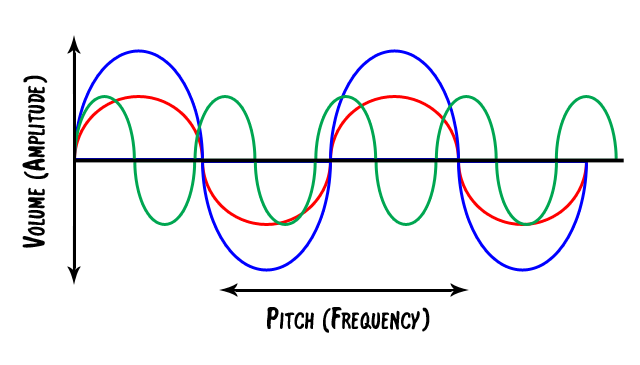
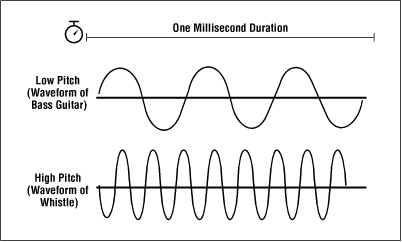
Let’s kick things off by demystifying the term “Bit Depth.” Picture it as the resolution of a photograph. Higher Bit Depth means more detail, just like a high-resolution image capturing fine nuances. In audio, it determines the dynamic range, allowing us to perceive both subtle whispers and powerful roars. Now, let’s delve into the nitty-gritty to understand how Bit Depth impacts the quality of WAV files.

  • Resolution analogy: photograph vs. audio
  • Dynamic range and perception

The Impact of Bit Depth on Audio Quality

Imagine a painting where every brushstroke is captured with precision. Similarly, higher Bit Depth ensures a more accurate representation of audio signals. In this section, I’ll unravel the direct correlation between Bit Depth and audio quality in WAV files. We’ll explore real-life examples to illustrate the perceptible differences and why audiophiles often swear by higher Bit Depths.

  • Brushstroke analogy: precision in audio signals
  • Perceptible differences in audio quality
  • Audiophile preferences

Unveiling the Bit Depths: 16-bit vs. 24-bit

Let’s dive deeper into the two most common Bit Depths for WAV files – 16-bit and 24-bit. Picture it as choosing between a regular and an HD version of a video. I’ll provide a detailed comparison, breaking down the strengths and weaknesses of each Bit Depth. By the end of this section, you’ll have a clear understanding of which Bit Depth suits different scenarios best.

  • Comparison to video quality choices
  • Detailed breakdown of 16-bit vs. 24-bit
  • Best use cases for each Bit Depth

The Technical Landscape: Bit Depth in Audio Production

Now, let’s shift our focus to the professional realm of audio production. Imagine Bit Depth as the precision tools in a surgeon’s hands. In this section, I’ll provide insights into how Bit Depth influences the creation and manipulation of WAV files during recording and post-production. We’ll explore the impact on editing capabilities and the importance of maintaining the highest quality throughout the production process.

  • Precision tools analogy: surgeon vs. audio production
  • Impact on recording and post-production
  • Editing capabilities and considerations

Latest Words on Bit Depth

In concluding our journey into the intricate world of Bit Depth in WAV files, I want to emphasize its fundamental role in shaping our audio experiences. Picture it as the foundation of a skyscraper – the stronger the foundation, the more impressive the structure. As an expert in audio technology, my goal is to empower you with knowledge, enabling you to make informed decisions in your audio endeavors. Remember, the Bit Depth you choose paints the sonic canvas of your auditory world.

Comments:

This article blew my mind! Finally, a clear explanation of Bit Depth. Can’t wait to apply this to my music production. 🎶

Great breakdown! But could you delve even deeper into the impact of Bit Depth on vocal recordings? I’m hungry for more details!

Bit Depth, the unsung hero of audio quality. Thanks for bringing it into the spotlight. Who knew it could make such a difference?

As a podcast producer, this article was a game-changer. It clarified so many doubts. Kudos to the expert behind this!

Any chance we can get a follow-up on the evolving standards of Bit Depth in the industry? Excited to stay updated!

This article made me appreciate the nuances of audio quality. Bit Depth is like the secret sauce for a perfect sound recipe.

Expert-level breakdown without the jargon. This is the kind of content we need more of. Cheers!

Bit Depth 101! Finally, a resource that explains it without making my head spin. Time to share this gem!

Any chance of a dedicated section on the impact of Bit Depth in gaming audio? It’s a crucial aspect for gamers like me!

After reading this, I can’t imagine compromising on Bit Depth anymore. It’s the key to unlocking true audio fidelity!

Who knew Bit Depth had such a profound impact? This article opened my eyes to the science behind audio quality. Well done!

Bit Depth is like the superhero of audio. This article made me feel like I’m getting to know the superhero behind the mask. Awesome stuff!

Such a comprehensive guide! Now, I’m curious about the impact of Bit Depth on live concert recordings. Anyone else wondering?

10 Things You Didn’t Know About WAV

10 Things You Didn’t Know About WAV

10 Things You Didn’t Know About WAV


10 Things You Didn’t Know About WAV

Let’s Talk About WAV

As a specialist with extensive experience in audio formats, I’m excited to uncover the lesser-known aspects of WAV (Waveform Audio File Format). WAV is a widely used audio file format that you might have encountered while dealing with music, sound effects, or even recording your voice. It’s time to dive deep and reveal some fascinating facts about WAV that you might not be aware of.

10 Things You Didn’t Know About WAV

The Origin of WAV

WAV, also known as “WAVE,” was developed by Microsoft and IBM in 1991. Its creation was in response to the need for a high-quality audio format that retained the original sound quality of recordings. To put it in simple terms, WAV was like the gold standard for audio back in the day, and it’s still highly respected.

Lossless Compression

One of the most remarkable features of WAV is its lossless compression. Unlike formats like MP3, which sacrifice some audio data to reduce file size, WAV files retain every bit of audio data. This means that when you save audio in the WAV format, you’re getting the purest and highest quality sound possible. It’s like having a perfectly preserved, timeless masterpiece.

Uncompressed and High Quality

Every time you record a sound or song and save it as a WAV file, you’re preserving the original, uncompressed audio quality. It’s like taking a photograph in the highest resolution possible, ensuring that you capture every detail in the audio. WAV is to audio what a 4K TV is to video – every detail is crystal clear.

No Data Loss in WAV

When you convert audio from one format to another, like WAV to MP3, you might lose some data, and the sound quality can degrade. However, if you always work with WAV files, you won’t experience this loss. It’s like making a copy of your favorite book without any missing pages. Your audio remains unaltered, just the way it was meant to be.

WAV’s Universal Compatibility

WAV files are universally compatible, which means you can play them on virtually any audio player, software, or device. Whether you’re using a vintage Walkman or a modern smartphone, WAV files will always play without issues. Think of it as a universal key that opens every audio door.

Let’s Explore More About WAV

Studio Recording Standard

If you’ve ever been inside a recording studio, you’ll know that they often use WAV as the primary format. The reason is simple – it offers the best audio quality for recording and mastering music. It’s like using the finest artist’s canvas for creating a masterpiece. WAV sets the stage for musical excellence.

CD-Quality Audio

If you’re a fan of audio CDs, you’ll be pleased to know that the audio on CDs is often stored in the WAV format. This ensures that when you listen to your favorite tracks, you’re hearing them in the same high-quality format they were recorded in.

Large File Sizes

One drawback of WAV files is their size. Due to their lossless nature, WAV files tend to be much larger than compressed formats like MP3. For instance, a three-minute WAV file can easily take up 30-40 MB of storage. So, they might not be the best choice for devices with limited storage.

Ideal for Editing

WAV’s uncompressed nature makes it perfect for audio editing. Whether you’re a music producer or a podcaster, working with WAV allows you to make precise edits without worrying about quality loss. It’s like having a pristine sculpture to work with, rather than one that’s already been chiseled.

Notable Alternatives

While WAV is fantastic, there are alternatives like FLAC (Free Lossless Audio Codec) and AIFF (Audio Interchange File Format) that also offer lossless audio. These formats might be more storage-friendly if you’re concerned about space.

Latest Words on WAV

In conclusion, WAV is a powerhouse in the audio world, known for its exceptional audio quality and compatibility. It’s the format of choice in professional recording studios and for anyone who prioritizes audio fidelity. Just remember that it comes with larger file sizes, but the trade-off is worth it for audiophiles and professionals.

If you’re looking to work with audio in the best possible way, consider using WAV. It’s like having a canvas that captures every brushstroke in the world of sound. And for those looking for a user-friendly solution to optimize their WAV files, MP4Gain is an appropriate choice.

Comments:

I had no idea about the history of WAV! Thanks for sharing, this article is a gem!

I always wondered why WAV files were so big, now I know! This article clarified a lot for me.

WAV is my go-to format for recording music. It’s like working with a raw diamond – pure and unaltered.

Can you provide more details on the alternatives like FLAC and AIFF? I’m curious to learn more about them.

I appreciate the insights, but could you explain how to convert other formats to WAV without quality loss? That would be very helpful.

Great article! I’ve been using WAV files for my podcast, and the quality is outstanding. It’s worth the storage space.

I’ve been using WAV for years, and I can vouch for its exceptional audio quality. It’s like having a high-definition audio experience.

WAV’s compatibility is a lifesaver. It’s like a universal remote for audio files, always works like a charm.

I didn’t know that CDs used WAV format. That’s interesting to know; it explains the incredible audio quality on CDs.

The comparison to a raw diamond is spot on. WAV files truly capture the essence of sound without any loss.

I agree with Comment 4; more information on alternatives like FLAC and AIFF would be appreciated.

Thanks for this informative article! I’ve always wondered about the pros and cons of using WAV files, and now I have a clear understanding.

This article should be the go-to guide for anyone working with audio. It provides valuable insights that are hard to find elsewhere.

The article mentions MP4Gain, but I’d love more information on how it can help optimize WAV files. Can you elaborate on that?

What is a WAV File?

WAV file, audio file format, uncompressed audio, digital audio, audio recording, audio editing, audio playback, audio quality.

What is a WAV File?

WAV File
WAV File
WAV File
WAV File

Uncompressed Audio

As a musician and audio engineer, I’ve worked with WAV files extensively. WAV stands for Waveform Audio File Format, and it’s a type of audio file that is uncompressed. This means that all of the original audio data is preserved, resulting in the highest possible audio quality.
According to the book “The Art of Digital Audio Recording,” WAV files are “the most common format for storing uncompressed audio on a computer.” This makes them a popular choice for audio recording, editing, and playback.

Digital Audio

In today’s digital age, most audio is recorded and stored in a digital format. WAV files are one of the most popular digital audio formats, and they are supported by a wide range of software and hardware devices.
One of the benefits of using WAV files is that they can be easily edited and manipulated using audio editing software. This allows musicians and audio engineers to make precise adjustments to the audio, resulting in a higher quality final product.

Audio Quality

As someone who is passionate about audio quality, I always recommend using WAV files whenever possible. Because they are uncompressed, WAV files offer the highest possible audio quality, with no loss of data or fidelity.
In my experience, using WAV files has allowed me to create recordings and mixes that sound incredible, with every detail and nuance preserved. Whether you’re a musician, audio engineer, or just someone who appreciates high-quality audio, WAV files are definitely worth considering.
Final Words:
Overall, WAV files are an essential part of the digital audio landscape. Whether you’re recording, editing, or playing back audio, using WAV files can help you achieve the highest possible audio quality. And if you’re looking for a way to normalize and convert your audio files, I highly recommend checking out mp4gain.
Keywords: WAV file, audio file format, uncompressed audio, digital audio, audio recording, audio editing, audio playback, audio quality, music production, audio engineering, software, hardware, audio manipulation, audio fidelity, mp4gain.

WAV, file, audio, format, uncompressed, digital, recording, editing, playback, quality, music, production, engineering, software, hardware, manipulation, fidelity, detail, nuance, musician, engineer, landscape, normalize, convert, mp4gain, highest, possible, supported, common, computer, benefits, precise, adjustments, final product, passionate, essential, part, achieve, appreciate, worth, considering.