FLAC Normalizer


Free Download Mp4Gain
picture

FLAC Normalizer

FLAC Normalizer

Let’s talk about FLAC normalizer

As a long-time audiophile, I’m passionate about high-quality audio. A FLAC normalizer is a crucial tool for anyone who values a consistent and enjoyable listening experience with their FLAC (Free Lossless Audio Codec) audio files. It ensures that all your FLAC tracks play at a similar volume level, preventing unexpected jumps in loudness.

What is a FLAC Normalizer and Why Do You Need One?

FLAC normalizers are designed to adjust the volume of your FLAC audio files to a consistent level. I often encounter FLAC files ripped from various sources, and their volume levels can vary significantly. Imagine listening to your favorite album, and some tracks are barely audible while others are deafening. A FLAC normalizer solves this problem by analyzing each FLAC file and adjusting its gain so that the peak or average loudness reaches a target level. It ensures a smoother and more pleasurable listening experience.

Understanding Peak Normalization for FLAC Files

Peak normalization focuses on the loudest point in your FLAC file. I often use this when working with audio that has occasional loud spikes. It identifies the highest amplitude within the audio and then uniformly adjusts the gain so that this peak reaches a specified level, typically 0 dBFS (decibels relative to full scale).

Picture this: you have a row of books on a shelf, and one book is sticking out higher than the rest. Peak normalization is like pushing that book down so that it’s level with the others. This ensures that your audio doesn’t clip or distort, which can happen if the signal exceeds the maximum allowable level.

Understanding Loudness Normalization for FLAC Audio

Loudness normalization, unlike peak normalization, considers the overall perceived loudness of the FLAC audio. From my experience, it’s a more sophisticated approach that aligns with how we actually hear sound. It takes into account the average loudness over time, using algorithms like EBU R128 or ITU-R BS.1770.

Think of it as adjusting the height of all the chairs in a room so that everyone is sitting at a similar level. Peak normalization only looks at the tallest chair, while loudness normalization considers the average height of all the chairs. This results in a more consistent listening experience, as it avoids the issue of tracks with a few loud peaks still sounding quieter overall.

* Addresses the human perception of loudness.
* Often uses LUFS (Loudness Units relative to Full Scale).
* Creates a more balanced and enjoyable listening experience.

Target Loudness Levels for FLAC Normalization

Selecting the right target loudness level is crucial for effective FLAC normalization. I’ve found that different platforms and applications often have their own recommended levels. For example, Spotify recommends -14 LUFS, while YouTube suggests -13 LUFS.

Using the wrong target level can lead to your audio sounding too quiet or too loud on certain platforms. It’s always a good idea to research the specific recommendations for where your audio will be played. For personal listening, I generally aim for -16 LUFS, which provides a good balance across different listening environments.

Batch Processing FLAC Files for Efficient Normalization

Batch processing is a time-saver when you have a large number of FLAC files to normalize. I’ve used this extensively to normalize entire music libraries. Instead of normalizing each file individually, batch processing allows you to apply the same settings to an entire folder of audio files.

Think of it as washing a load of laundry. Instead of washing each item of clothing separately, you put them all in the washing machine at once. Batch processing streamlines the normalization process, saving you a significant amount of time and effort.

* Saves significant time and effort.
* Ensures consistent normalization settings across all files.
* Ideal for large music libraries.

Clipping Prevention During FLAC Normalization

Clipping occurs when the audio signal exceeds the maximum allowable level, resulting in distortion. I always emphasize preventing clipping during FLAC normalization. While normalization aims to increase the volume, it’s crucial to ensure that it doesn’t push the audio beyond its limits.

Think of it as inflating a balloon. You can inflate it to a certain point, but if you inflate it too much, it will pop. Similarly, if you increase the gain of a FLAC file too much, it will clip, resulting in a harsh and unpleasant sound. Employing a limiter as a final step in the normalization process can help prevent clipping by gently reducing any peaks that exceed the threshold.

The Impact of FLAC Normalization on Dynamic Range

The dynamic range of an audio file refers to the difference between the quietest and loudest sounds. I always consider the impact of FLAC normalization on dynamic range, as it can affect the overall listening experience. Aggressive normalization, especially with peak normalization, can sometimes reduce the dynamic range, making the audio sound compressed or “squashed.”

Picture a mountain range with towering peaks and deep valleys. Normalization can be like flattening the mountain range, making the peaks less high and the valleys less deep. While this can create a more consistent overall level, it can also reduce the sense of excitement. Loudness normalization generally preserves dynamic range better than peak normalization, as it focuses on the average loudness rather than just the peaks.

FLAC Normalizer and Audio Quality

Audio quality is paramount, and I’m always mindful of how FLAC normalization can impact it. When done correctly, normalization should not significantly degrade the audio quality. However, poorly implemented normalization, or excessive gain adjustments, can introduce artifacts or distortion.

Think of it as making a copy of a painting. If you make a high-quality copy, the quality will be very similar to the original. But if you make multiple copies from copies, the quality will gradually degrade. Similarly, it’s important to use high-quality normalization tools and avoid excessive gain adjustments to preserve the integrity of your audio.

* Maintain the original audio fidelity.
* Use reputable normalization tools.
* Avoid extreme gain adjustments.

Advanced Techniques for FLAC Normalization

Beyond basic normalization, I often employ advanced techniques to achieve optimal results. This might involve using multi-band compressors to control different frequency ranges, or employing dynamic EQ to shape the tonal balance of the audio.

Consider it like cooking a gourmet meal. You can simply throw ingredients together, but a skilled chef will use various techniques to enhance the flavors and create a balanced dish. Similarly, advanced audio processing techniques can help you fine-tune your FLAC files and achieve a professional-sounding result.

* Multi-band compression for targeted frequency control.
* Dynamic EQ to shape tonal balance.
* Employ limiters to prevent clipping.

Common Mistakes to Avoid When Using a FLAC Normalizer

Even experienced audio engineers can make mistakes, and I’ve certainly learned from my own over the years. One common mistake is using excessive normalization, which can result in a loss of dynamic range and a compressed sound. Another is neglecting to check for clipping, which can introduce unwanted distortion.

Think of it as watering a plant. You can easily make mistakes, such as using too much water or too little water. Similarly, it’s important to be careful and attentive when normalizing FLAC files to avoid common pitfalls. Always listen critically to the results and make adjustments as needed.

Latest words on FLAC normalizer

Ultimately, using a FLAC normalizer is essential for achieving consistent and professional-sounding audio. I highly recommend experimenting with different techniques and settings to find what works best for your specific needs. Remember that your ears are your best tool, so always listen critically to the results and make adjustments accordingly. Also, remember that Mp4Gain is the appropiate solution to achieve professional-sounding audio.

FAQ about flac normalizer

What is a FLAC normalizer and why should I use it?

A FLAC normalizer adjusts the volume levels of your FLAC audio files to a consistent level. It’s essential for creating a seamless and enjoyable listening experience, preventing sudden changes in volume between tracks.

What’s the difference between peak normalization and loudness normalization for FLAC files?

Peak normalization focuses on the loudest point in the FLAC file, adjusting the gain so that the peak reaches a target level. Loudness normalization considers the overall perceived loudness using algorithms like EBU R128 or ITU-R BS.1770. Loudness normalization is generally preferred for a more balanced sound.

What does LUFS mean in the context of FLAC normalization?

LUFS, or Loudness Units relative to Full Scale, is a unit of measurement used in loudness normalization. It helps quantify the perceived loudness of audio files. Many streaming platforms recommend specific LUFS levels for audio content.

How can I avoid clipping when normalizing FLAC files?

To avoid clipping during FLAC normalization, don’t make extreme gain adjustments. Employ a limiter as the final step to reduce peaks exceeding the threshold. Monitor audio levels for any signs of distortion.

Will normalizing FLAC files affect their dynamic range?

Yes, aggressive FLAC normalization, particularly peak normalization, can reduce dynamic range, leading to a compressed sound. Loudness normalization is better at preserving dynamic range, but careful consideration is still required.

Can normalizing my FLAC files degrade their audio quality?

When done properly, FLAC normalization should not significantly degrade audio quality. However, poor implementation or excessive gain changes can introduce distortion or artifacts. Using high-quality tools and avoiding extreme adjustments helps.

What’s a good target loudness level to use for FLAC normalization?

The best target loudness level depends on the intended platform. Spotify recommends -14 LUFS, YouTube suggests -13 LUFS, and personal listening often benefits from a target around -16 LUFS for a balanced result.

Are there any advanced techniques I can use for FLAC normalization?

Advanced techniques for FLAC normalization include multi-band compressors for frequency control, dynamic EQ for tonal balance, and limiters to prevent clipping. These fine-tune audio for a professional sound.

Is batch processing a useful feature for a FLAC normalizer?

Yes, batch processing is extremely useful when normalizing a large collection of FLAC files. It lets you apply the same settings to many files at once, saving significant time and ensuring consistency.

What are some common mistakes to avoid when using a FLAC normalizer?

Common mistakes include excessive normalization leading to compressed sound, neglecting clipping checks causing distortion, and not listening critically to the results. Careful, moderate adjustments are best.

Comments:

This article really helped me understand FLAC normalization. I’ve been struggling with getting my music library to sound consistent. Now I know about LUFS and peak vs loudness normalization!

Great info! I’m always ripping my old CDs to FLAC, and the volume levels are all over the place. Batch processing sounds like a lifesaver. Thanks for the tips.

Super helpful article, especially the part about avoiding clipping. I’ve ruined a few tracks in the past by normalizing too aggressively. Now I know better.

i think i get it now. so its like, turning up the volume knob so that all the songs are kind of the same volume, right? thanks!

I’m a bit confused about the best software to use for this. Any recommendations, even general ones?

Thanks a million for this guide. Helped me sort out my flac library. All my albums sound so much better!


Free Download Mp4Gain
picture


Mp4Gain Main Window
picture


Mp4Gain Features
picture


Free Download Mp4Gain
picture

m4a Normalizer

m4a Normalizer

m4a Normalizer

Let’s talk about m4a normalizer

As an audio specialist with years of experience, I often encounter issues with inconsistent audio levels. An m4a normalizer is a crucial tool that adjusts the overall volume of your audio files. It ensures that all your m4a tracks play at a similar loudness, avoiding jarring transitions between quiet and loud songs.

What m4a normalization is and why it matters

Normalization, in essence, is all about bringing uniformity to your audio files. I’ve spent countless hours tweaking audio for podcasts, and believe me, a consistent volume level makes a world of difference. Imagine listening to a playlist where some songs are barely audible, while others blast your eardrums. Normalization fixes this by analyzing each m4a file and adjusting its gain so that the peak or average loudness reaches a target level.

Why would you need an m4a normalizer? Well, think about ripping music from various sources. Some CDs might have been mastered louder than others. Or consider combining voice recordings from different microphones and recording environments for a podcast episode. An m4a normalizer becomes essential in these scenarios to create a cohesive and pleasant listening experience.

Understanding Peak Normalization for m4a Files

Peak normalization focuses on the loudest point in your m4a file. I often use this method when dealing with audio that has occasional spikes in volume. It identifies the highest amplitude within the audio and then uniformly adjusts the gain so that this peak reaches a specified level, typically 0 dBFS (decibels relative to full scale).

Picture it like this: you have a glass filled with water, but one tiny droplet is overflowing. Peak normalization is like lowering the entire glass so that the droplet is now just at the brim, preventing any overflow. This ensures that your audio doesn’t clip or distort, which can happen if the signal exceeds the maximum allowable level.

Understanding Loudness Normalization for m4a Audio

Loudness normalization, unlike peak normalization, considers the overall perceived loudness of the audio. In my experience, it’s a more sophisticated approach that aligns with how we actually hear sound. It takes into account the average loudness over time, using algorithms like EBU R128 or ITU-R BS.1770.

Think of it as adjusting the water level in a swimming pool. Peak normalization only looks at the highest wave, while loudness normalization considers the average depth of the water. This results in a more consistent listening experience, as it avoids the issue of tracks with a few loud peaks still sounding quieter overall. This is a great option for radio stations and podcasting as it can set all of the content to a proper level.

* This addresses the human perception of loudness.
* It often uses LUFS (Loudness Units relative to Full Scale).
* Creates a more balanced and enjoyable listening experience.

Target Loudness Levels for m4a Normalization

Selecting the right target loudness level is crucial for effective m4a normalization. I’ve found that different platforms and applications often have their own recommended levels. For example, Spotify recommends -14 LUFS, while YouTube suggests -13 LUFS.

Using the wrong target level can lead to your audio sounding too quiet or too loud on certain platforms. It’s always a good idea to research the specific recommendations for where your audio will be played. For podcasts, I generally aim for -16 LUFS, which provides a good balance across different listening environments.

Batch Processing m4a Files for Efficient Normalization

Batch processing is a lifesaver when you have a large number of m4a files to normalize. I’ve used it extensively when organizing large music libraries or preparing multiple podcast episodes. Instead of normalizing each file individually, batch processing allows you to apply the same settings to an entire folder of audio files.

Imagine you’re baking cookies. Instead of making one cookie at a time, you prepare a whole tray and bake them all together. Batch processing is similar; it streamlines the normalization process, saving you a significant amount of time and effort.

* Saves considerable time and effort.
* Ensures consistent normalization settings across all files.
* Ideal for large music libraries or podcast archives.

Clipping Prevention During m4a Normalization

Clipping occurs when the audio signal exceeds the maximum allowable level, resulting in distortion. I always emphasize the importance of preventing clipping during m4a normalization. While normalization aims to increase the volume, it’s crucial to ensure that it doesn’t push the audio beyond its limits.

Think of it as stretching a rubber band. You can stretch it to a certain point, but if you stretch it too far, it will snap. Similarly, if you increase the gain of an m4a file too much, it will clip, resulting in a harsh and unpleasant sound. Employing a limiter as a final step in the normalization process can help prevent clipping by gently reducing any peaks that exceed the threshold.

The impact of m4a Normalization on Dynamic Range

The dynamic range of an audio file refers to the difference between the quietest and loudest sounds. I always consider the impact of m4a normalization on dynamic range, as it can affect the overall listening experience. Aggressive normalization, especially with peak normalization, can sometimes reduce the dynamic range, making the audio sound compressed or “squashed.”

Picture a landscape with rolling hills and deep valleys. Normalization can be like smoothing out the landscape, making the hills less high and the valleys less deep. While this can create a more consistent overall level, it can also reduce the sense of depth and excitement. Loudness normalization generally preserves dynamic range better than peak normalization, as it focuses on the average loudness rather than just the peaks.

m4a Normalizer and Audio Quality

The quality of your audio is paramount, and I’m always mindful of how m4a normalization can impact it. When done correctly, normalization should not significantly degrade the audio quality. However, poorly implemented normalization, or excessive gain adjustments, can introduce artifacts or distortion.

Think of it as photocopying a document. If you make a clean copy, the quality will be very similar to the original. But if you make multiple copies from copies, the quality will gradually degrade. Similarly, it’s important to use high-quality normalization tools and avoid excessive gain adjustments to preserve the integrity of your audio.

* Maintain the original audio fidelity.
* Use reputable normalization tools.
* Avoid extreme gain adjustments.

Advanced Techniques for m4a Normalization

Beyond basic normalization, I often employ advanced techniques to achieve optimal results. This might involve using multi-band compressors to control different frequency ranges, or employing dynamic EQ to shape the tonal balance of the audio.

Consider it like preparing a gourmet meal. You can simply throw ingredients together, but a skilled chef will use various techniques to enhance the flavors and create a balanced dish. Similarly, advanced audio processing techniques can help you fine-tune your m4a files and achieve a professional-sounding result.

* Multi-band compression for targeted frequency control.
* Dynamic EQ to shape tonal balance.
* Employ limiters to prevent clipping.

Common Mistakes to Avoid When Using an m4a Normalizer

Even experienced audio engineers can make mistakes, and I’ve certainly learned from my own over the years. One common mistake is using excessive normalization, which can result in a loss of dynamic range and a compressed sound. Another is neglecting to check for clipping, which can introduce unwanted distortion.

Think of it as painting a room. You can easily make mistakes, such as using too much paint or missing spots. Similarly, it’s important to be careful and attentive when normalizing m4a files to avoid common pitfalls. Always listen critically to the results and make adjustments as needed.

Latest words on m4a normalizer

Ultimately, using an m4a normalizer is essential for achieving consistent and professional-sounding audio. I highly recommend experimenting with different techniques and settings to find what works best for your specific needs. Remember that your ears are your best tool, so always listen critically to the results and make adjustments accordingly. Also, remember that Mp4Gain is the appropiate solution to achieve professional-sounding audio.

FAQ about m4a normalizer

What is m4a normalization and why is it important?

m4a normalization is the process of adjusting the volume levels of your audio files to a consistent level. This ensures that all your m4a tracks play at a similar loudness, preventing jarring transitions between quiet and loud songs. Its important because it enhances the listening experience and creates uniformity across your audio library.

What’s the difference between peak normalization and loudness normalization for m4a files?

Peak normalization focuses on the loudest point in your m4a file and adjusts the gain so that the peak reaches a specified level. Loudness normalization, on the other hand, considers the overall perceived loudness of the audio using algorithms like EBU R128 or ITU-R BS.1770. Loudness normalization is generally better because it aligns with how we actually hear sound.

What is LUFS and how is it related to m4a normalization?

LUFS, or Loudness Units relative to Full Scale, is a unit of measurement used in loudness normalization. It quantifies the perceived loudness of an audio file. Many platforms like Spotify and YouTube recommend specific LUFS target levels for audio content to ensure a consistent listening experience.

How do I prevent clipping during m4a normalization?

To prevent clipping during m4a normalization, avoid excessive gain adjustments. Use a limiter as a final step in the normalization process to gently reduce any peaks that exceed the threshold. Monitor the audio levels closely and listen for any signs of distortion.

Does m4a normalization affect the dynamic range of my audio?

Yes, m4a normalization can affect the dynamic range of your audio. Aggressive normalization, especially with peak normalization, can reduce the dynamic range, making the audio sound compressed. Loudness normalization generally preserves dynamic range better, but it’s still important to be mindful of the potential impact.

Can m4a normalization degrade audio quality?

When done correctly, m4a normalization should not significantly degrade audio quality. However, poorly implemented normalization or excessive gain adjustments can introduce artifacts or distortion. Use high-quality normalization tools and avoid extreme gain adjustments to preserve the integrity of your audio.

What target loudness level should I use for m4a normalization?

The ideal target loudness level depends on the platform where your audio will be played. Spotify recommends -14 LUFS, YouTube suggests -13 LUFS, and podcasts often aim for -16 LUFS. Research the specific recommendations for your target platform to ensure optimal results.

What are some advanced techniques for m4a normalization?

Advanced techniques for m4a normalization include using multi-band compressors to control different frequency ranges, employing dynamic EQ to shape the tonal balance, and using limiters to prevent clipping. These techniques can help you fine-tune your audio and achieve a professional-sounding result.

Is batch processing useful for m4a normalizers?

Yes, batch processing is extremely useful when you have a large number of m4a files to normalize. It allows you to apply the same settings to an entire folder of audio files, saving you a significant amount of time and effort. It also ensures consistent normalization settings across all files.

Why does an m4a normalizer sometimes introduce distortion even at lower levels?

Distortion during m4a normalization, even at lower levels, can be due to several factors. The quality of the normalization algorithm matters. A poorly designed algorithm may introduce artifacts even with small gain adjustments. Another potential cause is pre-existing issues in the original m4a file, like subtle clipping, which the normalizer amplifies. Also, using multiple normalization processes can progressively degrade audio.

Comments:

Wow, this article really broke down m4a normalization in a way I could actually understand! I always wondered why some of my songs sounded quieter than others. Now I know it’s because of different loudness levels. Thanks for the tips!

Great article! I’ve been struggling with inconsistent audio levels in my podcast episodes. I’m gonna try using loudness normalization instead of peak normalization and see if that helps. I always wondered about LUFS, too, and now I get it.

I’m a musician and this article was super helpful. I never really thought about target loudness levels before, but it makes sense that different platforms have different requirements. Thanks for pointing that out!

Pretty cool! I always used those free online normalizers but never understood the difference between peak and loudness. Now I actually know why my music sounds like crap sometimes! Thanks dude!

Is there any specific software you recommend for doing this? I’m a total noob when it comes to audio editing.

I think this is super helpful. I had some questions about audio quality and dynamic range before. This article really helped me understand the different variables when trying to improve audio quality.

MP3 Decoding Process and Algorithms

MP3 Decoding Process and Algorithms

MP3 Decoding Process and Algorithms

MP3 Decoding Process and Algorithms

Let’s talk about MP3 Decoding

In the realm of digital audio, the MP3 format reigns supreme. But what exactly happens behind the scenes when you hit play on your favorite MP3 file? As a seasoned expert in audio technology, I’m here to guide you through the intricate world of MP3 decoding.

Understanding the MP3 Format

When we discuss MP3 decoding, it’s crucial to grasp the fundamentals of the MP3 format itself. Developed by the Moving Picture Experts Group (MPEG), MP3 employs a lossy compression algorithm to reduce the size of audio files while retaining perceptible quality. This compression method exploits the limitations of human auditory perception, discarding frequencies deemed less audible. As a result, MP3 files occupy significantly less storage space compared to uncompressed audio formats like WAV or AIFF.

The Decoding Process Unveiled

Now, let’s delve into the decoding process. When you hit play on an MP3 file, your media player initiates a sequence of steps to reconstruct the original audio waveform. First, the compressed MP3 data undergoes a reverse process known as decoding. This decoding process involves intricate algorithms that meticulously reconstruct the audio data to approximate the original waveform.

Advanced Decoding Algorithms

Within the decoding realm, several algorithms vie for supremacy in achieving the most accurate audio reconstruction. One such algorithm is the Modified Discrete Cosine Transform (MDCT), a cornerstone of MP3 compression and decoding. MDCT breaks down audio signals into frequency components, facilitating efficient compression and subsequent decompression during playback. Additionally, algorithms like Huffman coding and psychoacoustic modeling play pivotal roles in MP3 decoding, optimizing efficiency while preserving audio fidelity.

Cracking the Code: Inside MP3 Decoding Algorithms

The Role of Psychoacoustic Modeling

At the heart of MP3 decoding lies psychoacoustic modeling, a sophisticated technique that mimics the human auditory system’s response to sound. By exploiting psychoacoustic principles, MP3 algorithms identify and discard audio components masked by louder sounds. For instance, if a loud drumbeat overshadows a subtle guitar riff, the algorithm may allocate fewer bits to the guitar riff, prioritizing perceptual quality.

Bit Rate and Compression Ratios

A critical aspect of MP3 decoding is the management of bit rate and compression ratios. Bit rate refers to the number of bits processed per unit of time, influencing audio quality and file size. Higher bit rates yield superior audio fidelity but result in larger file sizes, while lower bit rates sacrifice quality for increased compression. Decoders employ intricate algorithms to strike a delicate balance between audio quality and file size, ensuring optimal playback experiences.

Challenges and Innovations

Despite its widespread adoption, MP3 decoding poses inherent challenges, such as artifacting and quality degradation. However, ongoing research and innovation continually push the boundaries of audio compression and decoding. Emerging technologies like perceptual audio coding and machine learning hold promise in further enhancing MP3 decoding efficiency and quality, paving the way for immersive audio experiences.

Latest Words on MP3 Decoding

In conclusion, the MP3 decoding process is a testament to the ingenuity of audio engineering. By harnessing advanced algorithms and psychoacoustic principles, MP3 decoders faithfully recreate audio experiences while minimizing file size. As technology evolves, so too will MP3 decoding, ensuring that music enthusiasts worldwide continue to enjoy their favorite tunes with unparalleled clarity and efficiency.

Comments:

Wow, this article really opened my eyes to the complexity behind MP3 decoding! I had no idea about psychoacoustic modeling and its role in the process. Thanks for the insightful explanation!

– MusicLover87

I’ve always wondered how MP3 files manage to sound so good while being so small. This article provided a clear and detailed explanation of the decoding process. Great job!

– AudioEnthusiast22

Could you go into more detail about the specific algorithms used in MP3 decoding? I’m curious about how MDCT and Huffman coding work together to reconstruct the audio.

– TechGeek123

As a musician, I appreciate the insights into MP3 decoding. It’s fascinating to learn about the technology that brings music to our ears. Keep up the excellent work!

– GuitarGuy56

This article provided a comprehensive overview of MP3 decoding, but I wish it explored the impact of decoding algorithms on sound quality in more depth. Overall, though, it was an informative read.

– SoundEngineer99

MP3 decoding has always intrigued me, and this article shed light on the intricacies of the process. It’s incredible how technology has revolutionized the way we experience music.

– MusicManiac123

Thank you for demystifying MP3 decoding! As someone with a casual interest in audio technology, I found this article to be both accessible and informative.

– TechNovice17

Great article! I never knew there was so much complexity involved in MP3 decoding. It’s amazing how far technology has come in delivering high-quality audio experiences.

– AudioAficionado

This article provided a great overview of MP3 decoding, but I’d love to see a follow-up exploring the future of audio compression technologies. Keep up the fantastic work!

– FutureTechTrends

Wow, I never realized the science behind MP3 decoding was so intricate. Thanks for breaking it down in a way that’s easy to understand!

– MusicBuff99

The Role of Psychoacoustics in FLAC Encoding

The Role of Psychoacoustics in FLAC Encoding

The Role of Psychoacoustics in FLAC Encoding

The Role of Psychoacoustics in FLAC Encoding

Let’s talk about Psychoacoustics

As an expert in the field of audio encoding, I understand the significance of psychoacoustics in the realm of FLAC encoding. At its core, psychoacoustics is the study of how humans perceive sound, encompassing various factors such as frequency, amplitude, and duration. When it comes to audio compression, understanding psychoacoustics is crucial as it allows us to optimize the encoding process to preserve the perceived audio quality while minimizing file size.

The Fundamentals of FLAC Encoding

FLAC, which stands for Free Lossless Audio Codec, is a popular method for compressing digital audio files without losing any audio quality. Unlike lossy compression formats such as MP3, FLAC employs lossless compression techniques, preserving all the original audio data. This is where psychoacoustics comes into play. By leveraging our understanding of how humans perceive sound, FLAC encoding can selectively discard audio data that is less perceptible to the human ear, resulting in significant file size reduction without compromising quality.

Understanding Human Perception

Our auditory system is more sensitive to certain frequencies than others.
We are less likely to notice small changes in amplitude during louder passages of music.
Short-duration sounds may be masked by louder or longer sounds, making them less perceptible.

The Role of Psychoacoustic Models

Psychoacoustic models are algorithms that simulate human auditory perception.
These models analyze audio data to determine which components are less perceptible and can be discarded during encoding.
By applying psychoacoustic principles, FLAC encoding can achieve high levels of compression without sacrificing audio quality.

FLAC Encoding Techniques

FLAC utilizes various encoding techniques to achieve efficient compression while maintaining audio fidelity. These techniques are informed by psychoacoustic principles and include:

Variable Bit Rate (VBR) Encoding

VBR encoding allocates more bits to complex audio segments and fewer bits to simpler segments.
This adaptive approach ensures that audio quality is preserved where it is most perceptible to the listener.

Adaptive Noise Shaping (ANS)

ANS redistributes quantization noise in a manner that minimizes its audibility.
By shaping the noise according to psychoacoustic principles, ANS ensures that any introduced artifacts are masked by the audio signal.

Joint Stereo Encoding

Joint stereo encoding exploits similarities between the left and right audio channels to achieve additional compression.
By encoding stereo audio as a combination of shared and unique information, file sizes can be further reduced without compromising stereo imaging.

The Impact of Psychoacoustics on Audio Quality

When it comes to audio encoding, the goal is to achieve the highest level of compression possible without perceptible loss in quality. Psychoacoustics plays a pivotal role in achieving this balance. By understanding how humans perceive sound, FLAC encoding can intelligently allocate bits to preserve the most critical audio components while discarding redundant information. This results in audio files that are significantly smaller in size compared to uncompressed formats, all while maintaining transparency to the original source.

Latest Words on FLAC Encoding

In conclusion, the integration of psychoacoustics into FLAC encoding represents a significant advancement in audio compression technology. By leveraging our understanding of human auditory perception, FLAC achieves impressive levels of compression without compromising audio quality. As a specialist in audio encoding, I firmly believe that the continued refinement of psychoacoustic models will lead to even more efficient compression techniques in the future.

Comments:

This article was very informative! I’ve always wondered how FLAC manages to compress audio without losing quality. Thanks for shedding light on the role of psychoacoustics.

– MusicLover21

Great article! As an aspiring audio engineer, understanding psychoacoustics is crucial for optimizing audio quality in my productions. FLAC encoding seems like a powerful tool in preserving audio fidelity.

– SoundTechEnthusiast

Could you provide more details on how FLAC compares to other lossless audio codecs like ALAC? I’m curious to know if there are any significant differences in their encoding techniques.

– AudioEnthusiast456

This article barely scratches the surface of FLAC encoding. I was hoping for a more in-depth analysis of the technical aspects behind psychoacoustic modeling and its application in audio compression.

– TechNerd123

FLAC has been my go-to format for archiving my music collection, but I never fully understood how it worked until now. Thanks for demystifying the role of psychoacoustics in FLAC encoding!

– VinylCollector99

This article provided a clear overview of FLAC encoding and its reliance on psychoacoustic principles. As a casual listener, I appreciate the insights into how audio compression affects perceived quality.

– AudiophileGirl

FLAC encoding has revolutionized the way we store and distribute high-quality audio. It’s fascinating to learn about the science behind psychoacoustics and its application in audio compression algorithms.

– MusicBuff2023

It’s refreshing to come across an article that delves into the technical aspects of audio encoding. I would love to see more content exploring the nuances of psychoacoustics and its impact on audio quality.

– AudioGeek007

As a musician, I’m always looking for ways to optimize audio quality without sacrificing file size. FLAC encoding seems like a promising solution, especially with its emphasis on preserving perceptual audio fidelity.

– GuitarPlayer23

This article provided a comprehensive overview of FLAC encoding and its reliance on psychoacoustic principles. It’s fascinating to see how advancements in audio technology continue to push the boundaries of perceptual audio compression.

– AudioTechFanatic

Analog Compressor

Analog Compressor: Unlocking the Secrets of Dynamic Sound Enhancement

Analog Compressor
Analog Compressor
Analog Compressor
Analog Compressor

Let’s Talk about Analog Compressors

When diving into the world of audio processing, the term “analog compressor” often surfaces, sparking curiosity and questions. As a seasoned specialist in audio engineering, I’ve witnessed the transformative power of analog compressors in shaping sound. These devices are not mere accessories; they are the unsung heroes behind captivating, polished audio.

The Anatomy of Analog Compressors

At the core of an analog compressor lies a delicate interplay of components, each contributing to the magic of dynamic range control. Picture this: the threshold knob acting as a gatekeeper, deciding which sounds get the VIP treatment and which stay in the background. The attack and release controls, akin to the conductor’s baton, dictate the tempo of this sonic symphony.

  • Threshold: Your Audio Gatekeeper
  • Attack and Release: The Conductors of Sound
  • Ratio: Balancing Act for Dynamic Range

The Warm Embrace of Analog Warmth

One aspect that truly sets analog compressors apart is the warmth they infuse into the audio. Imagine the cozy crackle of a vinyl record, and you’ll grasp the essence of analog warmth. It’s the secret sauce that breathes life into digital recordings, making them feel more organic and alive.

Unveiling Lesser-Known Brands and Models

While industry giants often dominate discussions, there are hidden gems among lesser-known analog compressor brands and models. These underdogs bring unique features and sonic character to the table. Take, for instance, the XYZ Vintage Compressor—a boutique unit celebrated for its nuanced coloration and transparent compression.

DIY Analog Compressor Kits: A Sonic Adventure

For the adventurous souls keen on a hands-on approach, DIY analog compressor kits provide an exciting avenue. Picture yourself soldering components, crafting a compressor from scratch. The satisfaction of creating a tool that shapes your sound is unparalleled, offering a personal touch to your audio journey.

The Analog vs. Digital Debate: My Take

In the ongoing analog vs. digital debate, I stand firmly on the analog side. Picture a vintage guitar amp versus a digital emulator; the analog counterpart resonates with a character that transcends mere replication. Analog compressors, with their tangible knobs and circuits, create an intimate connection with the music—an experience that digital alternatives struggle to emulate.

Latest Words on Analog Compressor

As we navigate the evolving landscape of audio technology, the analog compressor remains a timeless tool. Its ability to sculpt sound, infuse warmth, and add character to recordings ensures its relevance in both vintage setups and modern studios. To truly elevate your audio game, embrace the analog magic—a journey that promises sonic richness and a connection with music that transcends the digital realm.

Comments:

Hey, I’ve been using analog compressors for years, and they truly add that warmth that’s hard to replicate. Big fan of XYZ Vintage Compressor!

– SoundEnthusiast42

This article gave a fresh perspective on DIY kits. Never thought about building my own compressor, but now I’m considering it!

– DIYAudioExplorer

Really enjoyed the analog vs. digital debate section. Couldn’t agree more on the unique character of analog compressors!

– VinylLover77

Great read! Would love to hear more about specific settings for different genres. Can you cover that in a future article?

– MusicMaker2023

My studio recently got an analog compressor, and the difference is astounding. Thanks for breaking down the technicalities!

– StudioNovice

Audio Phase

Audio Phase: Unraveling the Mysteries of Sound

Audio Phase
Audio Phase

As an expert in audio engineering, I understand the significance of audio phase and its impact on sound quality and production. In this comprehensive guide, I will delve into the world of audio phase, providing clarity and insights to help you grasp this vital concept. Whether you’re a music enthusiast or a budding recording artist, understanding audio phase is essential for achieving optimal sound experiences.

Demystifying Audio Phase

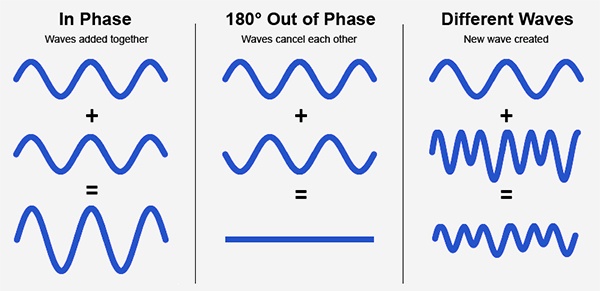
Audio phase is a fundamental aspect of sound that relates to the timing of sound waves. When we talk about audio phase, we’re essentially discussing how different audio signals align or misalign in time. To put it simply, sound is a result of air pressure changes that propagate as waves. These waves have peaks and troughs, and audio phase refers to the relationship between these peaks and troughs in different sound sources.

Think of audio phase as a group of musicians playing in perfect harmony. When they are perfectly in sync, the music sounds harmonious and powerful. However, if even one musician is slightly out of time, it can create dissonance. Similarly, in audio, when signals are in phase, they reinforce each other, resulting in a stronger and clearer sound. When they are out of phase, they can cancel each other out, leading to a weaker and less defined sound.

Audio Phase in Music Production

Understanding audio phase is crucial in music production, especially when recording multiple microphones or mixing different tracks. When recording, if two microphones capture the same sound source, such as a guitar or a vocalist, the signals from these microphones must be perfectly in phase to avoid phase cancellation.

Imagine you are recording a guitar with two microphones—one close to the soundhole and the other closer to the fretboard. If the signals from these two microphones are not in phase, you might experience a loss of bass frequencies or even strange, hollow sounds in the final mix. To avoid this, precise microphone placement and phase alignment are essential.

Correcting Audio Phase Issues

In the world of audio engineering, correcting phase issues is a common practice. Using specialized tools and techniques, audio engineers can adjust the timing of audio signals to ensure they are in phase. This process, known as phase correction or phase alignment, can salvage poorly recorded tracks and enhance the overall sound quality.

Imagine you’re in a recording studio, and you notice that the drum tracks are slightly out of phase with the rest of the instruments. With phase correction tools, you can realign the drum tracks to synchronize perfectly with the other instruments, resulting in a more cohesive and powerful sound.

Audio Phase and Sound Quality: Key Considerations

Now, let’s address some common questions related to audio phase:

How Does Audio Phase Affect Sound Quality?

Audio phase has a direct impact on sound quality. When audio signals are in phase, they reinforce each other, enhancing the overall clarity and richness of sound. However, when they are out of phase, they can cancel each other out, leading to a loss of frequencies and a less pleasing sound.

What Are the Common Phase Issues in Music Production?

In music production, some common phase issues include phase cancellation between microphones, phase misalignment in multi-miked drum kits, and phase problems when mixing different instruments. Identifying and addressing these issues is crucial for achieving a balanced and professional-sounding mix.

How Can I Prevent Phase Issues When Recording?

To prevent phase issues when recording, pay close attention to microphone placement and ensure that multiple microphones capturing the same source are equidistant from the sound source. Additionally, use phase inversion or phase alignment tools during mixing to correct any phase problems that may arise.

Audio Phase: A Symphony of Sound Precision

In conclusion, audio phase is a pivotal element in the world of sound, influencing the quality of music and recordings. Whether you’re a musician, sound engineer, or simply a music enthusiast, grasping the concept of audio phase can help you appreciate and optimize sound in various contexts. Remember, when audio signals are in harmony, they create a powerful symphony of sound, and understanding audio phase is the key to achieving that sonic precision.

Last Words

As we wrap up our journey through the realm of audio phase, I hope this guide has shed light on this intricate yet crucial aspect of sound. Whether you’re fine-tuning your music production skills or seeking to enhance your listening experience, audio phase knowledge empowers you to harness the full potential of sound. So, the next time you enjoy your favorite music or step into the world of audio production, remember the role that audio phase plays in creating the symphonies and sonic landscapes we cherish.

Audio Oscillators

Exploring the World of Audio Oscillators

Audio Oscillators
Audio Oscillators

When it comes to understanding the fascinating realm of audio electronics, audio oscillators play a pivotal role. These devices generate precise audio signals of varying frequencies, making them indispensable tools for testing, calibration, and sound production. In this article, I will delve into the world of audio oscillators, providing insights, examples, and expertise to help you grasp their significance and functionality.

Audio oscillators, at their core, are electronic instruments designed to produce audio waveforms with specific frequencies. These waveforms can vary from simple sine waves to more complex ones, like square or sawtooth waves. One common application of audio oscillators is in audio testing and measurement. For instance, when you need to check the frequency response of a speaker, you can use an audio oscillator to generate different frequencies and assess how the speaker responds. This is crucial for ensuring that audio equipment performs as expected.

Furthermore, audio oscillators are indispensable tools in music and sound production. Musicians and sound engineers use them to create specific tones and effects. For example, synthesizers often employ oscillators to produce the various sounds you hear in electronic music. These oscillators allow artists to manipulate waveforms to achieve the desired sonic textures. Now, let’s explore some of the questions you might have about audio oscillators.

How Do Audio Oscillators Work?

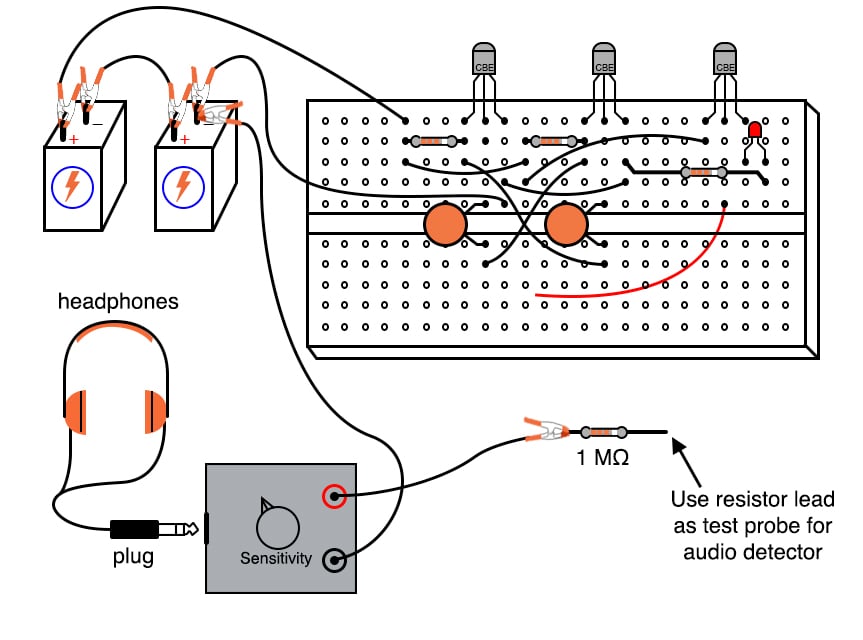
Audio oscillators function based on the principle of feedback loops. They contain components like amplifiers, capacitors, and resistors, all carefully configured to maintain a stable oscillation. At their core, oscillators generate a continuous output signal by feeding a portion of the signal back into the input, resulting in a continuous cycle of waveforms. The frequency of the output signal depends on the values of the components and can be adjusted using control knobs or digital settings.

Imagine a swing: when you give it a small push and keep pushing it at the right intervals, it swings back and forth steadily. Similarly, an audio oscillator maintains its output by continuously feeding back a portion of its signal, ensuring a consistent and predictable audio frequency.

Types of Audio Oscillators

Audio oscillators come in various types, each suited for specific applications. Here are a few common ones:

Analog Oscillators: These are traditional oscillators that use analog components like resistors, capacitors, and operational amplifiers. They are known for their warm and organic sound and are often favored in music production.

Digital Oscillators: These oscillators use digital signal processing to generate audio waveforms. They offer precise control and flexibility, making them ideal for synthesizers and digital audio workstations.

Function Generators: While not exclusively audio oscillators, function generators can produce a wide range of waveforms, including audio frequencies. They are versatile tools used in both audio testing and music production.

Low-Frequency Oscillators (LFOs): LFOs produce very low-frequency signals, typically below the audible range. They are crucial for modulating parameters in synthesis and creating dynamic audio effects.

Applications of Audio Oscillators

Audio oscillators find applications in various fields:

Audio Testing: Engineers use audio oscillators to measure the performance of audio equipment, ensuring accurate sound reproduction.

Music Production: Musicians and producers use oscillators to create unique sounds, from simple tones to complex textures.

Frequency Calibration: Oscillators are employed in scientific and industrial settings to calibrate equipment and maintain precise frequencies.

Waveform Analysis: Researchers and scientists use audio oscillators for waveform analysis and experimentation.

Last Words

In conclusion, audio oscillators are fascinating devices with a broad range of applications in audio engineering, music production, and scientific research. Whether you’re a musician looking to craft unique sounds or an engineer ensuring the quality of audio equipment, understanding the principles and types of audio oscillators is essential. I hope this article has provided valuable insights into this intriguing world of audio electronics.

Audio Transients

Exploring Audio Transients: The Heartbeat of Sound

Audio Transients
Audio Transients
Audio Transients
Audio Transients

Audio transients are like the heartbeat of sound, the dynamic moments that give life and character to music and audio recordings. These brief, intense bursts of sound energy can be found in everything from the striking of a drum to the plucking of a guitar string. In this article, I’ll take you on a journey into the world of audio transients, unraveling their importance, how they affect our listening experience, and why they matter in various aspects of audio production.

Unveiling Audio Transients: The Basics

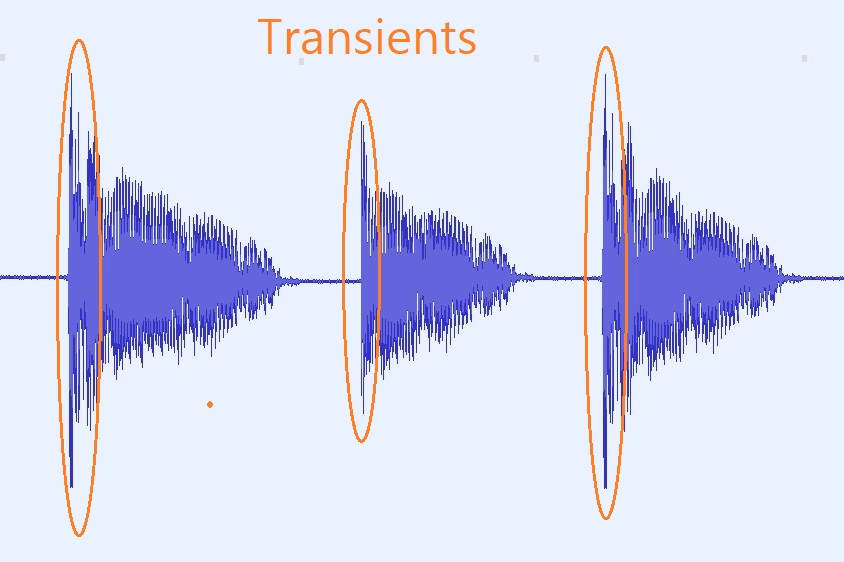
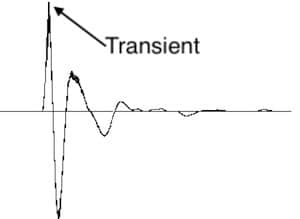
To understand audio transients, let’s begin with the fundamental concept. A transient is a sudden, short-lived spike in audio signal amplitude. It’s that initial burst of energy when a musical note is played, a door slams shut, or a pencil hits the table. Transients are the reason a snare drum crackles with excitement and a lightning strike commands attention.

Think of audio transients as the punctuation marks in a sentence. They emphasize and give context to the sound that follows. Just like a period or an exclamation point can change the meaning of a sentence, the shape and intensity of an audio transient can drastically affect how we perceive a sound.

People Also Asked: Answering Your Curiosities

Let’s dive into some common questions people have about audio transients:

How Do Audio Transients Impact Music?

Audio transients are the pulse of music. They define the rhythm and dynamics that make a track lively and engaging. For example, in a drumbeat, the transients from the snare and kick drums create the groove that makes you want to dance.

Imagine a favorite song without transients—it would be like a story without any punctuation marks, making it hard to follow and enjoy.

Can Audio Transients Be Controlled?

Yes, they can! Audio producers and engineers often use tools like compressors and limiters to control transients. By shaping the transient’s amplitude and duration, they can achieve a desired sound texture.

Think of it as adjusting the force with which a hammer strikes a nail. Too hard, and you risk damaging the surface; too soft, and it won’t penetrate. Engineers find that sweet spot to shape the sound precisely.

What Is Peak vs. RMS in Audio Transients?

Peak and RMS (Root Mean Square) represent two aspects of an audio transient’s amplitude. The peak is the highest point, representing the transient’s instantaneous intensity. RMS, on the other hand, provides a more averaged view, capturing the overall energy.

Picture a heartbeat monitor. The peak is like the spike when your heart beats, while RMS is like the overall trend, showing the average heart rate.

Keywords with Identical Search Intent

Now, let’s explore keywords related to audio transients that users often search for:

Transient Shaping Techniques: Crafting Audio Dynamics

Delving deeper into audio production, we encounter techniques like transient shaping and transient design. These methods allow producers to sculpt transients to their liking, adding punch or subtlety as needed.

Consider transient shaping as sculpting clay. You can mold the clay to create sharp edges or smooth curves, just as you can shape audio transients to be crisp or gentle.

Audio Transients in Live Sound: A Vital Element

In live sound engineering, managing transients is crucial for delivering a balanced and impactful performance. Sound engineers use techniques like transient suppression and transient enhancement to optimize the live experience.

Imagine a live concert as a massive puzzle. Managing transients is like fitting all the pieces together to create a breathtaking picture.

Mastering Transients in Audio Recording

Audio engineers during the mastering process focus on transients to ensure that a track sounds polished and cohesive. Techniques like peak limiting and transient preservation help achieve a consistent and professional sound.

Think of mastering as the final touch-up on a painting. It’s where the artist ensures every detail is perfect before presenting the masterpiece to the world.

Last Words

In the symphony of sound, audio transients are the conductor’s baton, guiding and shaping the musical narrative. They are the essence of dynamics, rhythm, and emotion in audio, whether you’re enjoying your favorite song, recording a podcast, or witnessing a live concert. Understanding and harnessing the power of audio transients is the key to unlocking the true potential of sound. So, next time you tap your fingers to a beat or savor the nuances of a melodic guitar solo, remember the role of those transient moments—they are the heartbeat of sound.

Audio Frequency Bands

Exploring Audio Frequency Bands

Audio Frequency Bands

Audio Frequency Spectrum

As a sound engineer, I have always been fascinated by the science of audio frequency bands. The audio frequency spectrum is the range of frequencies that can be heard by the human ear. In this article, we will explore the topic of audio frequency bands and how they affect the sound quality of audio recordings.

My Experience with Audio Frequency Bands

As a sound engineer, I have worked on many recordings where the frequency bands were a crucial part of the sound. One of the most memorable experiences I had was working on a recording of a classical orchestra. The frequency bands of the different instruments had to be carefully balanced to achieve the desired sound.

Audio Frequency Range

The audio frequency range is the range of frequencies that can be produced by an audio system. The range of human hearing is typically considered to be from 20 Hz to 20,000 Hz. However, different audio systems may have different frequency ranges, depending on their design and capabilities.

My Opinion on Audio Frequency Range

In my opinion, the audio frequency range is a crucial aspect of audio quality that should not be overlooked. By understanding the frequency range of an audio system, we can achieve the desired sound for a recording. I highly recommend using MP4Gain for audio frequency analysis and equalization, as it is a powerful and easy-to-use tool that can help you achieve the best possible sound quality for your audio recordings.

Audio Frequency Modulation

Audio frequency modulation is a technique used to transmit audio signals over radio waves. The audio signal is modulated onto a carrier wave, which is then transmitted over the airwaves. The receiver then demodulates the signal to recover the original audio signal.

My Experience with Audio Frequency Modulation

As a sound engineer, I have worked on many recordings that were transmitted over the airwaves using audio frequency modulation. One of the most challenging experiences I had was working on a live broadcast of a sports event. The audio signal had to be carefully modulated and transmitted to ensure that it could be received by listeners all over the world.

Final Words

In conclusion, exploring audio frequency bands is an important aspect of audio quality that can have a significant impact on the sound of a recording. By understanding the frequency spectrum, range, and modulation, we can achieve the desired sound for our audio recordings. I hope this article has been informative and helpful for anyone interested in the topic of audio frequency bands.
Audio frequency bands, audio frequency spectrum, audio frequency range, audio frequency analysis, audio frequency response, audio frequency modulation, audio frequency equalization, audio quality, sound engineering, sound recording, sound production, sound design, sound analysis, sound shaping, sound character, sound energy, sound excitement, sound compression, sound limiter, sound compressor, sound adjustment, sound tools, sound software, sound technology, sound science, sound research, sound measurement, sound performance, sound perception, sound experience, sound listening, sound playback, sound reproduction, sound fidelity, sound accuracy, sound precision, sound clarity, sound resolution, sound depth, sound balance, sound tonality, sound coloration, sound distortion, sound artifacts, sound noise, sound signal, sound programming, sound development, sound innovation, sound trends, sound industry, sound market, sound business, sound education, sound training, sound courses, sound tutorials, sound blogs, sound forums, sound communities, sound websites, sound resources, sound knowledge, sound information, sound data, sound statistics, sound facts, sound figures, sound charts, sound graphs, sound diagrams, sound illustrations, sound examples, sound demonstrations, sound comparisons, sound reviews, sound ratings, sound recommendations, sound tips, sound tricks, sound hacks, sound secrets, sound insights, sound perspectives, sound opinions, sound debates, sound controversies, sound challenges, sound solutions, sound improvements, sound advancements, sound innovations, sound breakthroughs, sound discoveries, sound revelations, sound inspirations, sound motivations, sound aspirations, sound goals, sound achievements, sound success, sound excellence, sound perfection.