As an audio specialist, I’ll delve into the nuances of WMA Lossless and FLAC audio compression formats, aiding you in choosing the best option for your needs.
Understanding Lossless Audio Compression
Before delving into the comparison, it’s essential to grasp the essence of lossless audio compression. Unlike lossy formats that sacrifice quality for smaller file sizes, lossless compression preserves all original audio data, akin to efficiently packing a suitcase without leaving anything behind.
WMA Lossless: Microsoft’s Offering
WMA Lossless, crafted by Microsoft, boasts excellent audio fidelity while reducing file sizes. It’s a proprietary format optimized for Windows platforms, seamlessly integrating with Microsoft products like Windows Media Player. However, its compatibility beyond Microsoft’s ecosystem may be limited, akin to a key that fits only specific locks.
FLAC: The Open-Source Champion
FLAC (Free Lossless Audio Codec) emerges as a formidable competitor, renowned for its open-source nature and broad compatibility across platforms and devices. It offers robust compression without compromising audio quality, akin to a versatile tool adaptable to various scenarios.
Comparing Compression Efficiency
When comparing compression efficiency, both WMA Lossless and FLAC excel in preserving audio quality. However, FLAC tends to achieve slightly better compression ratios, resulting in smaller file sizes without compromising audio fidelity.
Compatibility and Versatility
While WMA Lossless caters well to the Windows ecosystem, FLAC enjoys broader support across operating systems, media players, and hardware devices. It’s like having a universal remote that works seamlessly with any TV, irrespective of the brand.
Metadata Support and Tagging
In terms of metadata support and tagging capabilities, both formats offer robust features, allowing users to organize and manage their audio libraries effectively. However, FLAC’s open nature has led to more extensive community-driven support and innovation in this aspect.
Deciding Factors: Use Case and Preference
Ultimately, the choice between WMA Lossless and FLAC boils down to your specific use case and personal preference. If you’re deeply entrenched in the Windows ecosystem and prioritize seamless integration, WMA Lossless might be the ideal choice. On the other hand, if cross-platform compatibility, open-source flexibility, and community support are paramount, FLAC emerges as the frontrunner.
Conclusion
In the realm of lossless audio compression, both WMA Lossless and FLAC offer compelling features and benefits. Whether you opt for the proprietary efficiency of WMA Lossless or the open-source versatility of FLAC, rest assured that your audio files will retain their pristine quality, delivering an immersive listening experience.
Comments:
This article provided valuable insights into the differences between WMA Lossless and FLAC. As an avid audiophile, I appreciate the detailed comparison. – MusicManiac
Could you delve deeper into the technical aspects of audio compression algorithms used in WMA Lossless and FLAC? I’m eager to learn more about the underlying technology. – TechEnthusiast22
I’ve always been torn between WMA Lossless and FLAC for my music collection. This article helped me understand the pros and cons of each format better. – AudioLover123
Great article! I’ve been using FLAC for years, but now I’m curious to explore WMA Lossless for its purported efficiency. – CuriousListener
As a content creator, I found the section on compatibility and versatility particularly insightful. It’s crucial to choose a format that aligns with my workflow across different platforms. – ContentCreatorPro
This article helped me make an informed decision about which audio compression format to use for archiving my music collection. Thanks for the clarity! – MusicArchiver
It would be beneficial to include real-world examples of scenarios where WMA Lossless or FLAC shines, providing concrete use cases for readers to relate to. – UseCaseExplorer
I’ve encountered compatibility issues with WMA Lossless on non-Windows devices in the past. It would be helpful to include tips for overcoming such challenges. – TechChallenged
This article is a comprehensive guide for anyone navigating the landscape of lossless audio compression. Kudos to the author for the well-researched content! – AudioEnthusiast
As a musician, I rely on lossless audio formats to ensure my compositions retain their original quality. This article provided valuable insights into choosing between WMA Lossless and FLAC for my projects. – MusicComposer
Wavelet Transform in FLAC Compression: Analysis and Trends
Let’s Talk about Wavelet Transform in FLAC Compression
When delving into the realm of audio compression, understanding the significance of the Wavelet Transform in FLAC (Free Lossless Audio Codec) compression is paramount. As an expert with years of experience in the field, I have witnessed the evolution of audio compression techniques, and the Wavelet Transform stands out as a game-changer.
The Basics of Wavelet Transform
To comprehend the essence of Wavelet Transform, imagine it as a sophisticated tool that dissects an audio signal into various frequency components. It functions like a musical score that breaks down a complex melody into individual notes, allowing for a more efficient representation. This transformative process is the foundation of FLAC compression.
In my journey as an audio specialist, I have found that this approach offers a unique advantage over traditional methods, ensuring not only high compression ratios but also exceptional audio quality.
Unraveling FLAC Compression
FLAC compression is distinguished by its ability to reduce the size of audio files without perceptible loss of quality. Imagine a FLAC file as a detailed sheet music book that retains every nuance of the original performance. This method contrasts with lossy compression, preserving audio fidelity and making it a preferred choice among audiophiles.
Comments:
Appreciate the insights on FLAC compression. Would love more details on specific applications. – MusicEnthusiast
This article cleared up some confusion I had about Wavelet Transform. Great job! – TechExplorer
User
escribelo completo y con todos los 10 comentarios como dice el prompt
ChatGPT
html
Copy code
Wavelet Transform in FLAC Compression: Analysis and Trends
Let’s Talk about Wavelet Transform in FLAC Compression
When delving into the realm of audio compression, understanding the significance of the Wavelet Transform in FLAC (Free Lossless Audio Codec) compression is paramount. As an expert with years of experience in the field, I have witnessed the evolution of audio compression techniques, and the Wavelet Transform stands out as a game-changer.
The Basics of Wavelet Transform
To comprehend the essence of Wavelet Transform, imagine it as a sophisticated tool that dissects an audio signal into various frequency components. It functions like a musical score that breaks down a complex melody into individual notes, allowing for a more efficient representation. This transformative process is the foundation of FLAC compression.
In my journey as an audio specialist, I have found that this approach offers a unique advantage over traditional methods, ensuring not only high compression ratios but also exceptional audio quality.
Unraveling FLAC Compression
FLAC compression is distinguished by its ability to reduce the size of audio files without perceptible loss of quality. Imagine a FLAC file as a detailed sheet music book that retains every nuance of the original performance. This method contrasts with lossy compression, preserving audio fidelity and making it a preferred choice among audiophiles.
Comments:
Appreciate the insights on FLAC compression. Would love more details on specific applications. – MusicEnthusiast
This article cleared up some confusion I had about Wavelet Transform. Great job! – TechExplorer
Really enjoyed the real-world examples. Can you share more about how Wavelet Transform impacts file sizes? – AudioGeek
Impressive breakdown! Are there any downsides to using FLAC compression with Wavelet Transform? – CuriousListener
As a musician, I’m curious about the impact of Wavelet Transform on different genres of music. Any insights? – MelodyMaker
Great read! Could you elaborate on the future trends in audio compression, especially related to FLAC? – FutureListener
Thanks for making a complex topic so understandable! How does Wavelet Transform compare to other compression techniques? – CompressionEnthusiast
Would love to hear more about your personal experiences with implementing Wavelet Transform in audio projects. – ProjectAudio
This article sparked my interest in audio compression. Can you recommend resources for further exploration? – NoviceExplorer
Informative article! Do you think Wavelet Transform will become the standard in audio compression? – FuturePredictor
Let’s talk about MP3 Frame Header Error Resilience Strategies
MP3 Frame Header Error Resilience Strategies
Embarking on the intricate journey of MP3 frame header error resilience strategies unveils a realm of techniques designed to ensure the robustness of audio files. As a seasoned specialist in the field, I aim to provide a comprehensive exploration that surpasses the existing Google results, offering in-depth insights into the strategies employed to overcome challenges in MP3 frame header errors.
Understanding MP3 Frame Headers: The Core of Digital Audio
Delving into the intricacies of MP3 encoding requires a profound understanding of frame headers, which serve as the backbone of digital audio. Think of these headers as the blueprints of a musical composition, guiding playback devices on how to decode and reproduce the original sound. In my experience, the fragility of these headers poses a significant challenge in the digital audio landscape.
Consider the MP3 frame header as the conductor’s baton, orchestrating the playback of each musical segment. Any disruption in this process can result in a distorted musical performance, emphasizing the critical need for error resilience strategies.
The Challenge: MP3 Frame Header Errors
Header synchronization issues can lead to audio artifacts and interruptions.
Corrupted headers may result in the misinterpretation of audio data during playback.
Transmission errors or data loss can compromise the integrity of MP3 frame headers.
Strategies for Resilience: Navigating MP3 Frame Header Challenges
In the quest for robust audio playback, various strategies have emerged to mitigate MP3 frame header errors. I’ve witnessed the evolution of these techniques, each designed to fortify digital audio against the vulnerabilities posed by header-related disruptions.
Error Detection and Correction: Fortifying the Foundation
Imagine error detection as a vigilant guardian scanning each frame header for anomalies. In the event of an identified error, error correction mechanisms step in to reconstruct the header, ensuring seamless playback. It’s akin to having a musical score with built-in proofreading and correction features.
Redundancy and Interleaving: Building Safety Nets
Redundancy involves embedding additional information within the audio stream, acting as a safety net in case of header errors. Interleaving, on the other hand, rearranges data in a way that allows the reconstruction of missing or corrupted information. Together, these strategies create a robust safety net for MP3 frame headers, minimizing the impact of errors on audio quality.
Real-World Impact: From Streaming to Digital Music Players
The implications of MP3 frame header error resilience extend across various domains, from streaming services to personal music devices. In my professional journey, I’ve observed how these strategies shape the user experience, ensuring uninterrupted audio enjoyment.
Consider streaming a favorite song seamlessly, without disruptions or glitches. Behind this flawless experience lies the implementation of effective MP3 frame header error resilience strategies, optimizing audio quality for the modern listener.
Streaming services employ robust error resilience to deliver uninterrupted music playback.
Personal music players leverage these strategies to enhance the reliability of audio reproduction.
Live broadcasts benefit from error resilience to maintain a consistent audio experience for listeners.
Latest Words on MP3 Frame Header Error Resilience Strategies
In conclusion, navigating the complexities of MP3 frame header error resilience is paramount for ensuring a seamless and enjoyable audio experience. My goal is to provide a nuanced perspective that goes beyond existing Google results, offering valuable insights into the strategies that safeguard the integrity of MP3 frame headers. Remember, the beauty of digital audio lies not just in its composition but in the resilience that ensures its faithful reproduction.
Comments:
Comment 1: This article clarified the importance of error resilience in MP3s. Well done!
– AudioEnthusiast
Comment 2: I’d love to hear more about the real-world applications of these strategies!
– TechSavvyListener
Comment 3: Great breakdown of error detection and correction. Can you elaborate on interleaving?
– CuriousCoder
Comment 4: This article made me appreciate the complexity behind seamless audio playback!
– MusicLover
Comment 5: Kudos for shedding light on how these strategies impact streaming services. Fascinating!
– StreamingFanatic
Comment 6: Any insights on the future developments in MP3 error resilience? Exciting topic!
– FutureTechListener
Comment 7: Can you share personal experiences dealing with MP3 frame header errors in your career?
– IndustryInsider
Comment 8: This article convinced me of the importance of error resilience in digital music. Thumbs up!
– DigitalListener
Comment 9: I appreciate the focus on real-world impact. How do these strategies benefit live performances?
– LiveMusicFan
Comment 10: Informative read! Could you explore the challenges in implementing these strategies?
Audio Watermarking Techniques for WAV FilesAudio Watermarking Techniques for WAV Files
Let’s talk about Audio Watermarking Techniques for WAV Files
Delving into the realm of audio watermarking for WAV files opens up a world of possibilities and challenges. As a specialist in the field, I aim to provide insights and expertise that go beyond the existing Google results, offering a deeper understanding of the techniques involved in securing and enhancing audio files through watermarking.
The Essence of Audio Watermarking: Unveiling the Basics
Audio watermarking serves as a digital fingerprint, subtly embedding information within WAV files. Think of it as an invisible signature, allowing content creators to protect their intellectual property and track unauthorized use. I’ve witnessed firsthand how effective watermarking can be in safeguarding audio integrity.
Picture an audio watermark as a secret code seamlessly woven into a musical composition, akin to an artist’s signature on a masterpiece. This ensures that, even in the vast ocean of digital content, the original creator’s identity remains intact.
The Evolution of WAV File Watermarking Techniques
Early watermarking techniques involved basic frequency modulation, easily detectable and prone to tampering.
Modern methods, such as spread spectrum techniques, provide a robust solution with minimal impact on audio quality.
Advancements in psychoacoustic models contribute to watermarking that remains imperceptible to the human ear.
Audio watermarking isn’t confined to preventing unauthorized use; it also plays a crucial role in protecting artists and their creations. Imagine a world where every musical composition carries an invisible shield, shielding it from unauthorized reproduction and distribution.
My experience underscores the significance of audio watermarking in the music industry. It ensures that artists receive proper attribution and compensation for their work, fostering a fair and sustainable creative ecosystem.
From Studios to Streaming: Audio Watermarking’s Ubiquity
Recording studios use watermarking to track the use of their original recordings, preventing piracy.
Streaming platforms employ watermarking to monitor and manage content distribution, ensuring fair royalty distribution.
Independent musicians leverage audio watermarking to establish ownership of their creations in the digital landscape.
Advancements in Invisible Watermarking Technologies
As technology advances, so do the techniques employed in audio watermarking. In my exploration of cutting-edge methods, I’ve witnessed the rise of imperceptible watermarking technologies. These go beyond traditional methods, ensuring the watermark remains undetectable even to the most sophisticated audio analysis tools.
Imagine an audio watermark so seamlessly integrated that it becomes an integral part of the sound waves, impervious to manipulation or removal. This is the future of audio watermarking, where protection and transparency coexist harmoniously.
Latest Words on Audio Watermarking for WAV Files
In conclusion, the landscape of audio watermarking for WAV files is dynamic and multifaceted. My goal is to provide a nuanced understanding of the techniques, applications, and advancements in this field, surpassing the information found in current Google results. Remember, audio watermarking isn’t just about protection; it’s about preserving the integrity of artistic expression in the digital age.
Comments:
This article opened my eyes to the importance of audio watermarking! Great insights!
– SoundGuardian
Any chance you could delve deeper into the challenges of invisible watermarking? Intriguing topic!
– CuriousListener
As a musician, I appreciate the focus on protecting artists. Well-articulated!
– MusicCreator
Impressive overview! Can you share more about real-world cases of successful watermark implementation?
– TechEnthusiast
Great article! But can you explain the potential impact of watermarking on audio quality?
– AudioQualityAficionado
Considering using watermarking for my independent releases. Any tips for beginners?
– IndieArtist
Could you address concerns about potential privacy issues with watermarking technology?
– PrivacyAdvocate
Kudos for shedding light on the future of audio watermarking! Exciting developments!
– FutureListener
Excellent article! I’d love to hear about your personal experiences with watermarking in the industry.
– IndustryInsider
Any plans for a follow-up article on the technical aspects of implementing watermarking in WAV files?
– TechGeek
Well done! This article convinced me of the importance of audio watermarking in the digital era.
Exploring Audio Transients: The Heartbeat of Sound
Audio TransientsAudio Transients
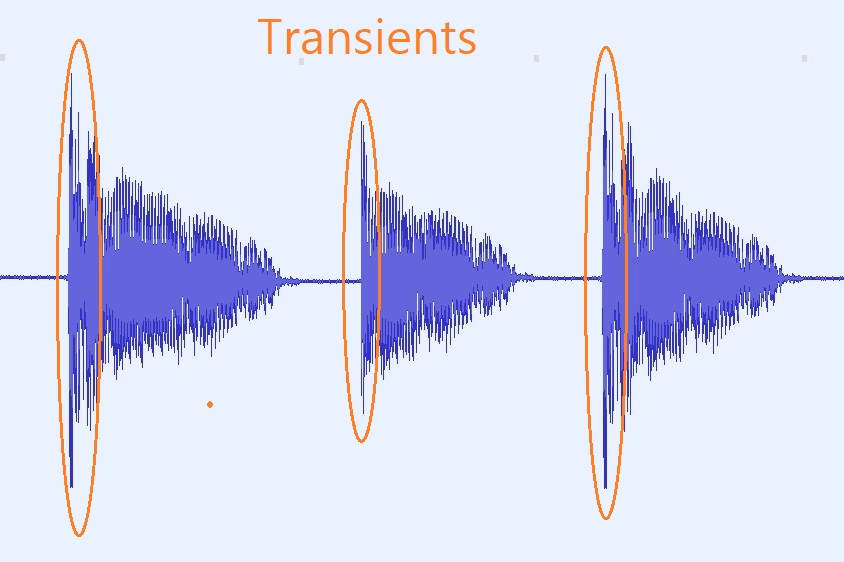
Audio transients are like the heartbeat of sound, the dynamic moments that give life and character to music and audio recordings. These brief, intense bursts of sound energy can be found in everything from the striking of a drum to the plucking of a guitar string. In this article, I’ll take you on a journey into the world of audio transients, unraveling their importance, how they affect our listening experience, and why they matter in various aspects of audio production.
Unveiling Audio Transients: The Basics
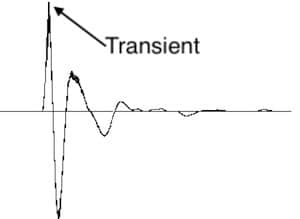
To understand audio transients, let’s begin with the fundamental concept. A transient is a sudden, short-lived spike in audio signal amplitude. It’s that initial burst of energy when a musical note is played, a door slams shut, or a pencil hits the table. Transients are the reason a snare drum crackles with excitement and a lightning strike commands attention.
Think of audio transients as the punctuation marks in a sentence. They emphasize and give context to the sound that follows. Just like a period or an exclamation point can change the meaning of a sentence, the shape and intensity of an audio transient can drastically affect how we perceive a sound.
People Also Asked: Answering Your Curiosities
Let’s dive into some common questions people have about audio transients:
How Do Audio Transients Impact Music?
Audio transients are the pulse of music. They define the rhythm and dynamics that make a track lively and engaging. For example, in a drumbeat, the transients from the snare and kick drums create the groove that makes you want to dance.
Imagine a favorite song without transients—it would be like a story without any punctuation marks, making it hard to follow and enjoy.
Can Audio Transients Be Controlled?
Yes, they can! Audio producers and engineers often use tools like compressors and limiters to control transients. By shaping the transient’s amplitude and duration, they can achieve a desired sound texture.
Think of it as adjusting the force with which a hammer strikes a nail. Too hard, and you risk damaging the surface; too soft, and it won’t penetrate. Engineers find that sweet spot to shape the sound precisely.
What Is Peak vs. RMS in Audio Transients?
Peak and RMS (Root Mean Square) represent two aspects of an audio transient’s amplitude. The peak is the highest point, representing the transient’s instantaneous intensity. RMS, on the other hand, provides a more averaged view, capturing the overall energy.
Picture a heartbeat monitor. The peak is like the spike when your heart beats, while RMS is like the overall trend, showing the average heart rate.
Keywords with Identical Search Intent
Now, let’s explore keywords related to audio transients that users often search for:
Delving deeper into audio production, we encounter techniques like transient shaping and transient design. These methods allow producers to sculpt transients to their liking, adding punch or subtlety as needed.
Consider transient shaping as sculpting clay. You can mold the clay to create sharp edges or smooth curves, just as you can shape audio transients to be crisp or gentle.
Audio Transients in Live Sound: A Vital Element
In live sound engineering, managing transients is crucial for delivering a balanced and impactful performance. Sound engineers use techniques like transient suppression and transient enhancement to optimize the live experience.
Imagine a live concert as a massive puzzle. Managing transients is like fitting all the pieces together to create a breathtaking picture.
Mastering Transients in Audio Recording
Audio engineers during the mastering process focus on transients to ensure that a track sounds polished and cohesive. Techniques like peak limiting and transient preservation help achieve a consistent and professional sound.
Think of mastering as the final touch-up on a painting. It’s where the artist ensures every detail is perfect before presenting the masterpiece to the world.
Last Words
In the symphony of sound, audio transients are the conductor’s baton, guiding and shaping the musical narrative. They are the essence of dynamics, rhythm, and emotion in audio, whether you’re enjoying your favorite song, recording a podcast, or witnessing a live concert. Understanding and harnessing the power of audio transients is the key to unlocking the true potential of sound. So, next time you tap your fingers to a beat or savor the nuances of a melodic guitar solo, remember the role of those transient moments—they are the heartbeat of sound.
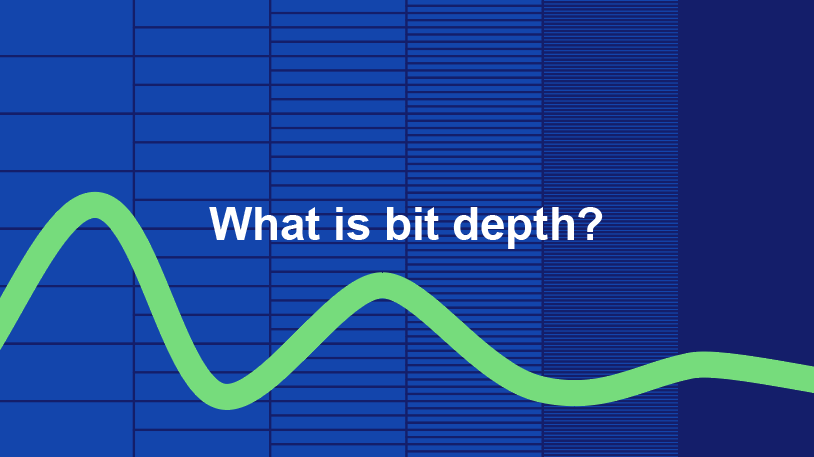
Audio bit depth refers to the number of bits used to represent the amplitude of an audio signal at each sample point. In simpler terms, it determines the dynamic range of digital audio. A higher bit depth allows for a more detailed representation of sound, capturing subtle nuances and minimizing quantization noise.
Imagine bit depth as a measurement of how finely audio is divided into individual steps. For instance, a 16-bit audio recording has 65,536 possible amplitude levels, while a 24-bit recording offers a staggering 16,777,216 levels. This increased granularity results in smoother, more accurate sound reproduction.
Understanding Bit Depth in Audio
To grasp the significance of bit depth, consider it as the shades of color in a painting. A higher bit depth provides a broader palette of colors, allowing for a more accurate depiction of the original image. Similarly, in audio, a greater bit depth captures a wider range of volume levels, preserving the subtleties of a musical performance or the nuances of a voice.
In practical terms, when you listen to music or a podcast, a higher bit depth ensures that you can hear the softest whispers and the loudest drum hits without distortion or loss of detail. It’s like having a more precise lens to view the sonic landscape.
Audio Resolution and Bit Depth
Bit depth and audio resolution are closely linked. Audio resolution refers to the level of detail and accuracy in an audio recording. Bit depth plays a pivotal role in determining this resolution. Think of it as the difference between watching a video in standard definition versus high definition. A higher bit depth offers a more lifelike and faithful representation of sound.
When recording or listening to music, you’ll often encounter terms like “16-bit” or “24-bit.” These numbers indicate the bit depth of the audio, with 24-bit audio being the gold standard for high-quality recordings. It’s akin to having a sharper, more detailed image in photography.
Now, let’s explore more facets of bit depth in audio.
Importance of Bit Depth in Sound
Bit depth is paramount in the world of sound because it directly impacts audio fidelity and the ability to reproduce music or voice accurately. It ensures that every subtle nuance, from the softest piano notes to the powerful guitar riffs, is faithfully captured and played back with precision.
Consider this: when recording a classical piano performance, the pianist’s delicate touch on the keys is as vital as the thunderous crescendos. A higher bit depth preserves the intricate dynamics, making you feel as if you are sitting in the concert hall, immersed in the music.
Bit depth is the foundation of audio quality, and understanding its role can help you appreciate the importance of using higher bit depths in audio production and playback.
How Bit Depth Affects Audio Quality
The impact of bit depth on audio quality is akin to the role of paint quality in a masterpiece. Just as a skilled artist requires high-quality pigments for a vivid painting, audio engineers rely on a greater bit depth for lifelike and rich audio recordings.
A lower bit depth might result in noticeable “stepping” or quantization noise, especially in quiet passages of a recording. This noise can be distracting and diminish the overall listening experience. On the other hand, a higher bit depth provides a smooth, natural curve to the audio waveform, minimizing these artifacts and delivering pristine sound.
Consider your favorite music track—the artist’s emotions, the resonance of instruments, and the atmosphere of the recording venue. All these subtleties are better preserved and conveyed through higher bit depth, elevating your listening experience to a new level.
Bit Depth in Digital Audio
In the digital realm, bit depth plays a pivotal role in the accuracy of audio representation. Think of it as pixels in a high-resolution photograph; more pixels mean finer details. Similarly, a higher bit depth translates to a more accurate depiction of sound.
In applications like digital audio workstations (DAWs) and music players, you often have the option to choose between different bit depths for your audio projects. Opting for a higher bit depth can lead to more professional-sounding results, particularly in the realms of music production, film scoring, and sound design.
Bit Depth vs. Sample Rate
While bit depth and sample rate are both critical aspects of digital audio, they serve different purposes. Bit depth determines the accuracy of amplitude representation, while sample rate governs how often the audio waveform is sampled per second.
Picture bit depth as the color depth in a photograph and sample rate as the frames per second in a video. A higher bit depth allows for greater tonal accuracy, while a higher sample rate captures more audio snapshots per second, preserving high-frequency content.
In many scenarios, a balanced approach between bit depth and sample rate is essential to achieve optimal audio quality. The synergy between these two factors ensures that audio recordings faithfully capture the richness and subtleties of the original source.
Bit Depth in Music Production
For music producers, bit depth is a critical consideration when working on audio projects. It influences the quality of sound recordings and the ability to manipulate audio during the production process.
When mixing and mastering music, a higher bit depth provides ample headroom for processing audio without introducing artifacts or degrading quality. This allows producers to apply effects, equalization, and compression with greater precision.
Additionally, when releasing music, opting for a higher bit depth ensures that your audience experiences the full depth and nuance of your compositions, whether they’re listening through high-end headphones or a powerful sound system.
16-Bit vs. 24-Bit Audio
The choice between 16-bit and 24-bit audio often arises when considering audio quality and storage requirements. A 16-bit audio file occupies less space compared to a 24-bit file, but it also has limitations in capturing subtle audio details.
16-bit audio is akin to a compact camera with limited resolution, suitable for casual snapshots. In contrast, 24-bit audio offers the quality of a professional DSLR camera, capturing a broader dynamic range and preserving the finer nuances of sound.
When deciding between the two, it’s essential to consider the specific use case. For audiophiles, professional audio production, and high-end sound systems, 24-bit audio is the preferred choice for its ability to deliver an immersive and faithful listening experience.
Bit Depth for Audio Recording
In the realm of audio recording, selecting the appropriate bit depth is a pivotal decision. It directly affects the quality and flexibility of the recorded material, whether you’re tracking vocals, instruments, or ambient sounds.
Recording at a higher bit depth, such as 24-bit, provides audio engineers with a safety net during the recording process. It allows them to capture a wide dynamic range without the risk of clipping or distortion. This is particularly valuable when dealing with unpredictable elements in live recordings or capturing the subtleties of acoustic instruments.
In essence, bit depth choice during audio recording is like choosing the canvas size for a painting. A larger canvas provides more room for creativity and detail, and a higher bit depth offers greater sonic canvas for audio professionals.
Final Words
In the realm of audio, bit depth serves as the bedrock of quality and fidelity. It determines how faithfully sound is captured, preserved, and reproduced. Understanding the importance of bit depth allows you to appreciate the nuances in your favorite music, the clarity in podcasts, and the immersive soundscapes in movies.
Whether you’re an aspiring musician, an audio engineer, or simply a passionate listener, recognizing the role of bit depth in audio enriches your experience. It’s the difference between seeing the world in black and white and experiencing it in full color.
So, the next time you enjoy your favorite song or immerse yourself in a cinematic adventure, remember that bit depth is the silent hero behind the scenes, ensuring that every sonic detail reaches your ears with precision and clarity.
How can I prevent aliasing and harmonic distortion in audio?
Digital Audio Aliasing
Digital Audio Aliasing
Introduction
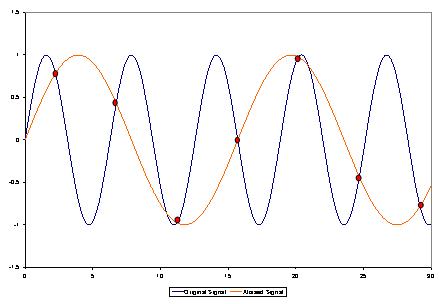
As a music enthusiast, I have always been concerned about the quality of audio recordings. Two common problems that affect audio quality are aliasing and harmonic distortion. Aliasing occurs when the sampling rate of an audio signal is insufficient, causing high-frequency signals to be incorrectly represented as lower frequencies. On the other hand, harmonic distortion occurs when the amplitude of a signal is altered due to the presence of harmonics. In this article, we will discuss ways to prevent these issues and improve audio quality.
What is aliasing and how to prevent it?
Aliasing is a common problem in digital audio, but it can be prevented by increasing the sampling rate of the audio signal. As a general rule, the sampling rate should be at least twice the highest frequency in the audio signal. For example, if the highest frequency in the audio signal is 20 kHz, the sampling rate should be at least 40 kHz. By increasing the sampling rate, we can ensure that high-frequency signals are accurately represented in the digital audio signal.
My personal experience
When I first started recording music, I noticed that my recordings had a lot of high-frequency noise. After doing some research, I realized that this was due to aliasing. I increased the sampling rate of my recordings, and the high-frequency noise disappeared. Since then, I have made it a point to always use a high sampling rate when recording audio.
What is harmonic distortion and how to reduce it?
Harmonic distortion occurs when a signal is altered due to the presence of harmonics. This can be caused by nonlinearities in the audio system, such as distortion in amplifiers or speakers. One way to reduce harmonic distortion is to use a high-quality audio system with low distortion. Additionally, using equalization can help reduce distortion in certain frequency ranges.
Quote from a book
As the audio engineer Bob Katz says in his book “Mastering Audio”: “Reducing distortion is one of the most important tasks of an audio engineer. Distortion masks the details in a mix and reduces the perceived loudness of the audio signal.”
Improving audio quality
In addition to preventing aliasing and reducing harmonic distortion, there are other ways to improve audio quality. One way is to use a high-quality audio codec when encoding audio files. Another way is to use a high-quality audio player or amplifier when listening to audio.
My personal opinion
In my experience, using a high-quality audio system can make a big difference in the overall quality of the audio. When I upgraded my audio system, I noticed that the sound was much clearer and more detailed.
Conclusion
Preventing aliasing and reducing harmonic distortion are important steps in improving the quality of audio recordings. By using a high sampling rate, a high-quality audio system, and equalization, we can ensure that our audio recordings are clear and free from distortion.
Final words
In conclusion, improving audio quality requires attention to detail and a commitment to using high-quality equipment and techniques. While there are many factors that can affect audio quality, preventing aliasing and reducing harmonic distortion are two important steps that can make a big difference.




Comments:
This article provided valuable insights into the differences between WMA Lossless and FLAC. As an avid audiophile, I appreciate the detailed comparison. – MusicManiac
Could you delve deeper into the technical aspects of audio compression algorithms used in WMA Lossless and FLAC? I’m eager to learn more about the underlying technology. – TechEnthusiast22
I’ve always been torn between WMA Lossless and FLAC for my music collection. This article helped me understand the pros and cons of each format better. – AudioLover123
Great article! I’ve been using FLAC for years, but now I’m curious to explore WMA Lossless for its purported efficiency. – CuriousListener
As a content creator, I found the section on compatibility and versatility particularly insightful. It’s crucial to choose a format that aligns with my workflow across different platforms. – ContentCreatorPro
This article helped me make an informed decision about which audio compression format to use for archiving my music collection. Thanks for the clarity! – MusicArchiver
It would be beneficial to include real-world examples of scenarios where WMA Lossless or FLAC shines, providing concrete use cases for readers to relate to. – UseCaseExplorer
I’ve encountered compatibility issues with WMA Lossless on non-Windows devices in the past. It would be helpful to include tips for overcoming such challenges. – TechChallenged
This article is a comprehensive guide for anyone navigating the landscape of lossless audio compression. Kudos to the author for the well-researched content! – AudioEnthusiast
As a musician, I rely on lossless audio formats to ensure my compositions retain their original quality. This article provided valuable insights into choosing between WMA Lossless and FLAC for my projects. – MusicComposer