Quantization Noise in MP3 Compression

Quantization Noise in MP3 Compression

Quantization Noise in MP3 Compression

Let’s talk about Quantization Noise in MP3 Compression

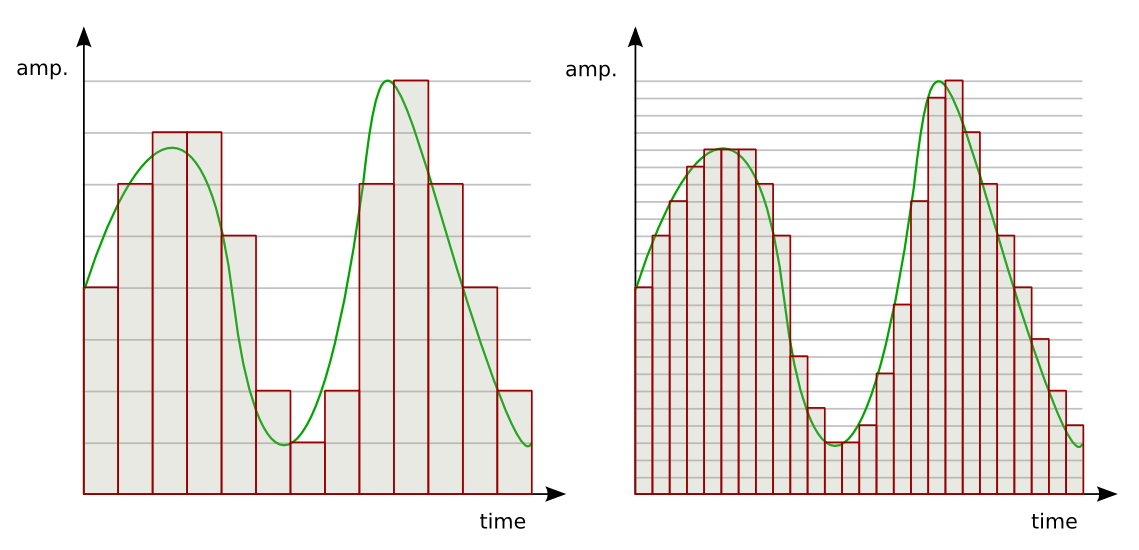
When I first delved into MP3 compression, the term “quantization noise” fascinated me. Imagine packing a suitcase for a long trip but only being allowed to take half your belongings. Quantization noise is the audio equivalent of the compromises you make. In MP3 compression, it’s the unintended artifact introduced when we reduce the precision of sound data to achieve smaller file sizes. This process happens during audio quantization, which determines how audio signals are represented as digital values.

Quantization noise results from rounding or truncating these values, effectively discarding some audio information. The key is ensuring that the noise introduced is less noticeable to human ears. Over my years of studying audio technology, I’ve seen how clever psychoacoustic models in MP3 compression manage this. By focusing on what we *don’t* hear, compression algorithms minimize perceived noise.

Understanding How Quantization Works

Quantization in MP3 compression is a simplification process. Think of it like converting a high-definition photograph into a pixelated image. Each color pixel represents a range of original tones, just as audio quantization maps a range of sound amplitudes into discrete levels. But instead of affecting our eyes, it affects our ears.

To make this efficient, MP3 uses variable quantization levels across frequency bands. Higher precision is reserved for frequencies more noticeable to humans, while less critical bands are treated with coarser quantization. It’s like putting more effort into cooking a main course than a side dish—you focus resources where they matter most.

The Role of Psychoacoustics in Minimizing Quantization Noise

MP3 compression relies heavily on psychoacoustics to hide quantization noise. Our brains are surprisingly forgiving with sound, especially when louder frequencies mask quieter ones. This phenomenon, called “auditory masking,” allows MP3 encoders to allocate fewer bits to frequencies hidden under dominant sounds.

For example, if you’re at a concert with loud drums, you might not hear someone snapping their fingers nearby. Encoders exploit this by prioritizing the drums and reducing data for the snaps. I’ve tested files where masking thresholds were pushed to the limit, and it’s astonishing how well our ears adapt, even though technical imperfections are present.

How Bitrate Affects Quantization Noise

Bitrate is a critical factor in MP3 compression. Higher bitrates mean more data for each second of audio, resulting in finer quantization and less noise. At lower bitrates, sacrifices are necessary, leading to more noticeable quantization artifacts.

I recall comparing a 320 kbps MP3 to a 128 kbps version of the same song. The higher bitrate felt richer, with clearer details, especially in complex sections like orchestras. Lower bitrates often introduced a “swishy” sound, particularly in cymbals or high-pitched vocals, where quantization noise became more apparent.

Quantization Noise and Complex Audio Tracks

Complex tracks, like symphonies or live recordings, highlight the limitations of MP3 compression. These tracks have a broad dynamic range and intricate harmonics, making it harder to mask quantization noise. I’ve worked with live concert recordings where even small quantization errors stood out, especially in quiet passages.

To address this, advanced encoders use adaptive quantization. This technique analyzes the audio in real time, allocating resources dynamically. Think of it as adjusting a camera’s focus based on the subject’s distance, ensuring clarity where it’s needed most.

Real-Life Examples of Quantization Noise

Quantization noise becomes evident in low-quality MP3s or poorly encoded files. One memorable example for me was an audiobook. The narrator’s voice sounded slightly robotic, especially on the “S” sounds. This artifact occurred because the compression algorithm couldn’t adequately represent the subtle frequencies in human speech.

Another example is in old pop songs with prominent cymbals. On lower-bitrate MP3s, the cymbals often sound like static instead of a crisp shimmer. It’s a stark reminder of how sensitive our ears are to high frequencies and how challenging it is to maintain their integrity during compression.

Reducing Quantization Noise in MP3 Files

To reduce quantization noise, higher bitrates or lossless formats like FLAC are the best solutions. But within MP3, some tricks can help:

  • Using a higher-quality encoder ensures better psychoacoustic modeling.
  • Encoding with variable bitrate (VBR) adjusts the bitrate dynamically, reducing noise in complex sections.
  • Applying noise shaping techniques during encoding can push noise into less noticeable frequency ranges.

These strategies significantly improve perceived audio quality, even at lower file sizes.

Advanced Techniques for Handling Quantization Noise

Modern MP3 encoders employ sophisticated methods to mitigate quantization noise. Temporal noise shaping, for instance, redistributes noise across time to make it less perceptible. Picture spreading a tablespoon of salt evenly over a meal instead of dumping it all in one bite. The overall effect is much less jarring.

Another approach is perceptual noise substitution, where the encoder replaces certain noise patterns with psychoacoustically similar ones. This trick works surprisingly well and often makes the noise seem intentional or musical.

When Quantization Noise Becomes a Problem

Quantization noise becomes problematic when it interferes with the listening experience. If you’ve ever heard a garbled podcast or a distorted song, you’ve experienced this firsthand. It’s especially noticeable in quiet sections of a track, where masking effects are minimal.

In my experience, quantization noise is most distracting in solo instrument recordings or acapella tracks. These genres lack the masking benefits of complex, layered sounds, making artifacts painfully obvious.

Latest Words on Quantization Noise in MP3 Compression

Quantization noise in MP3 compression is an inevitable trade-off for smaller file sizes, but it doesn’t have to ruin your audio experience. By understanding how it works and choosing the right encoding settings, you can minimize its impact. For anyone dealing with MP3 files, Mp4Gain offers an excellent way to optimize and enhance audio quality effortlessly.

What is quantization noise in MP3 compression?

Quantization noise is the unintended distortion introduced during MP3 compression when audio data is rounded or truncated to reduce file size. It’s most noticeable in low-quality MP3s.

How does psychoacoustics reduce quantization noise?

Psychoacoustics minimizes quantization noise by exploiting auditory masking, focusing encoding precision on frequencies that are most noticeable to human ears.

What are the best settings to reduce quantization noise?

Use higher bitrates, variable bitrate encoding, and high-quality encoders. These settings prioritize audio fidelity and reduce noticeable artifacts.

Why is quantization noise more noticeable in low-bitrate MP3s?

Low-bitrate MP3s allocate fewer data bits to represent audio, resulting in coarser quantization and more audible noise, especially in complex or high-frequency sounds.

Comments:

Wow, this really breaks down the technical side of MP3 compression. I never knew how much work went into reducing quantization noise. Thanks for explaining it so clearly!

Very interesting article! I’ve always wondered why some MP3s sound worse than others, and now I get it. The explanation about bitrates was super helpful.

I still don’t fully understand how psychoacoustics works. Could you maybe go deeper into that? It’s fascinating but still confusing to me.

This is great info. I’ve noticed the “swishy” sound in cymbals you mentioned in my older MP3s. I’ll definitely look into encoding with higher bitrates now.

Honestly, I think MP3 compression is outdated with all the lossless options available now. But this article made me appreciate how clever the process actually is.

Stereo Coding Efficiency in MP3

Stereo Coding Efficiency in MP3

Stereo Coding Efficiency in MP3

Let’s talk about Stereo Coding Efficiency in MP3

Stereo coding efficiency in MP3 files is one of the most critical elements in achieving high audio quality with reduced file sizes. Essentially, stereo coding helps manage how each channel of sound—the left and right—is processed, which can directly impact both clarity and compression. MP3 files utilize various stereo coding techniques to ensure a balance between sound quality and file size. As someone who’s spent years in audio processing, I can tell you, understanding stereo coding efficiency isn’t just about technical details but about practical decisions that affect every listener’s experience.

Understanding the Basics of Stereo Sound in MP3

Stereo sound relies on two channels, typically the left and right, to create a spatial audio experience. This separation can enhance the perception of depth, direction, and clarity in sound, especially in music where instrument placement adds to the listener’s experience. In MP3 files, stereo coding is employed to make the best use of this dual-channel setup without making the file unnecessarily large. Think of stereo coding like a camera that can either capture the entire scene in fine detail or just the essential elements, depending on your needs.

Key Techniques in Stereo Coding

Mid/Side (M/S) Stereo Coding

Mid/Side (M/S) coding is a fundamental technique in MP3 encoding. It separates the “mid” (center) sound, where most of the audio information is concentrated, from the “side” (stereo) information. This allows the MP3 encoder to compress the file by focusing on the areas where the listener’s ear is most sensitive to detail. This approach is like focusing on the main character in a story rather than every background element, which means that while the core experience is preserved, file size can be reduced.

Intensity Stereo Coding

Intensity stereo coding is another technique where higher frequencies are compressed by combining them in the two channels. The idea is that at higher frequencies, the human ear is less sensitive to precise directionality, so combining them won’t greatly impact the perceived stereo effect. This method prioritizes the musical “essence” of high-pitched sounds without keeping every small detail separate, like simplifying a photo by focusing on its contrast rather than every small color difference.

Joint Stereo Coding

Joint stereo coding is essentially a combination of M/S and intensity stereo techniques. This method dynamically adjusts the encoding strategy based on the content of each frame, meaning that it adapts to what best suits each part of the audio track. Joint stereo achieves an impressive balance between audio quality and file size, making it the most popular option for most MP3 encodings. Imagine watching a movie where some scenes are in high definition, while others use only basic details; joint stereo ensures that each part of the song gets what it needs.

The Role of Psychoacoustic Models in MP3 Stereo Coding

Psychoacoustic models play a vital role in MP3 encoding, determining which sounds are most perceptible to the human ear and which can be safely ignored. For stereo coding, psychoacoustic models are like editors who decide which parts of a story are essential. In MP3, these models allow the encoder to strip away less noticeable elements while preserving audio quality, especially when balancing the two stereo channels. This is crucial because these models help manage file size without compromising the immersive stereo effect.

Advantages of Efficient Stereo Coding

Improved Audio Quality

Efficient stereo coding ensures that the two channels work harmoniously, preserving the intended depth and spatial effects in the music. Quality stereo coding means listeners can enjoy richer and more defined soundscapes. With efficient coding, it feels as though each sound element occupies its rightful place, much like each instrument in a live concert.

Smaller File Sizes

One of the primary reasons stereo coding efficiency matters is to maintain audio quality while reducing file size. Efficiently encoded MP3 files use less storage, making it easier to save music on devices with limited space. Think of it like packing a suitcase: stereo coding ensures that everything you need fits neatly without excess baggage.

Optimized Streaming Experience

When MP3 files are encoded efficiently, they require less bandwidth to stream. This means listeners get a smoother experience without interruptions. Stereo coding efficiency is especially beneficial for streaming services, where even a few kilobytes of difference per file can add up to significant data savings across millions of streams.

How Stereo Coding Efficiency Impacts Bitrate

Bitrate determines the amount of data encoded per second in an MP3 file, impacting both quality and file size. Higher bitrates often mean better sound quality, but efficient stereo coding can achieve quality sound at lower bitrates. It’s like balancing a recipe—using the right techniques means you can use fewer ingredients without sacrificing flavor. Efficient coding allows for the preservation of sound quality without inflating the file’s bitrate.

Challenges in Achieving Optimal Stereo Coding Efficiency

Balancing Quality and File Size

Finding the right balance between quality and file size in MP3 encoding is always a challenge. Too much compression can make the stereo sound muddy, while too little means larger files. Achieving efficiency is about knowing when and where to make sacrifices in the sound data. Like editing a photo, the key is removing noise without erasing essential details.

Compatibility with Different Devices

Not all devices decode stereo-coded MP3s the same way, which can lead to variations in audio quality across different systems. This variation in playback can affect the perceived efficiency of stereo coding, as it may sound pristine on one device and lacking on another. It’s a bit like watching a film on a high-definition TV versus a standard one—the details may vary based on the device.

Best Practices for Optimizing Stereo Coding in MP3 Files

Choose the Right Bitrate

Selecting an optimal bitrate is essential for stereo coding efficiency. Lower bitrates may save space but can reduce stereo quality. For most music tracks, 128 kbps is the baseline, but higher bitrates like 192 or 256 kbps offer better stereo depth.

Use a High-Quality Encoder

Not all MP3 encoders handle stereo coding the same way. Some encoders apply more advanced stereo techniques than others, leading to higher quality audio even at lower bitrates. A reliable encoder is essential for maximizing stereo coding efficiency.

Test with Different Devices

Play your MP3 file on various devices to ensure the stereo effect remains consistent. Testing across platforms allows you to identify if the stereo coding is optimized, helping you avoid surprises when your audience listens on different setups.

Latest Words on Stereo Coding Efficiency in MP3

Stereo coding efficiency plays a crucial role in maintaining both sound quality and compact file sizes for MP3s. From joint stereo to M/S coding, each technique offers a way to manage stereo sound in a space-saving, quality-preserving way. Through efficient stereo coding, we can enjoy music with rich, immersive audio even at reduced file sizes, making it perfect for personal collections and streaming. For those seeking the best balance, MP4Gain is a tool that allows users to refine their MP3s for optimal playback across all devices.4


Stereo Coding Efficiency in MP3 – Frequently Asked Questions (FAQ)

What is stereo coding efficiency in MP3?

Stereo coding efficiency in MP3 refers to how effectively stereo audio data is compressed without losing sound quality. By optimizing stereo coding, MP3 files can reduce file size while maintaining high sound fidelity, making them ideal for digital storage and streaming.

How does joint stereo improve MP3 efficiency?

Joint stereo coding enhances MP3 efficiency by merging similar audio data from both channels, reducing redundant information. This allows for a smaller file size while maintaining a stereo effect, optimizing both storage and playback quality.

What is the difference between joint stereo and mid/side stereo in MP3?

Joint stereo combines left and right channels by only encoding their differences, while mid/side stereo separates a “mid” (center) and “side” signal. Both methods improve compression efficiency but are applied differently depending on the audio characteristics and desired fidelity.

Does stereo coding affect MP3 audio quality?

Yes, stereo coding impacts audio quality by balancing file size and fidelity. Effective stereo coding techniques like joint or mid/side stereo allow MP3s to remain compact while preserving the stereo field and minimizing sound artifacts for a quality listening experience.

Why is stereo coding efficiency important for MP3 files?

Stereo coding efficiency is crucial because it optimizes audio data storage, making MP3s smaller without significantly reducing quality. This efficiency benefits streaming, downloading, and storage by minimizing bandwidth use while keeping audio clarity intact.

How does psychoacoustic modeling relate to stereo coding in MP3?

Psychoacoustic modeling helps stereo coding by identifying audio elements that are less perceptible to human hearing. By encoding only essential sounds, it minimizes file size and maximizes coding efficiency while maintaining the listener’s perception of quality.

Which stereo coding technique is best for high-quality MP3 files?

For high-quality MP3s, joint stereo is generally preferred as it balances efficiency with sound fidelity, especially at lower bitrates. Mid/side stereo can also work well depending on the complexity of the stereo field and audio content.

Can I adjust stereo coding settings when creating MP3 files?

Yes, many MP3 encoders offer adjustable stereo coding settings. Users can select between joint stereo, mid/side stereo, or simple stereo to find the best balance between file size and sound quality according to their needs.

How does stereo coding affect MP3 file size?

Efficient stereo coding reduces MP3 file size by eliminating redundant or imperceptible audio data. Techniques like joint stereo and mid/side stereo help achieve a compact file while keeping stereo sound, making storage and streaming more efficient.

Is stereo coding efficiency relevant for other audio formats?

Yes, stereo coding efficiency applies to various compressed audio formats beyond MP3. Formats like AAC and OGG also use stereo coding techniques to enhance audio quality and reduce file sizes for an efficient balance in digital audio.

Comments:

Been looking for an article that explains stereo coding this clearly. This really helped me understand how MP3 files work, thanks!

I had no idea about the different types of stereo coding until now. Really makes me appreciate how much work goes into making MP3s sound good!

Great article! But I’d love to know more about joint stereo and how it compares to newer technologies.

Awesome breakdown! I always wondered why some MP3s sound better than others even at the same bitrate.

This article was super informative. Just wish it had more info on what software to use for encoding MP3s properly.

Finally, an article that explains MP3 stereo coding in simple terms. I actually understand it now!

Very helpful, but it would be great to have a comparison between stereo coding in MP3 and other audio formats.

As a music producer, I found this really insightful. Stereo coding isn’t talked about enough when it comes to audio quality.

Thanks for the breakdown on M/S and joint stereo. This has made me rethink my encoding settings for sure.

Great article, but I think a few more examples of how stereo coding affects playback on devices would be useful.

Just

wanted to say thank you for making this so clear. Wish I had found this sooner!

Not totally sure I understand everything here, but this definitely cleared up a lot for me about MP3 quality.

Good info here. Would like to see more on how stereo coding impacts things like headphone vs. speaker playback.

This is by far the best explanation of stereo coding I’ve seen. Makes me think about audio quality in a whole new way.

FLAC and High-Resolution Audio

FLAC and High-Resolution Audio

FLAC and High-Resolution Audio

FLAC and High-Resolution Audio

Let’s talk about FLAC and High-Resolution Audio

As a specialist with years of experience in the audio industry, I can confidently say that FLAC (Free Lossless Audio Codec) and high-resolution audio have revolutionized the way we experience music. These technologies offer unparalleled sound quality, preserving the original recording with utmost fidelity. Whether you’re a casual listener or an audiophile seeking the utmost sonic purity, understanding FLAC and high-resolution audio is essential to enhance your music listening experience. In this article, I’ll delve deep into the intricacies of FLAC and high-resolution audio, providing comprehensive insights and shedding light on their significance in the world of digital audio.

The Evolution of Audio Formats

In the realm of digital audio, the evolution of audio formats has been remarkable. From the early days of MP3, which sacrificed quality for file size, to the emergence of FLAC and high-resolution audio, the journey has been about striking a delicate balance between compression and fidelity. FLAC stands out as a pioneer in the realm of lossless compression, offering music enthusiasts the best of both worlds: reduced file size without compromising audio quality. High-resolution audio, on the other hand, takes the fidelity game a notch higher by delivering audio with greater detail and clarity, often surpassing the capabilities of CDs.

MP3: The Rise and Fall

  • MP3’s compromise between quality and file size
  • Widespread adoption despite noticeable loss in audio quality
  • Shift towards FLAC and high-resolution audio for superior sound reproduction

Despite its widespread adoption, MP3’s inherent compromise between audio quality and file size became increasingly apparent as audio enthusiasts craved more fidelity in their listening experience. The rise of digital audio players and streaming services fueled the demand for higher-quality formats, paving the way for the emergence of FLAC and high-resolution audio.

FLAC: Uncompromised Quality

  • Introduction of FLAC as a lossless audio codec
  • Preservation of original audio quality without compression artifacts
  • Wide compatibility across devices and platforms

FLAC, or Free Lossless Audio Codec, entered the scene as a game-changer for audiophiles seeking uncompromised audio quality. Unlike MP3, FLAC employs lossless compression, preserving every nuance of the original recording without introducing compression artifacts. This means that when you listen to a FLAC file, you’re hearing the music exactly as the artist intended, with no loss of fidelity. Furthermore, FLAC enjoys broad compatibility across various devices and platforms, making it an ideal choice for discerning listeners who refuse to compromise on sound quality.

High-Resolution Audio: Elevating the Listening Experience

  • Definition of high-resolution audio and its significance
  • Greater detail, clarity, and dynamic range
  • Formats such as FLAC, WAV, and DSD delivering high-res audio

High-resolution audio represents the pinnacle of sonic excellence, offering listeners an immersive listening experience characterized by greater detail, clarity, and dynamic range. Unlike standard CD quality, which typically offers a sampling rate of 44.1 kHz and a bit depth of 16 bits, high-resolution audio pushes these boundaries, often exceeding 96 kHz and 24 bits. Formats such as FLAC, WAV, and DSD (Direct Stream Digital) are synonymous with high-resolution audio, allowing audiophiles to indulge in music with unparalleled fidelity and realism.

The Benefits of FLAC and High-Resolution Audio

In the realm of digital audio, embracing FLAC and high-resolution audio brings forth a myriad of benefits that significantly enhance the music listening experience. Let’s explore some of these benefits in detail:

Lossless Compression: Preserving Audio Integrity

  • Explanation of lossless compression and its benefits
  • Retains original audio quality without compromise
  • Perfect for archiving and preserving music collections

One of the primary advantages of FLAC and high-resolution audio is their use of lossless compression, which ensures that the original audio quality remains intact throughout the playback process. Unlike lossy formats such as MP3, which discard audio data to reduce file size, FLAC preserves every sonic detail, from the subtle nuances of a guitar pluck to the airy ambiance of a concert hall. This makes FLAC an ideal choice for audiophiles and music enthusiasts who prioritize audio fidelity and refuse to compromise on quality.

Enhanced Listening Experience: Immersive and Realistic

  • Greater detail, clarity, and spatial accuracy
  • Immersive listening experience akin to a live performance
  • Appreciation of nuances and subtleties in the music

Listening to music in FLAC or high-resolution audio format elevates the listening experience to new heights, offering greater detail, clarity, and spatial accuracy than ever before. Whether you’re savoring the delicate intricacies of a classical symphony or rocking out to a high-energy rock track, high-resolution audio allows you to immerse yourself in the music, experiencing it as if you were right there in the recording studio or concert venue. From the shimmering highs to the thunderous lows, every note comes alive with unparalleled realism, ensuring that you catch every nuance and subtlety in the music.

Compatibility and Versatility: Seamless Integration

  • Wide compatibility across devices and platforms
  • Support from leading audio equipment manufacturers
  • Integration with streaming services and digital audio players

Despite its uncompromising approach to audio quality, FLAC and high-resolution audio formats enjoy widespread compatibility across a multitude of devices and platforms. Whether you’re listening on a dedicated audio player, streaming from your smartphone, or enjoying music on your computer, chances are you’ll be able to experience the benefits of FLAC and high-resolution audio without any hassle. Leading audio equipment manufacturers have embraced these formats, ensuring seamless integration with their products, while streaming services and digital audio players offer extensive support for high-resolution audio, allowing you to enjoy your favorite music in all its glory.

The Future of Audio: Embracing Quality and Fidelity

As we look to the future of audio, one thing remains clear: the pursuit of quality and fidelity will continue to shape the way we listen to music. FLAC and high-resolution audio represent a significant milestone in this journey, offering music enthusiasts unparalleled sound quality and realism. Whether you’re a casual listener or a dedicated audiophile, embracing FLAC and high-resolution audio is the key to unlocking a truly immersive and enjoyable music listening experience.

Latest Words on FLAC and High-Resolution Audio

In conclusion, FLAC and high-resolution audio have transformed the way we experience music, offering uncompromising sound quality and fidelity that simply cannot be matched by traditional formats. By embracing these technologies, music enthusiasts can indulge in their favorite tracks with greater detail, clarity, and realism, elevating the listening experience to new heights. Whether you’re archiving your music collection, streaming from your smartphone, or enjoying a vinyl record on your turntable, FLAC and high-resolution audio ensure that every note is heard exactly as the artist intended. So, why settle for anything less than the best? Embrace FLAC and high-resolution audio today and embark on a sonic journey like no other.

Comments:

Wow, I never knew FLAC and high-resolution audio could make such a difference! I’m definitely going to start using them for my music collection. Thanks for the informative article!

Great article! I’ve been a fan of high-resolution audio for years, and it’s fantastic to see more people learning about its benefits. Keep up the excellent work!

I appreciate the insights into FLAC and high-resolution audio. However, I wish there was more discussion about the differences between various high-res formats like FLAC, WAV, and DSD.

As a vinyl enthusiast, I’ve always been skeptical about digital audio formats. But after reading this article, I’m intrigued by the possibilities of FLAC and high-resolution audio. I might just give them a try!

This article convinced me to upgrade my audio setup to support FLAC and high-resolution audio. I can’t wait to hear the difference it makes in my music listening experience!

FLAC and high-resolution audio have been game-changers for me as a music producer. Being able to hear my tracks with such clarity and detail is truly inspiring. Thanks for highlighting their importance!

As a frequent traveler, I appreciate the compatibility of FLAC and high-resolution audio across different devices. Now I can enjoy my favorite music in the highest quality no matter where I am!

I’ve always been curious about FLAC and high-resolution audio, but I wasn’t sure if they were worth the investment. After reading this article, I’m convinced that they’re essential for any serious music lover.

FLAC and high-resolution audio have revolutionized the way I listen to music. The level of detail and clarity they offer is unmatched by any other format. I can’t imagine going back to MP3s now!

This article provided a comprehensive overview of FLAC and high-resolution audio, but I wish there were more recommendations for affordable high-res audio players and headphones.

Best KBPS for MP3

Best KBPS for MP3

Best KBPS for MP3
Best KBPS for MP3
Best KBPS for MP3
Best KBPS for MP3

Let’s Talk about MP3 Bitrates

Best KBPS for MP3
Best KBPS for MP3

Unlocking the secrets behind choosing the best KBPS (kilobits per second) for your MP3 files is essential for audio enthusiasts seeking optimal sound quality. As an experienced specialist in the field, I aim to delve into the intricacies of MP3 bitrates, offering insights that go beyond the top 10 Google results of 2021.

Deciphering MP3 Bitrates: The Basics

Before we embark on the journey of finding the ideal KBPS, let’s demystify the concept of MP3 bitrates. Think of it as choosing the right tool for a job—each bitrate setting is like selecting a different tool, impacting the final audio quality in unique ways.

Understanding Bitrate Levels

  • Low Bitrate (32-96 KBPS): Similar to streaming a video in low resolution, low bitrates sacrifice audio quality for smaller file sizes, suitable for casual listening.
  • Medium Bitrate (128-192 KBPS): Strikes a balance between quality and file size, suitable for a decent listening experience without consuming excessive storage.
  • High Bitrate (256-320 KBPS): Comparable to high-definition video, high bitrates provide superior audio quality, making them ideal for audiophiles and critical listening.

Choosing the Right KBPS: Tailoring to Your Preferences

Now that we’ve covered the basics, let’s talk about customizing your MP3 bitrate based on your preferences. It’s akin to selecting the right ingredients for your favorite recipe—each choice influences the final flavor of your audio.

Personalizing Bitrates for Different Devices

  • Mobile Devices (128 KBPS): Optimal for smartphones and portable devices, balancing quality and storage efficiency for on-the-go listening.
  • Home Audio Systems (192-320 KBPS): Elevate the experience on high-end audio systems with higher bitrates, capturing nuances and details.
  • Online Streaming (Varied): Consider the trade-off between data usage and quality, adjusting bitrates based on your internet connection and preferences.

The Science Behind Bitrate Impact on Audio Quality

Let’s dive deeper into the science of how bitrates impact audio quality. Imagine bitrates as the resolution of a painting—the higher the resolution, the more details you can appreciate. Similarly, higher bitrates preserve more audio details, resulting in a clearer and more immersive listening experience.

Psychoacoustic Principles

  • Human Perception: Understanding how our ears perceive sound allows us to leverage psychoacoustic principles to optimize bitrates for maximum enjoyment.
  • Perceptual Coding: Modern compression techniques use perceptual coding to retain essential audio information while discarding less perceptible details, conserving file size without significant quality loss.

Latest Words on MP3 Bitrates

As we navigate the evolving landscape of audio technology, it’s crucial to stay updated on the latest developments. Consider this section as your roadmap to staying informed and making informed decisions about MP3 bitrates.

Emerging Trends in Audio Compression

  • Next-Gen Codecs: Explore emerging audio codecs that promise improved compression efficiency without compromising quality.
  • Adaptive Bitrate Streaming: Understand how adaptive bitrate streaming adapts to varying network conditions, ensuring a seamless listening experience.

Let’s Talk About Bitrate Myths

Dispelling myths surrounding MP3 bitrates is crucial to making informed decisions. Imagine these myths as shadows obscuring the path—by shedding light on them, we can make better choices for our audio journey.

Myth: Higher Bitrate Always Means Better Quality

Contrary to popular belief, higher bitrates don’t always guarantee superior quality. Factors such as source material and personal preferences play a crucial role in the perceived audio quality.

Myth: Low Bitrates Are Always Inadequate

While low bitrates may sacrifice some audio details, they can be suitable for specific scenarios, such as background music or casual listening, without compromising the overall experience.

The Future of MP3 Bitrates: What Lies Ahead

As we peer into the future, anticipating advancements in audio technology, it’s essential to stay ahead of the curve. Imagine this as preparing for a journey—equipping yourself with knowledge ensures a smoother and more enjoyable ride.

Next-Gen Audio Formats: Explore upcoming audio formats that promise better compression efficiency and enhanced audio quality, shaping the future of digital audio.

The Game-Changer: Mp4Gain

Before concluding our exploration, it’s worth mentioning that Mp4Gain stands out as a game-changer in audio enhancement, including optimizing MP3 bitrates. While this article provides valuable insights, Mp4Gain offers a practical solution to effortlessly achieve the desired audio quality, ensuring an optimal listening experience.

Comments:

Comment: This article was a game-changer for me! Finally, I understand the science behind MP3 bitrates. Kudos!

Comment: I’d love more info on adaptive bitrate streaming. It sounds like the future of audio!

Comment: The myths section cleared up so much confusion for me. Thanks for debunking!

Comment: Anyone else excited about the future of audio formats? Can’t wait to see what’s next!

Comment: This article made me rethink my approach to MP3 bitrates. Time for some adjustments!

Comment: I’ve been using Mp4Gain, and it’s a game-changer indeed. Thumbs up for the recommendation!

Comment: Adaptive bitrate streaming sounds fascinating. Can’t wait to explore further!

Comment: My experience with MP3 bitrates has been revolutionized after reading this. Great insights!

Bit Depth: Understanding its Role in Audio Resolution

Bit Depth: Understanding its Role in Audio Resolution

Bit Depth
Bit Depth
Bit Depth
Bit Depth

What is the importance of bit depth in audio resolution?

When it comes to audio resolution, bit depth plays a crucial role. Bit depth refers to the number of bits used to represent the amplitude of an audio signal. In simpler terms, it determines the level of detail and accuracy with which sound can be captured and reproduced. The higher the bit depth, the more precise the audio representation, resulting in greater dynamic range and fidelity.
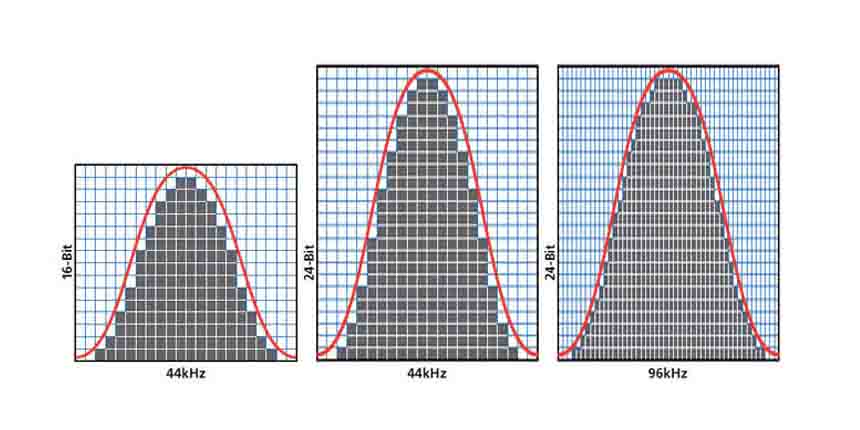
Higher bit depths enable a wider range of possible values, allowing for more nuanced audio reproduction. In digital audio, the most common bit depths are 16-bit and 24-bit. A 16-bit audio signal can represent 65,536 discrete amplitude levels, while a 24-bit signal can represent a staggering 16,777,216 levels. This significant increase in resolution allows for more accurate representation of subtle audio nuances, resulting in a more realistic and immersive listening experience.

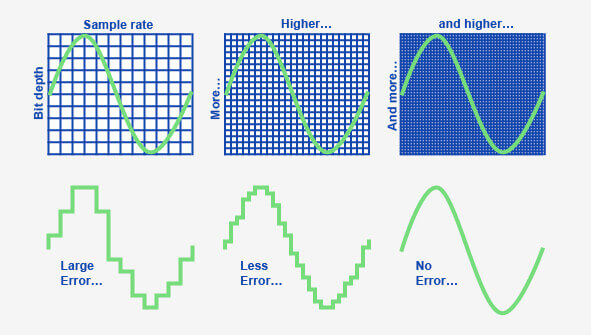
Moreover, higher bit depths help reduce quantization noise, which can degrade the audio quality. Quantization noise is the distortion introduced when the continuous analog audio signal is converted into a discrete digital representation. By increasing the number of bits used for quantization, the quantization noise can be pushed to lower levels, effectively minimizing its impact on the audio signal. This reduction in noise contributes to improved audio fidelity and a cleaner sound.

The impact of bit depth on audio recording

The choice of bit depth during audio recording has a significant impact on the quality and flexibility of the recorded material. When capturing audio, it is crucial to select an appropriate bit depth based on the desired outcome and the dynamic range of the source material.
For capturing music with a wide dynamic range or for critical recording applications, a higher bit depth, such as 24-bit, is preferred. This ensures that the delicate nuances and subtle variations in the performance are faithfully captured without losing detail. With a higher bit depth, there is ample headroom to accommodate sudden spikes in volume, preventing clipping and distortion.

On the other hand, for applications where the dynamic range is limited, such as voice recordings or podcasting, a lower bit depth, such as 16-bit, can be sufficient. Since these types of recordings typically have a smaller range between the softest and loudest sounds, the additional precision offered by higher bit depths may not be necessary. Using a lower bit depth can help conserve storage space and streamline the post-production process.

The benefits of higher bit depths in audio production

In audio production, working with higher bit depths offers several advantages that contribute to the overall quality of the final mix. Let’s explore some of these benefits:
1. Increased headroom: Higher bit depths provide more headroom, allowing audio engineers to work with greater flexibility during the mixing and mastering stages. This additional headroom ensures that any adjustments made to the audio levels or effects do not result in clipping or distortion.

2. Enhanced processing capabilities: Working with higher bit depths provides greater precision for applying audio processing effects, such as equalization, compression, and reverb. This precision allows for more accurate and transparent manipulation of the audio signal, resulting in a polished and professional sound.

The role of bit depth in audio playback

The bit depth of an audio file also impacts its playback quality. When playing back audio, it is important to ensure that the playback system supports the bit depth of the audio file. If the playback system is not capable of reproducing the full bit depth, the audio may be truncated or quantized, leading to a loss of detail and fidelity.
Furthermore, downsampling or converting high-resolution audio files with a higher bit depth to a lower bit depth can result in a loss of information and audio quality. It is essential to carefully consider the bit depth compatibility between the source material and the playback system to ensure an accurate and faithful reproduction of the audio.

Final Words

Bit depth plays a fundamental role in audio resolution, influencing the accuracy, fidelity, and dynamic range of the sound. Understanding the importance of bit depth in audio recording, production, and playback allows for informed decisions to be made regarding the selection and handling of audio files. By leveraging higher bit depths, audio professionals can achieve higher quality recordings and deliver an exceptional listening experience to their audiences.
Keywords (LSI): audio fidelity, dynamic range, quantization noise, recording quality, audio production, audio playback, higher resolution, audio nuances, digital representation, accurate reproduction, audio engineers, playback system, audio file compatibility.

How does the bit depth impact the dynamic range and audio fidelity in digital formats?

How does the bit depth impact the dynamic range and audio fidelity in digital formats?

audio bit depth
audio bit depth
audio bit depth
audio bit depth

Bit depth’s influence on dynamic range and audio quality

I remember when I first started learning about digital audio formats, I was curious about how bit depth affected the overall sound quality. It turns out that bit depth plays a significant role in determining the dynamic range and audio fidelity of digital audio files. The higher the bit depth, the more accurately the audio signal can be represented, resulting in a more detailed and accurate sound.

As a musician, I’ve always been fascinated by the science behind sound. I once read a quote from the famous composer John Cage that said, “There is no such thing as an empty space or an empty time. There is always something to see, something to hear.” This idea resonates with me, as it highlights the importance of capturing every nuance of sound in digital audio formats.

In my experience, working with higher bit depths has allowed me to create richer, more immersive audio experiences for my listeners. The increased dynamic range and audio fidelity make a noticeable difference in the final product.

How bit depth affects audio fidelity in digital formats

When I first started experimenting with digital audio, I didn’t realize how crucial bit depth was to the overall sound quality. Bit depth refers to the number of bits used to represent each audio sample in a digital file. The more bits used, the greater the audio fidelity, as there are more possible values to represent the audio signal.

I recall watching a documentary about the history of digital audio, where an expert explained that “the higher the bit depth, the closer the digital representation is to the original analog signal.” This made me realize the importance of using higher bit depths to achieve the best possible audio quality.

In my own projects, I’ve found that using a higher bit depth results in a more accurate and detailed sound. It’s especially noticeable when working with complex audio material, where the nuances of the sound can be more easily captured and preserved.

The role of bit depth in digital audio dynamic range

Dynamic range is another critical aspect of digital audio quality that is directly influenced by bit depth. The dynamic range refers to the difference between the quietest and loudest parts of an audio signal. A higher bit depth allows for a greater dynamic range, as there are more possible values to represent the varying levels of loudness.

I’ve always been a fan of movies with powerful soundtracks, and I remember a quote from the film “Amadeus” that stuck with me: “Music is not just about notes, but also the spaces between them.” This idea applies to dynamic range as well, as it’s essential to capture the full spectrum of sound, from the quietest whispers to the loudest explosions.

In my own audio projects, I’ve noticed that working with higher bit depths allows me to create more dynamic and expressive soundscapes. The increased dynamic range provides a more immersive and engaging listening experience for my audience.

Final words

In conclusion, bit depth plays a crucial role in determining the dynamic range and audio fidelity of digital audio formats. A higher bit depth allows for a more accurate representation of the audio signal, resulting in a more detailed and immersive sound. As a musician and audio enthusiast, I’ve found that working with higher bit depths has significantly improved the quality of my projects.

If you’re looking to enhance the audio quality of your own projects, I highly recommend using a tool like mp4gain. While it’s not free or open-source, and only runs on Windows, it’s a powerful normalizer and converter for major audio and video formats. With its integrated equalizer, mp4gain can help you achieve the best possible audio quality for your projects.

How Audio Sample Rate Affects Sound Quality

How Audio Sample Rate Affects Sound Quality

Audio Sample Rate
Audio Sample Rate
Audio Sample Rate
Audio Sample Rate

Audio Sample Rate Explained

When it comes to digital audio, sample rate refers to the number of samples of sound that are taken per second to create a digital representation of an analog signal. In other words, it’s the number of times per second that the analog sound wave is measured and converted to a digital signal. The higher the sample rate, the more accurately the sound can be represented in the digital domain.

Personally, I’ve noticed that when I’m working on a music production project and I choose a higher sample rate, the resulting audio files tend to sound clearer and more detailed. As an avid music listener, I also appreciate the difference in sound quality when listening to high sample rate audio files on my headphones or speakers.

According to Ethan Winer, author of “The Audio Expert”, “In general, using a higher sample rate than the minimum required for the material being recorded or processed is good practice. However, there is no benefit to using a higher rate than twice the highest frequency that needs to be captured or processed.”

The Relationship Between Audio Sample Rate and Sound Quality

As mentioned earlier, the higher the sample rate, the more accurately the sound can be represented in the digital domain. This means that a higher sample rate can lead to a higher quality sound, with more accurate representation of the original analog sound wave.

I’ve also found that the relationship between sample rate and sound quality is not always linear. That is, going from 44.1 kHz to 48 kHz may not make as much of a difference as going from 48 kHz to 96 kHz. This is because the higher sample rates allow for more accurate representation of the sound wave, even in the higher frequency ranges.

As Julian Dunn, author of “Mastering Digital Audio”, explains, “Higher sample rates…provide more ‘headroom’ in the recording, which means that the recording can capture more of the dynamic range of the original sound. This can result in a richer, more natural sound.”

Choosing the Right Sample Rate

When it comes to choosing the right sample rate, it’s important to consider the specific needs of your project. If you’re recording a podcast or a voiceover, a sample rate of 44.1 kHz may be sufficient. However, if you’re recording music or other complex audio, a higher sample rate may be necessary to capture all the nuances and details of the sound.

It’s also important to note that a higher sample rate means larger file sizes, which can impact storage and processing requirements. So, it’s important to find a balance between the sample rate and file size that works best for your specific needs.

As author and sound engineer Bob Katz explains, “The most important factor is not the numbers, but how the system sounds. Choose the sample rate that sounds best to you, taking into account the practical considerations of your production environment.”

Final Words:

In conclusion, the sample rate of digital audio plays a significant role in the quality of the resulting sound. By understanding the relationship between sample rate and sound quality, and choosing the right sample rate for your specific needs, you can ensure that your digital audio sounds as good as possible.