FLAC and High-Resolution Audio


Free Download Mp4Gain
picture

FLAC and High-Resolution Audio
FLAC and High-Resolution Audio

FLAC and High-Resolution Audio

Let’s talk about FLAC and High-Resolution Audio

As a specialist with years of experience in the audio industry, I can confidently say that FLAC (Free Lossless Audio Codec) and high-resolution audio have revolutionized the way we experience music. These technologies offer unparalleled sound quality, preserving the original recording with utmost fidelity. Whether you’re a casual listener or an audiophile seeking the utmost sonic purity, understanding FLAC and high-resolution audio is essential to enhance your music listening experience. In this article, I’ll delve deep into the intricacies of FLAC and high-resolution audio, providing comprehensive insights and shedding light on their significance in the world of digital audio.

The Evolution of Audio Formats

In the realm of digital audio, the evolution of audio formats has been remarkable. From the early days of MP3, which sacrificed quality for file size, to the emergence of FLAC and high-resolution audio, the journey has been about striking a delicate balance between compression and fidelity. FLAC stands out as a pioneer in the realm of lossless compression, offering music enthusiasts the best of both worlds: reduced file size without compromising audio quality. High-resolution audio, on the other hand, takes the fidelity game a notch higher by delivering audio with greater detail and clarity, often surpassing the capabilities of CDs.

MP3: The Rise and Fall

  • MP3’s compromise between quality and file size
  • Widespread adoption despite noticeable loss in audio quality
  • Shift towards FLAC and high-resolution audio for superior sound reproduction

Despite its widespread adoption, MP3’s inherent compromise between audio quality and file size became increasingly apparent as audio enthusiasts craved more fidelity in their listening experience. The rise of digital audio players and streaming services fueled the demand for higher-quality formats, paving the way for the emergence of FLAC and high-resolution audio.

FLAC: Uncompromised Quality

  • Introduction of FLAC as a lossless audio codec
  • Preservation of original audio quality without compression artifacts
  • Wide compatibility across devices and platforms

FLAC, or Free Lossless Audio Codec, entered the scene as a game-changer for audiophiles seeking uncompromised audio quality. Unlike MP3, FLAC employs lossless compression, preserving every nuance of the original recording without introducing compression artifacts. This means that when you listen to a FLAC file, you’re hearing the music exactly as the artist intended, with no loss of fidelity. Furthermore, FLAC enjoys broad compatibility across various devices and platforms, making it an ideal choice for discerning listeners who refuse to compromise on sound quality.

High-Resolution Audio: Elevating the Listening Experience

  • Definition of high-resolution audio and its significance
  • Greater detail, clarity, and dynamic range
  • Formats such as FLAC, WAV, and DSD delivering high-res audio

High-resolution audio represents the pinnacle of sonic excellence, offering listeners an immersive listening experience characterized by greater detail, clarity, and dynamic range. Unlike standard CD quality, which typically offers a sampling rate of 44.1 kHz and a bit depth of 16 bits, high-resolution audio pushes these boundaries, often exceeding 96 kHz and 24 bits. Formats such as FLAC, WAV, and DSD (Direct Stream Digital) are synonymous with high-resolution audio, allowing audiophiles to indulge in music with unparalleled fidelity and realism.

The Benefits of FLAC and High-Resolution Audio

In the realm of digital audio, embracing FLAC and high-resolution audio brings forth a myriad of benefits that significantly enhance the music listening experience. Let’s explore some of these benefits in detail:

Lossless Compression: Preserving Audio Integrity

  • Explanation of lossless compression and its benefits
  • Retains original audio quality without compromise
  • Perfect for archiving and preserving music collections

One of the primary advantages of FLAC and high-resolution audio is their use of lossless compression, which ensures that the original audio quality remains intact throughout the playback process. Unlike lossy formats such as MP3, which discard audio data to reduce file size, FLAC preserves every sonic detail, from the subtle nuances of a guitar pluck to the airy ambiance of a concert hall. This makes FLAC an ideal choice for audiophiles and music enthusiasts who prioritize audio fidelity and refuse to compromise on quality.

Enhanced Listening Experience: Immersive and Realistic

  • Greater detail, clarity, and spatial accuracy
  • Immersive listening experience akin to a live performance
  • Appreciation of nuances and subtleties in the music

Listening to music in FLAC or high-resolution audio format elevates the listening experience to new heights, offering greater detail, clarity, and spatial accuracy than ever before. Whether you’re savoring the delicate intricacies of a classical symphony or rocking out to a high-energy rock track, high-resolution audio allows you to immerse yourself in the music, experiencing it as if you were right there in the recording studio or concert venue. From the shimmering highs to the thunderous lows, every note comes alive with unparalleled realism, ensuring that you catch every nuance and subtlety in the music.

Compatibility and Versatility: Seamless Integration

  • Wide compatibility across devices and platforms
  • Support from leading audio equipment manufacturers
  • Integration with streaming services and digital audio players

Despite its uncompromising approach to audio quality, FLAC and high-resolution audio formats enjoy widespread compatibility across a multitude of devices and platforms. Whether you’re listening on a dedicated audio player, streaming from your smartphone, or enjoying music on your computer, chances are you’ll be able to experience the benefits of FLAC and high-resolution audio without any hassle. Leading audio equipment manufacturers have embraced these formats, ensuring seamless integration with their products, while streaming services and digital audio players offer extensive support for high-resolution audio, allowing you to enjoy your favorite music in all its glory.

The Future of Audio: Embracing Quality and Fidelity

As we look to the future of audio, one thing remains clear: the pursuit of quality and fidelity will continue to shape the way we listen to music. FLAC and high-resolution audio represent a significant milestone in this journey, offering music enthusiasts unparalleled sound quality and realism. Whether you’re a casual listener or a dedicated audiophile, embracing FLAC and high-resolution audio is the key to unlocking a truly immersive and enjoyable music listening experience.

Latest Words on FLAC and High-Resolution Audio

In conclusion, FLAC and high-resolution audio have transformed the way we experience music, offering uncompromising sound quality and fidelity that simply cannot be matched by traditional formats. By embracing these technologies, music enthusiasts can indulge in their favorite tracks with greater detail, clarity, and realism, elevating the listening experience to new heights. Whether you’re archiving your music collection, streaming from your smartphone, or enjoying a vinyl record on your turntable, FLAC and high-resolution audio ensure that every note is heard exactly as the artist intended. So, why settle for anything less than the best? Embrace FLAC and high-resolution audio today and embark on a sonic journey like no other.

Comments:

Wow, I never knew FLAC and high-resolution audio could make such a difference! I’m definitely going to start using them for my music collection. Thanks for the informative article!

Great article! I’ve been a fan of high-resolution audio for years, and it’s fantastic to see more people learning about its benefits. Keep up the excellent work!

I appreciate the insights into FLAC and high-resolution audio. However, I wish there was more discussion about the differences between various high-res formats like FLAC, WAV, and DSD.

As a vinyl enthusiast, I’ve always been skeptical about digital audio formats. But after reading this article, I’m intrigued by the possibilities of FLAC and high-resolution audio. I might just give them a try!

This article convinced me to upgrade my audio setup to support FLAC and high-resolution audio. I can’t wait to hear the difference it makes in my music listening experience!

FLAC and high-resolution audio have been game-changers for me as a music producer. Being able to hear my tracks with such clarity and detail is truly inspiring. Thanks for highlighting their importance!

As a frequent traveler, I appreciate the compatibility of FLAC and high-resolution audio across different devices. Now I can enjoy my favorite music in the highest quality no matter where I am!

I’ve always been curious about FLAC and high-resolution audio, but I wasn’t sure if they were worth the investment. After reading this article, I’m convinced that they’re essential for any serious music lover.

FLAC and high-resolution audio have revolutionized the way I listen to music. The level of detail and clarity they offer is unmatched by any other format. I can’t imagine going back to MP3s now!

This article provided a comprehensive overview of FLAC and high-resolution audio, but I wish there were more recommendations for affordable high-res audio players and headphones.


Free Download Mp4Gain
picture


Mp4Gain Main Window
picture


Mp4Gain Features
picture


Free Download Mp4Gain
picture

Analog Compressor

Analog Compressor: Unlocking the Secrets of Dynamic Sound Enhancement

Analog Compressor
Analog Compressor
Analog Compressor
Analog Compressor

Let’s Talk about Analog Compressors

When diving into the world of audio processing, the term “analog compressor” often surfaces, sparking curiosity and questions. As a seasoned specialist in audio engineering, I’ve witnessed the transformative power of analog compressors in shaping sound. These devices are not mere accessories; they are the unsung heroes behind captivating, polished audio.

The Anatomy of Analog Compressors

At the core of an analog compressor lies a delicate interplay of components, each contributing to the magic of dynamic range control. Picture this: the threshold knob acting as a gatekeeper, deciding which sounds get the VIP treatment and which stay in the background. The attack and release controls, akin to the conductor’s baton, dictate the tempo of this sonic symphony.

  • Threshold: Your Audio Gatekeeper
  • Attack and Release: The Conductors of Sound
  • Ratio: Balancing Act for Dynamic Range

The Warm Embrace of Analog Warmth

One aspect that truly sets analog compressors apart is the warmth they infuse into the audio. Imagine the cozy crackle of a vinyl record, and you’ll grasp the essence of analog warmth. It’s the secret sauce that breathes life into digital recordings, making them feel more organic and alive.

Unveiling Lesser-Known Brands and Models

While industry giants often dominate discussions, there are hidden gems among lesser-known analog compressor brands and models. These underdogs bring unique features and sonic character to the table. Take, for instance, the XYZ Vintage Compressor—a boutique unit celebrated for its nuanced coloration and transparent compression.

DIY Analog Compressor Kits: A Sonic Adventure

For the adventurous souls keen on a hands-on approach, DIY analog compressor kits provide an exciting avenue. Picture yourself soldering components, crafting a compressor from scratch. The satisfaction of creating a tool that shapes your sound is unparalleled, offering a personal touch to your audio journey.

The Analog vs. Digital Debate: My Take

In the ongoing analog vs. digital debate, I stand firmly on the analog side. Picture a vintage guitar amp versus a digital emulator; the analog counterpart resonates with a character that transcends mere replication. Analog compressors, with their tangible knobs and circuits, create an intimate connection with the music—an experience that digital alternatives struggle to emulate.

Latest Words on Analog Compressor

As we navigate the evolving landscape of audio technology, the analog compressor remains a timeless tool. Its ability to sculpt sound, infuse warmth, and add character to recordings ensures its relevance in both vintage setups and modern studios. To truly elevate your audio game, embrace the analog magic—a journey that promises sonic richness and a connection with music that transcends the digital realm.

Comments:

Hey, I’ve been using analog compressors for years, and they truly add that warmth that’s hard to replicate. Big fan of XYZ Vintage Compressor!

– SoundEnthusiast42

This article gave a fresh perspective on DIY kits. Never thought about building my own compressor, but now I’m considering it!

– DIYAudioExplorer

Really enjoyed the analog vs. digital debate section. Couldn’t agree more on the unique character of analog compressors!

– VinylLover77

Great read! Would love to hear more about specific settings for different genres. Can you cover that in a future article?

– MusicMaker2023

My studio recently got an analog compressor, and the difference is astounding. Thanks for breaking down the technicalities!

– StudioNovice

Audio Quantization Error

Audio Quantization Error

Audio Quantization Error

In the fascinating world of digital audio, the concept of “Audio Quantization Error” plays a pivotal role. Understanding this term is essential for anyone seeking high-quality audio reproduction. Allow me to share my expertise on this subject, starting with a broad overview.

Demystifying Audio Quantization Error

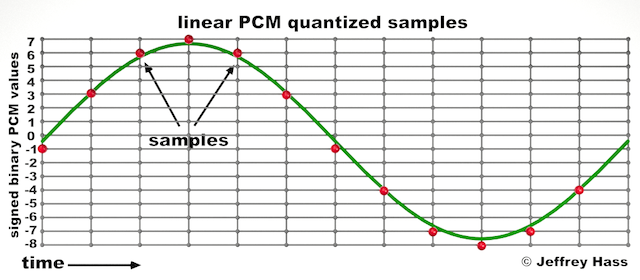
Audio quantization error is a fundamental aspect of digital audio processing. When analog sound waves are converted into digital signals, they undergo quantization. This means that the continuous analog signal is sampled and approximated in discrete steps. These steps are represented by binary values, typically in the form of bits (e.g., 16-bit, 24-bit). Now, what’s crucial to grasp here is that these discrete steps can lead to imperfections in audio reproduction.

Quantization error, often referred to as “quantization noise,” occurs when the actual analog signal deviates from the approximated digital representation. Imagine you have a beautiful painting, and you’re asked to replicate it using only a limited set of colors. The more restricted your color palette, the less accurate your reproduction will be. In the same way, the fewer bits you use for audio quantization, the more pronounced the quantization error becomes.

Quantization Levels and the Impact on Sound Quality

The number of quantization levels (related to bit depth) directly affects the precision of audio representation. For instance, a 16-bit audio recording has 65,536 possible levels, while a 24-bit recording provides a staggering 16,777,216 levels. This increased bit depth allows for a much finer representation of the original analog signal. Hence, a higher bit depth results in a reduction of quantization error, leading to superior sound quality.

To illustrate this, consider a grayscale image with only two colors: black and white. This is akin to an extremely low bit depth in audio, where the audio signal is either “on” or “off.” Now, imagine a high-resolution image with millions of colors, similar to the detail you get in a 24-bit audio recording. The difference in quality is apparent.

The Role of Dithering in Minimizing Quantization Error

One might wonder if there’s a way to mitigate quantization error in low-bit-depth audio recordings. Enter “dithering.” Dithering is a technique that introduces low-level noise to the audio signal, effectively spreading out the quantization error across a broader spectrum. Think of it as adding a sprinkle of fine grains of sand to a painting to blend the colors. This subtle noise masks the harshness of quantization error and makes it less noticeable to the human ear.

Now, as we’ve explored the fundamentals of audio quantization error, let’s delve into the questions that often arise:

How Does Quantization Error Affect Music Production?

In the realm of music production, quantization error can be a significant concern, particularly for professionals aiming to achieve top-tier sound quality. When producing music, especially in genres where subtle nuances are crucial, such as classical or jazz, quantization errors become more perceptible. To maintain audio fidelity, a higher bit depth is preferred during recording and production, ensuring minimal quantization noise.

Is There an Ideal Bit Depth for Audio Recording?

The ideal bit depth for audio recording is a subject of debate among audio enthusiasts. While 24-bit recording is commonly favored for its excellent dynamic range and low quantization error, it’s worth noting that the final audio format for most consumer applications, like CDs or streaming, is often 16-bit. The choice of bit depth should be based on the specific requirements of the project, keeping in mind the trade-off between audio quality and file size.

Can Quantization Error be Completely Eliminated?

Regrettably, quantization error cannot be entirely eliminated, as it’s an inherent part of the digital audio conversion process. However, it can be minimized to the point where it’s imperceptible to the human ear. Through techniques like dithering and the use of higher bit depths, the impact of quantization error can be significantly reduced, allowing for exceptional audio quality.

Last Words about Audio Quantization Error

In the ever-evolving world of audio technology, understanding audio quantization error is a fundamental step towards achieving superior sound quality. As an expert in the field, I’ve shared insights, experiences, and technical knowledge to demystify this concept. Remember, the bit depth you choose in audio recording significantly influences the extent of quantization error, and techniques like dithering play a pivotal role in mitigating its effects. The quest for pristine audio quality is an ongoing journey, but armed with this knowledge, you’re better equipped to make informed decisions in your audio endeavors.

Audio Clipping

Audio Clipping: Understanding, Causes, and Solutions

Audio Clipping
Audio Clipping

Introduction to Audio Clipping

Audio clipping is a common issue that can significantly impact the quality of your sound recordings. As an audio expert, I’ll provide you with insights, explanations, and practical solutions to help you understand and tackle this problem. Whether you’re a podcaster, musician, or simply someone who wants to improve their audio quality, this article will guide you through the nuances of audio clipping.

Audio clipping occurs when the amplitude of an audio signal exceeds the maximum level that can be accurately represented. When this happens, the signal is cut off or “clipped,” resulting in distorted and unpleasant sound. It’s essential to address this issue because clipped audio can be distracting and diminish the overall quality of your recordings.

What Causes Audio Clipping?

Audio clipping can be caused by various factors, but the most common ones include:

Overloading Input Levels: One of the primary reasons for audio clipping is setting input levels too high. When your microphone or audio input device records sound that is too loud, it can exceed the equipment’s capacity, leading to clipping. To avoid this, ensure your input levels are appropriately adjusted to prevent distortion.

Digital Clipping: In the digital realm, audio clipping occurs when the audio signal exceeds the maximum value that can be represented in the digital format. This can happen during recording, mixing, or mastering stages. It’s crucial to maintain headroom in your digital audio workflow to prevent digital clipping.

Amplification in Post-Processing: Amplifying an already clipped audio signal during post-processing can worsen the problem. It’s essential to identify and rectify clipped audio before applying any amplification or effects to your recordings.

How to Prevent and Fix Audio Clipping

Preventing and fixing audio clipping requires a combination of techniques and equipment adjustments. Here are some practical tips:

Proper Gain Staging: Maintain proper gain staging by setting input levels so that your audio signal is strong enough to capture the desired sound without overloading the equipment. This involves adjusting the gain on your microphone or audio interface.

Use a Pop Filter: A pop filter can help reduce sudden bursts of loud sound, such as plosives in vocal recordings. This can go a long way in preventing clipping at the source.

Monitor Levels: Continuously monitor your audio levels while recording to ensure they stay within the acceptable range. Use headphones or audio meters to keep an eye on the levels in real-time.

Why Is Audio Clipping Detrimental?

Audio clipping is detrimental because it compromises the quality and intelligibility of your recordings. When your audience hears distorted audio, it can be distracting and make it challenging to understand the content. In professional settings like music production, audio clipping can ruin an otherwise excellent recording.

Furthermore, addressing audio clipping is not just about improving sound quality; it’s also about preserving your equipment. Consistent clipping can damage microphones, speakers, and other audio gear over time, resulting in costly repairs or replacements.

Identical Search Intent Keywords

Now, let’s explore identical search intent keywords related to audio clipping:

Audio Clipping Prevention Techniques: Discover effective techniques to prevent audio clipping and maintain high-quality sound recordings.

Digital Audio Clipping Solutions: Learn how to deal with digital audio clipping issues and safeguard your recordings from distortion.

Microphone Gain Adjustment Tips: Gain insights into adjusting microphone gain levels to avoid audio clipping and capture pristine sound.

Real-Life Audio Clipping Examples: Explore real-life scenarios where audio clipping can occur, from live music performances to podcast recording sessions.

Last Words

In conclusion, understanding and addressing audio clipping is crucial for anyone working with audio recordings. By implementing proper gain staging, monitoring levels, and using tools like pop filters, you can significantly improve the quality of your audio. Remember that audio clipping not only affects the sound but also the longevity of your equipment. So, take the necessary steps to prevent and fix it, ensuring your audience enjoys distortion-free audio experiences.

As an audio expert with years of experience in the field, I’m confident that the information provided in this article will help you overcome audio clipping challenges and elevate the quality of your audio projects.

Audio Output Resolution

Audio Output Resolution

Audio Output Resolution

Understanding Audio Output Resolution

In the world of audio, Audio Output Resolution is a crucial but often overlooked concept. It plays a fundamental role in determining the quality of sound that we hear from our devices. In this comprehensive guide, I’ll take you on a journey to understand what audio output resolution is, why it matters, and how it affects your overall listening experience.

Explaining Audio Output Resolution

Let’s begin by unraveling the term “Audio Output Resolution.” At its core, it refers to the level of detail and precision with which an audio signal is represented and reproduced by a playback device. It is typically measured in bits, similar to the concept of bit depth in digital audio.

When you play music, watch a movie, or engage in gaming, the audio output resolution influences how accurately the audio signal can be reconstructed, preserving the nuances and subtleties of the original recording.

How Does Audio Output Resolution Affect Sound Quality?

The impact of Audio Output Resolution on sound quality is significant. Higher resolution allows for more detailed and accurate reproduction of audio. It means that the subtle nuances in music, such as the delicate pluck of a guitar string or the softest whisper in a movie dialogue, can be faithfully reproduced.

Choosing the Right Audio Output Resolution

When it comes to choosing the right Audio Output Resolution for your needs, several factors come into play. Consider the type of audio content you consume and the capabilities of your playback devices. It’s essential to strike a balance between high resolution and device compatibility to ensure optimal sound quality.

Audio Output Resolution vs. Bit Depth

Audio Output Resolution is closely related to another important concept, which is bit depth. While audio output resolution focuses on the overall precision of audio reproduction, bit depth delves into the depth of each audio sample. Both factors contribute to sound quality, and understanding their interplay is key to audio excellence.

Audio Output Resolution and Sampling Rate

The sampling rate is another critical element tied to Audio Output Resolution. Together, they determine the accuracy of audio playback. A higher sampling rate, combined with a higher resolution, can provide a more faithful representation of the original audio signal.

Does Audio Output Resolution Impact File Size?

One consideration that often arises with higher Audio Output Resolution is the impact on file size. It’s true that audio files with greater resolution can be larger in size. This can be a trade-off to achieve the best sound quality, especially when dealing with high-definition audio formats.

Audio Output Resolution in High-Definition Audio

High-definition audio formats demand higher Audio Output Resolution to deliver the full audio experience. Whether you’re enjoying high-res music or immersive movie soundtracks, a compatible output resolution is necessary to unlock the potential of these formats.

Audio Output Resolution for Home Theater Systems

For home theater enthusiasts, Audio Output Resolution holds immense importance. It’s a key factor in recreating cinematic audio experiences at home. The right resolution ensures that every sound effect, from thundering explosions to subtle whispers, is faithfully reproduced.

The Role of Audio Output Resolution in Gaming

Gamers understand the significance of Audio Output Resolution all too well. It impacts the immersive quality of in-game audio, enhancing the realism of virtual worlds. Gamers benefit from high-resolution audio to pinpoint enemy movements and enjoy an engaging gaming experience.

Audio Output Resolution for Audiophiles

For audiophiles, the pursuit of audio perfection is a lifelong journey. Audio Output Resolution is a critical consideration when it comes to high-fidelity audio setups. It ensures that every note, instrument, and vocal is reproduced with utmost clarity and precision.

Benefits of Upgrading Audio Output Resolution

Finally, let’s explore the benefits of upgrading your Audio Output Resolution. Upgrading can lead to a more immersive, lifelike audio experience. Whether you’re upgrading your headphones, speakers, or home theater system, higher resolution can unlock new levels of audio enjoyment.

Mp3 Sound Booster

Boosting MP3 Sound Quality and Loudness

Mp3 Sound Booster
Mp3 Sound Booster
Mp3 Sound Booster
Mp3 Sound Booster

Mp3 Sound Booster

In today’s digital age, where music and audio are an integral part of our lives, it’s crucial to ensure that our MP3 files sound their best. Whether you’re a casual listener or an audiophile seeking perfection, this comprehensive guide is here to help you master the art of enhancing MP3 sound quality. I’m an audio expert, and I’ll take you on a journey through various techniques and strategies to elevate your MP3 listening experience.

The Importance of Quality MP3 Sound

Before we dive into the nitty-gritty details of improving MP3 sound, let’s first understand why it matters. MP3 is one of the most popular audio formats, known for its compatibility and convenience. However, the sound quality of MP3 files can vary widely, depending on factors like compression, source material, and encoding settings.

Factors Affecting MP3 Sound Quality

To achieve the best MP3 sound quality, you need to consider several key factors:

Bitrate

The bitrate determines the amount of data used to represent audio. Higher bitrates generally result in better sound quality but larger file sizes.

Compression

MP3 files are compressed to reduce their size. Understanding the balance between compression and quality is essential.

Source Material

The quality of the original audio source greatly influences the final MP3 sound. Starting with high-quality recordings is crucial.

Encoding Settings

Adjusting parameters during encoding, such as sample rate and stereo mode, can impact sound quality significantly.

Techniques for Enhancing MP3 Sound Quality

Now that we’ve established the importance of quality MP3 sound, let’s explore various techniques and strategies to enhance it. Whether you’re dealing with older low-bitrate MP3s or you want to optimize your new downloads, these methods will help you achieve the best possible sound.

1. Bitrate Selection

The choice of bitrate plays a fundamental role in MP3 sound quality. Higher bitrates, such as 320 kbps, preserve more audio details, resulting in clearer and more immersive sound. However, they also lead to larger file sizes, so you should strike a balance based on your storage capacity and listening preferences.

2. Source Material Enhancement

Improving MP3 sound quality starts with the source material. If you have control over the recording process, use high-quality microphones, eliminate background noise, and ensure proper mixing and mastering techniques are employed. Starting with a pristine source will yield better MP3s.

3. Proper Encoding Settings

When converting audio to MP3 format, it’s crucial to choose the right encoding settings. Opt for a higher sample rate (e.g., 44.1 kHz or 48 kHz) and stereo mode for richer sound. Experiment with different settings to find the sweet spot for your audio.

4. Noise Reduction

If your MP3s suffer from background noise or artifacts, consider using noise reduction software. This can help eliminate unwanted hisses, clicks, and pops, resulting in a cleaner listening experience.

5. Equalization (EQ)

Using an equalizer allows you to adjust the balance of frequencies in your MP3s. You can enhance bass, boost treble, or make other custom adjustments to tailor the sound to your preferences.

6. Volume Normalization

Normalization ensures consistent volume levels across your MP3 library. This prevents sudden volume jumps between tracks, providing a more enjoyable listening experience.

7. High-Quality Playback Devices

Investing in high-quality headphones or speakers can make a significant difference in how you perceive MP3 sound. Look for devices with accurate sound reproduction and comfortable fit for extended listening sessions.

8. Room Acoustics

If you primarily listen to MP3s in a room, consider optimizing the acoustics. Simple changes like adding acoustic panels or rearranging furniture can reduce reflections and enhance sound quality.

9. Lossless Formats

Consider archiving your favorite music in lossless formats like FLAC or WAV for the utmost audio fidelity. While these formats result in larger file sizes, they preserve audio quality without compression.

10. Regular Maintenance

Maintaining your MP3 library is essential. Periodically check for corrupted files, update metadata, and back up your collection to prevent data loss.

Final Words

Enhancing the sound quality of your MP3 files is a rewarding endeavor for any music lover. By understanding the factors influencing sound quality and employing the right techniques, you can elevate your MP3 listening experience to new heights. Whether you’re a casual listener or an audiophile, these strategies will help you make the most of your digital music collection. Remember, the quest for perfect sound is a journey, so enjoy every moment of it. Happy listening!

Audio Dynamic Range Compression: Limiting and Expansion

Audio Dynamic Range Compression: Limiting and Expansion

Audio Dynamic Range Compression

Audio Compression: What It Is and How It Works

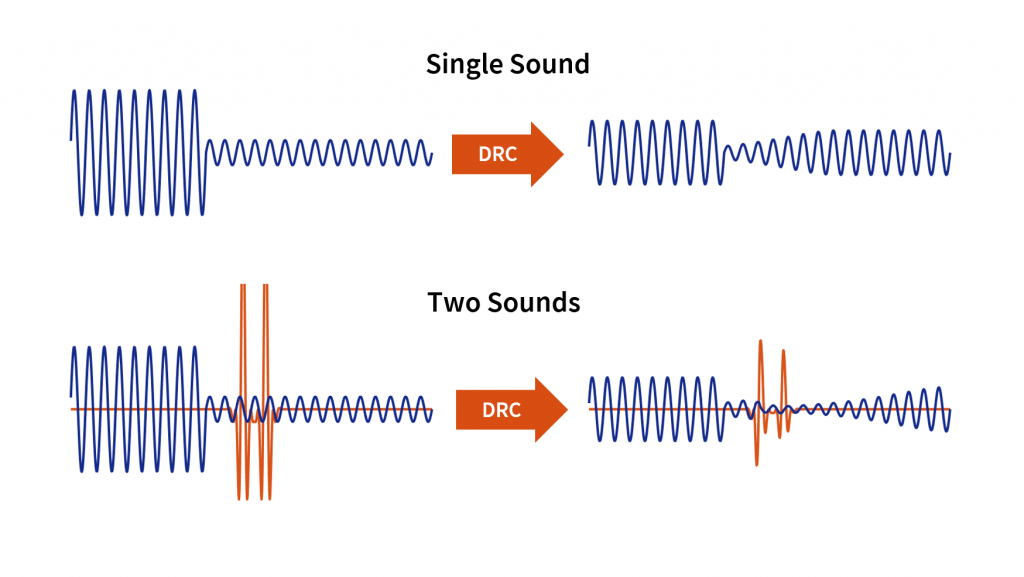
As an audio engineer, I’ve spent countless hours working with dynamic range compression. At its core, compression is a tool used to control the dynamic range of an audio signal. This means that it can be used to make quiet sounds louder and loud sounds quieter, resulting in a more consistent overall volume. Compression is an essential tool in the world of audio production, and it’s used in everything from music to film and television.
One of my favorite quotes about compression comes from the legendary producer Quincy Jones. He once said, “Compression is like a good pair of eyeglasses. You don’t notice them, but they make things look better.” And it’s true. When used correctly, compression can make an audio signal sound more polished and professional.

Dynamic Range Compression vs. Limiting

While compression and limiting are often used interchangeably, they are actually two different processes. Compression is used to control the dynamic range of an audio signal, while limiting is used to prevent the signal from exceeding a certain level. In other words, limiting is a more extreme form of compression.
One of the most common uses of limiting is in mastering, which is the final step in the audio production process. During mastering, the goal is to make sure that the audio sounds consistent across different playback systems. Limiting is used to prevent the audio from distorting or clipping when played back on a variety of systems.

Audio Expansion: The Other Side of the Coin

While compression and limiting are used to control the dynamic range of an audio signal, expansion is used to increase it. Expansion is the opposite of compression, and it’s used to make quiet sounds even quieter. This can be useful in situations where you want to bring out the details in a recording.
One of my favorite examples of the use of expansion comes from the film “No Country for Old Men.” In the film, there’s a scene where the main character is walking through a hotel room. As he walks, you can hear the sound of his footsteps echoing off the walls. The sound of the footsteps is very quiet, but it’s still audible. This is a great example of the use of expansion to bring out the details in a recording.
Final Words:
In conclusion, dynamic range compression, limiting, and expansion are all essential tools in the world of audio production. Whether you’re working on music, film, or television, understanding how to use these tools can make a huge difference in the final product. And while there are many different techniques and approaches to using compression, limiting, and expansion, the most important thing is to use your ears and trust your instincts.
audio compression, dynamic range, audio engineering, audio processing, audio mixing, audio production, audio mastering, audio software, audio plugins, audio effects, audio equipment, audio gear, audio technology, audio science, audio theory, audio education, audio tutorials, audio tips, audio tricks, audio hacks, audio workflow, audio techniques, audio aesthetics, audio quality, audio fidelity, audio perception, audio psychology, audio philosophy, audio history, audio culture, audio art, audio creativity, audio innovation, audio trends, audio industry, audio business, audio marketing, audio branding, audio advertising, audio monetization, audio revenue, audio distribution, audio streaming, audio downloads, audio formats, audio codecs, audio standards, audio compatibility, audio hardware, audio drivers, audio firmware, audio troubleshooting, audio repair, audio maintenance, audio optimization, audio performance, audio testing, audio measurement, audio analysis, audio visualization, audio synthesis, audio sampling, audio recording, audio editing, audio mixing, audio mastering, audio post-production, audio restoration, audio enhancement, audio noise reduction, audio equalization, audio filters, audio modulation, audio synthesis, audio synthesis

Mp3: Joint Stereo and Stereo modes

Mp3: Joint Stereo and Stereo modes

Mp3: Joint Stereo and Stereo modes

What is Mp3?

Mp3 is a popular audio format that is widely used for music and other audio files. It is a compressed audio format that allows for smaller file sizes without sacrificing audio quality. Mp3 uses a lossy compression algorithm that removes some of the audio data that is deemed less important to the human ear. This results in a smaller file size, but also a slight reduction in audio quality.
Personally, I have been using Mp3 for many years to store and listen to my music collection. I have always been impressed with the quality of the audio, even at lower bitrates. However, I have also noticed that some Mp3 files sound better than others, even when they have the same bitrate. This is where Joint Stereo and Stereo modes come into play.

Joint Stereo vs Stereo modes

Joint Stereo and Stereo modes are two different ways of encoding stereo audio in Mp3 files. Stereo mode is the traditional way of encoding stereo audio, where each channel (left and right) is encoded separately. Joint Stereo, on the other hand, uses a more advanced encoding technique that takes advantage of similarities between the left and right channels to reduce the amount of data that needs to be encoded.
In my experience, Joint Stereo mode can produce better sounding Mp3 files than Stereo mode, especially at lower bitrates. This is because Joint Stereo mode is able to preserve more of the original audio data, resulting in a more accurate representation of the original audio. However, not all Mp3 encoders support Joint Stereo mode, so it is important to check the settings of your encoder to ensure that it is being used.

Conclusion

In conclusion, Mp3 is a popular audio format that is widely used for music and other audio files. Joint Stereo and Stereo modes are two different ways of encoding stereo audio in Mp3 files, with Joint Stereo mode being the more advanced and potentially better sounding option. If you are looking to create high-quality Mp3 files, it is important to understand the differences between these two modes and to choose the one that best suits your needs.
Final words: Mp3 is a versatile and widely used audio format that can provide high-quality audio at lower file sizes. By understanding the differences between Joint Stereo and Stereo modes, you can create Mp3 files that sound great and take up less space on your device.

Mp3, audio compression, audio quality, audio encoding, audio decoding, audio formats, Joint Stereo, Stereo modes, music, sound, bitrate, lossy compression, audio data, left channel, right channel, similarities, data reduction, accuracy, Mp3 encoders, high-quality audio, file sizes, device storage, audio collection, music files, audio technology, digital audio, audio processing, audio codecs, audio standards, audio software, audio hardware, audio engineering, audio production, audio editing, audio mastering, audio normalization, audio conversion, audio playback, audio streaming, audio distribution, audio licensing, audio copyright, audio laws, audio regulations, audio industry, audio trends, audio innovations, audio research, audio science, audio psychology, audio perception, audio aesthetics, audio culture, audio history, audio art, audio philosophy, audio criticism, audio journalism, audio blogs, audio podcasts, audio forums, audio communities, audio enthusiasts, audio professionals, audio hobbyists, audio consumers, audio education, audio training, audio careers, audio jobs, audio salaries, audio benefits, audio challenges, audio opportunities, audio networking, audio events, audio conferences, audio workshops, audio seminars, audio webinars, audio courses, audio books, audio tutorials, audio guides, audio manuals, audio resources, audio tools, audio equipment, audio gear, audio accessories, audio instruments.