
Aliasing Reduction in MP3 Decoding

Let’s talk about aliasing reduction in MP3 decoding
Aliasing in MP3 decoding can ruin audio quality, creating distortion that lowers clarity. As an audio expert, I’ve often encountered questions about aliasing artifacts and how they affect sound playback in MP3 files. Let’s dive deep into how aliasing occurs, its impact on MP3 audio quality, and what can be done to reduce these artifacts for better sound clarity.
What is Aliasing in MP3 Decoding?
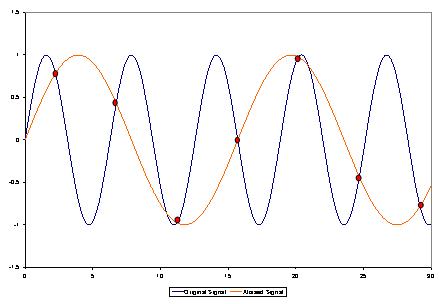
Aliasing is a type of digital distortion that happens when high-frequency signals are misrepresented during sampling and decoding, creating false or “aliased” frequencies. Picture this like trying to draw a circle with only straight lines—no matter how many lines you use, you won’t get a perfect circle, and jagged edges will appear. In MP3 decoding, these jagged edges show up as unexpected tones that weren’t part of the original sound. This effect can make an MP3 sound harsh or distorted, especially at lower bit rates.
Why Does Aliasing Occur in MP3 Files?
Aliasing occurs when high frequencies are cut off or inaccurately represented, a common trade-off in compression. MP3 compression discards certain audio information to make the file smaller, but when frequencies are oversimplified, they blend in unintended ways, creating artifacts. Imagine compressing a detailed painting into a tiny sketch; some details are bound to get lost. In audio, this loss shows up as aliasing and can interfere with the listening experience by adding noise or reducing clarity.
The Impact of Aliasing on Audio Quality
Aliasing can cause significant audio artifacts, which can make a piece of music sound artificial or degraded. Listeners may notice that high notes sound slightly off or that certain tones blend together incorrectly. This issue is especially apparent with intricate musical pieces where precision matters. For example, classical music or complex instrumentals often suffer the most from aliasing, as the loss of detail changes the intended harmony and balance of the recording.
How MP3 Decoding Algorithms Address Aliasing
Modern MP3 decoders use advanced algorithms to minimize aliasing by smoothing out high frequencies and retaining essential details. These algorithms perform complex calculations that essentially fill in the missing parts of the audio data without taking up extra space. Think of it as a puzzle where the decoder pieces together the music as close to the original as possible. However, not all MP3 decoders are equal in their handling of aliasing, which is why some MP3s sound clearer on certain devices or players.
Common Techniques for Reducing Aliasing Artifacts
-
Anti-Aliasing Filters
Anti-aliasing filters prevent high-frequency signals from causing distortion during decoding. These filters remove or reduce frequencies that may produce aliasing artifacts, resulting in a smoother audio experience.
-
Higher Bit Rates
Using higher bit rates during MP3 encoding keeps more of the audio detail intact, minimizing aliasing. Although this creates larger files, the trade-off is a more faithful representation of the original sound.
-
Advanced Decoding Algorithms
Some MP3 decoders are equipped with advanced algorithms that recognize and correct aliasing during playback. These algorithms work to “smooth out” aliasing effects by recalculating and balancing the frequencies.
Aliasing Reduction and Audio Fidelity in MP3s
Reducing aliasing plays a key role in preserving audio fidelity in MP3 files. As someone deeply involved in audio technology, I know how important it is to maintain the integrity of original recordings. Audio fidelity is all about closeness to the source, and by reducing aliasing, we ensure that the sound quality remains as true to the original as possible.
Using Bit Rates to Manage Aliasing
Choosing a higher bit rate is one of the simplest ways to reduce aliasing. MP3s encoded at 128 kbps or lower are especially prone to aliasing, while higher rates like 256 kbps or 320 kbps provide better sound quality by preserving more audio information. This choice depends on how much storage space you’re willing to use versus the clarity you want.
Does Reducing Aliasing Enhance MP3 Playback on All Devices?
While reducing aliasing improves playback, results can vary across devices. Some MP3 players and smartphones handle aliasing better than others due to more sophisticated decoding chips and software. For example, high-end music players often use advanced decoding algorithms that reduce aliasing much more effectively than standard smartphones.
The Role of Psychoacoustics in Aliasing Reduction
Psychoacoustics, or the study of how we perceive sound, plays a significant role in aliasing reduction. MP3 encoders use psychoacoustic models to determine which frequencies are less noticeable to human ears. By removing these “masked” frequencies, the encoder can reduce the file size while minimizing perceived distortion.
Addressing Aliasing for Different Music Genres
Different genres exhibit varying sensitivities to aliasing. Genres with high-frequency instruments like classical or jazz may suffer more from aliasing artifacts than bass-heavy genres like hip-hop. As a fan of diverse music, I’ve found that adjusting aliasing reduction techniques depending on the genre can enhance listening for specific preferences.
How Future Technology May Solve MP3 Aliasing
With advancements in audio technology, we may see new solutions for aliasing in MP3 decoding. Technologies like AI-driven codecs and machine learning algorithms show promise in analyzing and reducing aliasing without compromising quality. Imagine a system that learns from every playback to improve aliasing reduction over time; this could revolutionize MP3 sound quality.
Latest Words on Aliasing Reduction in MP3 Decoding
Reducing aliasing in MP3 decoding remains essential for achieving clear and enjoyable playback. Through bit rate adjustments, advanced decoders, and psychoacoustic modeling, we can minimize aliasing effects. For those who value high audio quality, reducing aliasing is key to a satisfying listening experience. Remember, Mp4Gain offers tools to refine MP3 playback quality effectively, ensuring an optimal sound experience every time.
Aliasing Reduction in MP3 Decoding – FAQ
What is aliasing in MP3 decoding?
Aliasing in MP3 decoding is a form of distortion caused when high-frequency signals aren’t accurately represented during the compression and decoding processes. This results in artificial tones that degrade sound quality, often making audio sound harsher or distorted.
Why does aliasing occur in MP3 files?
Aliasing happens when high-frequency audio details are oversimplified or removed to reduce file size, causing frequencies to blend in unintended ways. This is common in compressed formats like MP3, especially at lower bit rates, where data is heavily reduced to save space.
How does aliasing impact MP3 audio quality?
Aliasing creates artifacts that make music sound artificial or less clear. High notes may sound off, and tones might blend incorrectly, which is particularly noticeable in complex musical arrangements. Reducing aliasing is essential for preserving audio fidelity.
What methods are available to reduce aliasing in MP3 files?
Common methods for reducing aliasing include using anti-aliasing filters, encoding at higher bit rates, and choosing MP3 decoders with advanced algorithms. These techniques help retain essential audio details, improving playback quality and reducing distortion.
Does bit rate affect aliasing in MP3 files?
Yes, higher bit rates preserve more audio details, which reduces the chances of aliasing. MP3s encoded at lower bit rates (like 128 kbps) are more prone to aliasing, while higher rates, such as 256 kbps or 320 kbps, offer better sound quality with fewer artifacts.
Can all MP3 players reduce aliasing effectively?
Not all MP3 players handle aliasing equally. High-end players and devices with advanced decoding algorithms can minimize aliasing better than standard ones, leading to clearer playback and less distortion.
How does psychoacoustics influence aliasing reduction in MP3s?
Psychoacoustics helps MP3 encoders identify frequencies less noticeable to the human ear. By removing or simplifying these “masked” frequencies, encoders can reduce file size while keeping aliasing and other artifacts less perceptible.
What genres are most affected by aliasing?
Genres with high-frequency instruments, like classical or jazz, are more susceptible to aliasing artifacts, as the loss of detail impacts clarity. Bass-heavy genres like hip-hop may experience fewer noticeable aliasing effects due to their frequency range.
How might future technology improve aliasing in MP3 files?
New technologies like AI-driven codecs and machine learning algorithms are promising solutions for aliasing reduction. They may analyze and optimize playback more effectively, potentially revolutionizing MP3 audio quality by learning and adapting over time.
Is there an app that can enhance MP3 playback quality?
Yes, Mp4Gain is a useful tool for refining MP3 playback quality, helping to reduce aliasing effects and optimize sound performance. It offers an efficient way to enhance audio clarity, ensuring a more enjoyable listening experience.





Comments:
This article answered so many of my questions on aliasing! I didn’t realize it was such a big factor in sound quality. Thanks for explaining it simply.
I knew about bit rates but not much about aliasing. Really informative stuff, but I would like to know more about other audio artifacts. Good read!
Awesome breakdown on why aliasing makes MP3s sound weird sometimes. I usually ignore it but this makes me want to try higher bit rates!
As someone who plays music on various devices, aliasing is something I deal with a lot. Great to see practical tips for reducing it in MP3s!
This is the most detailed guide I’ve found on aliasing! I’ll definitely be more mindful of bit rates when I download music now.
Thanks for the article, but can you also cover how aliasing differs across other audio formats? I’m curious about FLAC and WAV.
Wow, I didn’t know psychoacoustics was involved in MP3 compression. Makes me appreciate digital music even more.
Nice article! I’ve always wondered why certain tracks sound bad on different players. This explains a lot.
Very interesting stuff! I learned a ton about the different techniques for aliasing reduction. Keep up the good work!
Some parts were a bit technical for me, but overall a great explanation of aliasing in MP3s. Good job simplifying a complex topic!
Great read! Really helped clarify some of my issues with MP3 quality. Now I know what to listen for with aliasing.
Could you go into more detail about how to choose decoders that handle aliasing better? I’d love to optimize my setup.