
Quantization Noise in MP3 Compression

Let’s talk about Quantization Noise in MP3 Compression
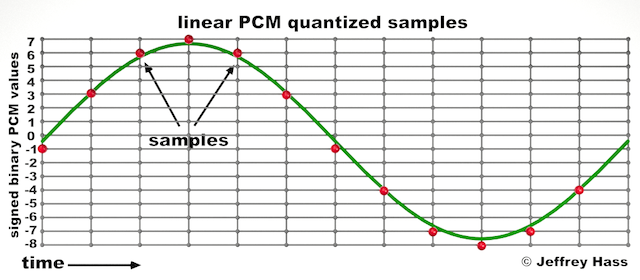
When I first delved into MP3 compression, the term “quantization noise” fascinated me. Imagine packing a suitcase for a long trip but only being allowed to take half your belongings. Quantization noise is the audio equivalent of the compromises you make. In MP3 compression, it’s the unintended artifact introduced when we reduce the precision of sound data to achieve smaller file sizes. This process happens during audio quantization, which determines how audio signals are represented as digital values.
Quantization noise results from rounding or truncating these values, effectively discarding some audio information. The key is ensuring that the noise introduced is less noticeable to human ears. Over my years of studying audio technology, I’ve seen how clever psychoacoustic models in MP3 compression manage this. By focusing on what we *don’t* hear, compression algorithms minimize perceived noise.
Understanding How Quantization Works
Quantization in MP3 compression is a simplification process. Think of it like converting a high-definition photograph into a pixelated image. Each color pixel represents a range of original tones, just as audio quantization maps a range of sound amplitudes into discrete levels. But instead of affecting our eyes, it affects our ears.
To make this efficient, MP3 uses variable quantization levels across frequency bands. Higher precision is reserved for frequencies more noticeable to humans, while less critical bands are treated with coarser quantization. It’s like putting more effort into cooking a main course than a side dish—you focus resources where they matter most.
The Role of Psychoacoustics in Minimizing Quantization Noise
MP3 compression relies heavily on psychoacoustics to hide quantization noise. Our brains are surprisingly forgiving with sound, especially when louder frequencies mask quieter ones. This phenomenon, called “auditory masking,” allows MP3 encoders to allocate fewer bits to frequencies hidden under dominant sounds.
For example, if you’re at a concert with loud drums, you might not hear someone snapping their fingers nearby. Encoders exploit this by prioritizing the drums and reducing data for the snaps. I’ve tested files where masking thresholds were pushed to the limit, and it’s astonishing how well our ears adapt, even though technical imperfections are present.
How Bitrate Affects Quantization Noise
Bitrate is a critical factor in MP3 compression. Higher bitrates mean more data for each second of audio, resulting in finer quantization and less noise. At lower bitrates, sacrifices are necessary, leading to more noticeable quantization artifacts.
I recall comparing a 320 kbps MP3 to a 128 kbps version of the same song. The higher bitrate felt richer, with clearer details, especially in complex sections like orchestras. Lower bitrates often introduced a “swishy” sound, particularly in cymbals or high-pitched vocals, where quantization noise became more apparent.
Quantization Noise and Complex Audio Tracks
Complex tracks, like symphonies or live recordings, highlight the limitations of MP3 compression. These tracks have a broad dynamic range and intricate harmonics, making it harder to mask quantization noise. I’ve worked with live concert recordings where even small quantization errors stood out, especially in quiet passages.
To address this, advanced encoders use adaptive quantization. This technique analyzes the audio in real time, allocating resources dynamically. Think of it as adjusting a camera’s focus based on the subject’s distance, ensuring clarity where it’s needed most.
Real-Life Examples of Quantization Noise
Quantization noise becomes evident in low-quality MP3s or poorly encoded files. One memorable example for me was an audiobook. The narrator’s voice sounded slightly robotic, especially on the “S” sounds. This artifact occurred because the compression algorithm couldn’t adequately represent the subtle frequencies in human speech.
Another example is in old pop songs with prominent cymbals. On lower-bitrate MP3s, the cymbals often sound like static instead of a crisp shimmer. It’s a stark reminder of how sensitive our ears are to high frequencies and how challenging it is to maintain their integrity during compression.
Reducing Quantization Noise in MP3 Files
To reduce quantization noise, higher bitrates or lossless formats like FLAC are the best solutions. But within MP3, some tricks can help:
- Using a higher-quality encoder ensures better psychoacoustic modeling.
- Encoding with variable bitrate (VBR) adjusts the bitrate dynamically, reducing noise in complex sections.
- Applying noise shaping techniques during encoding can push noise into less noticeable frequency ranges.
These strategies significantly improve perceived audio quality, even at lower file sizes.
Advanced Techniques for Handling Quantization Noise
Modern MP3 encoders employ sophisticated methods to mitigate quantization noise. Temporal noise shaping, for instance, redistributes noise across time to make it less perceptible. Picture spreading a tablespoon of salt evenly over a meal instead of dumping it all in one bite. The overall effect is much less jarring.
Another approach is perceptual noise substitution, where the encoder replaces certain noise patterns with psychoacoustically similar ones. This trick works surprisingly well and often makes the noise seem intentional or musical.
When Quantization Noise Becomes a Problem
Quantization noise becomes problematic when it interferes with the listening experience. If you’ve ever heard a garbled podcast or a distorted song, you’ve experienced this firsthand. It’s especially noticeable in quiet sections of a track, where masking effects are minimal.
In my experience, quantization noise is most distracting in solo instrument recordings or acapella tracks. These genres lack the masking benefits of complex, layered sounds, making artifacts painfully obvious.
Latest Words on Quantization Noise in MP3 Compression
Quantization noise in MP3 compression is an inevitable trade-off for smaller file sizes, but it doesn’t have to ruin your audio experience. By understanding how it works and choosing the right encoding settings, you can minimize its impact. For anyone dealing with MP3 files, Mp4Gain offers an excellent way to optimize and enhance audio quality effortlessly.
What is quantization noise in MP3 compression?
Quantization noise is the unintended distortion introduced during MP3 compression when audio data is rounded or truncated to reduce file size. It’s most noticeable in low-quality MP3s.
How does psychoacoustics reduce quantization noise?
Psychoacoustics minimizes quantization noise by exploiting auditory masking, focusing encoding precision on frequencies that are most noticeable to human ears.
What are the best settings to reduce quantization noise?
Use higher bitrates, variable bitrate encoding, and high-quality encoders. These settings prioritize audio fidelity and reduce noticeable artifacts.
Why is quantization noise more noticeable in low-bitrate MP3s?
Low-bitrate MP3s allocate fewer data bits to represent audio, resulting in coarser quantization and more audible noise, especially in complex or high-frequency sounds.


Comments:
Wow, this really breaks down the technical side of MP3 compression. I never knew how much work went into reducing quantization noise. Thanks for explaining it so clearly!
Very interesting article! I’ve always wondered why some MP3s sound worse than others, and now I get it. The explanation about bitrates was super helpful.
I still don’t fully understand how psychoacoustics works. Could you maybe go deeper into that? It’s fascinating but still confusing to me.
This is great info. I’ve noticed the “swishy” sound in cymbals you mentioned in my older MP3s. I’ll definitely look into encoding with higher bitrates now.
Honestly, I think MP3 compression is outdated with all the lossless options available now. But this article made me appreciate how clever the process actually is.