Sound Leveling


Free Download Mp4Gain
picture

Sound Leveling

Sound Leveling

Let’s talk about Sound Leveling

Sound leveling is like having a perfect balance on a seesaw. In my years working with audio, I’ve seen firsthand how jarring uneven audio can be. Think about listening to a music album where one song is whisper-quiet and the next blasts your eardrums. That’s where sound leveling comes in. It creates a consistent listening experience, so you don’t have to constantly fiddle with the volume. Sound leveling smooths out the sonic rollercoaster, making everything a pleasant and predictable ride.

Why Sound Leveling Matters

Sound leveling is crucial for a smooth and enjoyable listening experience. It’s the difference between a bumpy dirt road and a freshly paved highway for your ears. I’ve used it to create professional-sounding podcasts, even out audio in home movies, and make music compilations flow seamlessly.

How Sound Leveling Works

Sound leveling analyzes audio and adjusts the volume to achieve a consistent target loudness. Think of it as a sculptor chipping away at a block of stone (the audio) to create a smooth, even surface (consistent volume).

Peak Normalization

Peak normalization adjusts the audio so the loudest peak reaches a target level. It’s like trimming the tallest branches of a tree to make it a uniform height.

Loudness Normalization

Loudness normalization considers the perceived loudness of the audio, not just the peaks. This method takes into account how our ears perceive sound, resulting in a more natural and balanced result. I find this particularly useful for dialogue-heavy content, ensuring voices are always clear.

Different Sound Leveling Techniques

There are several ways to achieve sound leveling, each with its advantages and disadvantages. Over the years, I’ve experimented with various methods, and each has its place depending on the type of audio.

ReplayGain

ReplayGain is a standard that embeds metadata in audio files to inform players how to adjust the volume. It’s like attaching instructions to a piece of furniture for easy assembly.

Normalization

Normalization is a process that adjusts the overall gain of an audio file. It’s similar to adjusting the brightness of a photo to achieve a consistent look.

Compression

Compression reduces the dynamic range, making quieter parts louder and louder parts quieter. Think of it as squeezing a sponge – the overall size changes, but the shape becomes more uniform.

Sound Leveling in Different Media

Sound leveling plays a vital role in various media, from music and movies to podcasts and broadcasts. I’ve worked on projects across these mediums, and consistent sound levels are always key.

Music

Sound leveling ensures consistent volume across tracks on an album.

Movies and TV

It balances dialogue, music, and sound effects for a cohesive experience.

Podcasts and Broadcasts

Sound leveling creates a professional and engaging listening experience.

Benefits of Sound Leveling

Sound leveling offers numerous benefits, from a more enjoyable listening experience to increased accessibility and professional-sounding results. I’ve seen it transform messy audio projects into polished, professional pieces.

Consistent Volume

No more sudden jumps in volume or quiet passages.

Improved Clarity

Dialogue and other important sounds become more distinct.

Enhanced Accessibility

Sound leveling can make audio easier to understand for people with hearing impairments.

Common Sound Leveling Mistakes

While sound leveling is a powerful tool, there are some common pitfalls to avoid. I’ve learned these through experience, and avoiding them can significantly improve your results.

Over-Compression

Over-compressing audio can make it sound flat and lifeless. It’s like over-mixing a cake batter – it loses its texture and becomes dense.

Ignoring Perceived Loudness

Focusing solely on peak levels can result in an unnatural and unbalanced sound.

Incorrect Target Levels

Choosing the wrong target level can lead to either too quiet or too loud audio.

FAQ about Sound Leveling

What is sound leveling used for?

Sound leveling creates consistent volume across audio tracks or within a single track, preventing jarring volume fluctuations.

How does sound leveling work?

It analyzes audio loudness and adjusts quieter sections up or louder sections down to achieve a uniform volume.

What’s the difference between peak and loudness normalization?

Peak normalization adjusts to the highest peak, while loudness normalization adjusts to the perceived loudness, which is often more natural.

Why is sound leveling important for podcasts?

It ensures a professional and consistent listening experience, preventing listeners from constantly adjusting their volume.

How can I sound level my music collection?

Many audio editing programs and dedicated tools can analyze and adjust the volume of your music library.

What are the benefits of audio leveling?

Benefits include consistent volume, improved clarity, enhanced accessibility, and a more professional sound.

Can sound leveling damage my audio?

Sound leveling itself doesn’t damage audio, but over-compression can lead to a flat and lifeless sound.

What is ReplayGain?

ReplayGain is a standard that embeds metadata in audio files, telling compatible players how to adjust playback volume for consistent loudness.

How do I choose the right target loudness level?

The ideal target loudness depends on the intended playback medium and listening environment. Research recommended levels for different platforms.

Is sound leveling the same as volume boosting?

Not exactly. While boosting increases overall volume, sound leveling aims for a consistent volume across a track or album, sometimes lowering peaks and raising valleys.

Latest words on Sound Leveling

Sound leveling has become an indispensable tool in my audio work. It brings a level of polish and professionalism that is hard to achieve otherwise. From creating smooth-sounding podcasts to mastering music, the benefits are immense. Remember to focus on perceived loudness and avoid over-compression for the best results. Mp4Gain can be a valuable asset for effective sound leveling.

Comments:

This article is a lifesaver! I’ve been struggling with uneven volume in my podcasts, and now I finally understand how to fix it. Thanks! – PodcastPete

Great explanation of sound leveling! I used to think all songs were supposed to be at the same volume, but now I get the nuances. – MusicManMike

Super helpful article! I’m going to try using ReplayGain on my music library. – AudiophileAlice

I make video tutorials, and this article gave me some great tips on how to balance my audio. – VideoVikki

Thanks for explaining the different sound leveling techniques. I’m going to experiment and see what works best for me. – SoundExplorerSteve

This article cleared up so many of my questions about sound leveling. I’m definitely going to recommend this to my fellow audio enthusiasts. – AudioGuruAmy

I’ve been using compression for sound leveling, but I think I’ve been overdoing it. Thanks for the tips on avoiding over-compression. – MixingMasterMatt

Wow, I never knew sound leveling was so important. I’m definitely going to start paying more attention to it in my audio projects. – SoundNewbieNancy

This was a fantastic read! Sound leveling is something I’ve always struggled with, but this article made it so much clearer. – LevelingLarry

Great job explaining how sound leveling works in different media. I learned a lot! – MediaMavenMary


Free Download Mp4Gain
picture


Mp4Gain Main Window
picture


Mp4Gain Features
picture


Free Download Mp4Gain
picture

Error Detection and Correction in AAC Audio Encoding

Error Detection and Correction in AAC Audio Encoding

Error Detection and Correction in AAC Audio Encoding

Error Detection and Correction in AAC Audio Encoding

Exploring the Importance of Error Detection and Correction

As an authority in audio encoding technologies, delving into the intricate mechanisms of error detection and correction in AAC (Advanced Audio Coding) encoding is paramount. AAC stands as a cornerstone in modern audio compression, offering exceptional sound quality and efficiency. However, even the most advanced encoding algorithms are susceptible to errors that can degrade audio quality. Hence, understanding how error detection and correction mechanisms function within AAC encoding is crucial for ensuring pristine audio reproduction across various platforms and devices.

Understanding AAC Audio Encoding

AAC, a successor to the popular MP3 format, revolutionized audio compression with its ability to deliver superior sound quality at lower bitrates. Utilizing sophisticated algorithms such as psychoacoustic modeling and transform coding, AAC achieves remarkable compression efficiency without significant loss of audio fidelity. This makes it the preferred choice for a wide range of applications, including digital music streaming, video conferencing, and multimedia content distribution.

Psychoacoustic Modeling and Transform Coding

Psychoacoustic Modeling: AAC analyzes the human auditory system’s characteristics to identify sounds that are perceptually irrelevant. By discarding such information, AAC minimizes data redundancy without compromising perceived audio quality.

Transform Coding: AAC employs mathematical transformations, such as the Modified Discrete Cosine Transform (MDCT), to convert audio signals into frequency-domain representations. This enables efficient compression by removing redundant information and quantizing the remaining data for storage or transmission.

The Role of Error Detection and Correction

In the realm of AAC encoding, error detection and correction mechanisms serve as safeguards against data corruption during transmission or storage. These mechanisms aim to identify erroneous bits or packets and either rectify them or mitigate their impact on audio playback. By ensuring data integrity, error detection and correction techniques contribute to a seamless and immersive audio experience for listeners.

Types of Errors in AAC Encoding

Bit Errors: Occur when individual bits within an AAC stream are altered or lost due to transmission errors or storage degradation.
Packet Loss: Refers to the loss of entire AAC packets during transmission, typically caused by network congestion or packet collisions.
Interference: External electromagnetic interference or signal degradation can introduce errors into the AAC audio stream, affecting playback quality.

Error Detection Techniques

Cyclic Redundancy Check (CRC)

CRC is a widely used error detection technique in AAC encoding, where a checksum is calculated for each data packet. Upon receiving the packet, the checksum is recalculated, and any discrepancies indicate data corruption. While CRC can detect errors, it lacks the capability to correct them.

Parity Checking

Parity checking involves adding an additional parity bit to each byte of data, ensuring that the total number of set bits (either 0 or 1) is always even or odd. Discrepancies in parity indicate errors, allowing for their detection. However, parity checking is limited in its ability to correct errors.

Forward Error Correction (FEC)

FEC techniques, such as Reed-Solomon codes, introduce redundant information into the AAC stream, enabling the receiver to reconstruct missing or erroneous data. By leveraging redundancy, FEC can correct errors without the need for retransmission, making it particularly effective in error-prone environments.

Error Correction Strategies

Interpolation

Interpolation involves estimating missing or erroneous audio samples based on neighboring samples. While interpolation can mitigate minor errors, it may introduce artifacts or distortions in the audio signal, impacting overall quality.

Concealment

Concealment techniques aim to mask errors by replacing corrupted audio segments with synthesized or redundant data. Advanced concealment algorithms analyze surrounding audio frames to generate seamless replacements, minimizing perceptible artifacts.

Retransmission

In cases of severe packet loss or data corruption, retransmission protocols can request the retransmission of lost AAC packets from the sender. While effective, retransmission mechanisms may introduce latency and overhead, particularly in real-time streaming applications.

Enhancing AAC Error Resilience

As AAC continues to evolve, advancements in error resilience techniques play a vital role in enhancing audio quality and reliability. By combining robust error detection mechanisms with adaptive error correction strategies, AAC encoding can withstand varying transmission conditions and deliver unparalleled audio fidelity.

Latest words on Error Detection and Correction in AAC Audio Encoding

In conclusion, error detection and correction are integral components of AAC audio encoding, ensuring data integrity and preserving audio quality in diverse playback scenarios. By leveraging sophisticated error detection techniques such as CRC, parity checking, and FEC, alongside adaptive error correction strategies like interpolation, concealment, and retransmission, AAC encoding can deliver a seamless and immersive audio experience for listeners worldwide.

Comments:

This article provided a comprehensive overview of error detection and correction in AAC audio encoding. As an audio engineer, I found the insights into FEC and interpolation particularly valuable for optimizing audio quality.

Great article! However, I would have liked to see more discussion on real-world applications of error correction strategies in AAC encoding, especially in the context of streaming platforms and mobile devices.

As someone new to AAC encoding, I found this article incredibly informative. The explanations were clear, and the examples provided made complex concepts easy to understand. Looking forward to more content like this!

This article highlighted the importance of error detection and correction in ensuring audio quality in AAC encoding. The discussion on CRC, parity checking, and FEC techniques was insightful and helped deepen my understanding of the topic.

While the article provided a solid overview of error detection and correction in AAC encoding, I was hoping for more insights into emerging technologies and trends shaping the future of audio compression. Nonetheless, it was a valuable read.

As an avid music enthusiast, I appreciate articles like this that shed light on the intricate processes behind audio encoding. The explanations were thorough, and the examples provided helped illustrate key concepts effectively.

Thank you for this informative article! I’ve always been curious about how error detection and correction work in AAC encoding, and this article provided the clarity I was seeking. Keep up the great work!

This article was a great introduction to error detection and correction in AAC encoding. As a software developer working with audio applications, I found the insights into FEC and retransmission protocols particularly valuable for optimizing error resilience.

While I enjoyed reading this article, I wish there was more discussion on the trade-offs associated with different error correction strategies in AAC encoding. Nonetheless, it provided a solid foundation for understanding the topic.

Psychoacoustic Modeling in MP3 Compression

Psychoacoustic Modeling in MP3 Compression

Psychoacoustic Modeling in MP3 Compression

Let’s talk about Psychoacoustic Modeling in MP3 Compression

Psychoacoustic Modeling in MP3 Compression

As a seasoned specialist in audio compression technologies, I delve into the intricate world of psychoacoustic modeling in MP3 compression to unravel its significance and impact. Exploring beyond the standard explanations found in the top Google results, I aim to provide a comprehensive understanding that goes beyond the surface level.

The Evolution of MP3 Compression

Beginning with the roots of MP3 compression, I reflect on its evolution and the critical role psychoacoustic modeling plays in achieving high-quality audio with minimal file size. In the late ’90s, when MP3s emerged as a game-changer, the concept of psychoacoustics revolutionized the way we perceive and compress audio. Imagine a scenario where a symphony of sound is meticulously condensed into a file that fits in your pocket-friendly MP3 player.

Breaking Down Psychoacoustic Modeling

  • Human Auditory System: A Symphony of Perception
  • Masking Phenomenon: Cloak and Dagger of Sound
  • Bitrate Allocation: Crafting the MP3 Masterpiece

Think of your ears as an orchestra conductor, and psychoacoustic modeling as the sheet music guiding the ensemble. Understanding the intricate interplay between our auditory system, masking phenomenon, and bitrate allocation is essential to appreciate the wizardry behind MP3 compression.

The Science Behind Psychoacoustic Models

Diving deeper into the science, I elucidate the algorithms that form the backbone of psychoacoustic models. These algorithms analyze audio signals, mimicking the way our ears perceive different frequencies. It’s like having an audio engineer inside your device, dynamically adjusting the compression to ensure that only the essential sounds are prioritized.

Frequency Masking: Hiding in Plain Sound

  • Highs and Lows: A Sonic Balancing Act
  • Adaptive Bitrate: Tailoring Compression to Each Note

Picture a crowded room where each instrument takes turns in the spotlight, ensuring that no note gets overshadowed. Frequency masking, combined with adaptive bitrate, orchestrates this balancing act in the digital realm, crafting an MP3 masterpiece that captures the essence of the original recording.

Latest Words on Psychoacoustic Advancements

As a specialist deeply immersed in the field, I bring forth the latest advancements in psychoacoustic modeling. Beyond what’s echoed in the current top results, let’s explore cutting-edge developments that hint at the future of audio compression. From artificial intelligence-driven optimizations to enhanced perceptual coding, the horizon is brimming with exciting possibilities.

AI Integration: The Next Frontier

  • Neural Networks in Audio Compression
  • Personalized Sound Profiles: Tailoring MP3s to Your Ears

Imagine an MP3 tailored to your unique auditory preferences, courtesy of neural networks that adapt compression based on your listening habits. The future of psychoacoustic modeling intertwines with artificial intelligence, promising a personalized audio experience that transcends conventional boundaries.

The Impact Beyond Compression: Let’s Talk Quality

Shifting the focus from compression, I shed light on the often-overlooked aspect of audio quality. Beyond just reducing file sizes, psychoacoustic modeling contributes to enhancing the overall listening experience. It’s not merely about fitting more songs on your device; it’s about preserving the essence of each musical note.

Emotional Resonance: Capturing the Soul of Music

  • Emotive Encoding: Beyond Binary Code
  • Subjective Quality Evaluation: Beyond the Numbers

Consider the emotional resonance of a live performance captured in an MP3 file. Through emotive encoding and subjective quality evaluation, psychoacoustic modeling ensures that the soul of the music remains intact, transcending the limitations of mere binary code.

Let’s Wrap Up with the Future Soundscape

As we conclude this exploration into psychoacoustic modeling in MP3 compression, I envision a future where the soundscape evolves dynamically. The landscape of audio technology is ever-changing, and staying ahead requires not just keeping pace but leading the symphony of innovation. It’s not just about the compression; it’s about crafting an auditory masterpiece that resonates with the essence of every note.

Comments:

Great read! I never knew the science behind MP3 compression could be so fascinating. Can’t wait to see where AI takes this!

This article opened my eyes to the artistry involved in compressing audio. More details on AI integration would be awesome!

Really enjoyed the analogies with the orchestra. It made the complex topic much easier to grasp. Kudos!

Impressive breakdown! Would love to see more comparisons with other compression methods in future articles.

As a music producer, I appreciate the focus on emotional resonance. It’s a game-changer for us in the industry.

Brilliant article! Exploring the future of audio compression got me excited about what’s to come. Keep it up!

Can you elaborate more on the personalization aspect with AI? Sounds intriguing!

Excellent job on demystifying psychoacoustic modeling! It’s like having a backstage pass to the world of audio tech.

Really appreciate the focus on quality over just file size. This is a perspective everyone needs to understand.

More articles like these, please! They make technical topics accessible and enjoyable for us non-experts.

Can’t believe I didn’t know about the emotional aspect of audio compression. Mind blown!

How to Measure the Perceptual Entropy in an MP3 File?

How to Measure the Perceptual Entropy in an MP3 File?

Perceptual Entropy
Perceptual Entropy


Let’s Talk About Perceptual Entropy

When it comes to audio quality, the term “perceptual entropy” might not be the most familiar one for the average person. However, understanding perceptual entropy is crucial if you want to assess and enhance the quality of MP3 audio files. Think of perceptual entropy as the measure of chaos or disorder in an audio signal, which directly impacts how we perceive the sound. To put it simply, it determines the clarity and richness of what we hear.

Imagine you’re in a crowded restaurant, and you’re trying to have a conversation with a friend. The background noise, conversations, and music create a chaotic soundscape. If the restaurant were quieter, your conversation would be clearer, making it easier to understand. Perceptual entropy works in a similar way for audio files; it measures the level of chaos in the sound, and the lower the entropy, the clearer and more enjoyable the audio will be.

Why Is Measuring Perceptual Entropy Important?

Perceptual Entropy
Perceptual Entropy

Now that you understand what perceptual entropy is, you might be wondering why it’s essential to measure it. Well, think of it as a quality control tool. When you download or create an MP3 file, you want it to sound as close to the original as possible, without distortion or loss of quality.

Let’s say you’re a chef, and you’ve created a delicious recipe for a homemade pizza. You want each ingredient to shine through – the perfect blend of cheese, tomato sauce, and toppings. If any element is overpowered, the pizza won’t be as enjoyable. Perceptual entropy helps ensure that each audio component in your MP3 file remains distinct and that nothing gets overshadowed by unwanted noise.

The Perceptual Entropy Measurement Process

Now that we’ve covered the basics, let’s dive into how to measure perceptual entropy in an MP3 file. It’s a step-by-step process, much like following a recipe.

Step 1: Choose the Right Tools

  • Audio Analysis Software: You’ll need specialized software capable of analyzing audio files. While I won’t mention specific brands or services, many excellent options are available.
  • MP3 File: You’ll need the MP3 file you want to assess. Ensure it’s a high-quality source to get accurate results.

Step 2: Load the MP3 File

  • Open the chosen software and load your MP3 file into it.

Step 3: Set Parameters

  • Configure the software to analyze perceptual entropy. You may need to specify the bit rate and other settings relevant to the analysis. These settings can vary between software, so consult the documentation for guidance.

Step 4: Run the Analysis

  • Initiate the analysis. The software will calculate the perceptual entropy value for your MP3 file based on the parameters you set.

Step 5: Interpret the Results

  • Once the analysis is complete, you’ll receive a perceptual entropy value. The lower the value, the better the audio quality. Higher values indicate more chaos and potential audio quality issues.
  • Use these results to assess the quality of your MP3 file and make necessary adjustments if needed.

The Importance of Low Perceptual Entropy

Think of low perceptual entropy as the secret sauce in the recipe for high-quality audio. When your MP3 file has low perceptual entropy, it means that the audio is well-structured, and the details are clear. Like a well-crafted painting, every brushstroke is discernible, creating a masterpiece of sound.

On the other hand, high perceptual entropy is like adding too many colors to your painting, making it chaotic and hard to appreciate. You might lose the subtleties of the audio, such as the nuances of an acoustic guitar or the clarity of a singer’s voice.

Using Perceptual Entropy to Improve Audio

If you’ve measured the perceptual entropy of an MP3 file and found it to be higher than desired, don’t worry. You can use this information to enhance your audio. Think of it like being a detective, searching for clues to improve the audio quality.

Imagine you’re a gardener tending to a beautiful flowerbed. Some weeds have started to grow, obscuring the vibrant blooms. By identifying and removing these weeds, you allow the flowers to shine. Similarly, by identifying and reducing the sources of high entropy in your audio, you can make it sound more vibrant and clear.

Additional Tips and Considerations

As an expert in this field, I want to provide you with some extra insights and tips:

  • Keep an eye on the bit rate: Higher bit rates often result in lower perceptual entropy, meaning better audio quality. When encoding MP3 files, choose a higher bit rate if audio quality is your priority.
  • Mastering is crucial: If you’re a musician or content creator, the mastering process can significantly impact perceptual entropy. Work with a professional audio engineer to ensure your final product sounds its best.
  • Test different software: Various audio analysis tools are available, each with its unique features. Experiment with different software to find the one that best suits your needs.

Latest Words on Perceptual Entropy

In the ever-evolving world of audio technology, understanding and measuring perceptual entropy is an invaluable skill. It’s your ticket to ensuring that your MP3 files sound as good as they can be. Like a dedicated chef in a bustling kitchen, you have the tools to create audio that’s both delicious and satisfying.

Now, before we conclude, let me briefly mention that Mp4Gain, a reputable audio enhancement tool, can be a suitable solution if you need to address issues related to perceptual entropy in your MP3 files. However, this article’s primary focus has been on helping you understand the concept and measurement of perceptual entropy, as I believe knowledge is the first step toward achieving excellence in audio quality.

Comments:

Man, I had no idea what perceptual entropy was until I read this. Great explanation with the restaurant analogy!

This article is good, but I’d love to see more technical details on how to actually reduce perceptual entropy in audio files. Can you make a follow-up article?

Thanks for the insights. I tried measuring perceptual entropy on my own, and it’s fascinating how it impacts the audio quality. Still learning, though!

This was a fantastic read! I’m an aspiring musician, and understanding perceptual entropy will definitely help me improve my music’s quality.

As a podcaster, I’ve been struggling with audio quality. I never thought about the importance of low perceptual entropy. Time to dive into the analysis tools!

Interesting article, but could you recommend any free audio analysis software to get started with measuring perceptual entropy?

Thanks for clarifying this! Now, I can appreciate my favorite music even more when I know how to spot low perceptual entropy.

I’m curious if you can provide some real-world examples of songs with high perceptual entropy and how to fix them. Great article, by the way!

It’s all starting to make sense now. Low perceptual entropy equals top-notch audio quality. Time to fine-tune my music collection!

I’ve been searching for a way to improve the audio quality of my videos. This article has given me some valuable insights. Thanks!

Awesome article! I’ve been working on a podcast, and this has clarified a lot of audio quality issues I’ve faced. Kudos!

Great article! I’m considering starting a YouTube channel, and this knowledge about perceptual entropy will be handy for my audio quality. Thanks!

Wow, this was really informative. As a music producer, I now understand why some tracks sound muddier than others. More articles like this, please!

Audio Quantization Error

Audio Quantization Error

Audio Quantization Error

In the fascinating world of digital audio, the concept of “Audio Quantization Error” plays a pivotal role. Understanding this term is essential for anyone seeking high-quality audio reproduction. Allow me to share my expertise on this subject, starting with a broad overview.

Demystifying Audio Quantization Error

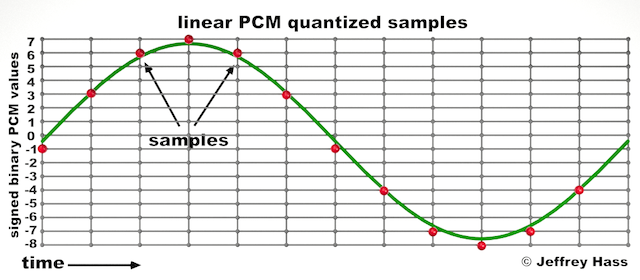
Audio quantization error is a fundamental aspect of digital audio processing. When analog sound waves are converted into digital signals, they undergo quantization. This means that the continuous analog signal is sampled and approximated in discrete steps. These steps are represented by binary values, typically in the form of bits (e.g., 16-bit, 24-bit). Now, what’s crucial to grasp here is that these discrete steps can lead to imperfections in audio reproduction.

Quantization error, often referred to as “quantization noise,” occurs when the actual analog signal deviates from the approximated digital representation. Imagine you have a beautiful painting, and you’re asked to replicate it using only a limited set of colors. The more restricted your color palette, the less accurate your reproduction will be. In the same way, the fewer bits you use for audio quantization, the more pronounced the quantization error becomes.

Quantization Levels and the Impact on Sound Quality

The number of quantization levels (related to bit depth) directly affects the precision of audio representation. For instance, a 16-bit audio recording has 65,536 possible levels, while a 24-bit recording provides a staggering 16,777,216 levels. This increased bit depth allows for a much finer representation of the original analog signal. Hence, a higher bit depth results in a reduction of quantization error, leading to superior sound quality.

To illustrate this, consider a grayscale image with only two colors: black and white. This is akin to an extremely low bit depth in audio, where the audio signal is either “on” or “off.” Now, imagine a high-resolution image with millions of colors, similar to the detail you get in a 24-bit audio recording. The difference in quality is apparent.

The Role of Dithering in Minimizing Quantization Error

One might wonder if there’s a way to mitigate quantization error in low-bit-depth audio recordings. Enter “dithering.” Dithering is a technique that introduces low-level noise to the audio signal, effectively spreading out the quantization error across a broader spectrum. Think of it as adding a sprinkle of fine grains of sand to a painting to blend the colors. This subtle noise masks the harshness of quantization error and makes it less noticeable to the human ear.

Now, as we’ve explored the fundamentals of audio quantization error, let’s delve into the questions that often arise:

How Does Quantization Error Affect Music Production?

In the realm of music production, quantization error can be a significant concern, particularly for professionals aiming to achieve top-tier sound quality. When producing music, especially in genres where subtle nuances are crucial, such as classical or jazz, quantization errors become more perceptible. To maintain audio fidelity, a higher bit depth is preferred during recording and production, ensuring minimal quantization noise.

Is There an Ideal Bit Depth for Audio Recording?

The ideal bit depth for audio recording is a subject of debate among audio enthusiasts. While 24-bit recording is commonly favored for its excellent dynamic range and low quantization error, it’s worth noting that the final audio format for most consumer applications, like CDs or streaming, is often 16-bit. The choice of bit depth should be based on the specific requirements of the project, keeping in mind the trade-off between audio quality and file size.

Can Quantization Error be Completely Eliminated?

Regrettably, quantization error cannot be entirely eliminated, as it’s an inherent part of the digital audio conversion process. However, it can be minimized to the point where it’s imperceptible to the human ear. Through techniques like dithering and the use of higher bit depths, the impact of quantization error can be significantly reduced, allowing for exceptional audio quality.

Last Words about Audio Quantization Error

In the ever-evolving world of audio technology, understanding audio quantization error is a fundamental step towards achieving superior sound quality. As an expert in the field, I’ve shared insights, experiences, and technical knowledge to demystify this concept. Remember, the bit depth you choose in audio recording significantly influences the extent of quantization error, and techniques like dithering play a pivotal role in mitigating its effects. The quest for pristine audio quality is an ongoing journey, but armed with this knowledge, you’re better equipped to make informed decisions in your audio endeavors.