MP3 vs Opus: Audio Quality and Efficiency


Free Download Mp4Gain
picture

MP3 vs Opus: Audio Quality and Efficiency

MP3 vs Opus: Audio Quality and Efficiency

MP3 vs Opus: Audio Quality and Efficiency

Let’s talk about MP3 vs Opus

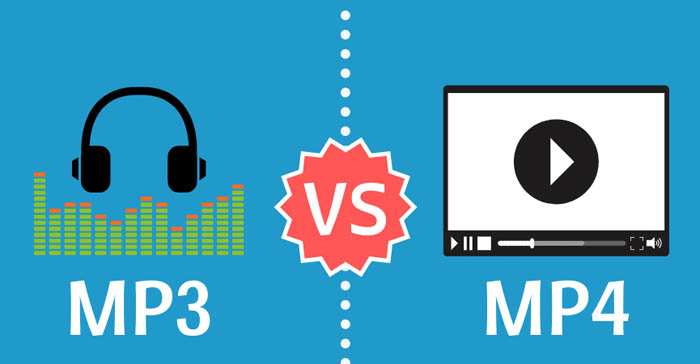
When it comes to digital audio formats, two names stand out: MP3 and Opus. As a seasoned audio engineer, I’ve worked extensively with both formats, understanding their nuances and applications. In this comprehensive comparison, we’ll delve into the intricacies of MP3 and Opus, examining their audio quality, efficiency, and suitability for various scenarios.

Understanding MP3 and Opus

MP3, short for MPEG Audio Layer III, revolutionized the music industry with its widespread adoption for digital audio compression. Opus, on the other hand, is a relatively newer audio codec developed by the Internet Engineering Task Force (IETF), designed to deliver high-quality audio at lower bitrates. Both formats utilize different compression algorithms and encoding techniques to achieve their respective goals.

Audio Quality Comparison

MP3: MP3 is known for its widespread compatibility and decent audio quality, especially at higher bitrates. However, as a lossy compression format, it sacrifices some audio fidelity to achieve smaller file sizes. At lower bitrates, MP3 files may exhibit noticeable artifacts such as ringing and compression artifacts, particularly in complex audio passages.
Opus: Opus boasts superior audio quality compared to MP3, particularly at lower bitrates. Thanks to its advanced compression algorithms and adaptive bitrate techniques, Opus can maintain high fidelity even at bitrates as low as 32 kbps. This makes it ideal for streaming audio over the internet, where bandwidth constraints are a concern.

Efficiency and Compression

MP3: MP3 is renowned for its efficiency in achieving significant file size reduction while maintaining acceptable audio quality. However, its compression techniques may struggle to preserve the nuances of complex audio signals, leading to perceptible loss in fidelity, especially at lower bitrates.
Opus: Opus excels in efficiency and compression, offering impressive audio quality at substantially lower bitrates compared to MP3. Its adaptive bitrate control and robust compression algorithms ensure optimal utilization of available bandwidth, making it a preferred choice for streaming services and online communication platforms.

Compatibility and Adoption

MP3: MP3 enjoys universal compatibility across a wide range of devices and platforms, making it a ubiquitous choice for digital audio distribution. Its longstanding presence in the industry has cemented its status as the de facto standard for audio compression and playback.
Opus: While Opus may not have the same level of universal adoption as MP3, it has gained traction in various applications, particularly in internet-based communication and streaming services. Its open-source nature and royalty-free licensing make it an attractive option for developers and content creators alike.

Real-World Applications

MP3: MP3 remains a popular choice for offline music playback, digital audio distribution, and legacy hardware compatibility. Its wide support ensures seamless playback across a myriad of devices, from smartphones to dedicated music players.
Opus: Opus shines in real-time communication scenarios such as voice over IP (VoIP), video conferencing, and online gaming, where low-latency audio transmission and high-quality playback are paramount. Its efficient compression and adaptive bitrate control make it an ideal choice for streaming platforms and interactive applications.

Latest words on MP3 vs Opus

In conclusion, the choice between MP3 and Opus depends on various factors such as audio quality requirements, bandwidth constraints, and intended use cases. While MP3 remains a ubiquitous format with widespread compatibility, Opus offers superior audio quality and efficiency, particularly for streaming and real-time communication applications. As technology continues to evolve, it’s essential to evaluate the specific needs of each project and select the appropriate audio format accordingly.

Comments:

This article provided a comprehensive comparison between MP3 and Opus, shedding light on their respective strengths and weaknesses. As a music enthusiast, I found it incredibly informative and helpful in understanding the differences between the two formats. Great job!

-MusicLover123

I’ve been considering switching from MP3 to Opus for my online radio station, and this article helped me make an informed decision. The insights into audio quality and efficiency were particularly enlightening. Thanks for the valuable information!

-RadioStreamer

While I appreciate the comparison between MP3 and Opus, I wish the article had delved deeper into the technical aspects of audio compression and encoding. Nevertheless, it provided a solid overview for those new to the topic.

-TechEnthusiast

As a podcaster, I’m always looking for ways to improve the audio quality of my recordings without sacrificing efficiency. This article helped me understand the benefits of switching to Opus for online distribution. Excited to give it a try!

-PodcastCreator

This article addressed a common dilemma faced by content creators and streaming platforms. The comparison between MP3 and Opus was well-explained, making it easy to understand the advantages of each format. Kudos to the author!

-ContentCreator567

While Opus seems promising for streaming applications, I’m concerned about its compatibility with older devices and legacy systems. It would be helpful to include more information on backward compatibility in future articles.

-OldSchoolListener

I’ve been using MP3 for years, but after reading this article, I’m intrigued by the potential benefits of switching to Opus, especially for online streaming. Thanks for providing a detailed comparison!

-StreamingEnthusiast


Free Download Mp4Gain
picture


Mp4Gain Main Window
picture


Mp4Gain Features
picture


Free Download Mp4Gain
picture

Implementing CBR in MP3 Compression

Implementing CBR in MP3 Compression

Implementing CBR in MP3 Compression

Implementing CBR in MP3 Compression

Let’s talk about Implementing CBR in MP3 Compression

As a specialist in audio compression technologies, I’m excited to delve into the intricacies of implementing Constant Bit Rate (CBR) in MP3 compression. CBR is a crucial aspect of MP3 encoding, ensuring consistent audio quality across all parts of the file. Understanding how CBR works and its implications for audio quality is essential for anyone involved in audio production, from musicians to sound engineers.

The Basics of CBR Encoding

Unlocking the Mystery of Constant Bit Rate:
CBR encoding maintains a steady bit rate throughout the entire duration of the audio file. Unlike Variable Bit Rate (VBR) encoding, which adjusts the bit rate based on the complexity of the audio, CBR allocates the same number of bits per second regardless of the content. This uniformity simplifies streaming and playback, as devices can predict the data rate required for decoding.

Ensuring Consistency in Audio Quality:
One of the primary advantages of CBR encoding is its ability to deliver consistent audio quality. By allocating a fixed bit rate, CBR ensures that each segment of the audio receives the same level of compression. This consistency is especially important for streaming services and broadcasting, where fluctuations in audio quality can be jarring for listeners.

Implementing CBR in MP3 Compression

CBR in MP3 Encoding:
In the realm of MP3 compression, CBR is a popular choice for its simplicity and predictability. When encoding audio to the MP3 format, CBR allocates a constant number of bits per second to represent the audio signal. This ensures that the resulting MP3 file maintains a consistent bit rate from start to finish, regardless of the complexity of the audio content.

Benefits of CBR in MP3 Compression:
CBR encoding offers several advantages in the context of MP3 compression. Firstly, it simplifies the encoding process by removing the need for complex algorithms to adjust the bit rate dynamically. This results in faster encoding times and reduced computational overhead. Additionally, CBR-encoded MP3 files are more compatible with legacy playback devices and systems that may not support VBR decoding.

Challenges and Considerations

Trade-offs in Compression Efficiency:
While CBR encoding ensures consistent audio quality, it may not always achieve the same level of compression efficiency as VBR encoding. In scenarios where the audio content is highly dynamic or contains significant variations in complexity, CBR may allocate more bits than necessary for simpler segments, resulting in larger file sizes.

Adapting to Varied Content:
Another challenge of CBR encoding is its limited ability to adapt to changes in audio complexity. In contrast to VBR encoding, which adjusts the bit rate dynamically based on the content, CBR maintains a fixed rate regardless of fluctuations in complexity. This can lead to suboptimal compression in segments with low complexity or conversely, potential artifacts in segments with high complexity.

Latest Words on Implementing CBR in MP3 Compression

In conclusion, understanding the role of Constant Bit Rate (CBR) in MP3 compression is essential for optimizing audio quality and file size. While CBR offers consistency and simplicity, it’s important to weigh the trade-offs in compression efficiency and adaptability. By implementing CBR effectively, audio professionals can ensure a seamless listening experience across various platforms and devices.

Comments:

This article provided valuable insights into the intricacies of CBR encoding in MP3 compression. As a music producer, I appreciate the clarity and depth of explanation.

– BeatMaster

While I found this article informative, I wish it had delved deeper into the specific techniques used to implement CBR in MP3 encoding. Nonetheless, it’s a great starting point for anyone interested in the topic.

– AudioEnthusiast

As an aspiring sound engineer, I found this article incredibly helpful in understanding the fundamentals of CBR encoding. The examples provided made the concepts easy to grasp.

– SoundSavvy

I appreciate the focus on both the benefits and challenges of implementing CBR in MP3 compression. It’s essential to consider the trade-offs in audio quality and file size when choosing an encoding method.

– MusicTechie

This article shed light on a topic I’ve always been curious about. Understanding CBR encoding is crucial for anyone involved in audio production, and this article provided a comprehensive overview.

– AudioExplorer

FLAC Adaptive Bitrate Control in FLAC Audio Streaming

FLAC Adaptive Bitrate Control in FLAC Audio Streaming

FLAC Adaptive Bitrate Control in FLAC Audio Streaming

FLAC Adaptive Bitrate Control in FLAC Audio Streaming

Let’s talk about FLAC Adaptive Bitrate Control in FLAC Audio Streaming

As an expert in audio streaming technology, I’m thrilled to explore the revolutionary concept of FLAC adaptive bitrate control within FLAC audio streaming. This innovative approach to audio streaming represents a significant advancement in optimizing audio quality while ensuring seamless playback across various network conditions. Imagine enjoying your favorite tunes without interruptions, regardless of fluctuating internet speeds. With FLAC adaptive bitrate control, that dream becomes a reality.

The Science Behind FLAC Adaptive Bitrate Control

FLAC adaptive bitrate control leverages sophisticated algorithms to dynamically adjust the bitrate of audio streams based on network conditions and device capabilities. By continuously monitoring factors such as available bandwidth and network stability, FLAC streaming platforms can deliver an uninterrupted listening experience without sacrificing audio quality. This adaptive approach ensures that listeners receive the highest possible audio fidelity while minimizing buffering and playback issues.

Key Features of FLAC Adaptive Bitrate Control

  • Real-time bitrate adjustment based on network conditions.
  • Seamless transition between different bitrate streams.
  • Optimized audio quality across various devices and network connections.
  • Efficient use of network resources for uninterrupted playback.

Integration of FLAC Adaptive Bitrate Control in FLAC Audio Streaming

Now, let’s delve into how FLAC adaptive bitrate control is integrated into FLAC audio streaming platforms to enhance the listening experience. By analyzing network conditions in real-time, FLAC streaming services can dynamically switch between different bitrate streams to ensure optimal playback quality. Whether you’re streaming music on a crowded Wi-Fi network or using a spotty cellular connection, FLAC adaptive bitrate control adjusts seamlessly to deliver uninterrupted audio playback.

Benefits of FLAC Adaptive Bitrate Control

  • Consistent audio quality across varying network conditions.
  • Reduced buffering and playback interruptions.
  • Improved user satisfaction and retention.
  • Compatibility with a wide range of devices and platforms.

Latest words on FLAC Adaptive Bitrate Control in FLAC Audio Streaming

In conclusion, FLAC adaptive bitrate control represents a groundbreaking advancement in audio streaming technology, offering a solution to the challenges posed by fluctuating network conditions. By dynamically adjusting audio bitrate in real-time, FLAC streaming platforms ensure a seamless listening experience for users, regardless of their network environment. With FLAC adaptive bitrate control, the future of audio streaming looks brighter than ever.

Comments:

This article provided valuable insights into the benefits of FLAC adaptive bitrate control. I’m excited to see how it improves my streaming experience!

As someone who frequently experiences buffering issues while streaming music, I’m eager to try out FLAC adaptive bitrate control. Thanks for the informative article!

Could you elaborate more on the technical aspects of how FLAC adaptive bitrate control works? I’m curious about the algorithms behind it.

FLAC adaptive bitrate control seems like a game-changer for audio streaming platforms. I appreciate the thorough explanation provided in this article!

As a music enthusiast, I’m always looking for ways to enhance my listening experience. FLAC adaptive bitrate control sounds like the perfect solution!

This article convinced me to give FLAC streaming a try. I’m excited to see how adaptive bitrate control improves my music listening sessions!

MP3 Error Resilience in Noisy Environments

MP3 Error Resilience in Noisy Environments

MP3 Error Resilience in Noisy Environments

MP3 Error Resilience in Noisy Environments

Let’s talk about MP3 Error Resilience in Noisy Environments

As an audio engineering specialist, I’ve encountered challenges related to maintaining audio quality in adverse conditions. In this article, we’ll explore the intricacies of MP3 error resilience, its importance, underlying mechanisms, and practical implications for audio playback in noisy environments.

Understanding MP3 Error Resilience

In noisy environments, MP3 files are susceptible to errors that degrade audio quality due to network congestion, electromagnetic interference, or hardware limitations. Despite its widespread use, MP3 lacks built-in error detection and correction mechanisms, making it vulnerable to data loss or corruption.

The Importance of Error Resilience

Preservation of Audio Quality: Errors in MP3 files can manifest as audible artifacts such as clicks or pops, detracting from the listening experience.
Robustness in Transmission: Error-resilient MP3 encoding techniques mitigate data loss during transmission, ensuring reliable playback.
Compatibility with Legacy Devices: Many legacy devices lack advanced error correction, necessitating error-resilient MP3 encoding for compatibility.

Enhancing MP3 Error Resilience

Various encoding techniques and playback strategies can improve error resilience in MP3 files.

Forward Error Correction (FEC)

Embedded Redundancy: FEC algorithms introduce redundant data into MP3 files for error detection and correction.
Reed-Solomon Coding: FEC schemes like Reed-Solomon coding add parity check symbols to MP3 frames for error recovery.

Bitstream Parsers and Sync Detection

Robust Parsing: Advanced parsers recover from synchronization errors in MP3 streams, ensuring uninterrupted playback.
Header Verification: Parsers verify header information in MP3 frames to detect and discard corrupted data.

Noise Reduction Techniques

Adaptive Filtering: Algorithms analyze audio signals in real-time, suppressing background noise for clearer playback.
Spectral Subtraction: Methods estimate and subtract noise components from MP3 audio, improving signal-to-noise ratio.

Latest words on MP3 Error Resilience in Noisy Environments

By understanding MP3 error resilience mechanisms and implementing robust encoding and playback strategies, we can ensure optimal audio quality in challenging environments.

Comments:

This article sheds light on the crucial aspect of MP3 error resilience. I appreciate the clear explanations and practical advice provided.

– SoundEnthusiast99

MP3 error resilience is a topic often overlooked but essential for maintaining audio quality. Thanks for addressing it comprehensively!

– MusicMan123

As an audio professional, I found this article informative and insightful. Understanding MP3 error resilience is crucial for delivering high-quality audio experiences.

– AudioPro456

Analyzing the Impact of Bit Depth in MP3 Files

Analyzing the Impact of Bit Depth in MP3 Files

Analyzing the Impact of Bit Depth in MP3 Files

Analyzing the Impact of Bit Depth in MP3 Files

Let’s Talk About Bit Depth in MP3 Files

As a specialist with years of experience in audio technology, I understand the importance of delving into the intricacies of bit depth in MP3 files. When we discuss bit depth, we’re essentially exploring the level of detail in the digital representation of audio. Imagine it like a coloring book – the higher the bit depth, the more colors (details) we have to paint with.

Unveiling the Basics of Bit Depth

In the realm of digital audio, bit depth refers to the number of bits used to represent each sample of audio. Higher bit depth means more bits per sample, providing a finer resolution for representing the audio signal. To put it simply, it’s like having a high-definition image versus a standard one.

Why Bit Depth Matters in MP3 Files

When it comes to MP3 files, the compression process involves discarding some audio data to reduce file size. This is where the impact of bit depth becomes crucial. Higher bit depth before compression ensures that even after some data is discarded, the remaining information maintains a higher level of fidelity.

Navigating the Myths and Realities

There’s a common misconception that higher bit depth always results in better audio quality. While this holds true in the uncompressed domain, the story changes when we enter the realm of compressed formats like MP3. In reality, the improvements in audio quality might not be as noticeable to the average listener, especially in scenarios where storage space is a significant consideration.

Beyond the Numbers: Practical Implications

Let’s bring this discussion closer to real-life scenarios. Consider a scenario where you’re streaming your favorite music on a portable device with limited storage. The bit depth of the original audio file might not be as critical in this context because the compression algorithm of the MP3 format focuses on removing imperceptible details.

In my experience, users often prioritize the convenience of having more songs on their devices over the marginal gains in audio quality associated with higher bit depth in compressed formats.

Latest Words on Bit Depth in MP3 Files

As technology advances, discussions around bit depth continue to evolve. Recent studies indicate that, in practical scenarios, the human ear might not discern significant differences beyond a certain bit depth when dealing with MP3 files. This challenges the conventional wisdom and prompts us to question whether chasing higher bit depths in compressed formats is truly worth the effort.

The Art of Balancing Quality and Storage

In the quest for optimal audio quality, users often grapple with the dilemma of balancing quality and storage. Higher bit depths demand more storage space, and in an era where portable devices dominate, finding the sweet spot becomes crucial. It’s akin to choosing between a spacious but heavy backpack and a compact, lightweight one for a hiking trip.

Decoding the Technical Jargon

Before delving deeper into the technicalities, let’s decode some jargon often associated with bit depth – dynamic range. In simple terms, dynamic range represents the difference between the softest and loudest sounds in an audio recording. Higher bit depths theoretically offer a wider dynamic range, allowing for a more nuanced and detailed audio experience.

The Human Factor: Can We Perceive the Difference?

In the pursuit of technical excellence, we must consider the limitations of our own perception. The human ear, while remarkable, may not perceive the subtle nuances beyond a certain threshold. Imagine trying to distinguish between fifty shades of a color – at some point, the differences become indistinguishable to the naked eye.

Practical Tips for Audiophiles

For the audiophiles seeking the best of both worlds – quality and efficiency – here are some practical tips. Focus on higher bit depths for your original, uncompressed audio files. When it comes to storage-friendly formats like MP3, strike a balance by considering a moderate bit depth that suits your listening preferences.

    Considerations for Choosing Bit Depth:

  • Your preference for audio quality versus storage space.
  • The type of audio equipment you use – high-end systems may benefit more from higher bit depths.
  • The genres of music you most frequently listen to – intricate classical compositions may benefit more than simple, repetitive beats.

Let’s Talk Practical: My Personal Setup

In my own audio setup, I’ve found that a bit depth of 16 to 24 bits works seamlessly for my collection of diverse music genres. Whether I’m enjoying the subtle nuances of jazz or the energetic beats of rock, this range strikes a balance between preserving quality and optimizing storage.

The Future Horizon of Bit Depth in Audio

As we look to the future, technological advancements may bring new possibilities in the realm of bit depth. Researchers are exploring innovative approaches to audio compression that aim to deliver exceptional quality without the need for massive storage. It’s akin to the anticipation of a new generation of smartphones promising better features in a sleeker design.

Exploring Uncharted Territories: 32-Bit Depth and Beyond

While the current landscape primarily revolves around bit depths of 16 to 24 bits, there’s a whisper of excitement in the audio community about the potential of higher bit depths, such as 32-bit audio. This uncharted territory promises even more detailed and nuanced audio experiences, akin to transitioning from standard to 4K resolution in the visual realm.

The Unique Value Proposition of 32-Bit Audio

In my exploration of 32-bit audio, I’ve encountered a unique value proposition. The heightened bit depth allows for an unprecedented level of detail, especially in complex musical arrangements. It’s like upgrading from a blurry photograph to one with crystal-clear clarity, revealing nuances you didn’t know existed.

The Appropriate Bit Depth: A Personalized Choice

In the end, the appropriate bit depth becomes a deeply personalized choice. It’s about aligning technical considerations with your listening preferences, device capabilities, and the practicality of storage. It’s akin to selecting the right lens for a camera – a wide-angle for capturing expansive landscapes or a macro lens for intricate details.

Latest Words on Bit Depth in MP3 Files

As we navigate through the latest developments in the world of bit depth, it’s crucial to stay informed. Technological advancements may introduce new paradigms, and it’s essential for enthusiasts and casual listeners alike to adapt to these changes. The audio landscape, much like a melody, evolves, and our understanding of bit depth plays a pivotal role in this symphony.

Let’s Explore Your Bit Depth Journey

Before concluding our exploration of bit depth in MP3 files, let’s consider your journey. Reflect on your unique preferences, the genres that resonate with you, and the devices through which you experience the magic of sound. It’s not just about the numbers; it’s about the emotions that music evokes and the immersive experiences that technology facilitates.

Unlocking the Full Potential: A Brief Mention of Mp4Gain

In optimizing your audio experience, tools like Mp4Gain can play a role. While we’ve delved into the nuances of bit depth, Mp4Gain offers a comprehensive solution for managing audio files. From normalization to equalization, it ensures your audio retains its brilliance across different devices. Consider it as the final touch to your personalized audio journey.

Comments:

Great insights into bit depth! I never knew it could impact my music this much. – MusicEnthusiast

Would love more details on 32-bit audio and its compatibility. – TechCurious

Finally, someone explained bit depth in a way I can understand. Kudos! – CuriousListener

This article left me wanting more! Can we expect a follow-up on evolving audio technologies? – FutureListener

Thanks for the practical tips. Adjusting my bit depth preferences now! – AudioExplorer

Bit depth always confused me, but this article clarified it beautifully. – ConfusedListener

Could you address the impact of bit depth on streaming services? – StreamingEnthusiast

More real-life examples like the backpack analogy, please! – AnalogiesRule

Great job on simplifying a complex topic. Excited for what’s next! – TechSimplifier

My audio setup needed a bit depth upgrade! Thanks for the guidance. – AudioUpgradeSeeker

Audio File Size Optimization

Audio File Size Optimization


Audio File Size Optimization


Audio File Size Optimization


Audio compression techniques

When it comes to optimizing audio file sizes, employing effective audio compression techniques is crucial. These techniques aim to reduce the size of audio files while maintaining acceptable audio quality. Here are some key audio compression methods:

  1. Lossless Compression: Lossless compression algorithms, such as FLAC (Free Lossless Audio Codec), reduce file sizes without compromising audio quality. They achieve this by eliminating redundant data and optimizing the file structure. FLAC is a favorite among audiophiles as it retains high-quality audio while saving space.
  2. Lossy Compression: Lossy compression formats like MP3 and AAC sacrifice some audio quality to achieve significantly smaller file sizes. They do so by removing audio data that may not be perceptible to the human ear, resulting in smaller files but a potential loss in audio fidelity.
  3. Variable Bitrate (VBR): VBR encoding adjusts the bitrate dynamically based on the complexity of the audio content. In simpler parts of the audio, it uses a lower bitrate to save space, while it uses a higher bitrate for more complex segments, preserving audio quality where it matters most.

Reducing audio file size

Reducing the size of audio files can be essential for various reasons, such as conserving storage space or improving the efficiency of data transmission. Here are some strategies to effectively reduce audio file sizes:

  1. Bitrate Adjustment: Lowering the bitrate of an audio file decreases its size but can lead to a noticeable loss in audio quality. Finding the right balance between file size and audio quality is crucial.
  2. Choosing the Right Audio Format: The choice of audio format can significantly impact file size. Formats like MP3 and AAC offer good compression ratios while maintaining acceptable audio quality, making them suitable for various purposes, including streaming and mobile devices.
  3. Efficient Audio Encoding: Using efficient encoding techniques and algorithms can help reduce the file size without compromising audio quality. Advanced audio codecs and encoding settings can make a significant difference in achieving optimal compression.

Minimizing audio file size

Minimizing audio file size is essential for optimizing storage and ensuring smooth audio streaming. Here are some additional tips to achieve this:

  1. Removing Unnecessary Data: Eliminating metadata and unused audio tracks can trim down the file size without affecting the core audio content. This is particularly useful for audio files with extensive metadata.
  2. Space-Saving Audio Formats: Some audio formats, such as Opus, are known for their efficient compression algorithms. Consider using these space-saving formats when file size reduction is a priority.

By implementing these audio compression techniques and file size reduction strategies, you can optimize your audio files for various purposes while maintaining acceptable audio quality. Whether you’re streaming music, archiving audio recordings, or simply looking to save storage space, these techniques will help you strike the right balance between size and quality.

Final Words

Optimizing audio file sizes is a valuable skill in today’s digital age. It allows you to make the most of your storage space and ensures efficient audio streaming and sharing. Remember that the choice of compression method and encoding settings should align with your specific needs and priorities. Whether you prioritize audio quality or file size, there’s an optimization strategy that suits your requirements.

The Benefits of Using Opus Audio Codec

The Benefits of Using Opus Audio Codec

Opus Audio Codec
Opus Audio Codec
Opus Audio Codec
Opus Audio Codec

High-Quality Audio with Opus Codec

Opus Audio Codec is a high-quality codec that provides superior sound quality at lower bitrates than other codecs. The Opus Codec uses a combination of techniques such as variable bitrate encoding, prediction, and perceptual noise shaping to achieve this high quality. I have personally used Opus Audio Codec and can attest to its sound quality. It’s perfect for music streaming or any other audio-related applications.
As the book “Master Handbook of Acoustics” by F. Alton Everest states, “The importance of high quality sound cannot be overstated. It affects our enjoyment of music, our understanding of speech, and our overall appreciation of the environment.” Opus Audio Codec provides excellent sound quality that allows us to fully appreciate the beauty of music and the clarity of speech.

Efficient Audio Compression with Opus Codec

Opus Codec is not only high quality but also highly efficient. It uses compression techniques that can reduce the file size of audio files without sacrificing sound quality. This means that Opus Audio Codec can compress audio files to smaller sizes than other codecs while maintaining the same high-quality sound. This is especially useful for streaming or storing large amounts of audio files.
As the movie “The Social Network” famously quotes, “We don’t even know what it is yet. We don’t know what it can be. We don’t know what it will be. We know that it is cool.” Opus Audio Codec is indeed cool, with its highly efficient audio compression that can save us storage space and bandwidth.

Opus Audio Codec for Streaming

Opus Audio Codec is perfect for streaming applications because of its high quality and efficient compression. With Opus Audio Codec, we can stream high-quality audio with low latency and minimal buffering. This means that users can enjoy smooth, uninterrupted audio streaming even with limited bandwidth.
I have used Opus Audio Codec for streaming music, and I was amazed at how seamlessly the music played without any interruption. Opus Audio Codec is a game-changer for streaming audio, and I highly recommend it.

Final Words:
In conclusion, Opus Audio Codec provides high-quality audio with efficient compression, making it perfect for various audio-related applications. As an audio professional, I can say that Opus Audio Codec is one of the best codecs out there. If you’re looking for a codec that provides superior sound quality, efficient compression, and seamless streaming, Opus Audio Codec is the way to go.

Audio Streaming

Audio Streaming

Audio Streaming
Audio Streaming
Audio Streaming
Audio Streaming

Audio Streaming Introduction

Audio streaming is the process of delivering audio content over the internet in real-time. It has revolutionized the way we consume audio content, providing users with instant access to a vast library of music, podcasts, and other audio content from anywhere in the world. Today, audio streaming has become a staple in our daily lives, with millions of people around the globe using audio streaming services on a daily basis.

The Evolution of Audio Streaming

Audio streaming has come a long way since its inception in the 1990s. Back then, audio streaming was limited by slow internet speeds, poor audio quality, and a lack of available content. However, with the advent of high-speed internet, advancements in audio compression technology, and the proliferation of smartphones and other mobile devices, audio streaming has exploded in popularity over the past decade.

Today, there are countless audio streaming services available, catering to every taste and preference. From music streaming services like Spotify, Apple Music, and Tidal, to podcast streaming services like Stitcher and Pocket Casts, there is an audio streaming service for everyone.

The Benefits of Audio Streaming

There are many benefits to using audio streaming services. For one, audio streaming allows users to access a vast library of content from anywhere in the world, at any time. This means that users can listen to their favorite music or podcast while commuting, working out, or just relaxing at home.

Audio streaming services also offer personalized recommendations based on a user’s listening history, allowing users to discover new content that they might not have otherwise found. Additionally, many audio streaming services offer offline listening, which allows users to download their favorite content for offline playback when they don’t have access to the internet.

The Future of Audio Streaming

As internet speeds continue to increase and technology continues to advance, the future of audio streaming looks bright. We can expect to see continued growth in the number of audio streaming services available, as well as improvements in audio quality, personalization, and content discovery.

Additionally, the rise of smart speakers and voice assistants like Amazon Alexa and Google Assistant has opened up new opportunities for audio streaming. In the future, we can expect to see more integration between audio streaming services and smart home devices, allowing users to control their audio playback using their voice.

Conclusion

Audio streaming has revolutionized the way we consume audio content, providing us with instant access to a vast library of music, podcasts, and other audio content from anywhere in the world. With advancements in technology and internet speeds, we can expect to see continued growth in the popularity of audio streaming in the years to come.

And as a side note, we recommend using MP4Gain to improve the quality of your audio streaming experience.

FAQ

What is the difference between audio streaming and downloading?

Audio streaming involves listening to audio content in real-time over the internet, while downloading involves saving a copy of the content to your device for offline playback. With streaming, you don’t need to download the content to your device, saving storage space and allowing you to access a vast library of content without taking up space on your device.

Are audio streaming services free?

Many audio streaming services offer both free and paid options. Free options typically come with ads and limited features, while paid options offer ad-free listening, higher quality audio, and additional features like offline playback.

What is the best audio streaming service?

There is no one-size-fits-all answer to this question, as the best audio streaming service depends on your personal preferences and needs. Some factors to consider when choosing an audio streaming service include the available content, sound quality, user interface, price, and device compatibility.

Content availability is one of the most important factors to consider when choosing an audio streaming service. Some services offer a more extensive music library than others, and the availability of specific genres or artists can vary. You should also consider if the streaming service has exclusive content, such as live sessions, concerts, or podcasts that may interest you.

Another important factor is sound quality. If you’re an audiophile or someone who values high-quality sound, you should choose a streaming service that offers lossless or high-fidelity audio. However, keep in mind that higher sound quality often comes with higher prices.

User interface and ease of use are also essential considerations. A user-friendly interface can make your experience more enjoyable and intuitive. Look for a streaming service that offers personalized recommendations and curated playlists that cater to your music preferences.

Price is also an important factor. While some streaming services offer free access, they may come with ads and limited features. Paid subscription services, on the other hand, offer more features, higher quality sound, and ad-free listening experiences. However, the cost of these services can vary significantly, so it’s important to consider your budget.

Lastly, device compatibility is essential. Make sure the streaming service you choose is compatible with your devices, including your smartphone, tablet, and smart speakers. Some services may also have limitations on the number of devices you can use simultaneously.

Overall, when choosing an audio streaming service, it’s important to consider your individual preferences and needs. Take advantage of free trials and explore different services to find the one that works best for you.