When it comes to digital audio formats, MP3 and AAC are two heavyweights vying for supremacy. As a seasoned audio specialist, I’ve delved deep into the intricacies of both formats to uncover their strengths and weaknesses. In this article, I’ll provide an in-depth comparison of MP3 and AAC, focusing on compression efficiency and audio quality.
Understanding MP3 Compression
Unraveling the Mysteries of MP3 Compression: MP3, short for MPEG-1 Audio Layer 3, revolutionized the digital audio landscape with its efficient compression algorithm. Developed by the Moving Picture Experts Group, MP3 employs a lossy compression technique to reduce file size while preserving perceptible audio quality. The MP3 format achieves compression by discarding audio data deemed less essential to human auditory perception, resulting in smaller file sizes ideal for storage and streaming.
Challenges of MP3 Compression: Despite its widespread adoption, MP3 compression faces inherent challenges, including artifacting and quality degradation. Artifacting manifests as audible distortions or anomalies introduced during compression, detracting from the listening experience. Moreover, aggressive compression settings can compromise audio fidelity, leading to a phenomenon known as “compression artifacts,” which manifest as hissing, ringing, or other unwanted noises.
Exploring AAC Compression
AAC: Advancements in Audio Compression: Advanced Audio Coding (AAC) represents the next evolution in audio compression technology. Developed by the Fraunhofer Institute and standardized by the MPEG group, AAC offers superior compression efficiency and audio quality compared to MP3. AAC achieves this feat through more sophisticated encoding algorithms, resulting in smaller file sizes without sacrificing perceptible audio fidelity.
The AAC Advantage: Unlike MP3, AAC supports a wider range of audio frequencies and dynamic ranges, enabling more accurate reproduction of the original audio signal. Additionally, AAC’s advanced encoding techniques minimize artifacting and distortion, delivering pristine audio experiences even at lower bit rates. As a result, AAC has become the preferred format for high-quality audio streaming, digital radio, and mobile applications.
Comparing Compression Efficiency
MP3 vs AAC: A Compression Showdown: In a head-to-head comparison, AAC outshines MP3 in compression efficiency and audio quality. AAC typically achieves higher compression ratios than MP3, meaning it can produce smaller file sizes while maintaining comparable audio quality. This advantage makes AAC the preferred choice for applications where bandwidth or storage space is limited, such as mobile streaming platforms and digital radio broadcasts.
The Impact of Compression Ratios: When selecting an audio format, it’s essential to consider the desired balance between file size and audio quality. Higher compression ratios, while beneficial for conserving storage space, may result in perceptible audio degradation, especially in complex musical passages or recordings with subtle nuances. Conversely, lower compression ratios yield larger file sizes but preserve more of the original audio fidelity, making them ideal for critical listening or archival purposes.
Quality Assessment and Real-life Examples
Listening Tests: MP3 vs AAC: Through extensive listening tests and subjective evaluations, audio enthusiasts and experts have scrutinized the quality of MP3 and AAC encodings across various genres and audio sources. These tests often involve blind comparisons where listeners rate the perceived audio quality of each format without prior knowledge of the encoding method. Real-life examples, such as comparing the same song encoded in MP3 and AAC formats, can highlight differences in audio transparency, dynamic range, and spatial imaging.
Personal Preference and Subjectivity: It’s essential to acknowledge that audio quality perception is inherently subjective, influenced by individual preferences, listening environments, and playback equipment. While objective measurements such as bit rate and frequency response provide valuable insights into compression efficiency, the ultimate judgment of audio quality rests with the listener’s ears and personal preferences.
Latest Words on MP3 vs AAC
In conclusion, the choice between MP3 and AAC hinges on balancing compression efficiency with audio quality, considering factors such as intended use, available bandwidth, and listener preferences. While MP3 remains a ubiquitous format, AAC offers significant advancements in compression technology, delivering superior audio fidelity and smaller file sizes. As technology continues to evolve, AAC stands poised to redefine the digital audio landscape, offering immersive listening experiences across a myriad of platforms and devices.
Comments:
This article provided a comprehensive comparison of MP3 and AAC, shedding light on the nuances of audio compression. As a music enthusiast, I found the insights valuable in understanding the trade-offs between file size and audio quality.
– MusicLover123
As a podcast producer, I appreciated the detailed analysis of MP3 and AAC compression. The article highlighted the importance of selecting the right format to ensure optimal audio quality for listeners.
– PodcasterPro
While I’ve been using MP3 for years, this article opened my eyes to the benefits of AAC compression. I’m excited to explore AAC further and potentially improve the audio quality of my digital music library.
– AudioExplorer
This article provided a balanced perspective on MP3 and AAC compression, addressing both the technical aspects and real-world implications. I appreciated the clear explanations and practical examples.
– TechEnthusiast77
As a digital DJ, I found this article to be incredibly informative. Understanding the differences between MP3 and AAC compression will undoubtedly impact my music selection and mixing techniques.
– DJMasterMix
Great article! The comparison between MP3 and AAC compression was eye-opening, especially regarding the trade-offs between file size and audio quality. I’ll definitely be sharing this with my friends.
– MusicFanatic99
This article provided valuable insights into the world of audio compression. As a budding audio engineer, I’m eager to explore AAC further and incorporate it into my workflow for optimal sound quality.
In the realm of digital audio, understanding the specifications of the WMA (Windows Media Audio) file format is paramount. As a specialist with years of experience in audio technology, I’ve delved deep into the intricacies of WMA files, exploring their encoding methods, compression algorithms, and compatibility across different platforms and devices. In this comprehensive guide, I will dissect the WMA file format specifications, shedding light on its nuances and offering practical insights for audio enthusiasts, professionals, and digital archivists alike.
The significance of WMA files in digital audio
WMA files occupy a significant place in the landscape of digital audio, particularly in the realm of Windows-based systems and media players. Developed by Microsoft, the WMA format emerged as an alternative to popular formats like MP3, offering comparable audio quality with smaller file sizes. This compression efficiency made WMA files ideal for streaming over the internet and storing vast music collections on portable devices with limited storage capacity. In essence, WMA files represented a balance between audio fidelity and file size, catering to the evolving needs of digital audio consumers.
Compression efficiency: The hallmark of WMA files
Comparable audio quality to MP3
Smaller file sizes for efficient storage and streaming
Ideal for portable devices with limited storage
Compatible with Windows-based systems and media players
Understanding the encoding methods of WMA files
WMA files employ sophisticated encoding methods to achieve their compression efficiency while maintaining audio quality. Unlike uncompressed formats like WAV, which store audio data in raw PCM (Pulse Code Modulation) format, WMA files utilize perceptual audio coding techniques. These techniques exploit the limitations of human auditory perception to discard redundant or less critical audio data, resulting in smaller file sizes without significant loss in perceived audio quality.
Perceptual audio coding: The science behind WMA compression
Discarding redundant audio data based on human auditory perception
Variable bit rate (VBR) encoding for optimal compression efficiency
Advanced algorithms for artifact reduction and error resilience
Compatibility and interoperability of WMA files
While WMA files offer compelling advantages in terms of compression efficiency, their compatibility with non-Windows platforms and devices has been a subject of contention. Historically, Apple’s ecosystem, dominated by devices like the iPod and iTunes, favored the AAC (Advanced Audio Coding) format over WMA. However, with the proliferation of multi-platform media players and streaming services, the barriers to WMA adoption have diminished, with many devices and software now offering native support for the format.
Bridging the compatibility gap: WMA in a multi-platform world
Native support on Windows-based systems and media players
Third-party plugins and software for playback on non-Windows platforms
Conversion tools for transcoding WMA to more widely supported formats
Integration with online streaming platforms and digital music stores
Latest words on WMA file format specifications
In conclusion, understanding the specifications of WMA files is essential for anyone working with digital audio, whether for personal enjoyment, professional production, or archival purposes. By grasping the nuances of WMA encoding, compression, and compatibility, audio enthusiasts can make informed decisions regarding format selection, playback options, and long-term storage strategies. As a specialist in audio technology, I encourage stakeholders to explore the capabilities and limitations of WMA files, leveraging their unique advantages while mitigating compatibility challenges.
Comments:
This article provides a comprehensive overview of WMA file format specifications, covering everything from compression methods to compatibility considerations. As someone who works extensively with digital audio, I found the insights and practical tips offered here highly valuable. Kudos to the author for shedding light on this important topic!
– AudioPro86
While this article offers valuable information on WMA file specifications, I would have liked to see more discussion on the evolution of the format over time and its relevance in today’s digital audio landscape. Nonetheless, a well-written and informative piece!
– DigitalAudioFan
As a newcomer to digital audio production, I found this article incredibly insightful in demystifying the complexities of WMA file format specifications. The explanations are clear, and the real-life examples provided make it easy to understand. Thank you for this informative guide!
– NewbieSoundEngineer
This article does a great job of breaking down the technical aspects of WMA files while keeping it accessible to readers of all levels of expertise. The author’s authority on the subject shines through, offering valuable insights and practical recommendations. Highly recommended!
– TechEnthusiast123
Excellent article! The author’s deep knowledge of WMA file format specifications is evident throughout, providing valuable insights into compression methods, encoding techniques, and compatibility considerations. A must-read for anyone working with digital audio!
– AudioAficionado
Thank you for this informative article on WMA file format specifications. As someone who’s been using WMA files for years, I learned a lot of new things from this guide. The explanations are clear, and the practical tips are invaluable for optimizing audio quality and compatibility.
– MusicLover456
This article provides a thorough examination of WMA file format specifications, covering everything from encoding methods to compatibility considerations. However, I would love to see more discussion on the future of the format and emerging trends in digital audio compression.
As an expert in audio coding, I understand the importance of optimizing AAC (Advanced Audio Coding) for various applications. Whether you’re streaming music, watching videos online, or creating multimedia content, the efficiency and quality of AAC encoding can significantly impact the user experience. AAC is widely regarded as one of the most efficient audio codecs available, offering superior sound quality at lower bitrates compared to its predecessors. In this article, I’ll delve into the intricacies of optimizing AAC audio coding, providing valuable insights and practical tips to enhance your audio encoding process.
The Fundamentals of AAC Encoding
When discussing AAC optimization, it’s essential to grasp the fundamentals of this audio coding format. AAC employs a variety of techniques to compress audio data while preserving its quality. These techniques include perceptual coding, transform coding, and entropy coding. Perceptual coding exploits the limitations of human auditory perception to discard audio information that is unlikely to be heard. Transform coding, on the other hand, utilizes mathematical transformations to represent audio signals more efficiently. Lastly, entropy coding reduces redundancy in the audio data to further minimize file size without compromising quality.
Perceptual Coding: Maximizing Efficiency
Utilizing psychoacoustic models to identify and eliminate irrelevant audio data
Adjusting encoding parameters based on the characteristics of the audio content
Implementing advanced algorithms for noise shaping and spectral band replication
Perceptual coding plays a crucial role in AAC optimization by maximizing compression efficiency without introducing perceptible artifacts. By leveraging psychoacoustic models, AAC encoders can prioritize essential audio components while discarding redundant or masked information. This results in smaller file sizes without significant loss of perceived quality. Additionally, adjusting encoding parameters based on the audio content’s characteristics ensures optimal performance across a wide range of listening environments.
Transform Coding: Enhancing Compression
Utilizing techniques such as the Modified Discrete Cosine Transform (MDCT) for spectral analysis
Applying windowing functions to mitigate spectral leakage and improve frequency resolution
Optimizing block size and overlap parameters for efficient data representation
Transform coding plays a crucial role in AAC optimization by efficiently representing audio signals in the frequency domain. The Modified Discrete Cosine Transform (MDCT) is a key component of AAC encoding, facilitating spectral analysis and enabling effective compression of audio data. By applying windowing functions and optimizing block size and overlap parameters, AAC encoders can minimize spectral leakage and enhance frequency resolution, resulting in higher-quality audio reproduction.
Entropy Coding: Minimizing Data Redundancy
Utilizing entropy coding techniques such as Huffman coding and arithmetic coding
Adapting encoding strategies based on the statistical properties of the audio signal
Employing context-based modeling to improve compression efficiency
Entropy coding is another critical aspect of AAC optimization, focusing on reducing data redundancy to further minimize file size. Techniques such as Huffman coding and arithmetic coding are commonly used to encode audio data more efficiently by assigning shorter codewords to frequently occurring symbols. Additionally, AAC encoders employ context-based modeling to adapt encoding strategies based on the statistical properties of the audio signal, further enhancing compression efficiency.
Optimizing AAC for Different Applications
Streaming Audio: Balancing Quality and Bandwidth
Implementing adaptive bitrate (ABR) streaming to dynamically adjust audio quality based on network conditions
Utilizing error resilience techniques to mitigate packet loss and ensure uninterrupted playback
Optimizing audio encoding parameters for specific streaming platforms and devices
Streaming audio presents unique challenges and opportunities for AAC optimization, as bandwidth constraints and varying network conditions can impact audio quality and playback reliability. Implementing adaptive bitrate (ABR) streaming allows AAC audio to adapt dynamically to changing network conditions, ensuring a seamless listening experience across a wide range of devices and connection speeds. Additionally, error resilience techniques such as forward error correction (FEC) and packet loss concealment (PLC) can help mitigate the effects of packet loss and ensure uninterrupted playback.
Mobile Devices: Maximizing Efficiency and Battery Life
Optimizing AAC encoding parameters to minimize computational complexity and power consumption
Utilizing hardware-accelerated AAC decoding to offload processing tasks from the CPU
Implementing energy-efficient playback strategies to prolong battery life
On mobile devices, optimizing AAC audio coding is essential for maximizing efficiency and prolonging battery life. By carefully selecting encoding parameters and minimizing computational complexity, AAC encoders can reduce the processing power required for audio playback, resulting in lower energy consumption and extended battery life. Additionally, leveraging hardware-accelerated AAC decoding capabilities allows mobile devices to offload audio processing tasks from the CPU, further enhancing efficiency and performance.
Multimedia Content Creation: Ensuring Compatibility and Quality
Choosing appropriate AAC profiles and bitrates for different types of multimedia content
Ensuring compatibility with a wide range of playback devices and platforms
Performing thorough quality testing and optimization to achieve optimal audio fidelity
In multimedia content creation, optimizing AAC audio coding involves balancing compatibility, quality, and efficiency. Content creators must carefully select AAC profiles and bitrates based on the nature of the content and target audience preferences. Additionally, thorough quality testing and optimization are essential to ensure optimal audio fidelity across various playback devices and platforms. By prioritizing compatibility and quality, content creators can deliver immersive audio experiences that enhance the overall multimedia viewing or listening experience.
Latest words on AAC Audio Coding
In conclusion, optimizing AAC audio coding is crucial for maximizing audio quality, efficiency, and compatibility across various applications and devices. By understanding the fundamentals of AAC encoding and leveraging advanced optimization techniques, audio professionals and content creators can deliver superior audio experiences that captivate audiences and enhance user satisfaction. Whether streaming music, watching videos, or creating multimedia content, AAC optimization plays a vital role in shaping the future of audio technology.
Comments:
Wow, this article really helped me understand the complexities of AAC audio coding! I’ve been struggling to optimize audio for my streaming platform, but now I feel much more confident. Thanks!
– MusicLover42
I found this article to be quite informative, but I wish it had delved deeper into the specific AAC encoding parameters for different streaming platforms. Can you provide more details on that?
– TechEnthusiast88
This article provided some valuable insights into AAC optimization for mobile devices. As a smartphone user, I appreciate learning how to maximize efficiency and battery life without sacrificing audio quality.
– MobileUser123
Great article! I’ve been experimenting with AAC encoding for my multimedia projects, and this article gave me some excellent tips for ensuring compatibility and quality across different platforms. Keep up the good work!
– MultimediaCreator
As a podcast producer, I’m always looking for ways to improve audio quality while minimizing file size. This article provided some helpful strategies for optimizing AAC encoding that I can implement right away. Thanks!
– PodcastPro
This article was a bit basic for my taste. I was hoping for more advanced techniques and strategies for optimizing AAC audio coding. It’s informative for beginners, but I was looking for something more in-depth.
– AudioEngineer99
Really appreciate the practical tips for optimizing AAC encoding on mobile devices. As someone who’s constantly on the go, maximizing battery life without sacrificing audio quality is a top priority for me.
– OnTheMove
This article helped me understand the importance of AAC optimization for streaming audio. I’m excited to implement adaptive bitrate streaming for my music platform to provide a better listening experience for my users.
– StreamMaster
I enjoyed reading this article, but I wish it had included more real-world examples of AAC optimization in action. Some case studies or success stories would have been a nice addition to illustrate the concepts discussed.
– CuriousListener
As a digital marketer working with multimedia content, I found this article to be incredibly valuable. Understanding the nuances of AAC optimization will allow me to create more engaging and immersive audiovisual experiences for my clients.
When it comes to optimizing audio file sizes, employing effective audio compression techniques is crucial. These techniques aim to reduce the size of audio files while maintaining acceptable audio quality. Here are some key audio compression methods:
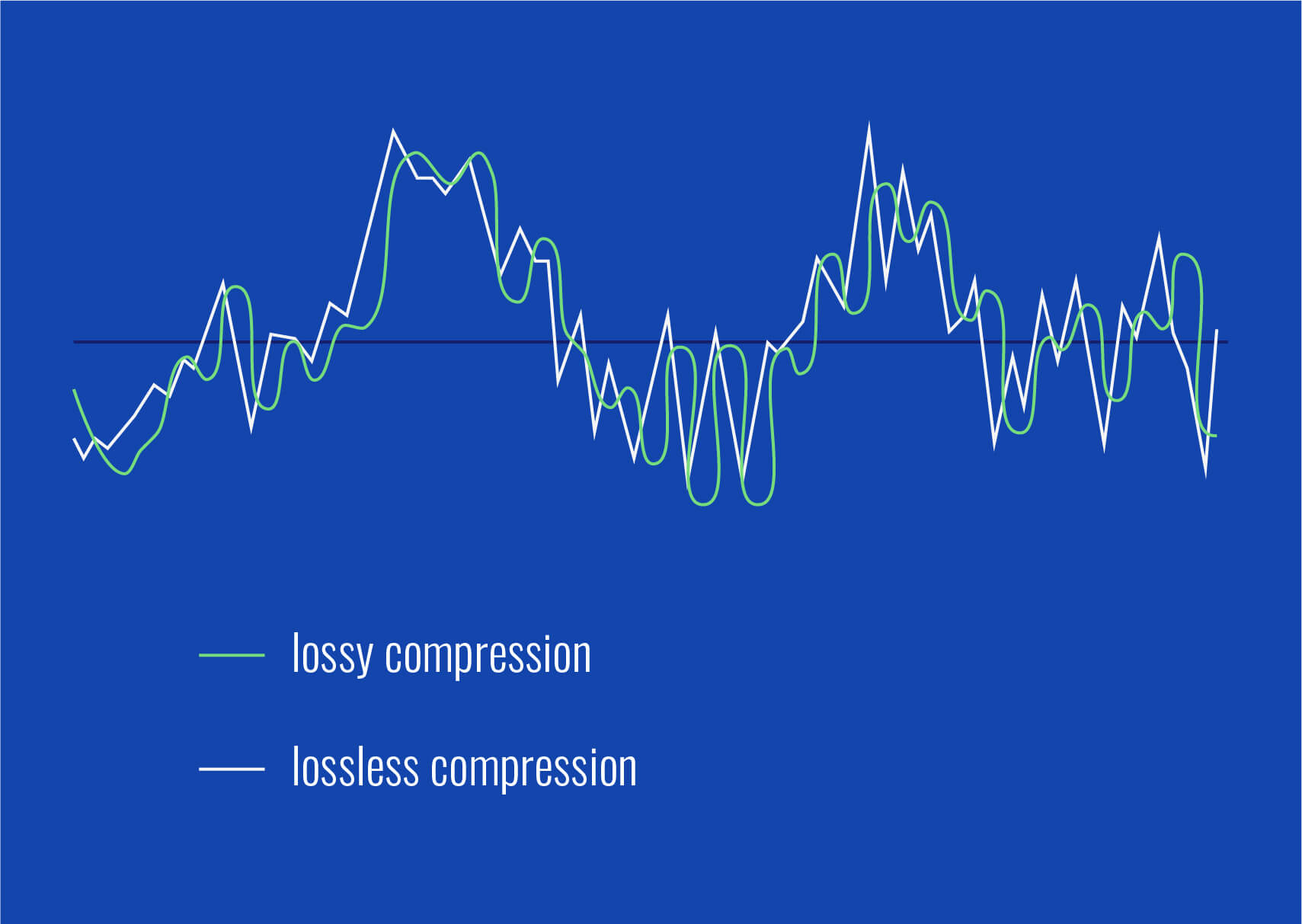
Lossless Compression: Lossless compression algorithms, such as FLAC (Free Lossless Audio Codec), reduce file sizes without compromising audio quality. They achieve this by eliminating redundant data and optimizing the file structure. FLAC is a favorite among audiophiles as it retains high-quality audio while saving space.
Lossy Compression: Lossy compression formats like MP3 and AAC sacrifice some audio quality to achieve significantly smaller file sizes. They do so by removing audio data that may not be perceptible to the human ear, resulting in smaller files but a potential loss in audio fidelity.
Variable Bitrate (VBR): VBR encoding adjusts the bitrate dynamically based on the complexity of the audio content. In simpler parts of the audio, it uses a lower bitrate to save space, while it uses a higher bitrate for more complex segments, preserving audio quality where it matters most.
Reducing audio file size
Reducing the size of audio files can be essential for various reasons, such as conserving storage space or improving the efficiency of data transmission. Here are some strategies to effectively reduce audio file sizes:
Bitrate Adjustment: Lowering the bitrate of an audio file decreases its size but can lead to a noticeable loss in audio quality. Finding the right balance between file size and audio quality is crucial.
Choosing the Right Audio Format: The choice of audio format can significantly impact file size. Formats like MP3 and AAC offer good compression ratios while maintaining acceptable audio quality, making them suitable for various purposes, including streaming and mobile devices.
Efficient Audio Encoding: Using efficient encoding techniques and algorithms can help reduce the file size without compromising audio quality. Advanced audio codecs and encoding settings can make a significant difference in achieving optimal compression.
Minimizing audio file size
Minimizing audio file size is essential for optimizing storage and ensuring smooth audio streaming. Here are some additional tips to achieve this:
Removing Unnecessary Data: Eliminating metadata and unused audio tracks can trim down the file size without affecting the core audio content. This is particularly useful for audio files with extensive metadata.
Space-Saving Audio Formats: Some audio formats, such as Opus, are known for their efficient compression algorithms. Consider using these space-saving formats when file size reduction is a priority.
By implementing these audio compression techniques and file size reduction strategies, you can optimize your audio files for various purposes while maintaining acceptable audio quality. Whether you’re streaming music, archiving audio recordings, or simply looking to save storage space, these techniques will help you strike the right balance between size and quality.
Final Words
Optimizing audio file sizes is a valuable skill in today’s digital age. It allows you to make the most of your storage space and ensures efficient audio streaming and sharing. Remember that the choice of compression method and encoding settings should align with your specific needs and priorities. Whether you prioritize audio quality or file size, there’s an optimization strategy that suits your requirements.
Boost the Volume of Lossy Audio FilesBoost the Volume of Lossy Audio Files
Amplify Sound in Lossy Audio Files
When it comes to enhancing the audio quality of your favorite songs or podcasts, you might find yourself dealing with lossy audio files. These files, while space-efficient, often suffer from reduced sound quality. Fortunately, there are ways to amplify the sound in lossy audio files, giving your listening experience a significant boost.
Lossy audio formats, such as MP3, AAC, or OGG, are designed to compress audio data to save storage space. However, this compression can lead to a loss of audio detail and a decrease in overall volume. To address this, you can use audio editing software to amplify the sound. By carefully adjusting the volume levels, you can make the audio more prominent and enjoyable. Just be cautious not to overdo it, as excessive amplification can lead to distortion.
Another effective way to amplify sound in lossy audio files is to use specialized audio processing tools. These tools often come with built-in volume normalization features that can help you increase the loudness while maintaining the audio’s quality. Whether you’re an aspiring musician, a podcast enthusiast, or simply looking to improve your music collection, amplifying sound in lossy audio files can breathe new life into your audio content.
Increase Volume of Compressed Audio
Compressed audio files have become the norm in today’s digital world due to their convenience and storage efficiency. However, one common drawback of these files is that they often lack the volume and punch of their uncompressed counterparts. If you’re wondering how to increase the volume of compressed audio, you’re in the right place.
To boost the volume of compressed audio files, you can start by using audio editing software. Most audio editing programs allow you to adjust the volume levels of individual tracks or sections of a file. Simply open your desired audio file in the software, locate the volume control, and gradually increase it until you achieve the desired loudness. Be cautious not to push the volume too high, as this can result in distortion and a loss of audio quality.
Additionally, consider using dynamic range compression (DRC) techniques. DRC helps balance the loud and quiet parts of an audio file, making it sound more consistent in volume. This technique is particularly useful when dealing with audio files that have uneven loudness levels. With the right adjustments, you can bring out the nuances in your compressed audio while maintaining clarity and preventing clipping.
By employing these techniques, you can effectively increase the volume of your compressed audio files, making them sound more vibrant and engaging.
Audio Volume Enhancement Techniques
Audio volume enhancement techniques are essential tools for anyone looking to improve the sound quality of their audio files, especially those in lossy formats. These techniques involve various methods to make audio files sound louder and more impactful.
One common technique is equalization, which allows you to adjust the balance of frequencies in your audio. By boosting certain frequency ranges, you can make your audio files sound fuller and more vibrant. This is particularly helpful for restoring lost detail in lossy audio files.
Another technique is the use of audio limiters and compressors. These tools help control the dynamic range of your audio, ensuring that loud parts aren’t too overpowering and quiet parts are audible. They can help you achieve a consistent and balanced volume throughout your audio file.
Additionally, you can explore mastering techniques. Mastering involves fine-tuning the overall sound of an audio file, including volume optimization. Professional mastering engineers use specialized software and hardware to enhance the loudness, clarity, and overall quality of audio recordings.
Enhance Audio Loudness in Lossy Formats
Enhancing audio loudness in lossy formats requires a combination of technical expertise and the right tools. Lossy formats like MP3 or AAC often sacrifice audio quality for smaller file sizes, which can result in lower volume levels. Here’s how you can address this issue effectively.
First, consider using audio editing software with volume normalization features. These features analyze the audio file and adjust the volume levels to ensure consistent loudness. This is particularly useful when dealing with a collection of lossy audio files with varying loudness levels.
Furthermore, explore dynamic range compression (DRC) to balance the audio’s dynamics. DRC reduces the difference between the loudest and quietest parts of an audio file, making it sound more uniform in volume. However, be cautious not to apply excessive compression, as it can lead to an unnatural and compressed sound.
Lastly, if you have a specific audio file that needs a volume boost, you can manually adjust the volume using your preferred audio editing software. Keep in mind that raising the volume too much may introduce distortion, so it’s crucial to find the right balance to enhance the loudness while preserving audio quality.
By utilizing these techniques, you can effectively enhance the audio loudness of your lossy format files and enjoy a more immersive listening experience.
Raise the Volume of Low-Quality Audio
Dealing with low-quality audio can be frustrating, especially when the volume is barely audible. Whether it’s an old recording or a poorly encoded audio file, there are ways to raise the volume and salvage the listening experience.
One approach is to use audio restoration software. These tools are designed to improve the quality of audio recordings, including boosting the volume. They often come with noise reduction features, which can help reduce background noise and further enhance the clarity of your audio.
Another option is to employ audio equalization. By adjusting the equalizer settings, you can emphasize the frequencies that are most critical for clarity and volume. Boosting the mid-range frequencies, for example, can make the vocals and instruments more prominent, resulting in a perceptible increase in volume.
If you have access to the original source of the audio, consider re-recording it or obtaining a higher-quality version. This approach eliminates the limitations of the existing low-quality audio file and ensures a better listening experience.
In summary, raising the volume of low-quality audio involves a combination of software tools and, when possible, improving the source material. These steps can help you enjoy clearer and louder audio, even from initially subpar recordings.
Boosting Sound Levels in Lossy Files
Boosting sound levels in lossy audio files is a common requirement for those looking to enhance their audio experience. Lossy formats, while efficient, often compromise on audio quality, resulting in lower volume levels. Here’s how you can effectively increase the sound levels in such files.
One of the simplest methods is to use audio editing software. Most audio editors provide volume adjustment controls that allow you to raise the volume of your lossy audio files. When doing this, be cautious not to push the volume too high, as it can lead to distortion and a loss of audio fidelity.
Additionally, you can explore the use of audio amplification plugins or tools. These specialized software options are designed to boost the loudness of audio files while minimizing the risk of distortion. They often come with presets and fine-tuning options to ensure optimal results.
When boosting sound levels, it’s essential to consider the intended playback environment. Different platforms and devices may have varying volume levels, so aim for a balance that ensures your audio remains clear and enjoyable across different systems.
By following these techniques and experimenting with volume adjustments, you can effectively boost sound levels in your lossy audio files and enjoy an improved listening experience.
Improving Audio Clarity in Compressed Formats
Improving audio clarity in compressed formats, such as MP3 or AAC, is a pursuit for audiophiles and music enthusiasts alike. While these formats offer excellent compression, they can sometimes sacrifice audio quality. Let’s explore how to enhance audio clarity in such files.
One approach is to use high-quality audio conversion tools. These tools can help you convert your compressed audio files into a lossless format, such as FLAC. Once in a lossless format, you can make edits and enhancements without further loss of audio quality. After the improvements, you can convert the file back to a compressed format with improved clarity.
Another technique involves applying equalization to your audio files. By fine-tuning the frequency balance, you can emphasize certain audio elements, such as vocals or instruments, and reduce any muddiness. This can result in clearer and more defined audio, even in compressed formats.
Furthermore, consider using noise reduction software to eliminate background noise and artifacts that may be present in your compressed audio. Reducing these unwanted elements can significantly enhance audio clarity.
Finally, if you have access to the original, uncompressed source of the audio, consider re-encoding it into a higher-quality compressed format. This can provide better clarity while still maintaining a smaller file size compared to lossless formats.
Enhancing audio clarity in compressed formats requires a combination of technical tools and careful adjustments. By experimenting with these techniques, you can achieve remarkable improvements in audio quality.
Loudness Enhancement for Lossy Audio
Loudness enhancement for lossy audio files can make a world of difference in your listening experience. Lossy formats, known for their space-saving benefits, often suffer from lower perceived volume levels. Here’s how you can effectively enhance the loudness of your lossy audio files.
One of the simplest methods is to use an audio player with built-in equalization settings. These settings allow you to boost specific frequency ranges, making the audio sound louder and more impactful. Experiment with different equalizer presets until you find the one that works best for your audio.
Another technique is to employ audio normalization. Many audio editing software tools provide normalization features that adjust the volume of your audio files to a consistent level. This ensures that all tracks play back at a similar loudness, enhancing the overall listening experience.
If you’re looking for a more advanced solution, consider using audio mastering techniques. Mastering involves fine-tuning the audio’s overall quality, including loudness optimization. Professional mastering engineers use specialized equipment and software to achieve the perfect balance of loudness and clarity.
Lastly, be mindful of the playback device you’re using. Some devices have built-in sound enhancements or equalization settings that can further enhance loudness. Experiment with these settings to find the right balance for your preferences.
By implementing these loudness enhancement techniques, you can breathe new life into your lossy audio files and enjoy them at a higher volume without sacrificing quality.
How to Make Quiet Audio Louder
Have you ever encountered audio that’s so quiet you strain to hear it even when you max out your volume controls? Learning how to make quiet audio louder is a valuable skill that can transform your listening experience.
One straightforward method is to use audio editing software. Open the quiet audio file in your chosen software and locate the volume adjustment controls. Gradually increase the volume until it reaches a comfortable level. Keep an eye on the audio waveform to ensure it doesn’t clip, which can result in distortion.
Another technique involves the use of audio normalization. This process analyzes the audio file and adjusts its volume to a consistent level, making quiet parts more audible without causing loud parts to become overly aggressive. Audio normalization is especially useful when you have multiple audio files with varying loudness levels.
Consider employing dynamic range compression (DRC) as well. DRC helps balance the dynamics of your audio, ensuring that the quietest parts are audible without overpowering the louder segments. However, use DRC judiciously to maintain natural audio quality.
Additionally, explore specialized audio enhancement software or plugins designed specifically for increasing the loudness of quiet audio. These tools often offer advanced algorithms to maximize loudness while minimizing distortion.
By mastering these techniques, you can effectively make quiet audio louder, bringing back the enjoyment in your audio content.
Audio Volume Optimization for Lossy Formats
Audio volume optimization for lossy formats is a crucial step to enhance the quality of your compressed audio files. These formats, while convenient, can suffer from reduced loudness. Let’s delve into the strategies for achieving audio volume optimization.
One method is to use audio editing software with volume adjustment capabilities. Open your lossy audio file in the software and increase the volume to your preferred level. Ensure that you maintain a balance between loudness and audio quality to prevent distortion.
Additionally, explore the use of volume normalization tools available in audio editing software. These tools analyze the audio and automatically adjust the volume to a consistent level. This is particularly useful when you have a collection of lossy audio files with varying loudness levels.
Dynamic range compression (DRC) is another technique to consider. DRC helps level out the loud and quiet parts of an audio file, resulting in a more uniform volume. However, exercise caution to avoid over-compression, which can lead to an unnatural sound.
Lastly, when exporting your audio, choose a higher bit rate if possible. This can improve the overall audio quality and contribute to better volume levels in lossy formats.
By applying these strategies for audio volume optimization, you can enjoy your favorite music and podcasts in lossy formats at a higher volume with improved clarity.
Final Words
In conclusion, whether you’re dealing with lossy audio files, compressed formats, or quiet audio, there are various techniques to boost volume and enhance your listening experience. Experiment with different methods, and remember to strike a balance between loudness and audio quality to achieve the best results. By mastering these techniques, you can enjoy your audio content at its fullest potential.
The Advanced Audio Codec, commonly abbreviated as ACC, is a standardized digital audio compression scheme. It has been designed to achieve better sound quality than MP3 at similar bit rates. Born out of the necessity to enhance audio quality in the era of digital technology, ACC has since become a prominent format in various multimedia applications.
Every format has its unique attributes, and ACC stands out for its efficiency and versatility. Its architecture allows it to retain more sound detail, thereby promising richer audio experiences.
Audio formats play a crucial role in defining the essence of digital media. Choosing the right format can determine the balance between quality and size, a factor paramount to the digital age.
“In the realm of sound, ACC shines bright amidst the myriad of formats.” – The Sound Almanac
Benefits of using ACC audio.
The superiority of ACC over some other traditional formats lies in its myriad advantages. Firstly, it offers a wider frequency range, meaning listeners can hear more details in both the low and high ends of the audio spectrum.
Moreover, it provides a more efficient compression algorithm, allowing for smaller file sizes without sacrificing quality. This makes ACC an excellent choice for streaming services and other platforms where bandwidth and storage are of concern.
Lastly, ACC’s adaptability ensures it can be used across various platforms, ensuring consistent audio quality regardless of the device.
“A great audio format is like a symphony; it brings out the best in every note.” – Digital Media Chronicles
How does AAC compare to MP3?
When one draws a comparison between ACC and MP3, the former often comes out on top in terms of technical prowess. While MP3 revolutionized the music industry in the 90s, ACC has taken the reins in the 21st century by providing enhanced audio clarity.
A key distinction lies in their bit rates. ACC can deliver similar or even better quality than MP3 at a reduced bit rate, making it more efficient and versatile.
However, it’s essential to understand that while ACC might hold technical advantages, MP3’s widespread adoption ensures its presence in most audio applications.
“While MP3 paved the way, ACC refined the path.” – Echoes of the Digital Age
Historical background of AAC format.
Delving into the history, ACC was introduced in 1997 as part of the MPEG-2 standard. Designed to be the successor of MP3, its development was driven by the goal of surpassing the existing audio formats in quality and efficiency.
Throughout its journey, ACC has undergone various enhancements. Each iteration aimed at refining its performance, making it a stalwart in the realm of digital audio.
Today, it stands as a testament to the advancements in audio technology, bridging the past and the present.
“History isn’t just about dates; it’s about innovation, especially in the digital world.” – Auditory Odyssey
Technical specifications of AAC.
ACC’s brilliance is underscored by its technical underpinnings. It supports up to 48 channels, as opposed to MP3’s two channels. Additionally, it boasts a wider frequency range, extending from 8Hz to 96kHz.
Its sampling rates and enhanced compression algorithms ensure a superior audio experience, setting ACC apart from its counterparts.
It’s these technical attributes that allow ACC to retain audio fidelity even at lower bit rates, a hallmark of its design.
“In technology, the devil is in the details, and ACC mastered them all.” – The Digital Revolution
How is AAC used in the modern era?
Today, ACC is ubiquitous. From streaming services to podcasts, its presence can be felt across various multimedia platforms. Its efficiency makes it ideal for applications where bandwidth is paramount, ensuring listeners receive top-tier audio quality.
Moreover, as devices evolve, ACC’s adaptability ensures its seamless integration, cementing its position in the digital realm.
The digital landscape is ever-evolving, and ACC continues to remain at its forefront, owing to its versatility and excellence.
“Modern challenges require modern solutions, and ACC is the answer to today’s audio challenges.” – Tales of the Technological Era
What devices support AAC playback?
Most modern devices, ranging from smartphones to home entertainment systems, support ACC playback. Its widespread acceptance is a testament to its superiority and the industry’s confidence in its capabilities.
Manufacturers realize the importance of sound quality for consumers. By incorporating ACC compatibility, they ensure that listeners get the best audio experience possible, regardless of the device they use.
As technology marches forward, the list of devices that support ACC is only expected to grow.
“In a world filled with noise, it’s the clarity of ACC that shines through.” – Rhythms of the Modern World
Future prospects of AAC technology.
The trajectory of ACC appears promising. As audio requirements become more demanding and listeners more discerning, AAC’s attributes position it as the format of the future.
Developments in audio technology might bring about new formats, but the foundational principles of ACC will likely remain relevant. Its adaptability ensures it can evolve with the times, making it a lasting presence in the audio world.
“The future is but a canvas, and ACC has already painted its masterpiece.” – Soundscapes of Tomorrow
Is AAC the best audio format?
While it’s tempting to label AAC as the best, it’s essential to understand that the “best” is subjective. AAC holds undeniable advantages in terms of efficiency and quality. However, the right format often depends on specific use cases and personal preferences.
That said, in many scenarios, ACC does emerge as the top contender, balancing quality with efficiency like few other formats can.
“Perfection isn’t an end but a journey, and ACC’s journey is nothing short of remarkable.” – The Audio Anthology
Potential drawbacks of AAC.
No technology is without its shortcomings. Some critics argue that while AAC is efficient, it may not always deliver the best quality for audiophiles at higher bit rates compared to other lossless formats.
Additionally, older devices might not support ACC, leading to compatibility issues.
Despite these drawbacks, AAC’s merits often outweigh its limitations, making it a favorite in many applications.
“Every coin has two sides, but it’s the shine that often catches the eye.” – Digital Dilemmas
Final words
The AAC format, with its rich history and technical brilliance, stands as a beacon in the realm of audio technology. Its journey from its inception to its widespread adoption today underscores its significance. As we continue to evolve in the digital age, ACC’s role in shaping our auditory experiences cannot be overstated.








Comments:
This article provided a comprehensive comparison of MP3 and AAC, shedding light on the nuances of audio compression. As a music enthusiast, I found the insights valuable in understanding the trade-offs between file size and audio quality.
– MusicLover123
As a podcast producer, I appreciated the detailed analysis of MP3 and AAC compression. The article highlighted the importance of selecting the right format to ensure optimal audio quality for listeners.
– PodcasterPro
While I’ve been using MP3 for years, this article opened my eyes to the benefits of AAC compression. I’m excited to explore AAC further and potentially improve the audio quality of my digital music library.
– AudioExplorer
This article provided a balanced perspective on MP3 and AAC compression, addressing both the technical aspects and real-world implications. I appreciated the clear explanations and practical examples.
– TechEnthusiast77
As a digital DJ, I found this article to be incredibly informative. Understanding the differences between MP3 and AAC compression will undoubtedly impact my music selection and mixing techniques.
– DJMasterMix
Great article! The comparison between MP3 and AAC compression was eye-opening, especially regarding the trade-offs between file size and audio quality. I’ll definitely be sharing this with my friends.
– MusicFanatic99
This article provided valuable insights into the world of audio compression. As a budding audio engineer, I’m eager to explore AAC further and incorporate it into my workflow for optimal sound quality.
– AudioNovice