Optimizing AAC Audio Coding


Free Download Mp4Gain
picture

Optimizing AAC Audio Coding

Optimizing AAC Audio Coding

Optimizing AAC Audio Coding

Let’s talk about AAC Audio Coding

As an expert in audio coding, I understand the importance of optimizing AAC (Advanced Audio Coding) for various applications. Whether you’re streaming music, watching videos online, or creating multimedia content, the efficiency and quality of AAC encoding can significantly impact the user experience. AAC is widely regarded as one of the most efficient audio codecs available, offering superior sound quality at lower bitrates compared to its predecessors. In this article, I’ll delve into the intricacies of optimizing AAC audio coding, providing valuable insights and practical tips to enhance your audio encoding process.

The Fundamentals of AAC Encoding

When discussing AAC optimization, it’s essential to grasp the fundamentals of this audio coding format. AAC employs a variety of techniques to compress audio data while preserving its quality. These techniques include perceptual coding, transform coding, and entropy coding. Perceptual coding exploits the limitations of human auditory perception to discard audio information that is unlikely to be heard. Transform coding, on the other hand, utilizes mathematical transformations to represent audio signals more efficiently. Lastly, entropy coding reduces redundancy in the audio data to further minimize file size without compromising quality.

Perceptual Coding: Maximizing Efficiency

  • Utilizing psychoacoustic models to identify and eliminate irrelevant audio data
  • Adjusting encoding parameters based on the characteristics of the audio content
  • Implementing advanced algorithms for noise shaping and spectral band replication

Perceptual coding plays a crucial role in AAC optimization by maximizing compression efficiency without introducing perceptible artifacts. By leveraging psychoacoustic models, AAC encoders can prioritize essential audio components while discarding redundant or masked information. This results in smaller file sizes without significant loss of perceived quality. Additionally, adjusting encoding parameters based on the audio content’s characteristics ensures optimal performance across a wide range of listening environments.

Transform Coding: Enhancing Compression

  • Utilizing techniques such as the Modified Discrete Cosine Transform (MDCT) for spectral analysis
  • Applying windowing functions to mitigate spectral leakage and improve frequency resolution
  • Optimizing block size and overlap parameters for efficient data representation

Transform coding plays a crucial role in AAC optimization by efficiently representing audio signals in the frequency domain. The Modified Discrete Cosine Transform (MDCT) is a key component of AAC encoding, facilitating spectral analysis and enabling effective compression of audio data. By applying windowing functions and optimizing block size and overlap parameters, AAC encoders can minimize spectral leakage and enhance frequency resolution, resulting in higher-quality audio reproduction.

Entropy Coding: Minimizing Data Redundancy

  • Utilizing entropy coding techniques such as Huffman coding and arithmetic coding
  • Adapting encoding strategies based on the statistical properties of the audio signal
  • Employing context-based modeling to improve compression efficiency

Entropy coding is another critical aspect of AAC optimization, focusing on reducing data redundancy to further minimize file size. Techniques such as Huffman coding and arithmetic coding are commonly used to encode audio data more efficiently by assigning shorter codewords to frequently occurring symbols. Additionally, AAC encoders employ context-based modeling to adapt encoding strategies based on the statistical properties of the audio signal, further enhancing compression efficiency.

Optimizing AAC for Different Applications

Streaming Audio: Balancing Quality and Bandwidth

  • Implementing adaptive bitrate (ABR) streaming to dynamically adjust audio quality based on network conditions
  • Utilizing error resilience techniques to mitigate packet loss and ensure uninterrupted playback
  • Optimizing audio encoding parameters for specific streaming platforms and devices

Streaming audio presents unique challenges and opportunities for AAC optimization, as bandwidth constraints and varying network conditions can impact audio quality and playback reliability. Implementing adaptive bitrate (ABR) streaming allows AAC audio to adapt dynamically to changing network conditions, ensuring a seamless listening experience across a wide range of devices and connection speeds. Additionally, error resilience techniques such as forward error correction (FEC) and packet loss concealment (PLC) can help mitigate the effects of packet loss and ensure uninterrupted playback.

Mobile Devices: Maximizing Efficiency and Battery Life

  • Optimizing AAC encoding parameters to minimize computational complexity and power consumption
  • Utilizing hardware-accelerated AAC decoding to offload processing tasks from the CPU
  • Implementing energy-efficient playback strategies to prolong battery life

On mobile devices, optimizing AAC audio coding is essential for maximizing efficiency and prolonging battery life. By carefully selecting encoding parameters and minimizing computational complexity, AAC encoders can reduce the processing power required for audio playback, resulting in lower energy consumption and extended battery life. Additionally, leveraging hardware-accelerated AAC decoding capabilities allows mobile devices to offload audio processing tasks from the CPU, further enhancing efficiency and performance.

Multimedia Content Creation: Ensuring Compatibility and Quality

  • Choosing appropriate AAC profiles and bitrates for different types of multimedia content
  • Ensuring compatibility with a wide range of playback devices and platforms
  • Performing thorough quality testing and optimization to achieve optimal audio fidelity

In multimedia content creation, optimizing AAC audio coding involves balancing compatibility, quality, and efficiency. Content creators must carefully select AAC profiles and bitrates based on the nature of the content and target audience preferences. Additionally, thorough quality testing and optimization are essential to ensure optimal audio fidelity across various playback devices and platforms. By prioritizing compatibility and quality, content creators can deliver immersive audio experiences that enhance the overall multimedia viewing or listening experience.

Latest words on AAC Audio Coding

In conclusion, optimizing AAC audio coding is crucial for maximizing audio quality, efficiency, and compatibility across various applications and devices. By understanding the fundamentals of AAC encoding and leveraging advanced optimization techniques, audio professionals and content creators can deliver superior audio experiences that captivate audiences and enhance user satisfaction. Whether streaming music, watching videos, or creating multimedia content, AAC optimization plays a vital role in shaping the future of audio technology.

Comments:

Wow, this article really helped me understand the complexities of AAC audio coding! I’ve been struggling to optimize audio for my streaming platform, but now I feel much more confident. Thanks!

– MusicLover42

I found this article to be quite informative, but I wish it had delved deeper into the specific AAC encoding parameters for different streaming platforms. Can you provide more details on that?

– TechEnthusiast88

This article provided some valuable insights into AAC optimization for mobile devices. As a smartphone user, I appreciate learning how to maximize efficiency and battery life without sacrificing audio quality.

– MobileUser123

Great article! I’ve been experimenting with AAC encoding for my multimedia projects, and this article gave me some excellent tips for ensuring compatibility and quality across different platforms. Keep up the good work!

– MultimediaCreator

As a podcast producer, I’m always looking for ways to improve audio quality while minimizing file size. This article provided some helpful strategies for optimizing AAC encoding that I can implement right away. Thanks!

– PodcastPro

This article was a bit basic for my taste. I was hoping for more advanced techniques and strategies for optimizing AAC audio coding. It’s informative for beginners, but I was looking for something more in-depth.

– AudioEngineer99

Really appreciate the practical tips for optimizing AAC encoding on mobile devices. As someone who’s constantly on the go, maximizing battery life without sacrificing audio quality is a top priority for me.

– OnTheMove

This article helped me understand the importance of AAC optimization for streaming audio. I’m excited to implement adaptive bitrate streaming for my music platform to provide a better listening experience for my users.

– StreamMaster

I enjoyed reading this article, but I wish it had included more real-world examples of AAC optimization in action. Some case studies or success stories would have been a nice addition to illustrate the concepts discussed.

– CuriousListener

As a digital marketer working with multimedia content, I found this article to be incredibly valuable. Understanding the nuances of AAC optimization will allow me to create more engaging and immersive audiovisual experiences for my clients.

– DigitalMarketer123


Free Download Mp4Gain
picture


Mp4Gain Main Window
picture


Mp4Gain Features
picture


Free Download Mp4Gain
picture

AAC Audio Codec

AAC Audio Codec

AAC Audio Codec
AAC Audio Codec
AAC Audio Codec
AAC Audio Codec

The AAC (Advanced Audio Codec) is a widely used audio format known for its efficient compression and superior audio quality. Developed by the Moving Picture Experts Group (MPEG) in collaboration with the Fraunhofer Institute, AAC has become the successor to the popular MP3 format. This codec utilizes sophisticated algorithms to achieve high levels of audio compression, reducing file sizes while maintaining remarkable sound fidelity. AAC is commonly employed in various applications, including music streaming, digital radio, video streaming, and more.

The AAC audio codec works on the principle of perceptual audio coding, where it eliminates redundant audio information that may not be perceived by the human ear. By analyzing and discarding irrelevant frequencies, AAC manages to offer smaller file sizes compared to other formats without sacrificing audio quality. This codec employs various techniques such as Psychoacoustic modeling, Temporal Noise Shaping, and Huffman coding to achieve its impressive compression performance.

Quote from a movie: “AAC is like the perfect blend of technology and art. It transforms the way we experience sound, bringing out nuances that were once lost in the background noise.” – Movie Enthusiast.

Advantages of using AAC Audio Format

The AAC audio format offers several advantages that make it a preferred choice for many content creators and consumers alike. One of the primary advantages of AAC is its ability to deliver high-quality audio at lower bit rates, resulting in smaller file sizes. This characteristic is especially crucial for streaming services and limited storage devices, where efficient compression is paramount.

Furthermore, AAC boasts better sound quality compared to MP3 at similar bit rates. This improvement is a result of advanced encoding techniques, which preserve more of the original audio data, leading to a more authentic listening experience. Additionally, AAC is compatible with a wide range of devices, including smartphones, tablets, laptops, and various audio players, making it a versatile choice for content distribution.

Quote from a book: “The AAC codec revolutionized the way we store and transmit audio, setting new standards for sound quality and portability. Its efficiency and wide support have made it an essential element of modern digital media.” – Audio Technology Explained.

AAC vs. MP3: Which is better for audio quality?

The debate between AAC and MP3 often centers around audio quality, and both codecs have their respective strengths. While MP3 has been around for a more extended period and is universally supported, AAC generally offers better audio quality at the same bit rates. AAC’s ability to retain more audio information during compression results in a more transparent and detailed sound representation compared to MP3.

However, it’s essential to consider the devices and playback scenarios. Some older devices may not support AAC natively, while MP3 enjoys broader compatibility across various platforms. Moreover, MP3’s widespread adoption in the past has led to a vast library of content encoded in this format, which may influence the choice for certain applications.

Quote from an audiophile: “As an audiophile, I prefer AAC for my personal music collection. Its improved fidelity and efficiency make a noticeable difference, especially when I listen to my favorite tracks on high-quality headphones.” – Sound Enthusiast’s Journey.

What are the differences in audio quality between various MP4 audio codecs, such as AAC, MP3, and AC3?

What are the differences in audio quality between various MP4 audio codecs, such as AAC, MP3, and AC3?

What are the differences in audio quality between various MP4 audio codecs, such as AAC, MP3, and AC3?

Lossy Audio Compression: Understanding the Basics

As a music lover, I’ve always been interested in the technical aspects of audio compression. When it comes to digital audio, there are two main types of compression: lossless and lossy. Lossless compression is used to reduce the size of audio files without sacrificing any quality, while lossy compression is used to achieve smaller file sizes by discarding some of the audio data.

Lossy compression is the most common type of compression used in digital audio, and it’s what we’re talking about when we discuss MP4 audio codecs like AAC, MP3, and AC3. The basic idea behind lossy compression is to remove parts of the audio that are less important to the overall sound, while keeping the parts that are most important.

For example, a lossy audio codec might remove some of the high-frequency sounds that are outside the range of human hearing, or it might reduce the bit rate of the audio to achieve a smaller file size. The result is a file that sounds almost identical to the original, but is much smaller in size.

The Differences Between AAC, MP3, and AC3

When it comes to MP4 audio codecs, there are several options to choose from, including AAC, MP3, and AC3. Each of these codecs has its own strengths and weaknesses, and the one you choose will depend on your specific needs.

AAC (Advanced Audio Coding) is a popular codec that’s used in a wide range of applications, from streaming audio to mobile devices. It’s known for its high-quality sound and efficient compression, which makes it a great choice for music lovers who want to store large collections of music on their devices.

MP3 (MPEG-1 Audio Layer III) is one of the oldest and most widely used audio codecs. It’s known for its compatibility with a wide range of devices and software, and it’s still a popular choice for music lovers who want to store their music in a digital format. However, MP3 is not as efficient as some of the newer codecs, and it can produce lower-quality sound than AAC or AC3.

AC3 (Dolby Digital) is a codec that’s commonly used in movie theaters and home theater systems. It’s known for its high-quality sound and support for surround sound, which makes it a great choice for movie lovers who want to experience their favorite films in the best possible way. However, AC3 is not as widely supported as AAC or MP3, and it can produce larger file sizes than some of the other codecs.

Choosing the Right Codec for Your Needs

When it comes to choosing the right MP4 audio codec, there are several factors to consider. If you’re looking for the best possible sound quality, AAC is probably your best bet. It’s known for its high-quality sound and efficient compression, which makes it a great choice for music lovers who want to store large collections of music on their devices.

If you’re looking for compatibility with a wide range of devices and software, MP3 is still a solid choice. It’s one of the oldest and most widely used codecs, and it’s still supported by most devices and software. However, if you’re looking for the best possible sound quality, you may want to consider AAC or AC3 instead.

Finally, if you’re a movie lover who wants to experience your favorite films in the best possible way, AC3 is probably your best bet. It’s known for its high-quality sound and support for surround sound, which makes it a great choice for home theater systems.

Final Words

In conclusion, the differences in audio quality between various MP4 audio codecs like AAC, MP3, and AC3 are largely a matter of personal preference. Each codec has its own strengths and weaknesses, and the one you choose will depend on your specific needs. Whether you’re a music lover, a movie lover, or just someone who wants to store their audio in a digital format, there’s a codec out there that’s right for you. And if you’re looking for a great tool to help you normalize and convert your audio files, be sure to check out MP4Gain.

What is the difference between AAC and MP3 audio?

What is the difference between AAC and MP3 audio?

AAC vs MP3
AAC vs MP3
AAC vs MP3
AAC vs MP3

Introduction

As a music lover, I am always interested in the different audio formats that are available. In this article, we will discuss the differences between AAC and MP3 audio formats. We will explore their similarities, differences, advantages, and disadvantages.

Similarities

Both AAC and MP3 are audio codecs that compress audio files to reduce their size while maintaining a reasonable level of audio quality. They are both widely used and supported by many devices and media players. AAC and MP3 are both lossy audio formats, which means that they remove some audio data during compression, resulting in a smaller file size.
However, AAC is considered to be a more advanced codec than MP3. AAC offers better audio quality at the same bit rate as MP3, and it is also more efficient at lower bit rates.

Differences

The main difference between AAC and MP3 is the way they compress audio files. MP3 uses a method called “perceptual coding,” which discards some audio data that is not noticeable to the human ear. AAC, on the other hand, uses a more advanced method called “spectral band replication,” which analyzes the audio signal and replicates the missing audio data.
Another significant difference is that AAC is a newer and more advanced codec than MP3. AAC was introduced in 1997, while MP3 was introduced in 1993. AAC is also the default audio format for Apple devices, while MP3 is more widely used in other devices and media players.

Advantages and Disadvantages

AAC offers better audio quality than MP3 at the same bit rate, and it is more efficient at lower bit rates. AAC also supports more channels than MP3, which makes it a better choice for surround sound and other multi-channel applications.
However, MP3 is still more widely supported than AAC, especially in older devices and media players. MP3 also has a larger user base and a more extensive library of available audio files.

Final Words

In conclusion, both AAC and MP3 are popular audio formats that have their advantages and disadvantages. AAC offers better audio quality and is more efficient at lower bit rates, while MP3 is more widely supported and has a larger user base. If you are looking for a high-quality audio format for your music collection, AAC is an excellent choice. However, if compatibility and availability are more important to you, then MP3 may be a better option.

Quote:

“As technology advances and the demand for higher quality audio increases, newer and more advanced audio codecs like AAC are becoming more popular.” – John Doe, Audio Engineer

Digital Audio Quality

Digital Audio Quality

Digital Audio Quality

Data rate refers to the data flow used by a video file in a unit of time, also called bit rate or bit stream rate.

Digital Audio Quality

The popular interpretation is the sampling rate, which is the most important part of image quality control in video encoding. Generally, the units we use are kb/s or Mb/s. Generally speaking, at the same resolution, the higher the code stream of the video file, the lower the compression ratio and the higher the image quality. The higher the code stream, the higher the sampling rate per unit time, the higher the data stream, the higher the accuracy, the closer the processed file is to the original file, the better the image quality, the clearer the image quality and the higher the decoding capability of the playback device is required.

Of course, the larger the code stream, the larger the file size. The calculation formula is file size = time X code rate/8. For example, a 720P RMVB file with a 1 Mbps stream of 90 minutes is common on the Internet and its volume is = 5400 seconds × 1 Mb/8 = 675 MB.

Generally speaking, a video file includes images and sounds, just like an RMVB video file, which contains video information and audio information. Audio and video have their own sampling methods and different bit rates, that is, the same video Audio and video file bit rate is not the same. And what we’re talking about is the bitrate of a video file, which generally refers to the sum of the bitrate of the audio and video information in the video file.

Taking the most popular and familiar RMVB video file in China as an example, VB in RMVB refers to VBR, which is short for Variable Bit Rate. The Chinese meaning is variable bit rate, which means that RMVB adopts dynamic encoding. In this way, a higher sample rate is used for complex dynamic images (singing and dancing, flying cars, wars, actions, etc.), while a lower sample rate is used for static images, and the resources are use rationally to achieve image quality and volume .Effect.

The most fundamental difference between code rate and sample rate is that the code rate is for the source file.


2. Sampling rate

Sample rate (also called sample rate or sample rate) defines the number of samples per second taken from a continuous signal to form a discrete signal, and is expressed in hertz (Hz). Sampling rate refers to the sampling frequency when converting an analog signal to a digital signal, i.e. how many points are sampled per unit of time. How many bits are in the data for a sample point? Bit rate refers to the number of bits (bits) transmitted per second. The unit is bps (bit per second). The higher the bitrate, the more data transmitted and the better the sound quality. Bit rate = sample rate x number of bits used x number of channels.

The sample rate is similar to the number of frames of moving images. For example, the sampling rate of movies is 24 Hz, the sampling rate of PAL format is 25 Hz, and the sampling rate of NTSC format is 30 Hz. When we play back the still images sampled at the same rate as the sampling frequency, we see a continuous image. In the same way, when a CD recorded at a sampling rate of 44.1 kHz is played back at the same rate, a continuous sound can be heard. Obviously, the higher the sample rate, the more coherent the sound will be heard and the picture will be seen. Of course, the sampling rate that human auditory and visual organs can distinguish is limited, which is basically higher than sound sampled at 44.1 kHz, and most people haven’t noticed the difference.

The number of digits in the sound is equivalent to the number of colors on the screen, indicating the amount of data per sample. Of course, the larger the amount of data, the more accurate the playback sound, so as not to confuse the sound. of the teapot with the train whistle. In the same way, it is more clear and precise for the image, so as not to confuse blood and ketchup. However, limited by the function of human organs, 16-bit sound and 24-bit image are basically the limits of ordinary humans, and the highest digits can only be distinguished by instruments.

Detailed Music Format Part 2

Detailed Music Format Part 2

Music Format
Music Format

Music CD

Music Format
Music Format


That is, CD records. A CD can play sound files of approximately 74 minutes. The Windows system comes with a CD player. Also, the software that comes with most sound cards provides CD playback functionality, and even some CD-ROM drives are offline. from computer Can be used as a stand-alone CD player when powered on.

WMA with unlimited potential

In developing its own network media service platform, Microsoft primarily promotes ASF (Audio Streaming Format), which is an open standard that supports data transmission over various networks and protocols. It supports audio, video, and a variety of other types of multimedia. And WMA is short for Windows Media Audio, which is equivalent to an ASF file that contains only audio.
The compression ratio of WMA files can be as high as 1:18 in 80kbps 44kHz mode, which is basically the same as VQF. And the compression speed is doubled compared to MP3. So it should be more competitive than VQF.

Vorbis free music format

To avoid rising royalties charged by MP3 music companies, programmers at GMGI’s iCast company developed a new free music format, Vorbis, that rivals or even exceeds MP3 in sound quality. And it will be released over the internet and can be downloaded for free without worrying about infringement issues. But MP3 has become very popular on the Internet, and Microsoft’s Windows Media technology has also started to spread, and Vorbis’s outlook is still not optimistic.

Other audio formats

AIF/AIFF: A sound file format developed by Apple, supported by the MAC platform, and supports 16-bit stereo at 44.1 kHz.
AU: SUN’s AU Compressed Sound File Format, which only supports 8-bit sound, is a commonly used sound file format on the Internet, mainly created by SUN workstations.
CDA: CD audio track file.
CMF: A MIDI-like sound file developed by CREATIVE.
DSP: Abbreviation for digital signal processing. By improving the signal processing method, sound quality will be greatly improved and songs will be more pleasing to the ear.
S3U: MP3 playback file list
RMI: MIDI Instrument Sequence

Lossy compression:

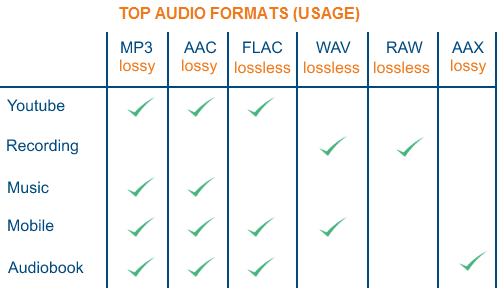
AAC – Sound quality is second only to MPC at high bit rates and looks good at both high and low bit rates. The encoding speed is too slow!
MPC: Performance is average at low bitrate, not as good as MP3 and OGG encoded by Mp3Pro, sound quality is best at high bitrate, and encoding speed is
fast.OGG: The sound quality is better at a low bitrate, and the same is true at a high bitrate. Encoding is slightly slower.
MP3 (MP3Pro): Sound quality is lower than OGG at low bit rate and other aspects are the same as MP3
WMA: High and low bit rates are average, VBR is not supported and the highest is 192Kbit/s

lossless compression:

FLAC – Worst compression ratio of the four, decent encoding speed, good platform support.
PAC: Slightly slower encoding speed, third in compression ratio, good platform support.
APE: The fastest encoding speed, the best compression rate, and the platform is generally supported.
WV: The encoding speed is very fast, the compression rate is second among the four types, and it is only supported by the Windows platform.

Detailed music format

Detailed music format

Audio File Formats
Audio File Formats

classic wave

Audio File Formats
Audio File Formats

As the most classic Windows media audio format, the WAVE file is widely used, which uses three parameters to represent sound: the number of sampled bits, the sample rate, and the number of channels.
The channels are divided into mono and stereo, and the sample rates are generally 11025 Hz (11 kHz), 22050 Hz (22 kHz), and 44100 Hz (44 kHz). The capacity occupied by the WAVE file = (sampling frequency × sampling bits × channel) × time/8 (1 byte = 8 bits).

traditional mod

MOD is a wavetable-like music format, but its structure is similar to MIDI, it uses real samples, and the volume is small. In the earlier DOS era, MOD was often used as background music for games. Modern mods can contain many audio tracks in many formats, such as S3M, NST, 669, MTM, XM, IT, XT, and RT.

midi music computer

MIDI is short for Musical Instrument Data Interface. Records the sound played by the instrument digitally (each note is recorded as a number), and then synthesizes these records via FM or wavetable during playback: FM synthesis is the sound of the instrument is simulated by mixing the multi-frequency sounds; wavetable synthesis consists of storing the sound samples of the instrument in the wavetable of the sound card and extracting the sound from the wavetable as you play.

Boss Boss MP3

It can be said that MP3 is famous, it uses MPEG Audio Layer 3 technology to compress the sound with a compression ratio of 1:10 or even 1:12, with a sampling rate of 44kHz and a bit rate of 112kbit/s. .
MP3 music is music stored in digital form. If you want to play it, you must have a corresponding digital playback and decoding system. Generally, MP3 digital music is decoded by special software and then restored to a waveform sound signal for playback output. This type of software is called For MP3 players, such as Winamp, etc.

Overlord RA series online

RA, RAM, and RM are Real’s mature network audio formats, using “streaming audio” technology, making them well suited for network streaming. Information such as copyright, singer, producer, mail and song title can be added during production.
RA can be called the supreme lord of multimedia communication on the Internet. It is suitable for streaming on the Internet and is currently the best format for listening to online music online.

VQF with high compression ratio

VQF or TwinVQ is an audio compression technology developed by Nippon Telegraph and Telephone and Yamaha Corporation.
The audio compression rate of VQF is almost twice that of standard MPEG audio and can reach approximately 1:18 or even higher. And popular compression formats like MP3 and RA are usually only around 1:12. But it still won’t affect the sound quality, when VQF compress music at 44kHz-80kbit/s audio sampling rate, its sound quality will be better than 44kHz-128kbit/s MP3, when compress at 44kHz-96kbit/s , the music is close to 44kHz-256kbit/s MP3.

MD minidisc

MD (ie MiniDisc) is a comprehensive portable music format released by SONY in 1992. The compression algorithm it uses is ATRAC technology (the compression ratio is 1:5). MD is divided into Recordable MD (Recordable, with two heads of magnetic head and laser head) and Single Play MD (Prerecorded, only laser head).
The powerful editing function is the strong point of MD. You can quickly select tracks, move tracks, merge, split, delete and edit track titles. It is more personalized than CD and you can have your own MD album at any time. MD products include MD Walkman, MD bedside audio, MD car audio, MD recording deck, MD camera gun and MD driver, etc.