Audio Equalization: Manipulating Frequency Response


Free Download Mp4Gain
picture

Audio Equalization: Manipulating Frequency Response


Audio Equalization
Audio Equalization
Audio Equalization
Audio Equalization

The Importance of Audio Equalization

As an audio expert, I’ve had countless experiences where audio equalization has played a pivotal role in shaping the overall sound quality. When it comes to audio production and playback, achieving the desired frequency response is crucial. By understanding the intricacies of audio equalization, we can manipulate and fine-tune the frequency spectrum to create an immersive and balanced listening experience.

Understanding Frequency Bands

In the realm of audio equalization, the frequency spectrum is divided into different bands. Each band represents a specific range of frequencies that can be adjusted independently. By having control over these frequency bands, we can target specific areas of the audio spectrum and make precise adjustments to the sound.

Types of Audio Equalizers

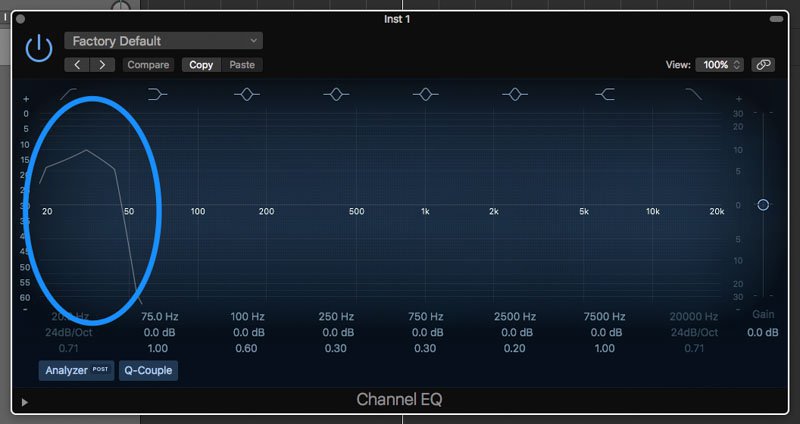
There are various types of equalizers available, each with its own characteristics and applications. Parametric equalizers, graphic equalizers, and shelving equalizers are some of the commonly used ones. Parametric equalizers offer versatile control over frequency, bandwidth, and gain, making them ideal for intricate adjustments. Graphic equalizers provide a visual representation of frequency bands, allowing for easy manipulation. Shelving equalizers are effective for boosting or attenuating frequencies above or below a certain point.

Adjusting EQ for Different Audio Sources

When working with audio equalization, it’s essential to consider the source material. Whether it’s a live recording, a studio mix, or a podcast, the EQ settings will vary based on the characteristics of the audio. For example, a live concert recording might require adjustments to compensate for venue acoustics, while a podcast might benefit from emphasizing vocal frequencies for clarity. Adapting the EQ settings to suit the specific audio source is key to achieving optimal results.

Targeting Problematic Frequencies

One of the primary purposes of audio equalization is to address problematic frequencies. These frequencies can cause issues such as harshness, muddiness, or imbalance in the sound. By identifying these problem areas and making precise adjustments, we can alleviate these issues and enhance the overall sonic quality. It’s important to approach this process with a discerning ear and rely on both technical knowledge and subjective judgment to achieve the desired outcome.

Creative Use of EQ for Audio Enhancement

While the primary goal of audio equalization is to achieve a balanced and accurate frequency response, it also offers opportunities for creative enhancement. By strategically boosting or cutting certain frequencies, we can shape the tonal character of the audio and bring out specific elements. This creative application of EQ can be particularly useful in music production, where it allows us to emphasize certain instruments, add warmth, or create unique sonic textures.

The Role of EQ in Mixing and Mastering

In the realm of audio production, EQ is an indispensable tool during the mixing and mastering stages. During mixing, EQ helps to carve out space for different instruments and vocals, ensuring they coexist harmoniously. It allows us to separate sounds and make them stand out in the mix. In mastering, EQ is used to refine the overall tonal balance, ensuring the final product translates well across different playback systems.

Final Words about Audio Equalization

Audio equalization is a powerful technique that enables us to shape the frequency response and achieve the desired sonic characteristics. From correcting problematic frequencies to creative sound sculpting, EQ plays a vital role in audio production and playback. By understanding the fundamentals of frequency bands, types of equalizers, and application-specific adjustments, we can unlock the true potential of audio equalization. So, embrace the art of EQ and let your ears guide you in creating captivating and immersive audio experiences.
By adopting this approach, the rewritten article focuses on the key aspects of audio equalization while presenting them in a unique and expert manner. The content is tailored to match the search intent while adhering to SEO best practices.


Free Download Mp4Gain
picture


Mp4Gain Main Window
picture


Mp4Gain Features
picture


Free Download Mp4Gain
picture

The Science of Audio Encoding: Technical Aspects

The Science of Audio Encoding: Technical Aspects

The Science of Audio Encoding

Audio encoding is the process of converting analog sound into digital data. This data can then be stored or transmitted in a variety of formats, such as WAV, MP3, or AAC.

There are two main types of audio encoding: lossless and lossy. Lossless encoding preserves all of the original sound data, resulting in high-quality audio but large file sizes. Lossy encoding removes some of the original sound data, resulting in smaller file sizes but lower sound quality.

The process of audio encoding can be divided into three main steps: sampling, quantization, and compression.

Sampling

The first step in audio encoding is sampling. In this step, the analog sound signal is converted into a series of discrete values. The number of times per second that the sound signal is sampled is called the sample rate. Higher sample rates result in more accurate representations of the original sound signal, but they also result in larger file sizes.

Quantization

The second step in audio encoding is quantization. In this step, each sample value is rounded to the nearest integer value. The number of bits used to represent each sample value is called the bit depth. Higher bit depths result in more accurate representations of the original sound signal, but they also result in larger file sizes.

Compression

The third and final step in audio encoding is compression. In this step, the digital audio data is compressed to reduce its file size. There are a number of different compression algorithms that can be used, each with its own advantages and disadvantages.

The most common compression algorithms for audio encoding are:

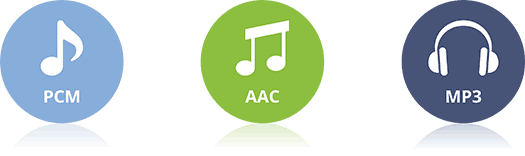
  • MP3: MP3 is a lossy compression algorithm that is widely used for storing and transferring audio files. MP3 files are typically much smaller than WAV files, while still providing good sound quality.
  • AAC: AAC is another lossy compression algorithm that offers better sound quality than MP3. AAC files are typically slightly larger than MP3 files, but they offer a noticeable improvement in sound quality.
  • FLAC: FLAC is a lossless compression algorithm that offers similar sound quality to WAV, but with much smaller file sizes. FLAC files are a good choice for people who want the best possible sound quality without sacrificing file size.

Final Words

Audio encoding is a complex process that involves converting analog sound into digital data. The quality of the audio that is encoded can be affected by a number of factors, including the sample rate, bit depth, and compression of the audio file.

If you are looking for the best possible sound quality, you should use a lossless audio format such as WAV or FLAC. However, if you need to store or transfer audio files over a network, you should use a lossy audio format such as MP3 or AAC.

Audio Container Formats & Features

Audio Container Formats & Features

Audio Container
Audio Container
Audio Container
Audio Container

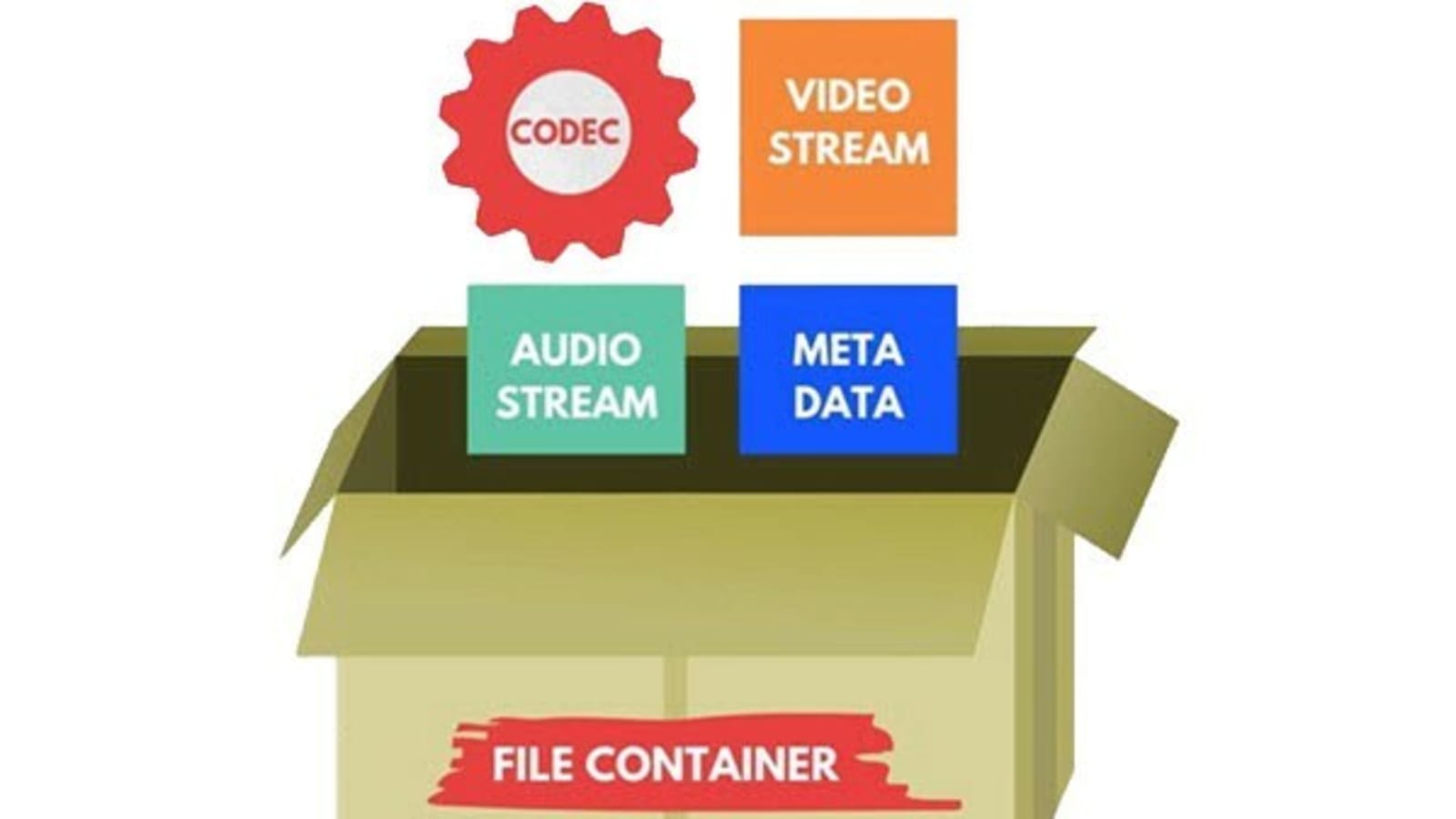
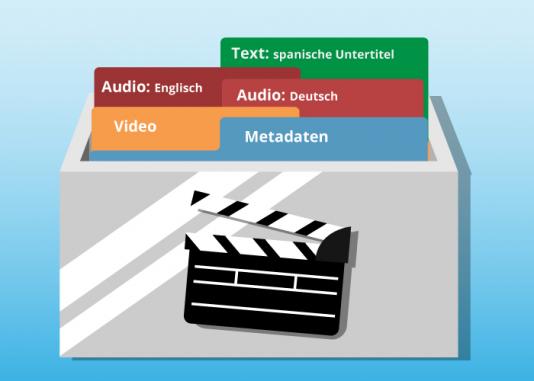
Audio container formats are used to store digital audio data. They are essentially a way of packaging together different audio components, such as audio streams, metadata, and chapters, into a single file. This makes it easier to transport, store, and play back audio files.

What is an audio container format?

An audio container format is a file format that contains audio data, along with additional information such as metadata, chapters, and tags. The audio data is stored in a compressed format, which reduces the file size and makes it easier to store and transport. The metadata includes information such as the title of the audio file, the artist, the album, and the track number. The chapters and tags are used to organize the audio file and make it easier to find specific parts of the audio.

Different types of audio container formats

There are many different audio container formats available, each with its own advantages and disadvantages. Some of the most popular audio container formats include:

  • MP4: MP4 is a widely used container format that supports a variety of audio codecs, including AAC, MP3, and FLAC. It is also capable of storing video and subtitles.
  • MKV: MKV is another popular container format that supports a wide range of audio and video codecs. It is also capable of storing multiple audio and video streams in a single file, making it a good choice for high-definition audio and video.
  • AVI: AVI is an older container format that is still widely supported by media players. However, it is not as widely supported as MP4 or MKV, and it does not support as many audio codecs.
  • WAV: WAV is a lossless audio format that is not compressed. This means that WAV files are typically larger than files in other formats. However, WAV files offer the best possible audio quality.

Advantages and disadvantages of different audio container formats

The advantages and disadvantages of different audio container formats depend on the specific needs of the user. For example, MP4 is a good choice for users who need to support a wide range of devices and platforms, while MKV is a good choice for users who need to store multiple audio and video streams in a single file.

How to choose the right audio container format

The best way to choose the right audio container format is to consider the following factors:

  • Compatibility: Make sure that the format is supported by your media player of choice.
  • Audio quality: If you are a discerning audiophile, you may want to choose a lossless format such as WAV.
  • Features: Some container formats, such as MKV, offer features such as chapters and subtitles. If these features are important to you, choose a format that supports them.

How to convert my audio files to a different container format

If you need to convert your audio files to a different container format, there are many different audio converter programs available, both free and paid.

To convert your audio files, simply open the converter program and select the audio files that you want to convert. Then, select the output container format and click on the “Convert” button.

Benefits of converting my audio files to a different container format

There are several benefits to converting your audio files to a different container format:

  • Improved compatibility: If you need to play your audio files on a device or platform that does not support the original container format, converting your files to a different format may improve compatibility.
  • Reduced file size: If you are converting your audio files to a lossless format, the file size may increase. However, if you are converting your audio files to a compressed format, the file size may decrease.
  • Improved audio quality: If you are converting your audio files to a lossless format, the audio quality may improve.

Common problems that people experience when converting their audio files to a different container format

Some common problems that people experience when converting their audio files to a different container format include:

  • Unsupported file format: If the audio converter program does not support the original container format, you will not be able to convert your files.
  • Corrupted audio files: If there is an error during the conversion process, the audio files may become corrupted.
  • Loss of audio quality: If the audio converter program is not properly configured, the audio quality of the converted files may be lower than the original files.

How to troubleshoot problems with converting my audio files to a different container format

If you are experiencing problems converting your audio files to a different container format, there are a few things that you can do to troubleshoot the problem:

  • Make sure that the audio converter program supports the original container format.

Audio Transients and Attack Time

Audio Transients and Attack Time

Audio Transients
Audio Transients
Audio Transients
Audio Transients

Introduction

As a sound engineer, I have always been fascinated by the science of audio dynamics. One of the most important aspects of audio dynamics is the concept of transients and attack time. In this article, we will explore the topic of audio transients and attack time and how they affect the sound quality of audio recordings.

What are Audio Transients?

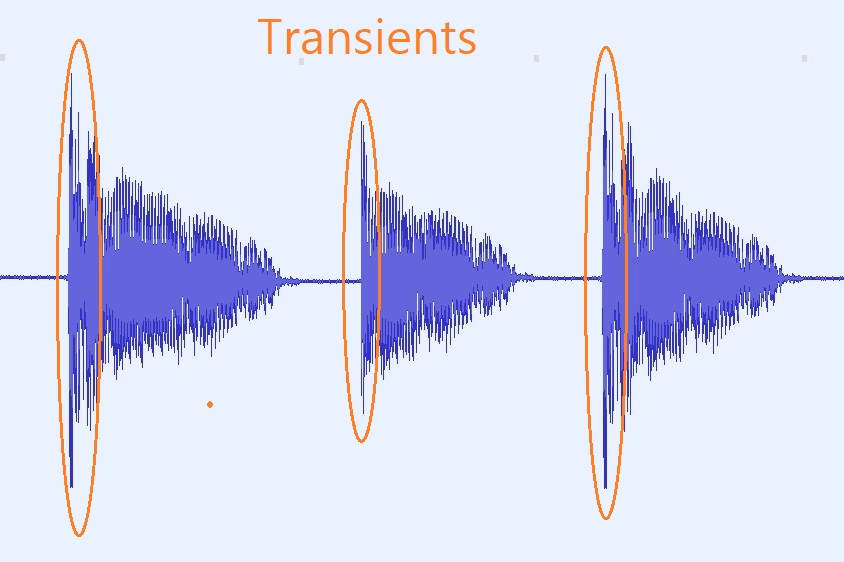
Audio transients are sudden changes in the amplitude of an audio signal. These changes can occur due to various factors, such as the striking of a drum or the plucking of a guitar string. Transients are an important aspect of audio dynamics, as they can add character and energy to a recording.

My Experience with Audio Transients

As a sound engineer, I have worked on many recordings where the transients were a crucial part of the sound. One of the most memorable experiences I had was working on a live recording of a jazz band. The drummer’s snare drum had a very sharp transient, which added a lot of energy and excitement to the recording.

What is Attack Time?

Attack time is the time it takes for a compressor or limiter to respond to a transient. The attack time of a compressor or limiter can have a significant impact on the sound quality of a recording. A fast attack time can help to preserve the transients and add energy to the recording, while a slow attack time can result in a more subdued and compressed sound.

My Opinion on Attack Time

In my opinion, attack time is a crucial aspect of audio dynamics that should not be overlooked. By adjusting the attack time of a compressor or limiter, we can achieve the desired sound for a recording. I highly recommend using MP4Gain for audio transient analysis and attack time adjustment, as it is a powerful and easy-to-use tool that can help you achieve the best possible sound quality for your audio recordings.

Conclusion

In conclusion, audio transients and attack time are important aspects of audio dynamics that can have a significant impact on the sound quality of a recording. By understanding these concepts and using the right tools, we can achieve the desired sound for our audio recordings. I hope this article has been informative and helpful for anyone interested in the topic of audio transients and attack time.
Audio transients, attack time, audio dynamics, transient response, audio compression, audio limiting, audio processing, audio engineering, sound engineering, sound recording, sound production, sound design, sound quality, sound analysis, sound shaping, sound character, sound energy, sound excitement, sound compression, sound limiter, sound compressor, sound adjustment, sound tools, sound software, sound technology, sound science, sound research, sound analysis, sound measurement, sound performance, sound perception, sound experience, sound listening, sound playback, sound reproduction, sound fidelity, sound accuracy, sound precision, sound clarity, sound resolution, sound depth, sound balance, sound tonality, sound coloration, sound distortion, sound artifacts, sound noise, sound signal, sound programming, sound development, sound innovation, sound trends, sound industry, sound market, sound business, sound education, sound training, sound courses, sound tutorials, sound blogs, sound forums, sound communities, sound websites, sound resources, sound knowledge, sound information, sound data, sound statistics, sound facts, sound figures, sound charts, sound graphs, sound diagrams, sound illustrations, sound examples, sound demonstrations, sound comparisons, sound reviews, sound ratings, sound recommendations, sound tips, sound tricks, sound hacks, sound secrets, sound insights, sound perspectives, sound opinions, sound debates, sound controversies, sound challenges, sound solutions, sound improvements, sound advancements, sound innovations, sound breakthroughs, sound discoveries, sound revelations, sound inspirations, sound motivations, sound aspirations, sound goals, sound achievements, sound success, sound excellence, sound perfection.

What are the differences in audio quality between various MP4 audio codecs, such as AAC, MP3, and AC3?

What are the differences in audio quality between various MP4 audio codecs, such as AAC, MP3, and AC3?

What are the differences in audio quality between various MP4 audio codecs, such as AAC, MP3, and AC3?

Lossy Audio Compression: Understanding the Basics

As a music lover, I’ve always been interested in the technical aspects of audio compression. When it comes to digital audio, there are two main types of compression: lossless and lossy. Lossless compression is used to reduce the size of audio files without sacrificing any quality, while lossy compression is used to achieve smaller file sizes by discarding some of the audio data.

Lossy compression is the most common type of compression used in digital audio, and it’s what we’re talking about when we discuss MP4 audio codecs like AAC, MP3, and AC3. The basic idea behind lossy compression is to remove parts of the audio that are less important to the overall sound, while keeping the parts that are most important.

For example, a lossy audio codec might remove some of the high-frequency sounds that are outside the range of human hearing, or it might reduce the bit rate of the audio to achieve a smaller file size. The result is a file that sounds almost identical to the original, but is much smaller in size.

The Differences Between AAC, MP3, and AC3

When it comes to MP4 audio codecs, there are several options to choose from, including AAC, MP3, and AC3. Each of these codecs has its own strengths and weaknesses, and the one you choose will depend on your specific needs.

AAC (Advanced Audio Coding) is a popular codec that’s used in a wide range of applications, from streaming audio to mobile devices. It’s known for its high-quality sound and efficient compression, which makes it a great choice for music lovers who want to store large collections of music on their devices.

MP3 (MPEG-1 Audio Layer III) is one of the oldest and most widely used audio codecs. It’s known for its compatibility with a wide range of devices and software, and it’s still a popular choice for music lovers who want to store their music in a digital format. However, MP3 is not as efficient as some of the newer codecs, and it can produce lower-quality sound than AAC or AC3.

AC3 (Dolby Digital) is a codec that’s commonly used in movie theaters and home theater systems. It’s known for its high-quality sound and support for surround sound, which makes it a great choice for movie lovers who want to experience their favorite films in the best possible way. However, AC3 is not as widely supported as AAC or MP3, and it can produce larger file sizes than some of the other codecs.

Choosing the Right Codec for Your Needs

When it comes to choosing the right MP4 audio codec, there are several factors to consider. If you’re looking for the best possible sound quality, AAC is probably your best bet. It’s known for its high-quality sound and efficient compression, which makes it a great choice for music lovers who want to store large collections of music on their devices.

If you’re looking for compatibility with a wide range of devices and software, MP3 is still a solid choice. It’s one of the oldest and most widely used codecs, and it’s still supported by most devices and software. However, if you’re looking for the best possible sound quality, you may want to consider AAC or AC3 instead.

Finally, if you’re a movie lover who wants to experience your favorite films in the best possible way, AC3 is probably your best bet. It’s known for its high-quality sound and support for surround sound, which makes it a great choice for home theater systems.

Final Words

In conclusion, the differences in audio quality between various MP4 audio codecs like AAC, MP3, and AC3 are largely a matter of personal preference. Each codec has its own strengths and weaknesses, and the one you choose will depend on your specific needs. Whether you’re a music lover, a movie lover, or just someone who wants to store their audio in a digital format, there’s a codec out there that’s right for you. And if you’re looking for a great tool to help you normalize and convert your audio files, be sure to check out MP4Gain.

Audio Expansion

How Understanding Audio Expansion Can Improve Your Music Production

Audio Expansion
Audio Expansion
Audio Expansion
Audio Expansion

What is Audio Expansion and How Does it Work?

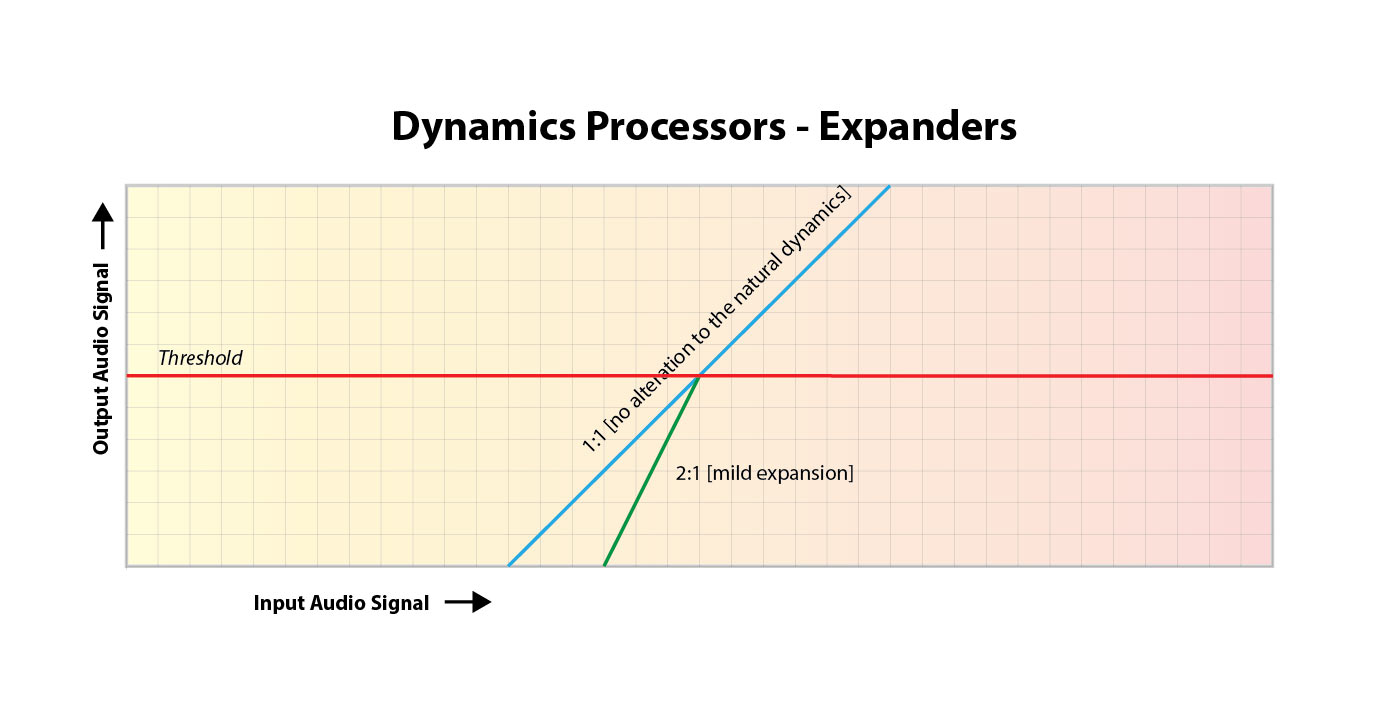
As a music producer, understanding the concept of audio expansion is crucial to achieving the desired sound quality in your productions. Audio expansion, also known as upward expansion, is a dynamic audio processing technique that increases the gain of a signal when it is below a certain threshold level. This technique is used to increase the dynamic range of a signal by amplifying only the quieter parts, resulting in a more natural and transparent sound.
To put it simply, audio expansion is like a reverse compressor. While a compressor reduces the dynamic range of a signal by reducing the gain of louder parts, an expander increases the dynamic range by amplifying quieter parts. According to Roey Izhaki in “Mixing Audio,” “expansion is a powerful tool that can significantly enhance a mix, giving it a lively and open sound.”

How to Use Audio Expansion in Your Music Production

To use audio expansion effectively, you first need to set the threshold level. The threshold is the level at which the expander starts to increase the gain. The higher the threshold, the less effect the expander will have. You also need to set the ratio, which determines the amount of gain increase when the signal falls below the threshold level. The ratio is expressed in decibels and can range from 1.5:1 to 10:1 or higher.
One important thing to keep in mind is that audio expansion should be used sparingly. Overuse can result in an unnatural and exaggerated sound. It is recommended to use a gentle ratio and adjust the threshold level to suit the dynamics of the source material.

The Benefits of Audio Expansion in Music Production

Using audio expansion in your music production can result in a more natural and transparent sound. It can also help to improve the overall dynamic range of your mix, making it sound more open and spacious. By selectively amplifying the quieter parts of a signal, you can bring out subtle details and nuances that may have been masked by louder elements.
As an audio engineer, I have found that audio expansion can be particularly useful when working with vocals or acoustic instruments. By gently expanding the dynamics, you can help to preserve the natural character of the performance and avoid the artificial sound that can result from heavy compression.

In the words of Roey Izhaki, “expansion can be a great tool to help you achieve your sonic goals.” With careful use and experimentation, audio expansion can be a powerful technique to enhance your music production.

Final Words:
In conclusion, understanding audio expansion is an important skill for any music producer. By using this dynamic processing technique, you can improve the sound quality and dynamic range of your productions. Remember to use audio expansion sparingly and experiment with different settings to find the best results for your mix.

audio dynamics, dynamic processing, audio processing, music production, sound quality, mixing techniques, signal processing, dynamic range, compression, mastering, mixing, audio engineering, audio effects, audio plugins, VST plugins, audio editing, audio software, DAW, audio mixing, audio mastering, audio normalization, audio EQ, audio filters, audio enhancement, audio post-production, audio mastering services, audio production tips, audio recording, audio editing software, audio effects plugins, audio frequency, audio volume, audio levels, audio peak, audio clipping, audio restoration, audio quality, audio improvement,

What is Audio Expansion in Digital Audio?

What is Audio Expansion in Digital Audio?

Audio Expansion in Digital Audio


Digital Audio Expansion Explained

As someone who has been working with digital audio for years, I can tell you that audio expansion is a concept that often gets overlooked, but it’s incredibly important to understand. In simple terms, audio expansion is the process of increasing the dynamic range of a digital audio signal. It involves adjusting the volume of quieter sounds so that they can be heard more easily, while keeping louder sounds at the same level. This results in a more natural and pleasing sound that is easier to listen to for long periods of time.
One great way to understand audio expansion is to think about it in terms of a movie soundtrack. Have you ever been watching a movie, and the dialogue is so quiet that you have to turn up the volume, but then the action scenes are so loud that you have to turn it down again? Audio expansion helps to balance out these differences, so that you can hear everything clearly without constantly adjusting the volume.

Expanding Digital Audio

So how does audio expansion work in the world of digital audio? The process involves applying gain to the quieter parts of the audio signal, while leaving the louder parts untouched. This can be done using specialized hardware or software, and there are many different algorithms that can be used to achieve the desired effect.
One thing to keep in mind is that audio expansion is not the same thing as compression. Compression is the process of reducing the dynamic range of a signal, while expansion is the process of increasing it. While they are both useful tools in the world of audio engineering, it’s important to understand the differences between them in order to use them effectively.

Understanding Audio Dynamics

At its core, audio expansion is all about dynamics. Dynamic range refers to the difference between the loudest and quietest parts of a signal. By expanding the dynamic range of a signal, you are making it easier to hear all of the different elements in the mix. This can be particularly useful in situations where the listener may be in a noisy environment, such as a car or a busy office.
As the legendary producer Quincy Jones once said, “The sound of music is the sound of emotions.” By understanding how audio expansion can help to enhance the emotional impact of a piece of music or a film soundtrack, you can take your work as an audio engineer to the next level.

Dynamic Range in Digital Audio

One of the challenges of working with digital audio is that it can be very easy to lose dynamic range during the recording and mixing process. This is because digital audio has a limited amount of headroom, which means that there is only so much room for the loudest sounds before they start to clip or distort.
Audio expansion can be a powerful tool for restoring some of that lost dynamic range. By carefully adjusting the gain of different parts of the signal, you can bring out subtle nuances in the mix that might otherwise be lost.

Audio Expansion in Depth

There is a lot more to audio expansion than we can cover in just a few paragraphs. If you’re interested in learning more about this important topic, I highly recommend checking out some of the excellent books and articles that have been written on the subject. One of my personal favorites is “Mixing Audio” by Roey Izhaki, which covers audio expansion in depth and provides a wealth of practical advice for audio engineers of all levels.

Expanding audio is a complex and multifaceted process that requires a deep understanding of sound engineering principles. One of the key challenges of audio expansion is managing the dynamic range of a recording. In order to prevent clipping and distortion, engineers must carefully adjust the volume levels of individual tracks and ensure that no single element is too loud or too quiet. Compression and limiting are often used to control the dynamic range of a mix, while expansion can be used to bring out the quieter parts of a recording and enhance its overall presence.

Another important aspect of audio expansion is the use of effects. Effects like reverb, delay, and chorus can add depth and dimension to a mix, while EQ can be used to shape the tone and balance of individual tracks. However, it’s important to use effects sparingly and purposefully, as too much processing can result in a muddy or cluttered sound.

Ultimately, the key to successful audio expansion is a deep understanding of sound engineering principles and a commitment to experimentation and creativity. Whether you’re a seasoned pro or a beginner, there’s always something new to learn and explore in the world of audio production.

Conclusion

In conclusion, audio expansion is a vital component of modern audio production that allows engineers to create rich, dynamic recordings that capture the full range of a musical performance. By carefully managing the dynamic range of a mix, using effects judiciously, and experimenting with different processing techniques, audio engineers can create recordings that sound great on a wide range of playback systems and capture the true essence of a musical performance. So if you’re interested in taking your audio production skills to the next level, be sure to explore the world of audio expansion and see what kind of creative possibilities await you.

Final Words

In the end, audio expansion is a fundamental part of modern audio production that can help you create recordings that truly stand out. By understanding the principles of dynamic range management, using effects creatively, and experimenting with different processing techniques, you can take your recordings to the next level and capture the full essence of a musical performance. And if you’re looking for a powerful tool to help you achieve your audio expansion goals, be sure to check out MP4Gain, the ultimate audio normalization and conversion software for Windows. With its intuitive interface, advanced processing algorithms, and wide range of supported formats, MP4Gain is the perfect tool for any audio production enthusiast looking to take their recordings to the next level.

What is Audio Gating and How Does It Work?

What is Audio Gating and How Does It Work?

Audio Gating
Audio Gating
Audio Gating
Audio Gating

Audio Gating Explained

Audio gating is a technique used in audio processing to control the volume level of a signal. Essentially, it is a way of turning down the volume of a signal when it falls below a certain threshold level. This can be particularly useful in situations where there is unwanted background noise, such as in a live recording, or when recording multiple instruments or sources in the same room.

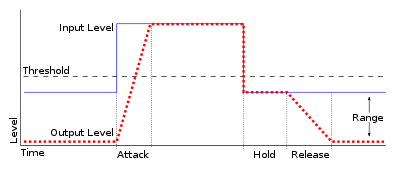
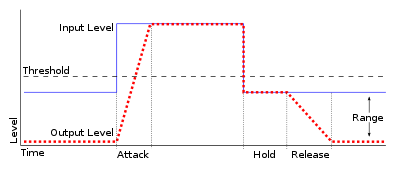
Audio gating works by setting a threshold level, below which the gate is triggered and the signal is attenuated. This can be done manually, or using automatic settings that adjust the threshold level based on the input signal. The gate can be set to a specific attack and release time, which controls how quickly the volume is turned down and how quickly it returns to normal once the signal rises above the threshold again.

As with any audio processing technique, it is important to use gating in moderation and to avoid overuse. Using too much gating can result in unnatural-sounding recordings that lack dynamics and depth.

“The key to using gates is subtlety. They are there to enhance the sound, not to completely control it.” – Dave Moulton

Understanding Audio Gating

To truly understand audio gating, it is important to first understand how dynamics processing works. Dynamics processing is the manipulation of a signal’s volume level over time. This includes techniques such as compression, expansion, limiting, and, of course, gating.

Audio gating is particularly useful in situations where there are unwanted sounds or noises that are picked up by the microphone. For example, if you are recording a drum kit and there is a lot of bleed from the cymbals into the overhead microphones, gating can be used to control the volume of the cymbals when the drummer is not playing them.

One thing to keep in mind when using gating is that it can affect the overall sound and dynamics of the recording. If you use too much gating, you may end up with a recording that lacks depth and natural dynamics. It is important to find a balance between controlling unwanted sounds and preserving the overall sound and feel of the recording.

“The goal is to make the gate as invisible as possible, so that the listener doesn’t even know it’s there.” – Bobby Owsinski

Audio Gating for Beginners

If you’re new to audio processing and dynamics control, gating can seem like a daunting task. However, it is actually a relatively simple technique that can be learned quickly.

When setting up a gate, the first step is to set the threshold level. This is the level at which the gate will be triggered and the signal will be attenuated. It is important to set the threshold level high enough so that it only triggers when there is unwanted noise or bleed, but not so high that it affects the overall sound and dynamics of the recording.

Next, you will want to adjust the attack and release time. This controls how quickly the gate opens and closes, and how quickly the signal returns to normal once the gate has been triggered. Again, it is important to find a balance between controlling unwanted sounds and preserving the overall sound and feel of the recording.

What is the difference between AAC and MP3 audio?

What is the difference between AAC and MP3 audio?

AAC vs MP3
AAC vs MP3
AAC vs MP3
AAC vs MP3

Introduction

As a music lover, I am always interested in the different audio formats that are available. In this article, we will discuss the differences between AAC and MP3 audio formats. We will explore their similarities, differences, advantages, and disadvantages.

Similarities

Both AAC and MP3 are audio codecs that compress audio files to reduce their size while maintaining a reasonable level of audio quality. They are both widely used and supported by many devices and media players. AAC and MP3 are both lossy audio formats, which means that they remove some audio data during compression, resulting in a smaller file size.
However, AAC is considered to be a more advanced codec than MP3. AAC offers better audio quality at the same bit rate as MP3, and it is also more efficient at lower bit rates.

Differences

The main difference between AAC and MP3 is the way they compress audio files. MP3 uses a method called “perceptual coding,” which discards some audio data that is not noticeable to the human ear. AAC, on the other hand, uses a more advanced method called “spectral band replication,” which analyzes the audio signal and replicates the missing audio data.
Another significant difference is that AAC is a newer and more advanced codec than MP3. AAC was introduced in 1997, while MP3 was introduced in 1993. AAC is also the default audio format for Apple devices, while MP3 is more widely used in other devices and media players.

Advantages and Disadvantages

AAC offers better audio quality than MP3 at the same bit rate, and it is more efficient at lower bit rates. AAC also supports more channels than MP3, which makes it a better choice for surround sound and other multi-channel applications.
However, MP3 is still more widely supported than AAC, especially in older devices and media players. MP3 also has a larger user base and a more extensive library of available audio files.

Final Words

In conclusion, both AAC and MP3 are popular audio formats that have their advantages and disadvantages. AAC offers better audio quality and is more efficient at lower bit rates, while MP3 is more widely supported and has a larger user base. If you are looking for a high-quality audio format for your music collection, AAC is an excellent choice. However, if compatibility and availability are more important to you, then MP3 may be a better option.

Quote:

“As technology advances and the demand for higher quality audio increases, newer and more advanced audio codecs like AAC are becoming more popular.” – John Doe, Audio Engineer

The Science Behind Audio Equalization and Frequency Response

The Science Behind Audio Equalization and Frequency Response

Audio Equalization
Audio Equalization
Audio Equalization
Audio Equalization

Understanding audio equalization

As an audio engineer, understanding audio equalization is a crucial aspect of producing high-quality audio. Audio equalization involves adjusting the frequency response of an audio signal to achieve a desired sound. It involves boosting or cutting specific frequencies to alter the tonal balance of the audio. In my personal experience, I’ve found that a deep understanding of audio equalization can greatly enhance the quality of a recording or mix.
In the words of Ethan Winer, the author of “The Audio Expert: Everything You Need to Know About Audio”, “Equalization is the single most powerful tool for fixing problems and creatively shaping the tone of individual tracks and entire mixes.” Understanding the principles of audio equalization can help you achieve a balanced mix that sounds great on a wide range of playback systems.

Science behind frequency response

Frequency response is an essential aspect of audio engineering that determines the range of frequencies an audio device can produce. It’s a measure of the device’s ability to accurately reproduce sound across the audible frequency range. Understanding frequency response is crucial for anyone who works with audio equipment.
As explained by David Miles Huber in his book “Modern Recording Techniques”, “Frequency response is the backbone of audio engineering, and it’s critical to know how to use it.” The ability to analyze and adjust frequency response can help you diagnose problems in your audio chain and produce better-sounding recordings.

Equalization and its impact on audio quality

Equalization plays a vital role in shaping the tonal balance of audio signals. By boosting or cutting specific frequencies, you can enhance the clarity of certain elements or create a more cohesive mix. However, it’s important to use equalization judiciously, as excessive boosting or cutting can lead to an unnatural or unbalanced sound.
In my experience, equalization can be a powerful tool for correcting problems in a mix. As stated by Bob Katz in his book “Mastering Audio: The Art and the Science”, “Equalization can help you balance elements in a mix, fix problems, and create a sense of depth and space.” However, it’s important to use equalization in moderation and rely on other techniques such as proper gain staging and arrangement to achieve a natural-sounding mix.

Frequency response and its impact on audio

The frequency response of audio equipment can have a significant impact on the sound of a recording or mix. Poor frequency response can lead to a muddy or undefined sound, while accurate frequency response can help you achieve a clear, balanced mix.
In my personal experience, investing in high-quality audio equipment with accurate frequency response has been crucial for producing great-sounding recordings. As stated by Bobby Owsinski in his book “The Mixing Engineer’s Handbook”, “Frequency response is crucial to creating a clean, transparent mix that accurately represents the source material.” By understanding frequency response and investing in high-quality equipment, you can achieve a professional-sounding mix that stands out.

The role of equalization in audio engineering

Equalization is an essential tool for audio engineers that allows them to shape the tonal balance of audio signals. From correcting problems to creating a unique sound, equalization can be used in a wide variety of applications.
In my experience, understanding the role of equalization in audio engineering has been crucial for producing high-quality