
What is Audio Gating and How Does It Work?
Audio Gating Explained
Audio gating is a technique used in audio processing to control the volume level of a signal. Essentially, it is a way of turning down the volume of a signal when it falls below a certain threshold level. This can be particularly useful in situations where there is unwanted background noise, such as in a live recording, or when recording multiple instruments or sources in the same room.
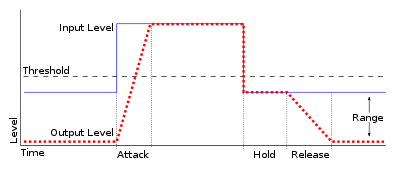
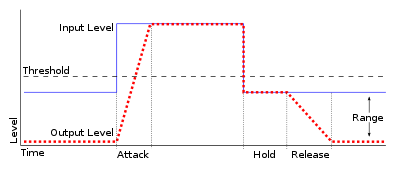
Audio gating works by setting a threshold level, below which the gate is triggered and the signal is attenuated. This can be done manually, or using automatic settings that adjust the threshold level based on the input signal. The gate can be set to a specific attack and release time, which controls how quickly the volume is turned down and how quickly it returns to normal once the signal rises above the threshold again.
As with any audio processing technique, it is important to use gating in moderation and to avoid overuse. Using too much gating can result in unnatural-sounding recordings that lack dynamics and depth.
“The key to using gates is subtlety. They are there to enhance the sound, not to completely control it.” – Dave Moulton
Understanding Audio Gating
To truly understand audio gating, it is important to first understand how dynamics processing works. Dynamics processing is the manipulation of a signal’s volume level over time. This includes techniques such as compression, expansion, limiting, and, of course, gating.
Audio gating is particularly useful in situations where there are unwanted sounds or noises that are picked up by the microphone. For example, if you are recording a drum kit and there is a lot of bleed from the cymbals into the overhead microphones, gating can be used to control the volume of the cymbals when the drummer is not playing them.
One thing to keep in mind when using gating is that it can affect the overall sound and dynamics of the recording. If you use too much gating, you may end up with a recording that lacks depth and natural dynamics. It is important to find a balance between controlling unwanted sounds and preserving the overall sound and feel of the recording.
“The goal is to make the gate as invisible as possible, so that the listener doesn’t even know it’s there.” – Bobby Owsinski
Audio Gating for Beginners
If you’re new to audio processing and dynamics control, gating can seem like a daunting task. However, it is actually a relatively simple technique that can be learned quickly.
When setting up a gate, the first step is to set the threshold level. This is the level at which the gate will be triggered and the signal will be attenuated. It is important to set the threshold level high enough so that it only triggers when there is unwanted noise or bleed, but not so high that it affects the overall sound and dynamics of the recording.
Next, you will want to adjust the attack and release time. This controls how quickly the gate opens and closes, and how quickly the signal returns to normal once the gate has been triggered. Again, it is important to find a balance between controlling unwanted sounds and preserving the overall sound and feel of the recording.

