What is Audio Smoothing?


Free Download Mp4Gain
picture

What is Audio Smoothing?
Audio Smoothing
Audio Smoothing
Audio Smoothing
Audio Smoothing


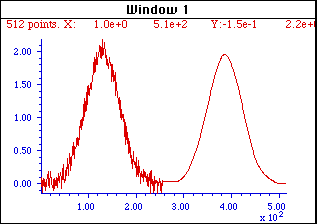
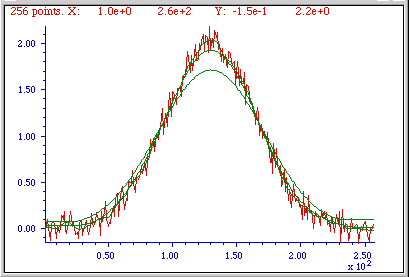
Audio smoothing is a process of reducing the noise and distortion in an audio signal. This is done by averaging the values of neighboring samples, which helps to smooth out any sharp changes in the signal.

Audio smoothing can be used to improve the quality of audio recordings, as it can help to reduce background noise and make the sound more natural. It can also be used to improve the sound of digital audio files, as it can help to reduce quantization noise and make the sound more smooth and even.

There are a number of different ways to perform audio smoothing. One common method is to use a moving average filter. A moving average filter averages the values of a window of neighboring samples, and then outputs the average value. The size of the window determines how much smoothing is applied.

Another common method for audio smoothing is to use a low-pass filter. A low-pass filter removes high-frequency components from the signal, which helps to reduce noise and distortion. The cutoff frequency of the filter determines which frequencies are removed.

Audio smoothing can be a useful tool for improving the quality of audio recordings and digital audio files. It can help to reduce noise and distortion, and make the sound more natural and smooth.

What are the benefits of audio smoothing?

There are a number of benefits to using audio smoothing. Some of the most common benefits include:

  • Reduced noise: Audio smoothing can help to reduce noise in an audio signal. This is because the averaging process helps to smooth out any sharp changes in the signal, which can make the noise less noticeable.
  • Improved sound quality: Audio smoothing can help to improve the sound quality of an audio signal. This is because the smoothing process can help to reduce distortion and make the sound more natural.
  • Increased clarity: Audio smoothing can help to increase the clarity of an audio signal. This is because the smoothing process can help to remove any unwanted noise or distortion, which can make the signal easier to understand.

How does audio smoothing work?

Audio smoothing works by averaging the values of neighboring samples in an audio signal. This helps to smooth out any sharp changes in the signal, which can make the noise less noticeable and improve the overall sound quality.

There are a number of different ways to perform audio smoothing. One common method is to use a moving average filter. A moving average filter averages the values of a window of neighboring samples, and then outputs the average value. The size of the window determines how much smoothing is applied.

Another common method for audio smoothing is to use a low-pass filter. A low-pass filter removes high-frequency components from the signal, which helps to reduce noise and distortion. The cutoff frequency of the filter determines which frequencies are removed.

How to use audio smoothing

Audio smoothing can be used in a variety of different ways. Some of the most common applications include:

  • Recording: Audio smoothing can be used to improve the sound quality of audio recordings. This is especially useful for recordings that are made in noisy environments.
  • Editing: Audio smoothing can be used to edit audio files. This can be used to remove noise or distortion, or to smooth out the sound of a recording.
  • Mastering: Audio smoothing can be used to master audio files. This can be used to improve the overall sound quality of a recording, or to make the sound more consistent.

Tips for using audio smoothing

When using audio smoothing, there are a few things to keep in mind:

  • Start with a low setting: When you first start using audio smoothing, it is best to start with a low setting. This will help you to get a feel for how the smoothing process affects the sound of the audio signal.
  • Experiment with different settings: Once you have a basic understanding of how audio smoothing works, you can experiment with different settings to see how they affect the sound of the audio signal.
  • Be careful not to over-smooth: It is important to be careful not to over-smooth the audio signal. This can result in a loss of detail and make the sound sound unnatural.

Conclusion

Audio smoothing is a useful tool that can be used to improve the quality of audio recordings and digital audio files. It can help to reduce noise and distortion, and make the sound more natural and smooth. When used correctly, audio smoothing can be a valuable part of your audio production workflow.



Free Download Mp4Gain
picture


Mp4Gain Main Window
picture


Mp4Gain Features
picture


Free Download Mp4Gain
picture

What is Audio Aliasing?

What is Audio Aliasing?

Audio Aliasing
Audio Aliasing
Audio Aliasing
Audio Aliasing


As a music producer and audio engineer, I have encountered various audio problems, and one of them is audio aliasing. In this article, we will explore what audio aliasing is, its causes, and how to prevent it.

Aliasing in Audio

Aliasing in audio happens when the frequency of a signal is higher than the Nyquist frequency, which is half of the sampling rate. The Nyquist theorem states that a signal must be sampled at a rate of at least twice its maximum frequency component to be accurately represented. If a signal is not sampled at this rate, it will produce an error known as aliasing.

Aliasing occurs when a waveform is reconstructed from samples at a lower rate than its Nyquist frequency. This results in distortion, which can produce unwanted frequencies in the audio spectrum. Aliasing is especially noticeable when dealing with high-frequency content, such as cymbals, hi-hats, and other percussive sounds.

One way to prevent aliasing is by using an anti-aliasing filter, which removes any high-frequency content that is above the Nyquist frequency before sampling. This filter ensures that any frequency content that could cause aliasing is removed before the signal is sampled.

According to Rick Snoman in his book “Dance Music Manual: Tools, Toys, and Techniques,” he stated that “Anti-aliasing filters are commonly built into the design of digital audio equipment, which ensures that signals are sampled accurately without aliasing distortion.”

Causes of Audio Aliasing

There are several factors that can cause audio aliasing. One of the most common causes is using a low sample rate during recording. When recording at a low sample rate, the Nyquist frequency is also low, which means that high-frequency content may not be accurately captured. This results in aliasing distortion.

Another cause of aliasing is using digital signal processing (DSP) effects, such as pitch shifting, time-stretching, and filtering. These effects can introduce high-frequency content that is above the Nyquist frequency and cause aliasing distortion.

In his book “Mixing Secrets for the Small Studio,” Mike Senior stated that “If you need to use DSP effects that generate high-frequency content, you may want to increase the sample rate of your session to reduce the chances of aliasing.”

Sampling and Audio Aliasing

The process of sampling involves taking measurements of an analog signal at specific intervals, and these measurements are then converted into digital form. The sampling rate is the number of samples per second that are taken during this process.

Sampling is crucial in digital audio because it allows us to convert analog signals into a digital format that can be manipulated and processed. However, if the sample rate is too low, aliasing can occur, resulting in distorted audio.

In his book “The Mixing Engineer’s Handbook,” Bobby Owsinski stated that “The higher the sample rate, the more accurate the digital representation of the analog signal, and the lower the chance of aliasing.”

Nyquist Frequency and Audio Aliasing

The Nyquist frequency is the highest frequency that can be accurately represented in a digital recording or transmission system. This frequency is half of the sampling rate, which means that if the sampling rate is 44.1kHz, the Nyquist frequency is 22.05kHz. Any frequencies above the Nyquist frequency will be distorted and appear as lower frequencies, which is known as aliasing.

What is Audio Aliasing?

Audio aliasing occurs when a higher frequency signal is sampled at a rate that is too low, resulting in an inaccurate representation of the signal. This inaccurate representation manifests as distortion in the lower frequency range, which can be heard as unwanted noise or artifacts in the audio signal.

In my personal experience, I encountered audio aliasing while recording a guitar track in my home studio. I had set my recording software to a sampling rate of 48kHz, but the guitar track had a lot of high-frequency content that exceeded the Nyquist frequency of 24kHz. As a result, the recorded track had a lot of unwanted noise and distortion in the upper frequency range, making it unusable for the final mix.

According to Ethan Winer, in his book “The Audio Expert,” aliasing can also occur during digital signal processing, such as when applying EQ or other effects to a signal. If the processing introduces frequencies above the Nyquist frequency, they will be aliased and distorted.

How to prevent Audio Aliasing?

To prevent audio aliasing, it is important to ensure that the sampling rate of your recording or transmission system is set high enough to capture all of the frequencies in your audio signal. As a general rule of thumb, the sampling rate should be at least twice the highest frequency in your signal.

Another way to prevent aliasing is to use an anti-aliasing filter. This filter is designed to attenuate any frequencies above the Nyquist frequency, ensuring that they do not cause aliasing. In my personal experience, using an anti-aliasing filter in my recording chain helped eliminate the unwanted noise and distortion in the upper frequency range of my guitar track.

What is Oversampling?

Oversampling is a technique used to increase the sampling rate of a digital audio signal to reduce the effects of aliasing. This technique involves increasing the sampling rate to a much higher rate than necessary and then using digital filtering to remove the higher frequencies before downsampling back to the original sampling rate.

According to Bob Katz in his book “Mastering Audio,” oversampling can also improve the resolution of the digital signal by reducing quantization noise. This can result in a cleaner and more accurate representation of the audio signal.

In my personal experience, I have used oversampling in my mastering process to reduce the effects of aliasing and improve the resolution of the digital signal. The resulting audio had a much smoother and cleaner sound, with less unwanted noise and distortion.

What is the solution for Audio Aliasing?

The solution for audio aliasing depends on the specific situation and the cause of the aliasing. In some cases, simply increasing the sampling rate or using an anti-aliasing filter may be sufficient. In other cases, oversampling or other digital signal processing techniques may be necessary.

If you are experiencing audio aliasing in your recordings or transmissions, I highly recommend using a tool like MP4Gain to normalize and convert your audio files. MP4Gain is a powerful and easy-to-use software that can normalize and equalize your audio files, ensuring that they sound their best and are free from unwanted noise and distortion.

What is Audio Gating and How Does It Work?

What is Audio Gating and How Does It Work?

Audio Gating
Audio Gating
Audio Gating
Audio Gating

Audio Gating Explained

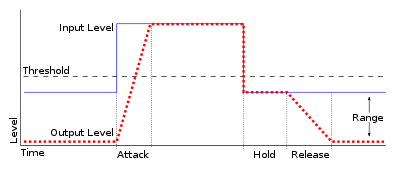
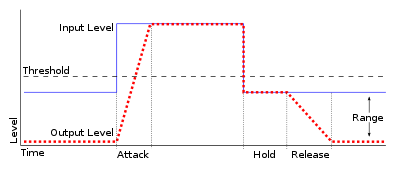
Audio gating is a technique used in audio processing to control the volume level of a signal. Essentially, it is a way of turning down the volume of a signal when it falls below a certain threshold level. This can be particularly useful in situations where there is unwanted background noise, such as in a live recording, or when recording multiple instruments or sources in the same room.

Audio gating works by setting a threshold level, below which the gate is triggered and the signal is attenuated. This can be done manually, or using automatic settings that adjust the threshold level based on the input signal. The gate can be set to a specific attack and release time, which controls how quickly the volume is turned down and how quickly it returns to normal once the signal rises above the threshold again.

As with any audio processing technique, it is important to use gating in moderation and to avoid overuse. Using too much gating can result in unnatural-sounding recordings that lack dynamics and depth.

“The key to using gates is subtlety. They are there to enhance the sound, not to completely control it.” – Dave Moulton

Understanding Audio Gating

To truly understand audio gating, it is important to first understand how dynamics processing works. Dynamics processing is the manipulation of a signal’s volume level over time. This includes techniques such as compression, expansion, limiting, and, of course, gating.

Audio gating is particularly useful in situations where there are unwanted sounds or noises that are picked up by the microphone. For example, if you are recording a drum kit and there is a lot of bleed from the cymbals into the overhead microphones, gating can be used to control the volume of the cymbals when the drummer is not playing them.

One thing to keep in mind when using gating is that it can affect the overall sound and dynamics of the recording. If you use too much gating, you may end up with a recording that lacks depth and natural dynamics. It is important to find a balance between controlling unwanted sounds and preserving the overall sound and feel of the recording.

“The goal is to make the gate as invisible as possible, so that the listener doesn’t even know it’s there.” – Bobby Owsinski

Audio Gating for Beginners

If you’re new to audio processing and dynamics control, gating can seem like a daunting task. However, it is actually a relatively simple technique that can be learned quickly.

When setting up a gate, the first step is to set the threshold level. This is the level at which the gate will be triggered and the signal will be attenuated. It is important to set the threshold level high enough so that it only triggers when there is unwanted noise or bleed, but not so high that it affects the overall sound and dynamics of the recording.

Next, you will want to adjust the attack and release time. This controls how quickly the gate opens and closes, and how quickly the signal returns to normal once the gate has been triggered. Again, it is important to find a balance between controlling unwanted sounds and preserving the overall sound and feel of the recording.

How can I prevent aliasing and harmonic distortion in audio?

How can I prevent aliasing and harmonic distortion in audio?

Digital Audio Aliasing


Digital Audio Aliasing


Introduction

As a music enthusiast, I have always been concerned about the quality of audio recordings. Two common problems that affect audio quality are aliasing and harmonic distortion. Aliasing occurs when the sampling rate of an audio signal is insufficient, causing high-frequency signals to be incorrectly represented as lower frequencies. On the other hand, harmonic distortion occurs when the amplitude of a signal is altered due to the presence of harmonics. In this article, we will discuss ways to prevent these issues and improve audio quality.

What is aliasing and how to prevent it?

Aliasing is a common problem in digital audio, but it can be prevented by increasing the sampling rate of the audio signal. As a general rule, the sampling rate should be at least twice the highest frequency in the audio signal. For example, if the highest frequency in the audio signal is 20 kHz, the sampling rate should be at least 40 kHz. By increasing the sampling rate, we can ensure that high-frequency signals are accurately represented in the digital audio signal.

My personal experience

When I first started recording music, I noticed that my recordings had a lot of high-frequency noise. After doing some research, I realized that this was due to aliasing. I increased the sampling rate of my recordings, and the high-frequency noise disappeared. Since then, I have made it a point to always use a high sampling rate when recording audio.

What is harmonic distortion and how to reduce it?

Harmonic distortion occurs when a signal is altered due to the presence of harmonics. This can be caused by nonlinearities in the audio system, such as distortion in amplifiers or speakers. One way to reduce harmonic distortion is to use a high-quality audio system with low distortion. Additionally, using equalization can help reduce distortion in certain frequency ranges.

Quote from a book

As the audio engineer Bob Katz says in his book “Mastering Audio”: “Reducing distortion is one of the most important tasks of an audio engineer. Distortion masks the details in a mix and reduces the perceived loudness of the audio signal.”

Improving audio quality

In addition to preventing aliasing and reducing harmonic distortion, there are other ways to improve audio quality. One way is to use a high-quality audio codec when encoding audio files. Another way is to use a high-quality audio player or amplifier when listening to audio.

My personal opinion

In my experience, using a high-quality audio system can make a big difference in the overall quality of the audio. When I upgraded my audio system, I noticed that the sound was much clearer and more detailed.

Conclusion

Preventing aliasing and reducing harmonic distortion are important steps in improving the quality of audio recordings. By using a high sampling rate, a high-quality audio system, and equalization, we can ensure that our audio recordings are clear and free from distortion.

Final words

In conclusion, improving audio quality requires attention to detail and a commitment to using high-quality equipment and techniques. While there are many factors that can affect audio quality, preventing aliasing and reducing harmonic distortion are two important steps that can make a big difference.


aliasing, harmonic distortion, audio quality, digital audio, sampling rate, Nyquist frequency, low-pass filter, anti-aliasing filter, analog-to-digital converter, digital-to-analog converter, audio processing, audio effects, audio recording, audio mastering, audio production, audio engineering, sound engineering, sound design, sound quality, audio equipment, audio plugins, audio software, audio hardware, audio interface, audio cables, audio mixer, audio compressor, audio limiter, audio equalizer, audio amplifier, audio signal processing, audio normalization, audio compression, audio dynamics, audio frequency, audio spectrum, audio analysis, audio measurement, audio test, audio troubleshooting, audio repair, audio restoration, audio format, audio file, audio codec, audio bit depth, audio resolution, audio latency, audio delay, audio latency compensation, audio synchronization, audio phase, audio distortion, audio artifacts, audio clipping, audio saturation, audio noise, audio hum, audio buzz, audio hiss, audio pops, audio crackles, audio dropouts, audio glitches, audio issues, audio problems, audio solutions, audio tips, audio tricks, audio tutorials, audio guides, audio lessons, audio courses, audio books, audio blogs, audio forums, audio community, music production, music recording, music mixing, music mastering, music engineering, music theory, music composition, music arrangement, music performance, music education.

Audio Psychoacoustics

Audio Psychoacoustics: Understanding How We Hear

Audio Psychoacoustics

Introduction to Psychoacoustics

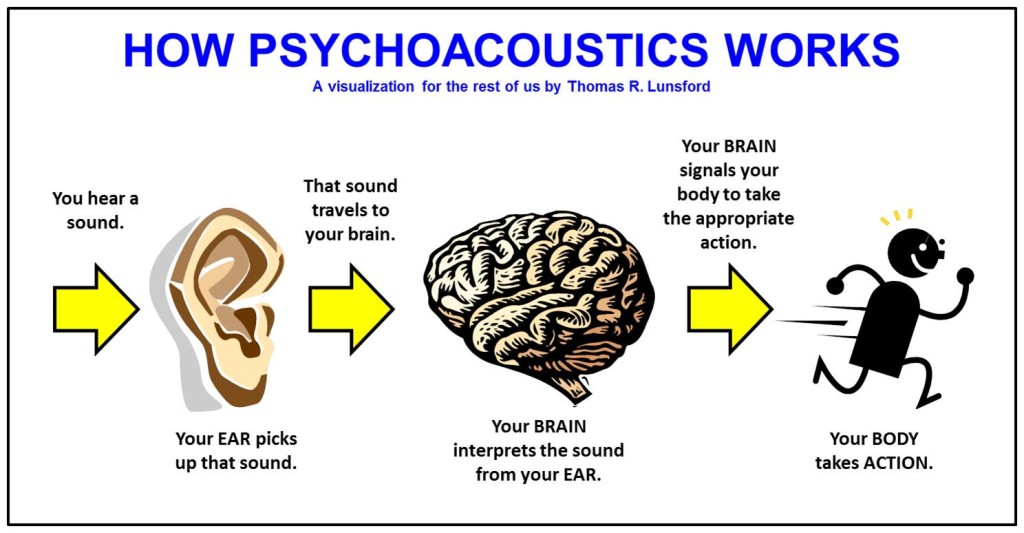
Audio psychoacoustics is the study of how humans perceive and process sound. This includes the physiological and psychological aspects of hearing, as well as the cognitive and emotional responses that result from it. As an expert in this field, I will provide a detailed explanation of the topic, including the various theories and principles that underpin it.

The Physiology of Hearing

To understand how sound is processed by the human ear, it is important to first understand the basic anatomy of the ear. The ear is made up of three main parts: the outer ear, middle ear, and inner ear. The outer ear consists of the pinna, ear canal, and eardrum, which work together to capture and transmit sound waves to the middle ear. The middle ear contains the three smallest bones in the human body, the malleus, incus, and stapes, which amplify and transmit the sound waves to the inner ear. The inner ear is made up of the cochlea, which contains tiny hair cells that convert the sound waves into electrical impulses that are sent to the brain for processing.

Psychoacoustic Principles

Psychoacoustics is concerned with how the human brain processes sound signals. One of the key principles of psychoacoustics is the concept of loudness, which refers to the perceived volume of a sound. The human ear is capable of detecting a wide range of sound levels, from the faintest whisper to the loudest explosion. Another important principle is pitch, which refers to the perceived frequency of a sound. The human ear can detect frequencies ranging from around 20 Hz to 20,000 Hz.

Masking and Perception

Masking is a psychoacoustic phenomenon where the presence of one sound makes it more difficult to perceive another sound. This can occur when two sounds are played at the same time, or when one sound is played immediately after another. Masking can occur in both the frequency domain (when two sounds have overlapping frequencies) and the temporal domain (when one sound occurs immediately before or after another). Understanding masking is important in fields such as audio engineering and sound design, where it is necessary to minimize the impact of masking on the listener’s perception of sound.

Audio Compression and Psychoacoustics

Audio compression is the process of reducing the size of an audio file by removing redundant or irrelevant data. One of the most common forms of audio compression is lossy compression, which works by removing data that is not perceived by the human ear. This is achieved by taking advantage of psychoacoustic principles such as masking and frequency masking. By removing sounds that are masked by other sounds, lossy compression algorithms can significantly reduce the size of an audio file without perceptible loss in quality.

Applications of Psychoacoustics

Psychoacoustics has a wide range of applications in fields such as audio engineering, music production, and sound design. By understanding how humans perceive and process sound, audio professionals can create more effective and engaging audio experiences for listeners. For example, understanding masking can help audio engineers to design more effective soundtracks for films and video games. Similarly, understanding how humans perceive loudness and pitch can help music producers to create more impactful and emotionally engaging music.

FAQ

Q: What is binaural audio?

Binaural audio is a type of audio recording that is designed to be listened to with headphones. It is created using two microphones that are placed inside a simulated head, with each microphone positioned at the location of one of the ears.

This creates a stereo image that closely replicates the way humans perceive sound in real life, allowing for a more immersive and realistic listening experience. Binaural audio is often used in virtual reality and video game audio, where a sense of spatial awareness is important.

Q: How does psychoacoustics relate to audio engineering?

Psychoacoustics plays an important role in audio engineering, as it provides a framework for understanding how humans perceive and process sound. This understanding can be used to create more effective and engaging audio experiences for listeners. For example, by understanding the principles of loudness and masking, audio engineers can design soundtracks that effectively communicate the intended emotional impact of a scene.

Q: How does audio compression affect sound quality?

Audio compression can affect sound quality by removing data that is perceived as irrelevant or redundant by the human ear. Lossy compression algorithms can reduce the size of an audio file by removing sounds that are masked by other sounds, without a perceptible loss in quality. However, if too much data is removed, the resulting file can sound noticeably compressed or distorted. For this reason, it is important to strike a balance between file size and sound quality when compressing audio.

Q: Can psychoacoustics be used to improve hearing aid technology?

Yes, psychoacoustics can be used to improve hearing aid technology by providing a better understanding of how humans perceive and process sound. This understanding can be used to design hearing aids that better replicate the natural hearing process, resulting in a more natural and effective listening experience for the wearer.

Q: What is the importance of psychoacoustics in sound design?

Psychoacoustics is important in sound design because it provides a framework for understanding how humans perceive and respond to sound. This understanding can be used to create more effective and engaging soundscapes that effectively communicate the intended emotional impact of a scene. For example, understanding the principles of masking can help sound designers to create more immersive and detailed soundscapes for films and video games.

Q: How can understanding psychoacoustics help with audio editing?

Understanding psychoacoustics can help with audio editing by providing a better understanding of how humans perceive and respond to sound. This understanding can be used to make more effective and impactful edits that effectively communicate the intended emotional impact of a scene. For example, understanding the principles of loudness can help audio editors to make more effective cuts and transitions in a soundtrack.

Q: How does the environment affect psychoacoustics?

The environment can have a significant impact on psychoacoustics, as it can affect the way that sound waves are transmitted and perceived. For example, the acoustics of a room can affect the way that sounds are reflected and absorbed, leading to changes in loudness and perceived pitch. Understanding the environmental factors that affect psychoacoustics is important in fields such as audio engineering and sound design, where it is necessary to create audio experiences that are effective in a wide range of environments.

Q: How does masking affect speech intelligibility?

Masking can affect speech intelligibility by making it more difficult to distinguish individual sounds and words in a sentence. This can occur when a speech signal is masked by other sounds that have overlapping frequencies, making it more difficult for the brain to isolate and process the speech signal. Understanding masking is important in fields such as audio engineering and sound design, where it is necessary to ensure that speech is clear and intelligible in a wide range of environments.

Audio Extraction

The Ultimate Guide to Audio Extraction: How to Get the Most Out of Your Audio Files


Audio Extraction
Audio Extraction
Audio Extraction
Audio Extraction


Introduction to Audio Extraction

Have you ever wanted to extract audio from a video or a song, but didn’t know how to do it? Audio extraction is the process of separating the audio track from a video file, music video or even a DVD. This can be useful for a variety of reasons, such as creating a music playlist, removing background music or sound effects from a video, or simply enjoying the audio on its own.

In this guide, we will discuss everything you need to know about audio extraction, including what it is, how it works, and the best tools to use for extracting audio from various sources.

What is Audio Extraction?

Audio extraction is the process of isolating the audio from a multimedia file, such as a video or a DVD, and saving it as a separate audio file. This can be done using specialized software or online tools, and it can be used for a variety of purposes, such as creating a music playlist or removing unwanted audio from a video.

How Does Audio Extraction Work?

Audio extraction works by separating the audio track from the video or DVD file. This can be done using software that is specifically designed for audio extraction, such as VLC Media Player or Audacity. These tools allow you to import the video or DVD file, and then select the audio track that you want to extract.

Once you have selected the audio track, you can then save it as a separate audio file in a variety of formats, such as MP3, WAV, or AAC. The resulting audio file will contain only the audio from the original video or DVD file.

Best Tools for Audio Extraction:

There are a variety of tools that you can use for audio extraction, depending on your needs and preferences. Here are some of the best tools for audio extraction:

  1. VLC Media Player: VLC is a popular media player that also has built-in audio extraction capabilities. Simply open the video or DVD file in VLC, select the audio track that you want to extract, and save it as a separate audio file.
  2. Audacity: Audacity is a free, open-source audio editing tool that can also be used for audio extraction. Import the video or DVD file into Audacity, select the audio track, and then export it as a separate audio file.
  3. Any Audio Converter: Any Audio Converter is a free tool that allows you to extract audio from a variety of sources, including videos and DVDs. Simply import the video or DVD file, select the audio track, and then save it as a separate audio file.

FAQs:

1. Is it legal to extract audio from a video or DVD?

The legality of audio extraction depends on the copyright laws in your country. In some cases, it may be legal to extract audio for personal use, but illegal to distribute or share the extracted audio. It’s always best to consult a legal professional if you have any doubts.

2. Can I extract audio from streaming services like Netflix or Amazon Prime Video?

Extracting audio from streaming services is often prohibited by the terms of service for these services. It is best to check the terms of service before attempting to extract audio from any streaming service.

3. What formats can I save the extracted audio in?

The formats you can save the extracted audio in will depend on the software or tool you are using for audio extraction. However, common formats include MP3, WAV, and AAC.

4. Can I extract audio from a video with multiple audio tracks?

Yes, you can extract audio from a video with multiple audio tracks. Most audio extraction tools will allow you to select the specific audio track you want to extract.

5. What can I do with extracted audio?

There are many things you can do with extracted audio, including creating a music playlist, removing background music or sound effects from a video, or simply enjoying the audio on its own.

Conclusion:

Audio extraction is a useful process that allows you to isolate and save audio from a multimedia file. With the right tools, you can extract audio from videos, music videos, and even DVDs. Whether you want to create a music playlist or remove unwanted audio from a video, audio extraction is a valuable tool to have in your arsenal.

We hope this guide has helped you understand what audio extraction is, how it works, and the best tools to use for audio extraction. Remember to always check the copyright laws in your country before extracting audio from any multimedia file.

Which format has the best sound quality for music?

Which format has the best sound quality for music?

Music Format
Music Format


PCM, the highest level in audio files, is the ancestor of all digital audio (not including analog), with the highest fidelity and high volume.

Music Format
Music Format

Common formats include pcm and cda, which are primarily used to burn records as CD files. CD is not a format, it is a standard, please refer to the official red book published by SONY (Sony) for details. It could be on a common CD-ROM, which was later modified) and cannot be saved as format.
Therefore, it must be said that PCM format has the best sound quality, but its volume is extremely large, so it generally uses WAV as the original file to save audio files, the quality is also quite high, the loss is almost quite small, but the volume is relatively large. This is a format developed and illustrated by Microsoft, which is suitable for Windows operating systems and can also be used on the latest MAC systems. Extension: .wav
is the original audio format dedicated to the MAC system, it is AIFF, the extension is Aiff, which was independently developed by Apple and is very common on Mac. That said, this is the best format (except PCM) on a Mac.
On Unix and Java platforms (which mostly refer to SUN platforms), the corresponding format is AU and the extension is au. It is currently the standard audio format under Unix and Java.
The above formats are all original file formats, which are usually huge in size. In order to facilitate transmission on computers, people have developed compression formats. Compression is divided into lossy compression and lossless compression. Obviously, lossy compression has a higher compression rate, but it requires The problem to be solved is how to solve the sound quality problem. The usual practice is to sacrifice the part that the human ear cannot hear, but the human ear is very different, so it is difficult to care for all people. Among the song formats, the best ones are flac (lossless, flac extension), Monkey’s Audio (lossless, ape extension), DTS (multichannel, mainly used with DVD, dtc/wav extension), AC3 (released by Dolby, multichannel surround , realistic sense of presence, extension ac3), AAC (loaded, good sound quality, extension Aac or mp4), WMV (this is also a video format, an improved version of wma and asf, quality is comparable High, extension wmv), as well as MusePack (mpc extension, completely free) and MP3Pro (mp3 extension) are also quite good, these formats are quite high in sound quality, even for users who require not bad sound. Also, the most popular formats are mp3 and ogg, as well as SONY’s special ATRAC/ATRAC3 format, which is dedicated to MD. These effects are also good and are more common on the Internet, but the effect is obviously not as good as the formats mentioned above.
As for rm and wma, because the compression is too high, the sound quality is really unflattering, especially those that circulate on the Internet, which are lost and cannot be lost anymore, so it is highly discouraged.

What music format has the best sound quality?

What music format has the best sound quality?

Music Format
Music Format

When I want to download songs, I always feel that the sound quality is not so pure, it seems a bit muddy, what format is good to listen to?

Music Format
Music Format

There are three lossless music quality formats: ape, wav and flac.

APE is one of the popular lossless compression formats for digital music. Due to its early appearance, it has a wide user base all over the world, especially in mainland China. Lossless compression formats such as APE use a more refined recording method to reduce volume, and the restored data is the same as the original file, ensuring file integrity.

WAV is a sound file format developed by Microsoft. It complies with the RIF file specification and is used to store audio information resources on the Windows platform. It is widely compatible with the Windows platform and its applications. This format supports a variety of compression types. algorithms and supports multiple WAV file with standard format is the same as CD format, with 44.1K sampling frequency and 16-bit quantization number, so the sound file quality is almost the Same as CD.

Chinese translation FLAC is a lossless audio compression coding. FLAC is a well-known free audio compression codec, which is characterized by lossless compression. Unlike other lossy compression codes such as MP3 and AAC, it does not destroy any original audio data, so it can restore the sound quality of music discs. It has been compatible with many software and hardware audio products (such as CDs, etc.) since 2012.

Why is the volume of music played by MP3 different?

Why is the volume of music played by MP3 different?

Why is the volume of music played by MP3 different?

When the MP3 player plays music, when the volume of the player is fixed, why some songs are loud and some are soft? Is there any way to solve this problem? Make MP3s play all music at the same volume.

Why is the volume of music played by MP3 different?

Mp4Gain manages to correct these differences in volume and optimize the quality of the audio, not only with mp3s, but with many audio and video formats as well.

When each music file is produced, the amplitude of the sound is included (the statement has nothing to do with bitrate). Therefore, different music files usually have different volume levels. This software can adjust to the same volume level in batches, MP4Gain is recommended.

These questions come to us all the time:

-How to deal with the different sound levels of the downloaded MP3 and put it in the MP3

MP4Gain is a volume adjustment software for
MP3 and many audio and video formats.
You can not only adjust the volume of a single
MP3, but also balance the volume of the entire album and also supports single channel adjustment.

It can analyze and adjust the volume of all MP3 or MP4 songs to the same size before burning a disc, so you don’t need to adjust the volume every time.

MP4Gain can analyze mp3 files to determine their loudness for human hearing. MP4Gain can then adjust mp3, mp4, flac, etc files so that the volume of each file is consistent without affecting the sound quality. In this way, you don’t have to adjust the volume buttons every time you play an mp3 when you play an mp3 with an mp3 player.

-The volume of downloaded mp3 or mp4 is different~
I put the downloaded songs in the player, but the volume is different and I can’t adjust the volume once I only listen to one song~ How to solve it?

With Mp4Gain you can simultaneously normalize audio or video files or extract the audio from a video and save it as mp3, flac, ogg, acc, m4a, etc.

Why some songs or videos play loud and others play low volume?

Why some songs or videos play loud and others play low volume?

Why some songs or videos play loud and others play low volume?

First of all, a correction, the concept of “recording level” should not be used here, because the music released is not the original dry material.

Why some songs or videos play loud and others play low volume?

Most commercially released music (except for special types such as classical) has been subjected to Maximize processing, which is equivalent to extreme compression processing, which reduces the dynamic contrast between loud and soft music and improves the overall level. “loudness war” in the industry.

However, not all music has the same dynamic, some music can make the dynamic fluctuation very small, but some can’t. For music that requires high dynamics, if the overall level is increased, the peak part will cause the level to overload, so the average level is reduced by the gap between the maximum level and the lowest level. medium loudness to judge the volume. Yes, in this way, we will feel that the volume of some music is “low”.

Also, some files downloaded from the Internet will have the Earning Tag parameter. If your player reads this parameter, it will adjust the relative level of the output via gain compensation, because the amount of gain compensation is different for different files. , so the volume goes up and down.

The solution? Mp4Gain that manages to avoid these differences in volume levels, not only in mp3, but in many audio or video formats.