Exploring Audio Bitrates: Technical Deep Dive


Free Download Mp4Gain
picture

Exploring Audio Bitrates: Technical Deep Dive

Audio Bitrates
Audio Bitrates
Audio Bitrates
Audio Bitrates

In this article, we will explore the technical aspects of audio bitrates. We will discuss what a bitrate is, how it affects audio quality, and how to choose the right bitrate for your needs.

What is a bitrate?

A bitrate is the number of bits per second that are used to encode an audio file. The higher the bitrate, the more data is used to encode the file, and the higher the quality of the audio will be. However, higher bitrates also result in larger file sizes.

How does bitrate affect audio quality?

Bitrate affects audio quality by determining how much data is used to represent the original sound waves. Higher bitrates allow for more data to be used, which results in more accurate representations of the original sound waves. This results in better audio quality, such as increased clarity and reduced noise.

How to choose the right bitrate

The right bitrate for you will depend on a number of factors, including:

  • The type of audio you are listening to. For example, music and speech have different requirements.
  • The quality of your audio equipment. Higher-quality equipment can reproduce higher bitrates without introducing any noticeable distortion.
  • Your personal preferences. Some people may prefer the sound of higher bitrates, while others may not notice a difference.

General bitrate recommendations

Here are some general bitrate recommendations for different types of audio:

  • Speech: 32 kbps to 96 kbps
  • Music: 128 kbps to 320 kbps
  • High-quality audio: 256 kbps to 512 kbps or higher

It is important to note that these are just general recommendations. The best way to determine the right bitrate for you is to experiment and see what sounds best to your ears.

Final words about audio bitrates

Audio bitrate is an important factor to consider when choosing an audio file format or when setting up an audio streaming service. By understanding how bitrate affects audio quality, you can choose the right bitrate for your needs and get the best possible listening experience.


Mp4Gain

Mp4Gain


Free Download Mp4Gain
picture


Mp4Gain Main Window
picture


Mp4Gain Features
picture


Free Download Mp4Gain
picture

What is the relationship between audio and video bit depth?

What is the relationship between audio and video bit depth?

audio and video bit depth

Audio Bit Depth and Video Bit Depth

Audio and video quality are two essential components of any multimedia content. Bit depth is one of the key factors that determine the quality of audio and video content. The bit depth of audio refers to the number of bits used to represent the amplitude of a sound wave. In contrast, video bit depth refers to the number of bits used to represent the color and brightness of each pixel in an image or video frame.

The higher the bit depth, the more accurately the audio or video content can be represented. A higher bit depth allows for a greater dynamic range and more subtle variations in sound or image. In general, a higher bit depth is desirable for both audio and video content.

As a personal experience, I have worked with audio and video editing for several years, and I have noticed a significant improvement in quality when using a higher bit depth. I often use a bit depth of 24 bits for audio and 10 bits for video when working on high-quality content.

Audio and Video Synchronization

The synchronization between audio and video is crucial for creating a seamless multimedia experience. When the audio and video are out of sync, it can be distracting and diminish the overall quality of the content.

The bit depth of both audio and video can affect the synchronization. For example, if the audio has a higher bit depth than the video, the audio may appear to be out of sync with the video. This can occur because the audio takes longer to process due to the higher bit depth. To avoid this issue, it is essential to ensure that both the audio and video have the same bit depth.

As a personal tip, I recommend using software that allows for precise synchronization adjustments. I have found that the use of keyframes and markers can significantly improve the accuracy of synchronization between audio and video.

Audio and Video Codecs and File Formats

Audio and video codecs and file formats can also affect the bit depth and overall quality of multimedia content. A codec is a software program that compresses and decompresses audio or video data, while a file format determines how the compressed data is stored.

Lossy codecs, such as MP3 and H.264, compress audio and video data by discarding information deemed unnecessary. This can result in a lower bit depth and lower overall quality. In contrast, lossless codecs, such as FLAC and ProRes, maintain the original quality by compressing the data without discarding any information.

As a personal preference, I usually work with lossless codecs and file formats when editing audio and video content. However, it is essential to consider the intended use and distribution of the content when choosing codecs and file formats. For example, lossy codecs are often used for streaming and web distribution due to their smaller file sizes.

Final Words

In conclusion, bit depth is a critical factor in determining the quality of audio and video content. A higher bit depth allows for greater accuracy and dynamic range. Ensuring that the audio and video have the same bit depth is crucial for synchronization. Codecs and file formats can also affect the bit depth and overall quality of multimedia content. Choosing the right codecs and file formats depends on the intended use and distribution of the content.

Remember that mp4gain is a great solution to normalize and convert audio and video files to ensure they have the same bit depth and quality.

Digital Audio Encoding

Digital Audio Encoding

Digital Audio Encoding

What is Digital Audio Encoding?

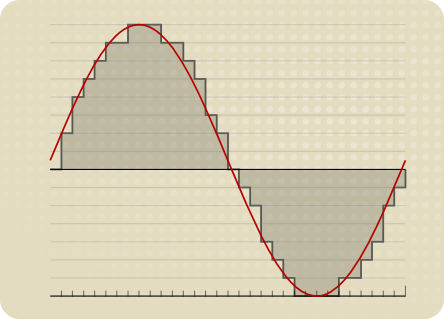
Digital Audio Encoding is the process of converting an analog audio signal into a digital format, which can be stored, processed, and transmitted electronically. It involves the use of an Analog-to-Digital Converter (ADC) to sample and quantize the analog audio waveform into a series of binary numbers that can be interpreted by a digital device. The resulting digital audio data can then be compressed, processed, and transmitted over various digital platforms, such as the internet, CDs, DVDs, and other digital storage devices.

The Importance of Digital Audio Encoding

Digital Audio Encoding has revolutionized the way we consume and produce audio content. It has made it possible to store, edit, and transmit high-quality audio content with minimal loss of quality. Some of the benefits of digital audio encoding include:

  • Improved sound quality: Digital audio encoding allows for high-quality audio content that is free from the distortions and noise associated with analog audio.
  • Easy storage and transfer: Digital audio files can be easily stored and transferred over various digital platforms with minimal loss of quality.
  • Efficient compression: Digital audio files can be compressed into smaller file sizes without significant loss of quality, making it easier to store and transfer large audio files.
  • Greater accessibility: Digital audio content can be easily accessed over various digital platforms, including the internet, mobile devices, and other digital devices.

The Digital Audio Encoding Process

The Digital Audio Encoding process involves several steps, which include:

  1. Sampling: The analog audio waveform is sampled at regular intervals using an Analog-to-Digital Converter (ADC).
  2. Quantization: The sampled waveform is quantized, i.e., each sample is assigned a binary number that represents its amplitude value.
  3. Encoding: The quantized samples are encoded into a digital format, such as WAV, MP3, or AAC.
  4. Compression: The encoded digital audio file can be compressed using lossy or lossless compression algorithms to reduce its file size.

Lossy vs. Lossless Audio Compression

Lossy and lossless audio compression are two types of compression algorithms used in digital audio encoding. Lossy compression algorithms compress audio files by removing data that is deemed unnecessary or redundant. This results in a smaller file size but may result in a loss of audio quality. Lossless compression algorithms, on the other hand, compress audio files without any loss of quality. This results in a larger file size but maintains the original audio quality.

Bitrate and its Importance in Digital Audio Encoding

Bitrate is a measure of the amount of data used to represent each second of digital audio. It is measured in bits per second (bps) or kilobits per second (kbps). The bitrate of a digital audio file has a significant impact on its quality and file size. Higher bitrates result in higher quality audio files but also larger file sizes. Lower bitrates result in smaller file sizes but may result in a loss of audio quality.

Common Digital Audio Formats

There are several digital audio formats used in digital audio encoding, including:

  • WAV: WAV is a lossless audio format that is commonly used for storing high-quality audio content.
  • MP3: MP3 is a lossy audio format that is commonly used for compressing and storing digital audio files for playback on various digital devices.
  • AAC: AAC is a lossy audio format that is commonly used for compressing and streaming digital audio content over the internet.
  • FLAC: FLAC is a lossless audio format that is commonly used for storing high-quality audio content, similar to WAV.

Challenges in Digital Audio Encoding

Despite the many benefits of digital audio encoding, there are several challenges that must be addressed to ensure optimal audio quality. These challenges include:

  • Sampling rate limitations: The sampling rate of an ADC can affect the accuracy of the digital audio representation. Higher sampling rates generally result in higher accuracy, but also require larger file sizes.
  • Bit depth limitations: The bit depth of an ADC can affect the dynamic range and noise floor of the digital audio representation. Higher bit depths generally result in higher accuracy, but also require larger file sizes.
  • Compression artifacts: Lossy compression algorithms can introduce compression artifacts, such as distortion and noise, which can degrade audio quality.

Future Developments in Digital Audio Encoding

Digital Audio Encoding is an ever-evolving field, with ongoing developments aimed at improving audio quality, reducing file sizes, and enhancing accessibility. Some of the latest developments include:

  • High-resolution audio: High-resolution audio formats, such as MQA and DSD, offer even higher audio quality than standard digital audio formats.
  • Immersive audio: Immersive audio formats, such as Dolby Atmos and DTS:X, offer a more immersive listening experience by incorporating height and surround sound elements.
  • Object-based audio: Object-based audio formats, such as MPEG-H 3D Audio, offer greater flexibility in audio content creation and delivery by enabling individual audio objects to be separately mixed and streamed.

FAQs

1. What is digital audio encoding?

Digital audio encoding is the process of converting an analog audio signal into a digital format, which can be stored, processed, and transmitted electronically.

2. Why is digital audio encoding important?

Digital audio encoding has revolutionized the way we consume and produce audio content by providing improved sound quality, easy storage and transfer, efficient compression, and greater accessibility.

3. What are some common digital audio formats?

Some common digital audio formats include WAV, MP3, AAC, and FLAC.

4. What is the difference between lossy and lossless audio compression?

Lossy compression algorithms compress audio files by removing data that is deemed unnecessary or redundant, resulting in a smaller file size but may result in a loss of audio quality. Lossless compression algorithms compress audio files without any loss of quality, resulting in a larger file size but maintaining the original audio quality.

5. What is bitrate and why is it important in digital audio encoding?

Bitrate is a measure of the amount of data used to represent each second of digital audio. It is important in digital audio encoding because it has a significant impact on audio quality and file size.

6. What are some challenges in digital audio encoding?

Some challenges in digital audio encoding include sampling rate limitations, bit depth limitations, and compression artifacts.

7. What are some future developments in digital audio encoding?

Some future developments in digital audio encoding include high-resolution audio, immersive audio, and object-based audio.

8. What is the difference between a lossy and lossless audio format?

Lossy audio formats use compression algorithms to reduce file size, sacrificing some audio quality in the process. Lossless audio formats, on the other hand, use compression algorithms that do not compromise audio quality, resulting in larger file sizes.

9. What is a sampling rate and how does it affect audio quality?

A sampling rate is the number of times per second that an analog audio signal is measured and converted into a digital signal. The higher the sampling rate, the more accurately the digital signal represents the original analog signal, resulting in higher audio quality. However, higher sampling rates also require larger file sizes and more processing power.

10. What is bit depth and how does it affect audio quality?

Bit depth refers to the number of bits used to represent each audio sample in a digital audio file. A higher bit depth allows for a greater dynamic range and lower noise floor, resulting in higher audio quality. However, higher bit depths also require larger file sizes and more processing power.

11. What is lossless compression?

Lossless compression is a compression algorithm that reduces the size of a digital audio file without sacrificing any audio quality. This is achieved by identifying and removing redundant or unnecessary data in the audio file.

12. What is immersive audio and how does it enhance the listening experience?

Immersive audio is an audio format that uses spatial sound technology to create a more immersive listening experience. This is achieved by incorporating height and surround sound elements, which create a more three-dimensional soundstage. This allows for a more realistic and engaging listening experience, especially when combined with a surround sound system.

Conclusion

Digital audio encoding has revolutionized the way we produce and consume audio content, providing improved sound quality, easy storage and transfer, efficient compression, and greater accessibility. While there are some challenges to overcome, ongoing developments in high-resolution, immersive, and object-based audio formats promise to further enhance the digital audio experience.

References

  • Bosi, M., & Goldberg, R. (2012). Introduction to digital audio coding and standards. Springer Science & Business Media.
  • Thompson, J. (2013). Understanding digital audio. Focal Press.

The Science Behind Digital Audio Compression

The Science Behind Digital Audio Compression

Digital Audio Compression


Digital audio compression is a complex topic that is often misunderstood. It is a process that reduces the size of digital audio files without affecting the overall quality of the sound. The goal of this article is to provide a comprehensive overview of the science behind digital audio compression, including its history, the different types of compression, and how it affects the quality of the sound.

Digital Audio Compression

The History of Digital Audio Compression

The history of digital audio compression can be traced back to the early 1990s when the first MP3 encoder was developed. MP3 stands for MPEG-1 Audio Layer 3 and is a method of compressing digital audio files. This compression method quickly gained popularity due to its ability to reduce file size without compromising the quality of the sound.

Since then, many different types of digital audio compression have been developed, each with its own set of advantages and disadvantages. However, they all work on the same principle of reducing the amount of data in the audio file while maintaining the overall quality of the sound.

The Different Types of Digital Audio Compression

There are two main types of digital audio compression: lossy and lossless. Lossy compression is the most common type of compression and is used in formats like MP3, AAC, and WMA. It works by removing parts of the audio file that are deemed less important to the overall quality of the sound.

Lossless compression, on the other hand, is used in formats like FLAC and ALAC. This method of compression works by compressing the file in a way that allows it to be decompressed back to its original form without losing any of the data. This means that the sound quality is preserved, but the file size is still reduced.

The Science Behind Digital Audio Compression

Digital audio compression works by reducing the amount of data in an audio file. The amount of data in an audio file is measured in bits per second (bps) or kilobits per second (kbps). The higher the bitrate, the better the quality of the sound. However, higher bitrates also mean larger file sizes.

Compression algorithms work by analyzing the audio data and removing parts that are not critical to the overall sound quality. These parts can include frequencies that are outside the range of human hearing or parts that are masked by other sounds in the file.

Once the compression algorithm has identified the parts of the file that can be removed, it uses a mathematical formula to compress the remaining data. This formula is designed to reduce the size of the file without affecting the overall quality of the sound.

The Effects of Compression on Sound Quality

The goal of digital audio compression is to reduce the size of the file without affecting the overall quality of the sound. However, compression can have some effects on sound quality, depending on the type of compression used and the bitrate of the original file.

Lossy compression, for example, can result in a loss of high-frequency information and dynamic range. This can lead to a loss of detail in the sound and a less natural-sounding reproduction of the original recording.

Lossless compression, on the other hand, preserves the original sound quality of the recording, but the resulting file sizes can still be quite large. This makes it less practical for use in situations where file size is a concern.

The Future of Digital Audio Compression

The future of digital audio compression is closely tied to the ongoing development of digital audio technology. As technology continues to improve, the potential for more efficient compression algorithms and higher quality sound reproduction is becoming a reality.

One of the most exciting developments in digital audio compression is the emergence of artificial intelligence (AI) and machine learning. These technologies have the potential to create compression

Which format has the best sound quality for music?

Which format has the best sound quality for music?

Music Format
Music Format


PCM, the highest level in audio files, is the ancestor of all digital audio (not including analog), with the highest fidelity and high volume.

Music Format
Music Format

Common formats include pcm and cda, which are primarily used to burn records as CD files. CD is not a format, it is a standard, please refer to the official red book published by SONY (Sony) for details. It could be on a common CD-ROM, which was later modified) and cannot be saved as format.
Therefore, it must be said that PCM format has the best sound quality, but its volume is extremely large, so it generally uses WAV as the original file to save audio files, the quality is also quite high, the loss is almost quite small, but the volume is relatively large. This is a format developed and illustrated by Microsoft, which is suitable for Windows operating systems and can also be used on the latest MAC systems. Extension: .wav
is the original audio format dedicated to the MAC system, it is AIFF, the extension is Aiff, which was independently developed by Apple and is very common on Mac. That said, this is the best format (except PCM) on a Mac.
On Unix and Java platforms (which mostly refer to SUN platforms), the corresponding format is AU and the extension is au. It is currently the standard audio format under Unix and Java.
The above formats are all original file formats, which are usually huge in size. In order to facilitate transmission on computers, people have developed compression formats. Compression is divided into lossy compression and lossless compression. Obviously, lossy compression has a higher compression rate, but it requires The problem to be solved is how to solve the sound quality problem. The usual practice is to sacrifice the part that the human ear cannot hear, but the human ear is very different, so it is difficult to care for all people. Among the song formats, the best ones are flac (lossless, flac extension), Monkey’s Audio (lossless, ape extension), DTS (multichannel, mainly used with DVD, dtc/wav extension), AC3 (released by Dolby, multichannel surround , realistic sense of presence, extension ac3), AAC (loaded, good sound quality, extension Aac or mp4), WMV (this is also a video format, an improved version of wma and asf, quality is comparable High, extension wmv), as well as MusePack (mpc extension, completely free) and MP3Pro (mp3 extension) are also quite good, these formats are quite high in sound quality, even for users who require not bad sound. Also, the most popular formats are mp3 and ogg, as well as SONY’s special ATRAC/ATRAC3 format, which is dedicated to MD. These effects are also good and are more common on the Internet, but the effect is obviously not as good as the formats mentioned above.
As for rm and wma, because the compression is too high, the sound quality is really unflattering, especially those that circulate on the Internet, which are lost and cannot be lost anymore, so it is highly discouraged.

What music format has the best sound quality?

What music format has the best sound quality?

Music Format
Music Format

When I want to download songs, I always feel that the sound quality is not so pure, it seems a bit muddy, what format is good to listen to?

Music Format
Music Format

There are three lossless music quality formats: ape, wav and flac.

APE is one of the popular lossless compression formats for digital music. Due to its early appearance, it has a wide user base all over the world, especially in mainland China. Lossless compression formats such as APE use a more refined recording method to reduce volume, and the restored data is the same as the original file, ensuring file integrity.

WAV is a sound file format developed by Microsoft. It complies with the RIF file specification and is used to store audio information resources on the Windows platform. It is widely compatible with the Windows platform and its applications. This format supports a variety of compression types. algorithms and supports multiple WAV file with standard format is the same as CD format, with 44.1K sampling frequency and 16-bit quantization number, so the sound file quality is almost the Same as CD.

Chinese translation FLAC is a lossless audio compression coding. FLAC is a well-known free audio compression codec, which is characterized by lossless compression. Unlike other lossy compression codes such as MP3 and AAC, it does not destroy any original audio data, so it can restore the sound quality of music discs. It has been compatible with many software and hardware audio products (such as CDs, etc.) since 2012.

Can you really hear the difference in the sound quality of music?

Can you really hear the difference in the sound quality of music?

difference in the sound quality of music

A brief discussion of the principle of audio compression

difference in the sound quality of music


grade headphones – performance, equipment – can you really hear the difference in music quality? A brief discussion of the principle of audio compression
When you listen to music, most of the time the format being played is MP3 or AAC.

Both formats are smaller formats in which the audio is processed and compressed. To reduce size and save space, they actually remove a portion of the sound signal compared to the original audio. But can you hear it?

In this article, we will introduce the principles of music compression and discuss a question: Does music compression really affect the music you listen to?

The principle of musical compression.
Most of the digital audio we receive every day, whether played online or stored as a file, uses the principle of lossy compression. Lossy compression not only compresses the data, but also deletes the original data, and with lossy compression, some data is gone forever.

But keep in mind that this censored data is not randomly selected. Audio compression formats apply psychoacoustics to remove sounds that are beyond our hearing range and that we are not aware of.

audio compression – operation, equipment – can you really hear the difference in music quality? A brief discussion of the principle of audio compression
The human ear has a hearing range of about 20 Hz to 20 kHz, and sound signals beyond this range cannot be detected even if they are removed. And as we age, the range of hearing decreases. Therefore, it can be said that the sounds that everyone hears are not really absolutely the same, even if they come from the same sound source.

The audio below can help you find your hearing range, you can listen to it with headphones to see how far away you can hear the sound signal. Be careful to control the volume at any time during the listening process, otherwise it may damage your hearing.

Also, when high-frequency sounds and low-frequency sounds are present at the same time, high-frequency sounds will be more difficult to hear clearly. For example, the constant drumbeats in the music can cause you to ignore the slight differences between the melodies.

This phenomenon is called “shadowing” and is used in the principle of compression. If there are louder low-frequency sounds, it can mask the sonic loss of high-frequency sounds. High and low here are relative, so this principle can be applied globally. But sounds above 15 kHz are more susceptible to masking, so that’s also a prime issue for compression.

Although it is obvious that the sound signal removed by lossy compression should be mostly useless data, there are still people who believe that these “ambient sounds” being removed will affect the three-dimensionality of the sound and flatten it.

In general, the key to lossy compression is finding a balance between reducing size and preserving sound quality.

How does the bit rate affect the quality of the music?
How does the bit rate affect the quality of the music?

Audio Bitrate Quality

Does the bit rate affect the quality of the music?

There is a lot of talk these days that we have lost real music with the advent of compressed audio formats like MP3, AAC and the like. Is it really so? Will lossless music save music? Can an inexperienced listener tell the difference between MP3 and FLAC music? Let’s take a look at this problem.
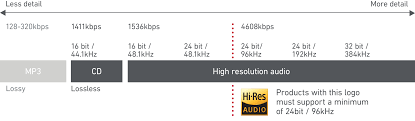
Audio Bitrate

What is Bitrate?

You’ve probably heard the term “bitrate” before and you probably have a basic idea of ​​what it means, but it might be a good idea to familiarize yourself with its official definition so you know how it all works.

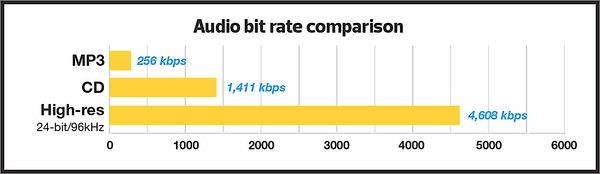
Bit rate is the number of bits or the amount of data that is processed over a period of time. In audio, this generally means kilobits per second. For example, the music you buy from iTunes is 256 kilobytes per second, which means that every second of the song contains 256 kilobytes of data.

The higher the bit rate of the track, the more space it will take up on your computer. Audio CDs typically take up quite a bit of space, so it has become common practice to compress these files so that you can burn more music to your hard drive (or iPod, Dropbox or whatever). This is where the “lossy” and “lossy” formats conflict.

Lossless and Lossy formats: what’s the difference?

When we say lossless, we mean that we haven’t really changed the original file. That is, we copy a track from the CD to our hard drive, but we do not compress it to the point of losing data. Essentially the same as the original CD track.

However, most of the time, you will probably extract your music in Lossy format. That is, you took a CD, copied it to your hard drive, and compressed the tracks so they don’t take up a lot of space. A typical MP3 or AAC album is probably about 100MB. The same album in a lossless format like FLAC or ALAC (aka Apple Lossless) will be around 300MB, so it has become common practice to use lossy formats for faster downloads and more hard drive savings. .

The problem is that when you compress a file to save space, you are removing chunks of data. Just like when you take a high quality image and compress it to JPEG, your computer grabs the raw data and “tricks” certain parts of the image into being basically the same, but with some loss of clarity and quality.

An example of how the JPEG graphics compression algorithm works
Remember that you are saving hard drive space by compressing music in lossy formats, which can make a big difference for an iPhone with 32GB of storage, but is only a trade-off in terms of size / quality.

There are different levels of compression: 128 Kbps, for example, takes up very little space, but it will also have a lower quality of playback than a larger 320 Kbps file, which in turn is of lower quality than the 1,411 reference file Kbps. From. 1,411 kbps is an audio CD level quality, which is more than sufficient in most cases.

The problem is not how much the music is compressed, but what equipment you listen to it on.

Does bit rate really matter?

As memory gets cheaper every year, listening to sound at a higher bit rate, or even lossless formats, is starting to become more and more popular. But is it worth the time, effort, and storage space on your phone or computer?

I don’t like answering questions this way, but sadly the answer is: it depends.

Part of the equation is the hardware you use. If you are using a good quality pair of headphones or speakers, you are used to wide frequency and dynamic range. As such, you are more likely to notice the downsides that come with compressing music into lower bitrate files. You may notice that low-quality MP3 files lack a certain level of detail; Subtle backing tracks may be harder to hear, the highs and lows won’t be as dynamic, or you may hear distortion in the lead vocal. In these cases, you may want a higher bit rate track.

However, if you’re listening to your music with a cheap pair of headphones on your iPod, you probably won’t notice the difference between a 128Kbps file and a 320Kbps file, let alone 1,411Kbps lossless music. Remember when you I showed the image a few paragraphs above and noticed that you probably had to look at it to see the flaws? Your headphones are like a truncated version of the image: they will make these imperfections difficult to perceive, as they are not physically capable of reproducing the music for you the way you want them to.

The other part of the equation is, of course, your own ears. It can be very difficult for some people to distinguish between two different bit rates for the simple reason: they listen to little music. Listening skills, like any other, develop with practice. If you listen to your favorite music often and a lot, your hearing becomes more accurate and begins to pick up small details and midtones. But until then, doesn’t it really matter what bitrate you use?

So what format and bit rate should you choose yourself? Is 320 Kbps enough for you or do you definitely need Lossless format?

The point is that it is difficult to hear the difference between a lossless file and a 320Kbps MP3 file. To hear the difference, you need serious high-quality equipment, good hearing, and some kind of music (for example, classical or jazz). .

For the vast majority of people, 320 Kbps is more than enough to listen to.

What else should you consider?

Music recorded in the Lossless format can be useful. Lossless files are more reliable in the future, in the sense that you can always compress them to Lossy format when you need to, but you can’t do the opposite and restore original CD quality from MP3 file. This, again, is one of the fundamental problems of online music stores: if you have created a huge music library on iTunes and one day you decide that you need more bitrate, you will have to buy it again, but this time only in CD format . …

Whenever I can, I always buy or copy music in Lossless format for backup.

I understand that audiophiles are like a needle under your nails. Like I said, it all depends on you, your audition and the equipment you have.

Compare two tracks recorded in Lossless and Lossy formats. Try a few different audio formats, listen to them for a while and see if it makes a difference for you or not.