How does the bit depth impact the dynamic range and audio fidelity in digital formats?


Free Download Mp4Gain
picture

How does the bit depth impact the dynamic range and audio fidelity in digital formats?

audio bit depth
audio bit depth
audio bit depth
audio bit depth

Bit depth’s influence on dynamic range and audio quality

I remember when I first started learning about digital audio formats, I was curious about how bit depth affected the overall sound quality. It turns out that bit depth plays a significant role in determining the dynamic range and audio fidelity of digital audio files. The higher the bit depth, the more accurately the audio signal can be represented, resulting in a more detailed and accurate sound.

As a musician, I’ve always been fascinated by the science behind sound. I once read a quote from the famous composer John Cage that said, “There is no such thing as an empty space or an empty time. There is always something to see, something to hear.” This idea resonates with me, as it highlights the importance of capturing every nuance of sound in digital audio formats.

In my experience, working with higher bit depths has allowed me to create richer, more immersive audio experiences for my listeners. The increased dynamic range and audio fidelity make a noticeable difference in the final product.

How bit depth affects audio fidelity in digital formats

When I first started experimenting with digital audio, I didn’t realize how crucial bit depth was to the overall sound quality. Bit depth refers to the number of bits used to represent each audio sample in a digital file. The more bits used, the greater the audio fidelity, as there are more possible values to represent the audio signal.

I recall watching a documentary about the history of digital audio, where an expert explained that “the higher the bit depth, the closer the digital representation is to the original analog signal.” This made me realize the importance of using higher bit depths to achieve the best possible audio quality.

In my own projects, I’ve found that using a higher bit depth results in a more accurate and detailed sound. It’s especially noticeable when working with complex audio material, where the nuances of the sound can be more easily captured and preserved.

The role of bit depth in digital audio dynamic range

Dynamic range is another critical aspect of digital audio quality that is directly influenced by bit depth. The dynamic range refers to the difference between the quietest and loudest parts of an audio signal. A higher bit depth allows for a greater dynamic range, as there are more possible values to represent the varying levels of loudness.

I’ve always been a fan of movies with powerful soundtracks, and I remember a quote from the film “Amadeus” that stuck with me: “Music is not just about notes, but also the spaces between them.” This idea applies to dynamic range as well, as it’s essential to capture the full spectrum of sound, from the quietest whispers to the loudest explosions.

In my own audio projects, I’ve noticed that working with higher bit depths allows me to create more dynamic and expressive soundscapes. The increased dynamic range provides a more immersive and engaging listening experience for my audience.

Final words

In conclusion, bit depth plays a crucial role in determining the dynamic range and audio fidelity of digital audio formats. A higher bit depth allows for a more accurate representation of the audio signal, resulting in a more detailed and immersive sound. As a musician and audio enthusiast, I’ve found that working with higher bit depths has significantly improved the quality of my projects.

If you’re looking to enhance the audio quality of your own projects, I highly recommend using a tool like mp4gain. While it’s not free or open-source, and only runs on Windows, it’s a powerful normalizer and converter for major audio and video formats. With its integrated equalizer, mp4gain can help you achieve the best possible audio quality for your projects.


Free Download Mp4Gain
picture


Mp4Gain Main Window
picture


Mp4Gain Features
picture


Free Download Mp4Gain
picture

What is the maximum video bit depth supported by MP4?

What is the maximum video bit depth supported by MP4?

Mp4 video bit depth
Mp4 video bit depth
Mp4 video bit depth
Mp4 video bit depth

Understanding the MP4 Video File Format

As video technology has advanced, so too has the number of video file formats available. One of the most popular video file formats today is the MP4 format. The MP4 format is known for its versatility and compatibility with a wide range of devices and platforms.

One of the key features of the MP4 file format is its ability to compress video data without sacrificing quality. This is achieved through the use of video compression algorithms, which reduce the amount of data required to store video content while maintaining its visual fidelity.

Maximizing Video Quality in MP4

To ensure that your MP4 videos look their best, it’s important to understand the maximum video bit depth supported by the format. Bit depth refers to the number of bits used to represent each color in a video image. The higher the bit depth, the more colors that can be represented, resulting in smoother gradients and more accurate color reproduction.

The maximum video bit depth supported by MP4 is 10 bits per channel, which allows for a total of 1.07 billion possible colors. This is a significant improvement over the 8-bit color depth supported by many other video file formats, which only allows for 16.7 million colors.

To take advantage of the higher bit depth supported by MP4, it’s important to use a video encoder that supports 10-bit color depth. This will ensure that your videos have the maximum possible color accuracy and quality.

Ensuring Compatibility and Playback

While MP4 is a widely supported video file format, it’s important to ensure that your videos are compatible with the devices and platforms you intend to use them on. This includes checking the video codec used in your MP4 files, as well as the audio codec and other technical specifications.

In addition, it’s important to consider the playback software or hardware that will be used to view your MP4 videos. Not all devices and software support the maximum video bit depth of 10 bits per channel, so it’s important to test your videos on a range of devices to ensure they will play back correctly.

Final Words

In conclusion, understanding the maximum video bit depth supported by MP4 is important for ensuring the best possible video quality. By using a video encoder that supports 10-bit color depth and testing your videos on a range of devices, you can ensure that your MP4 videos look their best and are compatible with a wide range of platforms.

What is the relationship between audio and video bit depth?

What is the relationship between audio and video bit depth?

audio and video bit depth

Audio Bit Depth and Video Bit Depth

Audio and video quality are two essential components of any multimedia content. Bit depth is one of the key factors that determine the quality of audio and video content. The bit depth of audio refers to the number of bits used to represent the amplitude of a sound wave. In contrast, video bit depth refers to the number of bits used to represent the color and brightness of each pixel in an image or video frame.

The higher the bit depth, the more accurately the audio or video content can be represented. A higher bit depth allows for a greater dynamic range and more subtle variations in sound or image. In general, a higher bit depth is desirable for both audio and video content.

As a personal experience, I have worked with audio and video editing for several years, and I have noticed a significant improvement in quality when using a higher bit depth. I often use a bit depth of 24 bits for audio and 10 bits for video when working on high-quality content.

Audio and Video Synchronization

The synchronization between audio and video is crucial for creating a seamless multimedia experience. When the audio and video are out of sync, it can be distracting and diminish the overall quality of the content.

The bit depth of both audio and video can affect the synchronization. For example, if the audio has a higher bit depth than the video, the audio may appear to be out of sync with the video. This can occur because the audio takes longer to process due to the higher bit depth. To avoid this issue, it is essential to ensure that both the audio and video have the same bit depth.

As a personal tip, I recommend using software that allows for precise synchronization adjustments. I have found that the use of keyframes and markers can significantly improve the accuracy of synchronization between audio and video.

Audio and Video Codecs and File Formats

Audio and video codecs and file formats can also affect the bit depth and overall quality of multimedia content. A codec is a software program that compresses and decompresses audio or video data, while a file format determines how the compressed data is stored.

Lossy codecs, such as MP3 and H.264, compress audio and video data by discarding information deemed unnecessary. This can result in a lower bit depth and lower overall quality. In contrast, lossless codecs, such as FLAC and ProRes, maintain the original quality by compressing the data without discarding any information.

As a personal preference, I usually work with lossless codecs and file formats when editing audio and video content. However, it is essential to consider the intended use and distribution of the content when choosing codecs and file formats. For example, lossy codecs are often used for streaming and web distribution due to their smaller file sizes.

Final Words

In conclusion, bit depth is a critical factor in determining the quality of audio and video content. A higher bit depth allows for greater accuracy and dynamic range. Ensuring that the audio and video have the same bit depth is crucial for synchronization. Codecs and file formats can also affect the bit depth and overall quality of multimedia content. Choosing the right codecs and file formats depends on the intended use and distribution of the content.

Remember that mp4gain is a great solution to normalize and convert audio and video files to ensure they have the same bit depth and quality.

What is the audio bit depth?

Understand what bit depth is, how it works, and how this feature will affect the quality of music during auditions;

Currently, many of those who are looking for quality audio or quality music keep mentioning “Hi-Res”, FLAC 24-bit, and MQA (Master Quality Audio) files. This is a growing trend in high-end smartphones that are trying to offer higher audio quality both in their DAC and in support of advanced Bluetooth audio codecs like LDAC, developed by Sony. Additionally, there are music streaming services that promise lossless audio quality, like Tidal.

BitDepth

The promise made by audio equipment manufacturers, developers of audio streaming and music streaming formats, is simple: superior audio quality due to the increased amount of data, also known as bit depth or English bit depth . There are 24 bits of 1 and 0 versus 16 bits on the CD. Of course, these high-resolution files are more expensive due to their quality, but the more bits, the better the result will be when listening to music, right?

Bitdepth

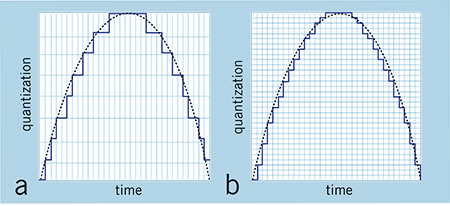
Low resolution audio is usually displayed using a jagged wave graph (with ladders). Source: soundguys
Well, the answer to the previous question is: not necessarily. The argument for a value in increasing bit depth is not based on something scientific, but on the distortion of what is actually happening and the exploitation of consumer ignorance about the media they are consuming. That is, it is a fact that stores selling 24-bit tracks reap far more benefits than a real improvement in promised sound quality.

Bit depth and sound quality.

The greatest example of companies selling 24-bit audio is the demonstration of a jagged sine wave, like stairs. When we look at a file that has a resolution of 16 bits, we see an irregular line, but when we look at the same song in 24 bits, it seems to be a practically smooth line, with better definition. It is a basic visual illustration, but depending on the person’s knowledge of the subject, he can be easily fooled.

Why use 24-bit or more audio files?

The utility of using a high-level bit depth applies to studios, because with each filter and conversion that is applied, the background noise increases. This increase in noise occurs due to the insertion of a new wave, as explained above. In other words, when using a higher bit depth level, the sound engineer prevents the original audio from generating noise by manipulating it for mixing and mastering.

However, remember that this will be more useful for audio production and not for the listener, as explained above.

conclusion
What will make the difference will be the balance between the sounds made in the mastering and not the bit depth itself, since the 16 bits of the CD are already more than enough for music listeners.

Multimedia formats: Digital audio


Sound is a continuous signal. To be stored with computer systems
it must be sampled, thus obtaining a digital signal.
The parameters that characterize the sampling are basically three:

 The sample rate
 Bit depth
 The number of channels
these parameters influence both the space occupied and the quality of the audio file
digital obtained.

Digital Audio

Sampling rate

The sampling frequency is the measurement expressed in Hertz (Hz) of the number
of times per second in which an analog signal is measured and stored
in digital form.

Sampling rate
The higher the sampling rate, the more the sequence of the samples
digital will be close to that of the original analog waveform.
Low sampling rates limit the frequency range that is
can record, which in turn can generate a recording that
poorly reproduces the original sound.
Two sampling frequencies:
A. Low sampling rate,
which distorts the wave of the original sound
B. High sampling rate,
which perfectly reproduces the wave of
original sound
To reproduce a certain frequency, the sampling frequency
it must be at least double it (Nyquist theorem).
For example, audio CDs have a sampling rate of 44.100 Hz,
so they can reproduce frequencies up to 22.050 Hz, which are hardly found
beyond the limit of human perception of 20,000 Hz.
The following table shows the most common sampling rates for
digital audio.

Bit depth

The bit depth represents the number of bits used to store a
single digital sample.
When a sound wave is sampled, each sample is assigned
the amplitude value closest to the original wave amplitude. A depth
in high bits it provides as many amplitude values ​​as possible, which results in a
greater dynamic range (the difference in decibels between the maximum volume that the component can sustain without
distort the waves and the background noise it produces), lower and higher background noise
fidelity.
For example if you use 8 bits you have 256 possible values ​​(28
) that, being
relatively few, offer less sound quality than a
tape; if instead 16 bits per sample are used, 65536 values ​​are obtained
possible (216).
The most common examples are the audio CD, recorded in 16 bit, and the DVD, which
supports up to 24 bit depth.

Compression formats

Hand in hand with the advent of digitalization, multimedia applications have
they are increasingly widespread until they become commonplace. One of
multimedia features is certainly the use of digital audio
vowel and sound. The biggest obstacle associated with digitizing audio is
the large size of the files that are produced, which puts them at
sector operators (especially those linked to the internet) the problem of
reduce the space occupied by the data to obtain the double advantage of:
 save in terms of memory occupation;
 save in terms of transfer time on the network.

For this reason, speaking of digitizing the audio, it is necessary to speak
also of data compression techniques. The compression techniques of the
data, of whatever nature they are, are divided into:
 lossless: compress data through a lossless process
of information that takes advantage of redundancies in data encoding
 lossy: compress data through a lossy process
of information that takes advantage of redundancies in the use of data.

Lossless formats

Lossless compression formats are more suitable for archiving rather than
to reproduction, since most of them require complete
decompression before they can be played.
One of the most common lossless compression formats is FLAC (Free Lossless Audio Codec).

Lossy formats

Lossy compression formats use compression algorithms capable of
drastically reduce the amount of data required to store a sound,
guaranteeing however an acceptable and faithful reproduction of the original file uncompressed.