Bit Depth: Understanding its Role in Audio Resolution


Free Download Mp4Gain
picture

Bit Depth: Understanding its Role in Audio Resolution
Bit Depth
Bit Depth
Bit Depth
Bit Depth

What is the importance of bit depth in audio resolution?

When it comes to audio resolution, bit depth plays a crucial role. Bit depth refers to the number of bits used to represent the amplitude of an audio signal. In simpler terms, it determines the level of detail and accuracy with which sound can be captured and reproduced. The higher the bit depth, the more precise the audio representation, resulting in greater dynamic range and fidelity.
Higher bit depths enable a wider range of possible values, allowing for more nuanced audio reproduction. In digital audio, the most common bit depths are 16-bit and 24-bit. A 16-bit audio signal can represent 65,536 discrete amplitude levels, while a 24-bit signal can represent a staggering 16,777,216 levels. This significant increase in resolution allows for more accurate representation of subtle audio nuances, resulting in a more realistic and immersive listening experience.

Moreover, higher bit depths help reduce quantization noise, which can degrade the audio quality. Quantization noise is the distortion introduced when the continuous analog audio signal is converted into a discrete digital representation. By increasing the number of bits used for quantization, the quantization noise can be pushed to lower levels, effectively minimizing its impact on the audio signal. This reduction in noise contributes to improved audio fidelity and a cleaner sound.

The impact of bit depth on audio recording

The choice of bit depth during audio recording has a significant impact on the quality and flexibility of the recorded material. When capturing audio, it is crucial to select an appropriate bit depth based on the desired outcome and the dynamic range of the source material.
For capturing music with a wide dynamic range or for critical recording applications, a higher bit depth, such as 24-bit, is preferred. This ensures that the delicate nuances and subtle variations in the performance are faithfully captured without losing detail. With a higher bit depth, there is ample headroom to accommodate sudden spikes in volume, preventing clipping and distortion.

On the other hand, for applications where the dynamic range is limited, such as voice recordings or podcasting, a lower bit depth, such as 16-bit, can be sufficient. Since these types of recordings typically have a smaller range between the softest and loudest sounds, the additional precision offered by higher bit depths may not be necessary. Using a lower bit depth can help conserve storage space and streamline the post-production process.

The benefits of higher bit depths in audio production

In audio production, working with higher bit depths offers several advantages that contribute to the overall quality of the final mix. Let’s explore some of these benefits:
1. Increased headroom: Higher bit depths provide more headroom, allowing audio engineers to work with greater flexibility during the mixing and mastering stages. This additional headroom ensures that any adjustments made to the audio levels or effects do not result in clipping or distortion.

2. Enhanced processing capabilities: Working with higher bit depths provides greater precision for applying audio processing effects, such as equalization, compression, and reverb. This precision allows for more accurate and transparent manipulation of the audio signal, resulting in a polished and professional sound.

The role of bit depth in audio playback

The bit depth of an audio file also impacts its playback quality. When playing back audio, it is important to ensure that the playback system supports the bit depth of the audio file. If the playback system is not capable of reproducing the full bit depth, the audio may be truncated or quantized, leading to a loss of detail and fidelity.
Furthermore, downsampling or converting high-resolution audio files with a higher bit depth to a lower bit depth can result in a loss of information and audio quality. It is essential to carefully consider the bit depth compatibility between the source material and the playback system to ensure an accurate and faithful reproduction of the audio.

Final Words

Bit depth plays a fundamental role in audio resolution, influencing the accuracy, fidelity, and dynamic range of the sound. Understanding the importance of bit depth in audio recording, production, and playback allows for informed decisions to be made regarding the selection and handling of audio files. By leveraging higher bit depths, audio professionals can achieve higher quality recordings and deliver an exceptional listening experience to their audiences.
Keywords (LSI): audio fidelity, dynamic range, quantization noise, recording quality, audio production, audio playback, higher resolution, audio nuances, digital representation, accurate reproduction, audio engineers, playback system, audio file compatibility.


Free Download Mp4Gain
picture


Mp4Gain Main Window
picture


Mp4Gain Features
picture


Free Download Mp4Gain
picture

How does the bit depth impact the dynamic range and audio fidelity in digital formats?

How does the bit depth impact the dynamic range and audio fidelity in digital formats?

audio bit depth
audio bit depth
audio bit depth
audio bit depth

Bit depth’s influence on dynamic range and audio quality

I remember when I first started learning about digital audio formats, I was curious about how bit depth affected the overall sound quality. It turns out that bit depth plays a significant role in determining the dynamic range and audio fidelity of digital audio files. The higher the bit depth, the more accurately the audio signal can be represented, resulting in a more detailed and accurate sound.

As a musician, I’ve always been fascinated by the science behind sound. I once read a quote from the famous composer John Cage that said, “There is no such thing as an empty space or an empty time. There is always something to see, something to hear.” This idea resonates with me, as it highlights the importance of capturing every nuance of sound in digital audio formats.

In my experience, working with higher bit depths has allowed me to create richer, more immersive audio experiences for my listeners. The increased dynamic range and audio fidelity make a noticeable difference in the final product.

How bit depth affects audio fidelity in digital formats

When I first started experimenting with digital audio, I didn’t realize how crucial bit depth was to the overall sound quality. Bit depth refers to the number of bits used to represent each audio sample in a digital file. The more bits used, the greater the audio fidelity, as there are more possible values to represent the audio signal.

I recall watching a documentary about the history of digital audio, where an expert explained that “the higher the bit depth, the closer the digital representation is to the original analog signal.” This made me realize the importance of using higher bit depths to achieve the best possible audio quality.

In my own projects, I’ve found that using a higher bit depth results in a more accurate and detailed sound. It’s especially noticeable when working with complex audio material, where the nuances of the sound can be more easily captured and preserved.

The role of bit depth in digital audio dynamic range

Dynamic range is another critical aspect of digital audio quality that is directly influenced by bit depth. The dynamic range refers to the difference between the quietest and loudest parts of an audio signal. A higher bit depth allows for a greater dynamic range, as there are more possible values to represent the varying levels of loudness.

I’ve always been a fan of movies with powerful soundtracks, and I remember a quote from the film “Amadeus” that stuck with me: “Music is not just about notes, but also the spaces between them.” This idea applies to dynamic range as well, as it’s essential to capture the full spectrum of sound, from the quietest whispers to the loudest explosions.

In my own audio projects, I’ve noticed that working with higher bit depths allows me to create more dynamic and expressive soundscapes. The increased dynamic range provides a more immersive and engaging listening experience for my audience.

Final words

In conclusion, bit depth plays a crucial role in determining the dynamic range and audio fidelity of digital audio formats. A higher bit depth allows for a more accurate representation of the audio signal, resulting in a more detailed and immersive sound. As a musician and audio enthusiast, I’ve found that working with higher bit depths has significantly improved the quality of my projects.

If you’re looking to enhance the audio quality of your own projects, I highly recommend using a tool like mp4gain. While it’s not free or open-source, and only runs on Windows, it’s a powerful normalizer and converter for major audio and video formats. With its integrated equalizer, mp4gain can help you achieve the best possible audio quality for your projects.

What is the difference between bit depth and bitrate?

What is the difference between bit depth and bitrate?

Bit Depth
Bit Depth
Bit depth
Bit Depth

Understanding Bit Depth and Bitrate

When it comes to audio and video files, there are two terms that are often used interchangeably: bit depth and bitrate. However, they are not the same thing. Bit depth refers to the number of bits used to represent each sample in an audio or video file, while bitrate refers to the amount of data transmitted per second.
Bit depth determines the number of possible values for each sample in a digital audio or video file. For example, an 8-bit audio file can have 256 possible values per sample, while a 16-bit file can have 65,536. The higher the bit depth, the more accurate the representation of the original sound or image.

On the other hand, bitrate refers to the amount of data transmitted per second in a digital file. In other words, it’s the rate at which data is encoded in a file. Higher bitrates typically mean higher quality files with more information, but also larger file sizes.

Audio Bit Depth vs Bitrate

When it comes to audio files, the bit depth and bitrate are both important factors in determining the quality of the sound. A higher bit depth means a more accurate representation of the original sound, while a higher bitrate means more data is transmitted per second, resulting in a higher quality sound.
However, it’s important to note that a higher bitrate does not necessarily mean a higher quality sound. If the original recording is of poor quality, increasing the bitrate will not improve the sound. In fact, it can actually result in larger file sizes with no improvement in sound quality.

Video Bit Depth vs Bitrate

Video files also have bit depth and bitrate, but they work slightly differently than in audio files. Bit depth determines the number of colors that can be represented in a video file, while bitrate determines the amount of data transmitted per second.
A higher bit depth means a wider range of colors can be represented in the video, resulting in a more accurate and vibrant image. However, a higher bitrate is also important for video files, as it determines the amount of detail that can be captured in each frame.

It’s important to find the right balance between bit depth and bitrate for video files, as increasing one can have a negative impact on the other. For example, a high bit depth with a low bitrate can result in a choppy or pixelated image, while a low bit depth with a high bitrate can result in a washed-out or blurry image.

Final Words

In conclusion, bit depth and bitrate are both important factors to consider when working with audio and video files. While they may seem similar, they serve different purposes and have different effects on the quality of the final product. It’s important to find the right balance between the two to ensure the best possible sound or image quality.
Keywords: audio bit depth, video bit depth, bit depth vs bitrate, bitrate definition, bitrate vs quality, audio quality, video quality, digital audio, digital video, file size, data transmission, accuracy, color representation, image quality, sound quality, audio recording, video recording, data encoding, pixelation, file format, media production, sound engineering, video editing, multimedia, digital media, technology, mp4gain, audio normalization, audio conversion, equalizer, windows, digital signal processing, dynamic

Audio bit depth

Audio bit depth

16 bit vs. 24 bit Audio, What Should You Record At? (FAQ Series) - YouTube

In digital audio using pulse code modulation (PCM), bit depth is the number of bits of information in each sample and corresponds directly to the resolution of each sample. Examples of bit depths include digital audio CD, which uses 16 bits per sample, and DVD-Audio and Blu-ray Disc, which can support up to 24 bits per sample.

Live Digital Audio in Plain English Part 1 - SoundGirls.org

In basic implementations, changes in bit depth mainly affect the noise floor due to quantization error, that is, signal-to-noise ratio (SNR) and dynamic range. However, techniques such as dithering, noise shaping, and oversampling mitigate these effects without changing the color depth. Bit depth also affects baud rate and file size. Bit depth is only relevant with respect to digital PCM signal. Non-PCM formats, such as lossy compression formats, have no associated bit depth.

Binary representation A PCM signal is a sequence of digital audio samples containing data that provides the information necessary to reconstruct the original analog signal. Each sample represents the amplitude of the signal at a specific point in time, and the samples are evenly distributed over time.

Amplitude: This is the only information that is explicitly stored in the sample and is usually stored as an integer or a number with a floating point number, encoded as a binary number with a fixed number of digits: the depth of sample bits, also called word length. or word size. Resolution indicates the number of discrete values ​​that can be represented in a range of analog values. The resolution of binary integers increases exponentially with increasing word length. Adding one bit doubles the resolution, adding twice doubles the resolution, and so on. The number of possible values ​​that can be represented by an integer bit depth can be calculated using 2 n, where n is the bit depth. Thus, a 16-bit system has a resolution of 65,536 (2 16) possible values.

PCM integer audio data is usually stored as signed numbers in binary complement format. Many audio file formats and Digital Audio Workstations (DAWs) now support PCM formats with floating point samples. Both the WAV file format and the AIFF file format support floating point representations. Unlike integers, whose bit structure is a single series of bits, a floating point number consists of separate fields, which are mathematically linked to form a number. The most common standard is IEEE 754, which consists of three fields: the sign bit, which indicates whether the number is positive or negative, the exponent, and the mantissa, which is increased by the exponent. Mantissa is expressed as a binary fraction in IEEE base two floating point format.

Floating point The resolution of floating point samples is less easy than that of integer samples because the floating point values ​​are not uniformly distributed. In floating point representation, the space between two adjacent values ​​is proportional to the value. This significantly increases the SNR in an integer system because the precision of a high-level signal will be the same as the precision of an identical signal at a lower level.

The tradeoff between floating point and integer values ​​is that the distance between large floating point values ​​is greater than the space between large integer values ​​of the same bit depth. Rounding a large floating point number results in more error than rounding a small floating point number, while rounding a whole number always results in the same level of error.

In other words, the integers have a uniform rounding, always rounding the least significant bit to 0 or 1, and the floating point has a uniform signal-to-noise ratio, the quantization noise level is always proportional to the signal level. The floating point noise floor will increase as the signal increases and will decrease as the signal decreases, resulting in audible drift if the bit depth is small enough.

Sample rate and bit depth

The comparison with the digital or film camera is not completely random: the sampling frequency of the audio signals, that is, the frequency of the samples per unit of time (usually given per second), is comparable to the frame rate per second from a film camera. The number of pixels in each individual image could be equated with the bit depth: HD movies “look better” than Super 8 movies. The higher the number of pixels on the sensor and the more often a photo is taken, more precisely, the “light to be recorded”, the landscape, can be digitally reproduced.

Bit Depth

Bit depth

Fortunately for us, a certain Harry Nyquist inspired a certain Claude Shannon long ago to support him with a theorem (a theoretical statement or theorem) that stated that an audio signal at twice the frequency must be sampled uniformly to match. with the original signal. to be able to rebuild sufficiently. Limiting the bandwidth of audible frequencies practically frees us from our hearing, which is basically only capable of consciously perceiving frequencies between a maximum of 20 Hz and 20,000 Hz.

Sample rate

The expense of completely and exactly reconstructing the analog output signal is theoretically infinite, since digital signals are discontinuous by nature in any case, while analog signals are always continuous. Unfortunately, it is inevitable that digital information is only suitable for rough storage of analog signals. The starting signal is “rough”, good word, right? Nyquist’s theorem also applies to digital cameras: they also deal with frequencies, that is, those of light.

digital audio

For signals up to 20 kHz more or less relevant to humans, a sampling frequency of 40 kHz is sufficient according to the aforementioned theorem. The 44.1 kHz sample rate common for CD quality comes from the 1970s or Sony’s “pulse code modulation (PCM) process for storing digital signals on video tapes. Later, Sony developed the Red Book standard for audio CDs with Philips.

The frequency, which is slightly wider by an additional 4000 Hz than twice that audible to humans, has its origin in the simplest possible filters, which are intended to remove so-called aliasing effects from the audible range of the reconstructed analog signal. during digitization: the wider this “corridor”, the simpler the filter technology.

PCM pulse code modulation method

Exactly 44.1 kHz got out of this, because sample rate converters can be more easily designed (used for studio technology or data carrier transfer) if the sample rate is an integer multiple of the output frequency. The output frequency here was the 60 Hz network frequency used for video digitization with 525 lines to digitize the TV signal. Changing 60 Hz would have been very laborious, it stuck. It is not a coincidence that multiplying 525 by an integer factor results in a frequency greater than 44,000 Hz, which we want to achieve to keep filters for anti-aliasing simple: the next largest integer that is divisible by 525 is 44,100. The multiplication factor is 84, as a whole number is desired, which should not interest us otherwise.

What is the audio bit depth?

Understand what bit depth is, how it works, and how this feature will affect the quality of music during auditions;

Currently, many of those who are looking for quality audio or quality music keep mentioning “Hi-Res”, FLAC 24-bit, and MQA (Master Quality Audio) files. This is a growing trend in high-end smartphones that are trying to offer higher audio quality both in their DAC and in support of advanced Bluetooth audio codecs like LDAC, developed by Sony. Additionally, there are music streaming services that promise lossless audio quality, like Tidal.

BitDepth

The promise made by audio equipment manufacturers, developers of audio streaming and music streaming formats, is simple: superior audio quality due to the increased amount of data, also known as bit depth or English bit depth . There are 24 bits of 1 and 0 versus 16 bits on the CD. Of course, these high-resolution files are more expensive due to their quality, but the more bits, the better the result will be when listening to music, right?

Bitdepth

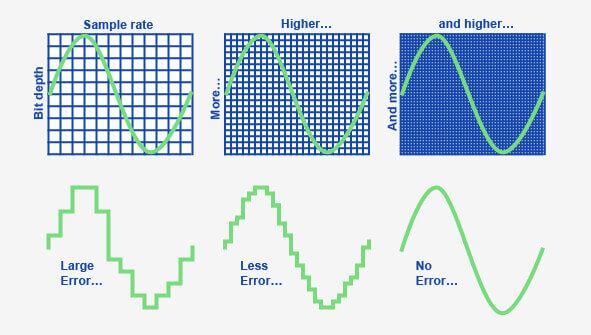
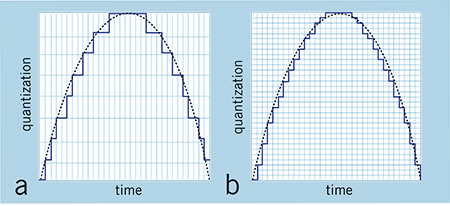
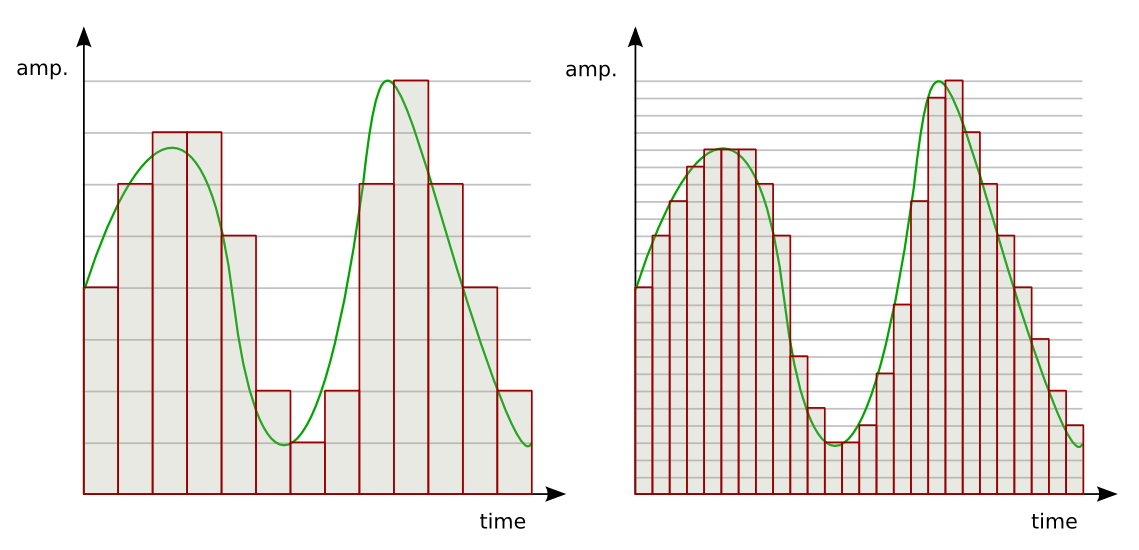
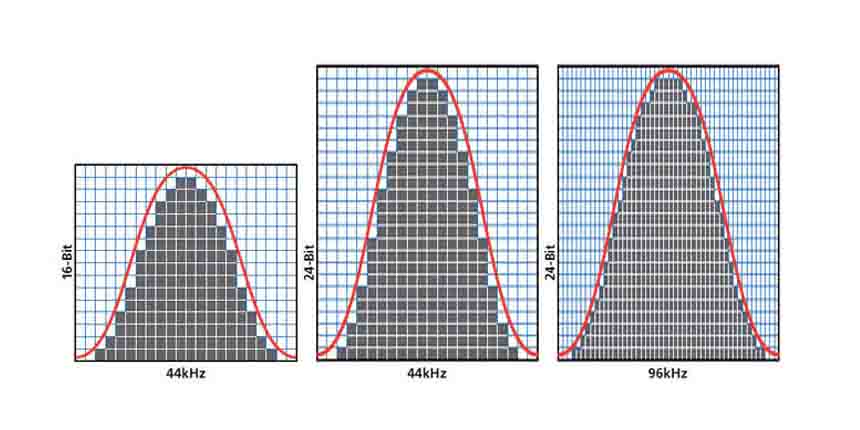
Low resolution audio is usually displayed using a jagged wave graph (with ladders). Source: soundguys
Well, the answer to the previous question is: not necessarily. The argument for a value in increasing bit depth is not based on something scientific, but on the distortion of what is actually happening and the exploitation of consumer ignorance about the media they are consuming. That is, it is a fact that stores selling 24-bit tracks reap far more benefits than a real improvement in promised sound quality.

Bit depth and sound quality.

The greatest example of companies selling 24-bit audio is the demonstration of a jagged sine wave, like stairs. When we look at a file that has a resolution of 16 bits, we see an irregular line, but when we look at the same song in 24 bits, it seems to be a practically smooth line, with better definition. It is a basic visual illustration, but depending on the person’s knowledge of the subject, he can be easily fooled.

Why use 24-bit or more audio files?

The utility of using a high-level bit depth applies to studios, because with each filter and conversion that is applied, the background noise increases. This increase in noise occurs due to the insertion of a new wave, as explained above. In other words, when using a higher bit depth level, the sound engineer prevents the original audio from generating noise by manipulating it for mixing and mastering.

However, remember that this will be more useful for audio production and not for the listener, as explained above.

conclusion
What will make the difference will be the balance between the sounds made in the mastering and not the bit depth itself, since the 16 bits of the CD are already more than enough for music listeners.

Multimedia formats: Digital audio


Sound is a continuous signal. To be stored with computer systems
it must be sampled, thus obtaining a digital signal.
The parameters that characterize the sampling are basically three:

 The sample rate
 Bit depth
 The number of channels
these parameters influence both the space occupied and the quality of the audio file
digital obtained.

Digital Audio

Sampling rate

The sampling frequency is the measurement expressed in Hertz (Hz) of the number
of times per second in which an analog signal is measured and stored
in digital form.

Sampling rate
The higher the sampling rate, the more the sequence of the samples
digital will be close to that of the original analog waveform.
Low sampling rates limit the frequency range that is
can record, which in turn can generate a recording that
poorly reproduces the original sound.
Two sampling frequencies:
A. Low sampling rate,
which distorts the wave of the original sound
B. High sampling rate,
which perfectly reproduces the wave of
original sound
To reproduce a certain frequency, the sampling frequency
it must be at least double it (Nyquist theorem).
For example, audio CDs have a sampling rate of 44.100 Hz,
so they can reproduce frequencies up to 22.050 Hz, which are hardly found
beyond the limit of human perception of 20,000 Hz.
The following table shows the most common sampling rates for
digital audio.

Bit depth

The bit depth represents the number of bits used to store a
single digital sample.
When a sound wave is sampled, each sample is assigned
the amplitude value closest to the original wave amplitude. A depth
in high bits it provides as many amplitude values ​​as possible, which results in a
greater dynamic range (the difference in decibels between the maximum volume that the component can sustain without
distort the waves and the background noise it produces), lower and higher background noise
fidelity.
For example if you use 8 bits you have 256 possible values ​​(28
) that, being
relatively few, offer less sound quality than a
tape; if instead 16 bits per sample are used, 65536 values ​​are obtained
possible (216).
The most common examples are the audio CD, recorded in 16 bit, and the DVD, which
supports up to 24 bit depth.

Compression formats

Hand in hand with the advent of digitalization, multimedia applications have
they are increasingly widespread until they become commonplace. One of
multimedia features is certainly the use of digital audio
vowel and sound. The biggest obstacle associated with digitizing audio is
the large size of the files that are produced, which puts them at
sector operators (especially those linked to the internet) the problem of
reduce the space occupied by the data to obtain the double advantage of:
 save in terms of memory occupation;
 save in terms of transfer time on the network.

For this reason, speaking of digitizing the audio, it is necessary to speak
also of data compression techniques. The compression techniques of the
data, of whatever nature they are, are divided into:
 lossless: compress data through a lossless process
of information that takes advantage of redundancies in data encoding
 lossy: compress data through a lossy process
of information that takes advantage of redundancies in the use of data.

Lossless formats

Lossless compression formats are more suitable for archiving rather than
to reproduction, since most of them require complete
decompression before they can be played.
One of the most common lossless compression formats is FLAC (Free Lossless Audio Codec).

Lossy formats

Lossy compression formats use compression algorithms capable of
drastically reduce the amount of data required to store a sound,
guaranteeing however an acceptable and faithful reproduction of the original file uncompressed.