What is the difference between bit depth and bitrate?


Free Download Mp4Gain
picture

What is the difference between bit depth and bitrate?

Bit Depth
Bit Depth
Bit depth
Bit Depth

Understanding Bit Depth and Bitrate

When it comes to audio and video files, there are two terms that are often used interchangeably: bit depth and bitrate. However, they are not the same thing. Bit depth refers to the number of bits used to represent each sample in an audio or video file, while bitrate refers to the amount of data transmitted per second.
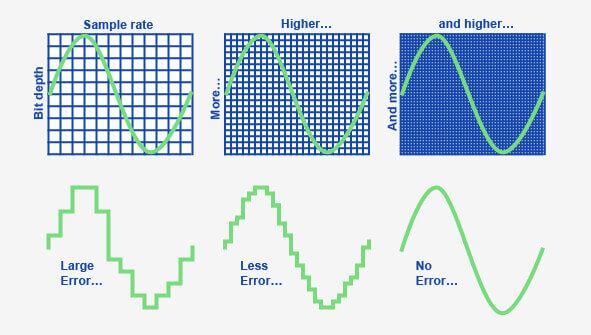
Bit depth determines the number of possible values for each sample in a digital audio or video file. For example, an 8-bit audio file can have 256 possible values per sample, while a 16-bit file can have 65,536. The higher the bit depth, the more accurate the representation of the original sound or image.

On the other hand, bitrate refers to the amount of data transmitted per second in a digital file. In other words, it’s the rate at which data is encoded in a file. Higher bitrates typically mean higher quality files with more information, but also larger file sizes.

Audio Bit Depth vs Bitrate

When it comes to audio files, the bit depth and bitrate are both important factors in determining the quality of the sound. A higher bit depth means a more accurate representation of the original sound, while a higher bitrate means more data is transmitted per second, resulting in a higher quality sound.
However, it’s important to note that a higher bitrate does not necessarily mean a higher quality sound. If the original recording is of poor quality, increasing the bitrate will not improve the sound. In fact, it can actually result in larger file sizes with no improvement in sound quality.

Video Bit Depth vs Bitrate

Video files also have bit depth and bitrate, but they work slightly differently than in audio files. Bit depth determines the number of colors that can be represented in a video file, while bitrate determines the amount of data transmitted per second.
A higher bit depth means a wider range of colors can be represented in the video, resulting in a more accurate and vibrant image. However, a higher bitrate is also important for video files, as it determines the amount of detail that can be captured in each frame.

It’s important to find the right balance between bit depth and bitrate for video files, as increasing one can have a negative impact on the other. For example, a high bit depth with a low bitrate can result in a choppy or pixelated image, while a low bit depth with a high bitrate can result in a washed-out or blurry image.

Final Words

In conclusion, bit depth and bitrate are both important factors to consider when working with audio and video files. While they may seem similar, they serve different purposes and have different effects on the quality of the final product. It’s important to find the right balance between the two to ensure the best possible sound or image quality.
Keywords: audio bit depth, video bit depth, bit depth vs bitrate, bitrate definition, bitrate vs quality, audio quality, video quality, digital audio, digital video, file size, data transmission, accuracy, color representation, image quality, sound quality, audio recording, video recording, data encoding, pixelation, file format, media production, sound engineering, video editing, multimedia, digital media, technology, mp4gain, audio normalization, audio conversion, equalizer, windows, digital signal processing, dynamic


Free Download Mp4Gain
picture


Mp4Gain Main Window
picture


Mp4Gain Features
picture


Free Download Mp4Gain
picture

Audio Bit Depth Explained

Audio Bit Depth Explained


Audio Bit Depth Explained

Bit Depth

Audio Bit Depth Explained

When it comes to producing or enjoying high-quality audio, understanding bit depth is essential. This technical aspect of digital audio determines the level of precision and accuracy with which sound is captured and reproduced. For sound engineers and audiophiles alike, a deep understanding of bit depth is a must-have skill for creating and experiencing truly exceptional sound.

What is Bit Depth?

Bit depth refers to the number of bits used to represent each sample in a digital audio file. Each sample represents the amplitude of the audio signal at a specific point in time. The bit depth determines the range of values that can be used to represent the amplitude of each sample. A higher bit depth provides a larger range of possible values, resulting in a more accurate representation of the audio signal. This, in turn, leads to a higher-quality audio recording.

Common bit depths used in audio recording and production include 16-bit, 24-bit, and 32-bit. The most common bit depth used in consumer audio devices is 16-bit, while 24-bit and 32-bit are more commonly used in professional audio production.

How Does Bit Depth Affect Audio Quality?

The bit depth of an audio recording has a significant impact on its overall quality. A higher bit depth provides a more accurate representation of the audio signal, resulting in a more natural and lifelike sound. With a higher bit depth, the audio signal can be recorded and processed with greater precision and accuracy, allowing for a wider dynamic range and more nuanced expression.

On the other hand, a lower bit depth can result in quantization errors, which can introduce distortion and noise into the audio signal. This can result in a loss of detail and clarity, particularly in quiet or complex passages of music.

Bit Depth and Dynamic Range

The dynamic range of an audio recording refers to the difference between the loudest and softest parts of the recording. A higher bit depth allows for a wider dynamic range, as the signal can be recorded with greater accuracy and precision. This means that even the softest parts of the recording can be captured with a higher level of detail and clarity, resulting in a more natural and lifelike sound.

For example, a recording of a classical music performance with a wide dynamic range may require a higher bit depth to capture the full range of dynamics and expression. Without a sufficient bit depth, the softer parts of the performance may be lost, resulting in a less engaging and less satisfying listening experience.

Conclusion

Understanding bit depth is crucial for anyone involved in the production or enjoyment of high-quality audio. By providing a more accurate representation of the audio signal, a higher bit depth can result in a more natural and lifelike sound, with a wider dynamic range and more nuanced expression. While a lower bit depth can result in quantization errors and a loss of detail and clarity, particularly in quiet or complex passages of music.

Overall, it is important to choose the appropriate bit depth for each recording or production, based on the dynamic range and complexity of the audio signal. By doing so, sound engineers and audiophiles can ensure that the audio they create or enjoy is of the highest quality possible.

As a final recommendation, we suggest using MP4Gain to adjust the volume and equalization of your digital audio files, ensuring that they are optimized for playback on a variety of devices and systems.

Understanding Audio Bit Depth: 8-bit vs. 16-bit vs. 24-bit

Understanding Audio Bit Depth: 8-bit vs. 16-bit vs. 24-bit

Bit Depth
Bit Depth

When it comes to digital audio, one of the most critical factors in determining the quality of a recording is the audio bit depth. In this article, we’ll delve into the technical details of audio bit depth and explore the differences between 8-bit, 16-bit, and 24-bit audio recordings.

Bit Depth
Bit Depth

What is Audio Bit Depth?

In digital audio, sound waves are converted into a series of numerical values that can be stored and manipulated by computers. Audio bit depth refers to the number of bits of information used to represent each sample in a digital audio recording. Each sample represents the amplitude of the sound wave at a specific point in time.

The bit depth determines the range of possible values for each sample. For example, an 8-bit audio recording has 256 possible values, while a 16-bit recording has 65,536 possible values, and a 24-bit recording has over 16 million possible values. This increase in possible values provides greater resolution and accuracy, resulting in improved sound quality.

Dynamic Range

Another critical aspect of audio bit depth is dynamic range, which refers to the difference between the quietest and loudest sounds that can be recorded. With an increase in bit depth, the dynamic range of a recording also increases. For example, a 16-bit audio recording has a dynamic range of 96 dB, whereas a 24-bit recording has a dynamic range of 144 dB. This difference in dynamic range is quite significant and is one of the reasons why 24-bit audio is preferred for professional applications.

Quantization Noise

Quantization noise is an inherent part of digital audio and is introduced during the process of converting an analog audio signal to a digital representation. Quantization noise is essentially the difference between the actual analog signal and the closest quantized digital value. The more bits used for quantization, the lower the level of quantization noise.

However, as the bit depth increases, the noise introduced becomes less of an issue. At 16 bits, quantization noise is typically not audible, but it can become noticeable when processing audio. At 24 bits, quantization noise is virtually non-existent, even when processing audio.

Conclusion

In conclusion, audio bit depth plays a crucial role in the quality of digital audio recordings. Increasing the bit depth of an audio recording provides greater resolution and accuracy, resulting in improved sound quality. Professionals in the music industry typically prefer 24-bit audio due to its higher dynamic range and lower quantization noise. However, for most consumer applications, 16-bit audio is perfectly adequate and results in high-quality sound.

It is also important to note that bit depth is just one aspect of digital audio quality. Other factors such as sample rate and compression algorithms also play a significant role in determining the overall quality of a digital audio recording. Nonetheless, understanding audio bit depth is a crucial step in the journey to becoming a proficient audio engineer or producer.

Bit Depth and Sample Rate PART 2

Bit Depth and Sample Rate PART 2

Bit Depth and Sample Rate

Fade processing

Bit Depth and Sample Rate

We now know that digital signal processing is bound to be very buggy. So the approximation of the total will also have a lot of error. These errors not only render the audio unrecoverable, but also introduce an unnatural sound.

To remove these artifacts, we add computed low-amplitude noise to the signal, which we call dithering. The amplitude of the jitter noise is very low, and although some is still heard, it is better than no addition.

Note that jitter noise accumulates. When you add noise to a signal, the signal-to-noise ratio decreases. If the operation is repeated, this ratio will continue to decrease, adding uncertainty to the signal. This is why dithering is often applied as the last step in mastering, and only once.

Dithering has quite an interesting history:

The first dither processing appeared during World War II. Bombers use mechanical computers for navigation and ballistic calculations. Interestingly, these computers are more precise in their processing performance in the air. Engineers realized that vibrations from the plane reduced errors in moving parts. His movements become more continuous, rather than sudden vibrations. Computers have little vibrating motors, and their vibrations are called oscillation, which is derived from the medieval English word “didderen,” meaning “to shake.” Modern dictionaries define dither as a state of high tension, confusion, or anxiety. Dithering brings digital systems closer to analog systems in some way.

– Ken Pohlmann, Digital Audio Rules


Sampling rate
According to theory, the sampling rate of 44.1 K per second is sufficient to cover the hearing range of the human ear. You may have inadvertently learned about Nyquist’s theorem, which states how to avoid aliasing (a type of distortion) and how to reconstruct all frequencies by sampling, which requires sampling at twice the highest frequency of the signal (this theorem also applies to non-audio media, we won’t go into that here).

The human ear has a hearing range of up to 20kHz (most studies show that this number is actually around 17K), so a sample rate of 40K is enough to hear every frequency clearly. 44.1K is the industry standard, which was determined by SONY, which was an oligopoly at the time, for a few reasons.

In a nutshell, the digital audio samples must be above the Nyquist frequency because, in practice, the samples are low-pass filtered during the digital-to-analog conversion process to prevent aliasing. The smoother the slope of the low pass filter, the lower the manufacturing cost. So an audio signal that normally uses a low pass filter will have a smooth slope at 2 kHz. For example, to keep the full spectrum below 20kHz, it should be done at a 44kHz sample rate (20K[highest frequency]+2K[low pass filter slope]x2[Nyquist theory]=44K)

Ultimately, the 44.1K standard was resolved in a battle between Sony and Philips (both had similar end goals). This is also based on the math behind audio sample rate and videotape anatomy. In this way, audio and video can coexist on the same video tape, which has a higher cost performance. However, 48K is the standard for video related to audio. CD audio remains at 44.1K.

Sample rate and bit depth

Sample rate and bit depth

uno2

When describing digital recording devices, two fundamental concepts are used: sample rate and bit depth. In this article, we will see what it is.

Sampling rate
The sample rate is the rate at which the logger captures samples of the input signal. When recording sound in digital form, in fact, individual samples or, in other words, values ​​of sound intensity are recorded at separate points in time.

The sample rate for recording devices is usually the following standard values: 44.1 kHz; 48 kHz and 96 kHz. The higher the sample rate, the more samples will be taken in 1 second and the better the digital sound quality we will get as a result.

What is the meaning of these numbers? They mean the number of times the recorder reads the sound intensity value from the input signal per second. The sample rate is measured in kilohertz (kHz), 1 kHz = 1000 samples per second.

For example, if the recording is made with a sampling frequency of 48 kHz, this means that the sound recorder measures and records the sound intensity value 48,000 times per second.

This number may seem unimaginably huge, but here the phenomenon called Nyquist frequency is worth remembering. The Nyquist frequency is named after the person who first discovered it. Defines the highest sound frequency that can be recorded at a given sample rate.

In short, the maximum tone that can be digitally fed is about half the sample rate.

Therefore, when recording at a sampling frequency of 48 kHz, the maximum audio frequency that can be recorded is 24 kHz. This is sufficient, considering that the human ear hears frequencies on average from 20 Hz to 20 kHz.

Bit depth
When talking about digital recording devices, you can often hear the words “16-bit”, “24-bit”, and so on. Some mean the number of information units with which the value of each sample obtained from the digital recording can be represented.

The higher the value of this number, the more accurately you can record the value of each sample and the higher the sound quality you will get as a result.

Do not think that the greater the number of bits, that is, the greater the bit depth, the greater the intensity value that can be set. Here is meant representation precision.

Modern recorders are usually 24 bits wide. It should be noted that recording with a large bit depth takes up a lot of space on the storage device, but this is not so important, because modern media has a huge volume and is becoming more and more affordable.

Why can the difference in bitrate make it sound great (high, medium, low)?

Why can the difference in bitrate make it sound great (high, medium, low)?

Bit Depth vs. Bit Rate

Reply:
Just to make sure this is clear, let’s differentiate

BIT RATE BIT DEPTH

sample rate vs bit depth

as much as

Bit rate

how they relate to audio in the digital domain …

Sampling frequency:

The sample rate is specified as a frequency (samples per second), for example, 44.1 kHz for CD. Other common values ​​are 48, 88.2, 96, 176.4, and 196 kHz, although some formats (such as DSD) have sample rates greater than 2.8 MHz. The sample rate indicates

how often the audio signal is measured

While some people view lower readings as a tiered bar graph, I prefer to view them as a child bitmap. If you take the outline of a horse and simplify it to 20 points so the child can connect, it’s not so much that you end up with steps (using straight and curved lines to connect 20 correctly spaced points can lead to a decent figure), but there won’t be without subtlety. Whereas with 200 (or 2000) points, you could approximate the wavy strands along the horse’s mane.

In audio, a lower sample rate does not make the sound “bad” (eg, fuzzy, fuzzy, or distorted), but rather limits the maximum frequency (pitch) that can be recorded / played back as intended.

Nyquist theorem formula

, The 44.1 kHz sampling rate was chosen for CD because it can record and play back frequencies up to 20 kHz. To record a spoken word (such as a speech, a sermon, or an audiobook), it would be difficult to detect a much lower sample rate, as the human voice has less and less harmonic information above 10 kHz.

Depth bits:

Considering that the sampling frequency determines how

often

audio signal is measured, bit depth indicates

scale accuracy

Since we are talking about digital audio, we describe this measurement scale in bits, where each bit is 0 or 1, and we concatenate a certain number of them to represent the value. When we have 8 bits, there are 256 possible numerical values, including zero. With 16 bits, there are 65,536 possible values. A 24-bit register can use 16,777,216 values.

When we convert analog audio to digital representation (A-to-D) and vice versa (D-to-A), we find interesting mathematical relationships. Each bit (digital) doubles the number of possible values ​​… And doubling the amplitude (approximately 4 times the power) of the sound wave (analog) corresponds to + 6 dB of loudness. Therefore, we can estimate the maximum dynamic range * of a digital recording at 6 dB / bit. Therefore, 8-bit recording has ~ 48 dB of dynamic range, 16-bit recording (such as a CD) has ~ 96 dB, and 24-bit recording has ~ 144 dB.

* For those of you unfamiliar with this term, dynamic range basically describes the difference between the quietest and loudest sound waves that can be recorded / played back. The CD has a difference of approximately 96 dB, which can be used to represent the most subtle pause compared to the incredibly loud burst of the cannon at Tchaikovsky’s climax.

1812 Overture

,

Three quick notes for those interested in delving into the rhythm …

There is a formula for the actual dynamic range of a digital recording that may differ slightly from the previous estimate, but it is a fairly minimal deviation, so an estimate of 6 dB / bit is what you normally see in quotes.
The latest 32-bit floating point representations combine a 24-bit number and an 8-bit exponent to represent many more possible values ​​than 24-bit registers. The dynamic range estimate is getting a bit dubious, but suffice it to say it’s well above 144 dB.
Using a lower bit depth, while you might think in terms of warp plugins with names like “bit-grinder”, doesn’t have to sound “bad” (eg fuzzy, fuzzy, or distorted), but just represents a reduced dynamic range. But since a 16-bit recording with a dynamic range of 96 dB (65,536 numerical values) cannot be represented in 8 bits (48 dB and 256 numerical values), to reduce the bit depth of the already digitized audio, a mathematical correction of the numbers down. (for example, 65535 becomes 255) using a compressor or limiter, which can cause the quietest recording bits to be lost so that the difference between soft and loud parts is <48 dB. Without such scheme, the transformation will cause clipping (numerical values ​​above the maximum),
Bit rate:

In digital audio, the bit rate is a measure of

how many bits are transmitted / processed per second