What Is Audio Sampling Rate: A Comprehensive Explanation


Free Download Mp4Gain
picture

What Is Audio Sampling Rate: A Comprehensive Explanation

Sample Rate
Sample Rate

Introduction

Sample Rate
Sample Rate

Audio sampling rate is a fundamental concept in digital audio that refers to the number of samples per second used to represent an analog audio signal in digital form. In this article, we’ll explore the technical details of audio sampling rate, its importance in digital audio, and its impact on audio quality and file size.

Sampling Rate Fundamentals

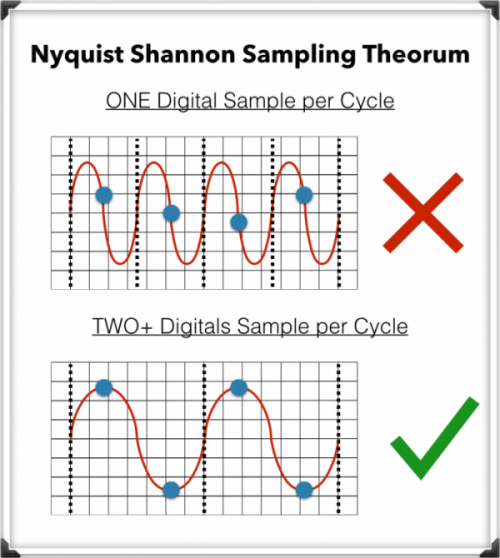
The concept of audio sampling rate is based on the Nyquist-Shannon sampling theorem, which states that in order to accurately represent an analog signal in digital form, the sampling rate must be at least twice the highest frequency present in the signal. This means that a signal with a highest frequency of 20kHz (the upper limit of human hearing) must be sampled at a rate of at least 40kHz in order to be accurately represented.

Sampling rate is measured in Hertz (Hz), which refers to the number of samples per second. Common sampling rates in digital audio range from 44.1kHz (used in CDs) to 192kHz (used in some high-resolution audio formats).

Sample Rate Conversion

In some cases, it may be necessary to convert audio from one sampling rate to another. Sample rate conversion involves resampling the audio data to a different rate, which can be done using digital signal processing techniques. However, sample rate conversion can introduce artifacts and reduce audio quality, especially when downsampling from a higher rate to a lower rate.

There are various reasons why sample rate conversion may be necessary, such as when mixing audio tracks with different sampling rates, or when preparing audio for distribution on different platforms with varying requirements.

Audio Quality and Sampling Rate

The sampling rate has a significant impact on audio quality, with higher sampling rates generally resulting in better fidelity and more accurate representation of the original signal. However, the benefits of higher sampling rates are limited by the limitations of human hearing and the practical limitations of digital audio technology.

While there is debate about the benefits of “high-resolution audio” formats with sampling rates above 44.1kHz, it is generally accepted that sampling rates above 96kHz provide little additional benefit in terms of audio quality.

Bit Depth and Sampling Rate

The bit depth of an audio sample refers to the number of bits used to represent the amplitude of the signal at each sample point. Higher bit depths allow for more precise representation of the signal, but also result in larger file sizes. The bit depth and sampling rate are related, as increasing the bit depth requires more data to be stored for each sample.

There is a trade-off between sampling rate and bit depth, as higher sampling rates require more data to be stored per second, which can limit the maximum bit depth that can be used without exceeding practical file size limits. However, this trade-off can be mitigated by using efficient audio compression techniques.

Sample Rate in Practice

Common sampling rates in digital audio include 44.1kHz (used in CDs), 48kHz (used in digital video), 88.2kHz, 96kHz, 176.4kHz, and 192kHz. Streaming services such as Spotify and Apple Music typically use lower sampling rates for their audio streams, with 44.1kHz being a common choice.

The Nyquist Theorem, named after the Swedish-American physicist Harry Nyquist, states that the sampling rate should be at least twice the highest frequency component in the signal being sampled. This is why the standard CD quality sampling rate is 44.1 kHz, which is just above the upper limit of human hearing.

However, it is important to note that there are higher sampling rates available, such as 48 kHz, 96 kHz, and even 192 kHz. These higher sampling rates can provide more detail and accuracy in the digital representation of the analog signal. However, they also require more storage space and processing power.

Another important factor to consider is the bit depth, which is the number of bits used to represent each sample. The more bits used, the more accurate and detailed the representation of the analog signal. CD quality uses a bit depth of 16 bits, but higher bit depths such as 24 bits are also available.

It is worth noting that some argue that higher sampling rates and bit depths may not necessarily result in audible improvements in sound quality, especially when considering the limitations of human hearing. Additionally, some argue that the increased storage and processing requirements may not be worth the potential improvements.

In conclusion, the sampling rate is a crucial component in the digital representation of analog audio signals. A higher sampling rate can provide more detail and accuracy in the digital representation, but also requires more storage and processing power. The Nyquist Theorem provides a guideline for choosing the appropriate sampling rate based on the highest frequency component in the signal. Additionally, the bit depth is another factor to consider in the accuracy and detail of the digital representation. While higher sampling rates and bit depths are available, the potential improvements in sound quality must be balanced against the increased storage and processing requirements.


Free Download Mp4Gain
picture


Mp4Gain Main Window
picture


Mp4Gain Features
picture


Free Download Mp4Gain
picture

Difference between digital and analog

Difference between digital and analog

Difference Between Analog Signal and Digital Signal

The sound is analog. And sound is the vibration of the air. How is this sound vibration transmitted?

Analog VS Digital
For example, when a stone is thrown into a calm water surface, the ripples spread around it, but if
Cut in the direction of the waves and look at the cut end, the waveform is as shown in Fig.1.

Air waves spread from the point where sound is emitted even in air. Although it is invisible to the eye, it has a
similar waveform. This is the analog waveform of sound.

Therefore, although it is digital, when such a sound waveform is recorded or communicated by phone or wireless, as
shown in Fig. 2, the change in the analog waveform is electrically replaced with a series of numerical values ​​according to a certain promise. ..

When recording or communicating, if you handle it as analog, it is easy for noise to enter and the sound quality to deteriorate, but when trying
the waveform of the sound as digital = numerical data, you can eliminate that worry and
maintain a certain quality. You can do various processing while maintaining it.

(2) What is convenient when it is digital

Digital audio signals are convenient because they can be recorded and edited using a personal computer, for example.

In addition, 74 minutes of music can be recorded on a CD with a diameter of only 12 cm, and through digital compression processing
, music of the same length can be recorded on an MD with a smaller diameter.

Since digital signals can be compressed in this way, it is also convenient for storing large amounts of information.
Not only sound, but also video signals with a higher amount of information can be recorded and communicated at high speed by using compression technology.

Especially in communication, a two-way digital multiplex communication can be realized communicating multiple pieces of information with a single wire.
In addition to electrical signals, laser light can also be used for optical communication, making communication possible at extremely high speeds.

(3) What is the sampling frequency?

Digital signals are processed at predetermined fixed time intervals.
The sample rate (sample rate) indicates how many times a second is processed and is expressed as Fs or fs.

The sampling frequency unit is Hz (Hertz), and the
44.1 kHz (kilohertz) sample rate means 44,100 pieces of data are processed per second.
(K represents 1000 times)

AD conversion converts a continuous analog signal into a digital signal,
measures the size of the signal at each moment determined by the sampling frequency (sampling) and converts
the result in a binary number (quantization).

On the other hand, DA conversion converts a digital signal into an analog signal,
It reads the digital signal in the sample rate time interval and connects it smoothly.

Since digital signals can be reproduced up to half the sampling frequency, how much
The higher the sample rate, the higher the playable frequency and the better the sound quality.
In familiar areas, 44.1 kHz is used for CD, and 48 kHz is used for DAT and B modes of satellite transmission.

In addition, recent professional equipment uses high sampling frequencies (high sampling), such as 88.2 kHz and 96 kHz,
and are designed to faithfully reproduce even higher frequency sounds to improve sound quality.

What is the audio bit rate? Relationship between “bit depth” and “sample rate” and sound quality PART 2

What is the audio bit rate? Relationship between “bit depth” and “sample rate” and sound quality PART 2

Audio bit rate

What is the bit depth that determines the sound quality?
What is the bit depth that determines the quality of the sound?
The bit rate is calculated by multiplying the two factors of bit depth and sample rate. Bit depth represents the amount of data per divided sample and is an element that affects the quality and expressiveness of the sound.

The sample rate is the finely divided horizontal axis and the bit depth is the one that overlaps the vertical axis. By providing a large amount of data (bit depth) to each sample, it is possible to create finer and more accurate audio data.

Bit depth is the precision of each image in animation production. The higher the bit depth, the more expressive the sound and effects will be, and the higher the sound quality will feel.

What is the sample rate that determines the smoothness?
Of the bit rates that determine audio quality, the sample rate is an element that represents the number of data divisions per second on the horizontal axis. It shows how many tens of thousands of data are divided per second and the higher the number of divisions, the higher the sound reproducibility and sound quality.

It is even easier to understand if you consider it a mechanism similar to animation production. The more images you use per second, the smoother your character will move, and the higher the sample rate (the number of data divisions), the smoother your sound will sound. Also, the amount of data increases according to the size of the sample rate.

In conclusion
To improve sound quality, it is important to increase the audio bit rate. The audio bit rate is determined by two factors: the bit depth, which determines the expressiveness of the sound, and the sampling rate, which determines the smoothness of the sound.

However, keep in mind that the higher the audio bit rate, the more beautiful the audio will be and will also be affected by the original sound source. If you want to create high-quality data from the moment of recording, why not ask a production company that has high-quality recording equipment?

I think there are many people who are concerned about the balance between capacity and sound quality when it comes to the audio system mounted on a computer. Professional engineers and mixers will come up with the best balance, so don’t hesitate to contact us on these points.

What is the audio bit rate? Relationship between “bit depth” and “sample rate” and sound quality

What is the audio bit rate? Relationship between “bit depth” and “sample rate” and sound quality

Digital Audio Basics

Bit rate is one of the factors that determine the quality of a video job.

BitRate

Among them, the one that determines the audio finish is the audio bit rate. Understanding the bit rate will allow you to control the sound quality and create better quality audio.

So on this occasion, I will explain bit depth and sample rate which are indispensable when talking about sound quality.

What is a bit rate?
What is a bit rate?
■ Bit rate represents high quality

Bit rate is a numerical value that represents the amount of information in the data, and the height of the bit rate is proportional to the quality of the data.

By looking at the bit rate, you can see how much data is packed in one second. Generally, the higher the bit rate, the higher the sound quality, and the sound and video are more realistic.

■ Audio bit rate and video bit rate

In the case of video, the bit rate is divided into two types, video and audio, and the overall quality of the video is determined by the height of each bit rate.

The “video data rate” shown in the video properties is the video bit rate and the bit rate assigned to “audio” is the audio bit rate. The “total bit rate” is the total of the two types of bit rates, video and audio, and is the bit rate of all video.

However, high bit rate audio is not always good. This is because if the quality of the original audio data or the equipment used for recording is poor, poor quality audio will be played. For example, if the original voice contains noise, the noise part will be reproduced realistically and the voice will be difficult to hear. Similarly, if the bit rate of the video is low, the movement will be choppy and unnatural, or the video will be uneven.

“High resolution” basics. What is the difference between DSD, FLAC, MQA, etc.? Part 7

“High resolution” basics. What is the difference between DSD, FLAC, MQA, etc.? Part 7

DSD vs. PCM

MQA encoding processing can be performed on 44.1 kHz to 768 kHz linear PCM sound sources and can be stored in existing file formats (container formats) such as FLAC, ALAC, and WAV. If you use a compatible device equipped with a dedicated decoder, you can “open origami” and demonstrate the original quality. It can be played with an unsupported device, but in that case, “Origami cannot be opened”, so normal PCM playback will be performed that does not include the original MQA information.

MQA is available for download at e-onkyo music. It has the advantage that it can be used with a low communication volume even with streaming type distribution, and abroad, the “TIDAL” music distribution is developing a high quality 96 kHz / 24 bit MQA streaming distribution ” TIDAL Masters “.

High Resolution Portable Player “DP-X1” Quickly Achieved MQA Compatibility
Current Status of Supported High-Resolution Formats and Music Distribution Services (as of July 2017)
WAV FLAC ALAC DSD MQA others
e-onkyo music 〇 〇 — 〇 〇 Dolby TrueHD
blackberry — 〇 — 〇 — —
OTOTOY 〇 〇 〇 〇 — —
Recochoku — 〇 — — — —
My sound — 〇 — — — —
slots — 〇 — 〇 — —
Is FLAC a powerful option right now?
Generally speaking, the high resolution format has been “PCM or DSD”, and for PCM, the choice has been “lossless compression” or “uncompressed”. There may be circumstances on the side of the playback device and sound preferences, but in terms of the balance between data compression effect (file capacity) and sound quality, “lossless” is a reasonable existence.

Among them, FLAC, which is easy to use on smartphones, will remain high resolution as source code is published and royalties are not incurred, it is already compatible with many compatible high resolution audio devices, and will be supported in the system level in the next iOS (iOS 11), will be the centerpiece of the format.

Looking around, there are signs of change, such as the emergence of a new face, MQA, and the spread of streaming services, but the audio format must have attractive content. Above all, I would like to hope that the record company / distribution service company is actively working in high resolution.

“High resolution” basics. What is the difference between DSD, FLAC, MQA, etc.? Part 6

“High resolution” basics. What is the difference between DSD, FLAC, MQA, etc.? Part 6

PCM DSD

Review the basics of “high resolution”. What is the difference between DSD, FLAC, MQA, etc.?

There are several formats, even if it says “high resolution”. If the format changes, the amount of sound information and thus the sound quality will change, the file size will also change, and whether the playback device / software will support it or not, it will also change, so choose a format is important. We will explain the main formats incorporating common technologies and unique pieces.

There are several high-resolution formats, but …
What is the sampling frequency?
Most digital sound sources are “linear PCM”. This is data obtained by digitizing (sampling) the sound waveform (analog signal) in a canned cycle, and that cycle is called the “sample rate.” If sampling is done every 1/44100 of a second it will be “44.1 kHz”, if it is 1/96000 of a second it will be “96 kHz”, if it is 1/192000 of a second it will be “192kHz”. This means that the implementation cycle of is shorter and the amount of information is greater. In other words, if you look at this number, you can see “how finely the sound was measured with respect to time.”

What is the number of quantization bits?
Value that indicates the number of steps in which the amplitude of a signal is expressed when an analog signal is converted into a signal.

“High resolution” basics. What is the difference between DSD, FLAC, MQA, etc.? Part 4

“High resolution” basics. What is the difference between DSD, FLAC, MQA, etc.? Part 4

DSD vs PCM

The number of audio devices that support ALAC has increased in recent years, and some high-resolution distribution sites handle it as well, but FLAC is compatible with more software / hardware, and there is a significant advantage in sound quality over FLAC. . it will eventually restore to the same linear PCM data), so there is no reason to choose it aggressively except for users who are unified with Apple products.

DSD vs PCM

“ALAC”, which is compatible with Apple software / hardware, can also be used for high resolution playback.
Wav
Classification:
PCM compression: no
extension: .wav

It is widely used as a linear PCM container format (it can store various types of data, and the codec can be selected for musical use), and it has been widely adopted by high-resolution distribution sites. Since linear PCM is not compressed, the file size is large, but since no decoding (decoding) processing is required, there are quite a few people who dare to choose WAV from a sound quality point of view.

It is playable on most digital audio software / devices, but tags / metadata such as artist names and album images cannot be expected to display a lot. It is possible to store data, but the format is not officially defined, so it can be displayed in one environment but not another. FLAC and ALAC are more convenient than WAV when using an application like Roon that searches for information, such as related artists, by referencing metadata.

Linear PCM with a sampling frequency of 352.8 kHz (8 times 44.1 kHz) or 384 kHz (8 times 48 kHz) and a quantization bit rate of 24 bits or more is called “DXD” (Digital eXtreme Definition). Originally intended for SACD production (because DSD is not suitable for editing), it is now used as a distribution format as well.

“High resolution” basics. What is the difference between DSD, FLAC, MQA, etc.? Part 3

“High resolution” basics. What is the difference between DSD, FLAC, MQA, etc.? Part 3

DSD vs PCM

PCM or DSD

PCM to DSD

So far, we have looked at high resolution definition on the premise of PCM, but “DSD (Direct Stream Digial)” is also recognized as a type of high resolution sound source. Regarding DSD, which is not clarified in the JEITA definition, the Japan Audio Association definition recognizes products that support 2.8MHz / 5.6MHz DSD playback as compatible high-resolution devices.

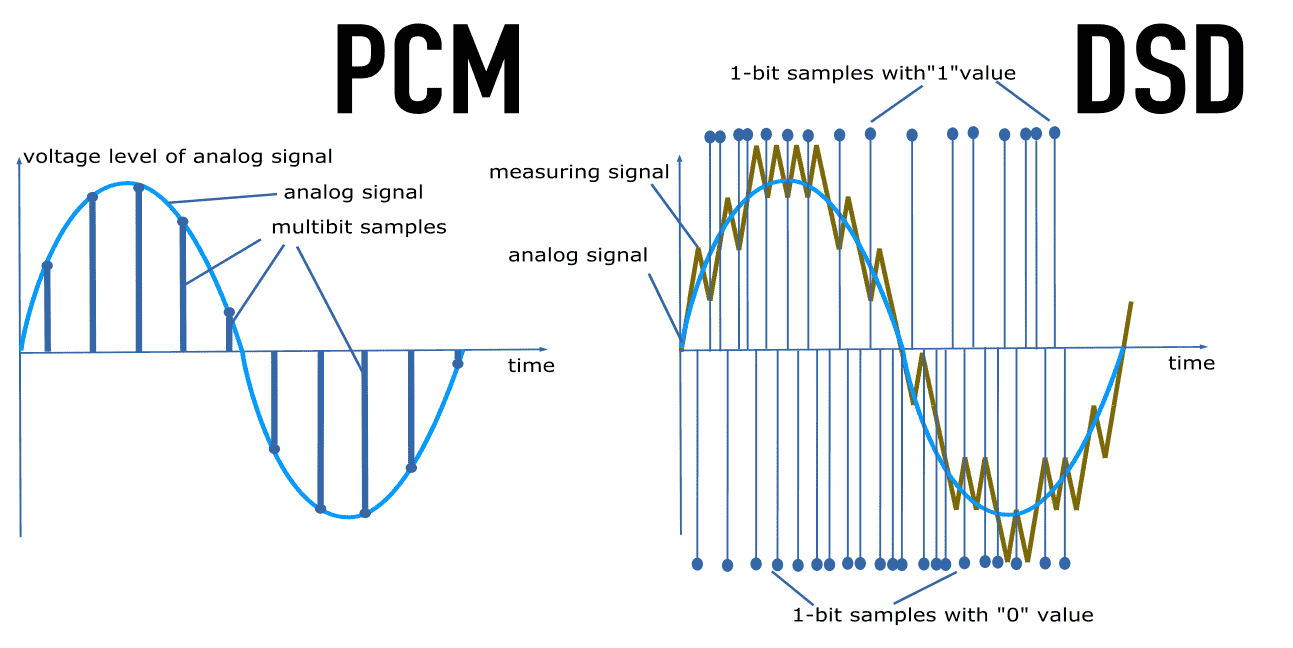
Sound reproduction methods are almost completely different between PCM and DSD. DSD always records 1 bit width (1 bit is represented by “0” or “1”) subdividing only in the direction of the time axis.

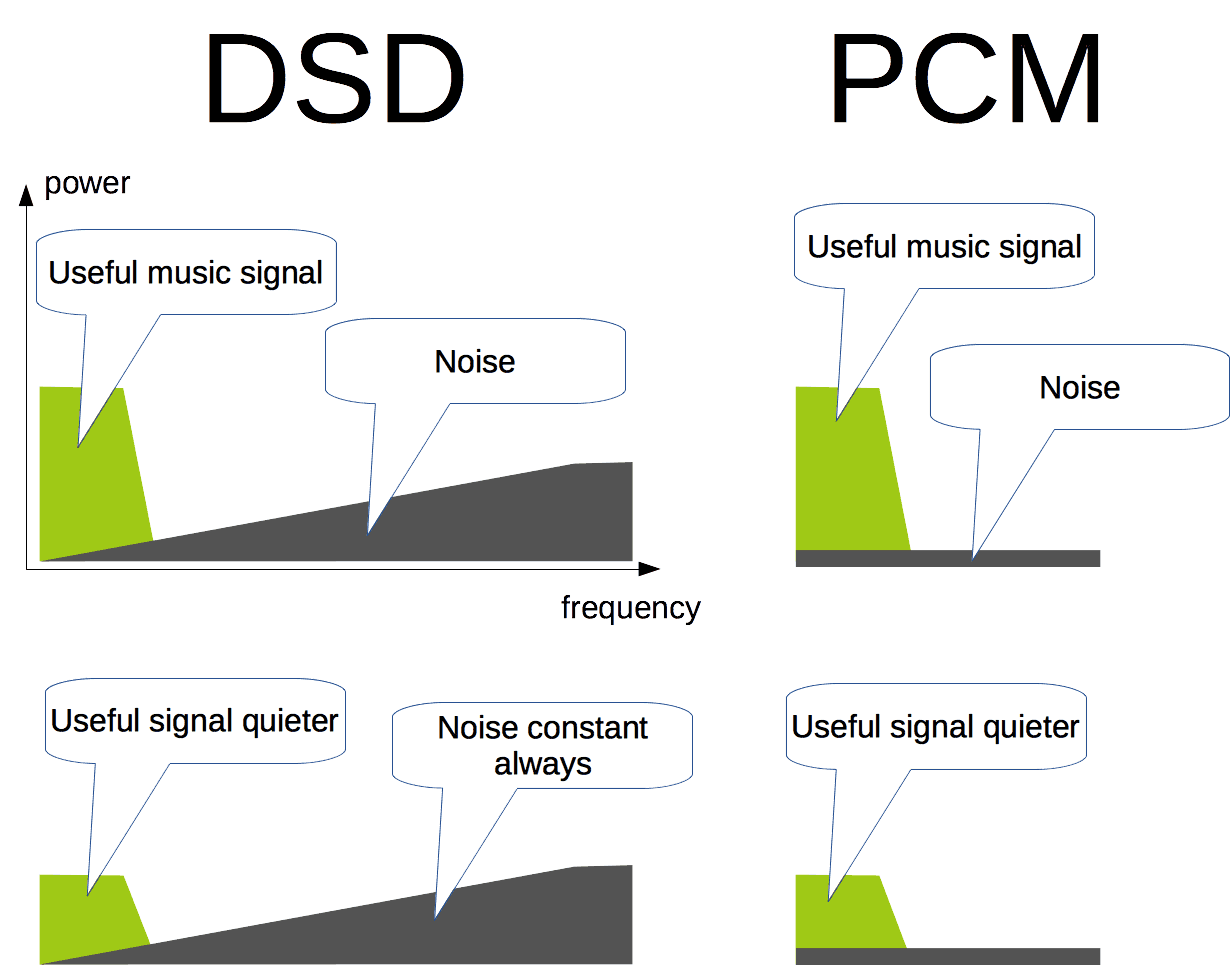
In the case of PCM, the resolution can be increased and the dynamic range can be expanded by increasing the number of bits, but on the other hand, quantization noise occurs (distortion caused by an error in rounding up / down the amplitude value real). . DSD is set to 1 bit to create a state in which no quantization noise is produced and the amount of information is ensured by significantly increasing the sample rate.

DSD has a 1-bit amplitude of “0 or 1” and records sound information with little information in the direction of the time axis.
(The picture is taken from the product information page of Sony HDD audio player “HAP-Z1ES”).
Main high-resolution formats
Data as uncompressed or compressed, lossless or lossy as compressed, PCM or DSD is primarily a high resolution format, and depends on the playback device / software to be used in addition to the taste of the sound. Let’s explain the characteristics of each format for the formats handled by the so-called music distribution sites.

FLAC
Classification:
PCM compression: Yes (lossless)
Extension: .flac

“FLAC” is a representative of high resolution audio sources. It is an open source lossless codec (software whose source code is open to the public and can be freely improved / redistributed), and one of the reasons for its widespread use is that it does not generate royalties. It is thought that the sense of security that allows us to confirm that we are there also helped spread the word.

It is often created (encoded) using uncompressed linear PCM as the source, and can be compressed to a file size of around 60% compared to the source. There are many supported hardware / software. At the moment, iOS is late (some apps have already supported it), but it almost certainly is if it is a device that claims to support high resolution. If you are wondering which format to choose, choose FLAC and you are right.

Most of the hardware / software and distribution sites that claim to support high resolution support FLAC (image is blackberry screen).
ALAC (Apple Lossless Audio Codec)
Classification:
PCM compression: Yes (lossless)
Extensions: .m4a, .mov, .alac

Introduced when Apple realized lossless audio streaming using a compact router (AirTunes). Initially it was an original technology, but then it was made open source and is now popular as a lossless codec alongside FLAC.

It has been well supported by Apple products since its introduction, and the files can be generated (encoded) using iTunes. However, Apple products are designed not to consider high resolution playback, so even if you play high resolution ALAC files on iOS devices, the information will be cut (reduced) to CD quality.

“High resolution” basics. What is the difference between DSD, FLAC, MQA, etc.? Part 2

“High resolution” basics. What is the difference between DSD, FLAC, MQA, etc.? Part 2

Bit Depth, Sample Rate

Thus, there is no strict unified standard for determining “whether or not the sound source is high resolution”, and whether or not it is high resolution is not determined only by the older formats such as FLAC and WAV.

High Resolution Audio

Since the amount of data is required to be greater than or equal to that of an audio CD and, in particular, that the number of quantization bits must be 24 bits or more, a sound source with a “sample rate of 44.1 kHz or more and a number of quantization bits of 24 bits or more “is high resolution. It seems good to think. Of course, it should be noted that the sound quality is not always high quality sound because it meets the high resolution conditions because it is not an audible standard.

Relationship between audio format and codec (for PCM)
Uncompressed or lossless compressed
Linear PCM is the sampled data itself, and theoretically does not deteriorate unless conversion processing is performed. However, since efficient data storage is not considered, the file size increases as the sample rate and the number of quantization bits increase. This is why multi-MB songs with compressed sound sources like MP3 are converted to tens of MB and hundreds of MB in high resolution.

That’s where the “lossless” codec is used. The purpose is to make the data compact by signing the linear PCM (processing to organize the data arrangement / storage pattern according to a certain rule). During playback, it is converted to the original linear PCM in real time, and in theory there is no deterioration in sound quality. “FLAC” and “ALAC” are typical examples, and linear PCM can be reduced to a data size of approximately 60%. The characteristic is that the sound quality does not deteriorate theoretically because the original information is left completely when encoded.

On the other hand, the “lossy compression” codec can achieve a high compression rate so that the data size is 10% of the original, but it is said to sound out of the audible band (human ears cannot perceive) during encoding. High frequency band) is removed. Sounds processed by lossy compression codecs are not classified as high resolution because the presence of sounds outside the audible band is believed to have a great influence on the expression of the realistic sound field and depth, which is You can tell that it is the advantage of high resolution. The way of thinking is dominant. In fact, even the JEITA and Japan Audio Association definition mentioned above does not include high resolution lossy compressed sound sources.

Compressibility and sound quality trends of the main digital audio formats
method Typical format Sound quality Compression rate
(assuming PCM is 100%)
Uncompressed WAV ◎ 100%
AIFF
Lossless compression FLAC ◎ Approximately 60-70%
A THE C
Lossy compression MQA About 15-25%
MP3 △ ~ ○ About 10 to 20%
CAA
Ogg Vorbis
WMA

“High resolution” basics. What is the difference between DSD, FLAC, MQA, etc.?

“High resolution” basics. What is the difference between DSD, FLAC, MQA, etc.?

High Resolution Audio
There are several formats, even if it says “high resolution”.

High Resolution audio

If the format changes, the amount of sound information and thus the sound quality will change, the file size will also change, and whether the playback device / software will support it or not, it will also change, so choose a format is important. We will explain the main formats incorporating common technologies and unique pieces.

There are several high-resolution formats, but …
What is the sampling frequency?
Most digital sound sources are “linear PCM”. This is data obtained by digitizing (sampling) the sound waveform (analog signal) in a canned cycle, and that cycle is called the “sample rate.” If sampling is done every 1/44100 of a second it will be “44.1 kHz”, if it is 1/96000 of a second it will be “96 kHz”, if it is 1/192000 of a second it will be “192kHz”. This means that the implementation cycle of is shorter and the amount of information is greater. In other words, if you look at this number, you can see “how finely the sound was measured with respect to time.”

What is the number of quantization bits?
Value indicating the number of steps in which the amplitude of a signal is expressed when an analog signal is converted to a digital signal (AD conversion) for linear PCM generation. The higher the value, the finer the amplitude of the sound can be captured, and the closer the waveform is to the original sound (analog signal), the more accurately the sound can be reproduced with high resolution.

The large number of quantization bits is directly related to the resolution of the data. For example, when the number of quantization bits is 1 (1 bit), the width of the expression is 2 steps of “0 or 1”, but in 2 bits, there are 4 steps of “00” and “01”, ” 10 “and” 11 “. They can be expressed. Similarly, 4-bit has 16 steps, 8-bit has 256 steps, 16-bit has 65,536 steps, and 24-bit has 16,777,216 steps, allowing for detailed expression.

The “dynamic range” of the maximum / minimum sound ratio that can be handled with the sound waveform data is determined by the number of quantization bits. The dynamic range of human hearing is about 120 dB, but when the number of quantization bits is 16 bits, it reaches 96 dB, but when it is 24 bits, it reaches 144 dB, and when it is 32 bits, reaches 192 dB. (increases by 6 dB for each additional bit) If it is a high resolution sound source, it can handle tiny sounds to powerful sounds with a margin.

Original waveform data. The vertical axis is the sample rate and the horizontal axis is the number of quantization bits.

The higher the sampling frequency (finer the horizontal axis) and the greater the number of quantization bits (finer the vertical axis), the richer in information the “high resolution” sound becomes.
Definition of “high resolution”
High-resolution quality audio sources (hereinafter referred to as high-resolution sound sources) excluding DSD are distinguished by the sample rate and number of quantization bits described above. The term “more than CD specifications” is often used, which means that it is based on the sampling frequency (44.1 kHz) and the number of quantization bits (16 bits) of the CD.

As defined by the Japan Electronics and Information Technology Industries Association (JEITA), high-resolution audio must “either the sampling rate or the number of quantization bits exceed CD specifications”, and sources high resolution sound will follow this.

On the other hand, the Japan Audio Association also defines high resolution, and the recommended high resolution logo is given to audio equipment that guarantees its playability. This standard is divided into analog and digital systems, and the file format is also mentioned, such as setting the standard for high-resolution sound sources to be “96 kHz / 24-bit FLAC and WAV compliant.”