The higher the bitrate, the higher the sound quality and the larger the file size.


Free Download Mp4Gain
picture

The higher the bitrate, the higher the sound quality and the larger the file size.

audio bit rate
audio bit rate

but the quality of the source file determines the final quality.

audio bit rate
audio bit rate

From highest to lowest, the sound quality will be worse, but from lowest to highest, the sound quality will remain unchanged at most, but the file will be larger.Many

General mp3 are good with bit rate around 128, and also 3-4 BM in size.

The bitrate, choosing it, directly affects the size of your mp3 file and the listening experience. High compression ratio has high distortion, and low compression ratio has low distortion, but how do we find a balance point that we can accept on both counts? This requires careful exploration in the experiment. Considering that the sound quality of low bitrate files is not suitable for playing music, the minimum set is 128kbps, and four fixed bitrate files of 128, 192, 256 and 320 are used for comparison. and try.

The compression ratio of 128 kbps is still relatively rough, and the high-frequency part is highly distorted after compression. It sounds hollow, wrinkled, rough, and there are often flickering sounds. Misunderstanding, the compressed volume of a 3 minute 39 piece of music is 3414 Kb. Although the volume is not large, the sound is not satisfactory, and there are relatively large defects.

192kbps bit rate compression effect is much better than 128. First of all, the sound is solid, at least there is no empty feeling, the high-frequency distortion is also much less, the sound is compact, the noise is small and clean, and achieve relatively ideal listening The sound effect, just because the compression is still relatively strong, the detail performance is still not very good, the texture of musical instruments, especially instruments of wind, it is still very hard, unreal and lacks musicality. The compressed size is 5123kb, and I think the compression ratio is 128~ It is better to use it in a mp3 player with a capacity of ~256m, which can not only satisfy the basic sense of hearing, but also is suitable in size.128m can store about 95 minutes of music, and 256m can double to 190 minutes of music.

The 256 kbps compression rate is naturally a step higher than 192 in terms of sound quality. Take the first 10 seconds of the track, the low frequency of the cello is obviously less grainy, and the sound is more smooth and natural, with texture and texture. It is also clearer, with much more detail, the rendering of the atmosphere is more prominent, the rotation of parts in the following songs is also more expressive, the clarity of large and small signals is also improved, and the sound is more detailed and lasting. But at the same time, the file size has also increased to 6831kb, which is still affordable for a 256m mp3 player. It is not difficult to know by calculation. According to the bit rate of 256, about 135 minutes of music can be stored. Generally speaking, it is enough, 128m is a bit less and can only support a little over an hour, so it is recommended to use 192 bitrate for 128m.

320 kbps is the maximum bitrate that lame can provide. The final file generated is 8592kb which is about 8.4M. Compared to the 37M of the wav file the compression ratio is basically 4.5:1 but the generated mp3 file sounds very distorted Now on Compared with other 320 bit rate, the natural advantage is obvious, the tone, details, etc. are very delicate, basically achieve the sound quality of the original CD copy, especially in the CD player with playback function from mp3, the basic No difference, but I use relatively high-end earplugs with high resolution, plus my experience and skill with music and equipment, I can still hear a lot of differences compared to wav files, first Instead, the compressed mp3 sounds a bit The crunch feeling is relatively dry on the whole. Without the wav file, it sounds fresh and dynamic. In terms of final details, nuances and sense of space, the separation is not as high as the quality of the wav file, but it is quite close in terms of timbre, but the performance is poor and the digital flavor is relatively strong. So if you are using a miniature hard drive player like an iPod, I recommend you use 320kbps compression ratio, which can get the best listening experience. Of course listening to wav directly is the best~



Free Download Mp4Gain
picture


Mp4Gain Main Window
picture


Mp4Gain Features
picture


Free Download Mp4Gain
picture

The bit rate directly affects the sound quality.

The bit rate directly affects the sound quality.

audio bit rate
audio bit rate

High bitrate is good and low bitrate is bad.

audio bit rate
audio bit rate

The code rate is the number of data bits transmitted per unit of time during data transmission. Generally, the unit we use is kbps, that is, kilobits per second.

The popular understanding is the sampling rate. The higher the sampling rate per unit time, the higher the precision, and the processed file is closer to the original file, but the file size is proportional to the sampling rate, so almost all encoding formats pay attention. It’s about how to use the lowest code rate to achieve the least distortion. The cbr (fixed code rate) and vbr (variable code rate) derived from this core are all articles in this regard, but things are not absolute, in terms of audio, the higher the bit rate, the lower the compressed ratio, the smaller the sound quality loss and the closer it is to the sound quality of the audio source.
The information in the computer is represented by binary 0 and 1, and each 0 or 1 is called a bit, which is represented by lowercase b, that is, bit (bit); uppercase B represents byte, ie byte, one byte = Eight bits, ie 1B=8b; the capital K in front stands for thousand, that is, thousand bits (Kb) or kilobytes (KB). Indicates the size of the file, usually using bytes (KB) to indicate the size of the file.

Kbps: The first thing to understand is that ps refers to /s, which is every second. Kbps refers to the speed of the network, that is, how many thousands of bits of information are transmitted per second (K means thousands of bits, Kb means how many thousands of bits), it is expressed in kb (kilobit), and in the case KBps means how many kilobytes are transferred per second. 1KBps = 8Kbps. The Internet speed of ADSL is 512 Kbps. If converted to bytes, it is 512/8 = 64 KBps (that is, 64 kilobytes per second).

A frame is a still image, and continuous frames form an animation, like a television image.
We normally say the number of frames. Simply put, it is the number of image frames transmitted in 1 second. It can also be understood that the graphics processor can update several times per second, usually expressed in fps (Frames Per Second). Each frame is a still image, and showing frames in rapid succession creates the illusion of movement. Higher frame rates result in smoother, more realistic animations. The more frames per second (fps), the smoother the motion is displayed.

What is the bitrate of the music?
It can also be called bit rate, which is nothing more than the amount of data reproduced per second by a type of music, the unit is expressed in bits, that is, binary bits. bps is the bit rate. b is bit, s is second, p is per, and one byte is equal to 8 binary bits. That is, the file size of a 4-minute song at 128bps is calculated as (128/8)*4*60=3840kB=3.8MB, which means that the same song with the same bit rate (bps) will not no matter what format (such as mp3 wma) The capacity is basically the same, which can only represent a transmission rate, not the sound quality. Due to different compression engines, the sound quality of different formats varies a lot. However, for the same format, the higher the bitrate, the larger the file and the better the sound quality.

What is the sample rate of the music?
Sampling rate refers to the number of samples per unit of time. The sampling rate is 44KHz, which means the number of samples per second is 44K, which means that 44,000 pieces of data are used to describe the sound waveform in 1 second. That is, the higher the sample rate, the better the sound quality. But he and bitrate are two completely different concepts.

Difference between digital and analog

Difference between digital and analog

Difference Between Analog Signal and Digital Signal

The sound is analog. And sound is the vibration of the air. How is this sound vibration transmitted?

Analog VS Digital
For example, when a stone is thrown into a calm water surface, the ripples spread around it, but if
Cut in the direction of the waves and look at the cut end, the waveform is as shown in Fig.1.

Air waves spread from the point where sound is emitted even in air. Although it is invisible to the eye, it has a
similar waveform. This is the analog waveform of sound.

Therefore, although it is digital, when such a sound waveform is recorded or communicated by phone or wireless, as
shown in Fig. 2, the change in the analog waveform is electrically replaced with a series of numerical values ​​according to a certain promise. ..

When recording or communicating, if you handle it as analog, it is easy for noise to enter and the sound quality to deteriorate, but when trying
the waveform of the sound as digital = numerical data, you can eliminate that worry and
maintain a certain quality. You can do various processing while maintaining it.

(2) What is convenient when it is digital

Digital audio signals are convenient because they can be recorded and edited using a personal computer, for example.

In addition, 74 minutes of music can be recorded on a CD with a diameter of only 12 cm, and through digital compression processing
, music of the same length can be recorded on an MD with a smaller diameter.

Since digital signals can be compressed in this way, it is also convenient for storing large amounts of information.
Not only sound, but also video signals with a higher amount of information can be recorded and communicated at high speed by using compression technology.

Especially in communication, a two-way digital multiplex communication can be realized communicating multiple pieces of information with a single wire.
In addition to electrical signals, laser light can also be used for optical communication, making communication possible at extremely high speeds.

(3) What is the sampling frequency?

Digital signals are processed at predetermined fixed time intervals.
The sample rate (sample rate) indicates how many times a second is processed and is expressed as Fs or fs.

The sampling frequency unit is Hz (Hertz), and the
44.1 kHz (kilohertz) sample rate means 44,100 pieces of data are processed per second.
(K represents 1000 times)

AD conversion converts a continuous analog signal into a digital signal,
measures the size of the signal at each moment determined by the sampling frequency (sampling) and converts
the result in a binary number (quantization).

On the other hand, DA conversion converts a digital signal into an analog signal,
It reads the digital signal in the sample rate time interval and connects it smoothly.

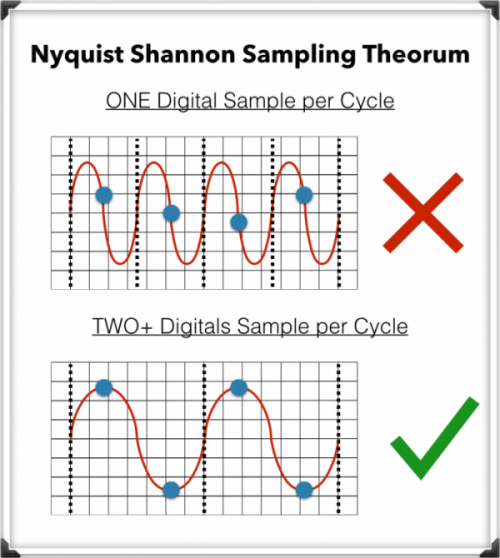
Since digital signals can be reproduced up to half the sampling frequency, how much
The higher the sample rate, the higher the playable frequency and the better the sound quality.
In familiar areas, 44.1 kHz is used for CD, and 48 kHz is used for DAT and B modes of satellite transmission.

In addition, recent professional equipment uses high sampling frequencies (high sampling), such as 88.2 kHz and 96 kHz,
and are designed to faithfully reproduce even higher frequency sounds to improve sound quality.

What is the audio bit rate? Relationship between “bit depth” and “sample rate” and sound quality PART 2

What is the audio bit rate? Relationship between “bit depth” and “sample rate” and sound quality PART 2

Audio bit rate

What is the bit depth that determines the sound quality?
What is the bit depth that determines the quality of the sound?
The bit rate is calculated by multiplying the two factors of bit depth and sample rate. Bit depth represents the amount of data per divided sample and is an element that affects the quality and expressiveness of the sound.

The sample rate is the finely divided horizontal axis and the bit depth is the one that overlaps the vertical axis. By providing a large amount of data (bit depth) to each sample, it is possible to create finer and more accurate audio data.

Bit depth is the precision of each image in animation production. The higher the bit depth, the more expressive the sound and effects will be, and the higher the sound quality will feel.

What is the sample rate that determines the smoothness?
Of the bit rates that determine audio quality, the sample rate is an element that represents the number of data divisions per second on the horizontal axis. It shows how many tens of thousands of data are divided per second and the higher the number of divisions, the higher the sound reproducibility and sound quality.

It is even easier to understand if you consider it a mechanism similar to animation production. The more images you use per second, the smoother your character will move, and the higher the sample rate (the number of data divisions), the smoother your sound will sound. Also, the amount of data increases according to the size of the sample rate.

In conclusion
To improve sound quality, it is important to increase the audio bit rate. The audio bit rate is determined by two factors: the bit depth, which determines the expressiveness of the sound, and the sampling rate, which determines the smoothness of the sound.

However, keep in mind that the higher the audio bit rate, the more beautiful the audio will be and will also be affected by the original sound source. If you want to create high-quality data from the moment of recording, why not ask a production company that has high-quality recording equipment?

I think there are many people who are concerned about the balance between capacity and sound quality when it comes to the audio system mounted on a computer. Professional engineers and mixers will come up with the best balance, so don’t hesitate to contact us on these points.

What is the audio bit rate? Relationship between “bit depth” and “sample rate” and sound quality

What is the audio bit rate? Relationship between “bit depth” and “sample rate” and sound quality

Digital Audio Basics

Bit rate is one of the factors that determine the quality of a video job.

BitRate

Among them, the one that determines the audio finish is the audio bit rate. Understanding the bit rate will allow you to control the sound quality and create better quality audio.

So on this occasion, I will explain bit depth and sample rate which are indispensable when talking about sound quality.

What is a bit rate?
What is a bit rate?
■ Bit rate represents high quality

Bit rate is a numerical value that represents the amount of information in the data, and the height of the bit rate is proportional to the quality of the data.

By looking at the bit rate, you can see how much data is packed in one second. Generally, the higher the bit rate, the higher the sound quality, and the sound and video are more realistic.

■ Audio bit rate and video bit rate

In the case of video, the bit rate is divided into two types, video and audio, and the overall quality of the video is determined by the height of each bit rate.

The “video data rate” shown in the video properties is the video bit rate and the bit rate assigned to “audio” is the audio bit rate. The “total bit rate” is the total of the two types of bit rates, video and audio, and is the bit rate of all video.

However, high bit rate audio is not always good. This is because if the quality of the original audio data or the equipment used for recording is poor, poor quality audio will be played. For example, if the original voice contains noise, the noise part will be reproduced realistically and the voice will be difficult to hear. Similarly, if the bit rate of the video is low, the movement will be choppy and unnatural, or the video will be uneven.

“High resolution” basics. What is the difference between DSD, FLAC, MQA, etc.? Part 7

“High resolution” basics. What is the difference between DSD, FLAC, MQA, etc.? Part 7

DSD vs. PCM

MQA encoding processing can be performed on 44.1 kHz to 768 kHz linear PCM sound sources and can be stored in existing file formats (container formats) such as FLAC, ALAC, and WAV. If you use a compatible device equipped with a dedicated decoder, you can “open origami” and demonstrate the original quality. It can be played with an unsupported device, but in that case, “Origami cannot be opened”, so normal PCM playback will be performed that does not include the original MQA information.

MQA is available for download at e-onkyo music. It has the advantage that it can be used with a low communication volume even with streaming type distribution, and abroad, the “TIDAL” music distribution is developing a high quality 96 kHz / 24 bit MQA streaming distribution ” TIDAL Masters “.

High Resolution Portable Player “DP-X1” Quickly Achieved MQA Compatibility
Current Status of Supported High-Resolution Formats and Music Distribution Services (as of July 2017)
WAV FLAC ALAC DSD MQA others
e-onkyo music 〇 〇 — 〇 〇 Dolby TrueHD
blackberry — 〇 — 〇 — —
OTOTOY 〇 〇 〇 〇 — —
Recochoku — 〇 — — — —
My sound — 〇 — — — —
slots — 〇 — 〇 — —
Is FLAC a powerful option right now?
Generally speaking, the high resolution format has been “PCM or DSD”, and for PCM, the choice has been “lossless compression” or “uncompressed”. There may be circumstances on the side of the playback device and sound preferences, but in terms of the balance between data compression effect (file capacity) and sound quality, “lossless” is a reasonable existence.

Among them, FLAC, which is easy to use on smartphones, will remain high resolution as source code is published and royalties are not incurred, it is already compatible with many compatible high resolution audio devices, and will be supported in the system level in the next iOS (iOS 11), will be the centerpiece of the format.

Looking around, there are signs of change, such as the emergence of a new face, MQA, and the spread of streaming services, but the audio format must have attractive content. Above all, I would like to hope that the record company / distribution service company is actively working in high resolution.

“High resolution” basics. What is the difference between DSD, FLAC, MQA, etc.? Part 6

“High resolution” basics. What is the difference between DSD, FLAC, MQA, etc.? Part 6

PCM DSD

Review the basics of “high resolution”. What is the difference between DSD, FLAC, MQA, etc.?

There are several formats, even if it says “high resolution”. If the format changes, the amount of sound information and thus the sound quality will change, the file size will also change, and whether the playback device / software will support it or not, it will also change, so choose a format is important. We will explain the main formats incorporating common technologies and unique pieces.

There are several high-resolution formats, but …
What is the sampling frequency?
Most digital sound sources are “linear PCM”. This is data obtained by digitizing (sampling) the sound waveform (analog signal) in a canned cycle, and that cycle is called the “sample rate.” If sampling is done every 1/44100 of a second it will be “44.1 kHz”, if it is 1/96000 of a second it will be “96 kHz”, if it is 1/192000 of a second it will be “192kHz”. This means that the implementation cycle of is shorter and the amount of information is greater. In other words, if you look at this number, you can see “how finely the sound was measured with respect to time.”

What is the number of quantization bits?
Value that indicates the number of steps in which the amplitude of a signal is expressed when an analog signal is converted into a signal.

“High resolution” basics. What is the difference between DSD, FLAC, MQA, etc.? Part 4

“High resolution” basics. What is the difference between DSD, FLAC, MQA, etc.? Part 4

DSD vs PCM

The number of audio devices that support ALAC has increased in recent years, and some high-resolution distribution sites handle it as well, but FLAC is compatible with more software / hardware, and there is a significant advantage in sound quality over FLAC. . it will eventually restore to the same linear PCM data), so there is no reason to choose it aggressively except for users who are unified with Apple products.

DSD vs PCM

“ALAC”, which is compatible with Apple software / hardware, can also be used for high resolution playback.
Wav
Classification:
PCM compression: no
extension: .wav

It is widely used as a linear PCM container format (it can store various types of data, and the codec can be selected for musical use), and it has been widely adopted by high-resolution distribution sites. Since linear PCM is not compressed, the file size is large, but since no decoding (decoding) processing is required, there are quite a few people who dare to choose WAV from a sound quality point of view.

It is playable on most digital audio software / devices, but tags / metadata such as artist names and album images cannot be expected to display a lot. It is possible to store data, but the format is not officially defined, so it can be displayed in one environment but not another. FLAC and ALAC are more convenient than WAV when using an application like Roon that searches for information, such as related artists, by referencing metadata.

Linear PCM with a sampling frequency of 352.8 kHz (8 times 44.1 kHz) or 384 kHz (8 times 48 kHz) and a quantization bit rate of 24 bits or more is called “DXD” (Digital eXtreme Definition). Originally intended for SACD production (because DSD is not suitable for editing), it is now used as a distribution format as well.

“High resolution” basics. What is the difference between DSD, FLAC, MQA, etc.? Part 3

“High resolution” basics. What is the difference between DSD, FLAC, MQA, etc.? Part 3

DSD vs PCM

PCM or DSD

PCM to DSD

So far, we have looked at high resolution definition on the premise of PCM, but “DSD (Direct Stream Digial)” is also recognized as a type of high resolution sound source. Regarding DSD, which is not clarified in the JEITA definition, the Japan Audio Association definition recognizes products that support 2.8MHz / 5.6MHz DSD playback as compatible high-resolution devices.

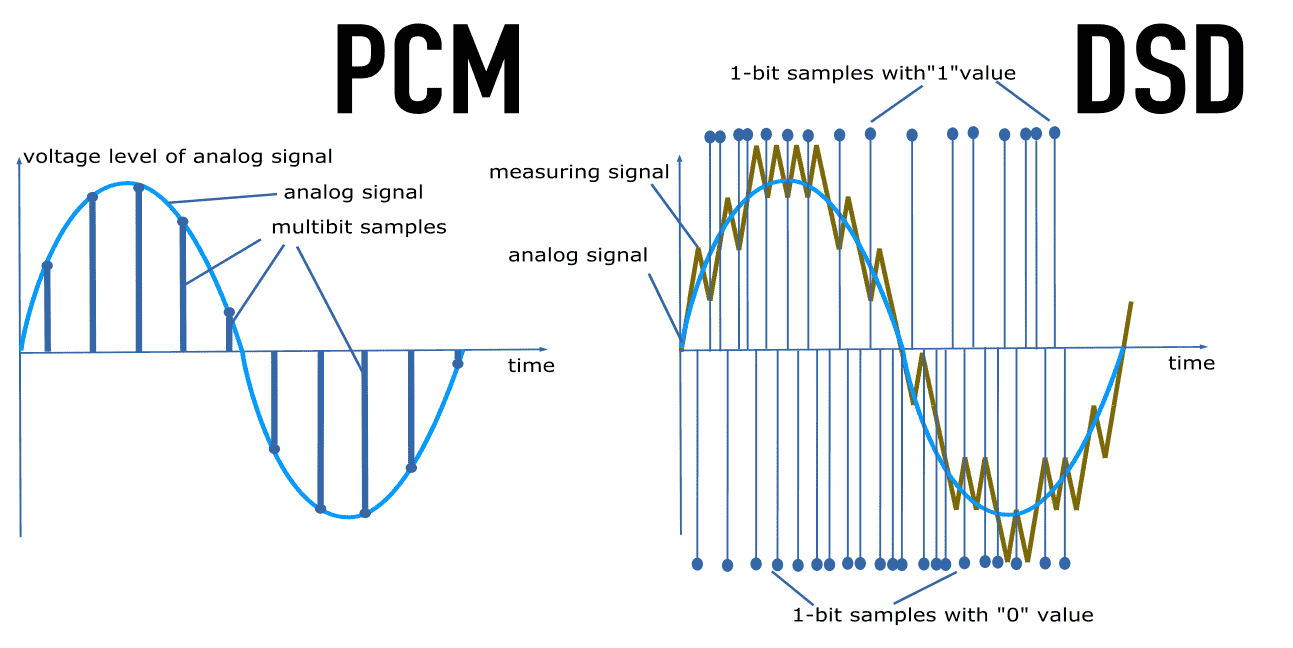
Sound reproduction methods are almost completely different between PCM and DSD. DSD always records 1 bit width (1 bit is represented by “0” or “1”) subdividing only in the direction of the time axis.

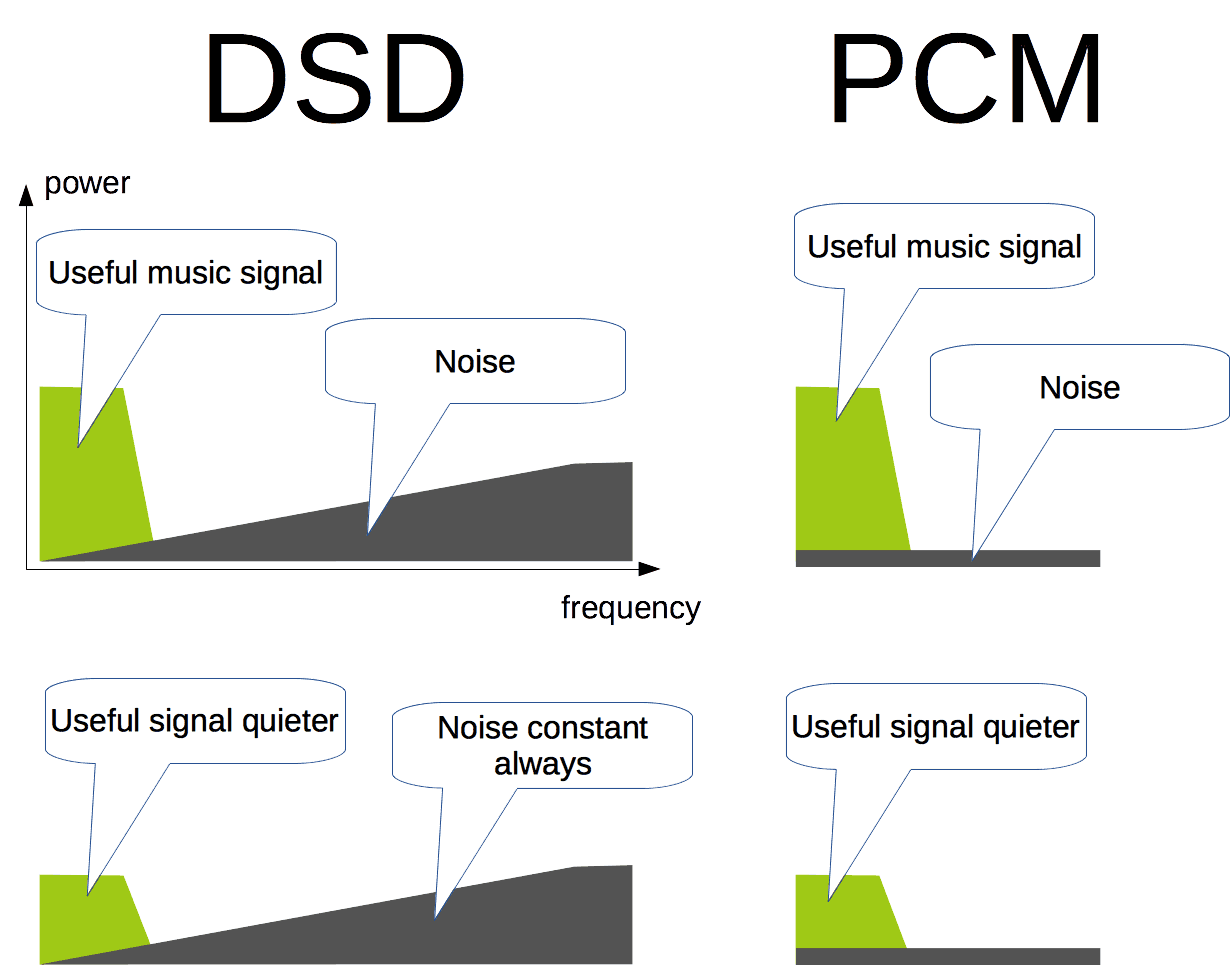
In the case of PCM, the resolution can be increased and the dynamic range can be expanded by increasing the number of bits, but on the other hand, quantization noise occurs (distortion caused by an error in rounding up / down the amplitude value real). . DSD is set to 1 bit to create a state in which no quantization noise is produced and the amount of information is ensured by significantly increasing the sample rate.

DSD has a 1-bit amplitude of “0 or 1” and records sound information with little information in the direction of the time axis.
(The picture is taken from the product information page of Sony HDD audio player “HAP-Z1ES”).
Main high-resolution formats
Data as uncompressed or compressed, lossless or lossy as compressed, PCM or DSD is primarily a high resolution format, and depends on the playback device / software to be used in addition to the taste of the sound. Let’s explain the characteristics of each format for the formats handled by the so-called music distribution sites.

FLAC
Classification:
PCM compression: Yes (lossless)
Extension: .flac

“FLAC” is a representative of high resolution audio sources. It is an open source lossless codec (software whose source code is open to the public and can be freely improved / redistributed), and one of the reasons for its widespread use is that it does not generate royalties. It is thought that the sense of security that allows us to confirm that we are there also helped spread the word.

It is often created (encoded) using uncompressed linear PCM as the source, and can be compressed to a file size of around 60% compared to the source. There are many supported hardware / software. At the moment, iOS is late (some apps have already supported it), but it almost certainly is if it is a device that claims to support high resolution. If you are wondering which format to choose, choose FLAC and you are right.

Most of the hardware / software and distribution sites that claim to support high resolution support FLAC (image is blackberry screen).
ALAC (Apple Lossless Audio Codec)
Classification:
PCM compression: Yes (lossless)
Extensions: .m4a, .mov, .alac

Introduced when Apple realized lossless audio streaming using a compact router (AirTunes). Initially it was an original technology, but then it was made open source and is now popular as a lossless codec alongside FLAC.

It has been well supported by Apple products since its introduction, and the files can be generated (encoded) using iTunes. However, Apple products are designed not to consider high resolution playback, so even if you play high resolution ALAC files on iOS devices, the information will be cut (reduced) to CD quality.

“High resolution” basics. What is the difference between DSD, FLAC, MQA, etc.? Part 2

“High resolution” basics. What is the difference between DSD, FLAC, MQA, etc.? Part 2

Bit Depth, Sample Rate

Thus, there is no strict unified standard for determining “whether or not the sound source is high resolution”, and whether or not it is high resolution is not determined only by the older formats such as FLAC and WAV.

High Resolution Audio

Since the amount of data is required to be greater than or equal to that of an audio CD and, in particular, that the number of quantization bits must be 24 bits or more, a sound source with a “sample rate of 44.1 kHz or more and a number of quantization bits of 24 bits or more “is high resolution. It seems good to think. Of course, it should be noted that the sound quality is not always high quality sound because it meets the high resolution conditions because it is not an audible standard.

Relationship between audio format and codec (for PCM)
Uncompressed or lossless compressed
Linear PCM is the sampled data itself, and theoretically does not deteriorate unless conversion processing is performed. However, since efficient data storage is not considered, the file size increases as the sample rate and the number of quantization bits increase. This is why multi-MB songs with compressed sound sources like MP3 are converted to tens of MB and hundreds of MB in high resolution.

That’s where the “lossless” codec is used. The purpose is to make the data compact by signing the linear PCM (processing to organize the data arrangement / storage pattern according to a certain rule). During playback, it is converted to the original linear PCM in real time, and in theory there is no deterioration in sound quality. “FLAC” and “ALAC” are typical examples, and linear PCM can be reduced to a data size of approximately 60%. The characteristic is that the sound quality does not deteriorate theoretically because the original information is left completely when encoded.

On the other hand, the “lossy compression” codec can achieve a high compression rate so that the data size is 10% of the original, but it is said to sound out of the audible band (human ears cannot perceive) during encoding. High frequency band) is removed. Sounds processed by lossy compression codecs are not classified as high resolution because the presence of sounds outside the audible band is believed to have a great influence on the expression of the realistic sound field and depth, which is You can tell that it is the advantage of high resolution. The way of thinking is dominant. In fact, even the JEITA and Japan Audio Association definition mentioned above does not include high resolution lossy compressed sound sources.

Compressibility and sound quality trends of the main digital audio formats
method Typical format Sound quality Compression rate
(assuming PCM is 100%)
Uncompressed WAV ◎ 100%
AIFF
Lossless compression FLAC ◎ Approximately 60-70%
A THE C
Lossy compression MQA About 15-25%
MP3 △ ~ ○ About 10 to 20%
CAA
Ogg Vorbis
WMA