
Psychoacoustic Models in MP3 and AAC Encoding

Let’s talk about Psychoacoustic Models in MP3 and AAC Encoding
When it comes to digital audio compression, especially in MP3 and AAC formats, psychoacoustic models are the secret sauce that makes it all work. These models allow us to shrink large audio files into much smaller sizes without a noticeable loss in sound quality. In my years of working with audio encoding, I’ve seen how these models have revolutionized the way we perceive sound after compression. The core idea is simple: we don’t hear all sounds equally. Some frequencies and nuances are more noticeable than others, and psychoacoustic models exploit this fact to make compression more efficient.
Think of it like this: imagine you’re at a concert, and a loud bass guitar is playing alongside a softer violin. Your attention is drawn to the bass because it’s much louder, and the violin’s subtle details get masked. This is exactly what psychoacoustic models do—they remove or reduce sounds that are unlikely to be heard due to masking effects. In this article, I’ll walk you through how psychoacoustic models in MP3 and AAC encoding work and why they matter for audio quality and file size.
Understanding the Basics of Psychoacoustic Models
Psychoacoustic models are based on the science of how our ears and brain perceive sound. They take into account how different sounds mask each other, which frequencies we are most sensitive to, and how we interpret sound in different contexts. MP3 and AAC encoding use these models to compress audio by identifying and removing information that won’t be noticeable to the listener.
A simple analogy would be taking a photograph with a high-resolution camera and then reducing its size by removing some pixels. You won’t notice much difference in the quality of the image because you can’t see all the pixels. Similarly, these audio encoders remove frequencies or audio details that the human ear won’t detect, making the audio file smaller without compromising its perceived quality.
Frequency Masking
- Frequency masking happens when a louder sound in one frequency range makes a softer sound in a nearby frequency range inaudible.
- Psychoacoustic models use this to discard or reduce the quieter, masked sounds, optimizing compression.
- For example, if a heavy guitar is playing at a loud volume, the model might remove the higher-pitched background notes that are masked by the louder guitar.
Temporal Masking
- Temporal masking occurs when one sound, like a sharp drum hit, can mask a quieter sound that occurs immediately after it.
- This type of masking is crucial for determining which transient sounds can be removed in compression.
- For instance, a loud snare hit can mask a subtle violin note that comes milliseconds after, making it unnecessary to keep all the data for that note.
The Role of Psychoacoustic Models in MP3 Encoding
In MP3 encoding, psychoacoustic models play a critical role in reducing the file size while maintaining an acceptable level of sound quality. The MP3 codec was one of the first to use psychoacoustic models to exploit human hearing limitations, and it was revolutionary when it was introduced in the 1990s. The encoder divides audio into different frequency bands and applies masking principles to decide which data can be discarded.
What’s fascinating is that MP3 uses a hybrid of time-domain and frequency-domain processing. It first splits the audio into small segments and then performs a frequency analysis. Using this information, the encoder decides which frequencies can be reduced or eliminated entirely. By doing this, the model allows the MP3 format to achieve relatively small file sizes while preserving the overall listening experience.
MP3 and the Trade-off Between Compression and Quality
- MP3 encoding sacrifices some of the finer audio details to reduce file size.
- The trade-off is more noticeable at lower bitrates, where artifacts like compression noise or a “tinny” sound may become audible.
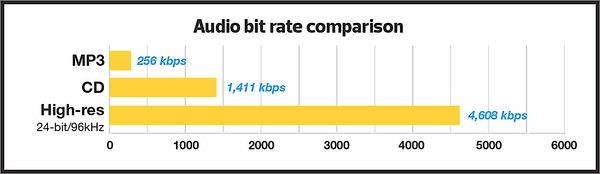
- Higher bitrates, like 192 kbps or 256 kbps, provide better sound quality, though the file size increases.
AAC: The Next Generation of Psychoacoustic Modeling
While MP3 revolutionized audio compression, AAC (Advanced Audio Codec) takes things a step further. As a more advanced codec, AAC uses a refined psychoacoustic model that performs better at lower bitrates, providing higher-quality audio with less data. This is especially important for modern audio streaming services, which need to balance high-quality sound with efficient bandwidth usage.
The AAC psychoacoustic model is more sophisticated, taking into account additional factors like stereo imaging and spatial effects. It’s also more adept at handling complex audio, such as orchestral music or tracks with a wide range of dynamics. From my experience, AAC does a better job than MP3 in preserving the subtleties of sound, especially at lower bitrates, which is why I recommend it over MP3 when available.
Why AAC Outperforms MP3
- AAC uses more advanced psychoacoustic techniques, making it more efficient at lower bitrates.
- It better preserves transient sounds and complex audio elements, like the reverberations of a piano or the nuances of a singer’s voice.
- With AAC, you can get excellent sound quality at 128 kbps, whereas MP3 may require 192 kbps or higher for a similar result.
How Psychoacoustic Models Help with Audio Quality at Low Bitrates
One of the most remarkable aspects of psychoacoustic models is how they enable high-quality audio at low bitrates. At lower bitrates, many codecs, including MP3 and AAC, might introduce artifacts such as distortion or loss of clarity. However, psychoacoustic models allow the encoder to focus on the most important elements of the sound—those that we are most likely to notice—while discarding the less important parts.
This is especially noticeable in AAC, where the advanced psychoacoustic model ensures that even at low bitrates, the encoding still captures essential auditory information, such as pitch, rhythm, and timbre. I’ve personally found that with AAC, even at 128 kbps, I can enjoy clear vocals and instruments without the harsh artifacts that often accompany MP3 at the same bitrate.
Latest Words on Psychoacoustic Models in MP3 and AAC Encoding
Psychoacoustic models are an integral part of both MP3 and AAC encoding, helping us achieve smaller file sizes while preserving audio quality. These models allow the encoder to reduce the file size by removing sounds that are less perceptible to the human ear, making the audio more efficient without sacrificing what matters most to the listener. While MP3 was groundbreaking in its time, AAC offers superior compression and better handling of complex audio, making it the better choice for modern audio applications.
As I’ve discussed throughout this article, these psychoacoustic models are crucial in ensuring that we can enjoy high-quality audio, even with file sizes that fit comfortably on our devices and bandwidth constraints. Whether you’re listening to your favorite album or streaming a podcast, psychoacoustic models are working behind the scenes to make your audio experience better. As the technology continues to improve, we can only expect even better performance in the future.
Frequently Asked Questions
What are psychoacoustic models in MP3 and AAC encoding?
Psychoacoustic models in MP3 and AAC encoding are based on the way humans perceive sound. These models analyze how different frequencies mask each other, allowing the codecs to remove or reduce the data for sounds that are less noticeable to the human ear. This process helps reduce file size without sacrificing audio quality. Essentially, psychoacoustic models optimize compression by focusing on the most important sounds in an audio file.
How do psychoacoustic models improve audio compression?
Psychoacoustic models improve audio compression by eliminating or reducing sounds that the human ear is less sensitive to. For example, louder sounds can mask softer ones, so the encoder can discard those quieter sounds, saving space without impacting the perceived quality of the audio. This makes it possible to compress audio files into smaller sizes while still delivering high-quality sound, especially in formats like MP3 and AAC.
What is the difference between MP3 and AAC in terms of psychoacoustic models?
The main difference between MP3 and AAC lies in the sophistication of their psychoacoustic models. AAC has a more advanced model that better handles complex audio, such as classical music or tracks with subtle dynamic changes. It also performs better at lower bitrates compared to MP3, providing higher sound quality at the same compression level. In short, AAC offers superior compression efficiency, especially when dealing with modern audio formats and streaming.
Why does AAC sound better than MP3 at lower bitrates?
AAC sounds better than MP3 at lower bitrates because it uses a more efficient psychoacoustic model. The AAC codec is designed to optimize the way it removes or reduces sounds, prioritizing the frequencies that are most important for human perception. This allows it to achieve a better balance between file size and audio quality, especially at bitrates like 128 kbps, where MP3 might begin to show noticeable artifacts.
How does temporal masking affect audio compression?
Temporal masking occurs when a loud sound at one moment in time masks a softer sound that follows it almost immediately. This effect is important for audio compression because it allows the encoder to discard these masked sounds without the listener noticing. This type of masking helps improve compression efficiency, especially in formats like MP3 and AAC, where transient sounds, like a snare hit or cymbal crash, may cover quieter background elements.
Can psychoacoustic models cause distortion in compressed audio?
While psychoacoustic models aim to reduce file size without degrading sound quality, they can sometimes introduce distortion, particularly at lower bitrates. This happens when the codec removes too much data, resulting in noticeable artifacts such as a “tinny” or metallic sound. However, with modern codecs like AAC, these artifacts are much less common, even at lower bitrates, thanks to more advanced psychoacoustic modeling.








Comments:
Wow, I had no idea how much science goes into these audio codecs. Your explanation about frequency and temporal masking really helped me understand why AAC sounds better at lower bitrates. Great article! – AudioFan77
I’ve always been a fan of MP3, but now I’m definitely considering switching to AAC for my music collection. The way you described the differences in psychoacoustic models makes it so much clearer! Thanks! – MusicJunkie88
This article is awesome! The real-life examples helped me visualize how psychoacoustic models work. I never understood how my music could sound so good at a low bitrate, but now I get it. Thanks for the great info! – SoundLover42
Can you talk more about how AAC handles high-frequency sounds compared to MP3? I’d love to know more about that! Great article though, very informative. – HighFreqFan
I didn’t realize how important these psychoacoustic models were in compressing audio. I always wondered how audio streaming services maintain such high-quality sound at lower bitrates. Now I know! – DeeJayDave
This is one of the most detailed articles on this topic I’ve found! I’ve been using AAC for a while now, but this article really made me appreciate how much better it is than MP3, especially for complex audio. – SoundEngineerX
Excellent breakdown of the differences between MP3 and AAC. I always assumed MP3 was “good enough” but now I realize AAC is the better choice, especially for lower bitrates. Thanks for clearing that up! – TechieTom
Great read, but I wish you would’ve gone deeper into how these psychoacoustic models impact the experience for listeners with hearing impairments. Any chance you can dive into that next? – ClearSound76
As a musician, I’ve always been picky about sound quality. After reading this, I’m convinced that AAC is worth the switch for my music files. Thanks for sharing your expertise! – MusicMaker24
I had no idea that psychoacoustic models were so important for compression. I always assumed audio codecs just “squished” the data and that was it! – CuriousGeorge
Very well-written article! I didn’t know much about psychoacoustics before, but now I understand why AAC sounds better at lower bitrates. Thanks for breaking it down so clearly! – TuneInExpert