Psychoacoustic Models in MP3 and AAC Encoding


Free Download Mp4Gain
picture

Psychoacoustic Models in MP3 and AAC Encoding

Psychoacoustic Models in MP3 and AAC Encoding

Let’s talk about Psychoacoustic Models in MP3 and AAC Encoding

When it comes to digital audio compression, especially in MP3 and AAC formats, psychoacoustic models are the secret sauce that makes it all work. These models allow us to shrink large audio files into much smaller sizes without a noticeable loss in sound quality. In my years of working with audio encoding, I’ve seen how these models have revolutionized the way we perceive sound after compression. The core idea is simple: we don’t hear all sounds equally. Some frequencies and nuances are more noticeable than others, and psychoacoustic models exploit this fact to make compression more efficient.

Think of it like this: imagine you’re at a concert, and a loud bass guitar is playing alongside a softer violin. Your attention is drawn to the bass because it’s much louder, and the violin’s subtle details get masked. This is exactly what psychoacoustic models do—they remove or reduce sounds that are unlikely to be heard due to masking effects. In this article, I’ll walk you through how psychoacoustic models in MP3 and AAC encoding work and why they matter for audio quality and file size.

Understanding the Basics of Psychoacoustic Models

Psychoacoustic models are based on the science of how our ears and brain perceive sound. They take into account how different sounds mask each other, which frequencies we are most sensitive to, and how we interpret sound in different contexts. MP3 and AAC encoding use these models to compress audio by identifying and removing information that won’t be noticeable to the listener.

A simple analogy would be taking a photograph with a high-resolution camera and then reducing its size by removing some pixels. You won’t notice much difference in the quality of the image because you can’t see all the pixels. Similarly, these audio encoders remove frequencies or audio details that the human ear won’t detect, making the audio file smaller without compromising its perceived quality.

Frequency Masking

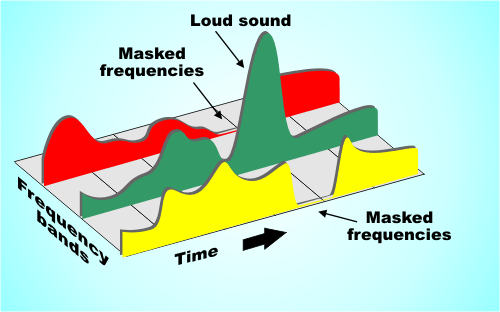
  • Frequency masking happens when a louder sound in one frequency range makes a softer sound in a nearby frequency range inaudible.
  • Psychoacoustic models use this to discard or reduce the quieter, masked sounds, optimizing compression.
  • For example, if a heavy guitar is playing at a loud volume, the model might remove the higher-pitched background notes that are masked by the louder guitar.

Temporal Masking

  • Temporal masking occurs when one sound, like a sharp drum hit, can mask a quieter sound that occurs immediately after it.
  • This type of masking is crucial for determining which transient sounds can be removed in compression.
  • For instance, a loud snare hit can mask a subtle violin note that comes milliseconds after, making it unnecessary to keep all the data for that note.

The Role of Psychoacoustic Models in MP3 Encoding

In MP3 encoding, psychoacoustic models play a critical role in reducing the file size while maintaining an acceptable level of sound quality. The MP3 codec was one of the first to use psychoacoustic models to exploit human hearing limitations, and it was revolutionary when it was introduced in the 1990s. The encoder divides audio into different frequency bands and applies masking principles to decide which data can be discarded.

What’s fascinating is that MP3 uses a hybrid of time-domain and frequency-domain processing. It first splits the audio into small segments and then performs a frequency analysis. Using this information, the encoder decides which frequencies can be reduced or eliminated entirely. By doing this, the model allows the MP3 format to achieve relatively small file sizes while preserving the overall listening experience.

MP3 and the Trade-off Between Compression and Quality

  • MP3 encoding sacrifices some of the finer audio details to reduce file size.
  • The trade-off is more noticeable at lower bitrates, where artifacts like compression noise or a “tinny” sound may become audible.
  • Higher bitrates, like 192 kbps or 256 kbps, provide better sound quality, though the file size increases.

AAC: The Next Generation of Psychoacoustic Modeling

While MP3 revolutionized audio compression, AAC (Advanced Audio Codec) takes things a step further. As a more advanced codec, AAC uses a refined psychoacoustic model that performs better at lower bitrates, providing higher-quality audio with less data. This is especially important for modern audio streaming services, which need to balance high-quality sound with efficient bandwidth usage.

The AAC psychoacoustic model is more sophisticated, taking into account additional factors like stereo imaging and spatial effects. It’s also more adept at handling complex audio, such as orchestral music or tracks with a wide range of dynamics. From my experience, AAC does a better job than MP3 in preserving the subtleties of sound, especially at lower bitrates, which is why I recommend it over MP3 when available.

Why AAC Outperforms MP3

  • AAC uses more advanced psychoacoustic techniques, making it more efficient at lower bitrates.
  • It better preserves transient sounds and complex audio elements, like the reverberations of a piano or the nuances of a singer’s voice.
  • With AAC, you can get excellent sound quality at 128 kbps, whereas MP3 may require 192 kbps or higher for a similar result.

How Psychoacoustic Models Help with Audio Quality at Low Bitrates

One of the most remarkable aspects of psychoacoustic models is how they enable high-quality audio at low bitrates. At lower bitrates, many codecs, including MP3 and AAC, might introduce artifacts such as distortion or loss of clarity. However, psychoacoustic models allow the encoder to focus on the most important elements of the sound—those that we are most likely to notice—while discarding the less important parts.

This is especially noticeable in AAC, where the advanced psychoacoustic model ensures that even at low bitrates, the encoding still captures essential auditory information, such as pitch, rhythm, and timbre. I’ve personally found that with AAC, even at 128 kbps, I can enjoy clear vocals and instruments without the harsh artifacts that often accompany MP3 at the same bitrate.

Latest Words on Psychoacoustic Models in MP3 and AAC Encoding

Psychoacoustic models are an integral part of both MP3 and AAC encoding, helping us achieve smaller file sizes while preserving audio quality. These models allow the encoder to reduce the file size by removing sounds that are less perceptible to the human ear, making the audio more efficient without sacrificing what matters most to the listener. While MP3 was groundbreaking in its time, AAC offers superior compression and better handling of complex audio, making it the better choice for modern audio applications.

As I’ve discussed throughout this article, these psychoacoustic models are crucial in ensuring that we can enjoy high-quality audio, even with file sizes that fit comfortably on our devices and bandwidth constraints. Whether you’re listening to your favorite album or streaming a podcast, psychoacoustic models are working behind the scenes to make your audio experience better. As the technology continues to improve, we can only expect even better performance in the future.

Frequently Asked Questions

What are psychoacoustic models in MP3 and AAC encoding?

Psychoacoustic models in MP3 and AAC encoding are based on the way humans perceive sound. These models analyze how different frequencies mask each other, allowing the codecs to remove or reduce the data for sounds that are less noticeable to the human ear. This process helps reduce file size without sacrificing audio quality. Essentially, psychoacoustic models optimize compression by focusing on the most important sounds in an audio file.

How do psychoacoustic models improve audio compression?

Psychoacoustic models improve audio compression by eliminating or reducing sounds that the human ear is less sensitive to. For example, louder sounds can mask softer ones, so the encoder can discard those quieter sounds, saving space without impacting the perceived quality of the audio. This makes it possible to compress audio files into smaller sizes while still delivering high-quality sound, especially in formats like MP3 and AAC.

What is the difference between MP3 and AAC in terms of psychoacoustic models?

The main difference between MP3 and AAC lies in the sophistication of their psychoacoustic models. AAC has a more advanced model that better handles complex audio, such as classical music or tracks with subtle dynamic changes. It also performs better at lower bitrates compared to MP3, providing higher sound quality at the same compression level. In short, AAC offers superior compression efficiency, especially when dealing with modern audio formats and streaming.

Why does AAC sound better than MP3 at lower bitrates?

AAC sounds better than MP3 at lower bitrates because it uses a more efficient psychoacoustic model. The AAC codec is designed to optimize the way it removes or reduces sounds, prioritizing the frequencies that are most important for human perception. This allows it to achieve a better balance between file size and audio quality, especially at bitrates like 128 kbps, where MP3 might begin to show noticeable artifacts.

How does temporal masking affect audio compression?

Temporal masking occurs when a loud sound at one moment in time masks a softer sound that follows it almost immediately. This effect is important for audio compression because it allows the encoder to discard these masked sounds without the listener noticing. This type of masking helps improve compression efficiency, especially in formats like MP3 and AAC, where transient sounds, like a snare hit or cymbal crash, may cover quieter background elements.

Can psychoacoustic models cause distortion in compressed audio?

While psychoacoustic models aim to reduce file size without degrading sound quality, they can sometimes introduce distortion, particularly at lower bitrates. This happens when the codec removes too much data, resulting in noticeable artifacts such as a “tinny” or metallic sound. However, with modern codecs like AAC, these artifacts are much less common, even at lower bitrates, thanks to more advanced psychoacoustic modeling.

Comments:

Wow, I had no idea how much science goes into these audio codecs. Your explanation about frequency and temporal masking really helped me understand why AAC sounds better at lower bitrates. Great article! – AudioFan77

I’ve always been a fan of MP3, but now I’m definitely considering switching to AAC for my music collection. The way you described the differences in psychoacoustic models makes it so much clearer! Thanks! – MusicJunkie88

This article is awesome! The real-life examples helped me visualize how psychoacoustic models work. I never understood how my music could sound so good at a low bitrate, but now I get it. Thanks for the great info! – SoundLover42

Can you talk more about how AAC handles high-frequency sounds compared to MP3? I’d love to know more about that! Great article though, very informative. – HighFreqFan

I didn’t realize how important these psychoacoustic models were in compressing audio. I always wondered how audio streaming services maintain such high-quality sound at lower bitrates. Now I know! – DeeJayDave

This is one of the most detailed articles on this topic I’ve found! I’ve been using AAC for a while now, but this article really made me appreciate how much better it is than MP3, especially for complex audio. – SoundEngineerX

Excellent breakdown of the differences between MP3 and AAC. I always assumed MP3 was “good enough” but now I realize AAC is the better choice, especially for lower bitrates. Thanks for clearing that up! – TechieTom

Great read, but I wish you would’ve gone deeper into how these psychoacoustic models impact the experience for listeners with hearing impairments. Any chance you can dive into that next? – ClearSound76

As a musician, I’ve always been picky about sound quality. After reading this, I’m convinced that AAC is worth the switch for my music files. Thanks for sharing your expertise! – MusicMaker24

I had no idea that psychoacoustic models were so important for compression. I always assumed audio codecs just “squished” the data and that was it! – CuriousGeorge

Very well-written article! I didn’t know much about psychoacoustics before, but now I understand why AAC sounds better at lower bitrates. Thanks for breaking it down so clearly! – TuneInExpert


Free Download Mp4Gain
picture


Mp4Gain Main Window
picture


Mp4Gain Features
picture


Free Download Mp4Gain
picture

Temporal Masking in MP3

Temporal Masking in MP3

Temporal Masking in MP3

Let’s talk about Temporal Masking in MP3

Temporal masking in MP3 is a game-changer for audio compression. Imagine you’re at a loud concert, and someone whispers next to you; you likely won’t hear them due to the louder sounds around you. MP3 encoding uses this principle to create smaller, more efficient files without compromising audio quality. I’ve seen firsthand how understanding temporal masking can enhance audio processing, especially for people trying to maximize storage or bandwidth without losing sound clarity. Let’s dive deep into how temporal masking works, why it’s so effective, and how it contributes to the MP3 format’s popularity.

Understanding the Concept of Temporal Masking

Temporal masking relies on a natural limitation in human hearing. When a loud sound occurs, it “masks” any softer sounds that happen shortly before or after it. This concept allows MP3 encoders to eliminate certain sounds that we wouldn’t notice anyway. When I first worked with audio files, I found that removing imperceptible sounds significantly reduced file size, and temporal masking does this efficiently by focusing on sounds that we truly register.

Why Temporal Masking is Essential for MP3 Compression

Compression is crucial for reducing file sizes in today’s digital world. Temporal masking plays a central role in MP3 compression by cutting out unnecessary data. For example, in a complex piece of music, many faint details would go unnoticed because they are hidden by louder parts. Removing these masked sounds through temporal masking lets MP3s keep essential audio data, which saves space while retaining quality. This technique is foundational to making MP3 one of the most popular audio formats.

How Temporal Masking Differs from Frequency Masking

While temporal masking is about timing, frequency masking is about pitch. Frequency masking occurs when a loud sound within a particular frequency range makes it hard to hear quieter sounds within that same range. I’ve noticed in audio engineering that using both masking techniques together results in smaller files that still sound true to the original recording. Temporal and frequency masking are like two sides of a coin, working together to maximize compression without sacrificing audio integrity.

Temporal Masking’s Impact on Different Music Genres

Not all music is affected by temporal masking in the same way. For example, classical music, with its vast dynamic range, may not be ideal for aggressive masking techniques. In contrast, pop or electronic music, which often has a steady volume level, may compress more efficiently. From my experience, temporal masking tends to work well with most genres, but the subtleties of softer genres require a careful approach to prevent audible degradation.

Potential Drawbacks of Temporal Masking in Low-Bitrate MP3 Files

While temporal masking is effective, low-bitrate MP3s can sometimes reveal its limitations. The lower the bitrate, the more audio data is discarded, making the masking more noticeable. This can result in a “washed-out” or less detailed sound. Higher bitrates, on the other hand, preserve more of the original sound while still using masking techniques to keep file sizes manageable. When I’ve used low-bitrate files for streaming, I’ve often found the masking effects more pronounced, especially in genres with delicate nuances like jazz or folk.

Temporal Masking in Other Audio Formats

Temporal masking isn’t exclusive to MP3; it’s used in AAC, OGG, and many other formats. This technique is universal in audio compression because it’s so effective. Each format, however, has its own approach to applying masking, depending on its design goals and target users. When working with these various formats, I’ve noticed that temporal masking works particularly well in AAC, which is known for maintaining quality at lower bitrates. This adaptability makes temporal masking an invaluable tool in digital audio compression.

Advanced Insights: Beyond Basic Temporal Masking

Beyond simple masking, advanced algorithms can dynamically adjust the intensity of temporal masking based on the audio’s complexity. In my experience, these adaptive methods allow for higher quality at lower bitrates. Some audio codecs even fine-tune masking based on the listener’s hearing profile, a fascinating application that takes masking to a personalized level. By diving deeper into these nuanced adjustments, we can see how temporal masking continues to evolve, making modern audio compression even more efficient.

Latest Words on Temporal Masking in MP3

Temporal masking remains a key factor in MP3’s widespread use, enabling smaller files while maintaining good sound quality. With today’s advancements, it’s more sophisticated than ever, allowing us to enjoy high-quality audio even in compressed formats. If you’re looking to get the most out of your MP3 files, Mp4Gain offers a solution to enhance audio clarity by ensuring optimal encoding.

Frequently Asked Questions about Temporal Masking in MP3

What is temporal masking in MP3?

Temporal masking in MP3 is an audio compression technique where sounds occurring within a short time frame of a louder sound are masked, or made inaudible to the human ear. This allows MP3 encoders to remove parts of the audio without affecting perceived quality, making file sizes smaller.

How does temporal masking improve MP3 quality?

Temporal masking helps improve MP3 quality by removing sounds that are not easily detected by human hearing, focusing only on the most important audio data. This enhances audio clarity while reducing file size, providing a high-quality listening experience even in compressed formats.

What is the difference between temporal masking and frequency masking?

While temporal masking hides sounds based on timing, frequency masking works by concealing sounds that fall within the same frequency range as louder sounds. Both techniques are used in MP3 compression to optimize audio quality and reduce file size.

Why is temporal masking used in audio compression?

Temporal masking is used in audio compression to eliminate sounds that listeners likely won’t hear, allowing for smaller file sizes without compromising sound quality. This efficiency is crucial for formats like MP3, where maintaining quality with reduced data is essential.

Does temporal masking affect all types of music equally?

Temporal masking can have different effects on various music genres. For instance, fast-paced genres like electronic or rock may experience more audible compression effects compared to slower genres, where subtle nuances are less likely to be masked.

Can temporal masking reduce sound quality in MP3s?

While temporal masking is designed to maintain sound quality, excessive compression can sometimes lead to noticeable losses in detail. However, with standard MP3 compression settings, temporal masking typically preserves sound quality effectively.

Is temporal masking used in other audio formats besides MP3?

Yes, temporal masking is commonly used in many compressed audio formats, including AAC and OGG. This technique is essential across various formats to reduce file sizes while keeping the audio quality as high as possible.

How does temporal masking affect low-bitrate MP3 files?

In low-bitrate MP3 files, temporal masking effects can become more apparent as more data is removed, potentially leading to a less natural sound. Higher bitrates typically allow for better masking and preservation of audio quality.

Comments:

I didn’t realize how much temporal masking impacts the audio quality of MP3 files. This article explains so much! Thanks for sharing.

Been looking for this info. Always wondered why some sounds just blend in, and now I get it’s the temporal masking effect!

Great article. I learned a lot about MP3 audio compression and how temporal masking is used. Never saw it explained so clearly before.

Good read, but I’d love to see more on how temporal masking affects specific genres like metal or jazz. Very curious about that.

This is very informative. The way temporal masking works in MP3 files really changed how I look at compressed audio formats.

Can anyone explain how this works with low bit rate MP3s? Are the temporal masking effects more noticeable?

Glad to finally understand what makes MP3s different from other audio formats. Temporal masking is such a cool feature!

So helpful! I’m studying audio engineering and this really helped me understand compression on a deeper level.

Well-explained! It would be great if you could add some diagrams to show how temporal masking works over time.

I never thought MP3s had such detailed processing behind them. Amazing article, thank you!

Wow, this article goes deep. Definitely learned something new about temporal masking and why it’s so effective in MP3s.

Couldn’t have explained it better! Temporal masking is such an important concept, and you did it justice.

As a DJ, understanding MP3 compression is huge. This article gave me a lot more respect for the tech behind MP3s.

Really useful breakdown of a complex topic. Temporal masking makes so much more sense now!

Just what I needed! Been curious about temporal masking, and this article answered all my questions.

Energy Compaction Techniques in MP3

Energy Compaction Techniques in MP3

Energy Compaction Techniques in MP3

Let’s Talk About Energy Compaction Techniques in MP3

Energy compaction techniques are the secret behind MP3’s ability to shrink audio files while preserving quality. When you listen to MP3s, what you might not realize is how much data gets compressed in ways that keep the sound clear and rich. As a specialist in audio encoding, I’ve worked with these techniques and seen how they save file space and bandwidth, making them essential in the world of digital audio. Through my years of experience, I’ve learned that these techniques rely on psychology and sound science to deliver that high quality in smaller file sizes. Let’s dig into how these strategies work and why they’re so effective.

Understanding Energy Compaction in Audio Compression

Energy compaction in audio means capturing the most “energy” or impactful parts of sound, then efficiently storing them. Think of a box you want to pack tightly. The idea is to keep the essential items while ditching things you won’t need. In audio, it’s similar, focusing on the frequencies that impact what we hear. Techniques like psychoacoustics and frequency masking help, concentrating on sounds our brains pick up easily while discarding what we won’t miss. This process is why MP3s retain such quality despite reduced data size.

The Science Behind Psychoacoustic Models

The psychoacoustic model is the backbone of MP3 compression, utilizing how humans perceive sound. I’ve noticed that this model’s core is auditory masking, where certain sounds cover others, allowing us to filter out less noticeable audio details. For example, in a crowded room, a loud voice drowns out quieter conversations. MP3s apply this by omitting audio frequencies masked by louder ones. This trimming down is barely perceptible but makes the file lighter without compromising the listening experience.

Frequency Masking: A Key to Efficient Compression

Frequency masking is a fascinating aspect that mimics how the human ear naturally filters sound. In audio compression, this technique reduces the data of sounds that are “hidden” by others. Imagine two musical notes, one high-pitched and soft, and the other low-pitched and loud. You’re more likely to notice the loud, low-pitched sound, while the softer one fades. MP3 compression leverages this concept to retain sounds that our ears will register while cutting those masked sounds, effectively reducing file size.

Bit Allocation and Its Role in MP3 Compression

Bit allocation is all about efficiency, deciding where to place the “energy” in an audio file. I see this as budgeting – you allocate more bits to essential areas and fewer bits to less noticeable parts. High-energy, dynamic sounds get more bits to ensure clarity, while low-energy areas get fewer. This smart allocation is a big reason MP3 files maintain quality even when compressed. It’s like highlighting the main points in a presentation, so you communicate the essentials without overloading the file.

Transform Coding: Breaking Down Sound Frequencies

Transform coding breaks audio into frequency components, simplifying the compression process. If you’ve ever used packing cubes in a suitcase, you know how they allow you to fit more while keeping things organized. Similarly, transform coding organizes sound into manageable “blocks” or frequencies. This process, usually through the Modified Discrete Cosine Transform (MDCT), rearranges and compacts data, fitting it more neatly and reducing the file size while keeping audio integrity.

The Role of Critical Band Analysis in Energy Compaction

Critical band analysis divides audio into “bands” or sections that our brains process separately. In MP3, it enhances compression by adjusting each band’s clarity. Think of critical bands as different instruments in a band, each with its role in the song. MP3 encoding uses this band separation to focus on parts of sound that we process most. The result? It delivers higher quality where our ears will notice it most, effectively maximizing audio impact while saving data.

Transform-Based Coding and MDCT in Depth

Transform-based coding through MDCT is a powerful compaction tool. It breaks down complex audio into smaller, easily encoded parts, making compression possible without losing clarity. I often think of this as slicing a pie – it’s easier to manage in sections. MP3 uses MDCT because it’s efficient for complex sounds, keeping the file size small without losing the richness. This efficiency is why MP3s perform so well, even for intricate audio like music.

Perceptual Coding: Focusing on Auditory Importance

Perceptual coding aligns with how our minds interpret sound by storing what’s essential and leaving out the rest. When I encode audio, I consider how perceptual coding can reduce unnecessary data. It’s like summarizing an article with only the main points. MP3s use this to keep files light and easy to store. By storing sounds our ears register best, perceptual coding delivers that “full” listening experience we crave.

Analyzing the Harmonic Structure in MP3 Compression

Harmonic structure in audio compression focuses on how sounds layer and interact. When encoding, MP3s maintain harmonics to keep that natural tone. Imagine hearing a piano piece: the melody and harmony intertwine to create that “piano” sound. Harmonic preservation means MP3s keep this intact, ensuring our ears enjoy the full, layered quality, even if data is reduced.

Spectral Compression for Efficient Data Reduction

Spectral compression reduces the bits used on lower-priority frequencies, focusing energy on what’s essential. This method is especially handy for music or sound with consistent tones. It’s similar to focusing a flashlight beam on a specific spot, illuminating it while dimming the rest. By emphasizing critical frequencies, MP3 compression keeps the audio’s richness intact, ensuring you don’t miss out on the sound’s fullness.

Handling Compression Artifacts in MP3

Compression artifacts can impact MP3 quality if not managed. When compressing audio, you might get “blurring” or “ringing” sounds. These occur if we go too far with reduction. Through trial and error, I’ve learned how to avoid these issues, balancing data reduction with sound quality. Techniques like noise shaping help smooth over these artifacts, keeping the listening experience pleasant.

Using Auditory Masking in MP3 Encoding

Auditory masking is an ingenious trick that capitalizes on how our brains ignore certain sounds. In MP3, we use masking to drop frequencies that softer sounds would cover. For instance, in a busy city, we focus on a friend’s voice, tuning out car engines and chatter. MP3s do this by saving on data for sounds that we wouldn’t consciously perceive, giving us high quality without the extra bits.

Bit Rate Reduction Without Quality Loss

Bit rate reduction aims to minimize data without compromising sound. It’s like trimming the fat off a steak: you keep the flavor but lose what’s unnecessary. MP3s apply this by reducing bits used on lower-priority sounds. Over the years, I’ve learned that careful tuning during compression ensures we retain sound depth and fidelity, even with a lower bit rate.

The Importance of Spectral Band Replication

Spectral band replication (SBR) helps MP3s reproduce high frequencies efficiently. Picture adjusting an equalizer to enhance treble – SBR does this, adding detail to compressed files. It’s particularly useful in improving quality for lower-bitrate files, giving us that crispness in sound that’s often missed. This technique is essential in maximizing audio output, especially in files with limited data capacity.

Practical Applications of Energy Compaction in MP3s

Energy compaction is all around us in music, podcasts, and online streaming. Each of these applications uses MP3’s compaction techniques to deliver high-quality audio with less data. It’s how we enjoy hours of music without maxing out storage space. Whether you’re listening on your phone or streaming online, energy compaction keeps things light and efficient, a real advantage for today’s digital lifestyle.

Maximizing MP3 Efficiency for Storage and Streaming

MP3 efficiency ensures we store more audio with less space. When I work on audio files, I focus on optimizing bit rate and frequency masking to ensure sound quality remains high. This balance lets us store extensive music libraries or stream smoothly on minimal bandwidth. It’s why MP3s remain a go-to choice for audio – they provide storage-friendly options without sacrificing quality.

Latest Words on Energy Compaction Techniques in MP3

Energy compaction techniques make MP3 a reliable format, giving us quality sound in a compact form. I’ve seen how these methods blend technology and psychology, creating a unique space in digital audio. By understanding the science behind compression and focusing on the parts we truly hear, MP3s continue to thrive. If you’re looking for efficient audio solutions, tools like Mp4Gain provide the tweaks and control needed to make the most of these compression techniques, enhancing your audio experience further.

Comments:

Man, this article opened my eyes about MP3! Never thought about how much goes into making files sound good even after they’re compressed. Awesome stuff!

I wish they’d gone even deeper on critical band analysis. It’s such a cool topic and super important for anyone making music or audio files.

Totally agree, learned so much. MP3s feel different now knowing how they work. Big thanks to whoever wrote this!

Could you go more in-depth about spectral band replication? Still kinda unclear on how it adds to quality on low bitrate files.

Impressive breakdown! Now I see why MP3 still rules. It’s like the ultimate file format for music. Thanks for the clarity!

This article made me realize how MP3s have stayed relevant. All those compaction techniques really make sense now. Nice!

I’m a DJ and always wondered why my MP3s sound great despite being compressed. Loved learning about frequency masking and bit allocation.

Good stuff, I only knew the basics but now understand the real tech behind MP3s. So useful, appreciate the article!

Wow, didn’t expect this much detail. Honestly makes me look at MP3s with a whole new level of respect. Solid info!

This breakdown makes MP3 compression so clear! Was just looking to understand the basics, but learned a ton.

Dynamic Range Compression in MP3

Dynamic Range Compression in MP3

Dynamic Range Compression in MP3

Let’s Talk About Dynamic Range Compression in MP3

Dynamic range compression (DRC) is a concept that often comes up in audio discussions, especially when we talk about MP3s and audio quality. It’s a process that affects how we hear quiet and loud sounds in a recording by balancing their volumes. Think of it like adjusting the volume knob automatically so the quieter sounds are more noticeable and the louder sounds don’t overwhelm. I have years of experience in audio processing and understand how DRC impacts everything from music streaming to the soundtracks we hear in movies. In this article, I’ll dive into how dynamic range compression works, how it affects MP3 files, and share insights on making the most of it in digital audio.

What is Dynamic Range Compression?

Dynamic range compression is all about controlling the difference between the quietest and loudest parts of an audio track. If you’ve ever listened to a song where the vocals get drowned out by the instruments, you’re experiencing a wide dynamic range. Compression tackles this by “squeezing” the audio into a more consistent volume range, making the quieter parts louder and the loudest parts softer. Think of it as balancing a book on a seesaw, where the compressor acts as the steadying force, preventing extreme highs or lows.

Why Dynamic Range Matters in MP3 Compression

MP3s are a compressed file format designed to reduce file size without significantly compromising sound quality. However, achieving this compression means some audio data is discarded, typically by cutting out sounds that are less likely to be noticed by human ears. This process, called lossy compression, already affects the dynamic range. DRC, when applied to an MP3, can both help and harm, depending on how it’s used. While it can bring out quieter details, it may also reduce the natural contrast between loud and soft sounds. For example, in classical music, which relies on these contrasts, heavy compression could strip away its depth.

How Dynamic Range Compression Works in MP3 Encoding

Dynamic range compression in MP3 encoding uses algorithms to measure the volume of the audio content and then applies compression settings accordingly. This includes parameters like threshold, which defines the volume level where compression starts, and ratio, which determines how much compression is applied. For instance, if I’m encoding an MP3 of a rock song, I might use a higher ratio to ensure that vocals don’t get buried under guitars, but with a softer threshold to keep the percussive energy intact.

  • Threshold: The volume level at which compression begins.
  • Ratio: The intensity of compression applied to sounds above the threshold.
  • Attack Time: How quickly the compressor reacts to loud sounds.
  • Release Time: How quickly the compression effect stops when the sound decreases.

How Human Hearing Influences Dynamic Range Compression

Our ears are sensitive to certain frequencies and less so to others. Dynamic range compression takes advantage of these natural listening preferences, particularly when applied to MP3s. MP3 compression removes “unnecessary” sounds based on psychoacoustic models, making dynamic range compression more noticeable. For example, in a jazz recording, the soft whisper of a saxophone might be drowned out by louder instruments. Compression can bring out this subtlety by amplifying the saxophone’s volume relative to louder sounds, providing a fuller listening experience.

The Role of Psychoacoustic Models in MP3 Compression

Psychoacoustic models consider what our brains are likely to ignore when processing sounds. MP3 encoders use these models to selectively discard sounds during compression, aiming to retain only the most essential elements. In my experience, understanding psychoacoustics helps make smart decisions in audio processing, especially in MP3s where balancing quality with file size is key. When applying dynamic range compression, these models guide what frequencies and volumes to boost or soften without degrading perceived quality.

Benefits of Dynamic Range Compression in MP3 Files

Dynamic range compression in MP3 files offers several benefits. For one, it creates a more uniform listening experience, especially in environments with ambient noise, like a car or train. I’ve found that DRC can make a podcast or an audiobook clearer and more enjoyable since it brings voices to a more consistent level.

  • Enhanced clarity in noisy settings.
  • Improved intelligibility for speech audio, like podcasts.
  • Balanced volume across different listening environments.
  • Preserved details in quiet audio passages.

Challenges of Using Dynamic Range Compression in MP3 Files

Applying too much compression in an MP3 file can lead to a “flattened” sound where the subtle dynamics that make music expressive get lost. This is sometimes called the “loudness war” effect. For instance, rock and pop tracks are often heavily compressed to make them sound louder, but at the cost of depth and dynamics. In classical or jazz, over-compression can erase the subtlety that’s crucial to the genre.

Different Types of Compression in MP3 Audio Processing

Several types of compression can be applied to MP3s, each with its own effects:

  • Peak Compression:

    Reduces only the peaks, preserving most of the dynamics.

  • Average Compression:

    Balances the average loudness of the track, ideal for dialogue-heavy audio.

  • Multiband Compression:

    Separates the audio into frequency bands and applies different compression settings to each.

How Much Compression is Too Much in an MP3 File?

Over-compressing an MP3 can make it sound unnatural and “boxy.” I always suggest a subtle approach to maintain a balance between loudness and audio fidelity. For most music genres, especially those that rely on dynamic contrast, over-compression can be detrimental.

Examples of Dynamic Range Compression in Real-Life Audio

Think of TV commercials that sound louder than the show you’re watching. That’s compression in action, used to grab your attention. In MP3s, compression is used similarly to make certain sounds “pop,” though with more nuance. Another example is in phone calls, where DRC is used to ensure the voice remains clear despite background noise.

Using DRC with MP4Gain for Optimal Results

If you want precise control over dynamic range compression, especially for MP3s, MP4Gain offers customizable settings that allow you to adjust compression levels based on your needs. Whether it’s enhancing vocals or ensuring a consistent playback volume, it’s a tool that brings out the best in compressed audio.

Latest Words on Dynamic Range Compression in MP3

Dynamic range compression, when used wisely, can enhance the listening experience of MP3s by bringing clarity and balance to the audio. While it’s a powerful tool, overuse can strip audio of its character and depth. My advice: start with minimal compression and adjust gradually to find the best balance. Understanding the effects of compression and using tools like MP4Gain can make a significant difference in your audio projects, ensuring the quality you want without sacrificing the nuances that make audio truly enjoyable.

Comments:

This was super helpful! I always wondered why MP3s sounded different. Great breakdown on compression.

Really good explanation. But I would like more info on how psychoacoustic models actually work in compression.

I’ve struggled with audio sounding “flat” after compressing—didn’t realize it could be the DRC settings!

Man, compression in MP3s is wild. Thanks for explaining it in simple terms, never knew about all these types of compression.

Can someone help me understand why compression is necessary at all? Why not just leave the audio alone?

This article cleared up so much for me. Now I know why some music feels “boxed in”!

Great article. I wish you’d talk about how MP3 compares to other formats in terms of compression.

Thanks for breaking it down! Didn’t know compression affects different genres in such specific ways.

Reading this made me realize why my podcasts sometimes sound different on my phone. Good info!

I never understood why my music sounded “muffled” on high volume. This helped a lot!

Interesting stuff. Might have to try out that MP4Gain tool you mentioned for my recordings.

Wow, very thorough. Really makes me appreciate the work that goes into audio processing.

I learned so much from this. Wish I knew about compression when I was starting with audio editing.

Nice article! You should add a video tutorial for those of us who want a visual guide.

This answered a lot of questions but left me wondering how compression affects live recordings. Anyone?

MP3 Compression: Bitrate and Audio Quality Tradeoffs

MP3 Compression: Bitrate and Audio Quality Tradeoffs

MP3 Compression
MP3 Compression
MP3 Compression
MP3 Compression

MP3 Compression

MP3 is a popular format for digital audio. It is a lossy format, which means that some of the original audio data is discarded in order to reduce the file size. The amount of data that is discarded is determined by the bitrate, which is a measure of the amount of data per second. A higher bitrate results in a higher quality audio file, but also a larger file size.

How MP3 Compression Works

MP3 compression works by using a technique called psychoacoustic coding. Psychoacoustic coding takes advantage of the fact that the human ear is not equally sensitive to all frequencies. For example, we can hear lower frequencies better than higher frequencies. Psychoacoustic coding uses this information to discard frequencies that are not as important to human hearing.

Bitrate and Audio Quality

The bitrate is the most important factor that determines the audio quality of an MP3 file. A higher bitrate results in a higher quality audio file, but also a larger file size. For example, a 128 kbps MP3 file will sound better than a 64 kbps MP3 file, but the 128 kbps file will be twice as large.

Choosing the Right Bitrate

The best bitrate to choose depends on how you plan to use the MP3 file. If you are going to listen to the file on a high-quality audio system, then you will want to use a high bitrate. If you are going to listen to the file on a portable device, then you may want to use a lower bitrate to save space.

Other Factors That Affect Audio Quality

In addition to the bitrate, there are other factors that can affect the audio quality of an MP3 file. These factors include the sampling rate, the bit depth, and the encoder used.

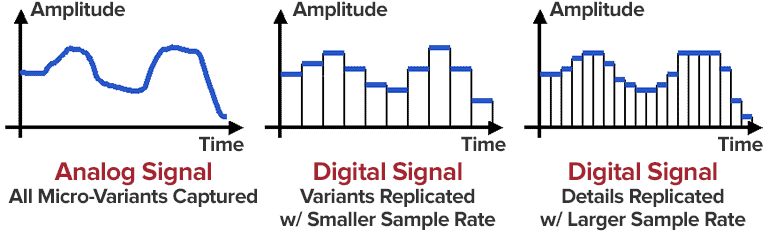
  • The sampling rate is the number of times per second that the audio signal is sampled. A higher sampling rate results in a higher quality audio file.
  • The bit depth is the number of bits used to represent each sample. A higher bit depth results in a higher quality audio file.
  • The encoder is the software that is used to compress the audio file. Different encoders use different algorithms, and some encoders produce better quality audio files than others.

Conclusion

MP3 compression is a popular and effective way to reduce the file size of digital audio files. By using a high bitrate, you can ensure that the audio quality of your MP3 files is good enough for your needs.

Frequently Asked Questions

What is the difference between MP3 and lossless audio formats?

MP3 is a lossy format, which means that some of the original audio data is discarded in order to reduce the file size. Lossless audio formats, such as FLAC and WAV, do not discard any data, so they retain the original audio quality. However, lossless audio files are much larger than MP3 files.

What is the best bitrate for MP3 files?

The best bitrate for MP3 files depends on how you plan to use them. If you are going to listen to the files on a high-quality audio system, then you will want to use a high bitrate. If you are going to listen to the files on a portable device, then you may want to use a lower bitrate to save space.

What are some tips for improving the audio quality of MP3 files?

There are a few things you can do to improve the audio quality of MP3 files. First, use a high bitrate. Second, use a high-quality encoder. Third, avoid using compression plugins or software that may degrade the audio quality.

What are some common problems with MP3 files?

Some common problems with MP3 files include:

  • Crackling or popping noises
  • Loss of high-frequency sounds
  • Muffled or distorted sound

These problems can be caused by a number of factors, including:

  • Low bitrate
  • Poor quality encoder
  • Damage to the file

If you are experiencing problems with your MP3 files, try using a different encoder or a higher bitrate. You can also try repairing the file using a file repair utility.

Understanding MP3 Compression

Understanding MP3 Compression

MP3 Compression
MP3 Compression
MP3 Compression
MP3 Compression

As someone who has been working with audio files for years, I can tell you that MP3 compression is one of the most important topics in the industry. It’s a technique that has revolutionized the way we listen to music, and it’s something that every audio enthusiast should understand.

How MP3 Compression Works

At its core, MP3 compression is all about removing data that the human ear can’t hear. This is done by analyzing the audio file and identifying sounds that are outside of the range of human hearing. These sounds are then removed, resulting in a smaller file size without any noticeable loss in quality.
As the book “The Art of Digital Audio” explains, “MP3 compression is based on the psychoacoustic principle that the human ear cannot discern certain sounds that are masked by other sounds.” This means that by removing these masked sounds, we can significantly reduce the file size of an audio file without sacrificing quality.

The Benefits of MP3 Compression

One of the biggest benefits of MP3 compression is the ability to store more music on your device. Before MP3 compression, most audio files were too large to be stored on a computer or portable music player. With MP3 compression, you can store hundreds or even thousands of songs on a single device.
Another benefit of MP3 compression is the ability to stream music over the internet. Without MP3 compression, streaming music would be nearly impossible due to the large file sizes of most audio files. MP3 compression allows for fast and efficient streaming, making it possible to listen to music on the go.

The Future of MP3 Compression

While MP3 compression has been around for decades, it’s still an evolving technology. As new audio formats and compression techniques are developed, we can expect MP3 compression to continue to improve.
One area where MP3 compression is likely to see significant growth is in the field of virtual and augmented reality. As these technologies become more advanced, the need for high-quality, low-latency audio will become increasingly important. MP3 compression is likely to play a key role in meeting this need.

MP3 Compression vs. Other Audio Formats

When it comes to audio formats, there are a lot of options out there. From WAV to FLAC to AAC, each format has its own strengths and weaknesses. So how does MP3 compression stack up against the competition?

MP3 Compression vs. WAV

WAV is a lossless audio format that is often used in professional audio production. While WAV files offer the highest possible audio quality, they also come with a large file size. This makes them impractical for most consumer applications.
MP3 compression, on the other hand, offers a good balance between file size and audio quality. While MP3 files are not as high-quality as WAV files, they are much smaller and more practical for everyday use.

MP3 Compression vs. FLAC

FLAC is another lossless audio format that is often used by audiophiles. Like WAV, FLAC files offer high-quality audio, but they also come with a large file size.
While FLAC files are great for archiving and preserving high-quality audio, they are not practical for everyday use. MP3 compression, on the other hand, offers a good compromise between file size and audio quality, making it the ideal format for most consumer applications.

MP3 Compression vs. AAC

AAC is a newer audio format that was developed by Apple. Like MP3 compression, AAC is a lossy format that offers a good balance between file size and audio quality.
While AAC files are generally smaller than MP3 files, they also tend to offer slightly better audio quality. However, because AAC is a proprietary format, it is not as widely supported as MP3 compression.

The Science Behind MP3 Compression

At its core, MP3 compression is all about the science of sound. By understanding how sound works and how the human ear perceives it, we can create audio files that are smaller and more efficient without sacrificing quality.

The Psychoacoustic Model

The key to MP3 compression is the psychoacoustic model. This model is based on the fact that the human ear is not equally sensitive to all frequencies of sound. In fact, our ears are much more sensitive to sounds in the midrange frequencies than they are to sounds in the high or low frequencies.
By taking advantage of this fact, MP3 compression is able to remove sounds that are outside of the range of human hearing. This results in a smaller file size without any noticeable loss in quality.

The Bitrate

Another important factor in MP3 compression is the bitrate. The bitrate is the amount of data that is used to represent each second of audio. A higher bitrate means that more data is being used, which results in a higher-quality audio file.
However, higher bitrates also mean larger file sizes. This is why most MP3 files are encoded at a bitrate of 128 kbps or 192 kbps. These bitrates offer a good balance between file size and audio quality.

The Future of MP3 Compression

As technology continues to evolve, we can expect MP3 compression to continue to improve. New compression techniques and audio formats are likely to emerge, offering even better audio quality and smaller file sizes.
However, even as new technologies emerge, MP3 compression is likely to remain a key part of the audio industry. Its ability to offer high-quality audio in a small file size makes it the ideal format for most consumer applications.

MP3 Compression Techniques

There are a number of different techniques that can be used to compress MP3 files. Each technique has its own strengths and weaknesses, and the best technique to use will depend on the specific needs of the user.

Constant Bitrate Encoding

Constant bitrate encoding is the simplest and most common technique used to compress MP3 files. With constant bitrate encoding, the bitrate is kept constant throughout the entire audio file.
While constant bitrate encoding is easy to implement, it can result in larger file sizes than other techniques. This is because the bitrate is not adjusted to match the complexity of the audio.

Variable Bitrate Encoding

Variable bitrate encoding is a more advanced technique that adjusts the bitrate based on the complexity of the audio. This means that more data is used to represent complex sounds, while less data is used to represent simpler sounds.
Variable bitrate encoding can result in smaller file sizes than constant bitrate encoding, while still maintaining high audio quality. However, it can be more difficult to implement than constant bitrate encoding.

Joint Stereo Encoding

Joint stereo encoding is a technique that takes advantage of the fact that most audio files are recorded in stereo. With joint stereo encoding, the left and right channels of the audio are analyzed separately, and the data is compressed based on the similarities between the two channels.
This technique can result in smaller file sizes than other techniques, while still maintaining high audio quality. However, it can also result in some loss of stereo separation.

The Benefits of MP3 Compression

As someone who has been working with audio files for years, I can tell you that MP3 compression is one of the most important topics in the industry. It’s a technique that has revolutionized the way we listen to music, and it’s something that every audio enthusiast should understand.

Storing More Music

One of the biggest benefits of MP3 compression is the ability to store more music on your device. Before MP3 compression, most audio files were too large to be stored on a computer or portable music player. With MP3 compression, you can store hundreds or even thousands of songs on a single device.
This is something that I’ve personally experienced. As someone who loves music, I used to have to carry around a large collection of CDs or cassette tapes. With MP3 compression, I can now carry my entire music collection in my pocket.

Streaming Music

Another benefit of MP3 compression is the ability to stream music over the internet. Without MP3 compression, streaming music would be nearly impossible due to the large file sizes of most audio files. MP3 compression allows for fast and efficient streaming, making it possible to listen to music on the go.
This is something that I’ve personally experienced as well. As someone who travels frequently, I rely on streaming music services to keep me entertained on long flights or train rides. Without MP3 compression, this would not be possible.

The Future of MP3 Compression

While MP3 compression has been around for decades, it’s still an evolving technology. As new audio formats and compression techniques are developed, we can expect MP3 compression to continue to improve.
One area where MP3 compression is likely to see significant growth is in the field of virtual and augmented reality. As these technologies become more advanced, the need for high-quality, low-latency audio will become increasingly important. MP3 compression is likely to play a key role in meeting this need.

MP3 Compression for Beginners

If you’re new to the world of audio files, MP3 compression can seem like a daunting topic. However, with a little bit of knowledge, you can quickly become an expert.

Choosing the Right Bitrate

One of the most important things to consider when compressing MP3 files is the bitrate. The bitrate is the amount of data that is used to represent each second of audio. A higher bitrate means that more data is being used, which results in a higher-quality audio file.
However, higher bitrates also mean larger file sizes. This is why most MP3 files are encoded at a bitrate of 128 kbps or 192 kbps. These bitrates offer a good balance between file size and audio quality.

Using the Right Software

Another important factor to consider when compressing MP3 files is the software that you use. While there are many different programs available for compressing audio files, not all of them are created equal.
If you’re looking for a reliable and easy-to-use program for compressing MP3 files, I would recommend checking out MP4Gain. This program offers a wide range of compression options, making it easy to find the right settings for your needs.

Conclusion

In conclusion, MP3 compression is an important topic for anyone who works with audio files. Whether you’re a professional audio engineer or just someone who loves music, understanding MP3 compression is essential.
By taking advantage of the techniques and technologies available for MP3 compression, you can store more music on your device, stream music over the internet, and enjoy high-quality audio without sacrificing file size. So if you haven’t already, I would encourage you to start exploring the world of MP3 compression today.

MP3 Compressor: A Technical Guide to Audio Compression

MP3 Compressor: A Technical Guide to Audio Compression

MP3 Compressor
MP3 Compressor

Audio compression is a vital technique in the music industry. The MP3 file format has been widely used for decades and is one of the most popular file formats for music files. In this article, we will delve into the technical aspects of MP3 compression, its algorithmic processes, and explore the potential drawbacks of this commonly used format.

MP3 Compressor
MP3 Compressor

Understanding Audio Compression

Audio compression is the process of reducing the dynamic range of an audio signal. This is achieved by analyzing the audio waveform and then reducing the amplitude of any signal that exceeds a certain threshold. This process can be done manually, but it is usually automated with specialized software.

There are several types of audio compressors, including peak, RMS, and multiband compressors. Each type of compressor has its own set of uses and parameters that can be adjusted to achieve the desired result. Peak compressors, for example, reduce the volume of any signal that exceeds a certain threshold, whereas RMS compressors average the signal over time and reduce the volume of signals that are too loud.

Understanding MP3 Compression

MP3 is a lossy compression format that is designed to reduce the file size of digital audio files. MP3 compression achieves this by discarding information that is not essential to the human ear. The compression is achieved by analyzing the audio data and removing frequencies that are not perceived by the human ear.

The MP3 Algorithm

The MP3 algorithm uses a process called perceptual coding to identify sounds that are less important to human perception and eliminate them from the audio signal. The algorithm then quantizes the remaining data, assigning values to each of the remaining samples. The resulting data is then further compressed through Huffman encoding, a type of lossless compression algorithm that replaces frequently occurring values with shorter codes.

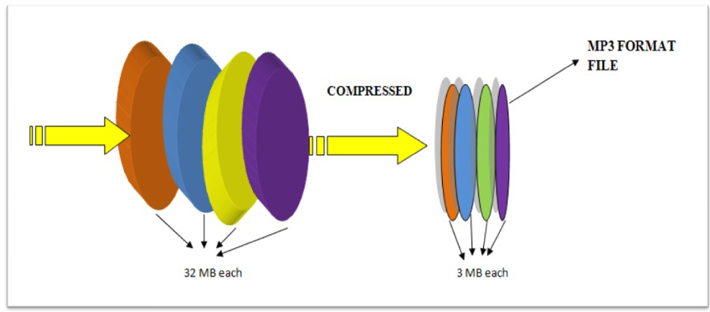
The result is a file that has been reduced in size by approximately 90% with relatively little loss in perceived sound quality.

MP3 Bitrate

MP3 compression also utilizes a technique called variable bitrate encoding (VBR). This technique adjusts the bitrate of the MP3 file in real-time, allowing for more detailed encoding when it is needed and more aggressive encoding when it is not.

The quality of an MP3 file is determined by its bitrate. Higher bitrates result in higher sound quality and larger file sizes, while lower bitrates result in lower sound quality and smaller file sizes. Bitrates are typically measured in kilobits per second (kbps), with a higher number indicating a higher bitrate.

The Drawbacks of MP3 Compression

While MP3 compression is a popular format, there are potential drawbacks to using it. One of the main issues is the loss of audio quality. MP3 compression removes frequencies that are not essential to the human ear, but this can result in a loss of audio quality, particularly for complex and dynamic recordings.

Additionally, the MP3 algorithm can introduce audible artifacts, such as ringing or “smearing” of the audio signal. This can be particularly noticeable in high-frequency content and can be exacerbated by aggressive compression settings or lower bitrates.

MP3 Compressor Alternatives

While MP3 compression is a popular format, there are other compression formats that offer similar features. One alternative is MP4Gain, which offers a functionally similar functionality to a compressor in its normalizer. MP4Gain is a tool that analyzes and adjusts the volume of audio files, providing a way to adjust audio levels without losing audio quality.

Unlike traditional audio compression, MP4Gain doesn’t remove audio data, and it doesn’t have a negative impact on sound quality. Instead, it adjusts the levels of the audio signal to provide a more consistent listening experience across different tracks.

Overall, MP3 compression remains one of the most widely used audio compression formats, and for good reason. It provides a high level of compression without sacrificing too much audio quality, making it an ideal format for sharing and distributing music online. However, it is important to understand the technical aspects of MP3 compression and to be aware of its potential drawbacks to make informed decisions when working with audio files.

The History of Audio Compressors

Early Days of Audio Compression

Audio compression has been used in various forms since the early days of audio recording. In the early 20th century, record producers used a technique called “overdubbing” to layer multiple tracks on top of each other to create a fuller, more dynamic sound. However, this technique also led to some tracks being too loud and others too quiet, which made the final mix sound unbalanced.

To solve this problem, audio engineers began using a technique called “gain reduction,” which involved reducing the volume of the louder tracks and boosting the volume of the quieter ones to achieve a more balanced sound. This technique laid the foundation for the modern audio compressor.

The Birth of the Audio Compressor

The first modern audio compressor was invented by the American electrical engineer, C.P. Boner, in 1936. Boner’s compressor used a photoelectric cell to detect changes in audio levels and adjust the gain accordingly. This invention was a game-changer for the music industry and paved the way for the development of more advanced compressors in the years to come.

The Rise of Digital Audio Compression

In the 1980s, digital audio compression became more popular with the advent of the Compact Disc (CD) format. The CD format was designed to hold more audio data than traditional vinyl records, but this required compressing the audio to fit more data on the disc.

One of the most popular audio compression formats of the 1980s and 1990s was the MPEG-1 Audio Layer 3, or MP3 for short. This format revolutionized the music industry by allowing users to share and distribute music online, but it also sparked controversy over issues such as music piracy and loss of audio quality.

Today, audio compression remains a critical tool in music production, broadcasting, and other areas of the audio industry. Advanced compression techniques, such as multi-band compression and dynamic range compression, continue to evolve, providing musicians and engineers with new ways to shape and control the sound of their recordings.

The compression algorithm of an Mp3.

The compression algorithm of an Mp3.

Mp3 compression algorithm

In addition to the physiological structural properties of the human ear, the function of the brain also plays a very important role.

Mp3 compression algorithm

The pitch in the sound is determined by the fundamental tone, while the timbre is determined by the harmonics, and the human brain will automatically complete the fundamental tone, even if the fundamental tone does not exist. For example, the bandwidth of a telephone is only 300~3200 Hz, but when we listen to a man with a base tone of 120 Hz talking on the telephone, we can still hear his correct tone and will not confuse a boy with a girl. . .

We still don’t know how the brain uses complex calculations to reconstruct this non-existent tone.

PS Add a little visual easter egg, can you see what’s weird about this image?


(Please read the answer to the end)

…………………………………………………………………………………………………………………… ………… ……… …………………………………………………………………………………………………………………… ………………………………………………………………………………………………………………………………… ………………………………………………………………………………………………………………………………… ……………………………………………………………………………………………………………………………… ……………………………………………………………………………………………………………………………… ……………………………
_ Your vision~ amazing! The human body still has too many unknown magic eggs waiting to be excavated~~

The compression algorithm of an Mp3.

The compression algorithm of an Mp3.

Mp3 compression algorithm

The birth of the MP3 compression algorithm is nonsense of human organs in the digital age. The whole algorithm is not improved around the math, but rather optimized around how to fool the human hearing organ.

Mp3 compression algorithm


So this algorithm is very curious, Baidu finally found information after a long time, and has a little understanding of the principle of it, so please record it.

basic principle
There is a special effect of shading effect on the human hearing model.
The role of the cochlea is as a spectrum analyzer, converting sound waves into signals of different frequencies. The villous cells at each specific location will be stimulated by a specific frequency, but when the basilar membrane leads to fluctuations, the villous cells around it will also be stimulated. That is, if there is a frequency with a high volume, and at the same time there is a relatively weak frequency near it, the sound of the relatively weak frequency will be covered by the relatively loud sound, and our human ears have no way to distinguish the sound There is another sound of a weaker frequency.

To the human ear, the perception characteristics of sound do not change on a linear frequency scale (human hearing is not that good), but can be expressed in a series of limited frequency bands called critical frequency bands. Simply put, the entire frequency band is divided into several segments, and in each frequency band the auditory perception of the human ear is the same, that is, the psychoacoustic characteristics are the same.
Then, according to this principle, the mp3 compression work can be simply divided into two parts:

The first step: dividing the original audio data into several subcritical frequency bands according to certain principles;

Step 2: Analyze the frequency spectrum according to the psychoacoustic model to find the masking effect curve. Then, according to this curve, each sub-frequency band is quantized separately, and finally the compression of the audio is below the masking effect curve.

In this way, mp3 compression is done. And it is surprising that mp3 is really compressed in the digital world, but it belongs to compression without distortion for human perception.

How does MP3 work?

How does MP3 work?

mp3 compression

1. The common name for portable MP3 player. a portable player
used to play music in MP3 format (now compatible with wma, wav and other formats).

MP3 Compression

Portable MP3 Player was originally developed by Korean Wenguang Su and Huang Dingxia (Moon & Hwang) Invented in 1997 and applied for related patents Detailed explanation of the
technology development of the MP3 format Format, which is designed to drastically reduce the amount of audio data, while for most users the playback quality is not appreciably degraded from the original uncompressed audio. It was invented and standardized in 1991 by a group of engineers from the Fraunhofer-Gesellschaft research organization in Erlangen, Germany. MPEG-1 Audio Layer 3, often referred to as MP3, is one of the most popular lossy compression and digital audio encoding formats today. There is no noticeable drop in sound quality compared to the original uncompressed audio. It was invented and standardized in 1991 by a group of engineers from the Fraunhofer-Gesellschaft research organization in Erlangen, Germany. General information MP3 is a data compression format. It discards pulse code modulation (PCM) audio data that is not important to the human ear (similar to how JPEG is lossy image compression), resulting in a much smaller file size. Various techniques are used in MP3, including psychoacoustics, to determine which parts of the audio can be discarded. MP3 audio can be compressed at different bit rates, providing a variety of trade-offs between data size and sound quality. The MP3 format uses a hybrid conversion mechanism to convert the time domain signal to the frequency domain signal: * 32-Band Polyphase Integrating Filter (PQF)
* Modified 36 or 12 tap discrete cosine filter (
MDCT); each subband size is independently selectable between 0…1 and 2…31 However, due to the unprecedented popularity of MP3, the success of any other format is currently unlikely. MP3 not only has extensive client software support, but also has a lot of hardware support, such as portable media players (referring to MP3 players), DVD and CD players.
The development of
MPEG-1 Audio Layer 2 encoding started with the German Deutsche Forschungs- und Versuchsanstalt für Luft- und Raumfahrt (later called Deutsches Zentrum für Luft- und Raumfahrt, German Space Center) Digital Audio Broadcasting (DAB) managed by Egon Meier-Project Engelen . This project is funded by the European Union as a EUREKA research project, and its name is commonly known as EU-147. The study period for EU-147 was from 1987 to 1994.
By 1991 there were already two proposals: Musicam (called Layer 2) and ASPEC (Adaptive Spectrum Sensing Entropy Coding). The Musicam method proposed by Philips of the Netherlands, CCETT of France, and the Institut für Rundfunktechnik of Germany was chosen due to its simplicity, robustness against errors, and lower computational effort in high-quality compression. The Musicam format based on subband coding is a key factor in determining the MPEG audio compression format (sampling rate, frame structure, data header, sample points per frame). This technology and its design philosophy are fully integrated into the definition of ISO MPEG Audio Layer I, II and later Layer III (MP3) formats. The standard was developed by Leon van de Kerkhof (Layer I) and Gerhard Stoll (Layer II) under the auspices of Prof. Mussmann (University of Hannover).
A working group consisting of Leon Van de Kerkhof from the Netherlands, Gerhard Stoll from Germany, Yves-François Dehery from France, and Karlheinz Brandenburg from Germany absorbed design ideas from Musicam and ASPEC and added their own design ideas to develop MP3 , which can play MP2. Sound quality from 192kbit/s to 128kbit/s.
All of these algorithms eventually became part of the first group of MPEG standards, MPEG-1, in 1992, resulting in the ISO/IEC 11172-3 international standard published in 1993. Further work on MPEG audio eventually became part of the MPEG-2 standard, a second group of MPEG standards developed in 1994, officially known as ISO/IEC 13818-3, first published in 1995.
The compression efficiency of an encoder is usually defined by the bit rate, since the compression rate depends on the number of bits.