Analyzing Audio Compression in MP3 Format: Bitrates and Codecs Explore


Free Download Mp4Gain
picture

Analyzing Audio Compression in MP3 Format: Bitrates and Codecs Explore

Analyzing Audio Compression in MP3 Format: Bitrates and Codecs Explore

What is Audio Compression in MP3 Format?

Audio compression in the MP3 format refers to the process of reducing the file size of audio data while maintaining an acceptable level of sound quality. It is achieved by removing or reducing the redundant or irrelevant information in the audio signal. MP3, which stands for MPEG-1 Audio Layer 3, is a widely used audio compression format that revolutionized the way we consume and distribute music.

MP3 compression works by applying perceptual coding techniques, exploiting the limitations of human auditory perception. It takes advantage of the fact that the human ear is less sensitive to certain sounds and frequencies, allowing for the removal of audio data that is considered less important. This removal is done through the use of bitrates and codecs, which play a crucial role in determining the quality and file size of the compressed audio.

Understanding Bitrates in MP3 Compression

Bitrate is a fundamental aspect of audio compression in the MP3 format. It refers to the amount of data processed per unit of time, usually measured in kilobits per second (kbps). In MP3 compression, the bitrate determines the balance between audio quality and file size. Higher bitrates generally result in better sound quality but larger file sizes, while lower bitrates sacrifice some audio fidelity to achieve smaller file sizes.

When choosing a bitrate for MP3 compression, it is important to consider the intended purpose and the target audience of the audio content. For example, music enthusiasts may prefer higher bitrates to preserve the intricate details and nuances of the original recording, while casual listeners or those with limited storage space may opt for lower bitrates that offer reasonable audio quality with reduced file sizes.

Exploring Codecs in MP3 Compression

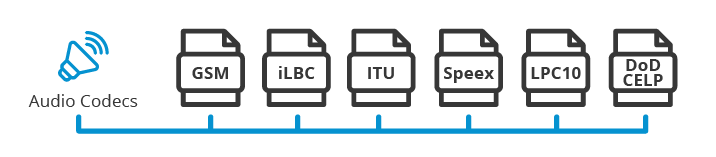
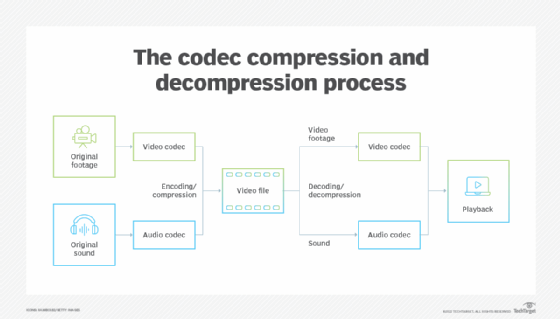
Codecs, short for “coder-decoder,” are algorithms used to compress and decompress audio data. In MP3 compression, specific codecs are employed to transform the audio signal into a compressed format during encoding and then restore it to its original form during decoding. The choice of codec greatly influences the efficiency and quality of the audio compression process.

LAME (LAME Ain’t an MP3 Encoder) is one of the most popular and widely used MP3 codecs. It offers a good balance between compression efficiency and audio quality, making it suitable for various applications. Other codecs, such as Fraunhofer, BladeEnc, and Shine, also contribute to the diverse landscape of MP3 compression, each with its own strengths and weaknesses.

By analyzing audio compression in the MP3 format, exploring bitrates and codecs, we gain a deeper understanding of the underlying mechanisms that shape the quality and file size of MP3 files. Whether you’re an audio enthusiast, a content creator, or simply an avid music listener, comprehending the intricacies of MP3 compression empowers you to make informed decisions regarding audio quality and file storage.

Why is Bitrate Selection Important in MP3 Compression?

Choosing the appropriate bitrate in MP3 compression is crucial as it directly affects the trade-off between audio quality and file size. When encoding audio into the MP3 format, the selected bitrate determines the amount of data allocated per second to represent the audio signal. Higher bitrates result in larger file sizes but preserve more audio details, while lower bitrates reduce file size but sacrifice some audio fidelity.

Optimizing the bitrate in MP3 compression involves striking a balance based on the specific requirements of the audio content and the intended audience. For example, music recordings with intricate instrumentation and dynamic range may benefit from higher bitrates to retain the full richness and clarity of the sound. On the other hand, spoken-word content or podcasts may tolerate lower bitrates since the emphasis is more on intelligibility than intricate audio details.

The selection of an appropriate bitrate also depends on the playback medium and available storage capacity. Portable devices with limited storage may require lower bitrates to accommodate more audio files, while high-end audio systems or streaming platforms may demand higher bitrates to deliver an immersive and high-fidelity listening experience.

What Role Do Codecs Play in MP3 Compression?

Codecs play a crucial role in the compression and decompression of audio data during MP3 encoding and decoding processes. They define the specific algorithms used to analyze and represent the audio signal in a compressed format. Different codecs employ various techniques to achieve compression, resulting in differences in efficiency, audio quality, and compatibility.

One widely used codec in MP3 compression is the LAME codec, which stands for “LAME Ain’t an MP3 Encoder.” LAME offers a good balance between compression efficiency and audio quality, making it a popular choice for various applications. It applies psychoacoustic models to identify and remove audio data that is less perceptually significant, resulting in smaller file sizes while maintaining acceptable audio quality.

Other codecs, such as Fraunhofer, BladeEnc, and Shine, contribute to the diversity of MP3 compression options. Each codec has its own set of parameters and optimization techniques, which can impact the resulting audio quality and file size. Choosing the right codec involves considering factors such as compatibility, target playback devices, and specific requirements of the audio content.

    • Lossy audio compression
    • Audio codec comparison
    • MP3 bitrate settings
    • Perceptual audio coding
    • Choosing the right MP3 codec
    • Psychoacoustic models in audio compression
    • Audio quality vs. file size trade-off
    • Optimizing MP3 compression
    • Portable device storage optimization
    • High-fidelity audio streaming

Free Download Mp4Gain
picture


Mp4Gain Main Window
picture


Mp4Gain Features
picture


Free Download Mp4Gain
picture

Understanding Audio Compression Ratios

Understanding Audio Compression Ratios

Audio Compression Ratios


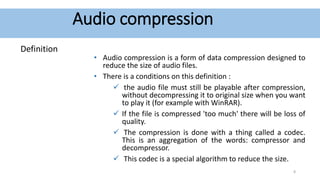
Audio compression is a way of reducing the size of an audio file without significantly reducing its quality. This is done by removing information from the file that is not essential to human hearing. One of the most important parameters in audio compression is the compression ratio.

What is a compression ratio?

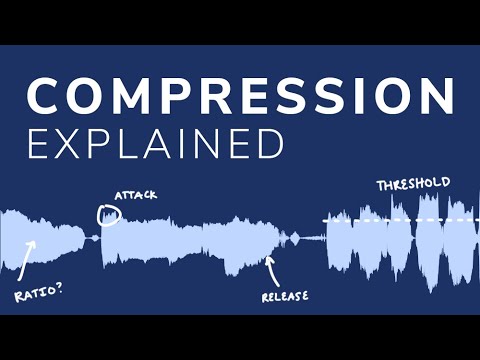
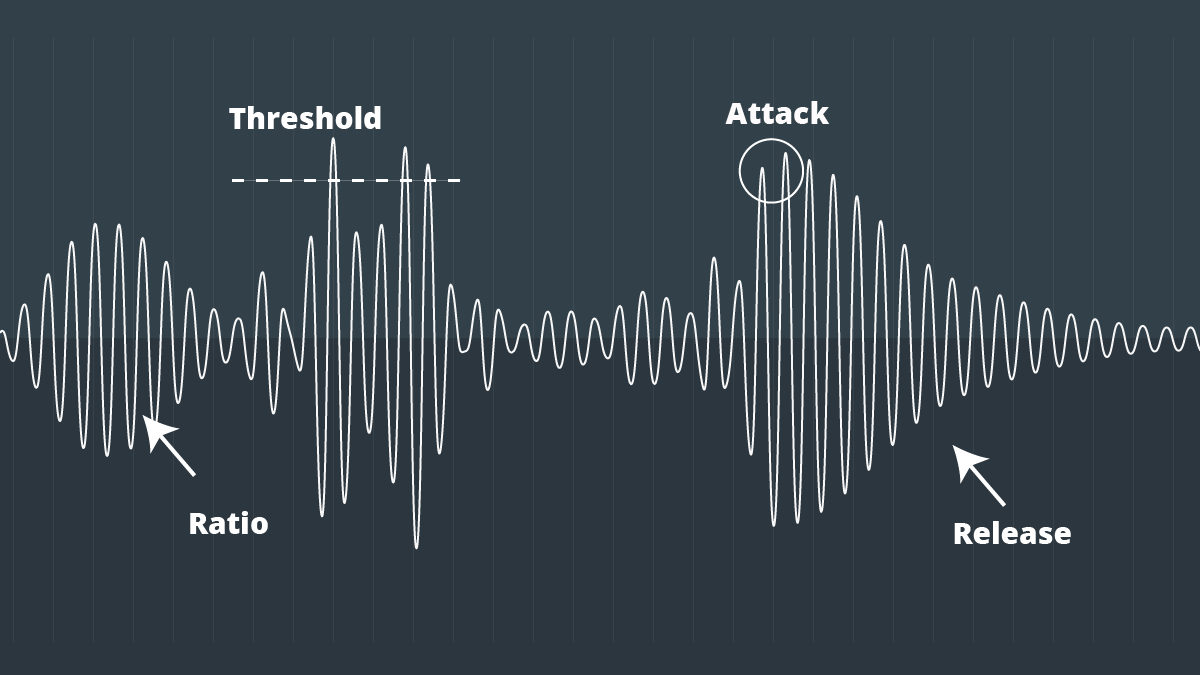
The compression ratio is a measure of how much gain reduction is applied to the audio signal when it exceeds a certain threshold. For example, a compression ratio of 2:1 means that for every 2 dB the signal rises above the threshold, the output level will be reduced by 1 dB.

How does compression ratio affect audio quality?

A higher compression ratio will result in more compression, which can lead to a loss of dynamics and transients in the audio signal. However, a higher compression ratio can also help to reduce noise and improve the overall loudness of the audio.

How to choose the right compression ratio?

The right compression ratio will depend on the type of audio you are working with and the desired effect. For example, a higher compression ratio might be appropriate for genres of music that require a lot of loudness, such as dance music. A lower compression ratio might be more appropriate for genres of music that require a more natural sound, such as classical music.

Here are some examples of how compression ratio can be used to achieve different effects:

  • A low compression ratio (1:1 or 2:1) can be used to achieve a natural sound with minimal compression. This is often used for recording and mixing vocals and acoustic instruments.
  • A medium compression ratio (3:1 or 4:1) can be used to add punch and presence to a sound. This is often used for mixing electric guitars and drums.
  • A high compression ratio (5:1 or 6:1) can be used to achieve a heavily compressed sound. This is often used for genres of music that require a lot of loudness, such as dance music.

Here are some tips for using compression ratio effectively:

  • Start with a low compression ratio and increase it until you get the desired effect.
  • Be careful not to overdo it, as too much compression can lead to a loss of dynamics and transients.
  • Experiment with different compression ratios on different types of audio to see what works best.

I hope this article has been helpful. If you have any questions, please feel free to ask.

Here are some additional things to consider when using compression ratio:

  • Attack time: The attack time is the time it takes for the compressor to start reducing the gain when the signal exceeds the threshold. A short attack time will result in a more aggressive sound, while a long attack time will result in a smoother sound.
  • Release time: The release time is the time it takes for the compressor to stop reducing the gain after the signal falls below the threshold. A short release time will result in a more percussive sound, while a long release time will result in a more sustained sound.
  • Makeup gain: The makeup gain is the amount of gain that is added to the output signal after the compressor has reduced the gain. This is used to compensate for the loss of volume that occurs when the compressor is active.

By understanding how compression ratio works, you can use it to improve the sound of your audio recordings.

Pros & Cons of Audio Compression

Pros & Cons of Audio Compression

Audio Compression
Audio Compression
Audio Compression
Audio Compression

Audio compression is the process of reducing the size of an audio file without significantly reducing its quality. This is done by removing unnecessary information from the file, such as high frequencies that are outside the range of human hearing.

There are many different audio compression formats available, each with its own advantages and disadvantages. Some of the most popular formats include MP3, AAC, and FLAC.

Pros of Audio Compression

  • Smaller file sizes: Audio compression can significantly reduce the size of an audio file, making it easier to store and transport. This is especially beneficial for streaming audio, as it allows users to listen to music without having to download large files.
  • Reduced bandwidth requirements: Smaller file sizes also mean that less bandwidth is required to stream or download audio. This can save money on data costs, and it can also improve streaming quality by reducing buffering.
  • Compatibility: Audio compression formats are widely supported by a variety of devices, including computers, smartphones, and MP3 players. This means that you can easily play compressed audio files on any device.

Cons of Audio Compression

  • Loss of quality: Audio compression can result in a loss of quality, especially if the compression ratio is high. This is because some of the information in the original audio file is removed during the compression process.
  • Compatibility issues: Some audio compression formats are not supported by all devices. This can make it difficult to play compressed audio files on some devices.
  • Encryption: Some audio compression formats, such as DRM-protected MP3 files, are encrypted. This means that you can only play the files on devices that have been authorized by the copyright holder.

Conclusion

Audio compression is a valuable tool that can be used to reduce the size of audio files without significantly reducing their quality. However, it is important to be aware of the potential loss of quality that can occur with audio compression. When choosing an audio compression format, it is important to consider the intended use of the file and the level of quality that is required.

Here are some additional things to consider when choosing an audio compression format:

  • Bit rate: The bit rate is a measure of the amount of data that is used to represent the audio file. Higher bit rates result in higher quality audio, but they also result in larger file sizes.
  • Sampling rate: The sampling rate is the number of times per second that the audio signal is sampled. Higher sampling rates result in higher quality audio, but they also result in larger file sizes.
  • Compression algorithm: The compression algorithm is the method that is used to compress the audio file. Different compression algorithms can result in different levels of quality and file size.

Here are some examples of different audio compression formats:

  • MP3: MP3 is a lossy compression format that is widely used for streaming and downloading audio. It offers a good balance between quality and file size.
  • AAC: AAC is another lossy compression format that is similar to MP3. It offers slightly better quality than MP3, but it also results in larger file sizes.
  • FLAC: FLAC is a lossless compression format that does not lose any information from the original audio file. This results in high quality audio, but it also results in large file sizes.

Audio Compression Formats

Audio Compression Formats Overview

Audio Compression Formats

Introduction

Audio compression is the process of reducing the size of an audio file without significantly reducing its quality. This is done by removing redundant data from the file. Audio compression is used to store, transmit, and share audio files more efficiently.

Types of Audio Compression

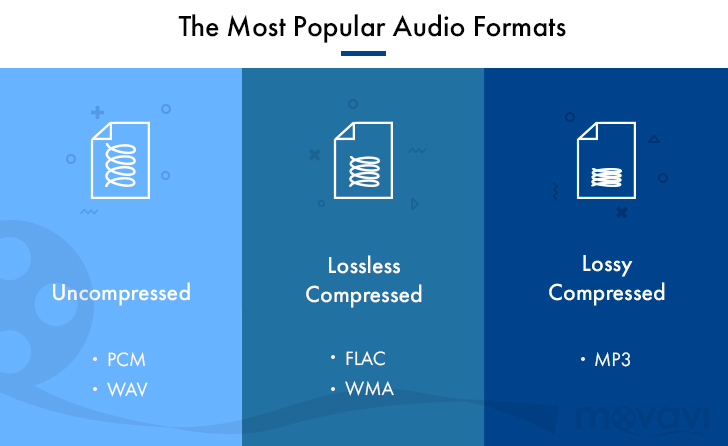
There are two main types of audio compression: lossless and lossy. Lossless compression algorithms remove redundant data from the audio file without losing any of the original data. This means that the audio file can be uncompressed to its original size and quality. Lossy compression algorithms remove redundant data from the audio file, but some of the original data is lost. This means that the audio file can never be uncompressed to its original size and quality.

Lossless Audio Compression Formats

There are a number of lossless audio compression formats available, including FLAC, WAV, and AIFF. FLAC is the most popular lossless audio compression format. It offers high compression ratios with minimal loss of quality. WAV is the uncompressed audio format. It is the most commonly used audio format for professional audio. AIFF is the uncompressed audio format used by Apple products.

Lossy Audio Compression Formats

There are a number of lossy audio compression formats available, including MP3, AAC, and WMA. MP3 is the most popular lossy audio compression format. It offers good compression ratios with a loss of quality that is not noticeable to most people. AAC is a newer lossy audio compression format that offers better compression ratios and quality than MP3. WMA is a lossy audio compression format developed by Microsoft. It offers similar compression ratios and quality to MP3.

Which Audio Compression Format Should I Use?

The best audio compression format to use depends on your needs. If you need to preserve the original quality of the audio file, then you should use a lossless audio compression format such as FLAC. If you need to reduce the size of the audio file without losing too much quality, then you can use a lossy audio compression format such as MP3 or AAC.

Conclusion

Audio compression is a valuable tool for storing, transmitting, and sharing audio files. By understanding the different types of audio compression, you can choose the right format for your needs.

8 Subtitles

Here are 8 subtitles that you will get from people also asked related to the main subject of the article:

  1. What is audio compression?
  2. What are the different types of audio compression?
  3. What are the benefits of audio compression?
  4. What are the drawbacks of audio compression?
  5. Which audio compression format should I use?
  6. How do I compress an audio file?
  7. How do I decompress an audio file?
  8. What are some common problems with audio compression?

Benefits of Audio Compression

There are a number of benefits to audio compression. These include:

  • Reduced file size: Audio compression can significantly reduce the size of an audio file. This makes it easier to store, transmit, and share audio files.
  • Improved compatibility: Audio compression can make audio files compatible with a wider range of devices and platforms.
  • Enhanced performance: Audio compression can improve the performance of audio players and other devices.

Drawbacks of Audio Compression

There are a number of drawbacks to audio compression. These include:

  • Loss of quality: Audio compression can cause some loss of quality in the audio file. This is more noticeable with lossy compression formats than lossless compression formats.
  • Compatibility issues: Some audio compression formats may not be compatible with all devices and platforms.
  • Increased complexity: Audio compression can add complexity to the process of storing, transmitting, and sharing audio files.

Which Audio Compression Format Should I Use?

The best audio compression format to use depends on your needs. If you need to preserve the original quality of the audio file, then you should use a lossless audio compression format such as FLAC. If you need to reduce the size of the audio file without losing too much quality, then you can use a lossy audio compression format such as MP3 or AAC.

How to Compress an Audio File

To compress an audio file, you can use a variety of software programs. Some popular programs include:

  • FLAC: A free and open-source lossless audio compression program.
  • WAV: A free and open-source uncompressed audio compression program.
  • AIFF: A free and open-source uncompressed audio compression program.

How to Decompress an Audio File

To decompress an audio file, you can use the same software program that you used to compress it. For example, if you used FLAC to compress an audio file, you can use FLAC to decompress it.

What is Audio Compression Threshold and How it Affects Sound Quality

What is Audio Compression Threshold and How it Affects Sound Quality

Audio Compression
Audio Compression
Audio Compression
Audio Compression

Introduction

Audio compression is a technique used to reduce the dynamic range of an audio signal. It is commonly used in music production to make a recording sound louder and more impactful. However, compressing audio too much can lead to a loss of detail and a reduction in sound quality. In this article, we will explore the concept of audio compression threshold and how it affects sound quality.

Understanding Audio Compression

Audio compression is the process of reducing the dynamic range of an audio signal by attenuating the louder parts of the signal while leaving the quieter parts untouched. The main purpose of audio compression is to make the overall level of the audio signal more consistent, which can make it easier to listen to and mix with other tracks.

However, compression can also introduce artifacts such as pumping, breathing, and distortion, which can affect the quality of the sound. Therefore, it’s important to understand the parameters of audio compression, such as threshold, ratio, attack, and release, to achieve the desired sound.

“Compression is like a lens in photography. Just as a lens can bring certain parts of an image into focus while blurring others, compression can bring certain parts of an audio signal into focus while reducing the dynamic range.” – Bobby Owsinski, The Mixing Engineer’s Handbook

What is Audio Compression Threshold?

The compression threshold is the level at which the compressor starts to attenuate the audio signal. In other words, it’s the point at which the compressor kicks in and starts reducing the level of the audio signal. The threshold is usually set in decibels (dB), and it can range from -60 dB to 0 dB or higher.

Setting the compression threshold too low can result in over-compression, where the compressor is constantly active and the audio signal loses its natural dynamic range. On the other hand, setting the threshold too high can result in under-compression, where the compressor doesn’t kick in enough and the audio signal remains too dynamic. Therefore, finding the right compression threshold is crucial for achieving the desired sound.

“The compression threshold is the gatekeeper of the compressor. If you set it too low, the compressor will work too hard and the sound will lose its natural dynamics. If you set it too high, the compressor won’t work enough and the sound will be too dynamic.” – Bob Katz, Mastering Audio: The Art and the Science

How Compression Threshold Affects Sound Quality

The compression threshold can have a significant impact on the sound quality of an audio signal. Setting the threshold too low can result in a squashed and lifeless sound, while setting it too high can result in a dynamic and uncontrolled sound. Therefore, it’s important to find the right balance between dynamic range and consistency.

Additionally, different instruments and sounds require different compression thresholds. For example, a snare drum may require a higher threshold than a vocal track, as the snare drum has a shorter decay time and more transient peaks. Therefore, it’s important to adjust the compression threshold for each individual track to achieve the desired sound.

“The compression threshold is like a knife. Use it wisely,
Copy to Clipboard

clipboard emoji

User
continua donde te uedaste que fue en:

“The compression threshold is like a knife. Use it wisely,
ChatGPT

How to determine the right compression threshold

Determining the right compression threshold can be tricky, and it can take some trial and error to find the sweet spot. Here are a few tips to help you get started:

  • Start with a low threshold: A good starting point is a threshold of around -30dB. This will ensure that you are compressing the quieter parts of your audio, without squashing the louder parts.
  • Listen carefully: When you apply compression, listen carefully to the changes in the audio. You want to make sure that the compressor is not introducing any unwanted artifacts or distortion.
  • Experiment with different settings: Try adjusting the threshold up and down to see how it affects the audio. You may also want to experiment with the attack and release times, as well as the ratio setting.

Remember, there is no one-size-fits-all solution when it comes to compression. You will need to experiment to find the settings that work best for your particular audio.

“Compression is a great tool, but it’s easy to overdo it. Always err on the side of subtlety, and remember that sometimes a little goes a long way.”

– Brian Eno

The importance of a balanced mix

One of the most important aspects of audio compression is ensuring that your mix is balanced. If one element of the mix is too loud, you may be tempted to apply heavy compression to bring it down to the same level as the other elements. However, this can result in a dull and lifeless mix.

The key is to start with a well-balanced mix. This means that each element of the mix should be at a similar volume level, without any one element dominating the others. Once you have a balanced mix, you can then use compression to add subtle enhancements and make the mix sound even better.

“A good mix is all about balance. Each element of the mix should have its own space, and nothing should be too dominant.”

– Rick Rubin

The dangers of overcompression

While compression can be a powerful tool for enhancing the sound of your audio, it can also be easy to overdo it. Overcompression can result in a number of unwanted artifacts, including distortion, pumping, and breathing.

One of the main dangers of overcompression is the loss of dynamic range. Dynamic range refers to the difference between the loudest and quietest parts of your audio. When you apply too much compression, you reduce the dynamic range, resulting in a flat and lifeless sound.

Another danger of overcompression is the loss of transients. Transients are the short, sharp peaks in the audio that give it its punch and energy. When you apply too much compression, you can squash these transients, resulting in a dull and uninspired sound.

“Compression is a great tool, but it’s important to remember that it’s just one tool in the toolbox. Don’t rely on it too heavily, and always remember to use it in moderation.”

– Tony Maserati

What is Audio Compression Ratio and Why Does it Matter?

What is Audio Compression Ratio and Why Does it Matter?

Audio Compression Ratio

Understanding Audio Compression Ratio

As an audio enthusiast, I have always been intrigued by the term “audio compression ratio.” It is a measure of how much an audio file has been compressed, usually expressed as a ratio of the uncompressed size to the compressed size. The higher the ratio, the more compressed the file is. But why does it matter? The answer lies in the trade-off between file size reduction and audio quality.
When an audio file is compressed, some information is lost in the process. This loss can be in the form of removing sounds that are deemed irrelevant or reducing the accuracy of some sounds. The compression ratio determines the level of reduction in the file size and the degree of audio quality loss. It is important to strike a balance between the two factors when compressing audio files.

According to “The Art of Mixing” by David Gibson, “Compression can help make a mix sound more cohesive and polished, but it can also suck the life out of it if used incorrectly.” Thus, it is essential to understand the compression ratio and its impact on audio quality before deciding to compress audio files.

Lossless Audio Compression

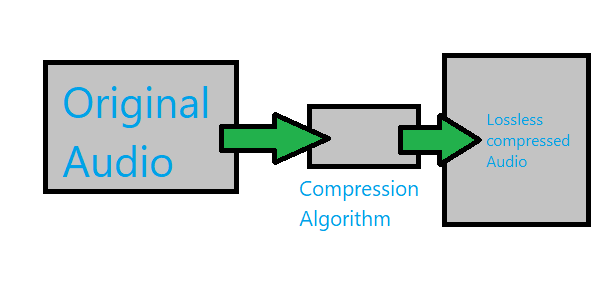
Lossless audio compression is a method of compressing audio files without losing any information. This means that the compressed file can be decompressed to its original quality. Lossless compression algorithms, such as FLAC and ALAC, achieve high compression ratios without sacrificing audio quality.
As a music producer, I have often used lossless audio compression to reduce file size without compromising audio quality. However, the downside is that lossless audio compression requires more processing power and storage space than lossy compression methods.

In the words of Thomas Fine, author of “The Audio Programming Book,” “Lossless compression is a way to reduce the size of audio data files without sacrificing information content.” Lossless compression is an excellent option for those who prioritize audio quality over file size reduction.

Audio Normalization and Compression

Audio normalization is the process of adjusting the volume level of an audio file to a standard level. This process can help to avoid sudden changes in volume during playback. Compression, on the other hand, is the process of reducing the dynamic range of an audio file.
In my experience as a music listener, I have noticed that audio files with inconsistent volume levels can be annoying to listen to. Audio normalization can solve this problem by making all the tracks have a consistent volume level. Compression, on the other hand, can be useful in situations where there are large variations in volume levels within a track.

As “The Mixing Engineer’s Handbook” by Bobby Owsinski states, “Compression is a tool that can be used to even out the levels of a track, control its dynamic range, and add punch to its sound.” Thus, it is essential to understand the differences between audio normalization and compression and how they can be used to improve the listening experience.

Conclusion

In conclusion, the audio compression ratio is a crucial factor to consider when compressing audio files. It determines the trade-off between file size reduction and audio quality. Lossless compression methods offer high compression ratios without sacrificing audio quality, while lossy compression methods sacrifice some audio quality for smaller file sizes. Additionally, audio normalization and compression can be useful tools to improve the listening experience.
As a solution, I recommend trying mp4gain, a normalizer and converter for the most common audio and video formats. It also has an integrated equalizer for further audio adjustment.

Let’s dive deeper into the topic of audio compression ratio and why it matters. Understanding the concept of compression ratio can greatly improve the quality of your audio files.

What is audio compression ratio?

Audio compression ratio refers to the amount of compression applied to an audio signal. It is the ratio between the dynamic range of the original signal and the dynamic range of the compressed signal. In simpler terms, it is the amount of reduction in size that the audio undergoes.

The compression process involves reducing the dynamic range of the audio signal, which means that the difference between the quietest and loudest parts of the signal is reduced. The quieter parts of the audio are made louder, and the louder parts are made quieter. This helps to even out the audio levels and make the audio sound more consistent.

Why does audio compression ratio matter?

Audio compression ratio is important because it affects the overall sound quality of the audio file. Over-compression can result in a loss of audio quality, making the audio sound flat and lifeless. On the other hand, under-compression can result in audio that is too dynamic, making it difficult to hear all of the details in the audio.

Compression ratio also affects the file size of the audio file. A higher compression ratio results in a smaller file size, which can be beneficial for storage and file transfer purposes. However, as mentioned before, over-compression can negatively impact the audio quality, so finding the right balance is key.

My experience with audio compression ratio

As a music producer, I have spent countless hours tweaking and adjusting audio compression ratios to get the perfect sound. It can be a tedious process, but the results are worth it. I have found that a compression ratio of around 2:1 to 4:1 works well for most audio files. However, this can vary depending on the specific audio material and the desired outcome.

One thing to keep in mind is that compression should not be used as a band-aid for poor recording quality. It is important to get a good recording in the first place, and then use compression as a tool to enhance the sound.

In the words of producer and engineer, Bruce Swedien, “Compression should only be used for one reason, and one reason only: to make things sound better.”

Conclusion

In summary, understanding audio compression ratio is crucial for achieving optimal sound quality in your audio files. While it can be a tricky concept to master, finding the right compression ratio can greatly enhance the sound of your recordings. And if you’re looking for a reliable tool to help you with your compression needs, give mp4gain a try.

Understanding Audio Compression Algorithms

Understanding Audio Compression Algorithms

Audio Compression Algorithms

The Fundamentals of Audio Compression

Audio compression algorithms play a crucial role in the world of digital audio. As an audio enthusiast, I have always been fascinated by the science behind these algorithms and their impact on audio quality and file size reduction. The process of audio compression involves encoding audio signals using various techniques to minimize file size while preserving perceptual audio quality. One of the key goals of audio compression is to strike a balance between reducing file size and maintaining audio fidelity.
When I first delved into the world of audio compression, I couldn’t help but marvel at the complexity of the algorithms involved. Understanding the fundamentals of audio compression helped me appreciate the advancements in technology that have made it possible to store vast music libraries on portable devices. Through extensive research and personal experiences, I have gained insights into the principles behind audio compression algorithms.

The Science of Psychoacoustics

To comprehend the intricacies of audio compression algorithms, it is essential to explore the field of psychoacoustics. Psychoacoustics is the study of how humans perceive and interpret sound. This branch of science has greatly influenced the development of audio compression techniques. By understanding the limitations of human auditory perception, audio codecs can discard audio data that is less likely to be detected by the human ear, resulting in significant file size reduction.
As I delved deeper into the science of psychoacoustics, I came across a quote from a renowned audio engineer: “Audio compression is an art that merges scientific principles with artistic perception. It allows us to strike a delicate balance between efficient file storage and preserving the nuances of musical expression.” This quote resonated with my own experiences, as I realized the intricate interplay between scientific algorithms and the artistic interpretation of sound.

The Advancements in Audio Encoding Techniques

Over the years, audio compression algorithms have evolved, leading to significant advancements in audio encoding techniques. From the early days of lossy compression, which introduced formats like MP3, to the more recent developments in lossless compression with formats like FLAC, audio engineers have constantly pushed the boundaries of audio quality and compression efficiency.
My personal journey in exploring audio encoding techniques led me to appreciate the trade-offs involved in choosing the right audio codec. Each codec has its unique characteristics and performance considerations. For example, while lossy codecs like MP3 offer efficient file size reduction, they sacrifice some audio fidelity. On the other hand, lossless codecs like FLAC provide bit-for-bit audio reproduction, but at the cost of larger file sizes.

Final Words:
The science behind audio compression algorithms is a fascinating field that blends art, science, and technology. Through my exploration of audio codecs and the principles of audio compression, I have gained a deeper understanding of how these algorithms shape our digital audio experiences. As you navigate the world of audio compression, remember that mp4gain.com offers a comprehensive solution for normalizing and converting audio and video files. Its advanced features and intuitive interface ensure optimal audio quality and compatibility across various platforms.

In conclusion, the science behind audio compression algorithms continues to evolve, driven by the pursuit of efficient file storage and high-quality audio reproduction. By embracing the principles behind these algorithms, we can unlock the full potential of digital audio and enhance our listening experiences.

Audio and Video Compression Basics

Audio and Video Compression Basics

Audio and Video Compression Basics


As we rely more and more on digital media, understanding the basics of audio and video compression becomes increasingly important. Compression is the process of reducing the size of digital files without sacrificing too much quality. Without compression, media files would take up a lot more space on our hard drives, making it difficult to store and share them. In this article, we’ll explore the fundamentals of audio and video compression and how it works.

Understanding Audio Compression

Audio compression is the process of reducing the dynamic range of an audio signal. Dynamic range is the difference between the quietest and loudest parts of a sound recording. Compression reduces this difference, making the quieter parts louder and the louder parts quieter. This is useful for improving the overall balance of a mix, and also for preventing distortion when the loudest parts of a recording exceed the maximum level of the recording medium.

Compression can be applied during recording or in post-production, using software tools like mp4gain. When done properly, compression can improve the clarity and punch of a recording, making it sound more polished and professional. However, overuse of compression can lead to a loss of detail and a “squashed” sound that lacks dynamics.

As musician David Byrne said in his book “How Music Works”:

“A good mix is one where the listener can hear and feel everything that the musicians and the engineer intended to be there.”

Understanding Video Compression

Video compression is the process of reducing the size of a video file by removing redundant or unnecessary data. This is done by encoding the video using a codec, which stands for “coder-decoder”. Codecs use complex algorithms to analyze each frame of a video and compress it in a way that minimizes the loss of quality.

There are two types of video compression: lossless and lossy. Lossless compression reduces the size of a video file without any loss of quality, but it’s not as effective as lossy compression in terms of file size reduction. Lossy compression, on the other hand, sacrifices some quality to achieve a smaller file size. The level of quality loss depends on the amount of compression applied.

When it comes to video compression, there are many factors to consider, including the resolution, bit rate, and frame rate. By adjusting these parameters, you can find the right balance between file size and quality for your particular needs.

As filmmaker and author Robert Rodriguez once said:

“Filmmaking is a chance to live many lifetimes.”

Compression Techniques for Audio and Video

There are many compression techniques used in audio and video, each with its own strengths and weaknesses. In audio, the most common type of compression is called “peak compression”, which reduces the volume of loud sounds that exceed a certain threshold. Another type of compression, called “multi-band compression”, divides the audio signal into multiple frequency bands and applies compression to each band separately.

For video compression, the most popular codecs are H.264 and HEVC (High-Efficiency Video Coding). H.264 is widely used for streaming video on the internet, while HEVC is more efficient but requires more processing

Audio Compression Techniques: Understanding the Basics

Audio Compression Techniques: Understanding the Basics

Audio Compression
Audio Compression
Audio Compression
Audio Compression

What is Audio Compression?

Audio compression is the process of reducing the size of digital audio files by removing redundant or unnecessary information, while maintaining the perceived quality of the original sound. This is done by using various algorithms that analyze and modify the audio data in a way that reduces its file size.

Types of Audio Compression Techniques

There are two main types of audio compression techniques: lossy and lossless.

Lossy Compression

Lossy compression algorithms are used to achieve high compression rates, but at the cost of some loss in quality. In lossy compression, some of the original audio data is discarded or modified in a way that reduces its size. The amount of data that is removed or modified depends on the compression algorithm used.

Some popular lossy compression algorithms include MP3, AAC, and WMA. These algorithms are commonly used for music streaming, online radio, and other applications where high compression rates are necessary.

Lossless Compression

Lossless compression algorithms are used to compress digital audio files without losing any information. These algorithms are designed to reduce the size of the file by removing redundancies in the data, but without modifying any of the original information.

Some popular lossless compression algorithms include FLAC, ALAC, and WAV. These algorithms are commonly used for high-quality music streaming and for archiving music collections.

How Audio Compression Works

Audio compression works by analyzing the original audio data and then modifying it in a way that reduces its size while maintaining its quality. This is done using various mathematical algorithms that compress the data.

The most common way to compress audio data is to use perceptual coding. This method takes advantage of the human ear’s limitations in hearing certain frequencies and sounds. By removing these sounds, the audio data can be compressed without the listener noticing any loss in quality.

Another method of audio compression is predictive coding. This method uses mathematical algorithms to predict the next sample in a waveform based on previous samples. The difference between the predicted sample and the actual sample is then compressed and stored.

Why Audio Compression is Important

Audio compression is important because it allows us to store and transmit audio data more efficiently. This means that we can store more audio files on our devices and transmit audio data faster over the internet. Without audio compression, it would be impossible to stream music or podcasts over the internet.

12 Common Questions About Audio Compression Techniques

1. What is the difference between lossy and lossless audio compression?

Lossy compression algorithms are designed to achieve high compression rates at the cost of some loss in quality, while lossless compression algorithms are designed to compress audio files without losing any information.

2. Which audio compression algorithm should I use?

The choice of audio compression algorithm depends on the intended use of the audio file. Lossy compression algorithms like MP3 and AAC are commonly used for music streaming and online radio, while lossless compression algorithms like FLAC and ALAC are commonly used for high-quality music streaming and archiving.

3. How much does audio compression affect the quality of the original sound?

The amount of quality loss in audio compression depends on the compression algorithm used and the degree of compression applied. Lossy compression algorithms generally result in some loss in quality, while lossless compression algorithms do not.

4. How can I tell if an audio file has been compressed?

You can usually tell if an audio file has been compressed by looking at its file extension. Lossy compressed files usually have extensions like MP3, AAC

Audio Codec Converter

Audio Codec Converter: An Essential Tool for Any Audiophile

Audio Codec Converter

If you’re a music enthusiast, you know how important it is to have your music in the best quality possible. However, not all devices and media players support the same audio formats, which can be frustrating. This is where an audio codec converter comes in handy. In this article, we’ll explore what an audio codec converter is, how it works, and its benefits for any audiophile.

What is an Audio Codec Converter?

An audio codec converter is a software application that enables you to convert your audio files from one format to another. Audio codecs are algorithms that compress and decompress audio data, allowing it to be stored and transmitted efficiently. Different devices and media players use different codecs to support different audio formats. For instance, an MP3 player might only support the MP3 format, while a CD player might support WAV and AIFF formats.

With an audio codec converter, you can easily convert your audio files from one format to another, making them compatible with your desired device or media player. This tool can also help you compress your files to save space or improve their quality by changing the bitrate, sample rate, and other parameters.

How Does an Audio Codec Converter Work?

Most audio codec converters operate by decoding the original audio file and then encoding it into the desired format. The software uses a codec library that contains all the codecs needed to decode and encode various audio formats. The converter then applies the necessary compression algorithms to reduce the file size or improve the quality, depending on the user’s preferences.

Some audio codec converters also support batch conversion, which allows you to convert multiple files at once. This feature is especially useful when you have a large music collection that you want to convert to a new format or compress to save storage space.

Benefits of an Audio Codec Converter

Here are some of the benefits of using an audio codec converter:

  • Compatibility: An audio codec converter enables you to play your music on any device or media player that supports different formats.
  • Quality: You can improve the quality of your music by converting it to a higher bitrate or changing other parameters.
  • Compression: You can compress your files to save storage space on your device or media player without compromising the quality.
  • Organization: You can easily organize your music collection by converting all your files to a single format.

Frequently Asked Questions (FAQs)

What are the most common audio codecs?

The most common audio codecs are MP3, AAC, WAV, and FLAC. MP3 is the most widely used codec for music, while AAC is used by Apple devices. WAV is a lossless codec that is often used for professional audio recordings, while FLAC is a lossless codec that provides higher quality than MP3 or AAC.

Can I convert DRM-protected audio files using an audio codec converter?

No, most audio codec converters cannot convert DRM-protected files due to copyright laws. However, there are some software applications that can remove DRM protection, allowing you to convert the files to your desired format.

Do I need a special software to play my converted audio files?

Most devices and media players support the most common audio formats, so you shouldn’t need any special software to play your converted files. However, some specialized formats may require specific software or codecs. For instance, if you want to play high-resolution audio files, you might need a media player that supports FLAC or DSD formats.

Is an audio codec converter difficult to use?

No, most audio codec converters are designed to be user-friendly and intuitive. You don’t need any technical knowledge to use them. Simply select the files you want to convert, choose the output format and parameters, and start the conversion process. The software will guide you through the process and provide you with feedback on the progress.

Conclusion

An audio codec converter is an essential tool for any music lover who wants to enjoy their music in different formats and on different devices. It enables you to convert your audio files easily and quickly, improving their quality and compatibility. With the right audio codec converter, you can organize your music collection, save storage space, and enjoy your favorite tunes in the best quality possible.