What is Audio Compression Threshold and How it Affects Sound Quality


Free Download Mp4Gain
picture

What is Audio Compression Threshold and How it Affects Sound Quality

Audio Compression
Audio Compression
Audio Compression
Audio Compression

Introduction

Audio compression is a technique used to reduce the dynamic range of an audio signal. It is commonly used in music production to make a recording sound louder and more impactful. However, compressing audio too much can lead to a loss of detail and a reduction in sound quality. In this article, we will explore the concept of audio compression threshold and how it affects sound quality.

Understanding Audio Compression

Audio compression is the process of reducing the dynamic range of an audio signal by attenuating the louder parts of the signal while leaving the quieter parts untouched. The main purpose of audio compression is to make the overall level of the audio signal more consistent, which can make it easier to listen to and mix with other tracks.

However, compression can also introduce artifacts such as pumping, breathing, and distortion, which can affect the quality of the sound. Therefore, it’s important to understand the parameters of audio compression, such as threshold, ratio, attack, and release, to achieve the desired sound.

“Compression is like a lens in photography. Just as a lens can bring certain parts of an image into focus while blurring others, compression can bring certain parts of an audio signal into focus while reducing the dynamic range.” – Bobby Owsinski, The Mixing Engineer’s Handbook

What is Audio Compression Threshold?

The compression threshold is the level at which the compressor starts to attenuate the audio signal. In other words, it’s the point at which the compressor kicks in and starts reducing the level of the audio signal. The threshold is usually set in decibels (dB), and it can range from -60 dB to 0 dB or higher.

Setting the compression threshold too low can result in over-compression, where the compressor is constantly active and the audio signal loses its natural dynamic range. On the other hand, setting the threshold too high can result in under-compression, where the compressor doesn’t kick in enough and the audio signal remains too dynamic. Therefore, finding the right compression threshold is crucial for achieving the desired sound.

“The compression threshold is the gatekeeper of the compressor. If you set it too low, the compressor will work too hard and the sound will lose its natural dynamics. If you set it too high, the compressor won’t work enough and the sound will be too dynamic.” – Bob Katz, Mastering Audio: The Art and the Science

How Compression Threshold Affects Sound Quality

The compression threshold can have a significant impact on the sound quality of an audio signal. Setting the threshold too low can result in a squashed and lifeless sound, while setting it too high can result in a dynamic and uncontrolled sound. Therefore, it’s important to find the right balance between dynamic range and consistency.

Additionally, different instruments and sounds require different compression thresholds. For example, a snare drum may require a higher threshold than a vocal track, as the snare drum has a shorter decay time and more transient peaks. Therefore, it’s important to adjust the compression threshold for each individual track to achieve the desired sound.

“The compression threshold is like a knife. Use it wisely,
Copy to Clipboard

clipboard emoji

User
continua donde te uedaste que fue en:

“The compression threshold is like a knife. Use it wisely,
ChatGPT

How to determine the right compression threshold

Determining the right compression threshold can be tricky, and it can take some trial and error to find the sweet spot. Here are a few tips to help you get started:

  • Start with a low threshold: A good starting point is a threshold of around -30dB. This will ensure that you are compressing the quieter parts of your audio, without squashing the louder parts.
  • Listen carefully: When you apply compression, listen carefully to the changes in the audio. You want to make sure that the compressor is not introducing any unwanted artifacts or distortion.
  • Experiment with different settings: Try adjusting the threshold up and down to see how it affects the audio. You may also want to experiment with the attack and release times, as well as the ratio setting.

Remember, there is no one-size-fits-all solution when it comes to compression. You will need to experiment to find the settings that work best for your particular audio.

“Compression is a great tool, but it’s easy to overdo it. Always err on the side of subtlety, and remember that sometimes a little goes a long way.”

– Brian Eno

The importance of a balanced mix

One of the most important aspects of audio compression is ensuring that your mix is balanced. If one element of the mix is too loud, you may be tempted to apply heavy compression to bring it down to the same level as the other elements. However, this can result in a dull and lifeless mix.

The key is to start with a well-balanced mix. This means that each element of the mix should be at a similar volume level, without any one element dominating the others. Once you have a balanced mix, you can then use compression to add subtle enhancements and make the mix sound even better.

“A good mix is all about balance. Each element of the mix should have its own space, and nothing should be too dominant.”

– Rick Rubin

The dangers of overcompression

While compression can be a powerful tool for enhancing the sound of your audio, it can also be easy to overdo it. Overcompression can result in a number of unwanted artifacts, including distortion, pumping, and breathing.

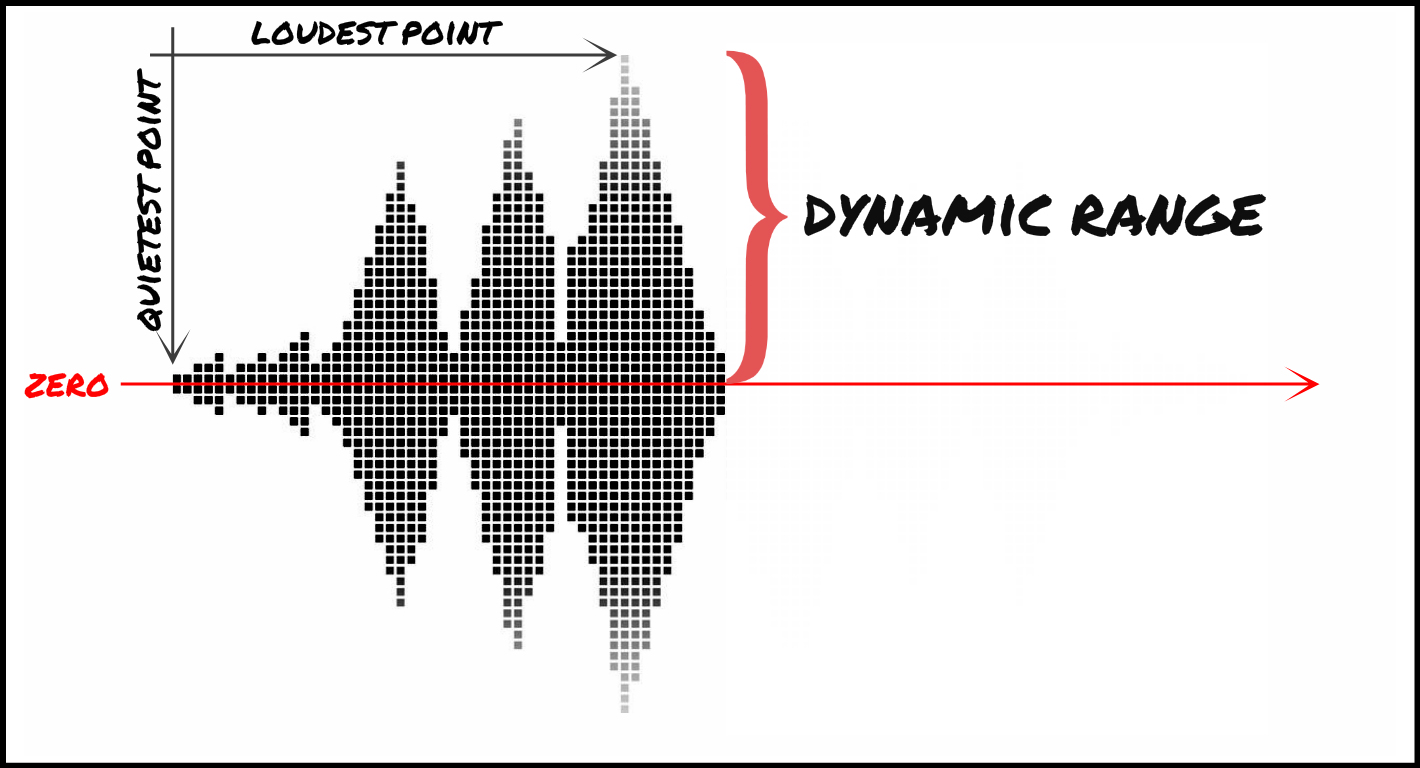
One of the main dangers of overcompression is the loss of dynamic range. Dynamic range refers to the difference between the loudest and quietest parts of your audio. When you apply too much compression, you reduce the dynamic range, resulting in a flat and lifeless sound.

Another danger of overcompression is the loss of transients. Transients are the short, sharp peaks in the audio that give it its punch and energy. When you apply too much compression, you can squash these transients, resulting in a dull and uninspired sound.

“Compression is a great tool, but it’s important to remember that it’s just one tool in the toolbox. Don’t rely on it too heavily, and always remember to use it in moderation.”

– Tony Maserati

Free Download Mp4Gain
picture


Mp4Gain Main Window
picture


Mp4Gain Features
picture


Free Download Mp4Gain
picture

Audio and Video Compression Basics

Audio and Video Compression Basics

Audio and Video Compression Basics


As we rely more and more on digital media, understanding the basics of audio and video compression becomes increasingly important. Compression is the process of reducing the size of digital files without sacrificing too much quality. Without compression, media files would take up a lot more space on our hard drives, making it difficult to store and share them. In this article, we’ll explore the fundamentals of audio and video compression and how it works.

Understanding Audio Compression

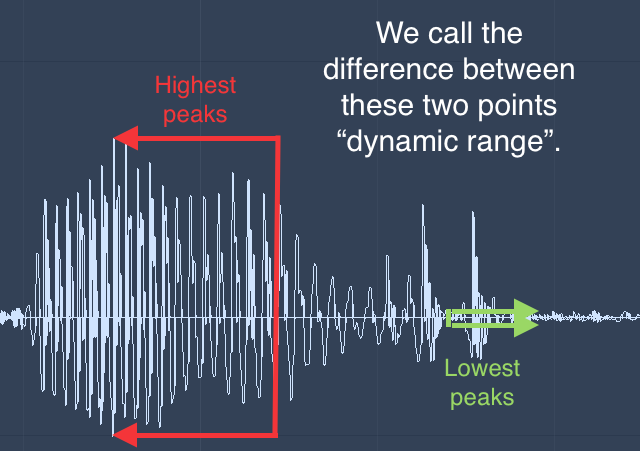
Audio compression is the process of reducing the dynamic range of an audio signal. Dynamic range is the difference between the quietest and loudest parts of a sound recording. Compression reduces this difference, making the quieter parts louder and the louder parts quieter. This is useful for improving the overall balance of a mix, and also for preventing distortion when the loudest parts of a recording exceed the maximum level of the recording medium.

Compression can be applied during recording or in post-production, using software tools like mp4gain. When done properly, compression can improve the clarity and punch of a recording, making it sound more polished and professional. However, overuse of compression can lead to a loss of detail and a “squashed” sound that lacks dynamics.

As musician David Byrne said in his book “How Music Works”:

“A good mix is one where the listener can hear and feel everything that the musicians and the engineer intended to be there.”

Understanding Video Compression

Video compression is the process of reducing the size of a video file by removing redundant or unnecessary data. This is done by encoding the video using a codec, which stands for “coder-decoder”. Codecs use complex algorithms to analyze each frame of a video and compress it in a way that minimizes the loss of quality.

There are two types of video compression: lossless and lossy. Lossless compression reduces the size of a video file without any loss of quality, but it’s not as effective as lossy compression in terms of file size reduction. Lossy compression, on the other hand, sacrifices some quality to achieve a smaller file size. The level of quality loss depends on the amount of compression applied.

When it comes to video compression, there are many factors to consider, including the resolution, bit rate, and frame rate. By adjusting these parameters, you can find the right balance between file size and quality for your particular needs.

As filmmaker and author Robert Rodriguez once said:

“Filmmaking is a chance to live many lifetimes.”

Compression Techniques for Audio and Video

There are many compression techniques used in audio and video, each with its own strengths and weaknesses. In audio, the most common type of compression is called “peak compression”, which reduces the volume of loud sounds that exceed a certain threshold. Another type of compression, called “multi-band compression”, divides the audio signal into multiple frequency bands and applies compression to each band separately.

For video compression, the most popular codecs are H.264 and HEVC (High-Efficiency Video Coding). H.264 is widely used for streaming video on the internet, while HEVC is more efficient but requires more processing

Dynamic Range in Audio

Understanding Dynamic Range in Audio

Dynamic Range in Audio

What is Dynamic Range in Audio?

Dynamic range refers to the difference between the loudest and quietest parts of an audio signal. It is an important aspect of sound engineering that determines the quality of sound produced. As an audio engineer, I have come across numerous situations where the dynamic range of a recording was too wide or too narrow, making it difficult to produce a high-quality mix.

In the book “The Mixing Engineer’s Handbook” by Bobby Owsinski, he states: “The dynamic range is what gives a recording its emotional impact. Too much and it becomes tiresome, too little and it becomes boring.” This perfectly illustrates the importance of understanding and mastering dynamic range in audio.

When working with audio, it is important to use tools such as compressors, limiters, and expanders to manage the dynamic range. These tools can help reduce the difference between the loudest and quietest parts of a recording, resulting in a more balanced sound.

How does Dynamic Range Compression work?

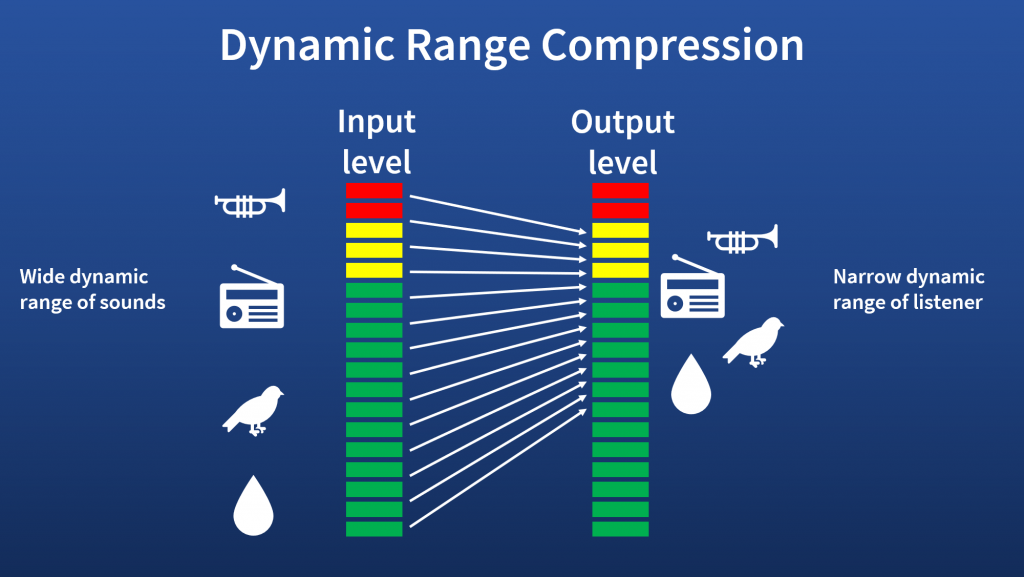
Dynamic Range Compression (DRC) is a technique used in audio engineering to reduce the dynamic range of a recording. This is achieved by reducing the volume of the loudest parts of the recording while leaving the quieter parts unchanged.

DRC is commonly used in music production to create a consistent volume level throughout a song. It is also used in broadcasting to ensure that the volume of advertisements is consistent with the volume of the program being aired.

In the movie “Whiplash,” the character Terence Fletcher, played by J.K. Simmons, says, “There are no two words in the English language more harmful than ‘good job’.” While this quote is not related to audio engineering, it perfectly illustrates the idea behind dynamic range compression. By reducing the difference between the loudest and quietest parts of a recording, we create a more consistent and balanced sound.

Why is Understanding Dynamic Range important?

Understanding dynamic range is important for anyone working with audio. It allows us to create high-quality recordings that are both pleasing to the ear and emotionally impactful.

As a personal anecdote, I once recorded a live concert where the dynamic range was too wide. The quiet parts of the recording were barely audible, while the loud parts were painfully loud. After mastering the recording and reducing the dynamic range, the final product was much more enjoyable to listen to.

In conclusion, dynamic range is a crucial aspect of sound engineering that should not be overlooked. By understanding how it works and using the right tools, we can create recordings that are both balanced and emotionally impactful.

Final Words

When it comes to audio engineering, mastering dynamic range is key to creating high-quality recordings. By using tools such as compressors and limiters, we can reduce the difference between the loudest and quietest parts of a recording, resulting in a more balanced sound. As an audio engineer, I have seen firsthand the importance of mastering dynamic range, and I urge anyone working with audio to take the time to understand it fully.

Audio Compression Techniques: Understanding the Basics

Audio Compression Techniques: Understanding the Basics

Audio Compression
Audio Compression
Audio Compression
Audio Compression

What is Audio Compression?

Audio compression is the process of reducing the size of digital audio files by removing redundant or unnecessary information, while maintaining the perceived quality of the original sound. This is done by using various algorithms that analyze and modify the audio data in a way that reduces its file size.

Types of Audio Compression Techniques

There are two main types of audio compression techniques: lossy and lossless.

Lossy Compression

Lossy compression algorithms are used to achieve high compression rates, but at the cost of some loss in quality. In lossy compression, some of the original audio data is discarded or modified in a way that reduces its size. The amount of data that is removed or modified depends on the compression algorithm used.

Some popular lossy compression algorithms include MP3, AAC, and WMA. These algorithms are commonly used for music streaming, online radio, and other applications where high compression rates are necessary.

Lossless Compression

Lossless compression algorithms are used to compress digital audio files without losing any information. These algorithms are designed to reduce the size of the file by removing redundancies in the data, but without modifying any of the original information.

Some popular lossless compression algorithms include FLAC, ALAC, and WAV. These algorithms are commonly used for high-quality music streaming and for archiving music collections.

How Audio Compression Works

Audio compression works by analyzing the original audio data and then modifying it in a way that reduces its size while maintaining its quality. This is done using various mathematical algorithms that compress the data.

The most common way to compress audio data is to use perceptual coding. This method takes advantage of the human ear’s limitations in hearing certain frequencies and sounds. By removing these sounds, the audio data can be compressed without the listener noticing any loss in quality.

Another method of audio compression is predictive coding. This method uses mathematical algorithms to predict the next sample in a waveform based on previous samples. The difference between the predicted sample and the actual sample is then compressed and stored.

Why Audio Compression is Important

Audio compression is important because it allows us to store and transmit audio data more efficiently. This means that we can store more audio files on our devices and transmit audio data faster over the internet. Without audio compression, it would be impossible to stream music or podcasts over the internet.

12 Common Questions About Audio Compression Techniques

1. What is the difference between lossy and lossless audio compression?

Lossy compression algorithms are designed to achieve high compression rates at the cost of some loss in quality, while lossless compression algorithms are designed to compress audio files without losing any information.

2. Which audio compression algorithm should I use?

The choice of audio compression algorithm depends on the intended use of the audio file. Lossy compression algorithms like MP3 and AAC are commonly used for music streaming and online radio, while lossless compression algorithms like FLAC and ALAC are commonly used for high-quality music streaming and archiving.

3. How much does audio compression affect the quality of the original sound?

The amount of quality loss in audio compression depends on the compression algorithm used and the degree of compression applied. Lossy compression algorithms generally result in some loss in quality, while lossless compression algorithms do not.

4. How can I tell if an audio file has been compressed?

You can usually tell if an audio file has been compressed by looking at its file extension. Lossy compressed files usually have extensions like MP3, AAC

Dynamic range compression

Dynamic range compression

Dynamic range compression


Dynamic range compression, also known as simply “compression,” is a common technique used in audio processing to reduce the dynamic range of an audio signal. In this article, we will explore the concept of dynamic range compression, how it works, and its applications in music production and sound engineering.

Dynamic range compression

What is Dynamic Range Compression?

Dynamic range refers to the difference between the loudest and softest parts of an audio signal. In music production and sound engineering, it is desirable to have a wide dynamic range to create a more natural and dynamic sound. However, some musical genres, such as rock or electronic music, rely on a more consistent volume level throughout the song, which can be achieved through compression.

Dynamic range compression is a process that reduces the difference between the loudest and softest parts of an audio signal, resulting in a more consistent volume level. Compression works by lowering the volume of the loudest parts of the signal and boosting the volume of the softest parts, effectively “compressing” the dynamic range.

How Does Dynamic Range Compression Work?

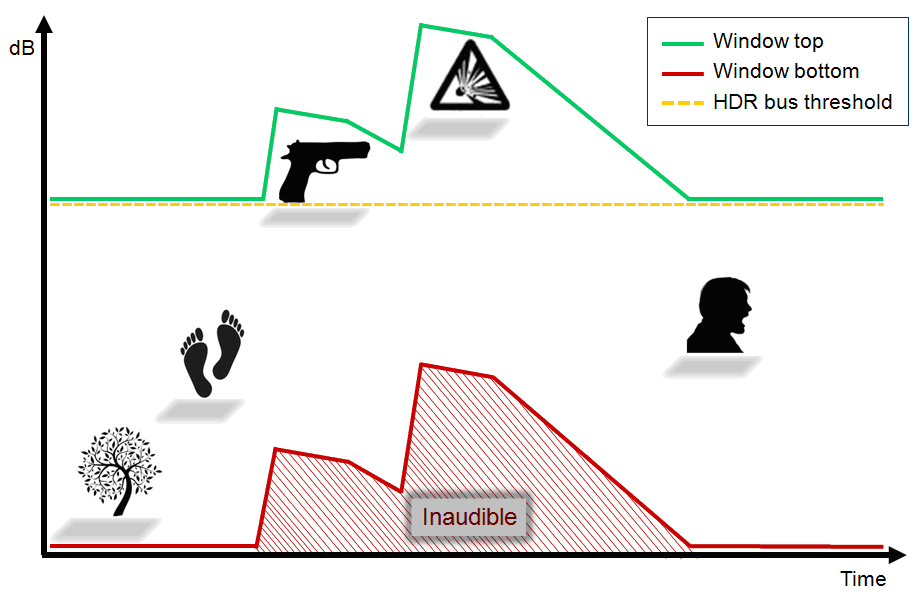
Dynamic range compression works by applying a gain reduction to the audio signal when the volume exceeds a certain threshold. The threshold is set by the user and determines at what volume level the gain reduction will start to occur. Once the threshold is reached, the compressor reduces the gain of the signal by a set amount, called the ratio.

For example, if the threshold is set to -10 dB and the ratio is set to 2:1, then any part of the signal that exceeds -10 dB will be reduced in volume by half. So if a part of the signal that was originally at -8 dB is now reduced by half, it will be brought down to -11 dB.

Applications of Dynamic Range Compression

Dynamic range compression is used in a variety of applications in music production and sound engineering. Here are some of the most common applications:

Leveling the Volume of a Mix

When mixing a song, it is common for certain parts of the track to be louder than others, such as the chorus being louder than the verses. Compression can be used to level out the volume of the mix and make it more consistent.

Adding Punch to Drums and Percussion

Compression can be used to add punch and impact to drums and percussion by bringing out the attack of the sound. By setting a fast attack time and a high ratio, the compressor can reduce the volume of the sustain portion of the sound, while leaving the attack relatively untouched.

Controlling the Dynamics of Vocals

Vocals are one of the most important elements in a song, and dynamic range compression can be used to control their dynamics. By compressing the vocals, you can make them more consistent in volume, while still retaining the natural dynamics of the performance.

Managing Peaks in Audio Recordings

When recording audio, it is common for certain parts of the signal to exceed 0 dB, which can cause clipping and distortion. Compression can be used to manage these peaks and prevent clipping, allowing for a cleaner and more dynamic recording.

Conclusion

Dynamic range compression is a powerful tool for music production and sound engineering, allowing for a more consistent and controlled sound. By understanding how compression works and its various applications, you can use it to enhance your recordings and mixes. While there are many software options available for dynamic range compression, one that we recommend is MP4Gain, which provides a user-friendly interface and a variety of compression options to suit your needs.

discussion on dynamic range compression.

discussion on dynamic range compression.

dynamic range

Dynamic range compression is a scapegoat for poor musical sound, but heavily compressed music isn’t a new trend – listen to Motown albums from the sixties. The same can be said of the Led Zeppelin classics or the younger Wilco and Radiohead albums.

Dynamic Range

Records, especially older ones that were recorded and produced before 1982, were less likely to get mixed up and get louder. They reproduce natural music with a natural dynamic range that is preserved on record and lost in most standard or high definition digital formats.

Of course, there are exceptions – listen to Steven Wilson’s recently released album from MA Recordings or Reference Recordings and you’ll hear how good digital sound can be. But this is rare, most modern recordings are tall and compressed.

Music compression has been the subject of serious criticism lately, but I would say that almost all of your favorite recordings are compressed. Some of them are less, some more, but they are still compressed. Dynamic range compression is a scapegoat for poor musical sound, but heavily compressed music isn’t a new trend – listen to Motown albums from the sixties. The same can be said of the Led Zeppelin classics or the younger Wilco and Radiohead albums. Dynamic range compression reduces the natural ratio between the loudest and lowest recorded sounds, so whispers can be as loud as screams. It’s pretty hard to find pop music from the last 50 years that hasn’t been compressed.

I recently had a nice chat with Tape Op founder and editor Larry Crane about the good, bad and bad aspects of compression. Larry Crane has worked with bands and artists such as Stefan Marcus, Cat Power, Sleater-Kinney, Jenny Lewis, M. Ward, The Go-Betweens, Jason Little, Eliot Smith, Quasi, and Richmond Fontaine. He also runs the Jackpot recording studio! in Portland, Oregon, home to The Breeders, The Decemberists, Eddie Vedder, Pavement, REM, She & Him and many, many more.

Crane agreed with my arguments, but added: “The compression conversation needs to be approached from two different sides: are we talking about compressing the entire track in the mixing and mastering process, or compressing individual music tracks (instruments and vocals) in the recording and mixing process? “That’s right, compression is applied at all stages of music production, so some of the dynamic range may have been lost long ago when the mastering engineer performed the last run. If you don’t have access to the multitrack master copy, the two tracks after mixing, and the final master copy, then you won’t be able to understand why the recording sounds like this.

As an example of surprisingly unnatural sound, but still great songs, I cite Spoon They Want My Soul’s album, released in 2014. Crane laughs and says he listens to it in the car because he sounds great there. Which brings us to another answer to the question why music is compressed: because compression and the extra “clarity” make it sound better in noisy places.

Larry Crane at work. Photo by Jason Quigley

When people say they like the sound of an audio recording, I think they like music, as if sound and music are inseparable terms. But for me, I differentiate these concepts. From a music lover’s point of view, the sound may be harsh and raw, but that won’t matter to most listeners.

Many are in a hurry to accuse mastering engineers of abusing compression, but compression is applied directly during recording, during mixing, and only then during mastering. If you have not been personally present at each of these stages, then you will not be able to know what the instruments and voices sounded like at the beginning of the process.

Crane was on fire: “If a musician deliberately wants to make the sound crazy and distorted like Guided by Voices records, then there is nothing wrong with that: desire always outweighs sound quality.” The performer’s voice is almost always compressed, the same goes for bass, drums, guitars, and synthesizers. Compression keeps vocal volume at the desired level throughout the song or stands out slightly from other sounds.

Compression done correctly can make the drums sound more lively or intentionally strange. In order for the music to sound good, you must be able to use the instruments necessary for this. That’s why it takes years to figure out how to use compression and not go overboard.