Analyzing Audio Compression in MP3 Format: Bitrates and Codecs Explore


Free Download Mp4Gain
picture

Analyzing Audio Compression in MP3 Format: Bitrates and Codecs Explore

Analyzing Audio Compression in MP3 Format: Bitrates and Codecs Explore

What is Audio Compression in MP3 Format?

Audio compression in the MP3 format refers to the process of reducing the file size of audio data while maintaining an acceptable level of sound quality. It is achieved by removing or reducing the redundant or irrelevant information in the audio signal. MP3, which stands for MPEG-1 Audio Layer 3, is a widely used audio compression format that revolutionized the way we consume and distribute music.

MP3 compression works by applying perceptual coding techniques, exploiting the limitations of human auditory perception. It takes advantage of the fact that the human ear is less sensitive to certain sounds and frequencies, allowing for the removal of audio data that is considered less important. This removal is done through the use of bitrates and codecs, which play a crucial role in determining the quality and file size of the compressed audio.

Understanding Bitrates in MP3 Compression

Bitrate is a fundamental aspect of audio compression in the MP3 format. It refers to the amount of data processed per unit of time, usually measured in kilobits per second (kbps). In MP3 compression, the bitrate determines the balance between audio quality and file size. Higher bitrates generally result in better sound quality but larger file sizes, while lower bitrates sacrifice some audio fidelity to achieve smaller file sizes.

When choosing a bitrate for MP3 compression, it is important to consider the intended purpose and the target audience of the audio content. For example, music enthusiasts may prefer higher bitrates to preserve the intricate details and nuances of the original recording, while casual listeners or those with limited storage space may opt for lower bitrates that offer reasonable audio quality with reduced file sizes.

Exploring Codecs in MP3 Compression

Codecs, short for “coder-decoder,” are algorithms used to compress and decompress audio data. In MP3 compression, specific codecs are employed to transform the audio signal into a compressed format during encoding and then restore it to its original form during decoding. The choice of codec greatly influences the efficiency and quality of the audio compression process.

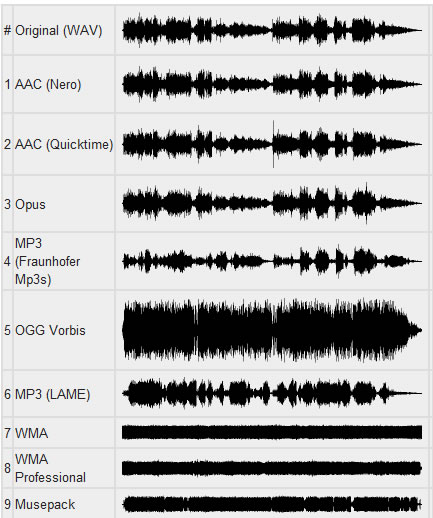
LAME (LAME Ain’t an MP3 Encoder) is one of the most popular and widely used MP3 codecs. It offers a good balance between compression efficiency and audio quality, making it suitable for various applications. Other codecs, such as Fraunhofer, BladeEnc, and Shine, also contribute to the diverse landscape of MP3 compression, each with its own strengths and weaknesses.

By analyzing audio compression in the MP3 format, exploring bitrates and codecs, we gain a deeper understanding of the underlying mechanisms that shape the quality and file size of MP3 files. Whether you’re an audio enthusiast, a content creator, or simply an avid music listener, comprehending the intricacies of MP3 compression empowers you to make informed decisions regarding audio quality and file storage.

Why is Bitrate Selection Important in MP3 Compression?

Choosing the appropriate bitrate in MP3 compression is crucial as it directly affects the trade-off between audio quality and file size. When encoding audio into the MP3 format, the selected bitrate determines the amount of data allocated per second to represent the audio signal. Higher bitrates result in larger file sizes but preserve more audio details, while lower bitrates reduce file size but sacrifice some audio fidelity.

Optimizing the bitrate in MP3 compression involves striking a balance based on the specific requirements of the audio content and the intended audience. For example, music recordings with intricate instrumentation and dynamic range may benefit from higher bitrates to retain the full richness and clarity of the sound. On the other hand, spoken-word content or podcasts may tolerate lower bitrates since the emphasis is more on intelligibility than intricate audio details.

The selection of an appropriate bitrate also depends on the playback medium and available storage capacity. Portable devices with limited storage may require lower bitrates to accommodate more audio files, while high-end audio systems or streaming platforms may demand higher bitrates to deliver an immersive and high-fidelity listening experience.

What Role Do Codecs Play in MP3 Compression?

Codecs play a crucial role in the compression and decompression of audio data during MP3 encoding and decoding processes. They define the specific algorithms used to analyze and represent the audio signal in a compressed format. Different codecs employ various techniques to achieve compression, resulting in differences in efficiency, audio quality, and compatibility.

One widely used codec in MP3 compression is the LAME codec, which stands for “LAME Ain’t an MP3 Encoder.” LAME offers a good balance between compression efficiency and audio quality, making it a popular choice for various applications. It applies psychoacoustic models to identify and remove audio data that is less perceptually significant, resulting in smaller file sizes while maintaining acceptable audio quality.

Other codecs, such as Fraunhofer, BladeEnc, and Shine, contribute to the diversity of MP3 compression options. Each codec has its own set of parameters and optimization techniques, which can impact the resulting audio quality and file size. Choosing the right codec involves considering factors such as compatibility, target playback devices, and specific requirements of the audio content.

    • Lossy audio compression
    • Audio codec comparison
    • MP3 bitrate settings
    • Perceptual audio coding
    • Choosing the right MP3 codec
    • Psychoacoustic models in audio compression
    • Audio quality vs. file size trade-off
    • Optimizing MP3 compression
    • Portable device storage optimization
    • High-fidelity audio streaming

Free Download Mp4Gain
picture


Mp4Gain Main Window
picture


Mp4Gain Features
picture


Free Download Mp4Gain
picture

Pros & Cons of Audio Compression

Pros & Cons of Audio Compression

Audio Compression
Audio Compression
Audio Compression
Audio Compression

Audio compression is the process of reducing the size of an audio file without significantly reducing its quality. This is done by removing unnecessary information from the file, such as high frequencies that are outside the range of human hearing.

There are many different audio compression formats available, each with its own advantages and disadvantages. Some of the most popular formats include MP3, AAC, and FLAC.

Pros of Audio Compression

  • Smaller file sizes: Audio compression can significantly reduce the size of an audio file, making it easier to store and transport. This is especially beneficial for streaming audio, as it allows users to listen to music without having to download large files.
  • Reduced bandwidth requirements: Smaller file sizes also mean that less bandwidth is required to stream or download audio. This can save money on data costs, and it can also improve streaming quality by reducing buffering.
  • Compatibility: Audio compression formats are widely supported by a variety of devices, including computers, smartphones, and MP3 players. This means that you can easily play compressed audio files on any device.

Cons of Audio Compression

  • Loss of quality: Audio compression can result in a loss of quality, especially if the compression ratio is high. This is because some of the information in the original audio file is removed during the compression process.
  • Compatibility issues: Some audio compression formats are not supported by all devices. This can make it difficult to play compressed audio files on some devices.
  • Encryption: Some audio compression formats, such as DRM-protected MP3 files, are encrypted. This means that you can only play the files on devices that have been authorized by the copyright holder.

Conclusion

Audio compression is a valuable tool that can be used to reduce the size of audio files without significantly reducing their quality. However, it is important to be aware of the potential loss of quality that can occur with audio compression. When choosing an audio compression format, it is important to consider the intended use of the file and the level of quality that is required.

Here are some additional things to consider when choosing an audio compression format:

  • Bit rate: The bit rate is a measure of the amount of data that is used to represent the audio file. Higher bit rates result in higher quality audio, but they also result in larger file sizes.
  • Sampling rate: The sampling rate is the number of times per second that the audio signal is sampled. Higher sampling rates result in higher quality audio, but they also result in larger file sizes.
  • Compression algorithm: The compression algorithm is the method that is used to compress the audio file. Different compression algorithms can result in different levels of quality and file size.

Here are some examples of different audio compression formats:

  • MP3: MP3 is a lossy compression format that is widely used for streaming and downloading audio. It offers a good balance between quality and file size.
  • AAC: AAC is another lossy compression format that is similar to MP3. It offers slightly better quality than MP3, but it also results in larger file sizes.
  • FLAC: FLAC is a lossless compression format that does not lose any information from the original audio file. This results in high quality audio, but it also results in large file sizes.

Audio Compression Formats

Audio Compression Formats Overview

Audio Compression Formats

Introduction

Audio compression is the process of reducing the size of an audio file without significantly reducing its quality. This is done by removing redundant data from the file. Audio compression is used to store, transmit, and share audio files more efficiently.

Types of Audio Compression

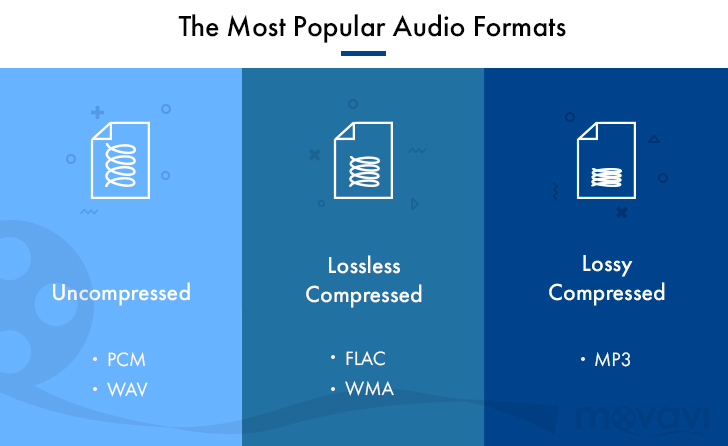
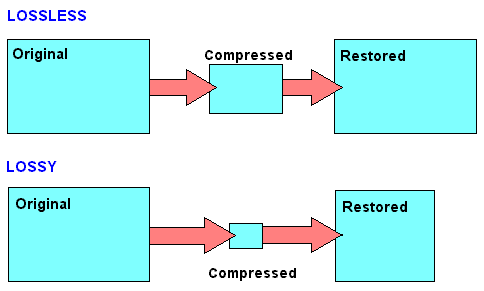
There are two main types of audio compression: lossless and lossy. Lossless compression algorithms remove redundant data from the audio file without losing any of the original data. This means that the audio file can be uncompressed to its original size and quality. Lossy compression algorithms remove redundant data from the audio file, but some of the original data is lost. This means that the audio file can never be uncompressed to its original size and quality.

Lossless Audio Compression Formats

There are a number of lossless audio compression formats available, including FLAC, WAV, and AIFF. FLAC is the most popular lossless audio compression format. It offers high compression ratios with minimal loss of quality. WAV is the uncompressed audio format. It is the most commonly used audio format for professional audio. AIFF is the uncompressed audio format used by Apple products.

Lossy Audio Compression Formats

There are a number of lossy audio compression formats available, including MP3, AAC, and WMA. MP3 is the most popular lossy audio compression format. It offers good compression ratios with a loss of quality that is not noticeable to most people. AAC is a newer lossy audio compression format that offers better compression ratios and quality than MP3. WMA is a lossy audio compression format developed by Microsoft. It offers similar compression ratios and quality to MP3.

Which Audio Compression Format Should I Use?

The best audio compression format to use depends on your needs. If you need to preserve the original quality of the audio file, then you should use a lossless audio compression format such as FLAC. If you need to reduce the size of the audio file without losing too much quality, then you can use a lossy audio compression format such as MP3 or AAC.

Conclusion

Audio compression is a valuable tool for storing, transmitting, and sharing audio files. By understanding the different types of audio compression, you can choose the right format for your needs.

8 Subtitles

Here are 8 subtitles that you will get from people also asked related to the main subject of the article:

  1. What is audio compression?
  2. What are the different types of audio compression?
  3. What are the benefits of audio compression?
  4. What are the drawbacks of audio compression?
  5. Which audio compression format should I use?
  6. How do I compress an audio file?
  7. How do I decompress an audio file?
  8. What are some common problems with audio compression?

Benefits of Audio Compression

There are a number of benefits to audio compression. These include:

  • Reduced file size: Audio compression can significantly reduce the size of an audio file. This makes it easier to store, transmit, and share audio files.
  • Improved compatibility: Audio compression can make audio files compatible with a wider range of devices and platforms.
  • Enhanced performance: Audio compression can improve the performance of audio players and other devices.

Drawbacks of Audio Compression

There are a number of drawbacks to audio compression. These include:

  • Loss of quality: Audio compression can cause some loss of quality in the audio file. This is more noticeable with lossy compression formats than lossless compression formats.
  • Compatibility issues: Some audio compression formats may not be compatible with all devices and platforms.
  • Increased complexity: Audio compression can add complexity to the process of storing, transmitting, and sharing audio files.

Which Audio Compression Format Should I Use?

The best audio compression format to use depends on your needs. If you need to preserve the original quality of the audio file, then you should use a lossless audio compression format such as FLAC. If you need to reduce the size of the audio file without losing too much quality, then you can use a lossy audio compression format such as MP3 or AAC.

How to Compress an Audio File

To compress an audio file, you can use a variety of software programs. Some popular programs include:

  • FLAC: A free and open-source lossless audio compression program.
  • WAV: A free and open-source uncompressed audio compression program.
  • AIFF: A free and open-source uncompressed audio compression program.

How to Decompress an Audio File

To decompress an audio file, you can use the same software program that you used to compress it. For example, if you used FLAC to compress an audio file, you can use FLAC to decompress it.

What is Audio Compression Threshold and How it Affects Sound Quality

What is Audio Compression Threshold and How it Affects Sound Quality

Audio Compression
Audio Compression
Audio Compression
Audio Compression

Introduction

Audio compression is a technique used to reduce the dynamic range of an audio signal. It is commonly used in music production to make a recording sound louder and more impactful. However, compressing audio too much can lead to a loss of detail and a reduction in sound quality. In this article, we will explore the concept of audio compression threshold and how it affects sound quality.

Understanding Audio Compression

Audio compression is the process of reducing the dynamic range of an audio signal by attenuating the louder parts of the signal while leaving the quieter parts untouched. The main purpose of audio compression is to make the overall level of the audio signal more consistent, which can make it easier to listen to and mix with other tracks.

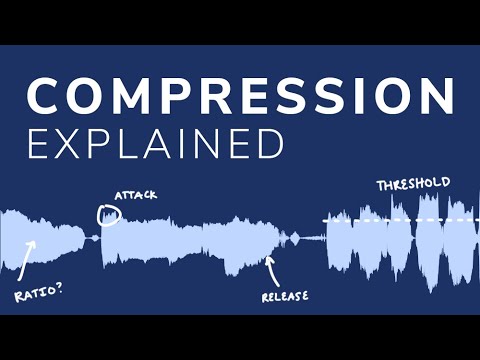
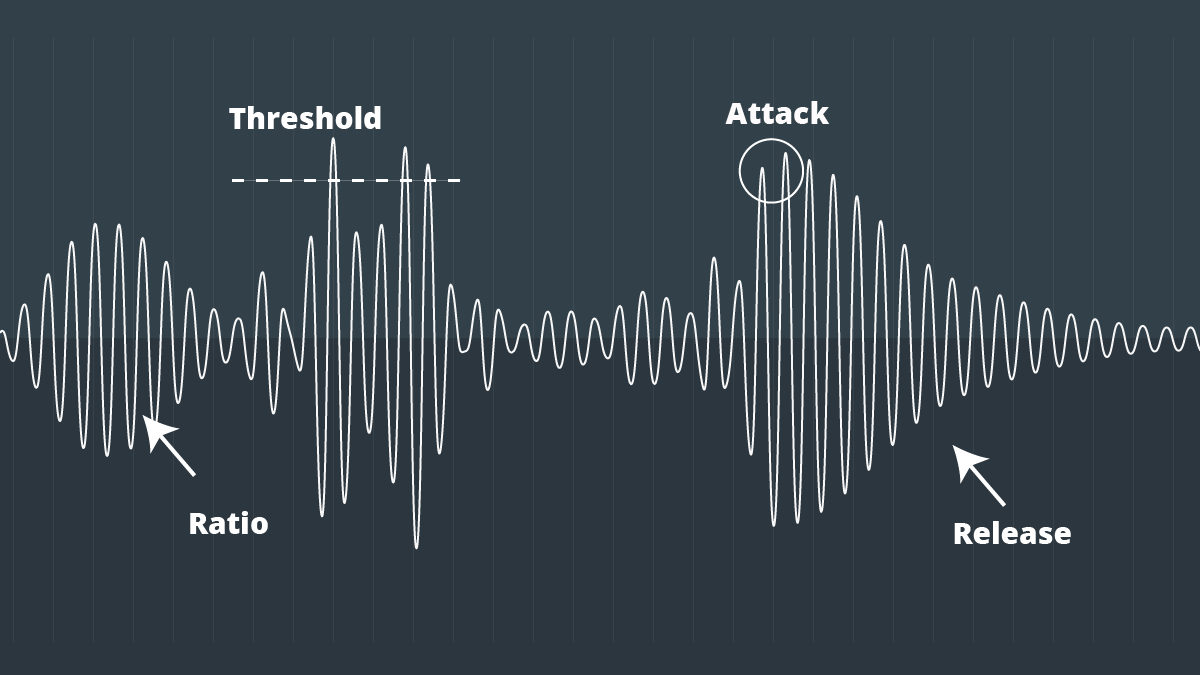
However, compression can also introduce artifacts such as pumping, breathing, and distortion, which can affect the quality of the sound. Therefore, it’s important to understand the parameters of audio compression, such as threshold, ratio, attack, and release, to achieve the desired sound.

“Compression is like a lens in photography. Just as a lens can bring certain parts of an image into focus while blurring others, compression can bring certain parts of an audio signal into focus while reducing the dynamic range.” – Bobby Owsinski, The Mixing Engineer’s Handbook

What is Audio Compression Threshold?

The compression threshold is the level at which the compressor starts to attenuate the audio signal. In other words, it’s the point at which the compressor kicks in and starts reducing the level of the audio signal. The threshold is usually set in decibels (dB), and it can range from -60 dB to 0 dB or higher.

Setting the compression threshold too low can result in over-compression, where the compressor is constantly active and the audio signal loses its natural dynamic range. On the other hand, setting the threshold too high can result in under-compression, where the compressor doesn’t kick in enough and the audio signal remains too dynamic. Therefore, finding the right compression threshold is crucial for achieving the desired sound.

“The compression threshold is the gatekeeper of the compressor. If you set it too low, the compressor will work too hard and the sound will lose its natural dynamics. If you set it too high, the compressor won’t work enough and the sound will be too dynamic.” – Bob Katz, Mastering Audio: The Art and the Science

How Compression Threshold Affects Sound Quality

The compression threshold can have a significant impact on the sound quality of an audio signal. Setting the threshold too low can result in a squashed and lifeless sound, while setting it too high can result in a dynamic and uncontrolled sound. Therefore, it’s important to find the right balance between dynamic range and consistency.

Additionally, different instruments and sounds require different compression thresholds. For example, a snare drum may require a higher threshold than a vocal track, as the snare drum has a shorter decay time and more transient peaks. Therefore, it’s important to adjust the compression threshold for each individual track to achieve the desired sound.

“The compression threshold is like a knife. Use it wisely,
Copy to Clipboard

clipboard emoji

User
continua donde te uedaste que fue en:

“The compression threshold is like a knife. Use it wisely,
ChatGPT

How to determine the right compression threshold

Determining the right compression threshold can be tricky, and it can take some trial and error to find the sweet spot. Here are a few tips to help you get started:

  • Start with a low threshold: A good starting point is a threshold of around -30dB. This will ensure that you are compressing the quieter parts of your audio, without squashing the louder parts.
  • Listen carefully: When you apply compression, listen carefully to the changes in the audio. You want to make sure that the compressor is not introducing any unwanted artifacts or distortion.
  • Experiment with different settings: Try adjusting the threshold up and down to see how it affects the audio. You may also want to experiment with the attack and release times, as well as the ratio setting.

Remember, there is no one-size-fits-all solution when it comes to compression. You will need to experiment to find the settings that work best for your particular audio.

“Compression is a great tool, but it’s easy to overdo it. Always err on the side of subtlety, and remember that sometimes a little goes a long way.”

– Brian Eno

The importance of a balanced mix

One of the most important aspects of audio compression is ensuring that your mix is balanced. If one element of the mix is too loud, you may be tempted to apply heavy compression to bring it down to the same level as the other elements. However, this can result in a dull and lifeless mix.

The key is to start with a well-balanced mix. This means that each element of the mix should be at a similar volume level, without any one element dominating the others. Once you have a balanced mix, you can then use compression to add subtle enhancements and make the mix sound even better.

“A good mix is all about balance. Each element of the mix should have its own space, and nothing should be too dominant.”

– Rick Rubin

The dangers of overcompression

While compression can be a powerful tool for enhancing the sound of your audio, it can also be easy to overdo it. Overcompression can result in a number of unwanted artifacts, including distortion, pumping, and breathing.

One of the main dangers of overcompression is the loss of dynamic range. Dynamic range refers to the difference between the loudest and quietest parts of your audio. When you apply too much compression, you reduce the dynamic range, resulting in a flat and lifeless sound.

Another danger of overcompression is the loss of transients. Transients are the short, sharp peaks in the audio that give it its punch and energy. When you apply too much compression, you can squash these transients, resulting in a dull and uninspired sound.

“Compression is a great tool, but it’s important to remember that it’s just one tool in the toolbox. Don’t rely on it too heavily, and always remember to use it in moderation.”

– Tony Maserati

Audio compression, how it works

Audio compression, how it works

Audio compression
Audio compression

audio compression


audio compression
audio compression


Audio compression technology refers to the application of suitable digital signal processing technology to the original digital audio signal stream (PCM encoding), without losing the amount of useful information, or under the condition that the loss introduced be insignificant, reduce (compress) its code rate, and also called compression encoding.

It must have a corresponding inverse transform, called decompression or decoding. The audio signal can introduce a lot of noise and some distortion after passing through a codec system

Audio compression technology refers to the application of suitable digital signal processing technology to the original digital audio signal stream (PCM encoding), without losing the amount of useful information, or under the condition that the loss introduced insignificant, reducing (compressing) its code rate, and also called compression encoding. It must have a corresponding inverse transform, called decompression or decoding. Audio signals can introduce a great deal of noise and some distortion after passing through a codec system. The advantages of digital signal are obvious, but it also has its own corresponding disadvantages, ie increased storage capacity requirements and increased channel capacity requirements during transmission. Taking a CD as an example, the sampling frequency is 44.1KHz and the quantization precision is 16 bits, so a stereo audio signal for 1 minute needs to occupy about 10M bytes of storage capacity, that is, the capacity of a CD turntable is only about 1 hour. Of course, the problem is even more pronounced in the world of much higher bandwidth digital video. Are all these bits necessary? The study found that there is a large redundancy in the direct use of the PCM code stream for storage and transmission. In fact, sound can be compressed at least 4:1 under lossless conditions, that is, only 25% of the digital amount is used to retain all the information, and the compression ratio in the video field can even reach to several hundred times. Therefore, in order to use limited resources, compression technology has received much attention since its inception. The research and application of audio compression technology has a long history, like A-law coding, u-law is a simple almost instant compression technology, and has been applied in ISDN voice transmission. Research on speech signals has been developed before and has matured, and has been widely used, such as adaptive differential PCM (ADPCM), linear predictive coding (LPC), and other technologies.

Compression audio encoding Part 3

Compression audio encoding Part 3

Audio  Compression

I often hear what is called Hi-Res Audio. The sampling frequency is said to be 96 kHz or 192 kHz, which is over 48 kHz, the number of quantization bits is 24 bits, and the limit (high range) of human hearing is about 20 kHz, but it expresses frequencies higher than that. It will be. It is the same bit rate as the image from a long time ago. .. ..
By the way, it seems that dogs can hear up to 60 kHz and cats up to about 64 kHz.

Hi-res audio example
Sampling frequency Number of quantization bits Number of channels bit rate Frequency that can be expressed
192 kHz twenty-four 2 9.216 kbps 96 kHz
192 kHz 16 2 6,144 kbps 96 kHz
96 kHz twenty-four 2 4.608 kbps 48 kHz
96 kHz 16 2 3,072 kbps 48 kHz
48 kHz twenty-four 2 2,304 kbps 24 kHz
Considering the limit of human hearing (about 20 kHz), according to the sampling theorem, 48 kHz or 44.1 kHz is a sufficient frequency, but what about all of them? .. ..
In my case, I cannot distinguish the high resolution range, but it should be able to reproduce the discarded frequency at 48 kHz to 96 kHz, and when the number of quantization bits is in the 24-bit range, the sound pressure (dB) is a bit. Feels like I’m going up (?) (It’s just a story from my ears).
I’d like to make a comparison if I get the chance, but I don’t think I can tell by ear without a proper regenerator (like an expensive analog amp).

Is it time for cats and dogs to get verified in the acoustic industry? .. ..

Compression audio encoding Part 2

Compression audio encoding Part 2

audio compression

16-bit monaural PCM bit rate (for audio) (example)

Sampling frequency Number of quantization bits Number of channels bit rate Comments
32 kHz 16 1 512 kbps Super Wide Band
24 kHz 16 1 384 kbps
16 kHz 16 1 256 kbps Broadband
8 kHz 16 1 128 kbps Narrowband

Sampling rate
If you check the web, there are explanations like the sampling required to convert analog waveforms to digital conversion. For example, it shows how many samples of an audio signal input from a microphone are taken per second and digitized. The larger the sample, the greater the range that can be recorded. When an analog waveform is digitized, the frequency that can be expressed is half the sampling frequency (sampling theorem). For example, with a sampling frequency of 48 kHz, it can be expressed up to 24 kHz. At 8 kHz (narrow band) and 16 kHz (wide band), which are often used for audio, you can only hear up to 4 kHz and 8 kHz, respectively. The higher the sample rate, the higher the bit rate.

Sampling theorem
It is a very simple explanation, but it can express up to half the sample rate. When sampling a signal, if the interval is small, it can be restored close to the original signal, but if it is too thick, it cannot be restored (I would like to write a little more detail when I talk about signal processing or other time ).

44.1 kHz
Why is there a poorly separated rate of 44.1? .. ..
Isn’t the technician deliberately wearing an annoying watch to prevent music CDs from being easily copied? I heard something like that. When I searched, it seems this happened (?) Due to the convenience of an old PCM recorder. In this age, it is difficult to know what 44.1 kHz is in development. The 44.1 kHz ↔ 48 kHz sampling conversion is a headache. For example, USB audio (USB audio device class) exchanges data at 1 ms intervals. In the case of 48kHz, the data is 48 samples, but when considering 44.1kHz, it will be 44 samples (x9) and 45 samples (x1) in 10ms. If a sample of 45 samples is misled (tentatively), it will be 44.0kHz. I think it’s more like that with voice and music, and the human ear is mostly misleading (just my personal opinion).
However, the objective evaluation method will soon come to an end. For example, you can clearly see that you were fooled by a sine wave (sine wave) (maybe you are unexpectedly on the market).

Number of quantization bits
Sampling had to take a value in the direction of time (discretization), but quantization had to take a value in the direction of amplitude. The range that is possible to display the volume of the sound, which is heard often, “dynamic range 96 dB” means that the number of quantization bits is 16 bits and the music signal is played in the range of 0 to 65535 I can do it. The number of quantization bits is also called the bit depth or bit depth.

Bitrate
In communication, it indicates how many bits of data are transferred per hour and is generally expressed in bps (bit / s) of how many bits are transferred (processed) per second. If it is small, the size when saving as a file is small and there is space on the transmission line for communication. For example, when an audio (1 channel) is compressed to 1/3, the 3 channel audio can be sent at the same bit rate. Excuse the old story, but considering from the age of analog communication (analog mobile phone), digitization + compression will be able to support multiple calls with the same radio wave.

compressing using audio encoding

When compressing using audio encoding (AAC, MP3, etc.), the compression rate is determined by the bit rate at the time of encoding.

Audio Compression

Specifically, if you set a low bitrate, the compression rate will be high and the file size when saved will be small, but what is the bitrate for the original sound source (PCM) without compression in the first place?

If you save it as PCM, the sound quality of the original sound will be obtained, but it can be a little inconvenient to save it without worrying about the file size. Also, depending on the application, I think the original sound size has enough memory capacity and the communication speed is correct. Therefore, I would like to write about the sample rate and bit rate that are often heard in digital audio.

The bit rate of digital audio is determined by the sample rate, the number of bits assigned to a sample (number of quantization bits), and the number of channels (stereo, monaural, etc.).

PCM bit rate (uncompressed) = sample rate x number of quantization bits x number of channels
As I wrote a bit last time, file containers like wav and mp4 format have this information as the header, so the application can see the header and play it. The compression rate of the encoding is determined by the bit rate specified at the time of encoding for this PCM (uncompressed) bit rate.
For example, as many of you know about music CDs, with 44.1 kHz stereo, this is the next bit rate.

Music CD bit rate: 44100Hz x 16bit x 2ch (stereo) = 1411.2kbps
When encoding this with MP3, AAC, etc., you will naturally specify a bitrate less than 1,411.2 kbps. For example, when encoding at 256 kbps, the compression rate is approximately 18% and the file size is 1/5 or less, assuming the original sound is 100%.

Encode 256 kbps music CDs: 256 kbps / 1,411.2 kbps = approximately 18%
Generally, the sample rates of audio devices actually connected to a PC are 48 kHz and 44.1 kHz for music, 16 kHz and 8 kHz for voice, such as microphones and headphones, and 32 kHz, 24 kHz, 22.05 kHz, etc.

The bit rate of PCM (uncompressed sound source) with 16-bit quantization bits is as follows.

Stereo (for music) PCM 16-bit bit rate (example)
Sampling frequency Number of quantization bits Number of channels bit rate Comments
48 kHz 16 2 1,536 kbps
44.1 kHz 16 2 1,411.2 kbps Music CD
32 kHz 16 2 1,024 kbps
24 kHz 16 2 768 kbps
22.05 kHz 16 2 705.6 kbps

Audio compression for music lovers

Audio compression for music lovers

Lossy compression


the truth about high bitrate lossy compression

lossy compression

In the opinion of most people, the word music lover is most often associated with a person who not only loves and collects music, but also appreciates high-quality music, and not only in artistic and aesthetic terms, but also the quality of the recording of the phonogram itself. Just think, a few years ago, an audio CD was considered the standard for music quality, whereas a computer, even in dreams, could not compete with the quality of a CD. However, time is a great joker, and he often likes to turn things upside down. It would seem that quite a while, a year or two passed and … that’s it, the CD on the PC went into the background. Don’t ask “why?”, You know the answer to this question yourself. Everything is to blame for the revolution in the world of computer sound: audio compression (hereinafter referred to as audiolo compression which means lossy compression to reduce the size of the audio file), which made it possible to store music on disk hard, lots of music! In addition, it was possible to exchange it over the Internet. New sound cards have been released, capable of almost “squeezing” studio quality out of a piece of hardware that seems useless in terms of music. Today, even having a computer that is not very smart in performance, having bought a Creative SoundBlaster Live! and remembering that since Soviet times there is a good amplifier and good acoustics, you will get nothing but a high-quality music center, the sound of which is inferior only to very expensive audio equipment (average or even the highest Hi-Fi category ). Add to this the general availability of music files and you understand that you have the power in your hands. And then there is a revolution, and you understand that a compact disc is no longer so convenient, you are fascinated by something completely different: the magic “MP3” signs. You cannot eat or sleep; you are faced with the seemingly insoluble “chicken and egg” question: how to “squeeze” and, most importantly, how to “squeeze” …

This is where I will help you. This article is the beginning of my new series of informational materials on music on the computer. For over a year developing OrlSoft MPeg eXtension and maintaining an extensive database of MP3 files, I have accumulated a great deal of research on audio compression. It is these studies that I will try to share with you. Many articles have been written on audio compression by different respected authors, so I will try not to write what I can easily find in other sources of information. I would like to put my position on the subject we are considering simply and clearly. We will not consider audio compression to be as compact a tool as possible put audio information on your hard drive (so that you can record so many hours of music there). Yes, compression allows you to record music more compactly, but my goal is to minimize quality loss by converting “pure” audio to compressed audio. This is why only high bit rates and qualitatively compressing encoders are considered in these modes. So it is much more convenient to work with compressed audio – instant access to any track from any album, convenient software for playback. And, of course, the financial issue has not been forgotten either.

Of the audio compression formats that exist today, in my opinion, three deserve attention: MP3 (or MPEG-1 Audio Layer III), LQT (as representative of the MPEG-2 AAC / MPEG-4 family) and a Completely new OGG format (Ogg Vorbis) developed by a group of enthusiasts:

MP3 is by far the most used of these (mainly because it is free). Let me remind you that it was thanks to the MP3 format that the victorious procession of compressed audio took place. However, as often happens with pioneers, little by little it is losing ground and giving way to new and better formats.
The second format, LQT, is a representative of a new direction of audio coding algorithms, a representative of the AAC family. This is a fairly high quality, but commercial and highly classified format.
OGG became widely known to the public this summer and is currently developing rapidly, soon (with the launch of the Encoder and Decoder) it should beat MP3 with better sound quality with smaller file size.

Does MP3 affect the sound quality?

The compression of songs affects the quality, but the losses are not necessarily audible.

mp3 audio quality

Is compression of MP3 songs harmful to the sound quality? Whether it is HD music or “normal” definition, the question of compression remains. The advantage is that the weight of the songs is reduced, so they take up less space in the memory of a phone or a portable music player. With standard MP3 compression, a music album ranges from 500 MB to 45 MB.

But by the way, the music is damaged. The sound seems a little less natural, less precise, less dynamic. Some of the audio information is literally destroyed. It doesn’t always sound good, but for some songs the difference is clear until everyone will notice.

mp3 quality

Fortunately, you can improve the quality of an MP3 song by compressing it with less force. The loss of sound quality becomes less clear, but in return the song weighs more. MP3 isn’t the only compressed music format that corrupts music. The most famous competitors are AAC, Ogg Vorbis and WMA. MP3 is not the most efficient compression format, this title applies to the Ogg Vorbis, but it is still a good option. All music players can play MP3 and online record stores prefer this format.

Lossless compression

However, some music lovers are reluctant to MP3. They swear by “nondestructive” compression, which does not remove sound information. The music has been completely preserved: we hear absolutely no difference. The best known non-destructive formats are Flac, APE and Alac. Unfortunately, not all electronic devices can play music recorded in these formats. Few artists offer their music in “non-destructive” compression. And the weight of the parts thus compressed is still very heavy. An album quickly reaches several hundred megabytes. However, the Flac stands out as the reference format for the most demanding music lovers.

Is it reasonable to keep using MP3? This remains a smart choice for most music lovers, as long as they choose an appropriate compression ratio. Which one to choose: 192 kbit / s, 256 kbit / s or 320 kbit / s? The stronger the compression, the lighter the number, but the lower the quality. With 128 kbit / s, the sound has clearly deteriorated, most of us can hear it. At 192 kbit / s, degradation becomes difficult for most of us to observe except for some rare numbers.

With 256 kbit / s, you have to have a musical ear and good sound equipment to make the difference. With 320 kbit / s, you need a well-trained ear and highly accurate audio equipment to make a difference. We only see a difference in quality in certain titles and only in certain passages. Therefore, most of us can settle for 192 kbit / s recording. Music lovers should expect a minimum of 256 kbit / s. And professionals will choose formats of 320 kbit / s or ‘lossless’.