Audio compression, how it works


Free Download Mp4Gain
picture

Audio compression, how it works

Audio compression
Audio compression

audio compression


audio compression
audio compression


Audio compression technology refers to the application of suitable digital signal processing technology to the original digital audio signal stream (PCM encoding), without losing the amount of useful information, or under the condition that the loss introduced be insignificant, reduce (compress) its code rate, and also called compression encoding.

It must have a corresponding inverse transform, called decompression or decoding. The audio signal can introduce a lot of noise and some distortion after passing through a codec system

Audio compression technology refers to the application of suitable digital signal processing technology to the original digital audio signal stream (PCM encoding), without losing the amount of useful information, or under the condition that the loss introduced insignificant, reducing (compressing) its code rate, and also called compression encoding. It must have a corresponding inverse transform, called decompression or decoding. Audio signals can introduce a great deal of noise and some distortion after passing through a codec system. The advantages of digital signal are obvious, but it also has its own corresponding disadvantages, ie increased storage capacity requirements and increased channel capacity requirements during transmission. Taking a CD as an example, the sampling frequency is 44.1KHz and the quantization precision is 16 bits, so a stereo audio signal for 1 minute needs to occupy about 10M bytes of storage capacity, that is, the capacity of a CD turntable is only about 1 hour. Of course, the problem is even more pronounced in the world of much higher bandwidth digital video. Are all these bits necessary? The study found that there is a large redundancy in the direct use of the PCM code stream for storage and transmission. In fact, sound can be compressed at least 4:1 under lossless conditions, that is, only 25% of the digital amount is used to retain all the information, and the compression ratio in the video field can even reach to several hundred times. Therefore, in order to use limited resources, compression technology has received much attention since its inception. The research and application of audio compression technology has a long history, like A-law coding, u-law is a simple almost instant compression technology, and has been applied in ISDN voice transmission. Research on speech signals has been developed before and has matured, and has been widely used, such as adaptive differential PCM (ADPCM), linear predictive coding (LPC), and other technologies.


Free Download Mp4Gain
picture


Mp4Gain Main Window
picture


Mp4Gain Features
picture


Free Download Mp4Gain
picture

Compression audio encoding Part 3

Compression audio encoding Part 3

Audio  Compression

I often hear what is called Hi-Res Audio. The sampling frequency is said to be 96 kHz or 192 kHz, which is over 48 kHz, the number of quantization bits is 24 bits, and the limit (high range) of human hearing is about 20 kHz, but it expresses frequencies higher than that. It will be. It is the same bit rate as the image from a long time ago. .. ..
By the way, it seems that dogs can hear up to 60 kHz and cats up to about 64 kHz.

Hi-res audio example
Sampling frequency Number of quantization bits Number of channels bit rate Frequency that can be expressed
192 kHz twenty-four 2 9.216 kbps 96 kHz
192 kHz 16 2 6,144 kbps 96 kHz
96 kHz twenty-four 2 4.608 kbps 48 kHz
96 kHz 16 2 3,072 kbps 48 kHz
48 kHz twenty-four 2 2,304 kbps 24 kHz
Considering the limit of human hearing (about 20 kHz), according to the sampling theorem, 48 kHz or 44.1 kHz is a sufficient frequency, but what about all of them? .. ..
In my case, I cannot distinguish the high resolution range, but it should be able to reproduce the discarded frequency at 48 kHz to 96 kHz, and when the number of quantization bits is in the 24-bit range, the sound pressure (dB) is a bit. Feels like I’m going up (?) (It’s just a story from my ears).
I’d like to make a comparison if I get the chance, but I don’t think I can tell by ear without a proper regenerator (like an expensive analog amp).

Is it time for cats and dogs to get verified in the acoustic industry? .. ..

Compression audio encoding Part 2

Compression audio encoding Part 2

audio compression

16-bit monaural PCM bit rate (for audio) (example)

Sampling frequency Number of quantization bits Number of channels bit rate Comments
32 kHz 16 1 512 kbps Super Wide Band
24 kHz 16 1 384 kbps
16 kHz 16 1 256 kbps Broadband
8 kHz 16 1 128 kbps Narrowband

Sampling rate
If you check the web, there are explanations like the sampling required to convert analog waveforms to digital conversion. For example, it shows how many samples of an audio signal input from a microphone are taken per second and digitized. The larger the sample, the greater the range that can be recorded. When an analog waveform is digitized, the frequency that can be expressed is half the sampling frequency (sampling theorem). For example, with a sampling frequency of 48 kHz, it can be expressed up to 24 kHz. At 8 kHz (narrow band) and 16 kHz (wide band), which are often used for audio, you can only hear up to 4 kHz and 8 kHz, respectively. The higher the sample rate, the higher the bit rate.

Sampling theorem
It is a very simple explanation, but it can express up to half the sample rate. When sampling a signal, if the interval is small, it can be restored close to the original signal, but if it is too thick, it cannot be restored (I would like to write a little more detail when I talk about signal processing or other time ).

44.1 kHz
Why is there a poorly separated rate of 44.1? .. ..
Isn’t the technician deliberately wearing an annoying watch to prevent music CDs from being easily copied? I heard something like that. When I searched, it seems this happened (?) Due to the convenience of an old PCM recorder. In this age, it is difficult to know what 44.1 kHz is in development. The 44.1 kHz ↔ 48 kHz sampling conversion is a headache. For example, USB audio (USB audio device class) exchanges data at 1 ms intervals. In the case of 48kHz, the data is 48 samples, but when considering 44.1kHz, it will be 44 samples (x9) and 45 samples (x1) in 10ms. If a sample of 45 samples is misled (tentatively), it will be 44.0kHz. I think it’s more like that with voice and music, and the human ear is mostly misleading (just my personal opinion).
However, the objective evaluation method will soon come to an end. For example, you can clearly see that you were fooled by a sine wave (sine wave) (maybe you are unexpectedly on the market).

Number of quantization bits
Sampling had to take a value in the direction of time (discretization), but quantization had to take a value in the direction of amplitude. The range that is possible to display the volume of the sound, which is heard often, “dynamic range 96 dB” means that the number of quantization bits is 16 bits and the music signal is played in the range of 0 to 65535 I can do it. The number of quantization bits is also called the bit depth or bit depth.

Bitrate
In communication, it indicates how many bits of data are transferred per hour and is generally expressed in bps (bit / s) of how many bits are transferred (processed) per second. If it is small, the size when saving as a file is small and there is space on the transmission line for communication. For example, when an audio (1 channel) is compressed to 1/3, the 3 channel audio can be sent at the same bit rate. Excuse the old story, but considering from the age of analog communication (analog mobile phone), digitization + compression will be able to support multiple calls with the same radio wave.

compressing using audio encoding

When compressing using audio encoding (AAC, MP3, etc.), the compression rate is determined by the bit rate at the time of encoding.

Audio Compression

Specifically, if you set a low bitrate, the compression rate will be high and the file size when saved will be small, but what is the bitrate for the original sound source (PCM) without compression in the first place?

If you save it as PCM, the sound quality of the original sound will be obtained, but it can be a little inconvenient to save it without worrying about the file size. Also, depending on the application, I think the original sound size has enough memory capacity and the communication speed is correct. Therefore, I would like to write about the sample rate and bit rate that are often heard in digital audio.

The bit rate of digital audio is determined by the sample rate, the number of bits assigned to a sample (number of quantization bits), and the number of channels (stereo, monaural, etc.).

PCM bit rate (uncompressed) = sample rate x number of quantization bits x number of channels
As I wrote a bit last time, file containers like wav and mp4 format have this information as the header, so the application can see the header and play it. The compression rate of the encoding is determined by the bit rate specified at the time of encoding for this PCM (uncompressed) bit rate.
For example, as many of you know about music CDs, with 44.1 kHz stereo, this is the next bit rate.

Music CD bit rate: 44100Hz x 16bit x 2ch (stereo) = 1411.2kbps
When encoding this with MP3, AAC, etc., you will naturally specify a bitrate less than 1,411.2 kbps. For example, when encoding at 256 kbps, the compression rate is approximately 18% and the file size is 1/5 or less, assuming the original sound is 100%.

Encode 256 kbps music CDs: 256 kbps / 1,411.2 kbps = approximately 18%
Generally, the sample rates of audio devices actually connected to a PC are 48 kHz and 44.1 kHz for music, 16 kHz and 8 kHz for voice, such as microphones and headphones, and 32 kHz, 24 kHz, 22.05 kHz, etc.

The bit rate of PCM (uncompressed sound source) with 16-bit quantization bits is as follows.

Stereo (for music) PCM 16-bit bit rate (example)
Sampling frequency Number of quantization bits Number of channels bit rate Comments
48 kHz 16 2 1,536 kbps
44.1 kHz 16 2 1,411.2 kbps Music CD
32 kHz 16 2 1,024 kbps
24 kHz 16 2 768 kbps
22.05 kHz 16 2 705.6 kbps

Main parameters to guarantee the audio quality of your digital product

Discover the main parameters to guarantee the audio quality of your digital product

Do you know the differences that exist between the formats? Do you understand how the compression rate works?

Audio settings for recorders or sound interfaces can be very confusing. But, if you are going to work with videos or podcasts, it will be useful to know how to interpret the parameters when recording and exporting files, either in Audacity (free), Reaper, Adobe Audition or in video editors.

Here we are going to talk about the differences between sampling rates (sample rate), resolution (bit depth), file compression rates and format variations. Thus, you will be more sure of the options you have regarding audio quality and you can guarantee good results.

In short, you will understand why we recommend recording in uncompressed format (WAV, for example) in 24 bits and 48 kHz. In addition, you will also know why, in most cases, we do not need more than a 192 kbps MP3 to export excellent quality audio.

We will also talk about the possibility of compressing more podcast files, which can be generated in MP3 64 kbps, mono, to facilitate online consumption.

Formats, extensions and codecs: What do they mean?
When it comes to audio files, we can talk about formats, extensions and codecs. In summary, we can say that the format refers to the type of file, identified by its extension (* .mp3, * .wav, * .ogg, * .wma etc), which often tells us how it has been encoded or which It is your codec.

For example, a file in the MP3 format has * .mp3 extension and MPEG-1 Audio Layer III codec.

Examples of audio file extensions

Normally those endings are mixed. But what is important to know is that, as in videos, files with the same type of extension do not always have the same codec and vice versa.

That information is valid so that you do not feel lost in case you do not understand the reason why a software, which normally plays your * .m4a files, does not play another one with the same extension, for example.

Such a situation could indicate that the codecs used are different. In that case, the solution would be to use other software to read the file or to convert it (new encoding). This can be done even in video editors.

The variations of formats and codecs depend on the options of the companies that develop the software that executes the files. In these cases, there are many things at stake, such as technical specifications and relations with patents.

On the other hand, files are usually divided into two types: without compression or compressed.

Files without compression

Audio recording equipment usually offers us options to record files without losing any information. These files, not compressed, can be generated in various formats and extensions, such as WAV, AIFF, FLAC and ALAC. For those who are familiar with photography, they are equivalent to RAW or DNG.

As they are usually very heavy, using lossless formats in the final product is only recommended in some cases, such as:

when the final product can be processed by the consumer (files intended for sound banks, for example);
when there will be recording on physical media (CD, DVD and Blue-Ray);
or for the audiophile market (for a matter of perceived value and high quality assurance).
But, even if you don’t want to end the process with a WAV (one of the most common), lossless formats can be very useful in the editing stage. Because they contain a lot of information, they support more extreme alterations without harming the audio quality.

With plugins, conversions and processing, they can be handled more freely, guaranteeing excellent quality, even if a compressed file is subsequently generated.

Compressed files

Most of the equipment available in the market (cameras, cell phones and even audio recorders) usually delivers already compressed files. This type of file is more practical, easy to process, requires less storage space and has very small sizes (in bytes).

Some examples of these formats are: 3GP, AAC, M4A, OGG, WMA and MP3, which is, without a doubt, the best known. The files are like JPEG or GIF in the field of images.

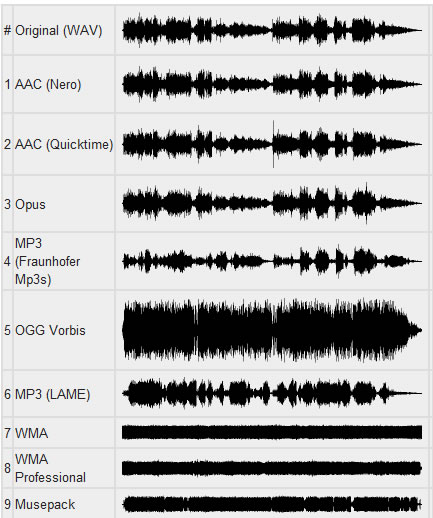
Through a complex algorithm, these files are generated seeking to keep only relevant information for our ears. Depending on the compression mode, we can generate an MP3 from a WAV and have a file 10 times smaller, without noticeable changes in audio quality.