Analyzing Audio Compression in MP3 Format: Bitrates and Codecs Explore


Free Download Mp4Gain
picture

Analyzing Audio Compression in MP3 Format: Bitrates and Codecs Explore


Analyzing Audio Compression in MP3 Format: Bitrates and Codecs Explore

What is Audio Compression in MP3 Format?

Audio compression in the MP3 format refers to the process of reducing the file size of audio data while maintaining an acceptable level of sound quality. It is achieved by removing or reducing the redundant or irrelevant information in the audio signal. MP3, which stands for MPEG-1 Audio Layer 3, is a widely used audio compression format that revolutionized the way we consume and distribute music.

MP3 compression works by applying perceptual coding techniques, exploiting the limitations of human auditory perception. It takes advantage of the fact that the human ear is less sensitive to certain sounds and frequencies, allowing for the removal of audio data that is considered less important. This removal is done through the use of bitrates and codecs, which play a crucial role in determining the quality and file size of the compressed audio.

Understanding Bitrates in MP3 Compression

Bitrate is a fundamental aspect of audio compression in the MP3 format. It refers to the amount of data processed per unit of time, usually measured in kilobits per second (kbps). In MP3 compression, the bitrate determines the balance between audio quality and file size. Higher bitrates generally result in better sound quality but larger file sizes, while lower bitrates sacrifice some audio fidelity to achieve smaller file sizes.

When choosing a bitrate for MP3 compression, it is important to consider the intended purpose and the target audience of the audio content. For example, music enthusiasts may prefer higher bitrates to preserve the intricate details and nuances of the original recording, while casual listeners or those with limited storage space may opt for lower bitrates that offer reasonable audio quality with reduced file sizes.

Exploring Codecs in MP3 Compression

Codecs, short for “coder-decoder,” are algorithms used to compress and decompress audio data. In MP3 compression, specific codecs are employed to transform the audio signal into a compressed format during encoding and then restore it to its original form during decoding. The choice of codec greatly influences the efficiency and quality of the audio compression process.

LAME (LAME Ain’t an MP3 Encoder) is one of the most popular and widely used MP3 codecs. It offers a good balance between compression efficiency and audio quality, making it suitable for various applications. Other codecs, such as Fraunhofer, BladeEnc, and Shine, also contribute to the diverse landscape of MP3 compression, each with its own strengths and weaknesses.

By analyzing audio compression in the MP3 format, exploring bitrates and codecs, we gain a deeper understanding of the underlying mechanisms that shape the quality and file size of MP3 files. Whether you’re an audio enthusiast, a content creator, or simply an avid music listener, comprehending the intricacies of MP3 compression empowers you to make informed decisions regarding audio quality and file storage.

Why is Bitrate Selection Important in MP3 Compression?

Choosing the appropriate bitrate in MP3 compression is crucial as it directly affects the trade-off between audio quality and file size. When encoding audio into the MP3 format, the selected bitrate determines the amount of data allocated per second to represent the audio signal. Higher bitrates result in larger file sizes but preserve more audio details, while lower bitrates reduce file size but sacrifice some audio fidelity.

Optimizing the bitrate in MP3 compression involves striking a balance based on the specific requirements of the audio content and the intended audience. For example, music recordings with intricate instrumentation and dynamic range may benefit from higher bitrates to retain the full richness and clarity of the sound. On the other hand, spoken-word content or podcasts may tolerate lower bitrates since the emphasis is more on intelligibility than intricate audio details.

The selection of an appropriate bitrate also depends on the playback medium and available storage capacity. Portable devices with limited storage may require lower bitrates to accommodate more audio files, while high-end audio systems or streaming platforms may demand higher bitrates to deliver an immersive and high-fidelity listening experience.

What Role Do Codecs Play in MP3 Compression?

Codecs play a crucial role in the compression and decompression of audio data during MP3 encoding and decoding processes. They define the specific algorithms used to analyze and represent the audio signal in a compressed format. Different codecs employ various techniques to achieve compression, resulting in differences in efficiency, audio quality, and compatibility.

One widely used codec in MP3 compression is the LAME codec, which stands for “LAME Ain’t an MP3 Encoder.” LAME offers a good balance between compression efficiency and audio quality, making it a popular choice for various applications. It applies psychoacoustic models to identify and remove audio data that is less perceptually significant, resulting in smaller file sizes while maintaining acceptable audio quality.

Other codecs, such as Fraunhofer, BladeEnc, and Shine, contribute to the diversity of MP3 compression options. Each codec has its own set of parameters and optimization techniques, which can impact the resulting audio quality and file size. Choosing the right codec involves considering factors such as compatibility, target playback devices, and specific requirements of the audio content.

    • Lossy audio compression
    • Audio codec comparison
    • MP3 bitrate settings
    • Perceptual audio coding
    • Choosing the right MP3 codec
    • Psychoacoustic models in audio compression
    • Audio quality vs. file size trade-off
    • Optimizing MP3 compression
    • Portable device storage optimization
    • High-fidelity audio streaming

Free Download Mp4Gain
picture


Mp4Gain Main Window
picture


Mp4Gain Features
picture


Free Download Mp4Gain
picture

Pros & Cons of Audio Compression

Pros & Cons of Audio Compression

Audio Compression
Audio Compression
Audio Compression
Audio Compression

Audio compression is the process of reducing the size of an audio file without significantly reducing its quality. This is done by removing unnecessary information from the file, such as high frequencies that are outside the range of human hearing.

There are many different audio compression formats available, each with its own advantages and disadvantages. Some of the most popular formats include MP3, AAC, and FLAC.

Pros of Audio Compression

  • Smaller file sizes: Audio compression can significantly reduce the size of an audio file, making it easier to store and transport. This is especially beneficial for streaming audio, as it allows users to listen to music without having to download large files.
  • Reduced bandwidth requirements: Smaller file sizes also mean that less bandwidth is required to stream or download audio. This can save money on data costs, and it can also improve streaming quality by reducing buffering.
  • Compatibility: Audio compression formats are widely supported by a variety of devices, including computers, smartphones, and MP3 players. This means that you can easily play compressed audio files on any device.

Cons of Audio Compression

  • Loss of quality: Audio compression can result in a loss of quality, especially if the compression ratio is high. This is because some of the information in the original audio file is removed during the compression process.
  • Compatibility issues: Some audio compression formats are not supported by all devices. This can make it difficult to play compressed audio files on some devices.
  • Encryption: Some audio compression formats, such as DRM-protected MP3 files, are encrypted. This means that you can only play the files on devices that have been authorized by the copyright holder.

Conclusion

Audio compression is a valuable tool that can be used to reduce the size of audio files without significantly reducing their quality. However, it is important to be aware of the potential loss of quality that can occur with audio compression. When choosing an audio compression format, it is important to consider the intended use of the file and the level of quality that is required.

Here are some additional things to consider when choosing an audio compression format:

  • Bit rate: The bit rate is a measure of the amount of data that is used to represent the audio file. Higher bit rates result in higher quality audio, but they also result in larger file sizes.
  • Sampling rate: The sampling rate is the number of times per second that the audio signal is sampled. Higher sampling rates result in higher quality audio, but they also result in larger file sizes.
  • Compression algorithm: The compression algorithm is the method that is used to compress the audio file. Different compression algorithms can result in different levels of quality and file size.

Here are some examples of different audio compression formats:

  • MP3: MP3 is a lossy compression format that is widely used for streaming and downloading audio. It offers a good balance between quality and file size.
  • AAC: AAC is another lossy compression format that is similar to MP3. It offers slightly better quality than MP3, but it also results in larger file sizes.
  • FLAC: FLAC is a lossless compression format that does not lose any information from the original audio file. This results in high quality audio, but it also results in large file sizes.

Audio Compression Formats

Audio Compression Formats Overview

Audio Compression Formats

Introduction

Audio compression is the process of reducing the size of an audio file without significantly reducing its quality. This is done by removing redundant data from the file. Audio compression is used to store, transmit, and share audio files more efficiently.

Types of Audio Compression

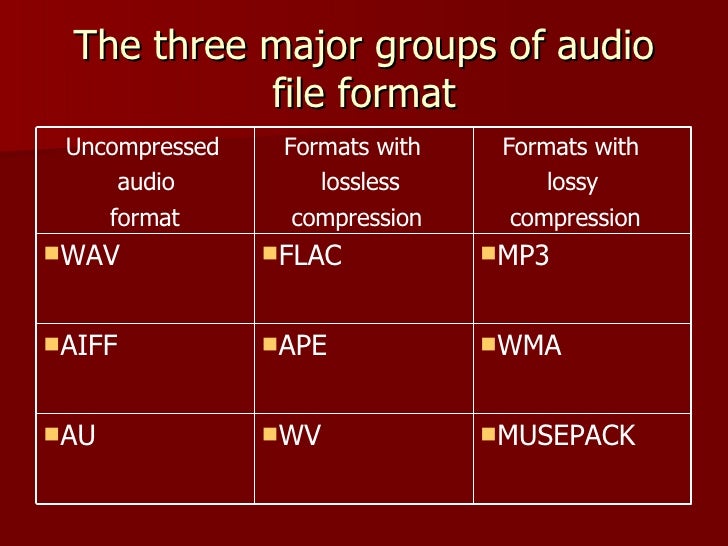
There are two main types of audio compression: lossless and lossy. Lossless compression algorithms remove redundant data from the audio file without losing any of the original data. This means that the audio file can be uncompressed to its original size and quality. Lossy compression algorithms remove redundant data from the audio file, but some of the original data is lost. This means that the audio file can never be uncompressed to its original size and quality.

Lossless Audio Compression Formats

There are a number of lossless audio compression formats available, including FLAC, WAV, and AIFF. FLAC is the most popular lossless audio compression format. It offers high compression ratios with minimal loss of quality. WAV is the uncompressed audio format. It is the most commonly used audio format for professional audio. AIFF is the uncompressed audio format used by Apple products.

Lossy Audio Compression Formats

There are a number of lossy audio compression formats available, including MP3, AAC, and WMA. MP3 is the most popular lossy audio compression format. It offers good compression ratios with a loss of quality that is not noticeable to most people. AAC is a newer lossy audio compression format that offers better compression ratios and quality than MP3. WMA is a lossy audio compression format developed by Microsoft. It offers similar compression ratios and quality to MP3.

Which Audio Compression Format Should I Use?

The best audio compression format to use depends on your needs. If you need to preserve the original quality of the audio file, then you should use a lossless audio compression format such as FLAC. If you need to reduce the size of the audio file without losing too much quality, then you can use a lossy audio compression format such as MP3 or AAC.

Conclusion

Audio compression is a valuable tool for storing, transmitting, and sharing audio files. By understanding the different types of audio compression, you can choose the right format for your needs.

8 Subtitles

Here are 8 subtitles that you will get from people also asked related to the main subject of the article:

  1. What is audio compression?
  2. What are the different types of audio compression?
  3. What are the benefits of audio compression?
  4. What are the drawbacks of audio compression?
  5. Which audio compression format should I use?
  6. How do I compress an audio file?
  7. How do I decompress an audio file?
  8. What are some common problems with audio compression?

Benefits of Audio Compression

There are a number of benefits to audio compression. These include:

  • Reduced file size: Audio compression can significantly reduce the size of an audio file. This makes it easier to store, transmit, and share audio files.
  • Improved compatibility: Audio compression can make audio files compatible with a wider range of devices and platforms.
  • Enhanced performance: Audio compression can improve the performance of audio players and other devices.

Drawbacks of Audio Compression

There are a number of drawbacks to audio compression. These include:

  • Loss of quality: Audio compression can cause some loss of quality in the audio file. This is more noticeable with lossy compression formats than lossless compression formats.
  • Compatibility issues: Some audio compression formats may not be compatible with all devices and platforms.
  • Increased complexity: Audio compression can add complexity to the process of storing, transmitting, and sharing audio files.

Which Audio Compression Format Should I Use?

The best audio compression format to use depends on your needs. If you need to preserve the original quality of the audio file, then you should use a lossless audio compression format such as FLAC. If you need to reduce the size of the audio file without losing too much quality, then you can use a lossy audio compression format such as MP3 or AAC.

How to Compress an Audio File

To compress an audio file, you can use a variety of software programs. Some popular programs include:

  • FLAC: A free and open-source lossless audio compression program.
  • WAV: A free and open-source uncompressed audio compression program.
  • AIFF: A free and open-source uncompressed audio compression program.

How to Decompress an Audio File

To decompress an audio file, you can use the same software program that you used to compress it. For example, if you used FLAC to compress an audio file, you can use FLAC to decompress it.

Audio compression formats

Audio compression formats

Audio Compression Formats

Now there are many audio compression formats that were originally developed for a computer, but later migrated to home appliances. Some of them are outdated and practically unused, some have appeared recently and have not had time to occupy their niche yet. Here I will focus only on the lossy compression formats that allow you to achieve the highest degree of compression of the audio data. What does “lossy compression” mean? Only after encoding from a .wav file to a compressed format, and then re-encoding from a compressed format to a .wav file, the original file and the final file will be different. Maybe not for the better.

audio compression formats

The compressed audio format means that there is practically no change in sound quality, despite the decrease in file size by several times. How do you manage to achieve such a result? The science of psychoacoustics answers this. The human brain is designed in such a way that we do not notice the whisper of books in the background of a conversation, although on a computer, with close listening, we can track this sound. So it turns out that it looks like it is, but it looks like it isn’t …

The combination of conventional data compression methods and the knowledge of what information is perceived by our brain and what is not, allows you to achieve a music compression ratio of up to 10 times with an acceptable sound quality. Below I have provided a brief overview of the most common and well-known music file compression formats that could be used to create a home music collection.

MP3
MPEG 1 Layer III (less often MPEG 2 Layer III), also sometimes called by people as incompetent MPEG 3 (this format does not exist), has been for many years the only association with the phrase “computer music” for many users. Developed in the late 1980s, the format, which allowed music to be compressed up to 10 times without a catastrophic loss of quality, quickly took root in home computers.

The optimal compression bit rate is approximately 192 Kb / s. Although everyone’s ears are different: someone distinguishes distortions better, someone worse. A decent minimum is 128 Kb / s. It is possible to use a variable bit rate. That is, at the moment when the range of sound frequencies is small, the bit rate decreases, and when many things sound at the same time, then, on the contrary, it increases. A constant bit rate greater than 320 Kb / s is often excessive and causes a loss of space. Also, the MP3 file includes a specific area header Id3 tag. Contains basic information about the file. There are 2 different versions of this tag. The second, consequently, is more extensive, but nothing revolutionary has been added. The sound quality of an MP3 file can vary greatly depending on the selected encoder and player.

MPEGplus / Musepack (MP + / MPC / MPP)
This encoder is similar in principle to MPEG Layer II (MP2), but uses a more advanced algorithm. Unlike most modern codecs, the goal of the creators of Musepack was not at all to achieve the highest possible quality at low bit rates. The format is best displayed at medium and high bit rates (typical file bit rate is usually in the 160-180 Kb / s range). A superb psychoacoustic model that uses VBR encoding for excellent sound quality. As a result, the codec performs better than most of its competitors at similar bit rates. The quality of the files obtained when compressed in MPC significantly exceeds the quality of similar MP3 files. One of the serious shortcomings of the current version of Musepack is the limitation of the file format: 44 kHz, 16 bit, stereo, which makes it inapplicable, for example, to compress audio tracks for DVD movies. If MP3 compatibility is not too important to you and you want the highest quality from the final file, choosing Musepack may be the ideal solution. Using this format is a real alternative to using lossless compression to encode music from CDs for those who are already disappointed with the possibilities of the MP3 format. and it is desirable that the quality of the final file is as high as possible, choosing Musepack may be the ideal solution. Using this format is a real alternative to using lossless compression to encode music from CDs for those who are already disappointed with the possibilities of the MP3 format. and it is desirable that the quality of the final file is as high as possible, choosing Musepack may be the ideal solution.

Audio compression, an explanation

Audio compression can be somewhat confusing at first due to the fact that the tools to implement it often have many elements that interact with each other and can be a headache.

Added to all this is the fact that audio / sound compression is often confused with compression in terms of digital formats (MP3 for example), which is a much more complex principle.

That is why we made this guide that aims to attack the most common doubts regarding compressors. The ones I had and the ones you probably have at the moment.

Let’s move on to the important:

What are compressors?

They are essentially an automatic volume or level control.

Let me explain: They are the equivalent of the fader of a console operated by a person in real time, that person has the function of lowering the fader when the volume of an element suddenly rises excessively. All this to control the dynamic range of said element and prevent it from going out of plane.

So what the compressor does in essence is reduce the level of a signal with parameters that are set by the user and that modify how it behaves.

How do they work?

Threshold and knee audio compression
An example of an acting audio compressor showing a 4: 1 reduction contrasting it with the signal without any reduction (1: 1)

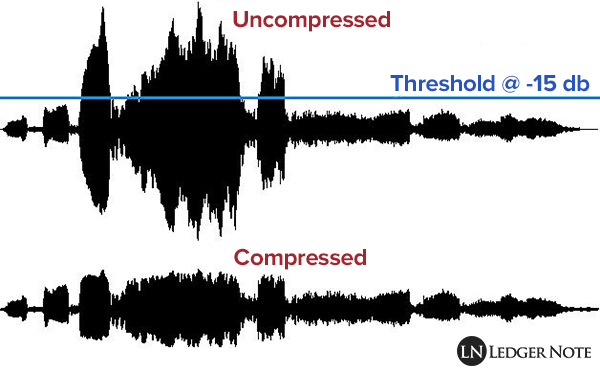
Comparing signals, that is to say: a signal enters the compressor, for example the voice we were talking about before and we set a certain level (threshold or treshold) which, if exceeded, causes the compressor to act reducing the level of said voice at the output as if it were the fader on a console.

So the compressor is all the time comparing the input signal against this threshold and reducing the signal at the output if it passes it. On the other hand, the amount of reduction at the output is not always the same, but can be modified by the user with another parameter.

What are all those knobs?

Compressors have various user-modifiable parameters that appear in the form of knobs on both digital and hardware models. Let’s see what they are:

Threshold or Treshold: we tell the compressor that if the signal goes above a certain level, it reduces it in gain. The lower the amount of signal enters the compression and therefore there will be greater reduction in gain. A detail to keep in mind is that in digital models the threshold will appear as a negative number, in essence the more negative that number is, the lower the threshold and the more signal is compressed.
Compression ratio or Ratio: here we tell the compressor to reduce the signal that exceeds the threshold by a certain proportion established by us. For example, if our signal passes the threshold by 10 decibels and we want it to decrease by 5 decibels, we put a ratio of 2: 1 (it works as a division). At higher rates, there will be a greater reduction, but also the compression may start to be noticeable, which that we generally don’t want to happen. What is sought is that it be transparent so that the listener does not realize that the signal was manipulated.

Attack or Attack: it is the time in seconds (generally in the order of milli seconds) that the compressor takes from the moment the signal passes the threshold to the complete reduction in gain that we set with the compression ratio. Keep in mind that the compressor essentially acts immediately, but it is this time that determines how it interacts with the envelope of the signal to be compressed.

Release: is the time in milli seconds that the compressor takes to return to unity gain once the signal stops being above the set threshold. In the same way that with the attack the release can modify the envelope of the sound in question and therefore is very important in the operation of the compressor.

Knee: it is a parameter found in some compressors that modifies the way in which the compressor begins to act, the name is due to the fact that the curve that describes the way in which the compressor begins to act is similar to a knee (knee in English ).
So that we understand better when we talk about soft knee we are talking about that the compressor starts to act gradually before the set threshold and reaches its compression ratio established in this way. Instead, a hard knee compressor will only act when the signal goes beyond the established threshold and therefore more aggressively.

Make up gain or output gain: is the parameter that controls the compressor’s output gain, after having activated and reduced the signal by a number of decibels. What is sought in general is that what was reduced in level is re-gained and therefore make the parts that had less volume now approach those that were compressed.