Audio compression


Free Download Mp4Gain
picture

Audio compression

Audio Compression

Well-established data compression methods such as RLE, statistical and dictionary methods can be used to compress lossless audio files, but the result is highly dependent on the specific audio data. Some sounds will compress well with RLE, but poorly with statistical algorithms. Statistical compression is more suitable for other sounds, but with a dictionary approach, on the contrary, expansion can occur. Here is a brief overview of the effectiveness of these three methods for compressing audio files.

Audio Compression

RLE works well with sounds that contain long series of repeating sound chunks – samples. With 8-bit sampling, this can happen quite often. Remember that the voltage difference between two 8-bit samples n and n – 1 is approximately 4 mV. A few seconds of homogeneous music, in which the sound wave changes by less than 4 mV, will generate a sequence of thousands of identical samples. With 16-bit sampling, obviously long repeats are less common and therefore the RLE algorithm will be less efficient.

Statistical methods assign variable length codes to audio samples according to their frequency. With 8-bit sampling, there are only 256 different samples, so the samples can be distributed evenly in a large audio file. A file of this type cannot be compressed well with the Huffman method. With 16-bit sampling, more than 65,000 sound bites are allowed. In this case, some samples may be more common and others less common. With a strong probability skew, good results can be achieved with the help of arithmetic coding.

Dictionary-based methods assume that some phrases will appear frequently throughout the file. This occurs in a text file in which individual words or sequences of them are repeated many times. However, the sound is an analog signal and the values ​​of the specific generated samples are highly dependent on the operation of the ADC. For example, with 8-bit sampling, an 8 mV waveform becomes a numeric sample of 2, but a nearby wave of, say 7.6 mV or 8.5 mV, can be converted to a different number. For this reason, voice snippets that contain overlapping phrases and sound the same to us may differ slightly when digitized. Then they will enter the dictionary in the form of different phrases, which will not give the expected compression. Therefore, dictionary methods are not very suitable for audio compression.

You can achieve better results in lossy audio compression by developing compression techniques that take into account the perception of sound. They remove the part of the data that remains inaudible to the audience. It is like compressing images, discarding information invisible to the eye. In both cases, we assume that the original information (image or sound) is analog, that is, part of the information has already been lost during quantization and digitization. Allowing a little more loss with care will not affect the quality of the uncompressed sound reproduction, which will not differ much from the original. We will briefly describe two approaches called silence suppression and compaction.

The idea behind silence suppression is to treat small samples as if they were not there (i.e. they are zero). Such a zeroing will generate a series of zeros, so the method of suppressing pauses is, in fact, a variant of RLE adapted to audio compression. This method is based on the peculiarity of sound perception, which consists of the tolerance of the human ear to rule out barely audible sounds. Audio files containing long stretches of quiet sound will be better compressed using the silence suppression method than files full of loud sounds. This method requires the participation of the user, who will control the parameters that establish the loudness threshold for the samples. This requires two more parameters, which are not necessarily controlled by the user. One parameter is used to determine the shortest sequences of silent samples, usually 2 or 3. And the second sets the smallest number of consecutive strong samples, when silence or pause occurs. For example, 15 silent samples can be followed by 2 strong and then 13 silent,

Consolidation is based on the property that the ear better distinguishes changes in the amplitude of soft sounds than loud sounds. A typical ADC for computer sound cards uses a linear conversion to convert the voltage into a numerical form. If the amplitude a became n, then the amplitude 2 a will become 2 n.


Free Download Mp4Gain
picture


Mp4Gain Main Window
picture


Mp4Gain Features
picture


Free Download Mp4Gain
picture

Audio compression, an explanation

Audio compression can be somewhat confusing at first due to the fact that the tools to implement it often have many elements that interact with each other and can be a headache.

Added to all this is the fact that audio / sound compression is often confused with compression in terms of digital formats (MP3 for example), which is a much more complex principle.

That is why we made this guide that aims to attack the most common doubts regarding compressors. The ones I had and the ones you probably have at the moment.

Let’s move on to the important:

What are compressors?

They are essentially an automatic volume or level control.

Let me explain: They are the equivalent of the fader of a console operated by a person in real time, that person has the function of lowering the fader when the volume of an element suddenly rises excessively. All this to control the dynamic range of said element and prevent it from going out of plane.

So what the compressor does in essence is reduce the level of a signal with parameters that are set by the user and that modify how it behaves.

How do they work?

Threshold and knee audio compression
An example of an acting audio compressor showing a 4: 1 reduction contrasting it with the signal without any reduction (1: 1)

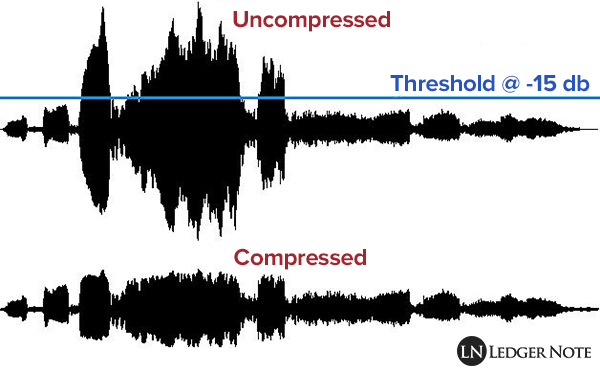
Comparing signals, that is to say: a signal enters the compressor, for example the voice we were talking about before and we set a certain level (threshold or treshold) which, if exceeded, causes the compressor to act reducing the level of said voice at the output as if it were the fader on a console.

So the compressor is all the time comparing the input signal against this threshold and reducing the signal at the output if it passes it. On the other hand, the amount of reduction at the output is not always the same, but can be modified by the user with another parameter.

What are all those knobs?

Compressors have various user-modifiable parameters that appear in the form of knobs on both digital and hardware models. Let’s see what they are:

Threshold or Treshold: we tell the compressor that if the signal goes above a certain level, it reduces it in gain. The lower the amount of signal enters the compression and therefore there will be greater reduction in gain. A detail to keep in mind is that in digital models the threshold will appear as a negative number, in essence the more negative that number is, the lower the threshold and the more signal is compressed.
Compression ratio or Ratio: here we tell the compressor to reduce the signal that exceeds the threshold by a certain proportion established by us. For example, if our signal passes the threshold by 10 decibels and we want it to decrease by 5 decibels, we put a ratio of 2: 1 (it works as a division). At higher rates, there will be a greater reduction, but also the compression may start to be noticeable, which that we generally don’t want to happen. What is sought is that it be transparent so that the listener does not realize that the signal was manipulated.

Attack or Attack: it is the time in seconds (generally in the order of milli seconds) that the compressor takes from the moment the signal passes the threshold to the complete reduction in gain that we set with the compression ratio. Keep in mind that the compressor essentially acts immediately, but it is this time that determines how it interacts with the envelope of the signal to be compressed.

Release: is the time in milli seconds that the compressor takes to return to unity gain once the signal stops being above the set threshold. In the same way that with the attack the release can modify the envelope of the sound in question and therefore is very important in the operation of the compressor.

Knee: it is a parameter found in some compressors that modifies the way in which the compressor begins to act, the name is due to the fact that the curve that describes the way in which the compressor begins to act is similar to a knee (knee in English ).
So that we understand better when we talk about soft knee we are talking about that the compressor starts to act gradually before the set threshold and reaches its compression ratio established in this way. Instead, a hard knee compressor will only act when the signal goes beyond the established threshold and therefore more aggressively.

Make up gain or output gain: is the parameter that controls the compressor’s output gain, after having activated and reduced the signal by a number of decibels. What is sought in general is that what was reduced in level is re-gained and therefore make the parts that had less volume now approach those that were compressed.