Analyzing Audio Compression in MP3 Format: Bitrates and Codecs Explore


Free Download Mp4Gain
picture

Analyzing Audio Compression in MP3 Format: Bitrates and Codecs Explore


Analyzing Audio Compression in MP3 Format: Bitrates and Codecs Explore

What is Audio Compression in MP3 Format?

Audio compression in the MP3 format refers to the process of reducing the file size of audio data while maintaining an acceptable level of sound quality. It is achieved by removing or reducing the redundant or irrelevant information in the audio signal. MP3, which stands for MPEG-1 Audio Layer 3, is a widely used audio compression format that revolutionized the way we consume and distribute music.

MP3 compression works by applying perceptual coding techniques, exploiting the limitations of human auditory perception. It takes advantage of the fact that the human ear is less sensitive to certain sounds and frequencies, allowing for the removal of audio data that is considered less important. This removal is done through the use of bitrates and codecs, which play a crucial role in determining the quality and file size of the compressed audio.

Understanding Bitrates in MP3 Compression

Bitrate is a fundamental aspect of audio compression in the MP3 format. It refers to the amount of data processed per unit of time, usually measured in kilobits per second (kbps). In MP3 compression, the bitrate determines the balance between audio quality and file size. Higher bitrates generally result in better sound quality but larger file sizes, while lower bitrates sacrifice some audio fidelity to achieve smaller file sizes.

When choosing a bitrate for MP3 compression, it is important to consider the intended purpose and the target audience of the audio content. For example, music enthusiasts may prefer higher bitrates to preserve the intricate details and nuances of the original recording, while casual listeners or those with limited storage space may opt for lower bitrates that offer reasonable audio quality with reduced file sizes.

Exploring Codecs in MP3 Compression

Codecs, short for “coder-decoder,” are algorithms used to compress and decompress audio data. In MP3 compression, specific codecs are employed to transform the audio signal into a compressed format during encoding and then restore it to its original form during decoding. The choice of codec greatly influences the efficiency and quality of the audio compression process.

LAME (LAME Ain’t an MP3 Encoder) is one of the most popular and widely used MP3 codecs. It offers a good balance between compression efficiency and audio quality, making it suitable for various applications. Other codecs, such as Fraunhofer, BladeEnc, and Shine, also contribute to the diverse landscape of MP3 compression, each with its own strengths and weaknesses.

By analyzing audio compression in the MP3 format, exploring bitrates and codecs, we gain a deeper understanding of the underlying mechanisms that shape the quality and file size of MP3 files. Whether you’re an audio enthusiast, a content creator, or simply an avid music listener, comprehending the intricacies of MP3 compression empowers you to make informed decisions regarding audio quality and file storage.

Why is Bitrate Selection Important in MP3 Compression?

Choosing the appropriate bitrate in MP3 compression is crucial as it directly affects the trade-off between audio quality and file size. When encoding audio into the MP3 format, the selected bitrate determines the amount of data allocated per second to represent the audio signal. Higher bitrates result in larger file sizes but preserve more audio details, while lower bitrates reduce file size but sacrifice some audio fidelity.

Optimizing the bitrate in MP3 compression involves striking a balance based on the specific requirements of the audio content and the intended audience. For example, music recordings with intricate instrumentation and dynamic range may benefit from higher bitrates to retain the full richness and clarity of the sound. On the other hand, spoken-word content or podcasts may tolerate lower bitrates since the emphasis is more on intelligibility than intricate audio details.

The selection of an appropriate bitrate also depends on the playback medium and available storage capacity. Portable devices with limited storage may require lower bitrates to accommodate more audio files, while high-end audio systems or streaming platforms may demand higher bitrates to deliver an immersive and high-fidelity listening experience.

What Role Do Codecs Play in MP3 Compression?

Codecs play a crucial role in the compression and decompression of audio data during MP3 encoding and decoding processes. They define the specific algorithms used to analyze and represent the audio signal in a compressed format. Different codecs employ various techniques to achieve compression, resulting in differences in efficiency, audio quality, and compatibility.

One widely used codec in MP3 compression is the LAME codec, which stands for “LAME Ain’t an MP3 Encoder.” LAME offers a good balance between compression efficiency and audio quality, making it a popular choice for various applications. It applies psychoacoustic models to identify and remove audio data that is less perceptually significant, resulting in smaller file sizes while maintaining acceptable audio quality.

Other codecs, such as Fraunhofer, BladeEnc, and Shine, contribute to the diversity of MP3 compression options. Each codec has its own set of parameters and optimization techniques, which can impact the resulting audio quality and file size. Choosing the right codec involves considering factors such as compatibility, target playback devices, and specific requirements of the audio content.

    • Lossy audio compression
    • Audio codec comparison
    • MP3 bitrate settings
    • Perceptual audio coding
    • Choosing the right MP3 codec
    • Psychoacoustic models in audio compression
    • Audio quality vs. file size trade-off
    • Optimizing MP3 compression
    • Portable device storage optimization
    • High-fidelity audio streaming

Free Download Mp4Gain
picture


Mp4Gain Main Window
picture


Mp4Gain Features
picture


Free Download Mp4Gain
picture

Pros & Cons of Audio Compression

Pros & Cons of Audio Compression

Audio Compression
Audio Compression
Audio Compression
Audio Compression

Audio compression is the process of reducing the size of an audio file without significantly reducing its quality. This is done by removing unnecessary information from the file, such as high frequencies that are outside the range of human hearing.

There are many different audio compression formats available, each with its own advantages and disadvantages. Some of the most popular formats include MP3, AAC, and FLAC.

Pros of Audio Compression

  • Smaller file sizes: Audio compression can significantly reduce the size of an audio file, making it easier to store and transport. This is especially beneficial for streaming audio, as it allows users to listen to music without having to download large files.
  • Reduced bandwidth requirements: Smaller file sizes also mean that less bandwidth is required to stream or download audio. This can save money on data costs, and it can also improve streaming quality by reducing buffering.
  • Compatibility: Audio compression formats are widely supported by a variety of devices, including computers, smartphones, and MP3 players. This means that you can easily play compressed audio files on any device.

Cons of Audio Compression

  • Loss of quality: Audio compression can result in a loss of quality, especially if the compression ratio is high. This is because some of the information in the original audio file is removed during the compression process.
  • Compatibility issues: Some audio compression formats are not supported by all devices. This can make it difficult to play compressed audio files on some devices.
  • Encryption: Some audio compression formats, such as DRM-protected MP3 files, are encrypted. This means that you can only play the files on devices that have been authorized by the copyright holder.

Conclusion

Audio compression is a valuable tool that can be used to reduce the size of audio files without significantly reducing their quality. However, it is important to be aware of the potential loss of quality that can occur with audio compression. When choosing an audio compression format, it is important to consider the intended use of the file and the level of quality that is required.

Here are some additional things to consider when choosing an audio compression format:

  • Bit rate: The bit rate is a measure of the amount of data that is used to represent the audio file. Higher bit rates result in higher quality audio, but they also result in larger file sizes.
  • Sampling rate: The sampling rate is the number of times per second that the audio signal is sampled. Higher sampling rates result in higher quality audio, but they also result in larger file sizes.
  • Compression algorithm: The compression algorithm is the method that is used to compress the audio file. Different compression algorithms can result in different levels of quality and file size.

Here are some examples of different audio compression formats:

  • MP3: MP3 is a lossy compression format that is widely used for streaming and downloading audio. It offers a good balance between quality and file size.
  • AAC: AAC is another lossy compression format that is similar to MP3. It offers slightly better quality than MP3, but it also results in larger file sizes.
  • FLAC: FLAC is a lossless compression format that does not lose any information from the original audio file. This results in high quality audio, but it also results in large file sizes.

Audio Compression Formats

Audio Compression Formats Overview

Audio Compression Formats

Introduction

Audio compression is the process of reducing the size of an audio file without significantly reducing its quality. This is done by removing redundant data from the file. Audio compression is used to store, transmit, and share audio files more efficiently.

Types of Audio Compression

There are two main types of audio compression: lossless and lossy. Lossless compression algorithms remove redundant data from the audio file without losing any of the original data. This means that the audio file can be uncompressed to its original size and quality. Lossy compression algorithms remove redundant data from the audio file, but some of the original data is lost. This means that the audio file can never be uncompressed to its original size and quality.

Lossless Audio Compression Formats

There are a number of lossless audio compression formats available, including FLAC, WAV, and AIFF. FLAC is the most popular lossless audio compression format. It offers high compression ratios with minimal loss of quality. WAV is the uncompressed audio format. It is the most commonly used audio format for professional audio. AIFF is the uncompressed audio format used by Apple products.

Lossy Audio Compression Formats

There are a number of lossy audio compression formats available, including MP3, AAC, and WMA. MP3 is the most popular lossy audio compression format. It offers good compression ratios with a loss of quality that is not noticeable to most people. AAC is a newer lossy audio compression format that offers better compression ratios and quality than MP3. WMA is a lossy audio compression format developed by Microsoft. It offers similar compression ratios and quality to MP3.

Which Audio Compression Format Should I Use?

The best audio compression format to use depends on your needs. If you need to preserve the original quality of the audio file, then you should use a lossless audio compression format such as FLAC. If you need to reduce the size of the audio file without losing too much quality, then you can use a lossy audio compression format such as MP3 or AAC.

Conclusion

Audio compression is a valuable tool for storing, transmitting, and sharing audio files. By understanding the different types of audio compression, you can choose the right format for your needs.

8 Subtitles

Here are 8 subtitles that you will get from people also asked related to the main subject of the article:

  1. What is audio compression?
  2. What are the different types of audio compression?
  3. What are the benefits of audio compression?
  4. What are the drawbacks of audio compression?
  5. Which audio compression format should I use?
  6. How do I compress an audio file?
  7. How do I decompress an audio file?
  8. What are some common problems with audio compression?

Benefits of Audio Compression

There are a number of benefits to audio compression. These include:

  • Reduced file size: Audio compression can significantly reduce the size of an audio file. This makes it easier to store, transmit, and share audio files.
  • Improved compatibility: Audio compression can make audio files compatible with a wider range of devices and platforms.
  • Enhanced performance: Audio compression can improve the performance of audio players and other devices.

Drawbacks of Audio Compression

There are a number of drawbacks to audio compression. These include:

  • Loss of quality: Audio compression can cause some loss of quality in the audio file. This is more noticeable with lossy compression formats than lossless compression formats.
  • Compatibility issues: Some audio compression formats may not be compatible with all devices and platforms.
  • Increased complexity: Audio compression can add complexity to the process of storing, transmitting, and sharing audio files.

Which Audio Compression Format Should I Use?

The best audio compression format to use depends on your needs. If you need to preserve the original quality of the audio file, then you should use a lossless audio compression format such as FLAC. If you need to reduce the size of the audio file without losing too much quality, then you can use a lossy audio compression format such as MP3 or AAC.

How to Compress an Audio File

To compress an audio file, you can use a variety of software programs. Some popular programs include:

  • FLAC: A free and open-source lossless audio compression program.
  • WAV: A free and open-source uncompressed audio compression program.
  • AIFF: A free and open-source uncompressed audio compression program.

How to Decompress an Audio File

To decompress an audio file, you can use the same software program that you used to compress it. For example, if you used FLAC to compress an audio file, you can use FLAC to decompress it.

What is Audio Compression Threshold and How it Affects Sound Quality

What is Audio Compression Threshold and How it Affects Sound Quality

Audio Compression
Audio Compression
Audio Compression
Audio Compression

Introduction

Audio compression is a technique used to reduce the dynamic range of an audio signal. It is commonly used in music production to make a recording sound louder and more impactful. However, compressing audio too much can lead to a loss of detail and a reduction in sound quality. In this article, we will explore the concept of audio compression threshold and how it affects sound quality.

Understanding Audio Compression

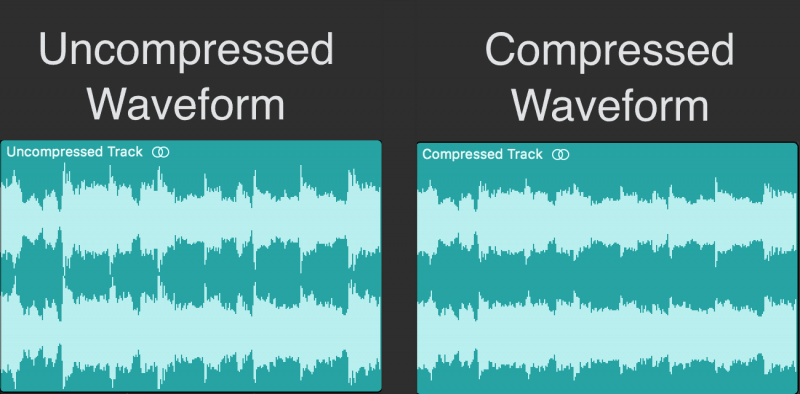
Audio compression is the process of reducing the dynamic range of an audio signal by attenuating the louder parts of the signal while leaving the quieter parts untouched. The main purpose of audio compression is to make the overall level of the audio signal more consistent, which can make it easier to listen to and mix with other tracks.

However, compression can also introduce artifacts such as pumping, breathing, and distortion, which can affect the quality of the sound. Therefore, it’s important to understand the parameters of audio compression, such as threshold, ratio, attack, and release, to achieve the desired sound.

“Compression is like a lens in photography. Just as a lens can bring certain parts of an image into focus while blurring others, compression can bring certain parts of an audio signal into focus while reducing the dynamic range.” – Bobby Owsinski, The Mixing Engineer’s Handbook

What is Audio Compression Threshold?

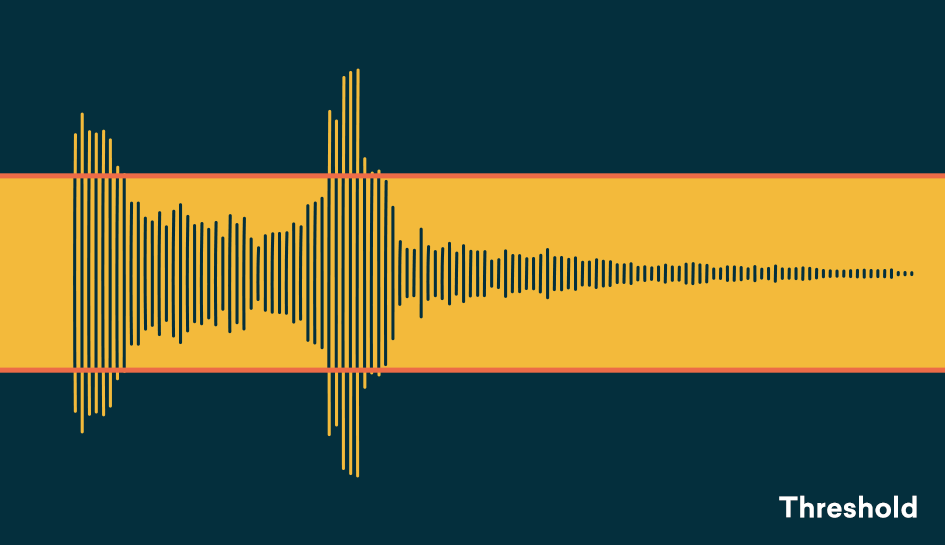
The compression threshold is the level at which the compressor starts to attenuate the audio signal. In other words, it’s the point at which the compressor kicks in and starts reducing the level of the audio signal. The threshold is usually set in decibels (dB), and it can range from -60 dB to 0 dB or higher.

Setting the compression threshold too low can result in over-compression, where the compressor is constantly active and the audio signal loses its natural dynamic range. On the other hand, setting the threshold too high can result in under-compression, where the compressor doesn’t kick in enough and the audio signal remains too dynamic. Therefore, finding the right compression threshold is crucial for achieving the desired sound.

“The compression threshold is the gatekeeper of the compressor. If you set it too low, the compressor will work too hard and the sound will lose its natural dynamics. If you set it too high, the compressor won’t work enough and the sound will be too dynamic.” – Bob Katz, Mastering Audio: The Art and the Science

How Compression Threshold Affects Sound Quality

The compression threshold can have a significant impact on the sound quality of an audio signal. Setting the threshold too low can result in a squashed and lifeless sound, while setting it too high can result in a dynamic and uncontrolled sound. Therefore, it’s important to find the right balance between dynamic range and consistency.

Additionally, different instruments and sounds require different compression thresholds. For example, a snare drum may require a higher threshold than a vocal track, as the snare drum has a shorter decay time and more transient peaks. Therefore, it’s important to adjust the compression threshold for each individual track to achieve the desired sound.

“The compression threshold is like a knife. Use it wisely,
Copy to Clipboard

clipboard emoji

User
continua donde te uedaste que fue en:

“The compression threshold is like a knife. Use it wisely,
ChatGPT

How to determine the right compression threshold

Determining the right compression threshold can be tricky, and it can take some trial and error to find the sweet spot. Here are a few tips to help you get started:

  • Start with a low threshold: A good starting point is a threshold of around -30dB. This will ensure that you are compressing the quieter parts of your audio, without squashing the louder parts.
  • Listen carefully: When you apply compression, listen carefully to the changes in the audio. You want to make sure that the compressor is not introducing any unwanted artifacts or distortion.
  • Experiment with different settings: Try adjusting the threshold up and down to see how it affects the audio. You may also want to experiment with the attack and release times, as well as the ratio setting.

Remember, there is no one-size-fits-all solution when it comes to compression. You will need to experiment to find the settings that work best for your particular audio.

“Compression is a great tool, but it’s easy to overdo it. Always err on the side of subtlety, and remember that sometimes a little goes a long way.”

– Brian Eno

The importance of a balanced mix

One of the most important aspects of audio compression is ensuring that your mix is balanced. If one element of the mix is too loud, you may be tempted to apply heavy compression to bring it down to the same level as the other elements. However, this can result in a dull and lifeless mix.

The key is to start with a well-balanced mix. This means that each element of the mix should be at a similar volume level, without any one element dominating the others. Once you have a balanced mix, you can then use compression to add subtle enhancements and make the mix sound even better.

“A good mix is all about balance. Each element of the mix should have its own space, and nothing should be too dominant.”

– Rick Rubin

The dangers of overcompression

While compression can be a powerful tool for enhancing the sound of your audio, it can also be easy to overdo it. Overcompression can result in a number of unwanted artifacts, including distortion, pumping, and breathing.

One of the main dangers of overcompression is the loss of dynamic range. Dynamic range refers to the difference between the loudest and quietest parts of your audio. When you apply too much compression, you reduce the dynamic range, resulting in a flat and lifeless sound.

Another danger of overcompression is the loss of transients. Transients are the short, sharp peaks in the audio that give it its punch and energy. When you apply too much compression, you can squash these transients, resulting in a dull and uninspired sound.

“Compression is a great tool, but it’s important to remember that it’s just one tool in the toolbox. Don’t rely on it too heavily, and always remember to use it in moderation.”

– Tony Maserati

Audio (audio) compression comparison [mp3, wma, ogg, atrac] Part 2

Audio (audio) compression comparison [mp3, wma, ogg, atrac] Part 2

AUDIO COMPRESSION

[Sound source used and points of interest]
・ 1kHz sine wave
Check for noise or correction. Investigate if abnormal sounds are mixed by emphasis or noise different from the originally generated range.

Audio Compression

· White noise
Check the frequency characteristics. Use sounds that are emitted at the same level for all sounds from 0 to 20 kHz and see if they are reproduced correctly.

·music
Use real music and investigate the differences with the original.

[Bitrate Settings]
Fixed bit rate: 96kHz, 128kHz, 256kHz, 320kHz Variable bit rate: 96-160kHz, 192-320kHz.
However, depending on the software, 320kHz cannot be set fixed and 350 can be set, or the upper and lower limit bits cannot be specified in the variable, and the sound quality standard can be specified in several steps ( medium sound quality, high sound quality). quality).be. Also, there are some that are configured with average bitrate instead of variable bitrate, so understand that it’s not a completely fair comparison.

[Software used [encoder]]
・ MP3 system
Afternoon Koda Ver.3.11a [gogo.exe ver.3.11]
Lame Ivy Frontend Encoder Ver.2.91 [Lame.exe Ver.3.93]
B’s GOLD Ver.7.12 [Unknown]
RipAudiCO Ver.3.70 [leme_enc.dll Ver.3.93]

・OGG system
oggdropXPd Ver.1.7.11 [Unknown]
B’s GOLD Ver.7.12 [Unknown]

・ WMA
B’s GOLD Ver.7.12 [Unknown]
(For WMA, I tried 3 types of software in my environment, but the result was exactly the same (maybe the encoder itself uses the same thing?) And it corresponds by software Since the bitrate range was narrow, only used a type).

・ ATRAC
nothing special. For ATRAC, we recorded analog from a CD player to an MD deck, optically connected an MD deck to a PC, and measured what was captured by WAV.

· To measure
Wave Space Ver.1.31

【others】
Although it is different from the main theme, I converted it to WAV for the visual measurement of each standard (because WaveSpace only supports wav), but the position where the sound of the WAVized data ends and the total playback. We discovered that there was a difference in time. , so we also investigated it.

3.Hardware 3.
Originally, the equipment used should be described in detail here, but the hardware environment is different for each individual, and this survey is only a guide in the first place, and it will be different if other people do the same. is a possibility of results, I will omit the detailed description of the hardware. (The thing is that I don’t have enough equipment to publish)

【Results of the test】
See the following for a summary of the results of each survey.
・White noise measurement result
・1kHz sine wave measurement result
・Music measurement results
・Simple file size and comment list

[Discussion]
ah There seems to be no big difference in file size (between the same bitrate)
stomach. Sound quality appears to be MP3 < WMA < OGG at low bit rates
(MP3: 128 = WMA: 96 < OGG: 96).
Hare. There is little difference at high bit rates
(there is a slight difference in the treble range, but it seems you won’t notice the difference unless you’re in a very good environment).
Worker. The difference in the encoder software was more than I expected
(especially in MP3)

“My conclusion”
[Less than 128]
If you’re worried about popularization (compatibility), [WMA] is good, and if you basically use it alone, [OGG] is good.
(I am worried about the amount of noise or the correction, but I sacrificed a bit on the sound quality anyway, so I chose the one that covers up to the high range as it is. Also, due to the relationship between ① and ②, mp3 is another with the same sound quality.The file size will be larger than

[With 256 and more]
The variable bit rate (192-320) of [Afternoon Koda] is good.
The fixed 320 is good for sound quality, but there is little difference between the fixed 256 and variable high-quality sound, and it seems that you can barely understand it even if you listen to it. If the sound quality is about the same, the smaller the file size, the better.

[Other impressions]
About OGG
I had high expectations for OGG, but I was concerned about the measurement result at 1 kHz, whether it was noise or correction. However, I find the relationship between sound quality (wide playback band) at low bit rates and file size to be excellent. At high bit rates the sound quality and file size are about the same as MP3s so I think MP3s are advantageous considering the penetration rate but I think they are doing pretty well considering the fact that they have just been developed. expected in the future

Audio (audio) compression comparison [mp3, wma, ogg, atrac]

Audio (audio) compression comparison [mp3, wma, ogg, atrac]

Compressed Audio

MP3-typed audio, etc., for storing music that was recorded on cassette tapes, music borrowed from CD rental shops or purchased music CDs, or for easy enjoyment with a portable player or car.

compressed audio

More and more people are recording with compression technology. However, there are many standards such as WMA recommended by Microsoft as well as MP3 when it comes to audio compression. Also, since the sound quality and compression rate of each standard change depending on the bit rate setting and the like, there is a wide variety of compression methods depending on the combination of the standard and the setting.

So, I wanted to check what the sound quality and file size would be when recording with which standard and with which settings, and select the standard that suits my purpose, so I took this survey. However, due to the investigation of the ideas of fans, the software and equipment used were covered by those that are freely obtainable in hand or on the net, so the result may be different from the original performance. , but it is only one. Take it as an example.
Since this test focuses on sound quality, it does not test at a low bit rate, which deteriorates sound quality.

Finally, in conducting this survey, I referenced many documents on the Internet. We would like to express our gratitude to each person (individual/corporation) for facilitating us to review materials that have been researched and created with considerable effort from their respective points of view. The sites I mainly referred to will be featured at the bottom of this page, so I recommend that those who are viewing this also take a look.

[Survey outline]
1. 1. Destination standards
As mentioned above, there are many audio compression standards, but here we have limited them to MP3, WMA, OGG, and ATRAC. The standards and reasons for the survey are shown below.

・MP3 ( Moving Picture Experts Group 1 Audio Layer – 3 )
I chose it because it is probably the best known and most popular standard and there are many compatible players for the same reason.

・WMA ( Windows Media Audio ) _ _
It is widely known alongside MP3. Recently, it has become compatible with car audio and DVD players. Also, according to a theory, the same bitrate is rumored to have higher sound quality and compression than MP3, so I chose it.

・OGG (Ogg Vorbis)
It may not be familiar to you yet, but although MP3 requires a license, the number of compatible players is gradually increasing due to the fact that it is unlicensed but offers high sound quality and high compression. Since it is (apparently) high-performance and license-free, it is easy to develop encoders and playback software, so we chose it with the expectation that it will spread in the future.

・ATRAC ( Advanced TR Transform Acoustic Coding ) _ _
This name may not be familiar to you, but you can understand the standard adopted by MD. Many people think that MD has the same high sound quality as CD, and since it is widely used as a storage medium for music, it was used as a reference for comparison.

・ Reason for not targeting other standards
There are many compression standards in addition to the above, but there are few compatible software and players, and considering the interaction with others (although I cannot say publicly), I judged that the comparison with the three types above is adequate. In addition, there is a standard called OpenMG (ATRAC3) recommended by SONY, etc., and there is no need to adopt other than SONY in mobile players, etc., but there are still few (limited) supported players, and recording is done. except for VAIO users, since it is difficult to do so, it was excluded from the target.

2. 2. Survey method
The three types of sounds selected for the survey were converted to various bit rates of each standard, visually compared to the original sounds, and listened to and evaluated. Also, I heard rumors that although the standard is the same, there are differences depending on the conversion software, so I used various types of software (encoder). the detail is just below.

What do the audio sample rates and sample sizes mean?

What do the audio sample rates and sample sizes mean?

The human hearing range

You can see that MP3 audio files have audio in the number of bits (in seconds) that the player uses, that is, the bit rate that indicates the quality of the audio.

human hearing range

But I am confused with the terms sample rate and sample size. Are they dependent on bit rate and sound quality? Or can it be explained in understandable terms?

This is a great article on the three terms you are asking. In summary, here are three definitions.

Bit rate: the amount of data per second. This can vary within the file (variable bit rate) and can have static values.
Sample Rate – The rate at which audio is measured per second. It is usually measured in kilohertz (kHz). The usual number you can see is 44.1 kHz. This is directly related to the bit depth or the number of bits measured in each cycle.
So at this point you need to do some math and you can see that the bitrate is in bits per second (usually measured in megabits per second). Therefore, bit rate = sample rate x bit depth. As far as I know, your sample size is just one of these 1-second chunks of data.

If you run pure math, you will find that these files are very large, but there are some compression algorithms that have been adopted to keep the files low without a significant loss of quality.

The sample size or bit depth is included, which is a measure of the number of bits in the sample, which is a direct quality measure. However, this only applies to PCM sampling. For irreversible formats like mp3, the sample size doesn’t really define the quality.

See Audio Bit Depth for more information.

1
2012/02/10Florist
Sample rate = There is no sample rate. Of audio samples transported per second

Sample size = The sample size determines the maximum dynamic range of a digitized sound. Dynamic range is the ratio of the maximum amplitude to the minimum non-zero amplitude of a signal, generally expressed in decibels (dB).

The sampling frequency affects the quality of the recorded sound. Therefore, a higher sample rate will improve the quality as the number of bits increases, but will require more data and result in larger files. The bit rate used to store the samples used to store the sampled data also affects the quality of the recording. Bit rate is the amount of space that can be used to store sampled data per second. The higher the bit rate, the better the sound, but more space is required to store the file.

Relationship between human audible range and sample rate

Relationship between human audible range and sample rate

Audio Sample Rate

The two main factors that indicate the performance of an audio interface are the number of sample bits and the sample rate.

sample rate

Of these, the number of sample bits is expressed as a numeric value, such as 16 bits or 24 bits, and last time I introduced that the dynamic range differs based on the difference in the number of sample bits. In other words, we have also used graphs to show that the difference in the number of bits is the precision with which very quiet sound can be expressed.
So what about the other sample rate? The sampling frequency is also called the sampling frequency, but the unit is usually kHz. The most commonly used are 32 kHz, 44.1 kHz, 48 kHz, and 96 kHz.
The Roland audio interfaces introduced last time, such as the UA-1X and UA-3FX, as well as the UA-1D and UA-20, are models that support 44.1 kHz and 48 kHz.

UA-1X dal_4007_s.jpg dal_4002_s.jpg UA-20
UX-1X UA-1D UA-3FX UA-20
As many of you will know, CDs, which can be said to be representative of digital audio, are compatible with 44.1 kHz and with 44.1 kHz, that clear sound can be expressed. But why is it 44.1 kHz? Here is a clear medical basis. It is the relationship with the human audible range, that is, the audible frequency band.
Generally, the highest pitch that can be expressed is said to be half the sample rate. In other words, 44.1 kHz is up to 22.05 kHz and 48 kHz is up to 24 kHz. On the other hand, the range that humans can hear is said to be 20 Hz to 20 kHz for healthy people. Therefore, according to the theory, recording of 20 kHz or more does not make sense because humans cannot perceive it. However, considering a small margin, it is the CD standard that can be expressed up to 22.05kHz. However, the reason it became a medium number like 44.1kHz is that when CD was standardized, the VTR was used for digital recording, and the TV’s horizontal and vertical sync signal was 44.1kHz., It is said which was by using it.

■ Can humans really detect sounds above 20 kHz?

However, if you can’t really hear more than 20 kHz, there is no point in picking up frequencies above that. But is that true?
The answer is clear from the appearance of DVD-Audio, which has a sound quality superior to that of CDs. Yes, it is certainly difficult to recognize 20 kHz or more as a single signal, but when signals of various frequencies, such as music, are expressed in an overlapping way, the atmosphere of the sound that can be heard depends on whether 20 kHz or more is being output. o No. It makes a difference. When I listen to a CD and an analog record, sometimes I feel that the sound of the record is better, but it can also be said that this is the result of not setting an upper limit on the frequency in the case of analogs.
Here, let’s experiment a bit to see if it is true that “the highest pitch that can be expressed is half the sample rate.”

48 kHz 96 kHz 48 kHz 96 kHz
White noise expressed at a sampling frequency of 48 kHz (left) and a sampling frequency of 96 kHz (right). In the case of 48 kHz, the sound is output only up to about 24 kHz, but in the case of 96 kHz, all the sound is output flat. In the two graphs above, the horizontal axis was only up to 48kHz, so it looked completely flat at 96kHz, but when the horizontal axis is up to 96kHz and expressed in exponential notation, it is 48k, which is almost the same as the theoretical . value. You can see exactly what comes out.
The graph shown here shows the extent to which frequency is expressed by creating white noise that mixes evenly from low to loud sounds at 48 kHz and 96 kHz. If you look at this, you can see that the 48 kHz sample rate is up to about 24 kHz and the 96 kHz sample rate is up to 48 kHz. However, the two charts on the right side have an index on the horizontal axis, so it might not seem like much of a difference, but it does have a double number range.
You can say that this is the difference between 48kHz and 96kHz.

■ If you want to make a CD last, do you need 24-bit / 96 kHz specifications?

By the way, some people may have some doubts about the story so far? Yes, I would like to digitally record analog recordings and tapes and eventually convert them to a CD, but if the CD itself is 16-bit / 44.1 kHz, the specs, such as 24-bit / 96 kHz, are above spec. Is it unnecessary?
It certainly may not be necessary if you burn the recording as is to CD without any processing.

What is Sample Rate and Bit Rate Depth?

What is Sample Rate and Bit Rate Depth?

Audio Compression

Both image and video data have some numerical values ​​related to image quality, such as the number of pixels, the number of colors that can be expressed, and the number of frames per second in the case of video.

Audio Compression

Similarly, audio data also has two numerical values ​​related to sound quality, which are the sample rate and the bit rate. I do not understand the difficulty in either case, but I am sure I am not mistaken, so I will write about these two today.

Sampling rate
Let’s start with the sample rate.

Simply put, the sample rate is a numerical value that indicates “how loud the sound is recorded.” For some reason, when the sampling frequency is 44.1 kHz, it is not possible to record up to 44.1 kHz and it seems that it is possible to record up to about 22 kHz. Remember that you register up to half the frequency. If you’re wondering why that happens, google it (laughs).

It seems to have an effect on the sound of musical instruments that produce a crisp sound like cymbals, but I have never bothered to change the sample rate under the same conditions and compare them, so the amount of sound depends on the frequency of sampling. It is unknown if it will change. In professional environments, it is often recorded at 48 kHz. On rare occasions, the sample rate changes the sound quality, and some teachers boast that they can tell the difference. You seem to understand something. I would love to take a blind test, but I don’t have free time to go out with me.

Bit rate depth
This is a numerical representation of “how low a sound can be picked up (small change in volume)”. This can be a bit difficult to imagine.

The higher the bit rate, the smoother the waveform lines will be as the sound rises and falls, and the lower the depth of the bit rate, the rougher it becomes.

There are two options, 16-bit or 24-bit. There are also 32 bits at the moment.

Bitrate is likely to make a difference when recording percussion instruments such as drums (instruments with extremely loud volume). Some engineers record in 16-bit from scratch because the sound impression changes when 24-bit drum sound is converted to 16-bit for burning to CD. Unlike the sample rate, this is quite different.

Personal feeling about sample rate and bit rate.
First of all, the sound quality of commonly sold CDs is 16-bit at 44.1 kHz. And, in the professional field, it is often recorded at 24 bits and 48 kHz (which is called Neyonyonpachi). And the human audible range is said to be up to 20 kHz.

With that in mind, it is honestly ridiculous to see and hear something like “This audio interface supports up to XXkHz, so the sound is good …”. Just record at 2448. And there should hardly be any current audio interface model that doesn’t support 2448.

There are audio interfaces that support 192 kHz, but I honestly doubt the idea that the higher the sample rate, the better the sound quality. The basis of recording is to record the desired sound as loud as possible. To record sounds that are far from the human audible range, reducing the proportion of sounds that we really want (of course, sounds that can be heard by the human ear) is what we call high-quality sound. First of all, I think that high frequency sound is nothing more than noise like white noise. If you think that those high frequency sounds are generated by playing musical instruments, it means that the same or louder sounds are generated from fluorescent lamps and all machines, and those sounds are also recorded.

Data lost due to compression is irreversible Part 2

Data lost due to compression is irreversible Part 2


audio compression

[Quantization bit number (bit depth)]

Audio Compression

◉ Unit: bit
◉ Audio: Resolution related to volume. The higher the value, the more faithfully the quiet sound can be reproduced and the wider the theoretical dynamic range (ratio of the maximum and minimum volume values). 16-bit, 24-bit, and 32-bit floats are used primarily in production.
◉ If you compare it with the video …: Conceptually, it corresponds to the number of gradation bits. In terms of feel, it is almost the same as the dynamic range of the video. The wider the range, the greater the gradation possible without overexposure and underexposure.
◉ Remarks: There is no concept of the amount of quantization bits in compression formats such as MP3.
◉ Image of the number of quantization bits

When a square is cut on the vertical (volume) axis, the volume change less than one step cannot be reproduced, resulting in noise. In other words, the finer the squares, the more accurately the low volume can be reproduced. The actual number of steps in the number of bits in common use is as follows.

・ 16 bits → 65,536 steps

・ 24 bit → 16,777,216 steps

It can be seen that the 24-bit, which is said to be high-resolution, can reproduce the volume change much more accurately than the CD-quality 16-bit. In other words, 24-bit has a “wider dynamic range” than 16-bit.

[Sampling frequency]
◉ Unit: Hz
◉ Audio: Temporal resolution. Involved in the reproducible frequency range. If the frequency is low, the treble range will not be reproduced correctly. As the frequency increases, it is possible to reproduce frequencies above the audible range. Those used primarily in production are 44.1 kHz, 48 kHz, 96 kHz, and 192 kHz.
◉ If you compare it to video …: In terms of temporal resolution, it is equivalent to frame rate. The higher the speed, the smoother the video will be (in the case of sound, it is perceived as treble reproducibility rather than smoothness).
◉ Remarks: The upper limit of the frequency that can actually be reproduced is half the frequency. For example, if the speed is 96 kHz, it can be played up to
48 kHz ◉ Explanatory sampling frequency diagram

If you compare it to a video, you may understand it in some way. As of 2018, I think the lowest line quality that can be used regularly is the “16 bit / 44.1 kHz” used by CDs. If each value gets lower than this, it will collapse more and more so that it can be heard. If the number of bits is small, small sounds are converted to noise, and if the sampling frequency is small, the aliasing noise (noise that is inevitably generated by digitization. Moiré sound phenomenon) falls into the audible range and is comes back jarring. And note that half the value of the sample rate is the upper limit of the actual recorded / played rate. In other words, in the case of “44.1 kHz”, the actual recording / playback is up to about 22 kHz. The human audible range is said to be 20Hz to 20kHz, so that’s a sufficient value in terms of specs. By setting the sample rate to twice the upper limit of this audible range, overlapping noise is removed from the audible range, and by cutting it with a digital filter, jarring noise, which is CD quality, is removed. From this, you can see that “16 bit / 44.1 kHz” is the lowest line.

The master file
must be of high quality

That said, it’s hard to understand how sound quality changes at low bits and low sample rates without actually experiencing it.