Digital Audio Encoding


Free Download Mp4Gain
picture

Digital Audio Encoding

Digital Audio Encoding

What is Digital Audio Encoding?

Digital Audio Encoding is the process of converting an analog audio signal into a digital format, which can be stored, processed, and transmitted electronically. It involves the use of an Analog-to-Digital Converter (ADC) to sample and quantize the analog audio waveform into a series of binary numbers that can be interpreted by a digital device. The resulting digital audio data can then be compressed, processed, and transmitted over various digital platforms, such as the internet, CDs, DVDs, and other digital storage devices.

The Importance of Digital Audio Encoding

Digital Audio Encoding has revolutionized the way we consume and produce audio content. It has made it possible to store, edit, and transmit high-quality audio content with minimal loss of quality. Some of the benefits of digital audio encoding include:

  • Improved sound quality: Digital audio encoding allows for high-quality audio content that is free from the distortions and noise associated with analog audio.
  • Easy storage and transfer: Digital audio files can be easily stored and transferred over various digital platforms with minimal loss of quality.
  • Efficient compression: Digital audio files can be compressed into smaller file sizes without significant loss of quality, making it easier to store and transfer large audio files.
  • Greater accessibility: Digital audio content can be easily accessed over various digital platforms, including the internet, mobile devices, and other digital devices.

The Digital Audio Encoding Process

The Digital Audio Encoding process involves several steps, which include:

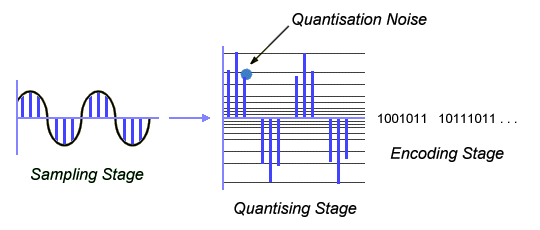
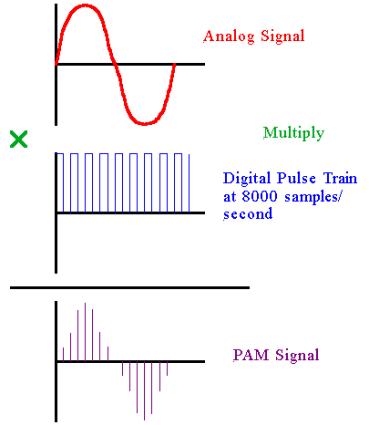
  1. Sampling: The analog audio waveform is sampled at regular intervals using an Analog-to-Digital Converter (ADC).
  2. Quantization: The sampled waveform is quantized, i.e., each sample is assigned a binary number that represents its amplitude value.
  3. Encoding: The quantized samples are encoded into a digital format, such as WAV, MP3, or AAC.
  4. Compression: The encoded digital audio file can be compressed using lossy or lossless compression algorithms to reduce its file size.

Lossy vs. Lossless Audio Compression

Lossy and lossless audio compression are two types of compression algorithms used in digital audio encoding. Lossy compression algorithms compress audio files by removing data that is deemed unnecessary or redundant. This results in a smaller file size but may result in a loss of audio quality. Lossless compression algorithms, on the other hand, compress audio files without any loss of quality. This results in a larger file size but maintains the original audio quality.

Bitrate and its Importance in Digital Audio Encoding

Bitrate is a measure of the amount of data used to represent each second of digital audio. It is measured in bits per second (bps) or kilobits per second (kbps). The bitrate of a digital audio file has a significant impact on its quality and file size. Higher bitrates result in higher quality audio files but also larger file sizes. Lower bitrates result in smaller file sizes but may result in a loss of audio quality.

Common Digital Audio Formats

There are several digital audio formats used in digital audio encoding, including:

  • WAV: WAV is a lossless audio format that is commonly used for storing high-quality audio content.
  • MP3: MP3 is a lossy audio format that is commonly used for compressing and storing digital audio files for playback on various digital devices.
  • AAC: AAC is a lossy audio format that is commonly used for compressing and streaming digital audio content over the internet.
  • FLAC: FLAC is a lossless audio format that is commonly used for storing high-quality audio content, similar to WAV.

Challenges in Digital Audio Encoding

Despite the many benefits of digital audio encoding, there are several challenges that must be addressed to ensure optimal audio quality. These challenges include:

  • Sampling rate limitations: The sampling rate of an ADC can affect the accuracy of the digital audio representation. Higher sampling rates generally result in higher accuracy, but also require larger file sizes.
  • Bit depth limitations: The bit depth of an ADC can affect the dynamic range and noise floor of the digital audio representation. Higher bit depths generally result in higher accuracy, but also require larger file sizes.
  • Compression artifacts: Lossy compression algorithms can introduce compression artifacts, such as distortion and noise, which can degrade audio quality.

Future Developments in Digital Audio Encoding

Digital Audio Encoding is an ever-evolving field, with ongoing developments aimed at improving audio quality, reducing file sizes, and enhancing accessibility. Some of the latest developments include:

  • High-resolution audio: High-resolution audio formats, such as MQA and DSD, offer even higher audio quality than standard digital audio formats.
  • Immersive audio: Immersive audio formats, such as Dolby Atmos and DTS:X, offer a more immersive listening experience by incorporating height and surround sound elements.
  • Object-based audio: Object-based audio formats, such as MPEG-H 3D Audio, offer greater flexibility in audio content creation and delivery by enabling individual audio objects to be separately mixed and streamed.

FAQs

1. What is digital audio encoding?

Digital audio encoding is the process of converting an analog audio signal into a digital format, which can be stored, processed, and transmitted electronically.

2. Why is digital audio encoding important?

Digital audio encoding has revolutionized the way we consume and produce audio content by providing improved sound quality, easy storage and transfer, efficient compression, and greater accessibility.

3. What are some common digital audio formats?

Some common digital audio formats include WAV, MP3, AAC, and FLAC.

4. What is the difference between lossy and lossless audio compression?

Lossy compression algorithms compress audio files by removing data that is deemed unnecessary or redundant, resulting in a smaller file size but may result in a loss of audio quality. Lossless compression algorithms compress audio files without any loss of quality, resulting in a larger file size but maintaining the original audio quality.

5. What is bitrate and why is it important in digital audio encoding?

Bitrate is a measure of the amount of data used to represent each second of digital audio. It is important in digital audio encoding because it has a significant impact on audio quality and file size.

6. What are some challenges in digital audio encoding?

Some challenges in digital audio encoding include sampling rate limitations, bit depth limitations, and compression artifacts.

7. What are some future developments in digital audio encoding?

Some future developments in digital audio encoding include high-resolution audio, immersive audio, and object-based audio.

8. What is the difference between a lossy and lossless audio format?

Lossy audio formats use compression algorithms to reduce file size, sacrificing some audio quality in the process. Lossless audio formats, on the other hand, use compression algorithms that do not compromise audio quality, resulting in larger file sizes.

9. What is a sampling rate and how does it affect audio quality?

A sampling rate is the number of times per second that an analog audio signal is measured and converted into a digital signal. The higher the sampling rate, the more accurately the digital signal represents the original analog signal, resulting in higher audio quality. However, higher sampling rates also require larger file sizes and more processing power.

10. What is bit depth and how does it affect audio quality?

Bit depth refers to the number of bits used to represent each audio sample in a digital audio file. A higher bit depth allows for a greater dynamic range and lower noise floor, resulting in higher audio quality. However, higher bit depths also require larger file sizes and more processing power.

11. What is lossless compression?

Lossless compression is a compression algorithm that reduces the size of a digital audio file without sacrificing any audio quality. This is achieved by identifying and removing redundant or unnecessary data in the audio file.

12. What is immersive audio and how does it enhance the listening experience?

Immersive audio is an audio format that uses spatial sound technology to create a more immersive listening experience. This is achieved by incorporating height and surround sound elements, which create a more three-dimensional soundstage. This allows for a more realistic and engaging listening experience, especially when combined with a surround sound system.

Conclusion

Digital audio encoding has revolutionized the way we produce and consume audio content, providing improved sound quality, easy storage and transfer, efficient compression, and greater accessibility. While there are some challenges to overcome, ongoing developments in high-resolution, immersive, and object-based audio formats promise to further enhance the digital audio experience.

References

  • Bosi, M., & Goldberg, R. (2012). Introduction to digital audio coding and standards. Springer Science & Business Media.
  • Thompson, J. (2013). Understanding digital audio. Focal Press.

Free Download Mp4Gain
picture


Mp4Gain Main Window
picture


Mp4Gain Features
picture


Free Download Mp4Gain
picture

The Science Behind Digital Audio Compression

The Science Behind Digital Audio Compression

Digital Audio Compression


Digital audio compression is a complex topic that is often misunderstood. It is a process that reduces the size of digital audio files without affecting the overall quality of the sound. The goal of this article is to provide a comprehensive overview of the science behind digital audio compression, including its history, the different types of compression, and how it affects the quality of the sound.

Digital Audio Compression

The History of Digital Audio Compression

The history of digital audio compression can be traced back to the early 1990s when the first MP3 encoder was developed. MP3 stands for MPEG-1 Audio Layer 3 and is a method of compressing digital audio files. This compression method quickly gained popularity due to its ability to reduce file size without compromising the quality of the sound.

Since then, many different types of digital audio compression have been developed, each with its own set of advantages and disadvantages. However, they all work on the same principle of reducing the amount of data in the audio file while maintaining the overall quality of the sound.

The Different Types of Digital Audio Compression

There are two main types of digital audio compression: lossy and lossless. Lossy compression is the most common type of compression and is used in formats like MP3, AAC, and WMA. It works by removing parts of the audio file that are deemed less important to the overall quality of the sound.

Lossless compression, on the other hand, is used in formats like FLAC and ALAC. This method of compression works by compressing the file in a way that allows it to be decompressed back to its original form without losing any of the data. This means that the sound quality is preserved, but the file size is still reduced.

The Science Behind Digital Audio Compression

Digital audio compression works by reducing the amount of data in an audio file. The amount of data in an audio file is measured in bits per second (bps) or kilobits per second (kbps). The higher the bitrate, the better the quality of the sound. However, higher bitrates also mean larger file sizes.

Compression algorithms work by analyzing the audio data and removing parts that are not critical to the overall sound quality. These parts can include frequencies that are outside the range of human hearing or parts that are masked by other sounds in the file.

Once the compression algorithm has identified the parts of the file that can be removed, it uses a mathematical formula to compress the remaining data. This formula is designed to reduce the size of the file without affecting the overall quality of the sound.

The Effects of Compression on Sound Quality

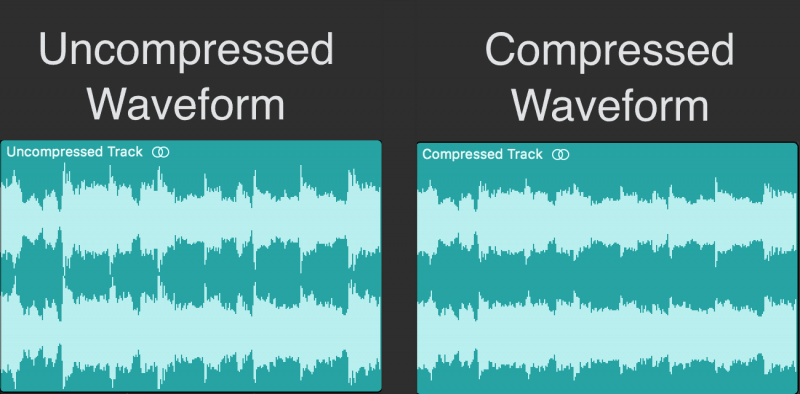
The goal of digital audio compression is to reduce the size of the file without affecting the overall quality of the sound. However, compression can have some effects on sound quality, depending on the type of compression used and the bitrate of the original file.

Lossy compression, for example, can result in a loss of high-frequency information and dynamic range. This can lead to a loss of detail in the sound and a less natural-sounding reproduction of the original recording.

Lossless compression, on the other hand, preserves the original sound quality of the recording, but the resulting file sizes can still be quite large. This makes it less practical for use in situations where file size is a concern.

The Future of Digital Audio Compression

The future of digital audio compression is closely tied to the ongoing development of digital audio technology. As technology continues to improve, the potential for more efficient compression algorithms and higher quality sound reproduction is becoming a reality.

One of the most exciting developments in digital audio compression is the emergence of artificial intelligence (AI) and machine learning. These technologies have the potential to create compression

Audio (audio) compression comparison [mp3, wma, ogg, atrac] Part 2

Audio (audio) compression comparison [mp3, wma, ogg, atrac] Part 2

AUDIO COMPRESSION

[Sound source used and points of interest]
・ 1kHz sine wave
Check for noise or correction. Investigate if abnormal sounds are mixed by emphasis or noise different from the originally generated range.

Audio Compression

· White noise
Check the frequency characteristics. Use sounds that are emitted at the same level for all sounds from 0 to 20 kHz and see if they are reproduced correctly.

·music
Use real music and investigate the differences with the original.

[Bitrate Settings]
Fixed bit rate: 96kHz, 128kHz, 256kHz, 320kHz Variable bit rate: 96-160kHz, 192-320kHz.
However, depending on the software, 320kHz cannot be set fixed and 350 can be set, or the upper and lower limit bits cannot be specified in the variable, and the sound quality standard can be specified in several steps ( medium sound quality, high sound quality). quality).be. Also, there are some that are configured with average bitrate instead of variable bitrate, so understand that it’s not a completely fair comparison.

[Software used [encoder]]
・ MP3 system
Afternoon Koda Ver.3.11a [gogo.exe ver.3.11]
Lame Ivy Frontend Encoder Ver.2.91 [Lame.exe Ver.3.93]
B’s GOLD Ver.7.12 [Unknown]
RipAudiCO Ver.3.70 [leme_enc.dll Ver.3.93]

・OGG system
oggdropXPd Ver.1.7.11 [Unknown]
B’s GOLD Ver.7.12 [Unknown]

・ WMA
B’s GOLD Ver.7.12 [Unknown]
(For WMA, I tried 3 types of software in my environment, but the result was exactly the same (maybe the encoder itself uses the same thing?) And it corresponds by software Since the bitrate range was narrow, only used a type).

・ ATRAC
nothing special. For ATRAC, we recorded analog from a CD player to an MD deck, optically connected an MD deck to a PC, and measured what was captured by WAV.

· To measure
Wave Space Ver.1.31

【others】
Although it is different from the main theme, I converted it to WAV for the visual measurement of each standard (because WaveSpace only supports wav), but the position where the sound of the WAVized data ends and the total playback. We discovered that there was a difference in time. , so we also investigated it.

3.Hardware 3.
Originally, the equipment used should be described in detail here, but the hardware environment is different for each individual, and this survey is only a guide in the first place, and it will be different if other people do the same. is a possibility of results, I will omit the detailed description of the hardware. (The thing is that I don’t have enough equipment to publish)

【Results of the test】
See the following for a summary of the results of each survey.
・White noise measurement result
・1kHz sine wave measurement result
・Music measurement results
・Simple file size and comment list

[Discussion]
ah There seems to be no big difference in file size (between the same bitrate)
stomach. Sound quality appears to be MP3 < WMA < OGG at low bit rates
(MP3: 128 = WMA: 96 < OGG: 96).
Hare. There is little difference at high bit rates
(there is a slight difference in the treble range, but it seems you won’t notice the difference unless you’re in a very good environment).
Worker. The difference in the encoder software was more than I expected
(especially in MP3)

“My conclusion”
[Less than 128]
If you’re worried about popularization (compatibility), [WMA] is good, and if you basically use it alone, [OGG] is good.
(I am worried about the amount of noise or the correction, but I sacrificed a bit on the sound quality anyway, so I chose the one that covers up to the high range as it is. Also, due to the relationship between ① and ②, mp3 is another with the same sound quality.The file size will be larger than

[With 256 and more]
The variable bit rate (192-320) of [Afternoon Koda] is good.
The fixed 320 is good for sound quality, but there is little difference between the fixed 256 and variable high-quality sound, and it seems that you can barely understand it even if you listen to it. If the sound quality is about the same, the smaller the file size, the better.

[Other impressions]
About OGG
I had high expectations for OGG, but I was concerned about the measurement result at 1 kHz, whether it was noise or correction. However, I find the relationship between sound quality (wide playback band) at low bit rates and file size to be excellent. At high bit rates the sound quality and file size are about the same as MP3s so I think MP3s are advantageous considering the penetration rate but I think they are doing pretty well considering the fact that they have just been developed. expected in the future

Audio (audio) compression comparison [mp3, wma, ogg, atrac]

Audio (audio) compression comparison [mp3, wma, ogg, atrac]

Compressed Audio

MP3-typed audio, etc., for storing music that was recorded on cassette tapes, music borrowed from CD rental shops or purchased music CDs, or for easy enjoyment with a portable player or car.

compressed audio

More and more people are recording with compression technology. However, there are many standards such as WMA recommended by Microsoft as well as MP3 when it comes to audio compression. Also, since the sound quality and compression rate of each standard change depending on the bit rate setting and the like, there is a wide variety of compression methods depending on the combination of the standard and the setting.

So, I wanted to check what the sound quality and file size would be when recording with which standard and with which settings, and select the standard that suits my purpose, so I took this survey. However, due to the investigation of the ideas of fans, the software and equipment used were covered by those that are freely obtainable in hand or on the net, so the result may be different from the original performance. , but it is only one. Take it as an example.
Since this test focuses on sound quality, it does not test at a low bit rate, which deteriorates sound quality.

Finally, in conducting this survey, I referenced many documents on the Internet. We would like to express our gratitude to each person (individual/corporation) for facilitating us to review materials that have been researched and created with considerable effort from their respective points of view. The sites I mainly referred to will be featured at the bottom of this page, so I recommend that those who are viewing this also take a look.

[Survey outline]
1. 1. Destination standards
As mentioned above, there are many audio compression standards, but here we have limited them to MP3, WMA, OGG, and ATRAC. The standards and reasons for the survey are shown below.

・MP3 ( Moving Picture Experts Group 1 Audio Layer – 3 )
I chose it because it is probably the best known and most popular standard and there are many compatible players for the same reason.

・WMA ( Windows Media Audio ) _ _
It is widely known alongside MP3. Recently, it has become compatible with car audio and DVD players. Also, according to a theory, the same bitrate is rumored to have higher sound quality and compression than MP3, so I chose it.

・OGG (Ogg Vorbis)
It may not be familiar to you yet, but although MP3 requires a license, the number of compatible players is gradually increasing due to the fact that it is unlicensed but offers high sound quality and high compression. Since it is (apparently) high-performance and license-free, it is easy to develop encoders and playback software, so we chose it with the expectation that it will spread in the future.

・ATRAC ( Advanced TR Transform Acoustic Coding ) _ _
This name may not be familiar to you, but you can understand the standard adopted by MD. Many people think that MD has the same high sound quality as CD, and since it is widely used as a storage medium for music, it was used as a reference for comparison.

・ Reason for not targeting other standards
There are many compression standards in addition to the above, but there are few compatible software and players, and considering the interaction with others (although I cannot say publicly), I judged that the comparison with the three types above is adequate. In addition, there is a standard called OpenMG (ATRAC3) recommended by SONY, etc., and there is no need to adopt other than SONY in mobile players, etc., but there are still few (limited) supported players, and recording is done. except for VAIO users, since it is difficult to do so, it was excluded from the target.

2. 2. Survey method
The three types of sounds selected for the survey were converted to various bit rates of each standard, visually compared to the original sounds, and listened to and evaluated. Also, I heard rumors that although the standard is the same, there are differences depending on the conversion software, so I used various types of software (encoder). the detail is just below.

What is a bit rate?

What is a bit rate?

BITRATE

I write “What is a bit rate?”, But most people can say “Bit rate? I have never heard of it”.

bitrate

Have you ever seen “MP3 128kbps” when going to home electronics retail stores?

MP3 is a compression format and the next 128 kbps is the part called the bit rate. This is an indicator of “how much data is converted per second”. The higher the number, the better the sound quality.

Conversely, the lower the number, the higher the compression ratio, but the worse the sound quality.

In other words, what is even more different from CD and MD players is that you can decide the sound quality yourself. (For indecisive people, it means “you have to decide yourself the goodness of the sound quality” (^ o ^) /)

I’m the last person, so it took me two weeks to decide …

If you don’t know, that’s fine. Most media players are set to MP3 128 kbps by default (initial state) or are recommended by the manufacturer’s software. For Windows Media Player, the extension is wma.

So if you don’t mind too much, buy it and import it on your computer and transfer it! It’s okay. Actually, I can’t tell the difference when I set it to 128 kbps or more. Is it a place where you can focus and see the difference between 128 kbps and 192bps? (If you have a good ear, you will be able to understand it in your daily life …)

So when does the bitrate change?
~~ By increasing the bit rate ~~
For example, if you buy a large capacity player, about 10,000 songs will be included. You don’t listen that much, you can’t hear it, right? So if the capacity is full I think it is fine to capture at 192 kbps or the highest 320 kbps. (To be honest, I don’t know the difference between 192 kbps and 320 kbps)

If it is a classical song, you can increase the bit rate by one step. That is a song to enjoy the song. I think pop music can be left as is. I enjoy singing.

It’s okay to change it depending on the song, but it might get annoying soon. .. ..

~~ By reducing the bit rate ~~ Since the
Flash memory player capacity is limited, some people use it with a lower bit rate. However, at 64 kps, you can see that the sound quality is clearly bad. Music like nothing? If so, one way is to downsize it to save capacity.

If you don’t have enough capacity, you can reduce it if you are learning a language. “So should we learn with poor sound quality?” It is true that the sound is a little worse, but the sound range (frequency) is limited to the human voice, so it is better than music. The sound did not get worse. If you don’t need it, 128 kbps is enough.

By the way, I put the difference in the bitrate as shown below. Actually, the file size is compressed to correspond to each one. The optimal compression rate is 128 kbps. Can you tell the difference compared to the original logo?

What is the “clock” on a CD?

What is the “clock” on a CD?

CD Player

The CD player contains a biological clock. You may think it is true, but it is a fact.

Cd Player

A watch is called a “clock” and it actually carries a crystal oscillator (crystal clock) that keeps the exact time. This is not for the timer. Time is important to read the information recorded on the CD, and the crystal clock, which is the body’s clock, plays an important role. Since this is a very high frequency pulse (clock pulse), it splits (slows down the count) and issues the necessary commands to various blocks in the player.

Let’s teach the seeds we are proud of as an ear study. “The clock is related to the pit length of the CD.” In order for the player to read the 0 and 1 information of the hole, it is necessary that the length of the hole and the time of the biological clock coincide exactly, but for that purpose it is not good. The length of the pit is set to an integral multiple of the clock. There are actually only 9 types of wells on the board, from the shortest (3T) to the longest (9T). You can see that T is a clock pulse and it is a well-researched format.

If the clock is wrong, the sound will be cloudy. This is because the pasle’s time axis fluctuates and jitter occurs. Therefore, the topic of discussion among fans is the external clock. If your body clock is poor, there are other, much more accurate cesium and rubidium clocks. You can use this pulse to move the player! This is why some high-end CD players have an external clock input.

Next time, let’s go through the glossary and how to read the optical disc player specifications that have come out so far.

CD Player Sound Quality Enhancement Technology: What are High Bits and High Sampling?

CD Player Sound Quality Enhancement Technology: What are High Bits and High Sampling?

However, CD players have various technologies to improve the sound depending on the manufacturer.

Like Denon’s AL24 processing and Pioneer’s legato link conversion. Even if the name is different for each manufacturer, it basically reproduces the subtle nuances and quirky atmosphere of the original analog audio that was cut on CD using extended technology like high bit and high sample. It’s just a device in CD format, but when you ask it, it certainly feels clear and the amount of information has increased.

So what kind of processing are you doing?

sampling

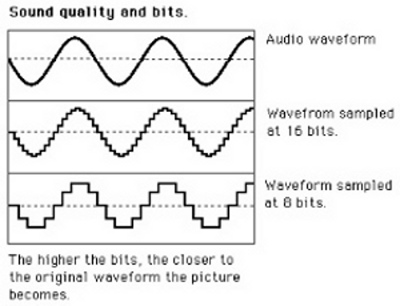
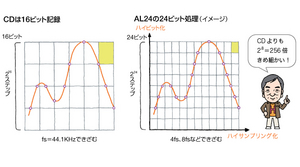
The left side of the figure is a normal CD format. The horizontal axis is incremented by fs = 44.1 kHz and the sample data is read with 16-bit precision. This is as explained above and unless there is special processing on the player side it will play as is with CD audio.

But the figure on the right is different. This is an image of the AL24 example, and the bits are expanded from the usual 16-bit to 24-bit using a dedicated chip. So a simple calculation can express a fine sound that is 2 to the eighth power, that is, 256 times. It seems that the upper and lower bits are moved and advanced things are done, but due to such bit expansion and high sampling (extending the high frequency range) like 4fs and 8fs in the direction of the horizontal axis, the squares are much smaller . Even if it is a CD, you can enjoy high-quality sound that surpasses that of a CD.

PCM conversion flow

PCM conversion flow

Pulse Code Modulation

Let’s summarize how analog music signals are digitized in PCM and burned to CD. PCM is an abbreviation for pulse code modulation. In Japanese, it translates to pulse code modulation method.

PCM

The music signal is originally a continuous analog signal. A continuous waveform that ripples like a wave will not fit in the hole of a CD as is, so test it first. What part of the rippling wave should be used as a sample? Of course, it is necessary to have regular intervals, and in the case of CD, it is decided to sample at 44.1 kHz. kHz is a unit of frequency and is the number of repetitions per second. We’re going to sample at a tremendous rate of 44,100 times per second. The job of sampling is sampling, and it does not mean that the waves are crushed separately.

After sampling in the direction of the time axis in this way, the next step is how to read the discrete data (points) with what precision. This is the quantification. It’s not used often, but in English it’s called quantizing. Since the vertical axis of the graph is the signal level, that is, the magnitude, the precision point is how many steps to read to the highest point of the wave. The unit is the number of bits.

The bits are a binary number in the digital count. Binary numbers are a game, and as the number of bits increases, the number that can be expressed at an accelerated rate increases (number of steps = sampling precision). The calculation is “2 raised to the power of the bits.” For example, 3 bits would have 2 x 2 x 2 = 8 steps, but 5 bits would have 2 x 2 x 2 x 2 x 2 = 32 steps. It seems that it will be incredible if we continue like this. Yes, 16 bits is 2 to the power of 16, so multiply 2 16 times to get 65536 steps. Remember the “65,000 steps”.

Still, it’s not analog per se, but if you play it on a CD player it will play the original continuous analog wave, which is why digital is Erai. Actually, after quantization, the encoding work is done and a 16-bit PCM digital signal is obtained as “010011 … 10”.

Digital is strict and, in fact, there are some rules. It is often said that “CD has a frequency range of 20 kHz and a dynamic range of 96 dB”. This is determined solely by the format. To put it bluntly, the 20 kHz high-frequency range comes from the sample rate, while the 16-bit quantization defines the D range as 96 dB.

It’s kind of logical, but it’s called “Shannon’s Sampling Theorem (Erai scholar)”, and it can record high frequencies up to almost half the sampling frequency (fs). For quantization, there is a guideline of 6 decibels per bit, which is 6 x 16 = 96 decibels.

What are the sample rate, the number of quantization bits, and the clock?

What are the sample rate, the number of quantization bits, and the clock?

Sample Rate and Bit Depth

There is some format jargon that you really need to know about CDs. It is the “sample rate” and the “quantization bit number”.

Sample Rate and Bit Depth

Related to that, you will deepen your understanding if you also learn about the “clock” from the CD. The next time you learn “How to Read Specifications / Optical Discs”, it will go into your head.

■ What is the sampling frequency and the number of bits?

Digital audio recorded on a CD has a 44.1 kHz sample rate and a 16-bit quantization bit rate, right? Yes, that is correct. It has appeared several times so far, but this is the first time that we have explained it in detail from the basics.

First, let’s start with the image. Just the esoteric feeling of sampling and quantizing, and the “vertical slice” and “horizontal slice” of the signals first. Think of it like cutting a radish. First of all, I’ll cut it vertically with a kitchen knife. You can make a lot of cuts, but they were originally continuous. The solid curve is the analog voice, and the first thing to do when digitizing it is the “vertical slice” = “sample” image.

Next is the quantification work. Even if the cut is a cut, it is quantified to “cross” the kitchen knife on its side. Then the radish will be divided into small squares. Did you imagine that the finer the square, the closer it is to the original analog signal?

The CD format is the rule of how fine the radish is cut (analog signal). “The sampling frequency is 44.1 kHz and the number of quantization bits is 16 bits” means that the first sampling is done at a rate of 44,100 times per second, and then the level is read with an accuracy of 16 bits (2 to power step 16). . Sampling is also called sampling, but in the first place, sampling is the norm, and without sampling, the quantification work cannot be done.

What is the so-called bit rate?

What is the so-called bit rate?

BitRate

A value indicating how many bits of information are processed or sent / received per unit of time.

AUDIO COMPRESSION

Also called transfer fee. The amount of information in one second of audio data and video data is expressed in “bits per second” (bps: bits per second). Usually used in conjunction with “k (kilo)” which represents a unit of thousand or “M (mega)” which represents one million units because the number of digits increases and is expressed as “kbps” or “Mbps” . (1 kbps is 1000 bps, 1 Mbps is 1 million bps). It is often used in the audiovisual (AV) genre, and in the case of audio and image data, the higher the value, the more detailed the information, and the better the sound quality and picture quality. The standard bit rate for MP3, one of the audio compression formats, is 128 kilobits per second (kbps), which compresses uncompressed WAV files (approximately 1400 kbps) with CD sound quality to approximately one-tenth of the amount of information. what are you doing. The video bit rate is higher due to the large amount of information, and the high definition terrestrial digital transmission is about 18 megabits per second (Mbps), and the BS high definition digital transmission is about 24 Mbps. Also There is a unit that expresses the transfer speed, “bytes per second” (Bps or B / s), which is a reference value that expresses the number of bytes per second. Since 1 byte is 8 bits, Bps can be calculated by dividing bps by 8.

Bit rate

It is the data communication speed, which is the amount of data that can be sent and received in a certain period of time. The unit is “bps”, which is short for “bits per second”. It is also used to refer to the amount of data used to express one second of video or audio when compressing video or audio. The greater the amount of data (= lower the compression rate), the more faithful it will be to the original, but a high-speed communication line is required.
On the other hand, as the amount of data is reduced (= the compression rate is higher), the image quality and sound quality deteriorate, but transmission is possible even in an environment where the communication speed is slow .
⇨  bps, transmission.

Processed per unit of time, or the transfer is a bit number. It is generally expressed as a number per second and uses bps as the unit. In a computer network, it is represented by a physical quantity as a communication speed, and in data transfer with a peripheral circuit or device within a computer, it is represented by a physical quantity as a transfer speed. It is also used as a unit to express the amount of information per second when compressing audio and video data, and if this value is the same, the higher the value, the higher the sound quality and picture quality. ◇ Also called “bit rate”, “bit efficiency” and “bit rate”.