What is a bit rate?


Free Download Mp4Gain
picture

What is a bit rate?

BITRATE

I write “What is a bit rate?”, But most people can say “Bit rate? I have never heard of it”.
bitrate

Have you ever seen “MP3 128kbps” when going to home electronics retail stores?

MP3 is a compression format and the next 128 kbps is the part called the bit rate. This is an indicator of “how much data is converted per second”. The higher the number, the better the sound quality.

Conversely, the lower the number, the higher the compression ratio, but the worse the sound quality.

In other words, what is even more different from CD and MD players is that you can decide the sound quality yourself. (For indecisive people, it means “you have to decide yourself the goodness of the sound quality” (^ o ^) /)

I’m the last person, so it took me two weeks to decide …

If you don’t know, that’s fine. Most media players are set to MP3 128 kbps by default (initial state) or are recommended by the manufacturer’s software. For Windows Media Player, the extension is wma.

So if you don’t mind too much, buy it and import it on your computer and transfer it! It’s okay. Actually, I can’t tell the difference when I set it to 128 kbps or more. Is it a place where you can focus and see the difference between 128 kbps and 192bps? (If you have a good ear, you will be able to understand it in your daily life …)

So when does the bitrate change?
~~ By increasing the bit rate ~~
For example, if you buy a large capacity player, about 10,000 songs will be included. You don’t listen that much, you can’t hear it, right? So if the capacity is full I think it is fine to capture at 192 kbps or the highest 320 kbps. (To be honest, I don’t know the difference between 192 kbps and 320 kbps)

If it is a classical song, you can increase the bit rate by one step. That is a song to enjoy the song. I think pop music can be left as is. I enjoy singing.

It’s okay to change it depending on the song, but it might get annoying soon. .. ..

~~ By reducing the bit rate ~~ Since the
Flash memory player capacity is limited, some people use it with a lower bit rate. However, at 64 kps, you can see that the sound quality is clearly bad. Music like nothing? If so, one way is to downsize it to save capacity.

If you don’t have enough capacity, you can reduce it if you are learning a language. “So should we learn with poor sound quality?” It is true that the sound is a little worse, but the sound range (frequency) is limited to the human voice, so it is better than music. The sound did not get worse. If you don’t need it, 128 kbps is enough.

By the way, I put the difference in the bitrate as shown below. Actually, the file size is compressed to correspond to each one. The optimal compression rate is 128 kbps. Can you tell the difference compared to the original logo?


Free Download Mp4Gain
picture


Mp4Gain Main Window
picture


Mp4Gain Features
picture


Free Download Mp4Gain
picture

What is the “clock” on a CD?

What is the “clock” on a CD?

CD Player

The CD player contains a biological clock. You may think it is true, but it is a fact.

Cd Player

A watch is called a “clock” and it actually carries a crystal oscillator (crystal clock) that keeps the exact time. This is not for the timer. Time is important to read the information recorded on the CD, and the crystal clock, which is the body’s clock, plays an important role. Since this is a very high frequency pulse (clock pulse), it splits (slows down the count) and issues the necessary commands to various blocks in the player.

Let’s teach the seeds we are proud of as an ear study. “The clock is related to the pit length of the CD.” In order for the player to read the 0 and 1 information of the hole, it is necessary that the length of the hole and the time of the biological clock coincide exactly, but for that purpose it is not good. The length of the pit is set to an integral multiple of the clock. There are actually only 9 types of wells on the board, from the shortest (3T) to the longest (9T). You can see that T is a clock pulse and it is a well-researched format.

If the clock is wrong, the sound will be cloudy. This is because the pasle’s time axis fluctuates and jitter occurs. Therefore, the topic of discussion among fans is the external clock. If your body clock is poor, there are other, much more accurate cesium and rubidium clocks. You can use this pulse to move the player! This is why some high-end CD players have an external clock input.

Next time, let’s go through the glossary and how to read the optical disc player specifications that have come out so far.

CD Player Sound Quality Enhancement Technology: What are High Bits and High Sampling?

CD Player Sound Quality Enhancement Technology: What are High Bits and High Sampling?

However, CD players have various technologies to improve the sound depending on the manufacturer.

Like Denon’s AL24 processing and Pioneer’s legato link conversion. Even if the name is different for each manufacturer, it basically reproduces the subtle nuances and quirky atmosphere of the original analog audio that was cut on CD using extended technology like high bit and high sample. It’s just a device in CD format, but when you ask it, it certainly feels clear and the amount of information has increased.

So what kind of processing are you doing?

sampling

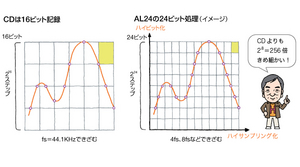
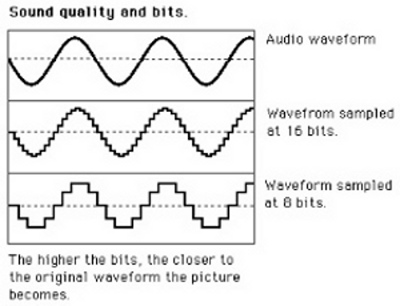
The left side of the figure is a normal CD format. The horizontal axis is incremented by fs = 44.1 kHz and the sample data is read with 16-bit precision. This is as explained above and unless there is special processing on the player side it will play as is with CD audio.

But the figure on the right is different. This is an image of the AL24 example, and the bits are expanded from the usual 16-bit to 24-bit using a dedicated chip. So a simple calculation can express a fine sound that is 2 to the eighth power, that is, 256 times. It seems that the upper and lower bits are moved and advanced things are done, but due to such bit expansion and high sampling (extending the high frequency range) like 4fs and 8fs in the direction of the horizontal axis, the squares are much smaller . Even if it is a CD, you can enjoy high-quality sound that surpasses that of a CD.

PCM conversion flow

PCM conversion flow

Pulse Code Modulation

Let’s summarize how analog music signals are digitized in PCM and burned to CD. PCM is an abbreviation for pulse code modulation. In Japanese, it translates to pulse code modulation method.

PCM

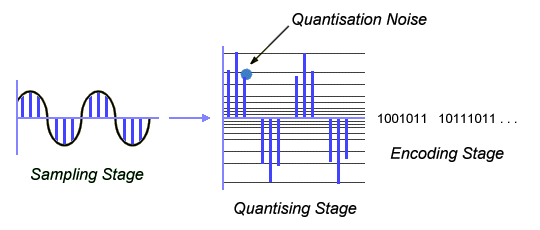
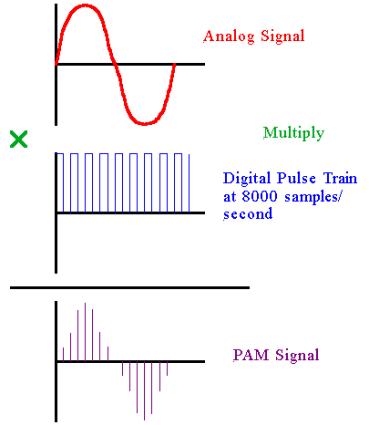
The music signal is originally a continuous analog signal. A continuous waveform that ripples like a wave will not fit in the hole of a CD as is, so test it first. What part of the rippling wave should be used as a sample? Of course, it is necessary to have regular intervals, and in the case of CD, it is decided to sample at 44.1 kHz. kHz is a unit of frequency and is the number of repetitions per second. We’re going to sample at a tremendous rate of 44,100 times per second. The job of sampling is sampling, and it does not mean that the waves are crushed separately.

After sampling in the direction of the time axis in this way, the next step is how to read the discrete data (points) with what precision. This is the quantification. It’s not used often, but in English it’s called quantizing. Since the vertical axis of the graph is the signal level, that is, the magnitude, the precision point is how many steps to read to the highest point of the wave. The unit is the number of bits.

The bits are a binary number in the digital count. Binary numbers are a game, and as the number of bits increases, the number that can be expressed at an accelerated rate increases (number of steps = sampling precision). The calculation is “2 raised to the power of the bits.” For example, 3 bits would have 2 x 2 x 2 = 8 steps, but 5 bits would have 2 x 2 x 2 x 2 x 2 = 32 steps. It seems that it will be incredible if we continue like this. Yes, 16 bits is 2 to the power of 16, so multiply 2 16 times to get 65536 steps. Remember the “65,000 steps”.

Still, it’s not analog per se, but if you play it on a CD player it will play the original continuous analog wave, which is why digital is Erai. Actually, after quantization, the encoding work is done and a 16-bit PCM digital signal is obtained as “010011 … 10”.

Digital is strict and, in fact, there are some rules. It is often said that “CD has a frequency range of 20 kHz and a dynamic range of 96 dB”. This is determined solely by the format. To put it bluntly, the 20 kHz high-frequency range comes from the sample rate, while the 16-bit quantization defines the D range as 96 dB.

It’s kind of logical, but it’s called “Shannon’s Sampling Theorem (Erai scholar)”, and it can record high frequencies up to almost half the sampling frequency (fs). For quantization, there is a guideline of 6 decibels per bit, which is 6 x 16 = 96 decibels.

What are the sample rate, the number of quantization bits, and the clock?

What are the sample rate, the number of quantization bits, and the clock?

Sample Rate and Bit Depth

There is some format jargon that you really need to know about CDs. It is the “sample rate” and the “quantization bit number”.

Sample Rate and Bit Depth

Related to that, you will deepen your understanding if you also learn about the “clock” from the CD. The next time you learn “How to Read Specifications / Optical Discs”, it will go into your head.

■ What is the sampling frequency and the number of bits?

Digital audio recorded on a CD has a 44.1 kHz sample rate and a 16-bit quantization bit rate, right? Yes, that is correct. It has appeared several times so far, but this is the first time that we have explained it in detail from the basics.

First, let’s start with the image. Just the esoteric feeling of sampling and quantizing, and the “vertical slice” and “horizontal slice” of the signals first. Think of it like cutting a radish. First of all, I’ll cut it vertically with a kitchen knife. You can make a lot of cuts, but they were originally continuous. The solid curve is the analog voice, and the first thing to do when digitizing it is the “vertical slice” = “sample” image.

Next is the quantification work. Even if the cut is a cut, it is quantified to “cross” the kitchen knife on its side. Then the radish will be divided into small squares. Did you imagine that the finer the square, the closer it is to the original analog signal?

The CD format is the rule of how fine the radish is cut (analog signal). “The sampling frequency is 44.1 kHz and the number of quantization bits is 16 bits” means that the first sampling is done at a rate of 44,100 times per second, and then the level is read with an accuracy of 16 bits (2 to power step 16). . Sampling is also called sampling, but in the first place, sampling is the norm, and without sampling, the quantification work cannot be done.

What is the so-called bit rate?

What is the so-called bit rate?

BitRate

A value indicating how many bits of information are processed or sent / received per unit of time.

AUDIO COMPRESSION

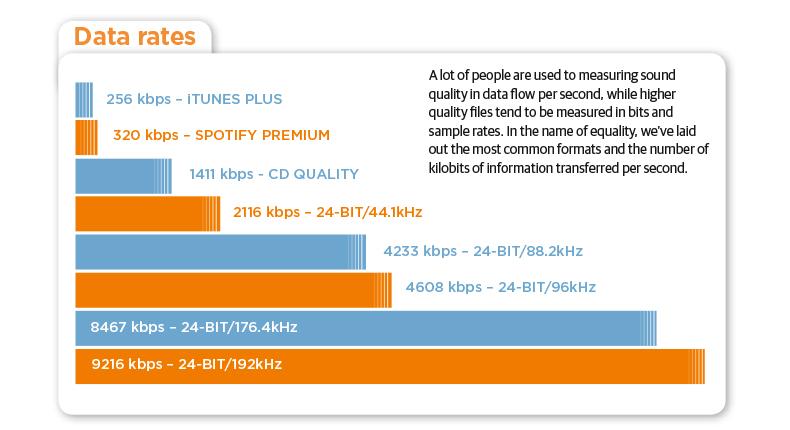
Also called transfer fee. The amount of information in one second of audio data and video data is expressed in “bits per second” (bps: bits per second). Usually used in conjunction with “k (kilo)” which represents a unit of thousand or “M (mega)” which represents one million units because the number of digits increases and is expressed as “kbps” or “Mbps” . (1 kbps is 1000 bps, 1 Mbps is 1 million bps). It is often used in the audiovisual (AV) genre, and in the case of audio and image data, the higher the value, the more detailed the information, and the better the sound quality and picture quality. The standard bit rate for MP3, one of the audio compression formats, is 128 kilobits per second (kbps), which compresses uncompressed WAV files (approximately 1400 kbps) with CD sound quality to approximately one-tenth of the amount of information. what are you doing. The video bit rate is higher due to the large amount of information, and the high definition terrestrial digital transmission is about 18 megabits per second (Mbps), and the BS high definition digital transmission is about 24 Mbps. Also There is a unit that expresses the transfer speed, “bytes per second” (Bps or B / s), which is a reference value that expresses the number of bytes per second. Since 1 byte is 8 bits, Bps can be calculated by dividing bps by 8.

Bit rate

It is the data communication speed, which is the amount of data that can be sent and received in a certain period of time. The unit is “bps”, which is short for “bits per second”. It is also used to refer to the amount of data used to express one second of video or audio when compressing video or audio. The greater the amount of data (= lower the compression rate), the more faithful it will be to the original, but a high-speed communication line is required.
On the other hand, as the amount of data is reduced (= the compression rate is higher), the image quality and sound quality deteriorate, but transmission is possible even in an environment where the communication speed is slow .
⇨  bps, transmission.

Processed per unit of time, or the transfer is a bit number. It is generally expressed as a number per second and uses bps as the unit. In a computer network, it is represented by a physical quantity as a communication speed, and in data transfer with a peripheral circuit or device within a computer, it is represented by a physical quantity as a transfer speed. It is also used as a unit to express the amount of information per second when compressing audio and video data, and if this value is the same, the higher the value, the higher the sound quality and picture quality. ◇ Also called “bit rate”, “bit efficiency” and “bit rate”.

What is the best way to use compressed sound sources like MP3, AAC and WMA correctly? Part 2

What is the best way to use compressed sound sources like MP3, AAC and WMA correctly? Part 2

audio compression

User-friendly bit rate of sound quality and capacity is 128 kbps to 160 kbps
The problem is the compression rate (= bit rate) expressed in the unit of “kbps”. Difficult theory aside, it’s okay if you think the point is “bitrate = standard for numerically expressing sound quality”.

audio bit rate

“Reduce the amount of data by reducing the sounds that are not harmful to the human ear” In a compressed sound source, the lower the bit rate, the lower the capacity, but the higher frequencies are cut off. So if you lower the bitrate too much during encoding, you will get some moody sound quality somehow.

・ ~ 96 kbps …… Since the sound does not lengthen, it is suitable for talk-centric radio programs, etc.
・ 128 kbps …… No matter who listens to it, there is not much discomfort. Suitable for pop and rock with PC speakers and car audio
・ 160 kbps …… Sound quality that can be satisfied even with general audio. Suitable for loud jazz
・ 192 kbps …… There are few glitches even when listening with headphones. Even classical music with a wide range is fine.
・ 256kbps / 320kbps …… High sound quality close to that of a CD (1411kbps equivalent)

Although there are individual differences, let’s think about it based on the above. The maximum difference in sound quality that a normal person can hear is 160 kbps. Beyond 192 kbps, you will not notice any difference unless you are a very “hearing” person.

Also, as the number of songs increases to 100 songs and 200 songs, the difference in capacity will be large, so choose a bit rate that is easy to use. If you convert a 4-5 minute song, often found in pop music, to MP3, the capacity will be roughly as follows.

·
128 kbps: Approximately 4 MB · 160kbps: Approximately 5-6MB · 192kbps:
About 7 MB320 kbps
: Approximately 10 MB

AAC and WMA have a higher compression rate than MP3 and the capacity is lower even at the same bit rate. Since it is also resistant to low bit rates, AAC and WMA can sound better at 128 kbps or less.

On the contrary, when it exceeds 160 kbps, MP3 has a superior sound quality in theory. Keep in mind that the higher the bitrate, the better the MP3 will be in terms of sound quality, whether you can listen to it or not.