What is the best way to use compressed sound sources like MP3, AAC and WMA correctly? Part 2


Free Download Mp4Gain
picture

What is the best way to use compressed sound sources like MP3, AAC and WMA correctly? Part 2

audio compression

User-friendly bit rate of sound quality and capacity is 128 kbps to 160 kbps
The problem is the compression rate (= bit rate) expressed in the unit of “kbps”. Difficult theory aside, it’s okay if you think the point is “bitrate = standard for numerically expressing sound quality”.

audio bit rate

“Reduce the amount of data by reducing the sounds that are not harmful to the human ear” In a compressed sound source, the lower the bit rate, the lower the capacity, but the higher frequencies are cut off. So if you lower the bitrate too much during encoding, you will get some moody sound quality somehow.

・ ~ 96 kbps …… Since the sound does not lengthen, it is suitable for talk-centric radio programs, etc.
・ 128 kbps …… No matter who listens to it, there is not much discomfort. Suitable for pop and rock with PC speakers and car audio
・ 160 kbps …… Sound quality that can be satisfied even with general audio. Suitable for loud jazz
・ 192 kbps …… There are few glitches even when listening with headphones. Even classical music with a wide range is fine.
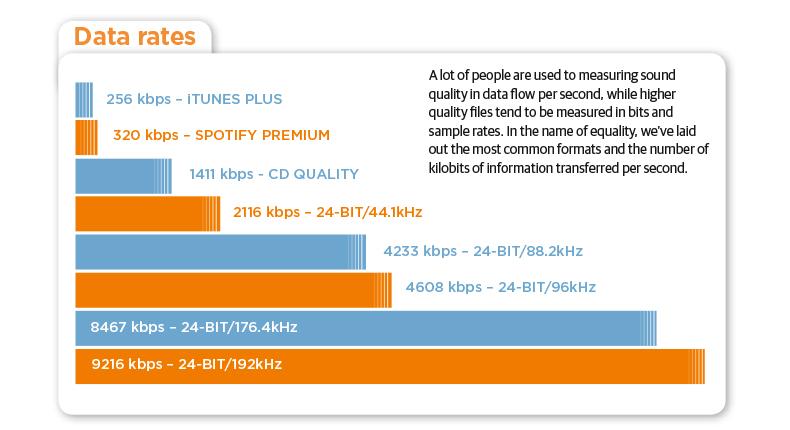
・ 256kbps / 320kbps …… High sound quality close to that of a CD (1411kbps equivalent)

Although there are individual differences, let’s think about it based on the above. The maximum difference in sound quality that a normal person can hear is 160 kbps. Beyond 192 kbps, you will not notice any difference unless you are a very “hearing” person.

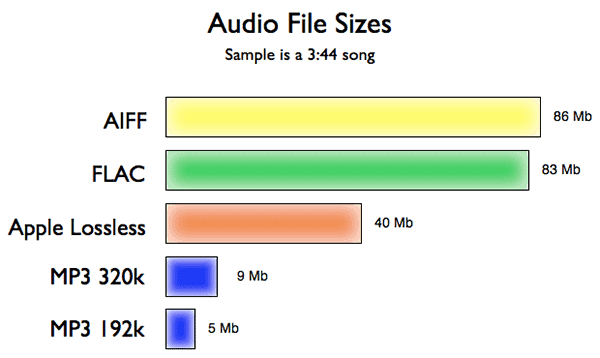
Also, as the number of songs increases to 100 songs and 200 songs, the difference in capacity will be large, so choose a bit rate that is easy to use. If you convert a 4-5 minute song, often found in pop music, to MP3, the capacity will be roughly as follows.

·
128 kbps: Approximately 4 MB · 160kbps: Approximately 5-6MB · 192kbps:
About 7 MB320 kbps
: Approximately 10 MB

AAC and WMA have a higher compression rate than MP3 and the capacity is lower even at the same bit rate. Since it is also resistant to low bit rates, AAC and WMA can sound better at 128 kbps or less.

On the contrary, when it exceeds 160 kbps, MP3 has a superior sound quality in theory. Keep in mind that the higher the bitrate, the better the MP3 will be in terms of sound quality, whether you can listen to it or not.


Free Download Mp4Gain
picture


Mp4Gain Main Window
picture


Mp4Gain Features
picture


Free Download Mp4Gain
picture

What is the best way to use compressed sound sources like MP3, AAC and WMA correctly?

What is the best way to use compressed sound sources like MP3, AAC and WMA correctly?

Audio Compression

When listening to music on a smartphone or iPod, what you seem to know but not understand is digitally compressed sound sources like MP3, AAC, and WMA. Let’s think again about “in what format” and “how much bit rate” is good.

audio compression mp3 acc wma

◆ World standard MP3, Apple standard AAC, Windows standard WMA
You all know that there are various formats of “digital sound sources”.

The best known is the WAV format, which is also used for CDs. Since it is an uncompressed format, there is no deterioration in sound quality and it is very versatile, but the capacity is not small, just over 50MB in 5 minutes.

Therefore, when used with a portable music player such as a smartphone, iPod, or Walkman, it is common to convert (= encode) from WAV to compressed sound sources such as MP3, AAC (M4A / M4P), and WMA.

By the way, compressed sound sources are used from the beginning for download distribution like iTunes. AAC for iTunes, MP3 for Amazon, and WMA for major national distribution sites are mainstream.

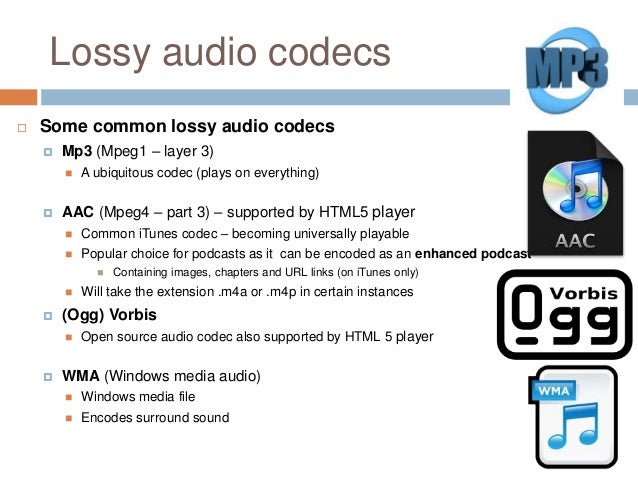
・ MP3 …… The oldest compression format established in 1995. There are many supported products, and it is the de facto standard that can be used in any case. “MP4” is a video standard, so don’t get it confused.

・ AAC (M4A / M4P) …… A standard established after MP3, which is a standard format for Apple products such as iPod and iPhone. M4P is a file protected by copyright. AAC is also used for audio on digital terrestrial broadcasts and digital BS on television.

・ WMA …… A format advocated by Microsoft. It has a strong affinity for Windows and many products are also used in voice recorders.

Sample rate and bit rate Part 2

Sample rate and bit rate Part 2

Sample Rate  Bit Rate

Listen and compare

sample rate and bit rate

Why don’t you really ask? In my memory, when I checked it in the past, I remember that it was difficult to distinguish it from the original sound (PCM) at 128 kbps of AAC under the conditions in the table above. I think this varies from person to person, and although I am involved with the audio and sound, I am aware that my ears are not a big problem, so even at a slightly higher rate, it is the same as the sound. original. I’m sure there are people who can tell the difference. At the low 32 kbps, you can clearly see the difference in sound quality. In terms of music, you can understand the metallic sound of the drum hi-hat.
Personally, I think that 44.1 Hz 16-bit (stereo) music CDs can be saved even at 128 kbps (1/10 compression or less) without losing sound quality. About 128 kbps is enough for my ears for both MP3 and AAC.

The bit rate is the compression rate
What happens if you set the encoding bit rate to 256 kbps for 16 kHz audio (monaural with 16 quantization bits)? .. .. Since the compression rate is 100%, it will be the same as the original sound. The sound quality should be the same as the original sound, but it may cause strange behavior depending on the encoders that are available for free (a configuration error may occur).

Sampling frequency Number of quantization bits Number of channels Original sound bit rate (PCM) Remarks
32 kHz 16 1 512 kbps Super Wide Band
24 kHz 16 1 384 kbps
16 kHz 16 1 256 kbps Broadband
8 kHz 16 1 128 kbps Narrowband
Regarding lossy compression of AAC and MP3, I think it is the result of research on how to encode at a low rate, so I personally think that setting a bitrate of 50% or more is not good. Lossless is recommended for compression ratios around 50% (lossless compression, MPEG-4 ALS, etc.). If you only think about saving, even if you compress it as is in PCM, it seems like it’s about half for audio with quiet sections. For lossy compression AAC, MP3, etc., if sound quality is important, about 15-20%, and if high compression is important, about 10% is sufficient sound quality.
Also, for audio purposes less than 10% and 5% is fine, but for audio it is recommended to lower the sample rate rather than suppress the bit rate to 48 kHz or 44.1 kHz (8 kHz or 16 kHz).

Stereo M / S (middle side)
The left and right signals are sum / difference signals. When encoding the sum signal (L + R) and the difference signal (LR) of both channels, the code is used when the correlation between channels is high, such as in stereo. The conversion efficiency is improved. For example, you can improve the coding efficiency of musical voices (L / R in phase, same amplitude).

Intensity stereo
When listening to high frequencies, the bit rate is reduced by combining the high frequency information (quantization coefficient) into one using the property that it is more susceptible to loudness than the L / R time difference.

In the end
Although bit rate may seem like a measure of sound quality, the digital audio field does not specify an encoded bit rate that exceeds the original sound bit rate. In short, I think it is important to use the proper bitrate for each encoder (encoder).

Sample rate and bit rate

Sample rate and bit rate

Sample Rates and Bit Depth

The compression ratio of audio encoding is determined by the bit rate at the time of encoding.

Sample Rate and Bit Depth

Last time I mainly wrote about the original sound bit rate (PCM), but this time I would like to write about the bit rate and compression rate of the encoding.

Specifically, setting a lower bitrate will increase the compression ratio and reduce the size of the file when it is saved. As I wrote last time, the bit rate of the sound source (PCM) before compression is as follows.

PCM bit rate = sample rate (Hz) x number of quantization bits x number of channels
For example, a music CD has the following 44.1 kHz stereo bit rate.

Music CD bit rate: 44100Hz x 16bit x 2ch (stereo) = 1411.2kbps
If it is encoded with MP3, AAC, etc., for example 256 kbps, the compression rate (assuming the original sound is 100%) is approximately 18% and the file size is 1/5 or less.

Encode Music CDs at 256 kbps: 256 kbps / 1,411.2 kbps = approximately 18%
If it’s 4 minutes of music, the file size is as follows.

Original sound: 1,411.2 kbps x 240 seconds = approximately 40.4 MB
Encode at 256 kbps: 256 kbps x 240 seconds = approximately 7.3 MB (+ header)
If a song is about 4 minutes long, 16 songs can be saved on CD650MB as original sound, but if it is encoded at 256 kbps as MP3 or AAC, 89 songs can be recorded.

Original sound: CD650MB / 40.4MB = about 16 songs
256 kbps encoded: CD650MB / 7.3MB = approximately 89 songs
If you check the web, you can compare the sound quality due to the difference in the bit rate. I think all the conditions are the same except the bit rate, but first of all there is a difference in the sound quality depending on the sample rate of the original sound source (PCM) and the number of quantization bits (the bit rate of the original sound changes). At the time of analog to digital conversion (ADC), the sound quality is determined by the conditions. No matter how high the bit rate is encoded for a sound source in poor condition, the sound quality is still poor. Even with the same bit rate, the compression rate changes depending on the number of channels (stereo or monaural). Therefore, strictly speaking, the evaluation of the sound quality cannot be judged only by the difference in the bit rate.
For example, when 48 kHz and 44.1 kHz 16-bit PCM is encoded at 32 kbps to 320 kbps, the compression ratio is as follows.

16-bit PCM compression ratio (when original sound is 100%)
Encoded bit rate 48 kHz stereo (1,536 kbps) 48 kHz monaural (768 kbps) 44.1 kHz stereo (1,411.2 kbps) 44.1 kHz monaural (705.6 kbps)
320 kbps 320/1536 = about 21% About 42% 320 / 1,411.2 = about 23% About 45%
256 kbps 256/1536 = about 17% About 33% 256 / 1,411.2 = about 18% About 36%
192 kbps 192/1536 = about 13% About 25% 192 / 1,411.2 = about 14% About 27%
160 kbps 160/1536 = about 10% About 21% 160 / 1,411.2 = about 11% About 23%
128 kbps 128/1536 = about 8% About 17% 128 / 1,411.2 = about 9% About 18%
64 kbps 64/1536 = about 4% About 8% 64 / 1,411.2 = about 5% About 9%
32 kbps 32/1536 = about 2% About 4% 32 / 1,411.2 = about 2% About 5%
Comparison with the original sound
It’s a bit of a twisted idea, but for example, which one is closer to the original sound, stereo or monaural in the above conditions?
Considering the compression ratio, it is the latter. Of course, stereo is superior to monaural in terms of expression, like expressing the depth of sound, so it makes sense to compare this and evaluate the sound quality, but in encoding, compression is done efficiently using stereo. Since there are algorithms (Stereo M / S and Stereo Intensity), the quality is not half that of monaural and the stereo is compressed efficiently.

What is the best way to use compressed sound sources like MP3, AAC and WMA correctly?

What is the best way to use compressed sound sources like MP3, AAC and WMA correctly?

Audio Compression

When listening to music on a smartphone or iPod, what you seem to know but not understand is digitally compressed sound sources like MP3, AAC, and WMA. Let’s think again about “in what format” and “how much bit rate” is good.

You all know that there are various formats of “digital sound sources”.

The best known is the WAV format, which is also used for CDs. Since it is an uncompressed format, there is no deterioration in sound quality and it is very versatile, but the capacity is not small, just over 50MB in 5 minutes.

Therefore, when used with a portable music player such as a smartphone, iPod, or Walkman, it is common to convert (= encode) from WAV to compressed sound sources such as MP3, AAC (M4A / M4P), and WMA.

By the way, compressed sound sources are used from the beginning for download distribution like iTunes. AAC for iTunes, MP3 for Amazon, and WMA for major national distribution sites are mainstream.

・ MP3 …… The oldest compression format established in 1995. There are many supported products, and it is the de facto standard that can be used in any case. “MP4” is a video standard, so don’t get it confused.

・ AAC (M4A / M4P) …… A standard established after MP3, which is a standard format for Apple products such as iPod and iPhone. M4P is a file protected by copyright. AAC is also used for audio on digital terrestrial broadcasts and digital BS on television.

・ WMA …… A format advocated by Microsoft. It has a strong affinity for Windows and many products are also used in voice recorders.

Based on these characteristics, let’s consider the compression format depending on the device used.

What methods are used to effectively compress digital audio?

What methods are used to effectively compress digital audio?

Digital audio Compresssion

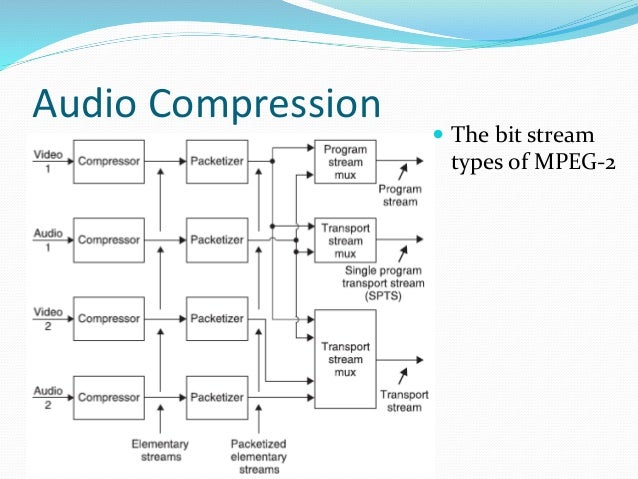
Currently, the most famous are Audio MPEG, PASC and ATRAC. All use the so-called “perception coding” (perceptual coding), in which information that is barely perceived by the ear is removed from the sound signal.

Audio compression

As a result, despite the change in the shape and spectrum of the signal, your hearing perception is practically unchanged and the compression ratio justifies a slight decrease in quality. Such encoding refers to lossy compression methods, when it is no longer possible to accurately restore the original waveform from the compressed signal.

Techniques to remove some of the information are based on a characteristic of human hearing, called masking: if there are pronounced peaks (dominant harmonics) in the sound spectrum, the weakest frequency components in the immediate vicinity of them are practically not perceived (masked) by ear. During encoding, the entire audio stream is divided into small frames, each of which is converted into a spectral representation and divided into several frequency bands. Within bands, masked sounds are detected and removed, after which each frame undergoes adaptive coding directly in spectral form. All these operations make it possible to significantly reduce (several times) the amount of data while maintaining the quality acceptable to most listeners.

Each of the described encoding methods is characterized by the bit rate at which the compressed information must enter the decoder when the audio signal is recovered. The decoder converts a series of compressed instantaneous signal spectra into a conventional digital waveform.

Audio MPEG is a group of audio compression techniques standardized by MPEG (Moving Pictures Experts Group). MPEG audio methods come in various types: MPEG-1, MPEG-2, etc .; currently the most common type is MPEG-1.

There are three layers of MPEG-1 audio to compress stereo signals:

1 – 1: 4 compression ratio with a data stream of 384 kbps;
2-1: 6..1: 8 at 256..192 kbps;
3 – 1: 10..1: 12 at 128..112 kbps.
The minimum data rate at each layer is defined as 32 kbps; the specified bit rates keep the signal quality close to that of a CD.

All three layers use a frame input spectral transform divided into 32 frequency bands. The most optimal level in terms of data volume and sound quality is recognized as level 3 with a bit rate of 128 kbps and a data density of approximately 1 Mb / min. When compressing at lower speeds, the forced limiting of the frequency band to 15-16 kHz begins, and phase distortions of the channels also appear (effect like a phaser or flanger).

MPEG audio is used in computer sound systems, CD-i / DVD, “audio” CD-ROM, digital radio / television, and other mass audio transmission systems.

PASC (Precision Adaptive Sub-Band Coding) is a special case of Audio MPEG-1 Layer 1 with a bit rate of 384 kbps (1: 4 compression). Used in the DCC system.

ATRAC (Adaptive TRansform Acoustic Coding) is based on a stereo audio format with 16-bit quantization and a sample rate of 44.1 kHz. When compressed, each frame is divided into 52 frequency bands, resulting in a transmission rate of 292 kbps (1: 5 compression). Used in MiniDisk system.

Digital audio compression methods

Digital audio compression methods

Audio Compression

Lossless compression

Audio Compression

Generally speaking, the meaning of lossless compression is as follows: some pattern is found in the original data, and taking this pattern into account, a second stream is generated, uniquely describing the original. For example, to encode binary sequences with many zeros and few ones, we can use the following replacement:

00> 0
01> 10
10> 110
11> 111

In this case, sixteen bits:

00 01 00 00 11 10 00 00

will be converted to thirteen bits:

0 10 0 0 111 110 0 0

If we write a compressed string without spaces, we can still add spaces in it, which means restoring the original sequence.

FLAC (Free Lossless Audio Codec – Free Lossless Audio Codec)
Coding principle: the algorithm tries to describe the signal with this function so that the result obtained after subtracting it from the original (called difference, remainder, error) can be encoded with the minimum of bits.

When the model is fitted, the algorithm subtracts the approximation from the original to obtain a residual signal (error), which is then losslessly encoded.

Lossy compression (MP3, AAC, WMA, OGG)
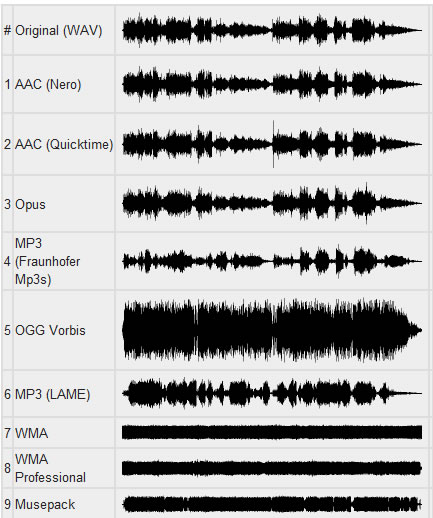
Using a lossy compression algorithm, the size of an MP3 file with an average bit rate of 128 kbps is approximately 1/11 of the original file of an Audio CD (uncompressed audio in CD-Audio format has a rate 1411.2 kbps bit rate). MP3 files can be created at high or low bit rates, which affects the quality of the result.

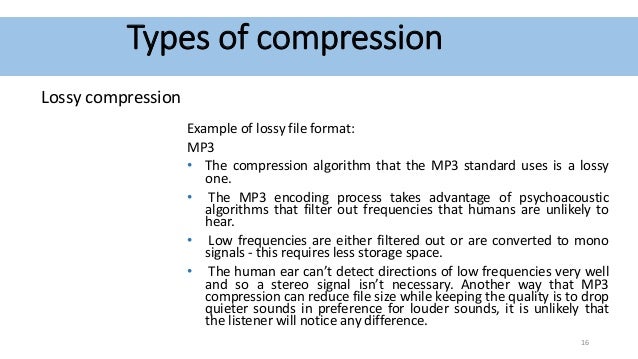
The principle of compression is to reduce the precision of some parts of the sound flow, which is almost indistinguishable for most people. The audio signal is divided into segments of equal length, each of which, after processing, is packed into its own frame (frame). Spectral decomposition requires continuity of the input signal; therefore, the previous and next tables are also used for calculations. The audio signal contains harmonics with a lower amplitude and harmonics that are close to the strongest; Such harmonics are cut off, as the average human ear will not always be able to determine the presence or absence of such harmonics. This characteristic of hearing is called the masking effect. It is also possible to replace two or more close peaks with an averaged one (which, as a rule, leads to sound distortion). The cutoff criterion is determined by the outflow requirement. Since the entire spectrum is relevant, the high frequency harmonics are not cut off, but are only selectively removed to reduce information flow due to rarefaction of the spectrum. After spectral removal, mathematical compression and frame packing methods are applied.

Masking effect
In certain cases, a sound can be hidden by another sound. For example, talking next to a train track can be completely impossible if a train passes. This type of effect is called masking. A weak sound is said to be masked if it becomes indistinguishable in the presence of a louder sound.

Simultaneous masking
Any two sounds, when heard simultaneously, have an impact on the perception of the relative volume between them. A louder sound reduces the perception of a weaker one, until the disappearance of your hearing. The closer the frequency of the masked sound is to the frequency of the masker, the more it will be hidden. The masking effect is not the same when the masked sound is shifted down or up in frequency relative to masking. Low-frequency sound masks high-frequency sound. However, it is important to note that high-frequency sounds cannot mask low-frequency sounds.

Time masking
This phenomenon is similar to frequency masking, but time masking occurs here. When the masking sound is stopped, the masking remains inaudible for some time. Under normal conditions, the effect of temporary masking lasts much less. The masking time depends on the frequency and amplitude of the signal and can be up to 100 ms.
In the case where the masking tone appears later than the masking, the effect is called post-masking. When the masking tone appears before the masking (this is also possible), the effect is called premasking.

Post-stimulus fatigue
Often, after exposure to loud, high-intensity sounds, a person’s hearing sensitivity drops dramatically. Recovery of normal thresholds can take up to 16 hours. This process is called “temporary change in hearing threshold.”

LEARN HOW AUDIO DATA COMPRESSION WORKS

LEARN HOW AUDIO DATA COMPRESSION WORKS

Audio Data Compression

MP3s Around Us Many, many years ago, the Internet was supposed to be the force that would democratize the music industry, physical distribution was supposed to become obsolete, and it was possible to publish music on the Internet and be heard by millions of audiences.

Audio Data Compression

In fact, enthusiasts and companies have created websites where fans can listen to new tunes, the MP3 format has made it easy to place songs for critics, and music demo pieces are now helping to sell a CD or LP. physical. It is not difficult to put your music on the Internet, but if you are not a star of the first magnitude, you will have to accept the placement of the data in compressed format to save space on the server, as well as save download time for those who download your masterpiece. While there are many critics of MP3, there are ways around some of the limitations of this format.

The MP3 format is based on the use of data compression algorithms that can reduce the amount of data required to play music. Compression algorithms in MP3 work with loss of data, they do not work like Zip or Rar compression algorithms that restore original file without data loss. MP3 algorithms discard “unnecessary” data. For example, if there is a lot of high-level sound on a track, the algorithm may assume that you cannot hear low-level material and think that only 24 dB of dynamic range is sufficient for that part of the audio material. It only requires 4 bits of data, a quarter of the data needed for 16-bit resolution. Unfortunately, it is difficult to preserve the sound quality of music when compressed, but it is possible. One way is to use algorithms, working without data loss, such as FLAC, or some algorithms offered by Microsoft and Apple for their audio formats. However, these algorithms do not lead to a significant reduction in file size; with complex music, the size reduction can be only 10-20%.

Although there are many algorithms for compressing audio data, only a few are the most common:

MP3. This format allows multiple levels of encoding, you can create audio files of almost any size with a smaller size with greater loss of precision. There are many free and shareware MP3 players (such as iTunes and Windows Media Player), to encode MP3, you can use iTunes and most digital audio editors.

AAC. As the native iPod format, this format is quite popular and sounds better than MP3 for the same file size according to most users. ITunes can convert files to AAC.

Windows Media Audio. The format is promoted by Windows, but is used less frequently than MP3 or AAC. WMA sound quality is generally better than MP3. While Microsoft does not offer users WMA playback software for the Mac platform, the Flip4Mac utility (free version available) can play Windows Media formats on Mac.

Ogg Vorbis. A great but rarely used format that sounds better than MP3 at the same bit rate, and unlike MP3, the encoding tools are free for developers. Ogg Vorbis files are not widely used yet, but they are popular with advanced technical users.

FLAC. This popular lossless format is not supported by many portable music players, but musicians often use FLAC to exchange files when working on collaborative projects. High sound quality is maintained.

Although MP3 does not offer the best quality, this format is most often used when placing audio files on the network. all players can play MP3. It is important to choose the correct MP3 settings. When encoding files to MP3, it is always best to use a high-quality source file without compression. Then select the compression settings. When saving in MP3 format, you can generally choose from a range of bit rates (bits per second), from 320 kbps stereo (great quality, but also a fairly large file) to 8 kbps mono (good enough for dictation) . In addition to the fixed settings, there is variable bit rate (VBR) encoding, which optimizes the bit stream according to the playback material. VBR encoding is not supported by all players.

Audio compression: facts, myths, and a blind test

Audio compression

When compressing, for example with MP3, there is a loss. But do you hear that? Where does good hearing end and where does esotericism begin? We verify the theory with a blind test, which you can do yourself.
Audio compression is a constant part of everyday life – almost always when you listen to music, it gets compressed. However, audio signal processing is difficult to understand for people who do not work in this field and who have adequate basic training. Consequently, in my impression, most people do not care at all or demonize MP3 and everything that has to do with compression.
MUSIC PRODUCTION WEEK: DAY 2, Compressor Tuesday: How to use compressors  and why? — Steemit

The question is: Are we depriving ourselves of a pleasant pleasure if we only listen to music on Spotify or YouTube? Or don’t you notice a difference with the best possible quality?

Numbers and what they say

Different measurement parameters say something about sound quality, but what exactly is it? The following is an overview of the factors as brief and clear as possible.

1. Bit rate

Bit rate tells you how many bits are processed per second. It is also called data transfer speed or bandwidth.

It makes intuitive sense: the more data that flows, the higher the sound quality. Bit rate is the most important measured variable in everyday life. However, the bitrate alone doesn’t say much about sound quality.

There are variable and constant bit rates. Today variable bit rates (abbreviated VBR) are mainly used. In “little happens” passages, more data can be compressed without audible loss, whereas a relatively large amount of data is stored in complex passages. The result is higher sound quality with the same file size. In the case of variable bit rates, the average is given as a value, sometimes also the maximum allowed.

2. Compression method

CAA compresses more efficiently than MP3, making it better quality than MP3 at the same bit rate. The same goes for Ogg Vorbis, which is used on Spotify.

Also the compression software that Encoder, has an impact on the quality. In the early days of MP3, 128 kbit / s songs often sounded terrible. Now they sound so much better because bad encoders are no longer used.

3. bit depth

Bit depth tells you how many bits a sample has. Therefore, it is also called the sampling depth. The more bits per sample, the more different volume levels can be stored.

This may remind you of photos and videos – there are bit depths too and they mean something similar.

The LG V30 can record * 10-bit videos **. What is the point? A direct comparison with our system camera VIDEO
mobile background
The LG V30 can record 10-bit videos. What is the point? A direct comparison with our system camera.
Which is better: * RAW or JPEG? **
background photo + video
Which is better: RAW or JPEG?
A CD has 16 bits per stereo channel. There is no fixed bit depth with MP3 and other compressed audio files. Bit depth hardly plays a role in normal everyday life, only in studio recordings. Sometimes 24-bit is also used there to get more out of the sound processing. However, in the end, the music is reduced to 16-bit because it can see the difference, according to acoustics experts I can’t hear anything.

.
4. Sampling frequency

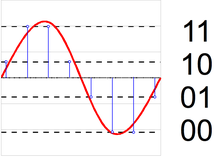
The sample rate (also called the sample rate) is also irrelevant for normal music listeners. But it is important to understand how digital sound storage works in the first place. A CD has a sampling frequency of 44100 Hz or 44.1 kHz. Hertz is a unit of measurement that indicates something like “frequency per second”. In audio sampling, it means that the sound level is measured 44,100 times per second. The same applies here: when recording in the studio, higher values ​​make sense, but not in the final format.

Nyquist’s theorem: Many people believe that digital music is fundamentally a loss compared to a “real” (analog) sound wave. These discussions began when the CD was invented and immediately ridiculed by audio snobs as inferior to the record. But that can be refuted. The Nyquiste Theorem states that an audio curve can be completely reconstructed from individual points without any loss if the sample rate is high enough. And it also says how high the rate should be: twice the bandwidth. Since the human ear reaches a maximum of 20,000 Hz, this bandwidth is roughly selected. Hence the sample rate of just over 40,000 Hz.

5. Other factors

With all the technical measurement parameters, it should not be forgotten that the best values ​​are useless if the sound is already badly recorded. For example, if the sound engineer has not set the volume level high enough, dynamism is lost. The recording starts to creak when it gets louder afterwards. If the level is too high, the result is even worse: the recording is cluttered, rattles and scratches. Or a dynamic compressor alienates the result. Bad recordings are ubiquitous on YouTube and are also sold on CDs, for example for very old studio recordings or live concert recordings.

The quality of your headphones or speakers also has an influence. With faulty minijacks, you will barely hear a difference between 128 kbit / s MP3 and uncompressed music. Most likely with good boxes.

How is music encoded?

First of all, let’s understand why music should be compressed.

Uncompressed files like AIFF and WAV take up a lot of space. This causes that it is not comfortable to transfer them on phones or players, or even store them on the hard drive of our computer.

Lossy audio encoding

Even trying to send them online would be very difficult, due to their large size.
,
This has forced the creation of various formats of audio files that take up less space. Of course, the important thing is that they sound practically the same as the original, although they take up less space.

lossless lossy audio

This is where compression enters the picture.

On the one hand, ZIP or RAR compression is used, but it is not enough. So other techniques are used, namely:

– An uncompressed file contains a lot of information about sounds (even silence) that is inaudible to the human ear and that information is discarded. With that one, it is possible to save a lot of space, since there is little point in occupying space in storing information about sounds that our hatred cannot perceive.

-On the other hand, there is a perfectly known phenomenon regarding the human ear, which is based on the idea that if two sounds occur more or less simultaneously and these sounds occupy similar or close frequencies and one of them sounds louder, the ear You will NOT hear the less loud sound.

This is other information that can also be discarded, since it is generally not audible or the brain does not process it.

Once discarding both types of information, the file has been much less large and therefore does not occupy the same space.

Practically what remains is to apply some composition algorithm, something similar to ZIP. And then you will have a compressed file, for example the mp3.

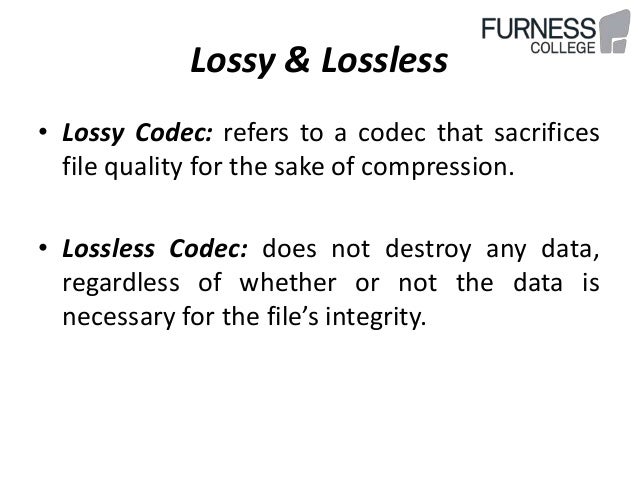
This is called the lossy method.

There is another method, without loss, where it is only compressed with a method similar to ZIP, but without discarding information.

Is there really a difference between the two? Practically no. the human ear practically cannot distinguish between the two.

A file with loss, that has a good sample rate (minimum 44,100) and a good bit rate, it is almost impossible to distinguish it from the original and therefore, from the file without loss.

Many experiments have been done allowing people to listen to both types of files (those with loss and those without loss) and more than 90% have not been able to distinguish between them, as long as the one with loss has a good samplerate and a good bit rate.