The Science Behind Digital Audio Compression


Free Download Mp4Gain
picture

The Science Behind Digital Audio Compression

Digital Audio Compression


Digital audio compression is a complex topic that is often misunderstood. It is a process that reduces the size of digital audio files without affecting the overall quality of the sound. The goal of this article is to provide a comprehensive overview of the science behind digital audio compression, including its history, the different types of compression, and how it affects the quality of the sound.

Digital Audio Compression

The History of Digital Audio Compression

The history of digital audio compression can be traced back to the early 1990s when the first MP3 encoder was developed. MP3 stands for MPEG-1 Audio Layer 3 and is a method of compressing digital audio files. This compression method quickly gained popularity due to its ability to reduce file size without compromising the quality of the sound.

Since then, many different types of digital audio compression have been developed, each with its own set of advantages and disadvantages. However, they all work on the same principle of reducing the amount of data in the audio file while maintaining the overall quality of the sound.

The Different Types of Digital Audio Compression

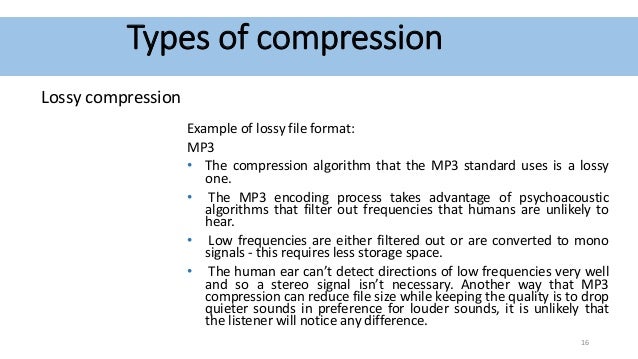
There are two main types of digital audio compression: lossy and lossless. Lossy compression is the most common type of compression and is used in formats like MP3, AAC, and WMA. It works by removing parts of the audio file that are deemed less important to the overall quality of the sound.

Lossless compression, on the other hand, is used in formats like FLAC and ALAC. This method of compression works by compressing the file in a way that allows it to be decompressed back to its original form without losing any of the data. This means that the sound quality is preserved, but the file size is still reduced.

The Science Behind Digital Audio Compression

Digital audio compression works by reducing the amount of data in an audio file. The amount of data in an audio file is measured in bits per second (bps) or kilobits per second (kbps). The higher the bitrate, the better the quality of the sound. However, higher bitrates also mean larger file sizes.

Compression algorithms work by analyzing the audio data and removing parts that are not critical to the overall sound quality. These parts can include frequencies that are outside the range of human hearing or parts that are masked by other sounds in the file.

Once the compression algorithm has identified the parts of the file that can be removed, it uses a mathematical formula to compress the remaining data. This formula is designed to reduce the size of the file without affecting the overall quality of the sound.

The Effects of Compression on Sound Quality

The goal of digital audio compression is to reduce the size of the file without affecting the overall quality of the sound. However, compression can have some effects on sound quality, depending on the type of compression used and the bitrate of the original file.

Lossy compression, for example, can result in a loss of high-frequency information and dynamic range. This can lead to a loss of detail in the sound and a less natural-sounding reproduction of the original recording.

Lossless compression, on the other hand, preserves the original sound quality of the recording, but the resulting file sizes can still be quite large. This makes it less practical for use in situations where file size is a concern.

The Future of Digital Audio Compression

The future of digital audio compression is closely tied to the ongoing development of digital audio technology. As technology continues to improve, the potential for more efficient compression algorithms and higher quality sound reproduction is becoming a reality.

One of the most exciting developments in digital audio compression is the emergence of artificial intelligence (AI) and machine learning. These technologies have the potential to create compression


Free Download Mp4Gain
picture


Mp4Gain Main Window
picture


Mp4Gain Features
picture


Free Download Mp4Gain
picture

What is an audio compressor?

What is an audio compressor?

audio compressor
audio compressor


An audio compressor can be a piece of software or hardware that takes a digital audio signal and applies an algorithm to the data to reduce the size of the signal for storage or transmission.

audio compressor
audio compressor


The term “audio compressor” also describes hardware or software used to modify an audio channel to remove or normalize frequencies above a defined threshold, usually to improve perceived sound quality. When data compression is described, an audio compressor can compress digital data into a lossless format, so all audio data remains intact, or into a lossy format, so some data may be changed or removed to improve the efficiency of the compression algorithm. Almost all digitally transmitted audio data uses some form of compression, leading to the development of hardware dedicated to compressing audio in real time. Similarly, many forms of digital audio recording, such as sound on compact discs (CDs) or digital video discs (DVDs), use compression to save space and allow more information to be stored.

There are many common algorithms that are commonly used to compress different types of digital data. However, audio signals are very unstable and do not benefit from traditional compression in the same way that images or other data do. Instead, an audio compressor may choose to create very large files with minimal compression, or it may be designed to modify the audio data to make it more suitable for compression, although this results in lossy compression where some audio elements are raw. The signal will be altered. or lost.

One way an audio compressor can prepare audio data for compression is by removing sound elements whose existence is not necessarily determined in the first place. This includes frequencies outside the range of human hearing, as well as sounds that produce data, but are actually masked by louder sounds in the same time period. Additionally, audio compressors sometimes attempt to modify rapid changes in the signal to be smoother, smoother, or more predictable. All of these methods allow the use of different compression techniques to ensure that the audio signal or file achieves a good amount of compression and still maintains acceptable quality.

When recording or editing music, an audio compressor can be hardware or software that helps level out the sound of an audio channel or track. The software will finally make weak sounds seem louder and unusual sound peaks softer. Channel compressors can also simply remove these peaks from the audio channel, increasing the perceived clarity of the remaining sound.

What methods are used to effectively compress digital audio?

What methods are used to effectively compress digital audio?

Digital audio Compresssion

Currently, the most famous are Audio MPEG, PASC and ATRAC. All use the so-called “perception coding” (perceptual coding), in which information that is barely perceived by the ear is removed from the sound signal.

Audio compression

As a result, despite the change in the shape and spectrum of the signal, your hearing perception is practically unchanged and the compression ratio justifies a slight decrease in quality. Such encoding refers to lossy compression methods, when it is no longer possible to accurately restore the original waveform from the compressed signal.

Techniques to remove some of the information are based on a characteristic of human hearing, called masking: if there are pronounced peaks (dominant harmonics) in the sound spectrum, the weakest frequency components in the immediate vicinity of them are practically not perceived (masked) by ear. During encoding, the entire audio stream is divided into small frames, each of which is converted into a spectral representation and divided into several frequency bands. Within bands, masked sounds are detected and removed, after which each frame undergoes adaptive coding directly in spectral form. All these operations make it possible to significantly reduce (several times) the amount of data while maintaining the quality acceptable to most listeners.

Each of the described encoding methods is characterized by the bit rate at which the compressed information must enter the decoder when the audio signal is recovered. The decoder converts a series of compressed instantaneous signal spectra into a conventional digital waveform.

Audio MPEG is a group of audio compression techniques standardized by MPEG (Moving Pictures Experts Group). MPEG audio methods come in various types: MPEG-1, MPEG-2, etc .; currently the most common type is MPEG-1.

There are three layers of MPEG-1 audio to compress stereo signals:

1 – 1: 4 compression ratio with a data stream of 384 kbps;
2-1: 6..1: 8 at 256..192 kbps;
3 – 1: 10..1: 12 at 128..112 kbps.
The minimum data rate at each layer is defined as 32 kbps; the specified bit rates keep the signal quality close to that of a CD.

All three layers use a frame input spectral transform divided into 32 frequency bands. The most optimal level in terms of data volume and sound quality is recognized as level 3 with a bit rate of 128 kbps and a data density of approximately 1 Mb / min. When compressing at lower speeds, the forced limiting of the frequency band to 15-16 kHz begins, and phase distortions of the channels also appear (effect like a phaser or flanger).

MPEG audio is used in computer sound systems, CD-i / DVD, “audio” CD-ROM, digital radio / television, and other mass audio transmission systems.

PASC (Precision Adaptive Sub-Band Coding) is a special case of Audio MPEG-1 Layer 1 with a bit rate of 384 kbps (1: 4 compression). Used in the DCC system.

ATRAC (Adaptive TRansform Acoustic Coding) is based on a stereo audio format with 16-bit quantization and a sample rate of 44.1 kHz. When compressed, each frame is divided into 52 frequency bands, resulting in a transmission rate of 292 kbps (1: 5 compression). Used in MiniDisk system.