Audio sample rates and bit depths in MP4 files


Free Download Mp4Gain
picture

Audio sample rates and bit depths in MP4 files
Let’s talk about audio sample rates and bit depths in MP4 files

Understanding audio sample rates and bit depths in MP4 files is essential for anyone working with audio or video. These two elements directly impact audio quality, file size, and playback compatibility. As someone deeply familiar with digital audio, I’ve found that knowing how sample rates and bit depths function can help create better audio experiences. Think of them as the resolution and color depth of a photo—they define clarity and richness.

Sample rates determine how many times audio is measured per second, while bit depth defines the accuracy of those measurements. For example, recording a live concert at 44.1 kHz and 16-bit is like taking clear snapshots of the performance, capturing both nuances and dynamics. Yet, adjusting these parameters for MP4 files involves balancing quality, compatibility, and efficiency.

What are audio sample rates?

Sample rates are the backbone of digital audio. They represent the number of audio samples taken per second, measured in kilohertz (kHz). A common analogy I use is to think of sample rates as frames in a movie—the higher the frame rate, the smoother the video.

The most widely used sample rate is 44.1 kHz, suitable for CDs and most streaming platforms. However, higher sample rates like 48 kHz or 96 kHz are used in professional audio production for increased clarity. But does a higher sample rate always mean better sound? Not necessarily. Beyond 48 kHz, the human ear often can’t perceive the difference, though it may matter in certain editing contexts.

  • 44.1 kHz: Standard for CDs and MP3s.
  • 48 kHz: Common for video and film production.
  • 96 kHz and above: Used for high-resolution audio.

Explaining bit depth in digital audio

Bit depth is like the precision of a ruler—it dictates how finely audio signals are measured. A higher bit depth means more accurate representations of sound, especially during quieter moments. For instance, 16-bit audio provides 65,536 levels of dynamic range, while 24-bit allows over 16 million.

Imagine recording rain. At 16-bit, you’ll hear the general ambiance. At 24-bit, you’ll pick out subtle drops hitting different surfaces. This depth can elevate the listening experience but comes at the cost of larger file sizes.

  • 8-bit: Limited dynamic range, often used in retro games.
  • 16-bit: Standard for CDs and streaming audio.
  • 24-bit: Preferred for professional audio work.

How sample rates and bit depths affect MP4 audio

When encoding audio for MP4 files, sample rates and bit depths affect playback quality and compatibility. Lower settings save space but compromise audio fidelity. Higher settings preserve detail but may not work on all devices.

For example, I’ve optimized MP4 files by converting studio recordings at 96 kHz/24-bit to 48 kHz/16-bit. This reduced the file size while maintaining excellent quality. The key is to assess the intended use—streaming, archival, or professional editing.

Why does sample rate conversion matter?

Sample rate conversion is essential when integrating audio into MP4 files. If mismatched sample rates occur, playback issues such as clicks or distortion may arise. By ensuring consistent sample rates, you achieve smooth audio integration.

A practical tip I often share is to use 48 kHz for MP4 files intended for video. This aligns with the industry standard for syncing audio with visuals, ensuring better compatibility across platforms.

Choosing the right bit depth for MP4 audio

Selecting the right bit depth balances quality and practicality. For most MP4 files, 16-bit is sufficient, offering CD-quality audio with manageable file sizes. However, 24-bit may be preferable for professional audio projects where preserving dynamic range is crucial.

When I mix music for MP4, I consider the audience. Casual listeners prefer compact files, while audiophiles appreciate the richness of higher bit depths.

Does higher quality always mean better audio?

Higher sample rates and bit depths don’t always result in better audio for MP4 files. Factors like playback equipment, intended use, and file size constraints play significant roles. For instance, a 96 kHz/24-bit audio file on standard earbuds won’t sound dramatically different from a 48 kHz/16-bit file.

I often recommend testing files in real-world scenarios. Use different devices and listening environments to gauge the impact of your settings.

Common challenges with sample rates and bit depths

Dealing with sample rates and bit depths can be tricky. Common issues include mismatched settings, compatibility problems, and unnecessary file size increases. I’ve encountered cases where a 192 kHz file caused playback issues on older devices, requiring downsampling.

To avoid such challenges, use tools that simplify the process. Maintain consistency across your project and adhere to common standards like 48 kHz/16-bit for most MP4 files.

Latest words on audio sample rates and bit depths in MP4 files

Understanding audio sample rates and bit depths in MP4 files is vital for creating high-quality content. By balancing quality, compatibility, and efficiency, you can optimize your files for various applications. Remember, higher isn’t always better—choose settings that suit your goals.

If you’re looking for a simple way to manage these settings, Mp4Gain can help. It’s an effective tool for optimizing audio parameters in MP4 files, ensuring clarity and consistency without unnecessary complexity.

What are audio sample rates in MP4 files?

Audio sample rates in MP4 files determine the number of audio samples captured per second, impacting sound quality and file size.

Why is 44.1 kHz a standard sample rate?

44.1 kHz is standard because it meets CD-quality requirements, offering excellent audio fidelity without excessive file size.

What is the difference between 16-bit and 24-bit audio?

16-bit audio provides 65,536 levels of detail, while 24-bit offers over 16 million, enhancing dynamic range and clarity.

What sample rate is best for MP4 files?

48 kHz is the best sample rate for MP4 files, aligning with video industry standards and ensuring smooth audio-visual sync.

Does higher bit depth improve MP4 audio?

Higher bit depth improves audio detail but may not always be noticeable in casual listening scenarios.

Why is sample rate conversion important?

Sample rate conversion ensures smooth integration of audio into MP4 files, preventing playback issues.

Can I mix sample rates in one MP4 file?

Mixing sample rates in an MP4 file is not recommended as it can cause playback inconsistencies and sync issues.

Is 96 kHz better for MP4 files?

96 kHz offers higher audio resolution but may not provide noticeable benefits for MP4 files used in everyday playback.

What bit depth should I use for MP4 files?

16-bit is sufficient for most MP4 files, balancing quality and file size effectively for general use.

Does Mp4Gain help with audio optimization?

Mp4Gain simplifies audio optimization by managing sample rates and bit depths, ensuring consistent quality

across MP4 files.

Comments:

I always wondered what bit depth really meant, and this article finally cleared it up. Thanks for explaining it so well!

Why do some people use 192 kHz if most of us can’t hear the difference? I think that part could use more detail!

This helped me a lot with optimizing my podcast files. I had no idea about the importance of using 48 kHz for video files. Great tip!

Fantastic explanation! I’ve been working with MP4 files for years, and this is the most thorough guide I’ve seen so far.

I wish there was more info on which bit depth to use for specific use cases. Otherwise, really helpful article.

Man, this makes so much sense now. I was always confused about sample rates when making my YouTube videos. Thanks!

Great read! It’s interesting how higher sample rates don’t always mean better sound. Saved me a ton of storage space.

Very informative! I’m a beginner, and now I feel more confident adjusting audio settings in my files.


Free Download Mp4Gain
picture


Mp4Gain Main Window
picture


Mp4Gain Features
picture


Free Download Mp4Gain
picture

MP3 vs WMA: Licensing and Compatibility

MP3 vs WMA: Licensing and Compatibility

MP3 vs WMA: Licensing and Compatibility

MP3 vs WMA: Licensing and Compatibility

Let’s Talk About MP3 and WMA

Navigating the world of digital audio formats can be a daunting task, especially when it comes to choosing between MP3 and WMA. As a seasoned expert in audio technologies, I’ve explored the intricacies of both formats to provide you with a comprehensive understanding of their licensing and compatibility.

The Battle of Audio Compression

MP3, short for MPEG Audio Layer III, and WMA, or Windows Media Audio, are two popular audio compression formats used for encoding digital audio files. Understanding Audio Compression: Both MP3 and WMA employ lossy compression techniques to reduce file size while maintaining acceptable audio quality. However, the specific algorithms and compression ratios vary between the two formats, leading to differences in sound fidelity and file size.

Licensing: Open Source vs Proprietary

MP3 Licensing: MP3 technology is widely regarded as the pioneer of digital audio compression and is supported by an extensive ecosystem of hardware and software devices. Despite its popularity, MP3 is not entirely free to use, as it is subject to licensing fees imposed by the Fraunhofer Society, the organization responsible for licensing MP3 patents.

WMA Licensing: In contrast, WMA is a proprietary format developed by Microsoft and is tightly integrated with the Windows operating system and associated software products. While Microsoft provides licenses for the development and distribution of WMA-based products, the format’s usage is inherently tied to the Windows ecosystem, limiting its compatibility with non-Microsoft platforms.

Compatibility: Versatility vs Integration

MP3 Compatibility: One of MP3’s greatest strengths lies in its broad compatibility with a wide range of devices and platforms, including smartphones, tablets, MP3 players, and multimedia software. Its status as a de facto standard for digital audio ensures seamless playback across various hardware and software environments, making it the preferred choice for many consumers.

WMA Compatibility: While WMA offers native support within the Windows ecosystem, its compatibility outside of Microsoft environments may be more limited. Although third-party software and hardware devices may offer WMA playback capabilities, users operating on non-Windows platforms may encounter compatibility issues or the need for additional software plugins to play WMA files.

Licensing and Compatibility in Practice

When choosing between MP3 and WMA, it’s essential to consider both licensing requirements and compatibility constraints. Practical Considerations: MP3’s widespread adoption and cross-platform compatibility make it an attractive option for consumers seeking versatility and ease of use. On the other hand, WMA may be more suitable for individuals deeply entrenched in the Windows ecosystem, where seamless integration and native support are paramount.

Latest Words on Licensing and Compatibility

In conclusion, the choice between MP3 and WMA ultimately hinges on your specific needs and preferences. Whether you prioritize open-source compatibility or seamless integration with Windows devices, understanding the licensing and compatibility implications of each format is crucial for making an informed decision. As technology continues to evolve, it’s essential to stay informed and adapt to the ever-changing landscape of digital audio formats.

Comments:

This article provides a clear breakdown of the licensing and compatibility differences between MP3 and WMA. As someone who’s struggled with file compatibility issues in the past, this information is invaluable!

– AudioEnthusiast123

While I appreciate the overview of MP3 and WMA, I wish the article had delved deeper into the technical aspects of audio compression and its implications for sound quality.

– TechSavvyMusician

As a Windows user, I’ve always gravitated towards WMA for its seamless integration with my devices. This article reaffirmed my decision and provided valuable insights into the licensing considerations.

– WindowsFanatic99

I found this article to be a helpful resource for understanding the differences between MP3 and WMA, especially in terms of licensing and compatibility. Keep up the great work!

– MusicLover88

Great article! It’s refreshing to see a comprehensive comparison that goes beyond the surface-level differences between MP3 and WMA. Keep up the excellent work!

– AudioTechGeek

I’ve always been a fan of MP3 for its wide compatibility, but this article shed light on the licensing implications that I hadn’t considered before. Thanks for the informative read!

– DigitalListener22

This article provided valuable insights into the licensing and compatibility aspects of MP3 and WMA. As someone who’s looking to digitize their music collection, this information will definitely come in handy!

– MusicCollector55

While I appreciate the overview, I wish the article had included more information about alternative audio formats and their respective licensing models.

– AudioTechEnthusiast

As a casual listener, I found this article to be incredibly informative and easy to understand. It’s helped me make a more informed decision about which audio format to use for my digital music collection.

– CasualListener123

This article provided a thorough analysis of the licensing and compatibility considerations for MP3 and WMA. As someone who’s struggled with file compatibility issues in the past, I found this information to be incredibly useful!

– DigitalAudioFanatic

MP3 Frame Structure and Headers

MP3 Frame Structure and Headers

MP3 Frame Structure and Headers

MP3 Frame Structure and Headers

Let’s talk about MP3 Frame Structure and Headers

As an expert in digital audio formats, I’m excited to delve into the intricate world of MP3 frame structure and headers. Understanding these components is crucial for anyone involved in audio encoding, decoding, or manipulation. So, let’s break down the complexities and demystify the inner workings of MP3 files.

The Essence of MP3 Frames

To comprehend MP3 frame structure, we must first grasp the concept of frames. In the realm of digital audio, frames serve as the building blocks of encoded data. Each frame encapsulates a portion of audio information, making it possible for devices to decode and reproduce sound accurately.

Key Characteristics of MP3 Frames:

  • Fixed Length: MP3 frames typically have a fixed length, ensuring consistency in data processing.
  • Header Information: Every frame begins with a header containing vital details for decoding.
  • Audio Data: Following the header, the frame carries compressed audio data.

MP3 frames play a pivotal role in maintaining audio fidelity while minimizing file size, making them indispensable in the realm of digital audio.

Decoding MP3 Frame Headers

Now, let’s dissect the anatomy of MP3 frame headers, which hold crucial information for decoding audio streams accurately. Understanding these headers is akin to deciphering the DNA of an MP3 file, unlocking its contents for playback.

Components of MP3 Frame Headers:

  • Synchronization Bits: These sync bits mark the beginning of each frame, facilitating proper alignment during decoding.
  • Audio Parameters: Headers store essential details such as bitrate, sample rate, and stereo mode, guiding the decoding process.
  • Frame Length: Each header specifies the length of the frame, enabling efficient parsing of audio data.

By parsing the header information, audio players can accurately reconstruct the original audio waveform, ensuring faithful reproduction of the source material.

Optimizing MP3 Encoding Efficiency

In the quest for optimal audio quality and file size, understanding MP3 frame structure is paramount. By leveraging advanced encoding techniques and optimizing frame parameters, audio engineers can strike a balance between fidelity and compression.

Advanced Encoding Strategies:

  • Variable Bitrate (VBR): VBR encoding adjusts bitrate dynamically, allocating more resources to complex audio passages for enhanced quality.
  • Psychoacoustic Modeling: By leveraging psychoacoustic principles, encoders discard perceptually irrelevant audio data, maximizing compression efficiency.
  • Joint Stereo: Joint stereo encoding exploits spatial redundancy in audio streams, further reducing file size without sacrificing quality.

These advanced strategies empower audio professionals to create MP3 files that deliver exceptional quality while conserving storage space—a testament to the ingenuity of digital audio technology.

Exploring Future Trends in MP3 Technology

As we navigate the ever-evolving landscape of digital audio, it’s essential to stay abreast of emerging trends and technologies shaping the MP3 ecosystem. From immersive audio formats to advancements in compression algorithms, the future holds boundless possibilities for audio enthusiasts and professionals alike.

Future Directions:

  • Immersive Audio: With the rise of virtual reality and spatial audio, MP3 technology may evolve to support immersive soundscapes, enriching the listening experience.
  • AI-driven Compression: Machine learning algorithms could revolutionize MP3 encoding, enabling more efficient compression without compromising quality.
  • Streaming Optimization: As streaming platforms dominate the audio landscape, MP3 formats may undergo refinements to enhance streaming efficiency and quality.

By embracing these emerging trends and harnessing the power of innovation, the MP3 format is poised to remain a cornerstone of digital audio for years to come.

Latest words on MP3 Frame Structure and Headers

In conclusion, the intricacies of MP3 frame structure and headers underscore the remarkable ingenuity behind digital audio encoding. From the humble beginnings of the MP3 format to its ubiquitous presence in today’s digital landscape, understanding these fundamental concepts is essential for anyone involved in audio production, distribution, or consumption.

Comments:

Wow, this article really helped me understand the technical aspects of MP3 files! I had no idea about the complexities behind frame headers.

I’ve been searching for a comprehensive guide on MP3 encoding, and this article exceeded my expectations. Great job!

Could you please provide more details on the differences between MPEG-1 and MPEG-2 audio layers? I’d love to learn more about their impact on MP3 frame structure.

This article perfectly explained why some MP3 files sound better than others despite having the same bitrate. Understanding psychoacoustic modeling is a game-changer!

As a musician, I appreciate the insights into optimizing MP3 encoding efficiency. It’s fascinating how technology can enhance the audio production process.

Great article! I’m excited to see how AI-driven compression will shape the future of MP3 technology. The possibilities are endless!

Thanks for shedding light on the future trends in MP3 technology. As a streaming enthusiast, I’m curious to see how immersive audio formats will revolutionize the listening experience.

This article helped me troubleshoot some issues with my MP3 files. Now I understand why certain files were causing compatibility problems across devices.

As a podcast producer, I found this article incredibly informative. It’s essential to optimize MP3 encoding for seamless streaming and distribution.

Thank you for demystifying MP3 frame structure and headers! This article provided valuable insights that will enhance my audio production workflow.

M4A Audio Object Types Analysis

M4A Audio Object Types Analysis

M4A Audio Object Types Analysis

M4A Audio Object Types Analysis

Let’s talk about M4A Audio Object Types Analysis

In the realm of audio file formats, M4A stands out as a popular choice, known for its versatility and efficiency. As an expert in audio technology, I’ve delved into the nuances of M4A audio object types to unravel their significance in modern multimedia applications. From basic definitions to advanced analysis, this article aims to provide a comprehensive understanding of M4A audio object types and their impact on audio quality and compatibility.

Understanding M4A Audio Object Types

Deciphering M4A Audio Object Types

At the core of M4A lies its audio object types, which define the characteristics and capabilities of audio streams within the file. These object types play a crucial role in determining the audio quality, compression efficiency, and compatibility of M4A files across different platforms and devices. Understanding the various object types is essential for optimizing audio encoding and decoding processes and ensuring seamless playback experiences for users.

Key Components of M4A Audio Object Types

  • Audio Profile: Defines the overall configuration and capabilities of the audio stream, such as supported codecs and channel configurations.
  • Sampling Rate: Specifies the number of samples per second captured from a continuous signal to represent audio information accurately.
  • Bitrate: Determines the amount of data used to represent audio per unit of playback time, influencing audio quality and file size.
  • Codec Compatibility: Ensures interoperability with different audio codecs and playback devices, enabling seamless audio playback across various platforms.

Navigating through these components requires a deep understanding of audio encoding principles and M4A specifications. As an expert in audio technology, I’ve explored the intricacies of M4A audio object types, uncovering their role in shaping the landscape of digital audio.

Significance of M4A Audio Object Types

Optimizing Audio Quality and Compatibility

The adoption of M4A audio object types has profound implications for audio quality and compatibility in multimedia applications. By leveraging advanced audio profiles and codecs, M4A files achieve superior audio fidelity and compression efficiency, making them ideal for various use cases ranging from music streaming to podcasting. Furthermore, the flexibility and versatility of M4A object types ensure compatibility with a wide range of playback devices and software platforms, offering users a seamless audio experience across different environments.

Enhancing Audio Compression Efficiency

  • Efficient Compression Algorithms: M4A object types leverage sophisticated compression algorithms to reduce file size while preserving audio quality, optimizing storage and bandwidth utilization.
  • Dynamic Bitrate Adjustment: Adaptive bitrate techniques dynamically adjust the bitrate of audio streams based on network conditions, ensuring uninterrupted playback and minimizing buffering issues.
  • Multi-Channel Support: M4A object types support multi-channel audio configurations, enabling immersive surround sound experiences in compatible playback systems.

As multimedia technologies continue to evolve, the role of M4A audio object types remains paramount in driving innovation and efficiency in digital audio processing.

Latest words on M4A Audio Object Types Analysis

In conclusion, the analysis of M4A audio object types provides valuable insights into the intricacies of digital audio encoding and compatibility. From fundamental concepts to advanced optimization techniques, understanding M4A object types is essential for audio professionals and enthusiasts alike. As a seasoned specialist in audio technology, I continue to explore the depths of M4A audio object types, uncovering new insights and pushing the boundaries of audio innovation.

Comments:

Wow, this article offered a comprehensive analysis of M4A audio object types! As a music producer, I found the insights invaluable for optimizing my audio encoding workflows.

-MusicProducer123

This article provided excellent insights into the significance of M4A audio object types in digital audio processing. I appreciated the practical examples and real-world applications discussed throughout the article.

-AudioEnthusiast456

As a podcast creator, understanding M4A audio object types is crucial for delivering high-quality audio content to my audience. This article offered clear explanations and actionable tips for optimizing audio encoding processes.

-PodcastCreator789

Informative article! I appreciated the detailed analysis of M4A audio object types and their impact on audio quality and compatibility. Looking forward to more content from this author.

-AudioTechFanatic

Digital Bit Depth in Audio

Digital Bit Depth in Audio

Digital Bit Depth in Audio

Digital bit depth in audio is a fundamental concept that impacts the quality and fidelity of digital sound. Bit depth, also known as audio resolution, refers to the number of bits used to represent the amplitude of an audio signal at a specific point in time. It essentially quantifies how finely audio samples are taken in the digital domain.

To put it simply, the bit depth determines the precision with which sound is captured and stored digitally. Common bit depths in digital audio are 16-bit, 24-bit, and 32-bit, with higher numbers providing greater precision.

Audio Bit Depth Explained

Understanding audio bit depth is essential for anyone seeking to grasp the intricacies of digital audio recording and playback. At its core, audio bit depth is a measure of how accurately an analog sound wave’s amplitude is captured and converted into a digital signal.

In practical terms, a higher bit depth signifies that the digital representation of an audio waveform closely mirrors the original analog signal, resulting in reduced quantization error or “noise.” Quantization error occurs when an analog value is approximated to the nearest digital value, and lower bit depths can make this error more noticeable, especially in quieter sections of audio.

Bit Depth and Audio Quality

Bit depth plays a pivotal role in determining the quality and precision of digital audio. The relationship between bit depth and audio quality is akin to an artist’s palette of colors. A higher bit depth provides a broader spectrum of shades and nuances, making the digital representation of sound more faithful to the original analog source.

For example, a 16-bit system offers 65,536 discrete amplitude levels, whereas a 24-bit system provides an astonishing 16,777,216 levels. This heightened precision results in smoother and more detailed audio representation, particularly in the subtle and quiet passages of a recording.

Digital Audio Resolution

Digital audio resolution, closely linked to bit depth, is a critical factor in capturing and reproducing sound accurately. It refers to the level of detail and clarity in digital audio. The greater the bit depth, the higher the resolution, and the finer the nuances that can be captured.

In the realm of audio production, higher digital audio resolution means that the subtle nuances, such as the intricacies of a singer’s voice or the delicate harmonics of a musical instrument, are preserved with remarkable fidelity.

Bit Depth in Music Recording

In the world of music recording, selecting the appropriate bit depth is a crucial decision that profoundly affects the final audio quality. Musicians and producers carefully consider bit depth when recording to ensure that the nuances and dynamics of their performances are accurately captured.

In practice, 24-bit recording is a popular choice among music professionals. This bit depth provides an ideal balance between precision and file size, allowing for the capture of subtle details while minimizing the risk of bit-depth noise in quieter sections of the recording.

Audio Signal Precision

Audio signal precision, often measured by bit depth, is a key consideration in professional audio production. It relates to how faithfully an audio system can reproduce the original sound. The higher the bit depth, the greater the precision in representing the analog signal, resulting in cleaner and more accurate audio playback.

For audio engineers and producers, achieving optimal audio signal precision is paramount. It ensures that the music they create is heard as intended, with all the intricacies and subtleties faithfully reproduced.

Bit Depth in Analog-to-Digital Conversion

Understanding how bit depth influences analog-to-digital conversion is essential for maintaining audio fidelity. Analog-to-digital conversion is the process of transforming continuous analog signals into discrete digital values. Bit depth determines the number of discrete values that can represent the amplitude of the analog signal during this conversion.

In essence, higher bit depth means that the analog-to-digital conversion process captures more precise details from the analog signal. This is particularly critical when working with high-quality audio sources where preserving every nuance is paramount.

Sound Fidelity and Bit Depth

Sound fidelity, the faithfulness with which audio is reproduced, is intricately linked to bit depth. A higher bit depth generally results in better audio fidelity, as it allows for the accurate representation of both subtle nuances and powerful crescendos in music.

Consider classical music or jazz, where dynamics play a significant role. With a higher bit depth, the audio system can faithfully reproduce the full range of soft and loud passages, ensuring that the listener experiences the music as intended by the performers and composers.

Impact of Bit Depth on Audio Playback

The impact of bit depth on audio playback is a critical factor in delivering a high-quality listening experience. When you listen to digital audio, the bit depth of the source file significantly affects what you hear.

In simple terms, higher bit depth in the source audio file results in a more faithful and detailed listening experience. This becomes especially noticeable in acoustic instruments, where the subtle nuances of a violin’s bowing or a pianist’s touch can be lost in lower bit depth recordings.

How Does Bit Depth Affect the Quality of Digital Audio?

Exploring how bit depth affects the quality of digital audio is crucial for audiophiles and audio professionals alike. It’s the bit depth that determines how accurately the audio signal is captured and reproduced, ultimately influencing the overall audio quality.

A higher bit depth translates to a more faithful representation of the original sound, with fewer imperfections or noise introduced during the recording and playback processes. This improvement in audio quality is particularly noticeable in genres that require a wide dynamic range and high levels of detail.

What Is the Role of Bit Depth in Recording Music Digitally?

The role of bit depth in recording music digitally is a multifaceted aspect of audio production. When musicians and engineers step into the studio, they must make critical decisions about bit depth to ensure that their recordings capture the essence of the music.

Choosing the appropriate bit depth is a balancing act. While higher bit depths provide greater precision and fidelity, they also result in larger file sizes. Musicians often opt for 24-bit recordings as they strike a harmonious balance between capturing subtle details and managing storage requirements.

How Is Audio Fidelity Influenced by Digital Bit Depth?

Understanding how digital bit depth influences audio fidelity is key to achieving top-tier sound quality. Audio fidelity, often described as the faithfulness of audio reproduction to the original source, is a critical consideration for audio professionals and enthusiasts.

With a higher bit depth, audio fidelity is enhanced because the digital representation of the sound is more detailed and accurate. This is especially crucial in professional audio production, where maintaining the highest possible fidelity is paramount.

Can You Explain the Importance of Bit Depth in Analog-to-Digital Conversion for Audio?

Explaining the importance of bit depth in analog-to-digital conversion sheds light on the intricacies of audio processing. Analog-to-digital conversion is the bridge that allows analog sound to be translated into a digital format that can be manipulated and stored. Bit depth plays a pivotal role in this process.

Higher bit depths ensure that the analog-to-digital conversion process captures more fine-grained details from the original analog signal. This is essential for preserving the richness and subtleties of audio, whether it’s a soaring vocal performance, the resonance of a musical instrument, or the ambiance of a recording environment.

What Is the Relationship Between Bit Depth and Dynamic Range in Digital Audio?

The relationship between bit depth and dynamic range in digital audio is a crucial one to understand. Dynamic range refers to the difference between the softest and loudest sounds that an audio system can reproduce. Bit depth plays a pivotal role in defining this dynamic range.

Higher bit depths translate to a wider dynamic range, allowing for the faithful reproduction of both subtle nuances and powerful crescendos in music. This is essential for maintaining audio fidelity, especially in genres with a wide range of dynamics, such as classical music and jazz.

How Does Bit Depth Impact the Accuracy of Audio Playback?

The impact of bit depth on the accuracy of audio playback cannot be overstated. When you listen to music or any digital audio content, the bit depth of the source file has a profound influence on what you hear.

Higher bit depth in the source audio file means that the playback faithfully represents the original recording. It allows for the subtlest details and nuances to shine through, creating a more immersive and engaging listening experience. In essence, higher bit depth contributes to the accuracy and realism of audio playback.

Are There Industry Standards for Bit Depth in Digital Audio Recording?

In the world of professional audio recording, industry standards play a vital role in guiding the use of bit depth. While there’s flexibility in choosing bit depths based on specific requirements, certain standards are commonly followed.

For instance, most audio CDs use 16-bit resolution, which offers high-quality playback suitable for the majority of consumers. However, in the realm of studio recording and mastering, 24-bit and even 32-bit formats are commonly employed to ensure the highest level of fidelity.

What Are the Advantages of Using Higher Bit Depth in Audio Processing?

Using higher bit depth in audio processing offers several distinct advantages. These advantages extend to both recording and post-production stages, and they significantly impact the overall quality of audio content.

Enhanced Audio Fidelity

One of the primary advantages is enhanced audio fidelity. Higher bit depths provide more precision in capturing and reproducing audio, resulting in recordings that faithfully preserve the original sound. This is particularly important in professional music production and critical listening environments.

Greater Dynamic Range

Higher bit depths also grant a greater dynamic range, allowing for the faithful representation of a wide range of sound intensities. This is particularly beneficial in genres of music or audio content with stark differences in volume, as it ensures that both delicate subtleties and powerful peaks are accurately reproduced.

How Can I Optimize Bit Depth for Better Audio Resolution?

For those involved in audio production or seeking the best listening experience, optimizing bit depth is crucial. It’s not just about using the highest available bit depth but also considering the entire audio workflow and ensuring that bit depth aligns with specific needs.

Matching Bit Depth to Audio Source

When recording audio, it’s essential to match the bit depth to the dynamic range of the audio source. For instance, a live jazz performance with wide dynamic swings benefits from 24-bit recording, while a podcast with a more consistent volume may suffice with 16-bit. This approach minimizes bit-depth noise while preserving audio quality.

Post-Production Considerations

During post-production, maintaining a high bit depth throughout the editing and mixing process is advisable. Only when preparing the final distribution format, such as a CD or streaming file, should the audio be converted to a lower bit depth to match the destination format.

The Benefits of Greater Bit Depth in Digital Audio Systems

As technology advances, digital audio systems are offering higher bit depths as an option. But what are the practical advantages of embracing these extended bit depths?

Future-Proofing Audio

One significant advantage is future-proofing your audio recordings. With higher bit depths, your recordings are better equipped to stand the test of time. As playback systems and formats improve, your high-bit-depth recordings will continue to sound exceptional, ensuring that your music or audio content remains relevant for years to come.

Editing Flexibility

Greater bit depths also provide increased editing flexibility. Audio engineers can apply effects and processing without worrying as much about introducing quantization errors or compromising audio quality. This freedom allows for more creative experimentation during the mixing and mastering stages, ultimately leading to more polished and refined audio content.

In conclusion, digital bit depth is a critical factor in the world of audio, influencing both recording and playback quality. Understanding its importance, selecting the appropriate bit depth for various scenarios, and embracing higher bit depths when possible can lead to an audio experience that is richer, more immersive, and of the highest fidelity. Whether you’re a musician, audio engineer, or simply a music enthusiast, appreciating the role of bit depth can elevate your audio journey to new heights.

Digital Audio Encoding

Digital Audio Encoding

Digital Audio Encoding

What is Digital Audio Encoding?

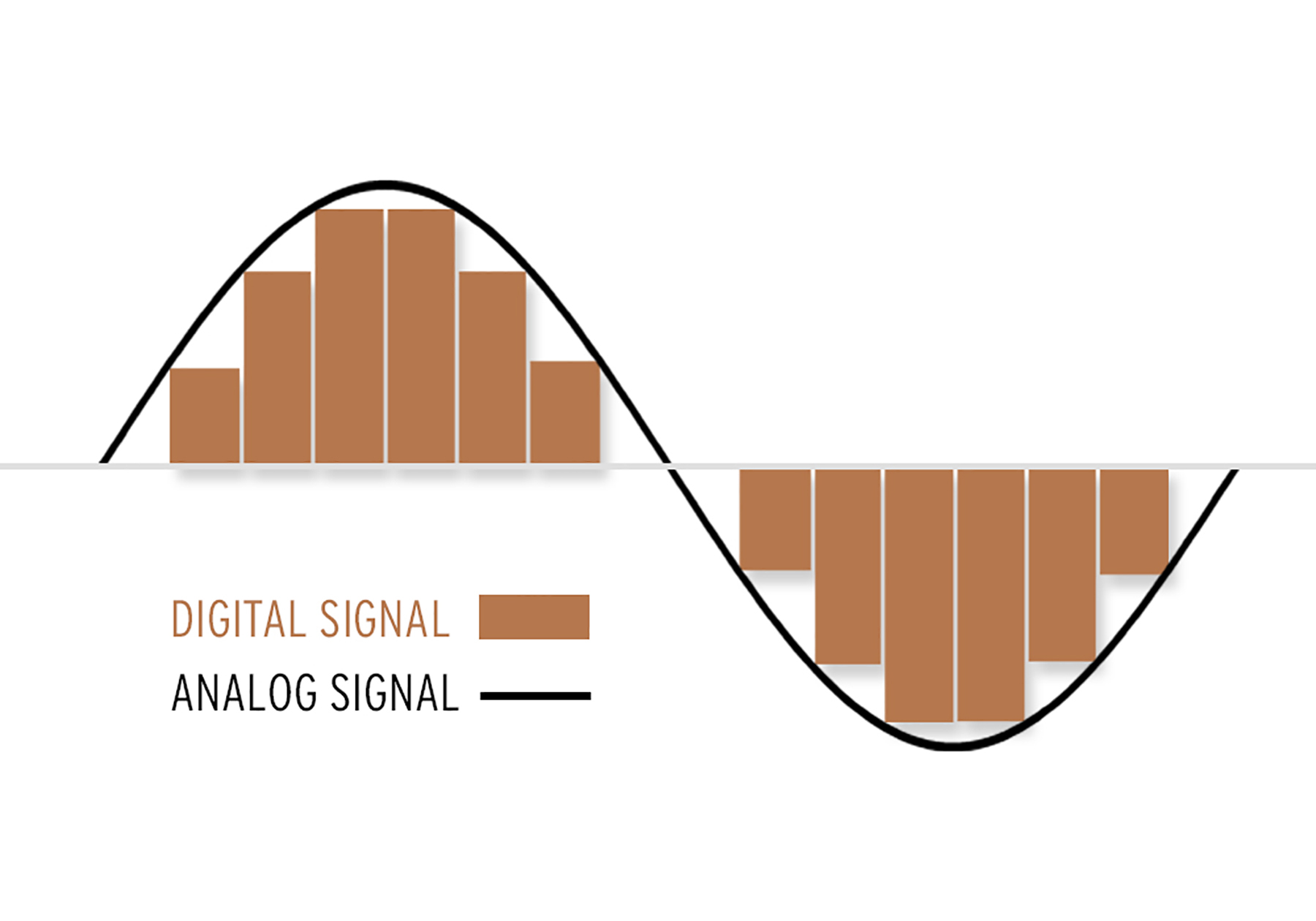
Digital Audio Encoding is the process of converting an analog audio signal into a digital format, which can be stored, processed, and transmitted electronically. It involves the use of an Analog-to-Digital Converter (ADC) to sample and quantize the analog audio waveform into a series of binary numbers that can be interpreted by a digital device. The resulting digital audio data can then be compressed, processed, and transmitted over various digital platforms, such as the internet, CDs, DVDs, and other digital storage devices.

The Importance of Digital Audio Encoding

Digital Audio Encoding has revolutionized the way we consume and produce audio content. It has made it possible to store, edit, and transmit high-quality audio content with minimal loss of quality. Some of the benefits of digital audio encoding include:

  • Improved sound quality: Digital audio encoding allows for high-quality audio content that is free from the distortions and noise associated with analog audio.
  • Easy storage and transfer: Digital audio files can be easily stored and transferred over various digital platforms with minimal loss of quality.
  • Efficient compression: Digital audio files can be compressed into smaller file sizes without significant loss of quality, making it easier to store and transfer large audio files.
  • Greater accessibility: Digital audio content can be easily accessed over various digital platforms, including the internet, mobile devices, and other digital devices.

The Digital Audio Encoding Process

The Digital Audio Encoding process involves several steps, which include:

  1. Sampling: The analog audio waveform is sampled at regular intervals using an Analog-to-Digital Converter (ADC).
  2. Quantization: The sampled waveform is quantized, i.e., each sample is assigned a binary number that represents its amplitude value.
  3. Encoding: The quantized samples are encoded into a digital format, such as WAV, MP3, or AAC.
  4. Compression: The encoded digital audio file can be compressed using lossy or lossless compression algorithms to reduce its file size.

Lossy vs. Lossless Audio Compression

Lossy and lossless audio compression are two types of compression algorithms used in digital audio encoding. Lossy compression algorithms compress audio files by removing data that is deemed unnecessary or redundant. This results in a smaller file size but may result in a loss of audio quality. Lossless compression algorithms, on the other hand, compress audio files without any loss of quality. This results in a larger file size but maintains the original audio quality.

Bitrate and its Importance in Digital Audio Encoding

Bitrate is a measure of the amount of data used to represent each second of digital audio. It is measured in bits per second (bps) or kilobits per second (kbps). The bitrate of a digital audio file has a significant impact on its quality and file size. Higher bitrates result in higher quality audio files but also larger file sizes. Lower bitrates result in smaller file sizes but may result in a loss of audio quality.

Common Digital Audio Formats

There are several digital audio formats used in digital audio encoding, including:

  • WAV: WAV is a lossless audio format that is commonly used for storing high-quality audio content.
  • MP3: MP3 is a lossy audio format that is commonly used for compressing and storing digital audio files for playback on various digital devices.
  • AAC: AAC is a lossy audio format that is commonly used for compressing and streaming digital audio content over the internet.
  • FLAC: FLAC is a lossless audio format that is commonly used for storing high-quality audio content, similar to WAV.

Challenges in Digital Audio Encoding

Despite the many benefits of digital audio encoding, there are several challenges that must be addressed to ensure optimal audio quality. These challenges include:

  • Sampling rate limitations: The sampling rate of an ADC can affect the accuracy of the digital audio representation. Higher sampling rates generally result in higher accuracy, but also require larger file sizes.
  • Bit depth limitations: The bit depth of an ADC can affect the dynamic range and noise floor of the digital audio representation. Higher bit depths generally result in higher accuracy, but also require larger file sizes.
  • Compression artifacts: Lossy compression algorithms can introduce compression artifacts, such as distortion and noise, which can degrade audio quality.

Future Developments in Digital Audio Encoding

Digital Audio Encoding is an ever-evolving field, with ongoing developments aimed at improving audio quality, reducing file sizes, and enhancing accessibility. Some of the latest developments include:

  • High-resolution audio: High-resolution audio formats, such as MQA and DSD, offer even higher audio quality than standard digital audio formats.
  • Immersive audio: Immersive audio formats, such as Dolby Atmos and DTS:X, offer a more immersive listening experience by incorporating height and surround sound elements.
  • Object-based audio: Object-based audio formats, such as MPEG-H 3D Audio, offer greater flexibility in audio content creation and delivery by enabling individual audio objects to be separately mixed and streamed.

FAQs

1. What is digital audio encoding?

Digital audio encoding is the process of converting an analog audio signal into a digital format, which can be stored, processed, and transmitted electronically.

2. Why is digital audio encoding important?

Digital audio encoding has revolutionized the way we consume and produce audio content by providing improved sound quality, easy storage and transfer, efficient compression, and greater accessibility.

3. What are some common digital audio formats?

Some common digital audio formats include WAV, MP3, AAC, and FLAC.

4. What is the difference between lossy and lossless audio compression?

Lossy compression algorithms compress audio files by removing data that is deemed unnecessary or redundant, resulting in a smaller file size but may result in a loss of audio quality. Lossless compression algorithms compress audio files without any loss of quality, resulting in a larger file size but maintaining the original audio quality.

5. What is bitrate and why is it important in digital audio encoding?

Bitrate is a measure of the amount of data used to represent each second of digital audio. It is important in digital audio encoding because it has a significant impact on audio quality and file size.

6. What are some challenges in digital audio encoding?

Some challenges in digital audio encoding include sampling rate limitations, bit depth limitations, and compression artifacts.

7. What are some future developments in digital audio encoding?

Some future developments in digital audio encoding include high-resolution audio, immersive audio, and object-based audio.

8. What is the difference between a lossy and lossless audio format?

Lossy audio formats use compression algorithms to reduce file size, sacrificing some audio quality in the process. Lossless audio formats, on the other hand, use compression algorithms that do not compromise audio quality, resulting in larger file sizes.

9. What is a sampling rate and how does it affect audio quality?

A sampling rate is the number of times per second that an analog audio signal is measured and converted into a digital signal. The higher the sampling rate, the more accurately the digital signal represents the original analog signal, resulting in higher audio quality. However, higher sampling rates also require larger file sizes and more processing power.

10. What is bit depth and how does it affect audio quality?

Bit depth refers to the number of bits used to represent each audio sample in a digital audio file. A higher bit depth allows for a greater dynamic range and lower noise floor, resulting in higher audio quality. However, higher bit depths also require larger file sizes and more processing power.

11. What is lossless compression?

Lossless compression is a compression algorithm that reduces the size of a digital audio file without sacrificing any audio quality. This is achieved by identifying and removing redundant or unnecessary data in the audio file.

12. What is immersive audio and how does it enhance the listening experience?

Immersive audio is an audio format that uses spatial sound technology to create a more immersive listening experience. This is achieved by incorporating height and surround sound elements, which create a more three-dimensional soundstage. This allows for a more realistic and engaging listening experience, especially when combined with a surround sound system.

Conclusion

Digital audio encoding has revolutionized the way we produce and consume audio content, providing improved sound quality, easy storage and transfer, efficient compression, and greater accessibility. While there are some challenges to overcome, ongoing developments in high-resolution, immersive, and object-based audio formats promise to further enhance the digital audio experience.

References

  • Bosi, M., & Goldberg, R. (2012). Introduction to digital audio coding and standards. Springer Science & Business Media.
  • Thompson, J. (2013). Understanding digital audio. Focal Press.

What is digital audio?

What is digital audio?

Digital Audio
Digital Audio

How does digital audio work?

Digital Audio
Digital Audio

What is the rate? Of course, I can’t directly explain to you that “rate is bitrate”. When you play sound files with some software, you should notice a small message. For example, “128Kbps”, “1411Kbps”… Some friends also know that under normal circumstances, the larger the number in front of “Kbps”, the better the sound effect, for example, CD is “1411Kbps”. So what exactly do these numbers represent? In a nutshell, how much data is converted into sound per second. The reason CDs sound better than MP3s is that CDs have more information per second than MP3s. For example, compared to a 1411 Kbps CD file, a 128 Kbps MP3 file can convert almost 12 times less data per second than a CD. For the same song, the CD is much more delicate to listen to (of course, there is a group of people in the crowd known as “mushrooms” who can feel that the effect is the same) MP3 expresses the same content with less data and, of course, its level of detail is not as good as that of a CD.


2. Sampling rate.


Sampling rate is also a very common term. The specific form is “XXHz”, where “XX” is a specific number. Such as “44100Hz (44.1KHz)”, “32000Hz (32KHz)” and so on. As mentioned above, digital audio files are made up of many “points”, so the sample rate is actually a standard “quantity” to collect these “points”. Obviously, the sampling rate of “44100 Hz” is higher than that of “32000 Hz”, so more points are collected per time unit (1 second). The more points per unit of time, the more complete the sound information and, of course, the closer to reality. So if the guaranteed rate is the same, the file “44100Hz” is better than “32000Hz” (of course, this is not absolute).


————————————————–


lossy compression


In fact, we are all familiar with lossy compressed audio sources. At present, popular lossy formats mainly include MP3, WMA, OGG, MP3pro, AAC, VQF, ASF, etc.


2.WMV format


The full name of WMA is WindowsMedia Audio, which is an audio format promoted by Microsoft. The WMA format achieves a higher compression ratio by reducing the data stream while maintaining sound quality. The compression ratio can usually reach 1:18, and the generated file size is only half of the corresponding MP3 file.


3.MP3 format


The full name of MP3 is MovingPicture Experts Group Audio Layer Ⅲ. In a nutshell, MP3 is an audio compression technology. Since the full name of this compression method is called MPEGAAudio Layer 3, people call it MP3 for short. It was born in 1993, and its “parents” are the German FaunhofeIIS and the French Thomson.


MP3 uses MPEGAudio Layer 3 technology to compress music into smaller files with a compression ratio of 1:10 or even 1:12. In other words, you can compress files to a smaller size with little loss of sound quality. And it keeps the original sound quality very well. It is precisely because of MP3’s small size and high sound quality that the MP3 format has become almost synonymous with online music. The MP3 format of music per minute is only 1 MB in size, so the size of each song is only 3-4 megabytes. Use an MP3 player to uncompress (decode) MP3 files in real time so that high-quality MP3 music can be played.

What is digital audio?

What is digital audio?

Digital Audio
Digital Audio

How does digital audio work?

Digital Audio
Digital Audio

In our daily lives, we listen to all kinds of music, and most of this music is transmitted in digital form, whether it is listened to or downloaded to a computer or played on an MP3 or CD player. Of course, you will often see various formats like MP3, WMV, APE, etc., but do you understand the meaning of these formats? Below I have compiled some of this content for you, I hope it helps you.


1. Introduction to digital music


Digital audio sources, that is, digital audio formats, first referred to CDs. After the CDs were compressed, a variety of formats suitable for playback on Walkmans were derived. These compressed formats can be divided into two categories: there is lossy and lossless compression. The compression mentioned here refers to converting the audio stream encoded in PCM or WAV format to other formats after special compression processing, so as to achieve the effect of reducing the file size. Lossy/Lossless refers to whether the sound signal retained in the new file is reduced compared to the original PCM/WAV format signal after compression.


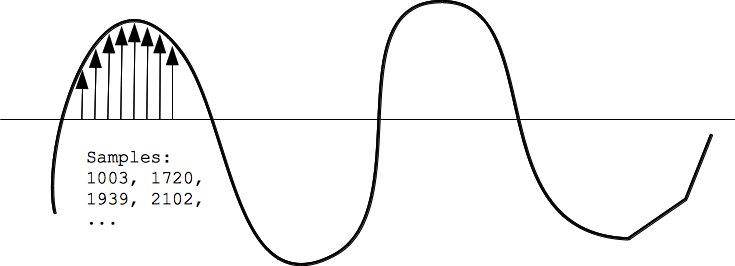
PCM encoding is short for PulseCode Modulation, also known as Pulse Code Modulation, which is one of the digital communication encoding methods. The sampled value is rounded and quantized according to the hierarchical unit, and the sampled value is represented by a set of binary codes to represent the amplitude of the sampled pulse.

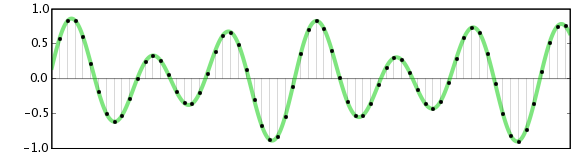
The final form of the digital audio signal is still made up of “0/1”. They can be any permutation and combination, such as “0001110101” or “11100001010”. Of course, different combinations have different effects. Seeing this, some friends should have noticed. If the sound is recorded in the form of “00101010”, then the final form is not a “dot”, that is, a simple “change” process. The sound is continuous, how can it be recorded with “dots”? Shouldn’t the sound we hear be segment by segment? The reason is not difficult to understand. Go home and turn on the fluorescent light, can you find the fluorescent light flickering? can not? In fact, fluorescent lights flicker constantly. Have you seen cartoons? They are all connected by a grid of still images. We can also simply understand the images one by one as “dots” one by one. Man against nature

There are limits to the sense of the world, both visual and auditory. The reason cartoons can produce coherent motion is that these “dots” are an illusion that people create when human vision doesn’t respond in time. With the exception of machines, people cannot distinguish these “dots”. So is the sound. If the frequency of the sound flicker is very fast, people cannot distinguish it. Also, when the sound performs a “digital conversion of analog signals” (D/A conversion), the decoder chip has already connected these “dots” coherently, so we hear a very coherent sound.