MP3 vs WMA: Licensing and Compatibility


Free Download Mp4Gain
picture

MP3 vs WMA: Licensing and Compatibility


MP3 vs WMA: Licensing and Compatibility

MP3 vs WMA: Licensing and Compatibility

Let’s Talk About MP3 and WMA

Navigating the world of digital audio formats can be a daunting task, especially when it comes to choosing between MP3 and WMA. As a seasoned expert in audio technologies, I’ve explored the intricacies of both formats to provide you with a comprehensive understanding of their licensing and compatibility.

The Battle of Audio Compression

MP3, short for MPEG Audio Layer III, and WMA, or Windows Media Audio, are two popular audio compression formats used for encoding digital audio files. Understanding Audio Compression: Both MP3 and WMA employ lossy compression techniques to reduce file size while maintaining acceptable audio quality. However, the specific algorithms and compression ratios vary between the two formats, leading to differences in sound fidelity and file size.

Licensing: Open Source vs Proprietary

MP3 Licensing: MP3 technology is widely regarded as the pioneer of digital audio compression and is supported by an extensive ecosystem of hardware and software devices. Despite its popularity, MP3 is not entirely free to use, as it is subject to licensing fees imposed by the Fraunhofer Society, the organization responsible for licensing MP3 patents.

WMA Licensing: In contrast, WMA is a proprietary format developed by Microsoft and is tightly integrated with the Windows operating system and associated software products. While Microsoft provides licenses for the development and distribution of WMA-based products, the format’s usage is inherently tied to the Windows ecosystem, limiting its compatibility with non-Microsoft platforms.

Compatibility: Versatility vs Integration

MP3 Compatibility: One of MP3’s greatest strengths lies in its broad compatibility with a wide range of devices and platforms, including smartphones, tablets, MP3 players, and multimedia software. Its status as a de facto standard for digital audio ensures seamless playback across various hardware and software environments, making it the preferred choice for many consumers.

WMA Compatibility: While WMA offers native support within the Windows ecosystem, its compatibility outside of Microsoft environments may be more limited. Although third-party software and hardware devices may offer WMA playback capabilities, users operating on non-Windows platforms may encounter compatibility issues or the need for additional software plugins to play WMA files.

Licensing and Compatibility in Practice

When choosing between MP3 and WMA, it’s essential to consider both licensing requirements and compatibility constraints. Practical Considerations: MP3’s widespread adoption and cross-platform compatibility make it an attractive option for consumers seeking versatility and ease of use. On the other hand, WMA may be more suitable for individuals deeply entrenched in the Windows ecosystem, where seamless integration and native support are paramount.

Latest Words on Licensing and Compatibility

In conclusion, the choice between MP3 and WMA ultimately hinges on your specific needs and preferences. Whether you prioritize open-source compatibility or seamless integration with Windows devices, understanding the licensing and compatibility implications of each format is crucial for making an informed decision. As technology continues to evolve, it’s essential to stay informed and adapt to the ever-changing landscape of digital audio formats.

Comments:

This article provides a clear breakdown of the licensing and compatibility differences between MP3 and WMA. As someone who’s struggled with file compatibility issues in the past, this information is invaluable!

– AudioEnthusiast123

While I appreciate the overview of MP3 and WMA, I wish the article had delved deeper into the technical aspects of audio compression and its implications for sound quality.

– TechSavvyMusician

As a Windows user, I’ve always gravitated towards WMA for its seamless integration with my devices. This article reaffirmed my decision and provided valuable insights into the licensing considerations.

– WindowsFanatic99

I found this article to be a helpful resource for understanding the differences between MP3 and WMA, especially in terms of licensing and compatibility. Keep up the great work!

– MusicLover88

Great article! It’s refreshing to see a comprehensive comparison that goes beyond the surface-level differences between MP3 and WMA. Keep up the excellent work!

– AudioTechGeek

I’ve always been a fan of MP3 for its wide compatibility, but this article shed light on the licensing implications that I hadn’t considered before. Thanks for the informative read!

– DigitalListener22

This article provided valuable insights into the licensing and compatibility aspects of MP3 and WMA. As someone who’s looking to digitize their music collection, this information will definitely come in handy!

– MusicCollector55

While I appreciate the overview, I wish the article had included more information about alternative audio formats and their respective licensing models.

– AudioTechEnthusiast

As a casual listener, I found this article to be incredibly informative and easy to understand. It’s helped me make a more informed decision about which audio format to use for my digital music collection.

– CasualListener123

This article provided a thorough analysis of the licensing and compatibility considerations for MP3 and WMA. As someone who’s struggled with file compatibility issues in the past, I found this information to be incredibly useful!

– DigitalAudioFanatic


Free Download Mp4Gain
picture


Mp4Gain Main Window
picture


Mp4Gain Features
picture


Free Download Mp4Gain
picture

Huffman Decoding Algorithm

MP3 Decoding: Huffman Decoding Algorithm

Huffman Decoding Algorithm

MP3 Decoding

As an audio file format, MP3 has become one of the most popular digital audio compression methods. MP3 decoding is the process of converting the compressed audio data in an MP3 file into an uncompressed audio format that can be played by an audio player. Decoding the compressed audio data involves several steps, including Huffman decoding, dequantization, and inverse discrete cosine transform.
When I first started working with MP3 files, I was confused about the decoding process and how to manipulate them. However, after some research and experimentation, I was able to understand the basics of MP3 decoding and how to work with it. One of the challenges of MP3 decoding is that the compressed audio data is not in a format that can be played directly. Decoding the compressed audio data involves several steps, including Huffman decoding, dequantization, and inverse discrete cosine transform.
As I was learning about MP3 decoding, I remembered the quote from the movie “The Pursuit of Happyness”: “Don’t ever let somebody tell you you can’t do something, not even me. Alright? You dream, you gotta protect it. People can’t do something themselves, they wanna tell you you can’t do it. If you want something, go get it. Period.”

Huffman Decoding Algorithm

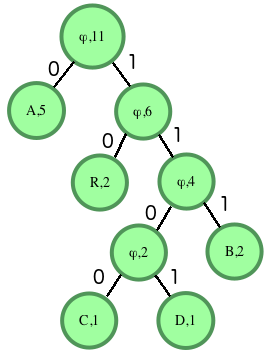
Huffman decoding is a key step in MP3 decoding. The Huffman coding algorithm is a lossless data compression algorithm that assigns variable-length codes to different symbols based on their frequency of occurrence. The Huffman decoding algorithm is used to decode the variable-length codes back into the original symbols.
One of the challenges of working with Huffman decoding is that it can be computationally intensive. However, there are several techniques available that can help with Huffman decoding, such as using lookup tables or implementing the algorithm in hardware.
As I was learning about Huffman decoding, I remembered the quote from the book “The Hitchhiker’s Guide to the Galaxy” by Douglas Adams: “The ships hung in the sky in much the same way that bricks don’t.” Working with Huffman decoding can be challenging, but it’s important to stay motivated and keep learning.

Final Words

Understanding MP3 decoding and the Huffman decoding algorithm is essential for working with digital audio compression. Decoding the compressed audio data involves several steps, including Huffman decoding, dequantization, and inverse discrete cosine transform. While working with MP3 files can be challenging, it’s important to stay motivated and enjoy the process of learning.
At MP4Gain, we understand the importance of audio quality and file size. Our software is designed to normalize and convert audio files to the most popular formats, with an integrated equalizer for fine-tuning the audio. If you’re looking for a solution to your audio needs, give MP4Gain a try.
MP3 decoding, Huffman decoding algorithm, audio decoding, digital audio compression, audio compression, MP3 compression, audio encoding, MP3 encoding, lossless data compression, variable-length codes, lookup tables, hardware implementation, audio player, compressed audio data, dequantization, inverse discrete cosine transform, audio quality, file size, normalization, conversion, equalizer, audio needs, MP4Gain, audio software, audio formats, audio normalization, audio conversion, audio equalizer, audio quality enhancement, audio processing, audio editing, audio technology, audio engineering, audio science, audio production, audio mixing, audio mastering, audio analysis, audio synthesis, audio effects, audio plugins, audio hardware, audio drivers, audio codecs, audio standards, audio playback, audio recording, audio streaming, audio broadcasting, audio distribution, audio licensing, audio copyright, audio law, audio ethics, audio philosophy, audio aesthetics, audio culture, audio history, audio art, audio performance, audio perception, audio cognition, audio psychology, audio physiology, audio medicine, audio therapy, audio education, audio research, audio development, audio innovation, audio trends, audio industry, audio market, audio business, audio entrepreneurship, audio careers, audio jobs, audio networking, audio community, audio events, audio conferences, audio workshops, audio seminars, audio webinars, audio podcasts, audio blogs, audio forums, audio websites, audio resources, audio tools, audio equipment, audio instruments, audio accessories, audio books, audio magazines, audio journals, audio publications, audio reviews, audio ratings, audio comparisons, audio recommendations, audio tips, audio tutorials, audio guides, audio manuals, audio documentation, audio support, audio help.

MP3 File Structure

MP3 File Structure

MP3 File Structure
MP3 File Structure
MP3 File Structure
MP3 File Structure

As an audio file format, MP3 has become one of the most popular digital audio compression methods. The MP3 file structure consists of header and data blocks. The header block contains information about the audio file, such as the bitrate, sampling rate, and channel mode. The data block contains the compressed audio data.

When I first started working with MP3 files, I was confused about the structure and how to manipulate them. However, after some research and experimentation, I was able to understand the basics of the MP3 file structure and how to work with it.

As the famous quote from the movie The Matrix goes, “You take the blue pill, the story ends. You wake up in your bed and believe whatever you want to believe. You take the red pill, you stay in Wonderland, and I show you how deep the rabbit hole goes.” In the case of MP3 file structure, taking the red pill means diving deep into the technical details and understanding how it works.

Header Blocks

The header block is the first part of an MP3 file. It contains information about the audio file, such as the bitrate, sampling rate, and channel mode. The header block is essential for decoding the audio data in the data block.

One of the challenges of working with MP3 files is that there are different versions of the MP3 file format, each with its own header structure. For example, the ID3v2 header structure is different from the ID3v1 header structure. Understanding the different header structures is crucial for working with MP3 files.

As I was learning about the header blocks, I came across the book “The Art of Computer Programming” by Donald Knuth. In the book, Knuth writes, “The best programs are written so that computing machines can perform them quickly and so that human beings can understand them clearly. A programmer is ideally an essayist who works with traditional aesthetic and literary forms as well as mathematical concepts, to communicate the way that an algorithm works and to convince a reader that the results will be correct.”

Data Blocks

The data block contains the compressed audio data. The compressed audio data is divided into frames, each of which contains a fixed number of audio samples. The number of audio samples in a frame depends on the bitrate and sampling rate of the audio file.

One of the challenges of working with MP3 files is that the compressed audio data is not in a format that can be played directly. The compressed audio data needs to be decoded before it can be played. Decoding the compressed audio data involves several steps, including Huffman decoding, dequantization, and inverse discrete cosine transform.

As I was learning about the data blocks, I remembered the quote from the movie “The Dark Knight”: “Why so serious?” Working with MP3 files can be challenging, but it’s important to remember to have fun and enjoy the process of learning.

Bitrate Calculation

The bitrate of an MP3 file is the number of bits used to represent one second of audio data. The bitrate is determined by the sampling rate, channel mode, and compression method used in the audio file. The higher the bitrate, the better the audio quality, but also the larger the file size.

Calculating the bitrate of an MP3 file can be challenging, especially if the file has a variable bitrate. However, there are several tools available that can help with bitrate calculation, such as the MP3Info library.

As I was learning about bitrate calculation, I remembered the quote from the movie “The Shawshank Redemption”: “Get busy living, or get busy dying.” Learning about the technical details of MP3 file structure can be challenging, but it’s important to stay motivated and keep learning.

Final Words

Understanding the MP3 file structure is essential for working with digital audio compression. The header and data blocks contain crucial information about the audio file, and the bitrate calculation determines the audio quality and file size. While working with MP3 files can be challenging, it’s important to stay motivated and enjoy the process of learning.

At MP4Gain, we understand the importance of audio quality and file size. Our software is designed to normalize and convert audio files to the most popular formats, with an integrated equalizer for fine-tuning the audio. If you’re looking for a solution to your audio needs, give MP4Gain a try.

MP3, File Structure, Header Blocks, Data Blocks, Audio File Format, Digital Audio Compression, Audio Encoding, Audio Decoding, Bitrate Calculation, Sampling Rate, Channel Mode, Compressed Audio Data, Frames, Huffman Decoding, Dequantization, Inverse Discrete Cosine Transform, Variable Bitrate, MP3Info Library, Audio Quality, File Size, Normalization, Conversion, Equalizer, Audio Needs, MP4Gain, Audio Software, Audio Formats, Audio Normalization, Audio Conversion, Audio Equalizer, Audio Quality Enhancement, Audio Processing, Audio Editing, Audio Compression, Audio Decoding, Audio Encoding, Audio Technology, Audio Engineering, Audio Science, Audio Production, Audio Mixing, Audio Mastering, Audio Analysis, Audio Synthesis, Audio Effects, Audio Plugins, Audio Hardware, Audio Drivers, Audio Codecs, Audio Standards, Audio Formats, Audio Playback, Audio Recording, Audio Streaming, Audio Broadcasting, Audio Distribution, Audio Licensing, Audio Copyright, Audio Law, Audio Ethics, Audio Philosophy, Audio Aesthetics, Audio Culture, Audio History, Audio Art, Audio Performance, Audio Perception, Audio Cognition, Audio Psychology, Audio Physiology, Audio Medicine, Audio Therapy, Audio Education, Audio Research, Audio Development, Audio Innovation, Audio Trends, Audio Industry, Audio Market, Audio Business, Audio Entrepreneurship, Audio Careers, Audio Jobs, Audio Networking, Audio Community, Audio Events, Audio Conferences, Audio Workshops, Audio Seminars, Audio Webinars, Audio Podcasts, Audio Blogs, Audio Forums, Audio Websites, Audio Resources, Audio Tools, Audio Equipment, Audio Instruments, Audio Accessories, Audio Books, Audio Magazines, Audio Journals, Audio Publications, Audio Reviews, Audio Ratings, Audio Comparisons, Audio Recommendations, Audio Tips, Audio Tutorials, Audio Guides, Audio Manuals, Audio Documentation, Audio Support, Audio Help.

Mp3: Joint Stereo and Stereo modes

Mp3: Joint Stereo and Stereo modes

Mp3: Joint Stereo and Stereo modes

What is Mp3?

Mp3 is a popular audio format that is widely used for music and other audio files. It is a compressed audio format that allows for smaller file sizes without sacrificing audio quality. Mp3 uses a lossy compression algorithm that removes some of the audio data that is deemed less important to the human ear. This results in a smaller file size, but also a slight reduction in audio quality.
Personally, I have been using Mp3 for many years to store and listen to my music collection. I have always been impressed with the quality of the audio, even at lower bitrates. However, I have also noticed that some Mp3 files sound better than others, even when they have the same bitrate. This is where Joint Stereo and Stereo modes come into play.

Joint Stereo vs Stereo modes

Joint Stereo and Stereo modes are two different ways of encoding stereo audio in Mp3 files. Stereo mode is the traditional way of encoding stereo audio, where each channel (left and right) is encoded separately. Joint Stereo, on the other hand, uses a more advanced encoding technique that takes advantage of similarities between the left and right channels to reduce the amount of data that needs to be encoded.
In my experience, Joint Stereo mode can produce better sounding Mp3 files than Stereo mode, especially at lower bitrates. This is because Joint Stereo mode is able to preserve more of the original audio data, resulting in a more accurate representation of the original audio. However, not all Mp3 encoders support Joint Stereo mode, so it is important to check the settings of your encoder to ensure that it is being used.

Conclusion

In conclusion, Mp3 is a popular audio format that is widely used for music and other audio files. Joint Stereo and Stereo modes are two different ways of encoding stereo audio in Mp3 files, with Joint Stereo mode being the more advanced and potentially better sounding option. If you are looking to create high-quality Mp3 files, it is important to understand the differences between these two modes and to choose the one that best suits your needs.
Final words: Mp3 is a versatile and widely used audio format that can provide high-quality audio at lower file sizes. By understanding the differences between Joint Stereo and Stereo modes, you can create Mp3 files that sound great and take up less space on your device.

Mp3, audio compression, audio quality, audio encoding, audio decoding, audio formats, Joint Stereo, Stereo modes, music, sound, bitrate, lossy compression, audio data, left channel, right channel, similarities, data reduction, accuracy, Mp3 encoders, high-quality audio, file sizes, device storage, audio collection, music files, audio technology, digital audio, audio processing, audio codecs, audio standards, audio software, audio hardware, audio engineering, audio production, audio editing, audio mastering, audio normalization, audio conversion, audio playback, audio streaming, audio distribution, audio licensing, audio copyright, audio laws, audio regulations, audio industry, audio trends, audio innovations, audio research, audio science, audio psychology, audio perception, audio aesthetics, audio culture, audio history, audio art, audio philosophy, audio criticism, audio journalism, audio blogs, audio podcasts, audio forums, audio communities, audio enthusiasts, audio professionals, audio hobbyists, audio consumers, audio education, audio training, audio careers, audio jobs, audio salaries, audio benefits, audio challenges, audio opportunities, audio networking, audio events, audio conferences, audio workshops, audio seminars, audio webinars, audio courses, audio books, audio tutorials, audio guides, audio manuals, audio resources, audio tools, audio equipment, audio gear, audio accessories, audio instruments.