MP3 Frequency Response: Technical Considerations

MP3 is a popular digital audio format that uses a lossy compression algorithm to reduce the size of audio files. One of the factors that can affect the quality of an MP3 file is its frequency response.
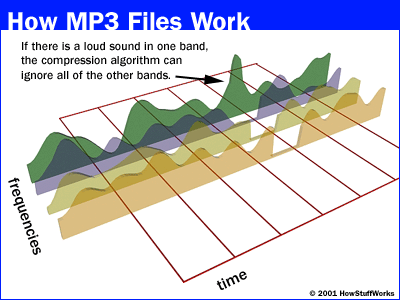
Frequency response is a measure of how well a system reproduces different frequencies of sound. A flat frequency response means that all frequencies are reproduced equally well. However, MP3 compression can introduce distortions that can affect the frequency response of an audio file.
There are a number of factors that can affect the frequency response of an MP3 file, including:
- The bitrate of the MP3 file. The bitrate is a measure of the amount of data that is used to represent the audio file. Higher bitrates result in better quality audio files, but they also result in larger file sizes.
- The encoder used to create the MP3 file. Different encoders use different compression algorithms, and these algorithms can have different effects on the frequency response of an audio file.
- The playback device. The playback device can also affect the frequency response of an MP3 file. Some playback devices, such as headphones, have a limited frequency response. This can result in loss of detail in the audio signal.
If you are concerned about the frequency response of your MP3 files, there are a few things you can do to improve the quality of the audio.
- Use a higher bitrate. This will result in better quality audio files, but it will also result in larger file sizes.
- Use a different encoder. Some encoders, such as the Fraunhofer mp3 encoder, are known for their good frequency response.
- Use a high-quality playback device. This will help to ensure that the full range of frequencies in the audio signal are reproduced.
By following these tips, you can improve the frequency response of your MP3 files and enjoy better quality audio.
Here are some additional questions that people often ask about MP3 frequency response:
1. What is a good frequency response for an MP3 file?
A good frequency response for an MP3 file will vary depending on the type of music that you are listening to. However, a general rule of thumb is that the frequency response should be flat within the range of human hearing, which is typically between 20 Hz and 20 kHz.
2. How does the bitrate of an MP3 file affect its frequency response?
The bitrate of an MP3 file is a measure of the amount of data that is used to represent the audio file. Higher bitrates result in better quality audio files, but they also result in larger file sizes. In general, a higher bitrate will result in a flatter frequency response.
3. What are some of the best encoders for MP3 files?
Some of the best encoders for MP3 files include the Fraunhofer mp3 encoder, the Xiph.org LAME encoder, and the Monkey’s Audio encoder. These encoders are known for their good quality and their ability to produce flat frequency responses.
4. What are some of the best playback devices for MP3 files?
Some of the best playback devices for MP3 files include high-quality headphones, home stereo systems, and car stereos. These devices are capable of reproducing the full range of frequencies in an audio signal, which can help to improve the quality of the audio.