As an audio enthusiast, I have always been fascinated by the technology behind digital audio. One of the most popular audio formats today is the MP3, which has revolutionized the way we listen to music. In this article, I will explain the basics of MP3 file structure, frames, and sync words, and how they work together to compress audio data.
What is MP3 Audio Compression?
MP3 is a digital audio format that uses lossy compression to reduce the size of audio files. This means that some of the audio data is discarded during the compression process, resulting in a smaller file size. The MP3 format was developed by the Fraunhofer Institute in Germany in the late 1980s and has since become the de facto standard for digital audio.
Understanding MP3 File Structure
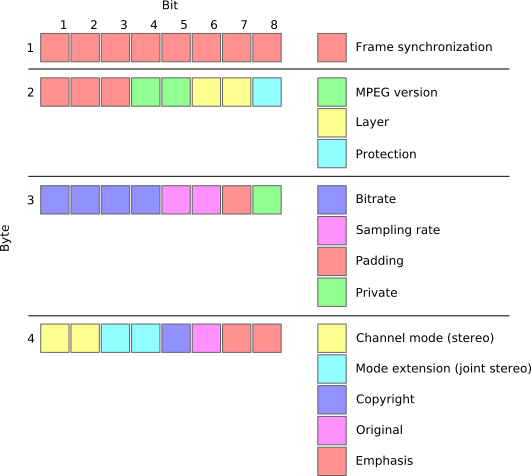
MP3 files are made up of a series of frames, each of which contains a small portion of the audio data. The frames are synchronized using sync words, which are unique patterns of bits that indicate the start of a new frame. The sync words are used by the MP3 decoder to identify the beginning of each frame and to synchronize the audio data.
How Frames and Sync Words Work Together
Frames and sync words are the building blocks of the MP3 file format. The frames contain the compressed audio data, while the sync words are used to identify the beginning of each frame. The sync words are also used to ensure that the frames are decoded in the correct order. Without sync words, the MP3 decoder would not be able to properly decode the audio data.
In conclusion, understanding the basics of MP3 file structure, frames, and sync words is essential for anyone who wants to work with digital audio. As an audio enthusiast, I have found that knowing how MP3 compression works has helped me to appreciate the technology behind digital audio. If you are looking for a reliable and efficient way to normalize and convert your audio files, I highly recommend MP4Gain. It is a powerful tool that can help you get the most out of your digital audio collection.
Final Words:
In this article, we have explored the basics of MP3 file structure, frames, and sync words. We have learned how MP3 compression works and how frames and sync words are used to compress and decompress audio data. If you have any questions or comments, please feel free to leave them below. Thank you for reading!
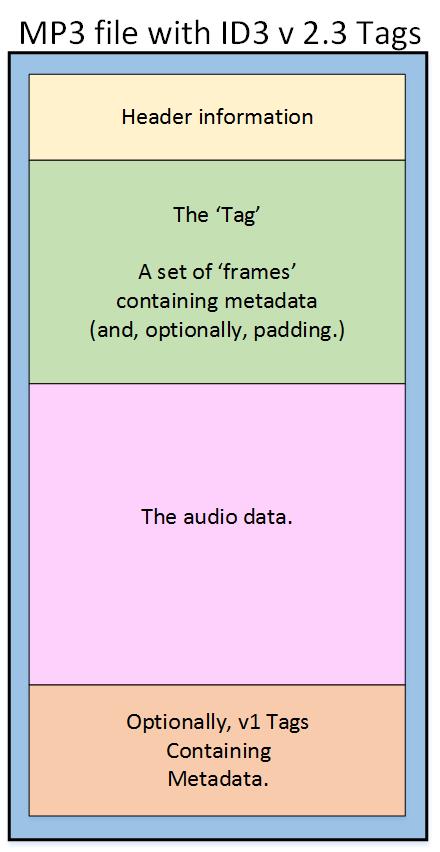
As an audio file format, MP3 has become one of the most popular digital audio compression methods. The MP3 file structure consists of header and data blocks. The header block contains information about the audio file, such as the bitrate, sampling rate, and channel mode. The data block contains the compressed audio data.
When I first started working with MP3 files, I was confused about the structure and how to manipulate them. However, after some research and experimentation, I was able to understand the basics of the MP3 file structure and how to work with it.
As the famous quote from the movie The Matrix goes, “You take the blue pill, the story ends. You wake up in your bed and believe whatever you want to believe. You take the red pill, you stay in Wonderland, and I show you how deep the rabbit hole goes.” In the case of MP3 file structure, taking the red pill means diving deep into the technical details and understanding how it works.
Header Blocks
The header block is the first part of an MP3 file. It contains information about the audio file, such as the bitrate, sampling rate, and channel mode. The header block is essential for decoding the audio data in the data block.
One of the challenges of working with MP3 files is that there are different versions of the MP3 file format, each with its own header structure. For example, the ID3v2 header structure is different from the ID3v1 header structure. Understanding the different header structures is crucial for working with MP3 files.
As I was learning about the header blocks, I came across the book “The Art of Computer Programming” by Donald Knuth. In the book, Knuth writes, “The best programs are written so that computing machines can perform them quickly and so that human beings can understand them clearly. A programmer is ideally an essayist who works with traditional aesthetic and literary forms as well as mathematical concepts, to communicate the way that an algorithm works and to convince a reader that the results will be correct.”
Data Blocks
The data block contains the compressed audio data. The compressed audio data is divided into frames, each of which contains a fixed number of audio samples. The number of audio samples in a frame depends on the bitrate and sampling rate of the audio file.
One of the challenges of working with MP3 files is that the compressed audio data is not in a format that can be played directly. The compressed audio data needs to be decoded before it can be played. Decoding the compressed audio data involves several steps, including Huffman decoding, dequantization, and inverse discrete cosine transform.
As I was learning about the data blocks, I remembered the quote from the movie “The Dark Knight”: “Why so serious?” Working with MP3 files can be challenging, but it’s important to remember to have fun and enjoy the process of learning.
Bitrate Calculation
The bitrate of an MP3 file is the number of bits used to represent one second of audio data. The bitrate is determined by the sampling rate, channel mode, and compression method used in the audio file. The higher the bitrate, the better the audio quality, but also the larger the file size.
Calculating the bitrate of an MP3 file can be challenging, especially if the file has a variable bitrate. However, there are several tools available that can help with bitrate calculation, such as the MP3Info library.
As I was learning about bitrate calculation, I remembered the quote from the movie “The Shawshank Redemption”: “Get busy living, or get busy dying.” Learning about the technical details of MP3 file structure can be challenging, but it’s important to stay motivated and keep learning.
Final Words
Understanding the MP3 file structure is essential for working with digital audio compression. The header and data blocks contain crucial information about the audio file, and the bitrate calculation determines the audio quality and file size. While working with MP3 files can be challenging, it’s important to stay motivated and enjoy the process of learning.
At MP4Gain, we understand the importance of audio quality and file size. Our software is designed to normalize and convert audio files to the most popular formats, with an integrated equalizer for fine-tuning the audio. If you’re looking for a solution to your audio needs, give MP4Gain a try.
Mp4 for Mp3. Convert MP4 to MP3: What you need to know
Mp4 for Mp3
In the digital age, converting between audio and video formats is a common task. If you want to convert from an MP4 format to an MP3 format, there are several options available. This guide covers the steps to convert MP4 to MP3.
Mp4 for Mp3
What do I need to convert MP4 to MP3?
To convert MP4 to MP3, the main thing you need is proper software. This means a program that is compatible with the MP4 format and at the same time is capable of exporting files in MP3 format. The most popular program for this task is MP4Gain.
In addition to suitable software, you will need access to the original MP4 files. This means you have to store them somewhere, like on your computer or a cloud storage drive. Once you have the MP4 files, you can start the conversion process.
Make sure you have the MP4 files
Before converting MP4 to MP3, make sure you have the necessary MP4 files in the right place. If you downloaded them from a website, make sure they are complete. If you got them from a videotape or DVD, make sure they were copied correctly. This is essential to ensure that the resulting files are of the highest quality.
Use the right software
Once you have found the MP4 files, you need to choose the right software to convert them to MP3. As mentioned above, MP4Gain is an excellent option, as it supports a wide range of audio and video formats. Plus, it’s compatible with Windows, Mac, and Linux, making it ideal for a variety of users.
Start conversion
Once you’ve chosen the right software, you can begin the conversion process. In most cases, this process is fairly straightforward. First, open the software and load the MP4 files. Then select MP3 as the output format. Finally, click the “Convert” button and wait for the process to complete.
In some programs, it is possible to adjust the output parameters. This allows you to control the quality of the resulting file, adjust the bitrate, or change the file size. These options are available in most MP4 to MP3 converter programs.
Final Steps
Once the MP4 file has been converted to MP3, you can use it to play music, watch online videos, or anything else you want. If you want to share the file with others, please note that MP3 format is a compressed audio format, so the original MP4 file will be larger.
We hope this guide has helped explain the steps to convert MP4 to MP3. If you would like more information about audio and video formats, there are a variety of resources available online. Good luck with the conversion!