As an audio enthusiast, I have always been fascinated by the technology behind digital audio. One of the most popular audio formats today is the MP3, which has revolutionized the way we listen to music. In this article, I will explain the basics of MP3 file structure, frames, and sync words, and how they work together to compress audio data.
What is MP3 Audio Compression?
MP3 is a digital audio format that uses lossy compression to reduce the size of audio files. This means that some of the audio data is discarded during the compression process, resulting in a smaller file size. The MP3 format was developed by the Fraunhofer Institute in Germany in the late 1980s and has since become the de facto standard for digital audio.
Understanding MP3 File Structure
MP3 files are made up of a series of frames, each of which contains a small portion of the audio data. The frames are synchronized using sync words, which are unique patterns of bits that indicate the start of a new frame. The sync words are used by the MP3 decoder to identify the beginning of each frame and to synchronize the audio data.
How Frames and Sync Words Work Together
Frames and sync words are the building blocks of the MP3 file format. The frames contain the compressed audio data, while the sync words are used to identify the beginning of each frame. The sync words are also used to ensure that the frames are decoded in the correct order. Without sync words, the MP3 decoder would not be able to properly decode the audio data.
In conclusion, understanding the basics of MP3 file structure, frames, and sync words is essential for anyone who wants to work with digital audio. As an audio enthusiast, I have found that knowing how MP3 compression works has helped me to appreciate the technology behind digital audio. If you are looking for a reliable and efficient way to normalize and convert your audio files, I highly recommend MP4Gain. It is a powerful tool that can help you get the most out of your digital audio collection.
Final Words:
In this article, we have explored the basics of MP3 file structure, frames, and sync words. We have learned how MP3 compression works and how frames and sync words are used to compress and decompress audio data. If you have any questions or comments, please feel free to leave them below. Thank you for reading!
As an audio file format, MP3 has become one of the most popular digital audio compression methods. The MP3 file structure consists of header and data blocks. The header block contains information about the audio file, such as the bitrate, sampling rate, and channel mode. The data block contains the compressed audio data.
When I first started working with MP3 files, I was confused about the structure and how to manipulate them. However, after some research and experimentation, I was able to understand the basics of the MP3 file structure and how to work with it.
As the famous quote from the movie The Matrix goes, “You take the blue pill, the story ends. You wake up in your bed and believe whatever you want to believe. You take the red pill, you stay in Wonderland, and I show you how deep the rabbit hole goes.” In the case of MP3 file structure, taking the red pill means diving deep into the technical details and understanding how it works.
Header Blocks
The header block is the first part of an MP3 file. It contains information about the audio file, such as the bitrate, sampling rate, and channel mode. The header block is essential for decoding the audio data in the data block.
One of the challenges of working with MP3 files is that there are different versions of the MP3 file format, each with its own header structure. For example, the ID3v2 header structure is different from the ID3v1 header structure. Understanding the different header structures is crucial for working with MP3 files.
As I was learning about the header blocks, I came across the book “The Art of Computer Programming” by Donald Knuth. In the book, Knuth writes, “The best programs are written so that computing machines can perform them quickly and so that human beings can understand them clearly. A programmer is ideally an essayist who works with traditional aesthetic and literary forms as well as mathematical concepts, to communicate the way that an algorithm works and to convince a reader that the results will be correct.”
Data Blocks
The data block contains the compressed audio data. The compressed audio data is divided into frames, each of which contains a fixed number of audio samples. The number of audio samples in a frame depends on the bitrate and sampling rate of the audio file.
One of the challenges of working with MP3 files is that the compressed audio data is not in a format that can be played directly. The compressed audio data needs to be decoded before it can be played. Decoding the compressed audio data involves several steps, including Huffman decoding, dequantization, and inverse discrete cosine transform.
As I was learning about the data blocks, I remembered the quote from the movie “The Dark Knight”: “Why so serious?” Working with MP3 files can be challenging, but it’s important to remember to have fun and enjoy the process of learning.
Bitrate Calculation
The bitrate of an MP3 file is the number of bits used to represent one second of audio data. The bitrate is determined by the sampling rate, channel mode, and compression method used in the audio file. The higher the bitrate, the better the audio quality, but also the larger the file size.
Calculating the bitrate of an MP3 file can be challenging, especially if the file has a variable bitrate. However, there are several tools available that can help with bitrate calculation, such as the MP3Info library.
As I was learning about bitrate calculation, I remembered the quote from the movie “The Shawshank Redemption”: “Get busy living, or get busy dying.” Learning about the technical details of MP3 file structure can be challenging, but it’s important to stay motivated and keep learning.
Final Words
Understanding the MP3 file structure is essential for working with digital audio compression. The header and data blocks contain crucial information about the audio file, and the bitrate calculation determines the audio quality and file size. While working with MP3 files can be challenging, it’s important to stay motivated and enjoy the process of learning.
At MP4Gain, we understand the importance of audio quality and file size. Our software is designed to normalize and convert audio files to the most popular formats, with an integrated equalizer for fine-tuning the audio. If you’re looking for a solution to your audio needs, give MP4Gain a try.
(1) MP3 encoding input signal: PCM (Pulse Code Modulation) sound signal, some audio files in .wav format are PCM signals.
( 2 ) MP3 encoded output signal: transmission in MP3 format
WAV format file capacity = (sampling frequency X quantization number of bits X channel) X time / 8 (byte = 8 bits). When the 2 bytes of 14H~15H have a value of 1 , it indicates the PCM encoding format of the data bit , which can be used as the input of the MP3 encoder .
3. Analysis of the SHINE program
SHINE is a MP coding program written in C language, consisting of 11 source files in total. Add the source file to the newly created VC purchase mode console application to run, but it must use command line mode when running.
1. File data structure
A config_t structure type is defined in types.h , and a global variable configuration is initialized with it, which is equivalent to an ” object ” in an object-oriented language, and is used to encode data and parameters throughout the process. coding Save and manage
Define a wave_t structure type to store PCM pulse format file information, and use wave_t to define the wave variable in config_t , which stores the MP3 encoded source information as the input to the MP3 encoder.
A type of structure mpeg_t is defined which is used to store MP3 encoded information, and the mpeg variable is defined in config_t with mpeg_t , and the information stored in this variable is output as MP3 encoded parameter information.
typedestruct {
time_tstart_time;
char*infile;
round_wave;
char* output file;
mpeg_tmpeg;
} config_t;
The above structure is mainly used to store the ” header ” information , and the byte stream entity information after encoding the output is stored in the bs structure ( defined in the bitstream.h file ), and the bs structure is defined as
An MP3 file is made up of frames, and a frame is the smallest unit of an MP3 file. The full name of MP3 must be MPEG1 Layer-3 audio file.
MPEG (MovingPictureExperts Group), MPGE audio layer refers to the sound part of the MPGE file, which is divided into three layers based on the quality and complexity of the encoding, namely Layer-1, Layer2 and Layer3, corresponding to MP1, MP2 and MP3 format files.
2. Structure of MP3 files
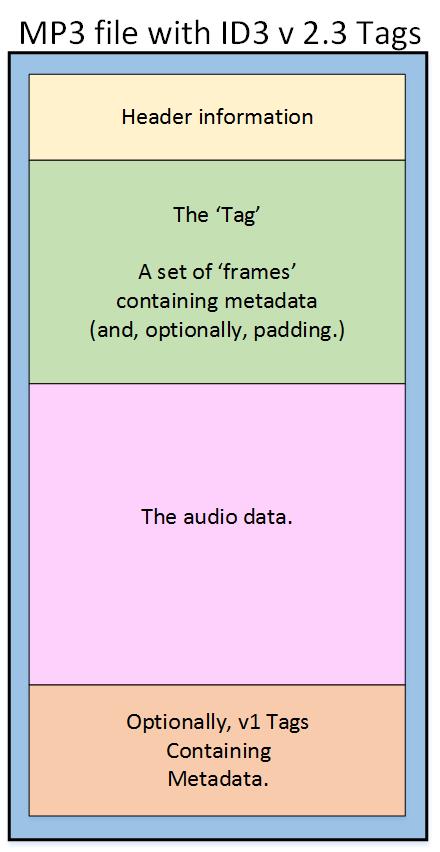
MP3 files are divided into 3 parts : TAG_V2(ID3V2 ) , Frame, TAG_V1(ID3V1) .
( 1 ) Frame format
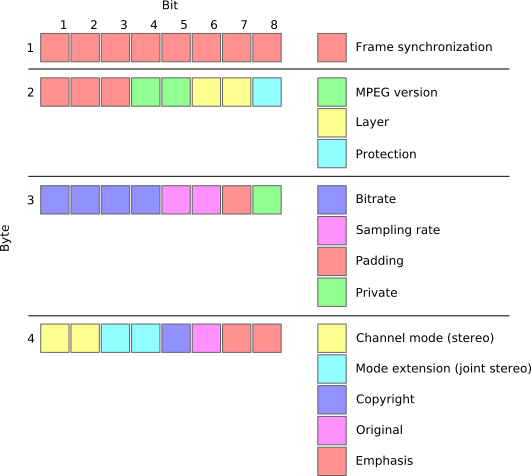
The frame header is 4 bytes and its structure is as follows
typedef FrameHeader
{
unsigned intsync: 11; // synchronization information
unsigned intversion: 2; // version
unsigned intlayer: 2; // layer
unsigned intprotection: 1; // CRC check
unsigned intbitrate: 4; // Bit rate
unsigned intfrequency: 2; // sample rate
unsigned intpadding: 1; // adjust frame length
unsigned intprivate: 1; // reserved word
unsigned intmode: 2; // channel mode
unsigned int mode extension: 2; // extended mode
unsigned intcopyright: 1; // Copyright
unsigned original: 1; // original logo
unsigned inemphasis: 2; // emphasis mode
}
HEADER, *LPHEADER;
Each frame takes 26 ms to play, regardless of the length of the frame. The length of MAIN_DATA is
ID3V1 is stored at the end of the MP3 file, a total of 128 Bytes, all information is stored sequentially and the insufficient part is filled with ‘\0’, which can be opened and viewed with UltraEdit.
typedef tagID3V1 structure
{
char header[3];
char Title[30];
artist char[30];
album char[30];
char Year[4];
char Comment[28];
coal reserve;
character track;;
charGenus;
}
ID3V1,*pID3V1;
( 3 ) ID3V2 format
ID3V2 is stored in the header of the MP3 file and consists of a tag header and several tag frames.
The tag header is 10 bytes,
char header[3];
char see;
character review;
char Flag;
character size [4];
Each tag frame consists of a 10-byte frame header and at least one byte of variable-length content. The frame header is defined as follows:
An MP3 song has three
versions: 96 Kbps (96 kilobits per second), 128 Kbps and 192 Kbps. Kbps (bit rate), which indicates the amount of music data per second,
the higher the Kbps value, the better the sound quality, and the larger the file, the MP3 standard stipulates that an MP3 file with a constant bit rate is called CBR, and most of the
MP3 files are CBR, and MP3 file with changing bit rate is called VBR, and the length of each FRAME can be changed. The following are
the differences between CBR and VBR:
1) CBR: The size of the FRAME with a fixed bitrate is fixed (the formula is as above), as long as the total length of the file and the length of the frame are known, mp3 can be calculated from the 26ms needed to play each frame. The total playback time can also be monitored by counting the number of frames to control operations such as fast forward, fast rewind, and slow playback. Note: Sometimes not all frames are the same length and some frames may be one or more bytes longer.
2) VBR: VBR is an algorithm released by XING company, so there will be “XING” keyword in the MP3 FRAME (many popular
Small software can also perform VBR compression (it is not known if they comply with this agreement), it is stored in the first valid FRAME in the MP3 file and identifies that the MP3 file is VBR. At the same time, the first FRAME stores the total number of FRAMES of the MP3 file, which makes it easy to get the total playing time, and at the same time, there are 100 bytes to store the FRAME INDEX of 100 times segments of the total playing time. . Suppose a 4 minute MP3 song 240S is divided into 100 segments, and the time difference between two adjacent INDEXes is 2.4S, so through this INDEX as long as some FRAMES are processed before and then we can quickly find the FRAME header we need to fast forward. Table 2 Explanation of the byte of
structure of the first frame of the VBR 1-4 file The same standard sound frame header as CBR 5-40 Save the VBR file logo “Xing” (58 69 6E 67), the specific location of this logo depends on the adopted standard MPEG and the sound depends on the channel mode. The leading and trailing bytes of the flag are not used. 36-39 MPEG-1 and non-mono (common) 21-24 MPEG-1 and mono 21-24 MPEG-2 and non-mono 13-16 MPEG-2 and mono 41-44 Flags, indicates whether the frame number, Se stores information about file length, directory table, and VBR scale, and if so, 01 02 04 08. 45-48 frame number (including first frame) 49-52 file length 53-152 file table directory, used for byte positioning according to time. 153-156 VBR scale for bit rate changes
MP3 file is composed of frame (frame), frame is the smallest composition unit of MP3 file. MP3 full name should be MPEG1 Layer 3 audio files. MPEG
(Motion Picture Experts Group) translates into Chinese as Moving Picture Experts Group, and refers specifically to moving video and audio compression standards.
MPEG1 standard, also known as MPEG audio layer, which is divided into three layers based on compression quality and encoding complexity, namely,
Layer-1, Layer2 and Layer3, which correspond to the three sound files of MP1, MP2 and MP3 respectively, and use different
levels of audio files according to different purposes. The higher the MPEG audio encoding level, the more complex the encoder and the higher the compression ratio. The compression ratios of MP1 and MP2 are 4:1 and
6:1-8:1 respectively, while the compression ratio of MP3 is as high as 10:1-8:1. 12:1, meaning one minute of CD-quality music requires 10MB
of storage space without compression, but only about 1 MB after MP3 compression encoding. However, MP3 uses a lossy compression method for audio signals.
Low sound distortion, MP3 adopts “sensory coding technology”, that is, when encoding, the audio file is first analyzed for frequency spectrum, and then the noise level is filtered by a filter, and then each bit remaining is sparse and arranged by quantization, and finally form an MP3 file with a higher compression ratio, and make the file
compressed achieve a sound effect closer to the original sound source when played back.
2. The complete structure of the file
MP3 The MP3 file is roughly divided into three parts: TAG_V2 (ID3V2), Frame, TAG_V1 (ID3V1) ID3V2
contains
information like author, composer, album, etc. The length is not fixed, which expands the information volume of ID3V1.
frame
… Frame A series
of frames, the number is determined by the file size and the length of the frame
. The length of each FRAME may not be fixed, or it may be fixed. It is determined by the bit rate. Each FRAME is divided into two parts: frame header and data entity. The frame header records information such as bit rate, sample rate, and mp3 version, and each frame is independent of each other. ID3V1 contains information like author, composer, album, etc. ., and the length is 128BYTE. 3. MP3 Frame Format 1. Frame Header Format The frame header is 4 bytes long. For fixed bitrate MP3 files, the frame header format of all frames is the same. The data structure is as follows: typedef FrameHeader { unsigned int sync: 11; // unsigned synchronization information int version: 2; // version