As an audio enthusiast, I have always been fascinated by the technology behind digital audio. One of the most popular audio formats today is the MP3, which has revolutionized the way we listen to music. In this article, I will explain the basics of MP3 file structure, frames, and sync words, and how they work together to compress audio data.
What is MP3 Audio Compression?
MP3 is a digital audio format that uses lossy compression to reduce the size of audio files. This means that some of the audio data is discarded during the compression process, resulting in a smaller file size. The MP3 format was developed by the Fraunhofer Institute in Germany in the late 1980s and has since become the de facto standard for digital audio.
Understanding MP3 File Structure
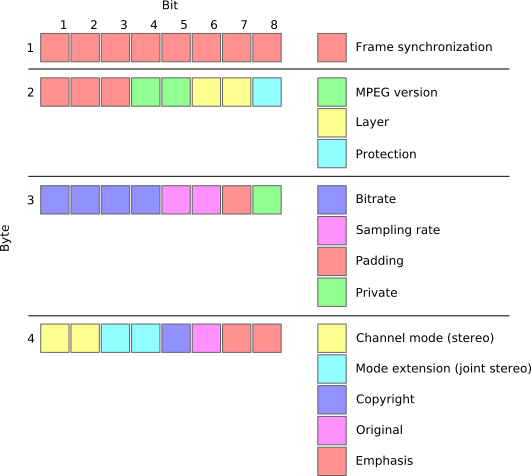
MP3 files are made up of a series of frames, each of which contains a small portion of the audio data. The frames are synchronized using sync words, which are unique patterns of bits that indicate the start of a new frame. The sync words are used by the MP3 decoder to identify the beginning of each frame and to synchronize the audio data.
How Frames and Sync Words Work Together
Frames and sync words are the building blocks of the MP3 file format. The frames contain the compressed audio data, while the sync words are used to identify the beginning of each frame. The sync words are also used to ensure that the frames are decoded in the correct order. Without sync words, the MP3 decoder would not be able to properly decode the audio data.
In conclusion, understanding the basics of MP3 file structure, frames, and sync words is essential for anyone who wants to work with digital audio. As an audio enthusiast, I have found that knowing how MP3 compression works has helped me to appreciate the technology behind digital audio. If you are looking for a reliable and efficient way to normalize and convert your audio files, I highly recommend MP4Gain. It is a powerful tool that can help you get the most out of your digital audio collection.
Final Words:
In this article, we have explored the basics of MP3 file structure, frames, and sync words. We have learned how MP3 compression works and how frames and sync words are used to compress and decompress audio data. If you have any questions or comments, please feel free to leave them below. Thank you for reading!
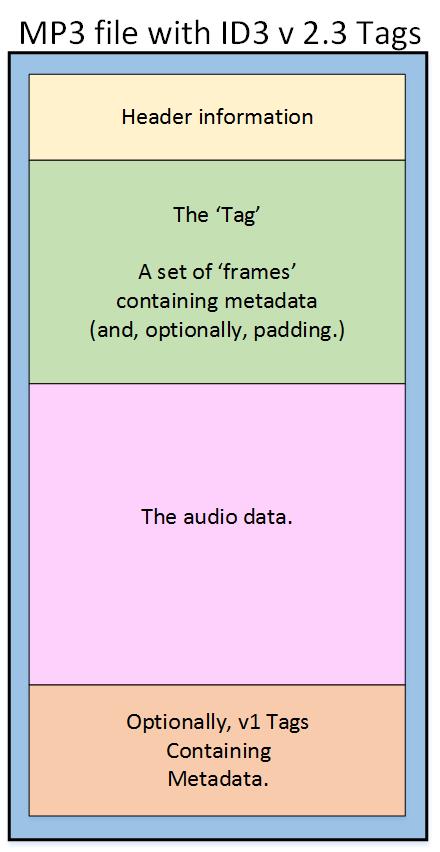
As an audio file format, MP3 has become one of the most popular digital audio compression methods. The MP3 file structure consists of header and data blocks. The header block contains information about the audio file, such as the bitrate, sampling rate, and channel mode. The data block contains the compressed audio data.
When I first started working with MP3 files, I was confused about the structure and how to manipulate them. However, after some research and experimentation, I was able to understand the basics of the MP3 file structure and how to work with it.
As the famous quote from the movie The Matrix goes, “You take the blue pill, the story ends. You wake up in your bed and believe whatever you want to believe. You take the red pill, you stay in Wonderland, and I show you how deep the rabbit hole goes.” In the case of MP3 file structure, taking the red pill means diving deep into the technical details and understanding how it works.
Header Blocks
The header block is the first part of an MP3 file. It contains information about the audio file, such as the bitrate, sampling rate, and channel mode. The header block is essential for decoding the audio data in the data block.
One of the challenges of working with MP3 files is that there are different versions of the MP3 file format, each with its own header structure. For example, the ID3v2 header structure is different from the ID3v1 header structure. Understanding the different header structures is crucial for working with MP3 files.
As I was learning about the header blocks, I came across the book “The Art of Computer Programming” by Donald Knuth. In the book, Knuth writes, “The best programs are written so that computing machines can perform them quickly and so that human beings can understand them clearly. A programmer is ideally an essayist who works with traditional aesthetic and literary forms as well as mathematical concepts, to communicate the way that an algorithm works and to convince a reader that the results will be correct.”
Data Blocks
The data block contains the compressed audio data. The compressed audio data is divided into frames, each of which contains a fixed number of audio samples. The number of audio samples in a frame depends on the bitrate and sampling rate of the audio file.
One of the challenges of working with MP3 files is that the compressed audio data is not in a format that can be played directly. The compressed audio data needs to be decoded before it can be played. Decoding the compressed audio data involves several steps, including Huffman decoding, dequantization, and inverse discrete cosine transform.
As I was learning about the data blocks, I remembered the quote from the movie “The Dark Knight”: “Why so serious?” Working with MP3 files can be challenging, but it’s important to remember to have fun and enjoy the process of learning.
Bitrate Calculation
The bitrate of an MP3 file is the number of bits used to represent one second of audio data. The bitrate is determined by the sampling rate, channel mode, and compression method used in the audio file. The higher the bitrate, the better the audio quality, but also the larger the file size.
Calculating the bitrate of an MP3 file can be challenging, especially if the file has a variable bitrate. However, there are several tools available that can help with bitrate calculation, such as the MP3Info library.
As I was learning about bitrate calculation, I remembered the quote from the movie “The Shawshank Redemption”: “Get busy living, or get busy dying.” Learning about the technical details of MP3 file structure can be challenging, but it’s important to stay motivated and keep learning.
Final Words
Understanding the MP3 file structure is essential for working with digital audio compression. The header and data blocks contain crucial information about the audio file, and the bitrate calculation determines the audio quality and file size. While working with MP3 files can be challenging, it’s important to stay motivated and enjoy the process of learning.
At MP4Gain, we understand the importance of audio quality and file size. Our software is designed to normalize and convert audio files to the most popular formats, with an integrated equalizer for fine-tuning the audio. If you’re looking for a solution to your audio needs, give MP4Gain a try.
MP3 file format: Understanding Variable Bit Rate Encoding
Variable Bit Rate EncodingVariable Bit Rate Encoding
MP3 file format
The MP3 file format revolutionized the way we listen to music and audio content. It allowed us to store high-quality audio files in a compact size, making it easier to share and transfer them. However, to achieve this level of compression, MP3 file format uses a lossy compression technique that removes certain parts of the audio data. As a result, the audio quality of MP3 files is lower than the original recording.
Variable Bit Rate Encoding
Variable Bit Rate Encoding (VBR) is a technique used by MP3 file format to achieve better compression while maintaining audio quality. Instead of using a constant bit rate for the entire file, VBR adjusts the bit rate according to the complexity of the audio. This means that more complex parts of the audio, such as music with lots of instruments, will have a higher bit rate, while simpler parts, like a solo voice, will have a lower bit rate. This results in smaller file sizes without sacrificing audio quality.
According to the book “Mastering Audio: The Art and the Science” by Bob Katz, “VBR is a much more efficient way of storing audio data…it allows us to use the bits more efficiently.” However, VBR can also be more complex to decode and can cause compatibility issues with some audio players.
Audio Quality
The goal of VBR is to maintain audio quality while reducing file size. However, the quality of the audio can still be affected by the bit rate used. A higher bit rate will result in better audio quality but also a larger file size, while a lower bit rate will result in a smaller file size but lower audio quality. It’s important to strike a balance between file size and audio quality based on your specific needs.
In the words of filmmaker George Lucas, “Sound is 50 percent of the movie-going experience.” So, whether you’re listening to music or watching a movie, the audio quality should be a top priority.
File Size
One of the main benefits of VBR is that it reduces the file size of MP3 files. However, the file size can still vary depending on the bit rate used and the length of the audio file. A longer audio file with a higher bit rate will result in a larger file size, while a shorter audio file with a lower bit rate will result in a smaller file size.
It’s important to keep file size in mind when sharing and transferring MP3 files. If the file size is too large, it may take longer to upload or download, which can be frustrating for both you and the recipient.
Audio Codecs
MP3 file format is not the only audio codec that uses variable bit rate encoding. Other codecs, such as AAC and Vorbis, also use VBR to achieve better compression and maintain audio quality. It’s important to understand the differences between these codecs and choose the one that best suits your needs.
In conclusion, MP3 file format’s variable bit rate encoding is a powerful tool that allows us to store high-quality audio files in a compact size. However, it’s important to strike a balance between file size and audio quality based on your specific needs. Whether you’re listening to music or watching a movie, the audio quality should always be a top priority.
Final Words
In conclusion, the MP3 file format is an incredibly popular and versatile format for audio files. However, the handling of variable bit rate encoding can be a complex and nuanced topic. It’s important to understand the differences between constant and variable bit rate encoding, as well as the potential trade-offs in file size and sound quality.
At the end of the day, it’s up to the individual user to determine which encoding method works best for their needs. Whether you’re a music lover who wants to store high-quality files on your device or a professional sound engineer who needs to carefully balance file size and audio fidelity, understanding the ins and outs of variable bit rate encoding is an important step.
As David Bowie once said, “I suppose for me as an artist, it wasn’t always just about expressing my work; I really wanted, more than anything else, to contribute in some way to the culture I was living in.” By understanding the technical aspects of audio file formats and encoding methods, we can better appreciate and contribute to the world of music and sound.
As an audio file format, MP3 is known for its ability to compress audio data to a manageable size without sacrificing quality. The MP3 file format is based on a set of rules that determine how audio data is stored, organized, and compressed. To understand the structure of an MP3 file, it’s important to know its components, which include the header, audio data, and metadata.
The header of an MP3 file contains information about the file’s format, encoding, and bit rate. It also includes information about the length of the audio data and any additional metadata that may be included. The audio data is the compressed audio stream that makes up the bulk of the file, while metadata includes information like artist name, album name, and track number.
The Components of an MP3 File
To truly understand the structure of an MP3 file, it’s important to break down its components. The audio data is the most important component of the file, as it contains the actual audio content. This data is compressed using various algorithms to reduce its size while maintaining a high level of audio quality.
The header of the file is also important, as it contains information about the file’s format and encoding. The header is located at the beginning of the file and provides important information about the file’s size, length, and other technical specifications.
Finally, metadata is an essential component of an MP3 file. Metadata includes information like artist name, album name, track number, and other relevant details about the audio content. This information is used by media players to organize and display audio content in a user-friendly manner.
The Anatomy of an MP3 File
The structure of an MP3 file can be likened to the anatomy of a living organism. Each component of the file works together to create a cohesive and functional audio file. The header serves as the brain of the file, providing important information about the file’s structure and format.
The audio data is like the heart of the file, pumping out the compressed audio stream that makes up the bulk of the file. And metadata is like the skin of the file, providing important information about the content and giving it context.
As with any living organism, each component of an MP3 file is essential to its overall function. Understanding the structure and components of an MP3 file is key to creating and working with high-quality audio content.
Final Words:
In conclusion, understanding the structure of an MP3 file is crucial to working with audio content in a digital age. By understanding the anatomy of an MP3 file, you can better appreciate the technical complexity of audio compression and gain a deeper appreciation for the art of digital audio. As a tool for audio normalization and conversion, mp4gain is an excellent choice for anyone looking to optimize their audio content for use in a digital environment.
MP3, file format, audio compression, audio data, header, metadata, encoding, bit rate, audio normalization, digital audio, media player, algorithm, technical specifications, audio content, file structure, digital environment, audio quality, audio conversion, audio stream, audio file.
I still remember the first time I heard an MP3 file. It was the late 90s, and the internet was still in its early days. I was amazed at how a song could be so compressed and still sound decent. Little did I know that this was just the beginning of a revolutionary audio technology that would change the way we listen to music forever.
The Birth of the MP3 File Format
The MP3 file format was first developed in 1987 by a German engineer named Karlheinz Brandenburg. He was working for the Fraunhofer Institute for Integrated Circuits in Erlangen, Germany, where he and his team were tasked with developing a digital audio format that could compress audio files without losing too much quality.
The breakthrough came in the early 90s when the first MP3 encoder was released. It was able to compress audio files by a factor of 10 to 12 times their original size without losing too much quality. This meant that a 50 MB audio file could be compressed down to 5 MB or less. This was a huge development at the time, as it made it possible to share audio files over the internet, which was still in its infancy.
The Evolution of MP3 Technology
Over the next few years, the MP3 format continued to evolve and improve. In 1995, the first MP3 player was released by Saehan Information Systems in South Korea. It was called the MPMan and was the size of a small portable cassette player. It had a 32 MB memory and could store up to 8 songs.
By the late 90s, MP3 players had become more common, and the MP3 format had become the standard for digital audio. The first iPod was released in 2001, and it revolutionized the way we listen to music. It had a 5 GB hard drive and could store up to 1000 songs. It was sleek, portable, and easy to use, and it quickly became the must-have gadget for music lovers around the world.
The Future of MP3 Technology
Despite its popularity, the MP3 format is not without its flaws. It is a lossy compression format, which means that some of the original audio data is lost during the compression process. This can result in a loss of audio quality, especially at lower bit rates.
However, there are new audio technologies being developed that may one day replace the MP3 format. One of these is the High-Resolution Audio (HRA) format, which is capable of reproducing audio at a much higher quality than the MP3 format. Another is the Master Quality Authenticated (MQA) format, which is designed to deliver studio-quality audio in a compact file size.
In conclusion, the MP3 format has come a long way since its inception in 1987. It has revolutionized the way we listen to music and has made it possible to share audio files over the internet. While it may one day be replaced by newer audio technologies, its legacy will live on.
mp3 compression, digital audio format, mp3 file size, audio quality, mp3 history, music industry, lossy compression, audio technology, high-quality audio, mp3 player, audio codec, file sharing, online music, digital music
Uncompressed audio formats such as WAV and AIFF offer great sound quality at the cost of large file sizes. With the rise of Internet file sharing in the mid-1990s, people quickly realized that sending uncompressed files over a dial-up connection was impractical and often impossible. Thus, MP3 (MPEG-2 Audio Layer III encoding) was born.
A three-minute song would take about 30MB to output in WAV or AIFF format, while converting to MP3 would take a tenth of the space, about 3MB. Thanks to efficient compression algorithms, MP3 has become a staple of the Internet age and has remained strong.
PS: Previously, everyone called all music players “MP3”. For example, when they met, they said, “Did you buy an MP3?”
Like images, smaller audio files lose clarity and detail.
However, small files sacrifice sound quality. Take the image above. On the left, you can vividly see every little wrinkle and color. However, the highly compressed image (on the right) becomes very pixelated and loses all sharpness and detail (but still makes sense). The same thing happens when compressing audio files.
Different compression formats use different methods to re-encode data in a space-efficient way. However, this space-saving method means that some data must be lost in the process. High frequencies are usually the first to be lost because most people’s ears cannot hear details in the high frequencies. The lower the encoding quality, the more frequencies and details will be lost in the audio.
That said, modern compression algorithms allow for higher bit rates, which in turn means they can achieve high compression rates with very little loss in audio quality. Bitrate indicates the amount of data transferred per second of audio content, and a general rule of thumb is: smallest bitrate = smallest file size. So if you want to maintain good quality, but still take advantage of the fact that MP3s are easy to share, you should keep your bitrate above 128 Kbps (kilobits per second).
What is an M4A/MP4 file?
File extensions: .m4a, .mp4
Format Type: Lossy Compressed
M4A (MPEG-4 Part 14) files are Apple’s answer to MP3. Often considered the successor to MP3, this Mac-focused compressed audio format has gained popularity with the birth of the iTunes Store. In the iTunes Store, M4A became the main format for music purchases through the online music store. It remains the format of choice for all audio included in apps published in the Mac and iOS app stores, as well as in Nintendo and PlayStation products.
M4A files are encoded using the lossy Advanced Audio Coding (AAC) codec, which is capable of delivering the same bitrate as MP3, but with better compression. This reduces file size while providing higher audio quality.
Although many audio players can play M4A files on various platforms, the compatibility is still not as good as MP3, so MP3 is still the most viewed.