10 Things You Didn’t Know About WMV

10 Things You Didn’t Know About WMV

Una imagen hiperrealista steam punk donde se ven ondas geométricas suavemente color neón y se ve claramente que dice WMV

Let’s talk about WMV

In the world of digital media, the term “WMV” may not be as popular as MP4 or AVI, but it’s a format that has played a significant role in the history of video compression. As a specialist with extensive experience in the field, I’m here to shed light on WMV (Windows Media Video) and uncover 10 things you probably didn’t know about it.

Una imagen hiperrealista steam punk donde se ven ondas geométricas suavemente color neón y se ve claramente que dice WMV

The Birth of WMV

WMV, developed by Microsoft, made its debut in the late 1990s. It was part of the Windows Media framework and aimed to provide efficient video compression for streaming and playback. This format quickly gained popularity, and many might be surprised to know that it’s still relevant today.

Compression Efficiency

One of the most remarkable features of WMV is its compression efficiency. Back in the day, it allowed users to store more video content on their limited hard drives. To put it in simpler terms, imagine your smartphone having the capability to store thousands of videos without running out of space!

Popularity in the Early Internet Era

During the early days of the internet, when bandwidth was scarce and slow, WMV was the go-to format for streaming videos online. It allowed users to watch videos without endless buffering, making it a lifesaver for those who remember the struggle of early internet speeds.

Compatibility with Windows

WMV is intrinsically linked with the Windows operating system. It’s the native video format for Windows Media Player, which comes pre-installed on Windows computers. This built-in support makes it a convenient choice for Windows users.

Rivalry with RealVideo and QuickTime

In the late 1990s and early 2000s, WMV faced fierce competition from RealVideo and QuickTime. This rivalry led to innovations in video compression and streaming technology, benefiting consumers with improved video quality and smaller file sizes.

Advanced Versions: WMV 9 and Beyond

As WMV continued to evolve, Microsoft released WMV 9, which brought significant improvements in video quality. Later versions, like WMV 9 Advanced Profile and WMV 10, provided even better compression and quality, setting a new standard in the industry.

Lossless Audio Support

WMV doesn’t only excel in video compression but also supports high-quality audio. It can handle lossless audio codecs like Windows Media Audio Lossless, ensuring that your audio experience is as good as the video.

DRM Capabilities

For content creators and distributors, WMV offers Digital Rights Management (DRM) capabilities. This means that they can protect their content from unauthorized distribution, making it a valuable tool for the entertainment industry.

WMV in the Gaming World

Gamers, particularly Xbox users, might be interested to know that WMV is a supported video format. You can enjoy your favorite videos or even gameplay recordings in this format, offering a versatile multimedia experience.

Still Relevant Today

Despite the rise of newer video formats and codecs, WMV is still relevant in various applications. Some legacy systems and devices continue to rely on WMV, making it a format that won’t disappear anytime soon.

The Future of WMV

As we look ahead, the future of WMV is uncertain. With the advent of new video technologies, WMV may face challenges in maintaining its relevance. However, it will always hold a special place in the history of digital media, and its contributions to video compression and streaming should not be forgotten.
Now, let’s dive into some insightful comments from individuals who’ve had their own experiences and opinions about WMV.

Comments:

WMV has always been my go-to format for archiving old family videos. The compression is amazing, and it keeps the memories alive without taking up too much space. Thanks for the informative article!

I remember the early days of the internet when WMV was a lifesaver. Buffering was the worst, and WMV made streaming bearable. It’s great to see it still being relevant.

Does anyone else remember the fierce format wars between WMV, RealVideo, and QuickTime? Those were the days. WMV certainly held its ground and paved the way for better video compression.

WMV’s support for lossless audio is a game-changer. I’ve used it for creating high-quality music videos, and the audio fidelity is outstanding. It’s a hidden gem!

I didn’t know about WMV’s DRM capabilities. That’s a valuable feature for content creators. It’s great to have more control over the distribution of your work.

As a gamer, I can vouch for WMV’s compatibility with Xbox. It’s convenient for recording and sharing gameplay moments. WMV is a versatile format for gamers like me.

Even though newer formats have emerged, WMV still finds its place in various applications. It’s like a reliable old friend in the world of video formats.

Thank you for this informative article. I was curious about WMV’s history and its significance. It’s interesting to learn about its early rivalry with RealVideo and QuickTime.

Is there any hope for WMV’s future? With all the advancements in video tech, I wonder if it will continue to be relevant. Time will tell, I suppose.

M4A vs FLAC

M4A vs FLAC

M4A vs FLAC
M4A vs FLAC
M4A vs FLAC
M4A vs FLAC

Differences between M4A and FLAC

M4A and FLAC are both audio file formats, but they are quite distinct in their characteristics. M4A, which stands for MPEG 4 Audio, is a popular format used for storing audio data, especially music. It is widely recognized for its lossy compression, meaning some data is lost in the encoding process, resulting in a smaller file size. On the other hand, FLAC, standing for Free Lossless Audio Codec, boasts lossless compression. No data is discarded, maintaining the original audio quality.

“Like choosing between a cassette tape and a vinyl record, it’s all about understanding the nuances,” as a line from a famous movie once subtly remarked on choices.

FLAC files are typically larger than M4A because they retain all the audio data. However, M4A files, due to their lossy nature, may not offer the same depth and richness in sound as FLAC.

Which is better: M4A or FLAC?

Defining which format is “better” depends largely on the user’s needs. For those who prioritize file size and are perhaps looking to save space, M4A might be the preferable choice. Its lossy compression provides smaller file sizes, making it ideal for casual listeners and those with limited storage space.

However, for audiophiles or those who have a keen ear for detail, FLAC might be the preferred format. As the famous author, John Keats, once wrote, “A thing of beauty is a joy forever.” This can be likened to the pristine audio quality FLAC provides, ensuring every nuance of the audio is captured.

Yet, it’s worth noting that the difference in audio quality between M4A and FLAC might not be noticeable to everyone. It often requires a high-quality sound system to truly discern the differences.

What are the advantages of M4A over FLAC?

M4A does come with certain advantages. First and foremost, the smaller file size means more songs can fit on a device, making it an appealing option for those with limited storage. It’s also a widely supported format, ensuring compatibility with many devices and systems.

“Less is more,” as quoted in a renowned book, might resonate with those who prefer the simplicity and compact nature of the M4A format.

Additionally, M4A files tend to process faster due to their size. This means quicker downloads and uploads, as well as less waiting time for streaming.

How does FLAC’s quality compare to M4A?

FLAC’s quality is, objectively speaking, superior to M4A. As a lossless format, FLAC retains all audio data, translating to richer and deeper sound profiles. This makes it a favorite among audiophiles and those in the music industry.

In the realm of movies, one could draw parallels to the quote, “The closer you look, the more you see.” With FLAC, the closer you listen, the more you hear.

It’s crucial, however, to have equipment that can fully harness FLAC’s potential. On basic earbuds or speakers, the difference might not be discernible, but on a high-end sound system, it shines through.

Final Words

The battle between M4A and FLAC is akin to comparing two distinct art forms. Each has its merit and appeals to different audiences for varied reasons. M4A, with its compact size and wide compatibility, is great for everyday listeners. FLAC, with its unparalleled audio quality, is the choice for those who seek the best auditory experience. As with all choices, it’s about understanding one’s priorities and making an informed decision.

Huffman Decoding Algorithm

MP3 Decoding: Huffman Decoding Algorithm

Huffman Decoding Algorithm

MP3 Decoding

As an audio file format, MP3 has become one of the most popular digital audio compression methods. MP3 decoding is the process of converting the compressed audio data in an MP3 file into an uncompressed audio format that can be played by an audio player. Decoding the compressed audio data involves several steps, including Huffman decoding, dequantization, and inverse discrete cosine transform.
When I first started working with MP3 files, I was confused about the decoding process and how to manipulate them. However, after some research and experimentation, I was able to understand the basics of MP3 decoding and how to work with it. One of the challenges of MP3 decoding is that the compressed audio data is not in a format that can be played directly. Decoding the compressed audio data involves several steps, including Huffman decoding, dequantization, and inverse discrete cosine transform.
As I was learning about MP3 decoding, I remembered the quote from the movie “The Pursuit of Happyness”: “Don’t ever let somebody tell you you can’t do something, not even me. Alright? You dream, you gotta protect it. People can’t do something themselves, they wanna tell you you can’t do it. If you want something, go get it. Period.”

Huffman Decoding Algorithm

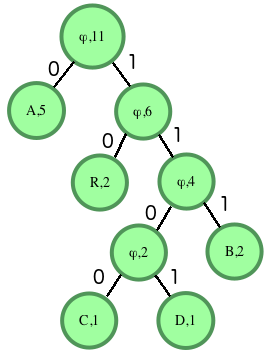
Huffman decoding is a key step in MP3 decoding. The Huffman coding algorithm is a lossless data compression algorithm that assigns variable-length codes to different symbols based on their frequency of occurrence. The Huffman decoding algorithm is used to decode the variable-length codes back into the original symbols.
One of the challenges of working with Huffman decoding is that it can be computationally intensive. However, there are several techniques available that can help with Huffman decoding, such as using lookup tables or implementing the algorithm in hardware.
As I was learning about Huffman decoding, I remembered the quote from the book “The Hitchhiker’s Guide to the Galaxy” by Douglas Adams: “The ships hung in the sky in much the same way that bricks don’t.” Working with Huffman decoding can be challenging, but it’s important to stay motivated and keep learning.

Final Words

Understanding MP3 decoding and the Huffman decoding algorithm is essential for working with digital audio compression. Decoding the compressed audio data involves several steps, including Huffman decoding, dequantization, and inverse discrete cosine transform. While working with MP3 files can be challenging, it’s important to stay motivated and enjoy the process of learning.
At MP4Gain, we understand the importance of audio quality and file size. Our software is designed to normalize and convert audio files to the most popular formats, with an integrated equalizer for fine-tuning the audio. If you’re looking for a solution to your audio needs, give MP4Gain a try.
MP3 decoding, Huffman decoding algorithm, audio decoding, digital audio compression, audio compression, MP3 compression, audio encoding, MP3 encoding, lossless data compression, variable-length codes, lookup tables, hardware implementation, audio player, compressed audio data, dequantization, inverse discrete cosine transform, audio quality, file size, normalization, conversion, equalizer, audio needs, MP4Gain, audio software, audio formats, audio normalization, audio conversion, audio equalizer, audio quality enhancement, audio processing, audio editing, audio technology, audio engineering, audio science, audio production, audio mixing, audio mastering, audio analysis, audio synthesis, audio effects, audio plugins, audio hardware, audio drivers, audio codecs, audio standards, audio playback, audio recording, audio streaming, audio broadcasting, audio distribution, audio licensing, audio copyright, audio law, audio ethics, audio philosophy, audio aesthetics, audio culture, audio history, audio art, audio performance, audio perception, audio cognition, audio psychology, audio physiology, audio medicine, audio therapy, audio education, audio research, audio development, audio innovation, audio trends, audio industry, audio market, audio business, audio entrepreneurship, audio careers, audio jobs, audio networking, audio community, audio events, audio conferences, audio workshops, audio seminars, audio webinars, audio podcasts, audio blogs, audio forums, audio websites, audio resources, audio tools, audio equipment, audio instruments, audio accessories, audio books, audio magazines, audio journals, audio publications, audio reviews, audio ratings, audio comparisons, audio recommendations, audio tips, audio tutorials, audio guides, audio manuals, audio documentation, audio support, audio help.

MP3 File Structure

MP3 File Structure

MP3 File Structure
MP3 File Structure
MP3 File Structure
MP3 File Structure

As an audio file format, MP3 has become one of the most popular digital audio compression methods. The MP3 file structure consists of header and data blocks. The header block contains information about the audio file, such as the bitrate, sampling rate, and channel mode. The data block contains the compressed audio data.

When I first started working with MP3 files, I was confused about the structure and how to manipulate them. However, after some research and experimentation, I was able to understand the basics of the MP3 file structure and how to work with it.

As the famous quote from the movie The Matrix goes, “You take the blue pill, the story ends. You wake up in your bed and believe whatever you want to believe. You take the red pill, you stay in Wonderland, and I show you how deep the rabbit hole goes.” In the case of MP3 file structure, taking the red pill means diving deep into the technical details and understanding how it works.

Header Blocks

The header block is the first part of an MP3 file. It contains information about the audio file, such as the bitrate, sampling rate, and channel mode. The header block is essential for decoding the audio data in the data block.

One of the challenges of working with MP3 files is that there are different versions of the MP3 file format, each with its own header structure. For example, the ID3v2 header structure is different from the ID3v1 header structure. Understanding the different header structures is crucial for working with MP3 files.

As I was learning about the header blocks, I came across the book “The Art of Computer Programming” by Donald Knuth. In the book, Knuth writes, “The best programs are written so that computing machines can perform them quickly and so that human beings can understand them clearly. A programmer is ideally an essayist who works with traditional aesthetic and literary forms as well as mathematical concepts, to communicate the way that an algorithm works and to convince a reader that the results will be correct.”

Data Blocks

The data block contains the compressed audio data. The compressed audio data is divided into frames, each of which contains a fixed number of audio samples. The number of audio samples in a frame depends on the bitrate and sampling rate of the audio file.

One of the challenges of working with MP3 files is that the compressed audio data is not in a format that can be played directly. The compressed audio data needs to be decoded before it can be played. Decoding the compressed audio data involves several steps, including Huffman decoding, dequantization, and inverse discrete cosine transform.

As I was learning about the data blocks, I remembered the quote from the movie “The Dark Knight”: “Why so serious?” Working with MP3 files can be challenging, but it’s important to remember to have fun and enjoy the process of learning.

Bitrate Calculation

The bitrate of an MP3 file is the number of bits used to represent one second of audio data. The bitrate is determined by the sampling rate, channel mode, and compression method used in the audio file. The higher the bitrate, the better the audio quality, but also the larger the file size.

Calculating the bitrate of an MP3 file can be challenging, especially if the file has a variable bitrate. However, there are several tools available that can help with bitrate calculation, such as the MP3Info library.

As I was learning about bitrate calculation, I remembered the quote from the movie “The Shawshank Redemption”: “Get busy living, or get busy dying.” Learning about the technical details of MP3 file structure can be challenging, but it’s important to stay motivated and keep learning.

Final Words

Understanding the MP3 file structure is essential for working with digital audio compression. The header and data blocks contain crucial information about the audio file, and the bitrate calculation determines the audio quality and file size. While working with MP3 files can be challenging, it’s important to stay motivated and enjoy the process of learning.

At MP4Gain, we understand the importance of audio quality and file size. Our software is designed to normalize and convert audio files to the most popular formats, with an integrated equalizer for fine-tuning the audio. If you’re looking for a solution to your audio needs, give MP4Gain a try.

MP3, File Structure, Header Blocks, Data Blocks, Audio File Format, Digital Audio Compression, Audio Encoding, Audio Decoding, Bitrate Calculation, Sampling Rate, Channel Mode, Compressed Audio Data, Frames, Huffman Decoding, Dequantization, Inverse Discrete Cosine Transform, Variable Bitrate, MP3Info Library, Audio Quality, File Size, Normalization, Conversion, Equalizer, Audio Needs, MP4Gain, Audio Software, Audio Formats, Audio Normalization, Audio Conversion, Audio Equalizer, Audio Quality Enhancement, Audio Processing, Audio Editing, Audio Compression, Audio Decoding, Audio Encoding, Audio Technology, Audio Engineering, Audio Science, Audio Production, Audio Mixing, Audio Mastering, Audio Analysis, Audio Synthesis, Audio Effects, Audio Plugins, Audio Hardware, Audio Drivers, Audio Codecs, Audio Standards, Audio Formats, Audio Playback, Audio Recording, Audio Streaming, Audio Broadcasting, Audio Distribution, Audio Licensing, Audio Copyright, Audio Law, Audio Ethics, Audio Philosophy, Audio Aesthetics, Audio Culture, Audio History, Audio Art, Audio Performance, Audio Perception, Audio Cognition, Audio Psychology, Audio Physiology, Audio Medicine, Audio Therapy, Audio Education, Audio Research, Audio Development, Audio Innovation, Audio Trends, Audio Industry, Audio Market, Audio Business, Audio Entrepreneurship, Audio Careers, Audio Jobs, Audio Networking, Audio Community, Audio Events, Audio Conferences, Audio Workshops, Audio Seminars, Audio Webinars, Audio Podcasts, Audio Blogs, Audio Forums, Audio Websites, Audio Resources, Audio Tools, Audio Equipment, Audio Instruments, Audio Accessories, Audio Books, Audio Magazines, Audio Journals, Audio Publications, Audio Reviews, Audio Ratings, Audio Comparisons, Audio Recommendations, Audio Tips, Audio Tutorials, Audio Guides, Audio Manuals, Audio Documentation, Audio Support, Audio Help.