WAV File Compression: Lossless vs. Lossy Approaches

WAV File Compression: Lossless vs. Lossy Approaches

WAV File Compression: Lossless vs. Lossy Approaches

WAV File Compression: Lossless vs. Lossy Approaches

Let’s talk about WAV File Compression

Hey there, fellow music enthusiast! Are you wondering about the best ways to compress your WAV files without sacrificing quality? Well, you’ve come to the right place. As a seasoned audio engineer with years of experience in the industry, I’m here to guide you through the intricacies of WAV file compression, specifically exploring the differences between lossless and lossy approaches. By the end of this article, you’ll have a solid understanding of the various compression methods available and how to choose the right one for your needs.

Understanding WAV Files

Before diving into compression techniques, let’s quickly revisit what WAV files are. WAV (Waveform Audio File Format) is a widely used audio file format known for its uncompressed, high-quality sound. Unlike formats like MP3 or AAC, which use lossy compression to reduce file size, WAV files retain all the original audio data captured during recording. As a result, they offer pristine audio fidelity but tend to have larger file sizes.

Lossless Compression

  • Lossless compression preserves all the original audio data while reducing file size.
  • Techniques such as FLAC (Free Lossless Audio Codec) and ALAC (Apple Lossless Audio Codec) are commonly used for WAV file compression.
  • These methods achieve compression by identifying and eliminating redundant or unnecessary data without compromising audio quality.

Lossless compression is like packing a suitcase efficiently – you’re maximizing space without leaving anything behind. It’s perfect for situations where maintaining audio integrity is paramount, such as professional music production or archival purposes. Plus, with lossless compression, you can always unpack your files without any loss of quality.

Lossy Compression

  • Lossy compression sacrifices some audio quality to achieve greater file size reduction.
  • Popular formats like MP3 and AAC use lossy compression algorithms.
  • During compression, non-essential audio data is discarded based on psychoacoustic principles, resulting in smaller file sizes.

Think of lossy compression as decluttering your room – you’re getting rid of unnecessary items to free up space. While this approach may lead to some loss of audio detail, it’s often imperceptible to the average listener, making it ideal for streaming, portable devices, and online distribution.

Choosing the Right Compression Method

Now that you understand the differences between lossless and lossy compression, how do you decide which method to use? It ultimately depends on your specific needs and priorities.

Considerations for Lossless Compression

  • If you require the highest possible audio quality without compromise, lossless compression is the way to go.
  • Lossless formats are well-suited for professional audio production, mastering, and archival purposes.
  • They’re also ideal for situations where storage space isn’t a significant concern.

For audiophiles and professionals who demand pristine sound reproduction, lossless compression offers the best of both worlds – reduced file sizes without sacrificing audio fidelity.

Considerations for Lossy Compression

  • Lossy compression is more suitable for scenarios where file size is a primary consideration.
  • If you’re distributing music online, streaming content, or using portable devices with limited storage capacity, lossy formats are a practical choice.
  • Most listeners won’t notice the slight loss in quality introduced by lossy compression, especially when listening through typical consumer audio equipment.

While purists may prefer the uncompromising quality of lossless formats, the convenience and efficiency of lossy compression make it a practical solution for everyday audio needs.

Conclusion

In the realm of WAV file compression, choosing between lossless and lossy approaches boils down to finding the right balance between audio quality and file size. Whether you prioritize pristine fidelity or efficient storage, there’s a compression method suited to your needs. By understanding the differences between these approaches, you can make informed decisions when managing your audio library or preparing content for distribution. So go ahead, experiment with different compression techniques, and enjoy the best of what WAV files have to offer!

Comments:

This article is so helpful! I’ve been struggling to understand the difference between lossless and lossy compression, but now it’s crystal clear. Thanks a bunch!

As a musician, I appreciate the detailed explanation of WAV file compression. It’s essential to strike the right balance between quality and file size, and this article nails it!

Could you dive deeper into the technical aspects of lossless compression algorithms? I’m intrigued by the science behind it and would love to learn more.

I’ve been using MP3 files for years without realizing there was a difference between lossy and lossless compression. This article opened my eyes to a whole new world of audio quality!

As a DJ, file size is always a concern when managing my music library. Learning about the pros and cons of lossless and lossy compression helps me make smarter choices when selecting formats for my tracks.

Great article! I appreciate the practical examples and real-world comparisons. Understanding WAV file compression is crucial for anyone working with audio, and this article delivers the information in an accessible way.

Could you provide some recommendations for software or tools that support lossless compression? I’m eager to try it out for myself!

This article does an excellent job of demystifying WAV file compression. I feel much more confident navigating the world of audio formats now. Keep up the fantastic work!

I never knew there was so much to consider when it comes to compressing WAV files. This article sheds light on the complexities of audio compression and offers valuable insights for both beginners and experienced users.

As a music producer, I’m always looking for ways to optimize my workflow. Understanding the nuances of WAV file compression helps me deliver high-quality tracks while conserving storage space. Thanks for sharing your expertise!

Flac and Ogg Volume Adjuster

Flac and Ogg Volume Adjuster

Flac and Ogg Volume Adjuster

Are you tired of dealing with uneven audio levels in your Flac and Ogg files? Well, you’re not alone. Many audio enthusiasts and professionals often face the challenge of maintaining consistent sound quality across their collections. In this article, I’ll delve into the world of Flac and Ogg volume adjustment and explore various methods to tackle this issue effectively.

Audio File Format Adjustments

Before we dive into volume adjustments, it’s crucial to understand the nature of Flac and Ogg audio formats. Flac, short for Free Lossless Audio Codec, and Ogg Vorbis are popular choices for storing high-quality audio. Flac provides lossless compression, preserving audio quality without sacrificing file size, while Ogg is known for its open-source nature and efficient compression.

Sound Volume Control for Flac and Ogg

To control the volume of your Flac and Ogg files, you’ll need specialized tools or software designed for audio processing. These tools allow you to adjust the volume levels without compromising the overall audio quality. Keep in mind that it’s essential to maintain a balance between amplifying the audio and preventing distortion.

Adjusting Audio Levels in Flac and Ogg

One common method for volume adjustment is using an audio editor. These editors offer precise control over the audio, enabling you to increase or decrease the volume as needed. It’s important to preview the changes and make incremental adjustments to achieve the desired result.

Whether you’re a music enthusiast or a professional sound engineer, the ability to adjust volume levels in Flac and Ogg files is invaluable. By understanding the intricacies of these audio formats and utilizing the right tools, you can ensure a consistent and enjoyable listening experience.

Normalizing Sound in Flac and Ogg Files

Normalization is another technique to bring uniformity to your audio collection. This process adjusts the volume of each file to a standard level, eliminating extreme variations. Normalization algorithms analyze the audio content and adjust the gain accordingly, making it ideal for batch processing large libraries.

Volume Equalization for Flac and Ogg

Volume equalization is about ensuring that all your Flac and Ogg files have similar loudness levels. This technique is essential when you’re creating playlists or organizing audio for playback. Volume equalization tools use various methods to balance the audio, providing a seamless listening experience.

Audio Gain in Flac and Ogg Formats

Audio gain, also known as amplification, allows you to increase the overall loudness of your Flac and Ogg files. This can be particularly useful if you have older recordings or content with low volume levels. However, it’s crucial to exercise caution and avoid over-amplification, which can lead to distortion.

Balancing Audio in Flac and Ogg Files

Balancing audio involves adjusting the volume levels of individual tracks within a file. This is handy when dealing with live recordings or albums where tracks may have varying loudness. Balancing tools provide a means to fine-tune each track’s volume to create a consistent listening experience.

Flac and Ogg Audio Level Management

Managing audio levels in Flac and Ogg files is an ongoing process, especially if you frequently add new content to your collection. Regularly reviewing and adjusting volume levels ensures that your audio library remains enjoyable and free from sudden volume spikes or drops.

Tweaking Volume in Flac and Ogg

Sometimes, you may want to apply specific tweaks to the volume of your Flac and Ogg files. This could involve emphasizing certain frequencies or applying dynamic range compression to enhance the audio quality. Experimenting with these tweaks can lead to a more personalized listening experience.

Enhancing Audio Dynamics in Flac and Ogg

Audio dynamics play a crucial role in the overall quality of your listening experience. Adjusting volume levels in Flac and Ogg files can help bring out the nuances in your music. By carefully managing audio dynamics, you can ensure that every note and sound is delivered with precision and clarity.

Final Words

Flac and Ogg volume adjustment is an essential aspect of maintaining an enjoyable audio collection. Whether you’re a music enthusiast or a professional, understanding the tools and techniques available can significantly enhance your listening experience. With the right approach, you can achieve balanced and consistent audio quality in your Flac and Ogg files.

Demystifying the OGG Audio Format

Demystifying the OGG Audio Format

Demystifying the OGG Audio Format

OGG is a free, open-source audio format that was created by the Xiph.Org Foundation. It is a popular choice for streaming and downloading music because it offers good audio quality and smaller file sizes than other formats, such as MP3.

Here are some of the key features of OGG:

  • Open-source: OGG is an open-source format, which means that it is free to use and distribute. This makes it a popular choice for developers who want to create their own music players or other software that can play OGG files.
  • Small file sizes: OGG files are typically smaller than MP3 files of the same quality. This makes them a good choice for streaming or downloading music over the internet, or for storing music on devices with limited storage space.
  • Good audio quality: OGG files offer good audio quality, comparable to MP3 files. This is because OGG uses a lossy compression algorithm that is designed to remove data from the audio file without significantly affecting the quality.

Here are some of the most common questions that people ask about OGG:

1. What is the difference between OGG and MP3?

OGG and MP3 are both lossy audio formats, which means that they use compression to reduce the size of the audio file. However, OGG uses a different compression algorithm than MP3. This means that OGG files are typically smaller than MP3 files of the same quality.

2. What software can I use to play OGG files?

There are many different software programs that can play OGG files. Some popular options include VLC Media Player, Winamp, and Audacity.

3. Where can I find OGG files?

There are many different websites where you can find OGG files. Some popular options include Jamendo, Free Music Archive, and Magnatune.

4. Is OGG a good choice for music streaming?

Yes, OGG is a good choice for music streaming. It offers good audio quality and smaller file sizes than other formats, such as MP3. This makes it a good choice for listening to music online or on mobile devices.

5. Is OGG a good choice for music downloads?

Yes, OGG is a good choice for music downloads. It offers good audio quality and smaller file sizes than other formats, such as MP3. This makes it a good choice for storing music on devices with limited storage space.

Overall, OGG is a good choice for anyone who wants to listen to music with good audio quality and smaller file sizes. It is an open-source format that is free to use and distribute, and it is supported by a wide range of software.

What is a signal-to-noise ratio in audio?

What is a signal-to-noise ratio in audio?

signal-to-noise ratio audio

Understanding the Basics of Audio Quality

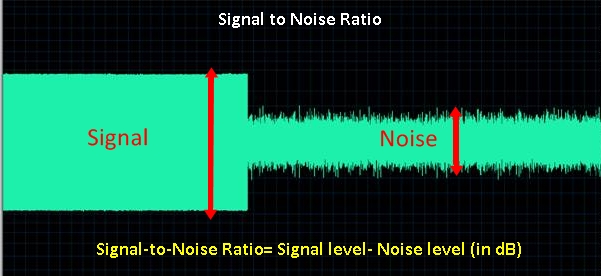
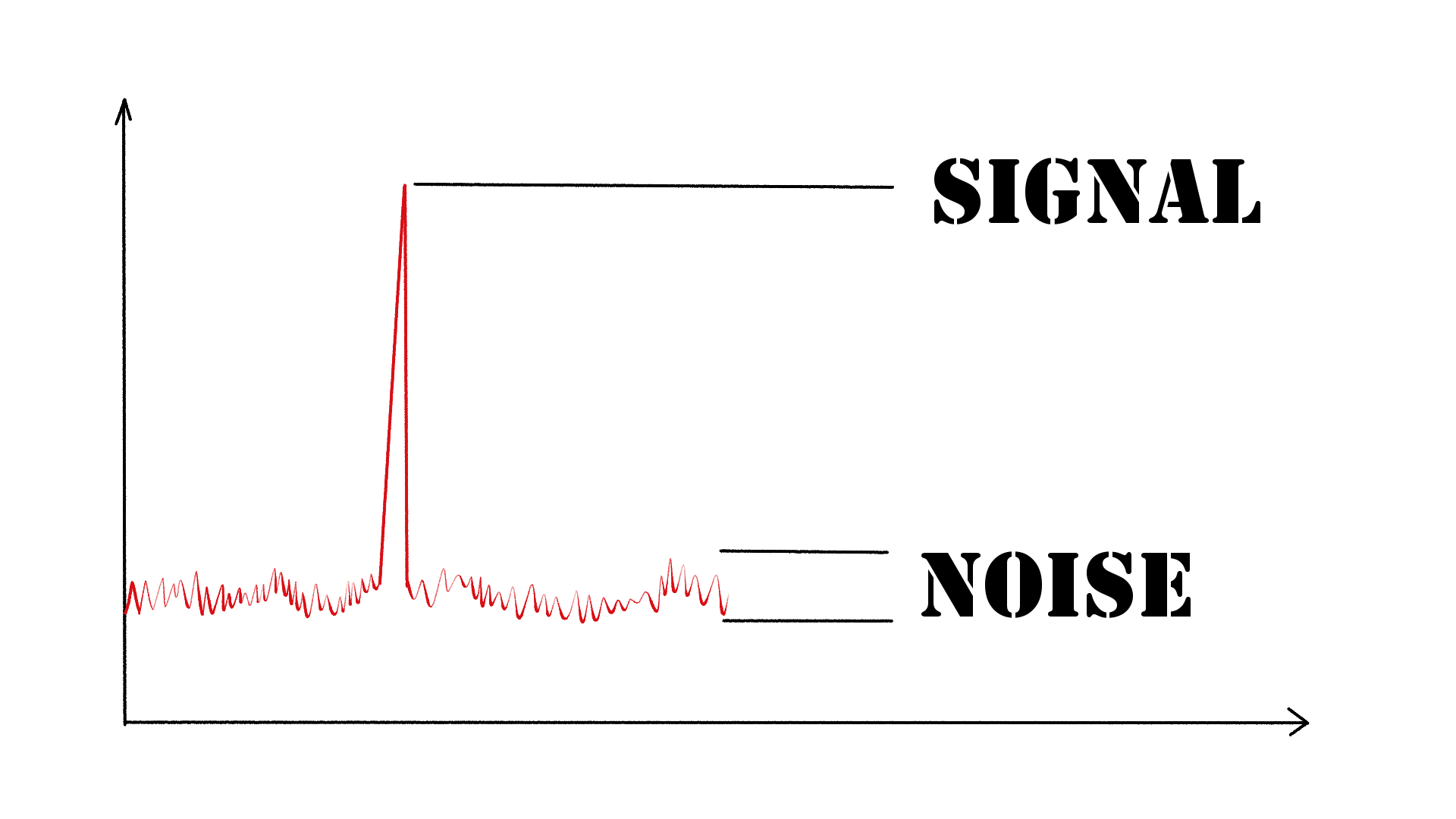
As an audio engineer, I have come across many questions about audio quality, and one of the most common ones is “What is a signal-to-noise ratio in audio?” In simple terms, the signal-to-noise ratio (SNR) is the difference between the desired audio signal and the background noise. A high SNR means that the desired signal is much stronger than the noise, resulting in better audio quality.
When it comes to audio quality, there are many factors to consider, such as audio processing, normalization, compression, dynamics, and distortion. Each of these factors can affect the SNR and, therefore, the overall audio quality. For example, audio normalization can help to increase the SNR by adjusting the volume levels of the audio signal, while audio compression can reduce the dynamic range of the audio signal, resulting in a more consistent SNR.

The Importance of Audio Normalization

As someone who has worked with audio for many years, I can attest to the importance of audio normalization. Normalization is the process of adjusting the volume levels of an audio signal to a standard level, which can help to improve the SNR and overall audio quality.
One of the benefits of audio normalization is that it can help to prevent distortion in the audio signal. When an audio signal is too loud, it can cause distortion, which can be heard as a buzzing or crackling sound. By normalizing the audio signal, you can ensure that it is at a safe and consistent volume level, which can help to prevent distortion and improve the overall audio quality.

The Role of Audio Compression in Audio Quality

Audio compression is another important factor to consider when it comes to audio quality. Compression is the process of reducing the dynamic range of an audio signal, which can help to make it sound more consistent and balanced.
One of the benefits of audio compression is that it can help to improve the SNR by reducing the background noise in the audio signal. However, it is important to use compression carefully, as too much compression can result in a loss of detail and dynamics in the audio signal. As with all aspects of audio engineering, finding the right balance is key to achieving the best possible audio quality.
Final Words:
In conclusion, understanding the basics of audio quality is essential for anyone working with audio. Whether you are an audio engineer, musician, or just someone who enjoys listening to music, knowing about factors such as SNR, normalization, compression, dynamics, and distortion can help you to achieve the best possible audio quality. And if you are looking for a solution to improve your audio quality, consider using mp4gain, a powerful and easy-to-use audio normalizer and converter that can help you to achieve consistent and high-quality audio.

audio quality, signal-to-noise ratio, audio engineering, audio processing, audio normalization, audio compression, audio dynamics, audio distortion, audio editing, audio software, audio plugins, audio effects, audio mixing, audio mastering, audio recording, audio equipment, audio cables, audio interfaces, audio monitors, audio speakers, audio headphones, audio formats, mp3, mp4, wav, flac, aac, ogg, audio bitrate, audio frequency, audio spectrum, audio waveform, audio visualization, audio analysis, audio restoration, audio repair, audio enhancement, audio improvement, audio tips, audio tricks, audio tutorials, audio guides, audio blogs, audio forums, audio community, audio enthusiasts, audio professionals, music production, sound design, sound effects, soundtracks, soundscapes, sound libraries, sound samples, soundfonts, sound packs, sound kits, sound engineering, sound recording, sound mixing, sound mastering, sound equipment, sound cables, sound interfaces, sound monitors, sound speakers, sound headphones, sound formats, sound bitrate, sound frequency, sound spectrum, sound waveform, sound visualization, sound analysis, sound restoration, sound repair, sound enhancement, sound improvement, sound tips, sound tricks, sound tutorials, sound guides, sound blogs, sound forums, sound community, sound enthusiasts, sound professionals.

Video Codecs: H.264, H.265, and VP9

The Importance of Choosing the Right Video Codec


H.264, H.265, and VP9

Video Codecs: H.264, H.265, and VP9

As the world becomes increasingly digitized, the importance of video codecs in our lives cannot be overstated. Video codecs are essential in video compression, encoding, streaming, and playback. Choosing the right codec can make the difference between smooth playback and frustrating buffering, between crisp and clear images and pixelated messes. In this article, we will explore the differences between three of the most popular video codecs in use today: H.264, H.265, and VP9.

H.264 vs H.265: What’s the Difference?

H.264, also known as AVC (Advanced Video Coding), has been the dominant codec in use for the past decade. It is widely supported by devices and software and offers good compression while maintaining high video quality. However, H.265 (HEVC) is slowly taking over. It is a newer and more advanced codec that offers better compression ratios, which means smaller file sizes with the same quality as H.264. H.265 is also better at handling high-resolution videos, making it a good choice for 4K and 8K videos. However, it requires more processing power to decode, which may be an issue on older devices.

Personally, I have found that H.265 delivers noticeably better quality than H.264 for the same file size. It is especially noticeable in high-motion scenes like action movies or sports. However, it does require more processing power, so make sure your device can handle it before choosing it as your preferred codec.

VP9: The New Kid on the Block

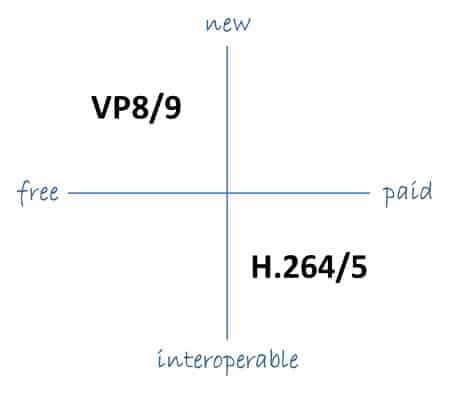
VP9 is a newer codec developed by Google and is designed to be a royalty-free alternative to H.265. It offers better compression than H.264 while maintaining the same video quality. It is also highly efficient at handling high-resolution videos, making it a good choice for 4K and 8K videos. However, its adoption has been slow due to its lack of support in many devices and software. It also requires more processing power to decode than H.264.

One of my personal experiences with VP9 was when I was trying to stream a 4K video on my laptop. I noticed that the video was buffering a lot and the quality was not as good as I expected. After some research, I found out that the video was encoded with VP9, which my laptop did not support. I had to switch to H.264 to get smooth playback.

Conclusion: Choosing the Right Video Codec

Choosing the right video codec is crucial for ensuring smooth video playback and high video quality. H.264 is still a solid choice for most situations, but H.265 and VP9 offer better compression and handling of high-resolution videos. However, they require more processing power and may not be supported by all devices and software. Make sure to choose the codec that best suits your needs and device capabilities.

In conclusion, video codecs are an essential part of our digital lives, and choosing the right one can make all the difference in our video-watching experience. Always keep in mind the pros and cons of each codec and make an informed decision based on your needs.

Ogg: Is it a Lossless Format?

Ogg: Is it a Lossless Format?

Ogg: Is it a Lossless Format?


“You can’t build a reputation on what you are going to do.” – Henry Ford

Ogg is a popular audio format that is often used for storing and streaming audio files. But is Ogg a lossless format? This is a question that has puzzled many audio enthusiasts and professionals alike. In this article, we will explore this topic in more detail and answer this question once and for all.

What is a Lossless Audio Format?

“Music is the divine way to tell beautiful, poetic things to the heart.” – Pablo Casals

Before we dive into whether Ogg is a lossless format or not, let’s first define what a lossless audio format is. A lossless audio format is a type of audio compression that preserves all of the original data of the audio file. This means that when you compress an audio file into a lossless format, you are not sacrificing any audio quality. Lossless audio formats are often preferred by audio professionals because they allow for high-quality audio recordings that maintain the fidelity of the original recording.

Is Ogg a Lossless Format?

“The only way to do great work is to love what you do.” – Steve Jobs

The short answer to this question is no, Ogg is not a lossless format. Ogg is a lossy audio format, which means that it compresses audio files by discarding some of the audio data. When you convert an audio file to Ogg format, some of the audio data is lost in the compression process, which results in a lower quality audio file.

While Ogg is not a lossless format, it still has many benefits. Ogg files are much smaller in size than lossless formats, which makes them easier to store and share. They are also supported by many different media players, making them a popular choice for streaming audio files.

Should You Use Ogg?

“Music is the strongest form of magic.” – Marilyn Manson

Whether or not you should use Ogg depends on your specific needs and preferences. If you are an audio professional who needs the highest quality audio recordings, then a lossless audio format is probably the best option for you. However, if you are just looking to share and stream audio files, then Ogg may be a good choice for you.

Ultimately, the choice of audio format comes down to personal preference and the specific use case. While Ogg may not be a lossless format, it still offers many benefits and is a popular choice for many people.

Final Words

“Without music, life would be a mistake.” – Friedrich Nietzsche

In conclusion, Ogg is not a lossless format. While lossless audio formats are preferred by audio professionals for their high fidelity, Ogg still offers many benefits such as smaller file sizes and wide support in media players. Whether or not you choose to use Ogg depends on your specific needs and preferences. But regardless of the format you choose, music is an important part of our lives and brings us joy and inspiration every day.