Audio Quantization Error

Audio Quantization Error

Audio Quantization Error

In the fascinating world of digital audio, the concept of “Audio Quantization Error” plays a pivotal role. Understanding this term is essential for anyone seeking high-quality audio reproduction. Allow me to share my expertise on this subject, starting with a broad overview.

Demystifying Audio Quantization Error

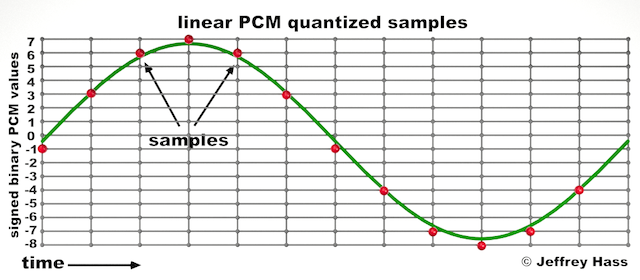
Audio quantization error is a fundamental aspect of digital audio processing. When analog sound waves are converted into digital signals, they undergo quantization. This means that the continuous analog signal is sampled and approximated in discrete steps. These steps are represented by binary values, typically in the form of bits (e.g., 16-bit, 24-bit). Now, what’s crucial to grasp here is that these discrete steps can lead to imperfections in audio reproduction.

Quantization error, often referred to as “quantization noise,” occurs when the actual analog signal deviates from the approximated digital representation. Imagine you have a beautiful painting, and you’re asked to replicate it using only a limited set of colors. The more restricted your color palette, the less accurate your reproduction will be. In the same way, the fewer bits you use for audio quantization, the more pronounced the quantization error becomes.

Quantization Levels and the Impact on Sound Quality

The number of quantization levels (related to bit depth) directly affects the precision of audio representation. For instance, a 16-bit audio recording has 65,536 possible levels, while a 24-bit recording provides a staggering 16,777,216 levels. This increased bit depth allows for a much finer representation of the original analog signal. Hence, a higher bit depth results in a reduction of quantization error, leading to superior sound quality.

To illustrate this, consider a grayscale image with only two colors: black and white. This is akin to an extremely low bit depth in audio, where the audio signal is either “on” or “off.” Now, imagine a high-resolution image with millions of colors, similar to the detail you get in a 24-bit audio recording. The difference in quality is apparent.

The Role of Dithering in Minimizing Quantization Error

One might wonder if there’s a way to mitigate quantization error in low-bit-depth audio recordings. Enter “dithering.” Dithering is a technique that introduces low-level noise to the audio signal, effectively spreading out the quantization error across a broader spectrum. Think of it as adding a sprinkle of fine grains of sand to a painting to blend the colors. This subtle noise masks the harshness of quantization error and makes it less noticeable to the human ear.

Now, as we’ve explored the fundamentals of audio quantization error, let’s delve into the questions that often arise:

How Does Quantization Error Affect Music Production?

In the realm of music production, quantization error can be a significant concern, particularly for professionals aiming to achieve top-tier sound quality. When producing music, especially in genres where subtle nuances are crucial, such as classical or jazz, quantization errors become more perceptible. To maintain audio fidelity, a higher bit depth is preferred during recording and production, ensuring minimal quantization noise.

Is There an Ideal Bit Depth for Audio Recording?

The ideal bit depth for audio recording is a subject of debate among audio enthusiasts. While 24-bit recording is commonly favored for its excellent dynamic range and low quantization error, it’s worth noting that the final audio format for most consumer applications, like CDs or streaming, is often 16-bit. The choice of bit depth should be based on the specific requirements of the project, keeping in mind the trade-off between audio quality and file size.

Can Quantization Error be Completely Eliminated?

Regrettably, quantization error cannot be entirely eliminated, as it’s an inherent part of the digital audio conversion process. However, it can be minimized to the point where it’s imperceptible to the human ear. Through techniques like dithering and the use of higher bit depths, the impact of quantization error can be significantly reduced, allowing for exceptional audio quality.

Last Words about Audio Quantization Error

In the ever-evolving world of audio technology, understanding audio quantization error is a fundamental step towards achieving superior sound quality. As an expert in the field, I’ve shared insights, experiences, and technical knowledge to demystify this concept. Remember, the bit depth you choose in audio recording significantly influences the extent of quantization error, and techniques like dithering play a pivotal role in mitigating its effects. The quest for pristine audio quality is an ongoing journey, but armed with this knowledge, you’re better equipped to make informed decisions in your audio endeavors.

Audio Phase

Audio Phase: Unraveling the Mysteries of Sound

Audio Phase
Audio Phase

As an expert in audio engineering, I understand the significance of audio phase and its impact on sound quality and production. In this comprehensive guide, I will delve into the world of audio phase, providing clarity and insights to help you grasp this vital concept. Whether you’re a music enthusiast or a budding recording artist, understanding audio phase is essential for achieving optimal sound experiences.

Demystifying Audio Phase

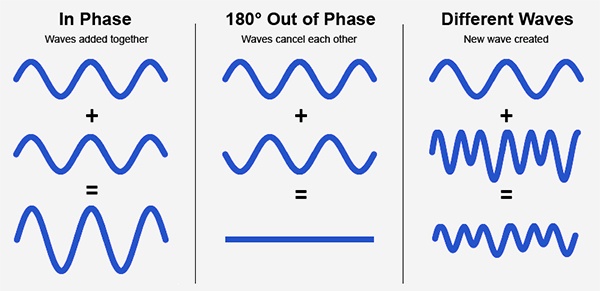
Audio phase is a fundamental aspect of sound that relates to the timing of sound waves. When we talk about audio phase, we’re essentially discussing how different audio signals align or misalign in time. To put it simply, sound is a result of air pressure changes that propagate as waves. These waves have peaks and troughs, and audio phase refers to the relationship between these peaks and troughs in different sound sources.

Think of audio phase as a group of musicians playing in perfect harmony. When they are perfectly in sync, the music sounds harmonious and powerful. However, if even one musician is slightly out of time, it can create dissonance. Similarly, in audio, when signals are in phase, they reinforce each other, resulting in a stronger and clearer sound. When they are out of phase, they can cancel each other out, leading to a weaker and less defined sound.

Audio Phase in Music Production

Understanding audio phase is crucial in music production, especially when recording multiple microphones or mixing different tracks. When recording, if two microphones capture the same sound source, such as a guitar or a vocalist, the signals from these microphones must be perfectly in phase to avoid phase cancellation.

Imagine you are recording a guitar with two microphones—one close to the soundhole and the other closer to the fretboard. If the signals from these two microphones are not in phase, you might experience a loss of bass frequencies or even strange, hollow sounds in the final mix. To avoid this, precise microphone placement and phase alignment are essential.

Correcting Audio Phase Issues

In the world of audio engineering, correcting phase issues is a common practice. Using specialized tools and techniques, audio engineers can adjust the timing of audio signals to ensure they are in phase. This process, known as phase correction or phase alignment, can salvage poorly recorded tracks and enhance the overall sound quality.

Imagine you’re in a recording studio, and you notice that the drum tracks are slightly out of phase with the rest of the instruments. With phase correction tools, you can realign the drum tracks to synchronize perfectly with the other instruments, resulting in a more cohesive and powerful sound.

Audio Phase and Sound Quality: Key Considerations

Now, let’s address some common questions related to audio phase:

How Does Audio Phase Affect Sound Quality?

Audio phase has a direct impact on sound quality. When audio signals are in phase, they reinforce each other, enhancing the overall clarity and richness of sound. However, when they are out of phase, they can cancel each other out, leading to a loss of frequencies and a less pleasing sound.

What Are the Common Phase Issues in Music Production?

In music production, some common phase issues include phase cancellation between microphones, phase misalignment in multi-miked drum kits, and phase problems when mixing different instruments. Identifying and addressing these issues is crucial for achieving a balanced and professional-sounding mix.

How Can I Prevent Phase Issues When Recording?

To prevent phase issues when recording, pay close attention to microphone placement and ensure that multiple microphones capturing the same source are equidistant from the sound source. Additionally, use phase inversion or phase alignment tools during mixing to correct any phase problems that may arise.

Audio Phase: A Symphony of Sound Precision

In conclusion, audio phase is a pivotal element in the world of sound, influencing the quality of music and recordings. Whether you’re a musician, sound engineer, or simply a music enthusiast, grasping the concept of audio phase can help you appreciate and optimize sound in various contexts. Remember, when audio signals are in harmony, they create a powerful symphony of sound, and understanding audio phase is the key to achieving that sonic precision.

Last Words

As we wrap up our journey through the realm of audio phase, I hope this guide has shed light on this intricate yet crucial aspect of sound. Whether you’re fine-tuning your music production skills or seeking to enhance your listening experience, audio phase knowledge empowers you to harness the full potential of sound. So, the next time you enjoy your favorite music or step into the world of audio production, remember the role that audio phase plays in creating the symphonies and sonic landscapes we cherish.

Mp3 Sound Booster

Boosting MP3 Sound Quality and Loudness

Mp3 Sound Booster
Mp3 Sound Booster
Mp3 Sound Booster
Mp3 Sound Booster

Mp3 Sound Booster

In today’s digital age, where music and audio are an integral part of our lives, it’s crucial to ensure that our MP3 files sound their best. Whether you’re a casual listener or an audiophile seeking perfection, this comprehensive guide is here to help you master the art of enhancing MP3 sound quality. I’m an audio expert, and I’ll take you on a journey through various techniques and strategies to elevate your MP3 listening experience.

The Importance of Quality MP3 Sound

Before we dive into the nitty-gritty details of improving MP3 sound, let’s first understand why it matters. MP3 is one of the most popular audio formats, known for its compatibility and convenience. However, the sound quality of MP3 files can vary widely, depending on factors like compression, source material, and encoding settings.

Factors Affecting MP3 Sound Quality

To achieve the best MP3 sound quality, you need to consider several key factors:

Bitrate

The bitrate determines the amount of data used to represent audio. Higher bitrates generally result in better sound quality but larger file sizes.

Compression

MP3 files are compressed to reduce their size. Understanding the balance between compression and quality is essential.

Source Material

The quality of the original audio source greatly influences the final MP3 sound. Starting with high-quality recordings is crucial.

Encoding Settings

Adjusting parameters during encoding, such as sample rate and stereo mode, can impact sound quality significantly.

Techniques for Enhancing MP3 Sound Quality

Now that we’ve established the importance of quality MP3 sound, let’s explore various techniques and strategies to enhance it. Whether you’re dealing with older low-bitrate MP3s or you want to optimize your new downloads, these methods will help you achieve the best possible sound.

1. Bitrate Selection

The choice of bitrate plays a fundamental role in MP3 sound quality. Higher bitrates, such as 320 kbps, preserve more audio details, resulting in clearer and more immersive sound. However, they also lead to larger file sizes, so you should strike a balance based on your storage capacity and listening preferences.

2. Source Material Enhancement

Improving MP3 sound quality starts with the source material. If you have control over the recording process, use high-quality microphones, eliminate background noise, and ensure proper mixing and mastering techniques are employed. Starting with a pristine source will yield better MP3s.

3. Proper Encoding Settings

When converting audio to MP3 format, it’s crucial to choose the right encoding settings. Opt for a higher sample rate (e.g., 44.1 kHz or 48 kHz) and stereo mode for richer sound. Experiment with different settings to find the sweet spot for your audio.

4. Noise Reduction

If your MP3s suffer from background noise or artifacts, consider using noise reduction software. This can help eliminate unwanted hisses, clicks, and pops, resulting in a cleaner listening experience.

5. Equalization (EQ)

Using an equalizer allows you to adjust the balance of frequencies in your MP3s. You can enhance bass, boost treble, or make other custom adjustments to tailor the sound to your preferences.

6. Volume Normalization

Normalization ensures consistent volume levels across your MP3 library. This prevents sudden volume jumps between tracks, providing a more enjoyable listening experience.

7. High-Quality Playback Devices

Investing in high-quality headphones or speakers can make a significant difference in how you perceive MP3 sound. Look for devices with accurate sound reproduction and comfortable fit for extended listening sessions.

8. Room Acoustics

If you primarily listen to MP3s in a room, consider optimizing the acoustics. Simple changes like adding acoustic panels or rearranging furniture can reduce reflections and enhance sound quality.

9. Lossless Formats

Consider archiving your favorite music in lossless formats like FLAC or WAV for the utmost audio fidelity. While these formats result in larger file sizes, they preserve audio quality without compression.

10. Regular Maintenance

Maintaining your MP3 library is essential. Periodically check for corrupted files, update metadata, and back up your collection to prevent data loss.

Final Words

Enhancing the sound quality of your MP3 files is a rewarding endeavor for any music lover. By understanding the factors influencing sound quality and employing the right techniques, you can elevate your MP3 listening experience to new heights. Whether you’re a casual listener or an audiophile, these strategies will help you make the most of your digital music collection. Remember, the quest for perfect sound is a journey, so enjoy every moment of it. Happy listening!

What is a signal-to-noise ratio in audio?

What is a signal-to-noise ratio in audio?

signal-to-noise ratio audio

Understanding the Basics of Audio Quality

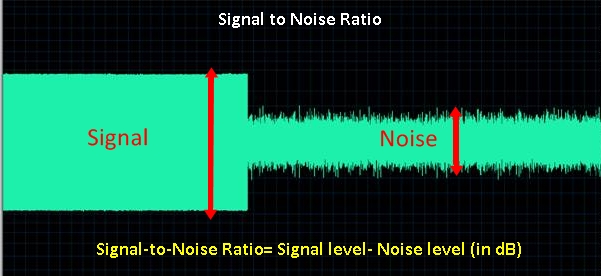
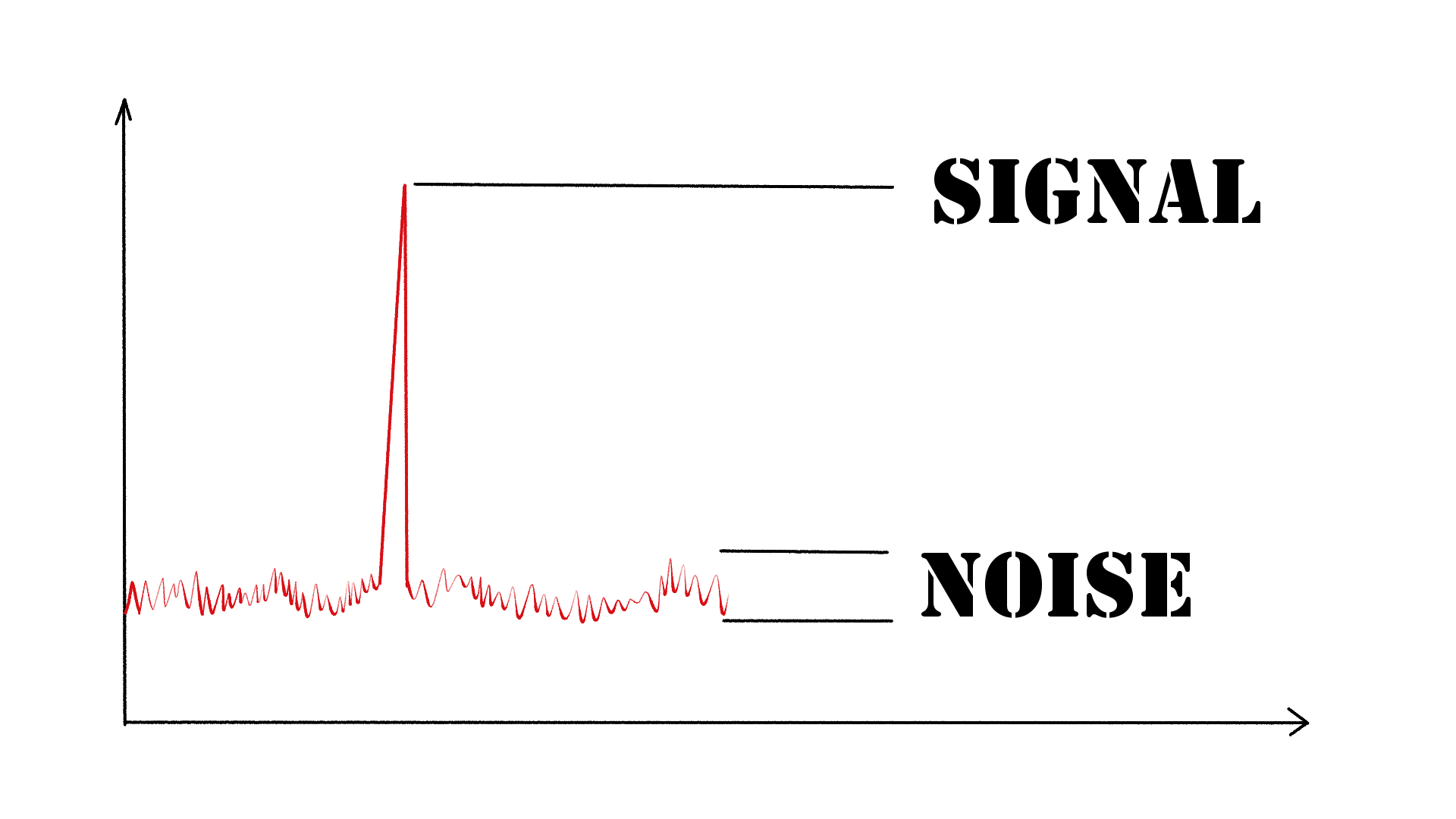
As an audio engineer, I have come across many questions about audio quality, and one of the most common ones is “What is a signal-to-noise ratio in audio?” In simple terms, the signal-to-noise ratio (SNR) is the difference between the desired audio signal and the background noise. A high SNR means that the desired signal is much stronger than the noise, resulting in better audio quality.
When it comes to audio quality, there are many factors to consider, such as audio processing, normalization, compression, dynamics, and distortion. Each of these factors can affect the SNR and, therefore, the overall audio quality. For example, audio normalization can help to increase the SNR by adjusting the volume levels of the audio signal, while audio compression can reduce the dynamic range of the audio signal, resulting in a more consistent SNR.

The Importance of Audio Normalization

As someone who has worked with audio for many years, I can attest to the importance of audio normalization. Normalization is the process of adjusting the volume levels of an audio signal to a standard level, which can help to improve the SNR and overall audio quality.
One of the benefits of audio normalization is that it can help to prevent distortion in the audio signal. When an audio signal is too loud, it can cause distortion, which can be heard as a buzzing or crackling sound. By normalizing the audio signal, you can ensure that it is at a safe and consistent volume level, which can help to prevent distortion and improve the overall audio quality.

The Role of Audio Compression in Audio Quality

Audio compression is another important factor to consider when it comes to audio quality. Compression is the process of reducing the dynamic range of an audio signal, which can help to make it sound more consistent and balanced.
One of the benefits of audio compression is that it can help to improve the SNR by reducing the background noise in the audio signal. However, it is important to use compression carefully, as too much compression can result in a loss of detail and dynamics in the audio signal. As with all aspects of audio engineering, finding the right balance is key to achieving the best possible audio quality.
Final Words:
In conclusion, understanding the basics of audio quality is essential for anyone working with audio. Whether you are an audio engineer, musician, or just someone who enjoys listening to music, knowing about factors such as SNR, normalization, compression, dynamics, and distortion can help you to achieve the best possible audio quality. And if you are looking for a solution to improve your audio quality, consider using mp4gain, a powerful and easy-to-use audio normalizer and converter that can help you to achieve consistent and high-quality audio.

audio quality, signal-to-noise ratio, audio engineering, audio processing, audio normalization, audio compression, audio dynamics, audio distortion, audio editing, audio software, audio plugins, audio effects, audio mixing, audio mastering, audio recording, audio equipment, audio cables, audio interfaces, audio monitors, audio speakers, audio headphones, audio formats, mp3, mp4, wav, flac, aac, ogg, audio bitrate, audio frequency, audio spectrum, audio waveform, audio visualization, audio analysis, audio restoration, audio repair, audio enhancement, audio improvement, audio tips, audio tricks, audio tutorials, audio guides, audio blogs, audio forums, audio community, audio enthusiasts, audio professionals, music production, sound design, sound effects, soundtracks, soundscapes, sound libraries, sound samples, soundfonts, sound packs, sound kits, sound engineering, sound recording, sound mixing, sound mastering, sound equipment, sound cables, sound interfaces, sound monitors, sound speakers, sound headphones, sound formats, sound bitrate, sound frequency, sound spectrum, sound waveform, sound visualization, sound analysis, sound restoration, sound repair, sound enhancement, sound improvement, sound tips, sound tricks, sound tutorials, sound guides, sound blogs, sound forums, sound community, sound enthusiasts, sound professionals.