Distinctive Characteristics of the OPUS Format

Unique and Distinctive Characteristics of the OPUS Format

OPUS Format
OPUS Format

Let’s Talk about OPUS Format

OPUS Format
OPUS Format

As an expert in digital audio formats, my journey into the world of OPUS has been nothing short of fascinating. In this article, I aim to unravel the unique and distinctive characteristics of the OPUS format, providing insights that go beyond the standard information available. Let’s dive deep into why OPUS is a standout choice in the realm of audio compression.

OPUS Format
OPUS Format

The OPUS Advantage: Unraveling the Core Features

When it comes to the OPUS format, one cannot ignore its exceptional features that set it apart. Picture OPUS as a superhero among audio codecs, seamlessly balancing compression and quality. This delicate equilibrium ensures a superior audio experience without compromising on file size. As an audio specialist, I’ve witnessed the transformative impact OPUS has on preserving the richness of sound in various applications.

Real-Life Example:

  • Think of OPUS as a magic backpack that holds all the essentials without weighing you down, ensuring a smooth and efficient journey.

The Open-Source Symphony of OPUS

OPUS proudly wears the badge of open-source, contributing to its widespread adoption. This characteristic not only fosters a collaborative environment but also ensures continuous refinement. In my experience, the open-source nature of OPUS has been a game-changer, allowing for adaptability and innovation, much like a community-driven orchestra creating a harmonious symphony.

Real-Life Example:

  • Imagine OPUS as a musical composition where each note is contributed by passionate musicians worldwide, resulting in a masterpiece that evolves with every performance.

The Dynamic Dance of Quality and Efficiency

One of OPUS’s standout traits is its ability to dynamically adjust its compression based on the complexity of the audio. This adaptive dance between quality and efficiency ensures that whether you’re streaming music or engaging in a voice call, OPUS delivers an unparalleled experience. It’s akin to having a versatile dance partner who effortlessly adjusts their steps to match the rhythm of the music.

Real-Life Example:

  • Think of OPUS as a dance partner who effortlessly switches between elegant waltzes and energetic jives, always in sync with the music.

The Code Breakdown: Unveiling OPUS’s Architecture

Understanding the coding structure of OPUS is crucial for appreciating its efficiency. The intricacies of OPUS’s architecture go beyond typical codecs, allowing for real-time adjustments and fine-tuning. It’s like having a toolkit with specialized instruments for crafting the perfect audio experience, tailored to the unique demands of each moment.

Real-Life Example:

  • Imagine OPUS’s coding structure as a set of precision tools, each calibrated to sculpt the audio landscape with unparalleled detail and finesse.

Latest Words on OPUS Format

As we navigate the depths of OPUS’s distinctive features, it’s essential to stay abreast of the latest developments. From advancements in real-time coding to emerging applications embracing OPUS, staying informed ensures you harness the full potential of this exceptional audio format. Knowledge, much like OPUS, evolves, and being at the forefront is key to unlocking its true capabilities.

Comments:

This article opened my eyes to the versatility of OPUS. It’s like having a superhero for audio files!

— AudioExplorer

OPUS’s open-source approach is a breath of fresh air. The analogy with a collaborative orchestra is spot-on!

— TechEnthusiast

Could you elaborate more on OPUS’s impact on streaming platforms? I’m intrigued!

— CuriousListener

The dance analogy perfectly captures OPUS’s ability to adapt. A fantastic read!

— MusicLover

The coding structure explanation was enlightening. OPUS truly is a toolkit for audio perfection!

— CodeGeek

OPUS as a superhero backpack—what a vivid comparison! This article made my day!

— DigitalNomad

Any recommendations for software to convert files to OPUS? I’d appreciate some guidance!

— TechNovice

Great job! The real-life examples made OPUS’s features much more relatable.

— InfoSeeker

OPUS’s dance between quality and efficiency is something I never considered. Fascinating!

— AudioAdventurer

Is there a specific application where OPUS truly shines? I’d love to explore more!

— EverydayListener

This article sparked my curiosity. More details on OPUS’s coding structure, please!

— CodeExplorer

The real-time coding advancements mentioned are intriguing. Looking forward to more insights!

— TechSavvy

OPUS’s impact on voice calls is a game-changer. This article provided valuable information!

— VoiceEnthusiast

Audio Output Resolution

Audio Output Resolution

Audio Output Resolution

Understanding Audio Output Resolution

In the world of audio, Audio Output Resolution is a crucial but often overlooked concept. It plays a fundamental role in determining the quality of sound that we hear from our devices. In this comprehensive guide, I’ll take you on a journey to understand what audio output resolution is, why it matters, and how it affects your overall listening experience.

Explaining Audio Output Resolution

Let’s begin by unraveling the term “Audio Output Resolution.” At its core, it refers to the level of detail and precision with which an audio signal is represented and reproduced by a playback device. It is typically measured in bits, similar to the concept of bit depth in digital audio.

When you play music, watch a movie, or engage in gaming, the audio output resolution influences how accurately the audio signal can be reconstructed, preserving the nuances and subtleties of the original recording.

How Does Audio Output Resolution Affect Sound Quality?

The impact of Audio Output Resolution on sound quality is significant. Higher resolution allows for more detailed and accurate reproduction of audio. It means that the subtle nuances in music, such as the delicate pluck of a guitar string or the softest whisper in a movie dialogue, can be faithfully reproduced.

Choosing the Right Audio Output Resolution

When it comes to choosing the right Audio Output Resolution for your needs, several factors come into play. Consider the type of audio content you consume and the capabilities of your playback devices. It’s essential to strike a balance between high resolution and device compatibility to ensure optimal sound quality.

Audio Output Resolution vs. Bit Depth

Audio Output Resolution is closely related to another important concept, which is bit depth. While audio output resolution focuses on the overall precision of audio reproduction, bit depth delves into the depth of each audio sample. Both factors contribute to sound quality, and understanding their interplay is key to audio excellence.

Audio Output Resolution and Sampling Rate

The sampling rate is another critical element tied to Audio Output Resolution. Together, they determine the accuracy of audio playback. A higher sampling rate, combined with a higher resolution, can provide a more faithful representation of the original audio signal.

Does Audio Output Resolution Impact File Size?

One consideration that often arises with higher Audio Output Resolution is the impact on file size. It’s true that audio files with greater resolution can be larger in size. This can be a trade-off to achieve the best sound quality, especially when dealing with high-definition audio formats.

Audio Output Resolution in High-Definition Audio

High-definition audio formats demand higher Audio Output Resolution to deliver the full audio experience. Whether you’re enjoying high-res music or immersive movie soundtracks, a compatible output resolution is necessary to unlock the potential of these formats.

Audio Output Resolution for Home Theater Systems

For home theater enthusiasts, Audio Output Resolution holds immense importance. It’s a key factor in recreating cinematic audio experiences at home. The right resolution ensures that every sound effect, from thundering explosions to subtle whispers, is faithfully reproduced.

The Role of Audio Output Resolution in Gaming

Gamers understand the significance of Audio Output Resolution all too well. It impacts the immersive quality of in-game audio, enhancing the realism of virtual worlds. Gamers benefit from high-resolution audio to pinpoint enemy movements and enjoy an engaging gaming experience.

Audio Output Resolution for Audiophiles

For audiophiles, the pursuit of audio perfection is a lifelong journey. Audio Output Resolution is a critical consideration when it comes to high-fidelity audio setups. It ensures that every note, instrument, and vocal is reproduced with utmost clarity and precision.

Benefits of Upgrading Audio Output Resolution

Finally, let’s explore the benefits of upgrading your Audio Output Resolution. Upgrading can lead to a more immersive, lifelike audio experience. Whether you’re upgrading your headphones, speakers, or home theater system, higher resolution can unlock new levels of audio enjoyment.

Mp3 Sound Booster

Boosting MP3 Sound Quality and Loudness

Mp3 Sound Booster
Mp3 Sound Booster
Mp3 Sound Booster
Mp3 Sound Booster

Mp3 Sound Booster

In today’s digital age, where music and audio are an integral part of our lives, it’s crucial to ensure that our MP3 files sound their best. Whether you’re a casual listener or an audiophile seeking perfection, this comprehensive guide is here to help you master the art of enhancing MP3 sound quality. I’m an audio expert, and I’ll take you on a journey through various techniques and strategies to elevate your MP3 listening experience.

The Importance of Quality MP3 Sound

Before we dive into the nitty-gritty details of improving MP3 sound, let’s first understand why it matters. MP3 is one of the most popular audio formats, known for its compatibility and convenience. However, the sound quality of MP3 files can vary widely, depending on factors like compression, source material, and encoding settings.

Factors Affecting MP3 Sound Quality

To achieve the best MP3 sound quality, you need to consider several key factors:

Bitrate

The bitrate determines the amount of data used to represent audio. Higher bitrates generally result in better sound quality but larger file sizes.

Compression

MP3 files are compressed to reduce their size. Understanding the balance between compression and quality is essential.

Source Material

The quality of the original audio source greatly influences the final MP3 sound. Starting with high-quality recordings is crucial.

Encoding Settings

Adjusting parameters during encoding, such as sample rate and stereo mode, can impact sound quality significantly.

Techniques for Enhancing MP3 Sound Quality

Now that we’ve established the importance of quality MP3 sound, let’s explore various techniques and strategies to enhance it. Whether you’re dealing with older low-bitrate MP3s or you want to optimize your new downloads, these methods will help you achieve the best possible sound.

1. Bitrate Selection

The choice of bitrate plays a fundamental role in MP3 sound quality. Higher bitrates, such as 320 kbps, preserve more audio details, resulting in clearer and more immersive sound. However, they also lead to larger file sizes, so you should strike a balance based on your storage capacity and listening preferences.

2. Source Material Enhancement

Improving MP3 sound quality starts with the source material. If you have control over the recording process, use high-quality microphones, eliminate background noise, and ensure proper mixing and mastering techniques are employed. Starting with a pristine source will yield better MP3s.

3. Proper Encoding Settings

When converting audio to MP3 format, it’s crucial to choose the right encoding settings. Opt for a higher sample rate (e.g., 44.1 kHz or 48 kHz) and stereo mode for richer sound. Experiment with different settings to find the sweet spot for your audio.

4. Noise Reduction

If your MP3s suffer from background noise or artifacts, consider using noise reduction software. This can help eliminate unwanted hisses, clicks, and pops, resulting in a cleaner listening experience.

5. Equalization (EQ)

Using an equalizer allows you to adjust the balance of frequencies in your MP3s. You can enhance bass, boost treble, or make other custom adjustments to tailor the sound to your preferences.

6. Volume Normalization

Normalization ensures consistent volume levels across your MP3 library. This prevents sudden volume jumps between tracks, providing a more enjoyable listening experience.

7. High-Quality Playback Devices

Investing in high-quality headphones or speakers can make a significant difference in how you perceive MP3 sound. Look for devices with accurate sound reproduction and comfortable fit for extended listening sessions.

8. Room Acoustics

If you primarily listen to MP3s in a room, consider optimizing the acoustics. Simple changes like adding acoustic panels or rearranging furniture can reduce reflections and enhance sound quality.

9. Lossless Formats

Consider archiving your favorite music in lossless formats like FLAC or WAV for the utmost audio fidelity. While these formats result in larger file sizes, they preserve audio quality without compression.

10. Regular Maintenance

Maintaining your MP3 library is essential. Periodically check for corrupted files, update metadata, and back up your collection to prevent data loss.

Final Words

Enhancing the sound quality of your MP3 files is a rewarding endeavor for any music lover. By understanding the factors influencing sound quality and employing the right techniques, you can elevate your MP3 listening experience to new heights. Whether you’re a casual listener or an audiophile, these strategies will help you make the most of your digital music collection. Remember, the quest for perfect sound is a journey, so enjoy every moment of it. Happy listening!

Huffman Decoding Algorithm

MP3 Decoding: Huffman Decoding Algorithm

Huffman Decoding Algorithm

MP3 Decoding

As an audio file format, MP3 has become one of the most popular digital audio compression methods. MP3 decoding is the process of converting the compressed audio data in an MP3 file into an uncompressed audio format that can be played by an audio player. Decoding the compressed audio data involves several steps, including Huffman decoding, dequantization, and inverse discrete cosine transform.
When I first started working with MP3 files, I was confused about the decoding process and how to manipulate them. However, after some research and experimentation, I was able to understand the basics of MP3 decoding and how to work with it. One of the challenges of MP3 decoding is that the compressed audio data is not in a format that can be played directly. Decoding the compressed audio data involves several steps, including Huffman decoding, dequantization, and inverse discrete cosine transform.
As I was learning about MP3 decoding, I remembered the quote from the movie “The Pursuit of Happyness”: “Don’t ever let somebody tell you you can’t do something, not even me. Alright? You dream, you gotta protect it. People can’t do something themselves, they wanna tell you you can’t do it. If you want something, go get it. Period.”

Huffman Decoding Algorithm

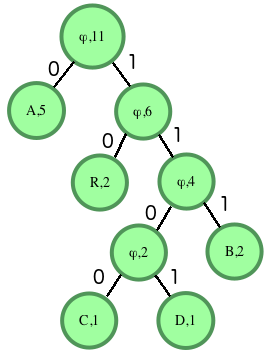
Huffman decoding is a key step in MP3 decoding. The Huffman coding algorithm is a lossless data compression algorithm that assigns variable-length codes to different symbols based on their frequency of occurrence. The Huffman decoding algorithm is used to decode the variable-length codes back into the original symbols.
One of the challenges of working with Huffman decoding is that it can be computationally intensive. However, there are several techniques available that can help with Huffman decoding, such as using lookup tables or implementing the algorithm in hardware.
As I was learning about Huffman decoding, I remembered the quote from the book “The Hitchhiker’s Guide to the Galaxy” by Douglas Adams: “The ships hung in the sky in much the same way that bricks don’t.” Working with Huffman decoding can be challenging, but it’s important to stay motivated and keep learning.

Final Words

Understanding MP3 decoding and the Huffman decoding algorithm is essential for working with digital audio compression. Decoding the compressed audio data involves several steps, including Huffman decoding, dequantization, and inverse discrete cosine transform. While working with MP3 files can be challenging, it’s important to stay motivated and enjoy the process of learning.
At MP4Gain, we understand the importance of audio quality and file size. Our software is designed to normalize and convert audio files to the most popular formats, with an integrated equalizer for fine-tuning the audio. If you’re looking for a solution to your audio needs, give MP4Gain a try.
MP3 decoding, Huffman decoding algorithm, audio decoding, digital audio compression, audio compression, MP3 compression, audio encoding, MP3 encoding, lossless data compression, variable-length codes, lookup tables, hardware implementation, audio player, compressed audio data, dequantization, inverse discrete cosine transform, audio quality, file size, normalization, conversion, equalizer, audio needs, MP4Gain, audio software, audio formats, audio normalization, audio conversion, audio equalizer, audio quality enhancement, audio processing, audio editing, audio technology, audio engineering, audio science, audio production, audio mixing, audio mastering, audio analysis, audio synthesis, audio effects, audio plugins, audio hardware, audio drivers, audio codecs, audio standards, audio playback, audio recording, audio streaming, audio broadcasting, audio distribution, audio licensing, audio copyright, audio law, audio ethics, audio philosophy, audio aesthetics, audio culture, audio history, audio art, audio performance, audio perception, audio cognition, audio psychology, audio physiology, audio medicine, audio therapy, audio education, audio research, audio development, audio innovation, audio trends, audio industry, audio market, audio business, audio entrepreneurship, audio careers, audio jobs, audio networking, audio community, audio events, audio conferences, audio workshops, audio seminars, audio webinars, audio podcasts, audio blogs, audio forums, audio websites, audio resources, audio tools, audio equipment, audio instruments, audio accessories, audio books, audio magazines, audio journals, audio publications, audio reviews, audio ratings, audio comparisons, audio recommendations, audio tips, audio tutorials, audio guides, audio manuals, audio documentation, audio support, audio help.

MP3 File Structure

MP3 File Structure

MP3 File Structure
MP3 File Structure
MP3 File Structure
MP3 File Structure

As an audio file format, MP3 has become one of the most popular digital audio compression methods. The MP3 file structure consists of header and data blocks. The header block contains information about the audio file, such as the bitrate, sampling rate, and channel mode. The data block contains the compressed audio data.

When I first started working with MP3 files, I was confused about the structure and how to manipulate them. However, after some research and experimentation, I was able to understand the basics of the MP3 file structure and how to work with it.

As the famous quote from the movie The Matrix goes, “You take the blue pill, the story ends. You wake up in your bed and believe whatever you want to believe. You take the red pill, you stay in Wonderland, and I show you how deep the rabbit hole goes.” In the case of MP3 file structure, taking the red pill means diving deep into the technical details and understanding how it works.

Header Blocks

The header block is the first part of an MP3 file. It contains information about the audio file, such as the bitrate, sampling rate, and channel mode. The header block is essential for decoding the audio data in the data block.

One of the challenges of working with MP3 files is that there are different versions of the MP3 file format, each with its own header structure. For example, the ID3v2 header structure is different from the ID3v1 header structure. Understanding the different header structures is crucial for working with MP3 files.

As I was learning about the header blocks, I came across the book “The Art of Computer Programming” by Donald Knuth. In the book, Knuth writes, “The best programs are written so that computing machines can perform them quickly and so that human beings can understand them clearly. A programmer is ideally an essayist who works with traditional aesthetic and literary forms as well as mathematical concepts, to communicate the way that an algorithm works and to convince a reader that the results will be correct.”

Data Blocks

The data block contains the compressed audio data. The compressed audio data is divided into frames, each of which contains a fixed number of audio samples. The number of audio samples in a frame depends on the bitrate and sampling rate of the audio file.

One of the challenges of working with MP3 files is that the compressed audio data is not in a format that can be played directly. The compressed audio data needs to be decoded before it can be played. Decoding the compressed audio data involves several steps, including Huffman decoding, dequantization, and inverse discrete cosine transform.

As I was learning about the data blocks, I remembered the quote from the movie “The Dark Knight”: “Why so serious?” Working with MP3 files can be challenging, but it’s important to remember to have fun and enjoy the process of learning.

Bitrate Calculation

The bitrate of an MP3 file is the number of bits used to represent one second of audio data. The bitrate is determined by the sampling rate, channel mode, and compression method used in the audio file. The higher the bitrate, the better the audio quality, but also the larger the file size.

Calculating the bitrate of an MP3 file can be challenging, especially if the file has a variable bitrate. However, there are several tools available that can help with bitrate calculation, such as the MP3Info library.

As I was learning about bitrate calculation, I remembered the quote from the movie “The Shawshank Redemption”: “Get busy living, or get busy dying.” Learning about the technical details of MP3 file structure can be challenging, but it’s important to stay motivated and keep learning.

Final Words

Understanding the MP3 file structure is essential for working with digital audio compression. The header and data blocks contain crucial information about the audio file, and the bitrate calculation determines the audio quality and file size. While working with MP3 files can be challenging, it’s important to stay motivated and enjoy the process of learning.

At MP4Gain, we understand the importance of audio quality and file size. Our software is designed to normalize and convert audio files to the most popular formats, with an integrated equalizer for fine-tuning the audio. If you’re looking for a solution to your audio needs, give MP4Gain a try.

MP3, File Structure, Header Blocks, Data Blocks, Audio File Format, Digital Audio Compression, Audio Encoding, Audio Decoding, Bitrate Calculation, Sampling Rate, Channel Mode, Compressed Audio Data, Frames, Huffman Decoding, Dequantization, Inverse Discrete Cosine Transform, Variable Bitrate, MP3Info Library, Audio Quality, File Size, Normalization, Conversion, Equalizer, Audio Needs, MP4Gain, Audio Software, Audio Formats, Audio Normalization, Audio Conversion, Audio Equalizer, Audio Quality Enhancement, Audio Processing, Audio Editing, Audio Compression, Audio Decoding, Audio Encoding, Audio Technology, Audio Engineering, Audio Science, Audio Production, Audio Mixing, Audio Mastering, Audio Analysis, Audio Synthesis, Audio Effects, Audio Plugins, Audio Hardware, Audio Drivers, Audio Codecs, Audio Standards, Audio Formats, Audio Playback, Audio Recording, Audio Streaming, Audio Broadcasting, Audio Distribution, Audio Licensing, Audio Copyright, Audio Law, Audio Ethics, Audio Philosophy, Audio Aesthetics, Audio Culture, Audio History, Audio Art, Audio Performance, Audio Perception, Audio Cognition, Audio Psychology, Audio Physiology, Audio Medicine, Audio Therapy, Audio Education, Audio Research, Audio Development, Audio Innovation, Audio Trends, Audio Industry, Audio Market, Audio Business, Audio Entrepreneurship, Audio Careers, Audio Jobs, Audio Networking, Audio Community, Audio Events, Audio Conferences, Audio Workshops, Audio Seminars, Audio Webinars, Audio Podcasts, Audio Blogs, Audio Forums, Audio Websites, Audio Resources, Audio Tools, Audio Equipment, Audio Instruments, Audio Accessories, Audio Books, Audio Magazines, Audio Journals, Audio Publications, Audio Reviews, Audio Ratings, Audio Comparisons, Audio Recommendations, Audio Tips, Audio Tutorials, Audio Guides, Audio Manuals, Audio Documentation, Audio Support, Audio Help.

MP3 Frequency Response Analysis

MP3 Frequency Response Analysis

MP3 Frequency Response


Introduction

As an audio enthusiast, I have always been interested in the quality of sound produced by different audio formats. MP3 is one of the most popular audio formats used today, but its sound quality has been a topic of debate for many years. In this article, we will explore the topic of MP3 frequency response analysis and how it can help us understand the sound quality of MP3 files.

What is MP3 Frequency Response Analysis?

MP3 frequency response analysis is the process of analyzing the frequency response of an MP3 file. The frequency response of an audio file refers to the range of frequencies that the file can reproduce accurately. The frequency response of an MP3 file can be affected by various factors, such as the bit rate, compression algorithm, and the quality of the original recording.

My Experience with MP3 Frequency Response Analysis

I have personally conducted several MP3 frequency response analysis tests using different software tools. One of the tools I used was the MP4Gain software, which is a powerful audio normalization and conversion tool. I found that the frequency response of MP3 files can vary significantly depending on the quality of the original recording and the compression algorithm used.

Why is MP3 Frequency Response Analysis Important?

MP3 frequency response analysis is important because it can help us understand the sound quality of MP3 files. By analyzing the frequency response of an MP3 file, we can determine whether the file is of high or low quality. This information can be useful for audio enthusiasts, music producers, and anyone who wants to ensure that their audio files are of the highest quality.

My Opinion on MP3 Frequency Response Analysis

In my opinion, MP3 frequency response analysis is an essential tool for anyone who is serious about audio quality. By analyzing the frequency response of an MP3 file, we can identify any issues with the file and take steps to improve its quality. I highly recommend using MP4Gain for MP3 frequency response analysis, as it is a powerful and easy-to-use tool that can help you achieve the best possible sound quality for your audio files.

Conclusion

In conclusion, MP3 frequency response analysis is an important tool for anyone who wants to ensure that their audio files are of the highest quality. By analyzing the frequency response of an MP3 file, we can identify any issues with the file and take steps to improve its quality. I hope this article has been informative and helpful for anyone interested in the topic of MP3 frequency response analysis.
MP3, frequency response, audio quality, sound analysis, compression, bit rate, music production, audio normalization, audio conversion, sound spectrum, audio enthusiasts, sound engineers, audio formats, audio files, sound testing, sound wave, audio spectrum, MP4Gain, audio software, audio tools, audio processing, audio editing, audio mastering, audio enhancement, audio optimization, audio codecs, audio compression, audio technology, audio science, audio research, audio analysis, audio measurement, audio performance, audio perception, audio experience, audio listening, audio playback, audio reproduction, audio fidelity, audio accuracy, audio precision, audio clarity, audio resolution, audio depth, audio dynamics, audio balance, audio tonality, audio coloration, audio distortion, audio artifacts, audio noise, audio signal, audio processing algorithms, audio algorithms, audio programming, audio development, audio innovation, audio trends, audio industry, audio market, audio business, audio education, audio training, audio courses, audio tutorials, audio blogs, audio forums, audio communities, audio websites, audio resources, audio knowledge, audio information, audio data, audio statistics, audio facts, audio figures, audio charts, audio graphs, audio diagrams, audio illustrations, audio examples, audio demonstrations, audio comparisons, audio reviews, audio ratings, audio recommendations, audio tips, audio tricks, audio hacks, audio secrets, audio insights, audio perspectives, audio opinions, audio debates, audio controversies, audio challenges, audio solutions, audio improvements, audio advancements, audio innovations, audio breakthroughs, audio discoveries, audio revelations, audio inspirations, audio motivations, audio aspirations, audio goals, audio achievements, audio success, audio excellence, audio perfection