MP3 Frequency Response


Free Download Mp4Gain
picture

MP3 Frequency Response: Technical Considerations

MP3 Frequency Response


MP3 is a popular digital audio format that uses a lossy compression algorithm to reduce the size of audio files. One of the factors that can affect the quality of an MP3 file is its frequency response.

Frequency response is a measure of how well a system reproduces different frequencies of sound. A flat frequency response means that all frequencies are reproduced equally well. However, MP3 compression can introduce distortions that can affect the frequency response of an audio file.

There are a number of factors that can affect the frequency response of an MP3 file, including:

  • The bitrate of the MP3 file. The bitrate is a measure of the amount of data that is used to represent the audio file. Higher bitrates result in better quality audio files, but they also result in larger file sizes.
  • The encoder used to create the MP3 file. Different encoders use different compression algorithms, and these algorithms can have different effects on the frequency response of an audio file.
  • The playback device. The playback device can also affect the frequency response of an MP3 file. Some playback devices, such as headphones, have a limited frequency response. This can result in loss of detail in the audio signal.

If you are concerned about the frequency response of your MP3 files, there are a few things you can do to improve the quality of the audio.

  • Use a higher bitrate. This will result in better quality audio files, but it will also result in larger file sizes.
  • Use a different encoder. Some encoders, such as the Fraunhofer mp3 encoder, are known for their good frequency response.
  • Use a high-quality playback device. This will help to ensure that the full range of frequencies in the audio signal are reproduced.

By following these tips, you can improve the frequency response of your MP3 files and enjoy better quality audio.

Here are some additional questions that people often ask about MP3 frequency response:

1. What is a good frequency response for an MP3 file?

A good frequency response for an MP3 file will vary depending on the type of music that you are listening to. However, a general rule of thumb is that the frequency response should be flat within the range of human hearing, which is typically between 20 Hz and 20 kHz.

2. How does the bitrate of an MP3 file affect its frequency response?

The bitrate of an MP3 file is a measure of the amount of data that is used to represent the audio file. Higher bitrates result in better quality audio files, but they also result in larger file sizes. In general, a higher bitrate will result in a flatter frequency response.

3. What are some of the best encoders for MP3 files?

Some of the best encoders for MP3 files include the Fraunhofer mp3 encoder, the Xiph.org LAME encoder, and the Monkey’s Audio encoder. These encoders are known for their good quality and their ability to produce flat frequency responses.

4. What are some of the best playback devices for MP3 files?

Some of the best playback devices for MP3 files include high-quality headphones, home stereo systems, and car stereos. These devices are capable of reproducing the full range of frequencies in an audio signal, which can help to improve the quality of the audio.


Free Download Mp4Gain
picture


Mp4Gain Main Window
picture


Mp4Gain Features
picture


Free Download Mp4Gain
picture

MP3 File Structure

MP3 File Structure

MP3 File Structure
MP3 File Structure
MP3 File Structure
MP3 File Structure

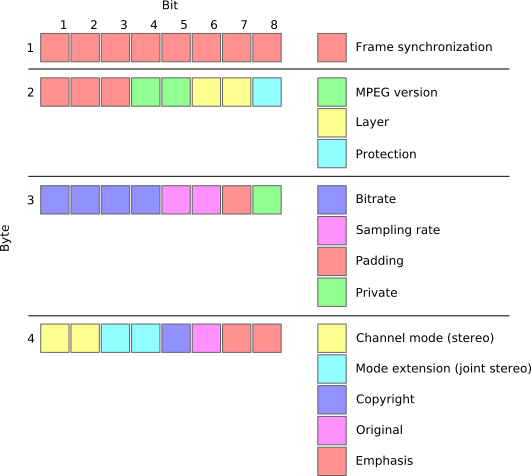
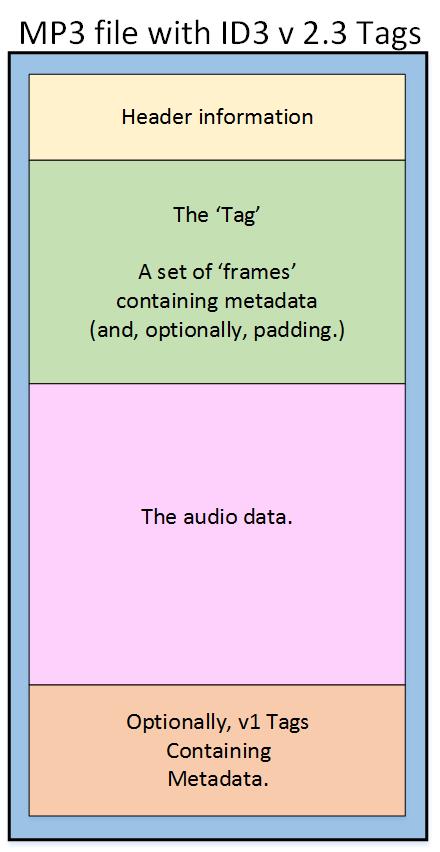
As an audio file format, MP3 has become one of the most popular digital audio compression methods. The MP3 file structure consists of header and data blocks. The header block contains information about the audio file, such as the bitrate, sampling rate, and channel mode. The data block contains the compressed audio data.

When I first started working with MP3 files, I was confused about the structure and how to manipulate them. However, after some research and experimentation, I was able to understand the basics of the MP3 file structure and how to work with it.

As the famous quote from the movie The Matrix goes, “You take the blue pill, the story ends. You wake up in your bed and believe whatever you want to believe. You take the red pill, you stay in Wonderland, and I show you how deep the rabbit hole goes.” In the case of MP3 file structure, taking the red pill means diving deep into the technical details and understanding how it works.

Header Blocks

The header block is the first part of an MP3 file. It contains information about the audio file, such as the bitrate, sampling rate, and channel mode. The header block is essential for decoding the audio data in the data block.

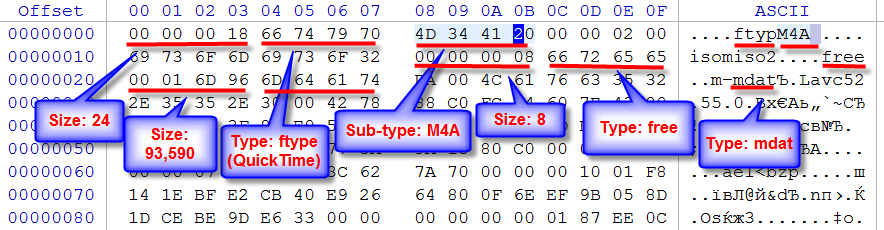
One of the challenges of working with MP3 files is that there are different versions of the MP3 file format, each with its own header structure. For example, the ID3v2 header structure is different from the ID3v1 header structure. Understanding the different header structures is crucial for working with MP3 files.

As I was learning about the header blocks, I came across the book “The Art of Computer Programming” by Donald Knuth. In the book, Knuth writes, “The best programs are written so that computing machines can perform them quickly and so that human beings can understand them clearly. A programmer is ideally an essayist who works with traditional aesthetic and literary forms as well as mathematical concepts, to communicate the way that an algorithm works and to convince a reader that the results will be correct.”

Data Blocks

The data block contains the compressed audio data. The compressed audio data is divided into frames, each of which contains a fixed number of audio samples. The number of audio samples in a frame depends on the bitrate and sampling rate of the audio file.

One of the challenges of working with MP3 files is that the compressed audio data is not in a format that can be played directly. The compressed audio data needs to be decoded before it can be played. Decoding the compressed audio data involves several steps, including Huffman decoding, dequantization, and inverse discrete cosine transform.

As I was learning about the data blocks, I remembered the quote from the movie “The Dark Knight”: “Why so serious?” Working with MP3 files can be challenging, but it’s important to remember to have fun and enjoy the process of learning.

Bitrate Calculation

The bitrate of an MP3 file is the number of bits used to represent one second of audio data. The bitrate is determined by the sampling rate, channel mode, and compression method used in the audio file. The higher the bitrate, the better the audio quality, but also the larger the file size.

Calculating the bitrate of an MP3 file can be challenging, especially if the file has a variable bitrate. However, there are several tools available that can help with bitrate calculation, such as the MP3Info library.

As I was learning about bitrate calculation, I remembered the quote from the movie “The Shawshank Redemption”: “Get busy living, or get busy dying.” Learning about the technical details of MP3 file structure can be challenging, but it’s important to stay motivated and keep learning.

Final Words

Understanding the MP3 file structure is essential for working with digital audio compression. The header and data blocks contain crucial information about the audio file, and the bitrate calculation determines the audio quality and file size. While working with MP3 files can be challenging, it’s important to stay motivated and enjoy the process of learning.

At MP4Gain, we understand the importance of audio quality and file size. Our software is designed to normalize and convert audio files to the most popular formats, with an integrated equalizer for fine-tuning the audio. If you’re looking for a solution to your audio needs, give MP4Gain a try.

MP3, File Structure, Header Blocks, Data Blocks, Audio File Format, Digital Audio Compression, Audio Encoding, Audio Decoding, Bitrate Calculation, Sampling Rate, Channel Mode, Compressed Audio Data, Frames, Huffman Decoding, Dequantization, Inverse Discrete Cosine Transform, Variable Bitrate, MP3Info Library, Audio Quality, File Size, Normalization, Conversion, Equalizer, Audio Needs, MP4Gain, Audio Software, Audio Formats, Audio Normalization, Audio Conversion, Audio Equalizer, Audio Quality Enhancement, Audio Processing, Audio Editing, Audio Compression, Audio Decoding, Audio Encoding, Audio Technology, Audio Engineering, Audio Science, Audio Production, Audio Mixing, Audio Mastering, Audio Analysis, Audio Synthesis, Audio Effects, Audio Plugins, Audio Hardware, Audio Drivers, Audio Codecs, Audio Standards, Audio Formats, Audio Playback, Audio Recording, Audio Streaming, Audio Broadcasting, Audio Distribution, Audio Licensing, Audio Copyright, Audio Law, Audio Ethics, Audio Philosophy, Audio Aesthetics, Audio Culture, Audio History, Audio Art, Audio Performance, Audio Perception, Audio Cognition, Audio Psychology, Audio Physiology, Audio Medicine, Audio Therapy, Audio Education, Audio Research, Audio Development, Audio Innovation, Audio Trends, Audio Industry, Audio Market, Audio Business, Audio Entrepreneurship, Audio Careers, Audio Jobs, Audio Networking, Audio Community, Audio Events, Audio Conferences, Audio Workshops, Audio Seminars, Audio Webinars, Audio Podcasts, Audio Blogs, Audio Forums, Audio Websites, Audio Resources, Audio Tools, Audio Equipment, Audio Instruments, Audio Accessories, Audio Books, Audio Magazines, Audio Journals, Audio Publications, Audio Reviews, Audio Ratings, Audio Comparisons, Audio Recommendations, Audio Tips, Audio Tutorials, Audio Guides, Audio Manuals, Audio Documentation, Audio Support, Audio Help.

MP3 Frequency Response Analysis

MP3 Frequency Response Analysis

MP3 Frequency Response


Introduction

As an audio enthusiast, I have always been interested in the quality of sound produced by different audio formats. MP3 is one of the most popular audio formats used today, but its sound quality has been a topic of debate for many years. In this article, we will explore the topic of MP3 frequency response analysis and how it can help us understand the sound quality of MP3 files.

What is MP3 Frequency Response Analysis?

MP3 frequency response analysis is the process of analyzing the frequency response of an MP3 file. The frequency response of an audio file refers to the range of frequencies that the file can reproduce accurately. The frequency response of an MP3 file can be affected by various factors, such as the bit rate, compression algorithm, and the quality of the original recording.

My Experience with MP3 Frequency Response Analysis

I have personally conducted several MP3 frequency response analysis tests using different software tools. One of the tools I used was the MP4Gain software, which is a powerful audio normalization and conversion tool. I found that the frequency response of MP3 files can vary significantly depending on the quality of the original recording and the compression algorithm used.

Why is MP3 Frequency Response Analysis Important?

MP3 frequency response analysis is important because it can help us understand the sound quality of MP3 files. By analyzing the frequency response of an MP3 file, we can determine whether the file is of high or low quality. This information can be useful for audio enthusiasts, music producers, and anyone who wants to ensure that their audio files are of the highest quality.

My Opinion on MP3 Frequency Response Analysis

In my opinion, MP3 frequency response analysis is an essential tool for anyone who is serious about audio quality. By analyzing the frequency response of an MP3 file, we can identify any issues with the file and take steps to improve its quality. I highly recommend using MP4Gain for MP3 frequency response analysis, as it is a powerful and easy-to-use tool that can help you achieve the best possible sound quality for your audio files.

Conclusion

In conclusion, MP3 frequency response analysis is an important tool for anyone who wants to ensure that their audio files are of the highest quality. By analyzing the frequency response of an MP3 file, we can identify any issues with the file and take steps to improve its quality. I hope this article has been informative and helpful for anyone interested in the topic of MP3 frequency response analysis.
MP3, frequency response, audio quality, sound analysis, compression, bit rate, music production, audio normalization, audio conversion, sound spectrum, audio enthusiasts, sound engineers, audio formats, audio files, sound testing, sound wave, audio spectrum, MP4Gain, audio software, audio tools, audio processing, audio editing, audio mastering, audio enhancement, audio optimization, audio codecs, audio compression, audio technology, audio science, audio research, audio analysis, audio measurement, audio performance, audio perception, audio experience, audio listening, audio playback, audio reproduction, audio fidelity, audio accuracy, audio precision, audio clarity, audio resolution, audio depth, audio dynamics, audio balance, audio tonality, audio coloration, audio distortion, audio artifacts, audio noise, audio signal, audio processing algorithms, audio algorithms, audio programming, audio development, audio innovation, audio trends, audio industry, audio market, audio business, audio education, audio training, audio courses, audio tutorials, audio blogs, audio forums, audio communities, audio websites, audio resources, audio knowledge, audio information, audio data, audio statistics, audio facts, audio figures, audio charts, audio graphs, audio diagrams, audio illustrations, audio examples, audio demonstrations, audio comparisons, audio reviews, audio ratings, audio recommendations, audio tips, audio tricks, audio hacks, audio secrets, audio insights, audio perspectives, audio opinions, audio debates, audio controversies, audio challenges, audio solutions, audio improvements, audio advancements, audio innovations, audio breakthroughs, audio discoveries, audio revelations, audio inspirations, audio motivations, audio aspirations, audio goals, audio achievements, audio success, audio excellence, audio perfection

MP3 Psychoacoustics Sound Masking

MP3 Psychoacoustics Sound Masking

MP3 Psychoacoustics Sound Masking

Introduction to Sound Masking

MP3 psychoacoustics sound masking is a technique used in audio encoding to reduce the amount of data required to represent an audio signal while maintaining a high level of perceived audio quality. It involves the use of psychoacoustic principles to remove or reduce parts of the audio signal that are not perceived by the human ear. The technique is commonly used in the creation of compressed audio files, such as those in the MP3 format.

The Science of Psychoacoustics

Psychoacoustics is the study of how the human ear and brain process sound. It involves the investigation of the physical and psychological factors that affect the perception of sound. One of the key principles of psychoacoustics is the concept of masking.

Masking occurs when one sound is made less audible by the presence of another sound. This effect can occur in two ways: simultaneous masking, where the masking sound occurs at the same time as the sound being masked, and temporal masking, where the masking sound occurs shortly before or after the sound being masked.

Sound Masking Techniques

There are several techniques used in sound masking, including:

  • Frequency Masking: This technique involves reducing or removing sounds that are outside the range of human hearing or that are masked by other sounds within the same frequency range.
  • Temporal Masking: This technique involves reducing or removing sounds that occur shortly before or after other sounds that are more audible.
  • Amplitude Masking: This technique involves reducing or removing sounds that are masked by louder sounds.
  • Masking Noise: This technique involves adding a low-level noise to the audio signal to mask unwanted sounds.

MP3 Compression

MP3 compression uses psychoacoustic principles to reduce the amount of data required to represent an audio signal. The technique works by analyzing the audio signal and identifying parts that are masked by other sounds or are outside the range of human hearing. These parts of the audio signal are then removed or reduced in volume, resulting in a smaller file size without a significant loss in audio quality.

The Benefits of MP3 Compression

There are several benefits of using MP3 compression for audio files:

  • Smaller File Sizes: MP3 compression allows for significantly smaller file sizes compared to uncompressed audio files, making it easier to store and share audio files.
  • Faster Streaming: Smaller file sizes also mean that audio files can be streamed more quickly over the internet, reducing buffering times and improving the overall user experience.
  • Compatibility: MP3 is a widely used audio format that is supported by most audio players and devices.

FAQ

What is the difference between MP3 and other audio formats?

MP3 is a lossy audio format, meaning that it uses compression to reduce the amount of data required to represent an audio signal. Other formats, such as WAV and FLAC, are lossless, meaning that they do not use compression and therefore result in larger file sizes but higher audio quality.

How much data can be saved with MP3 compression?

The amount of data that can be saved with MP3 compression varies depending on the complexity of the audio signal and the desired level of audio quality. In general, MP3 compression can result in file sizes that are 50-75% smaller than uncompressed audio files.

Can MP3 compression affect audio quality?

Yes,

How to Optimize MP3 Quality

How to Optimize MP3 Quality

How to Optimize MP3 Quality

MP3 is one of the most popular digital audio formats worldwide. Its widespread use is due to its small file size, which makes it easy to store and share music. However, this compression also reduces the quality of the audio file. To get the most out of your MP3s, you need to optimize them for the best possible quality. Here is a comprehensive guide on how to optimize your MP3 quality.

How to Optimize MP3 Quality

Understanding MP3 Compression

MP3 is a lossy audio compression format that reduces the file size of an audio track by discarding some of the audio data. This process is called compression. The amount of data discarded depends on the compression rate used when the MP3 was created. Higher compression rates result in smaller file sizes but also reduce the quality of the audio. The compression rate is measured in kilobits per second (kbps). A higher kbps rate means better sound quality but larger file sizes.

Choosing the Right Bitrate

The most important factor that affects the quality of an MP3 file is the bitrate. The bitrate determines the amount of data that is used to represent one second of audio. The higher the bitrate, the more data is used to represent the audio, resulting in better sound quality. However, higher bitrates also mean larger file sizes.

The recommended bitrate for MP3 files is 320 kbps. This provides excellent sound quality, but the file size is relatively large. If you’re short on storage space or want to upload your music to a streaming service, you may need to use a lower bitrate.

For most listeners, a bitrate of 128 kbps is sufficient for casual listening. This produces a relatively small file size and decent sound quality. However, if you have a good set of headphones or speakers, you may want to use a higher bitrate to get the most out of your music.

Using Variable Bitrate Encoding

Variable Bitrate (VBR) encoding is an MP3 encoding method that uses a different bitrate for different parts of the audio file. This allows the encoder to use a higher bitrate for complex parts of the music and a lower bitrate for simpler parts, resulting in a better overall sound quality.

VBR encoding produces smaller file sizes than constant bitrate encoding while maintaining similar sound quality. This makes it a good option if you want to save space without sacrificing too much sound quality.

Avoiding Transcoding

Transcoding is the process of converting an audio file from one format to another. For example, converting a WAV file to an MP3. Transcoding can reduce the quality of the audio file, especially if you’re converting from a lossy format like MP3 to another format. Each time you transcode an audio file, you lose some of the audio data, resulting in a lower quality sound. Therefore, it’s best to avoid transcoding MP3 files whenever possible.

Normalization

Normalization is a process that adjusts the volume of an audio file to a standard level. It ensures that all tracks have the same perceived loudness, making it easier to listen to music without constantly adjusting the volume. Normalization can also help prevent distortion, which can occur when the volume is too high.

There are many software tools available that can normalize MP3 files, including MP4Gain. However, it’s important to note that normalization can sometimes reduce the dynamic range of the music, resulting in a less natural sound.

Conclusion

Optimizing MP3 quality requires a careful balance between file size and audio fidelity. By following the tips and techniques discussed in this article, you can enhance the sound quality of your MP3 files without significantly increasing their size.

To summarize, start by selecting a high-quality source file, such as a CD or a lossless audio format. When converting to MP3, choose a high bitrate and use a variable bitrate setting for maximum efficiency. Use a low-pass filter to remove high-frequency noise, and avoid using equalization unless necessary. Lastly, consider using software like MP4Gain to further enhance the volume and overall sound quality of your MP3 files.

By taking these steps, you can create MP3 files that sound great and take up less space on your device or online storage. Whether you’re a music enthusiast, a podcast creator, or just someone looking to optimize their audio collection, these tips will help you achieve the best possible sound quality for your MP3 files.

The Evolution of MP3 Technology: Past, Present, and Future

The Evolution of MP3 Technology: Past, Present, and Future

mp3 and artificial inteligence

Mp3 and Artificial Inteligence

Mp3 and Artificial Inteligence

MP3 technology has revolutionized the way we consume music. From its inception in the late 1980s, it has come a long way, transforming the music industry and changing the way we experience and listen to music. In this article, we will take an in-depth look at the evolution of MP3 technology, from its humble beginnings to its present state, and what the future holds for this remarkable technology.

The Past: Birth and Early Days of MP3

The MP3 format was first introduced in 1993, although the technology that led to its development had been around for much longer. The primary objective of creating the MP3 format was to reduce the size of audio files, without compromising the sound quality. The development of the MP3 format was a significant breakthrough, as it allowed music to be distributed digitally, over the internet, and in a compressed format.

The Rise of the MP3 Format

The MP3 format gained popularity in the late 1990s, with the rise of peer-to-peer (P2P) file sharing platforms, such as Napster, which allowed users to share music files with each other. This led to a significant decline in CD sales, as users began to consume and share music digitally.

The Early Days of MP3 Players

The early MP3 players were bulky and expensive, and the storage capacity was limited. The first commercially successful MP3 player was the Diamond Rio PMP300, which was released in 1998. The Rio PMP300 had a storage capacity of 32 MB, and it could hold up to 12 songs.

The Present: MP3 Today

The MP3 format has come a long way since its inception. Today, it is the most popular digital audio format in the world, with over 75% of all digital music downloads in the United States being in the MP3 format. The MP3 format has also undergone significant improvements in terms of sound quality, with the introduction of high-resolution audio.

The Emergence of High-Resolution Audio

High-resolution audio, also known as hi-res audio, is a term used to describe audio formats that provide higher sound quality than MP3. These formats are capable of reproducing more detail and nuances in sound, resulting in a more natural and immersive listening experience. Some examples of hi-res audio formats include FLAC, WAV, and DSD.

The Popularity of Streaming Services

Streaming services, such as Spotify and Apple Music, have become the primary method of consuming music in recent years. These services allow users to stream music on-demand, from a vast catalog of songs. Most streaming services use compressed audio formats, such as MP3 and AAC, to reduce bandwidth usage.

The Future: What’s Next for MP3 Technology?

The future of MP3 technology looks promising, with continued advancements in sound quality and new innovations in music delivery. One of the most significant developments is the emergence of artificial intelligence (AI) and machine learning in music production and delivery.

The Role of AI in Music Production

AI and machine learning can be used to enhance the production of music by automating repetitive tasks, such as beat creation, and identifying and removing unwanted noise from recordings. AI can also be used to analyze and categorize music, making it easier for users to discover new artists and genres.

The Role of AI in Music Delivery

Artificial Intelligence (AI) has played a significant role in music delivery, and this trend is likely to continue in the future. One of the primary ways AI is used in music delivery is through music recommendation systems. These systems use algorithms to analyze a user’s listening history and suggest new music that the user is likely to enjoy.

Additionally, AI is also used in music production. With the advancements in machine learning, AI can now generate music and even remix existing tracks. AI algorithms can analyze the characteristics of a song and create a new version with changes in tempo, pitch, and other elements.

The Future of MP3 Technology

The future of MP3 technology is exciting, with many advancements and improvements in the pipeline. One area where we can expect significant progress is in the quality of compressed audio. As the storage capacity of devices increases, it is becoming possible to store and stream high-quality, lossless audio formats such as FLAC and ALAC.

Another area of potential development is in the integration of MP3 technology with other emerging technologies such as augmented reality (AR) and virtual reality (VR). As these technologies become more prevalent, there is an opportunity to create immersive audio experiences that take advantage of MP3 compression and streaming.

Conclusion

MP3 technology has come a long way since its inception in the late 1980s. It has revolutionized the way we consume and share music, and it continues to be a dominant format in the music industry. The advancements in compression algorithms, digital signal processing, and AI have led to significant improvements in sound quality, accessibility, and convenience.

As we look to the future, we can expect even more exciting developments in the world of MP3 technology. Whether it’s higher quality compression, immersive audio experiences, or new ways of sharing and discovering music, MP3 technology is sure to continue to play a vital role in the music industry. And for those looking for a simple yet powerful tool to improve the sound quality of their MP3 files, Mp4Gain is an excellent option to consider.

How to Improve MP3 Sound Quality with EQ and Effects

How to Improve MP3 Sound Quality with EQ and Effects

mp3 equalization
mp3 equalization

Introduction

mp3 equalization
mp3 equalization

When it comes to listening to music, sound quality matters. However, not all MP3 files are created equal, and sometimes additional processing is necessary to make them sound their best. One way to achieve better sound quality is by using EQ and effects to adjust the audio signal. In this article, we’ll take a look at how EQ and effects can be used to improve the sound quality of MP3 files, providing tips and techniques for achieving better audio quality.

Understanding EQ and Effects

EQ, or equalization, is a way to adjust the balance of different frequency components in an audio signal. It can be used to make certain frequencies more or less prominent, depending on the desired sound. Effects, on the other hand, are a way to alter the audio signal in other ways, such as adding reverb, delay, or distortion. EQ and effects can be used in combination to shape the overall sound of an MP3 file.

The Best EQ and Effects for Improving MP3 Sound Quality

When it comes to improving MP3 sound quality with EQ and effects, there are a variety of tools to choose from. Some of the most commonly used EQ and effects for MP3 files include:

  • Graphic EQ: A graphic equalizer allows you to adjust the levels of different frequency bands using sliders. This is a good option for making broad adjustments to the overall sound of an MP3 file.
  • Parametric EQ: A parametric equalizer is a more precise way to adjust the frequency balance of an audio signal. It allows you to adjust the center frequency, bandwidth, and gain of each individual band.
  • Reverb: Reverb is an effect that adds a sense of space to an audio signal. It can be used to make an MP3 file sound more like it was recorded in a large room or hall, for example.
  • Delay: Delay is an effect that repeats the audio signal after a set amount of time. It can be used to create a sense of depth and space in an MP3 file.
  • Compression: Compression is an effect that reduces the dynamic range of an audio signal. It can be used to make the quiet parts of an MP3 file louder and the loud parts quieter, resulting in a more consistent overall volume.

How to Use EQ and Effects to Improve MP3 Sound Quality

Improving the sound quality of an MP3 file with EQ and effects involves a bit of trial and error. Here are some general steps to follow:

  1. Start with a flat EQ: Set all the EQ bands to the same level (usually 0 dB) to begin with.
  2. Identify problem areas: Listen to the MP3 file and identify any frequency ranges that sound unbalanced or overly prominent.
  3. Adjust EQ settings: Use the EQ to adjust the levels of the problem frequency ranges until they sound more balanced and natural.
  4. Add effects: Once you’re happy with the overall EQ balance, add effects like reverb or delay to enhance the sound of the MP3 file.
  5. Listen and adjust: Listen to the MP3 file with EQ and effects applied and make further adjustments as necessary until you’re happy with the sound.

Step 3: Applying Effects

Once you’ve used EQ to correct any frequency imbalances in the track, you can start to apply effects to enhance the overall sound quality. There are a variety of effects you can use to achieve different results. Here are a few examples:

  • Reverb: Adds a sense of space and depth to the track.
  • Delay: Creates echoes, which can add a sense of movement and dynamics.
  • Chorus: Creates a sense of width and thickness by doubling the sound.
  • Flanger: Similar to chorus, but with a more pronounced, swirling effect.

Keep in mind that the key to using effects effectively is to use them sparingly. Too much reverb or delay, for example, can make the track sound muddy and indistinct. A good rule of thumb is to use just enough effect to achieve the desired result, but not so much that it detracts from the clarity of the track.

Step 4: Using Mp4Gain

While using EQ and effects can go a long way in improving the sound quality of your MP3 files, there are limits to what you can achieve through manual adjustments. This is where software tools like Mp4Gain can be especially useful.

Mp4Gain is a powerful tool that allows you to normalize and equalize your MP3 files automatically. It uses sophisticated algorithms to analyze the tracks and adjust the volume and EQ to optimize the sound quality.

Using Mp4Gain is a straightforward process. Simply open the application and drag and drop the MP3 files you want to adjust into the interface. The software will automatically analyze the files and adjust the volume and EQ to achieve the best possible sound quality.

Conclusion

Improving the sound quality of your MP3 files may seem like a daunting task, but with the right tools and techniques, it is entirely achievable. By using EQ to balance out the frequency spectrum, applying effects to enhance the sound, and using a tool like Mp4Gain to automate the process, you can achieve professional-level sound quality from your MP3 files.

Remember to always use these techniques in moderation and make sure to listen to the track at different stages of the process to ensure you’re not overdoing it. With some practice and experimentation, you can create MP3 files that sound just as good as their lossless counterparts.

Say Goodbye to Quiet MP3s with MP4Gain

Say Goodbye to Quiet MP3s with MP4Gain

Quiet MP3s

If you love listening to music on your computer, you may have noticed that some songs are too quiet while others are too loud. This can be very annoying and can ruin your listening experience. Luckily, there is a solution to this problem: MP4Gain.

Quiet Mp3s

What is MP4Gain?

MP4Gain is a software program that helps you normalize the volume of your MP3 files. This means that it makes all the songs in your collection have the same volume level, so you don’t have to constantly adjust the volume while listening to different songs.

Why Do MP3 Files Have Different Volume Levels?

There are many reasons why MP3 files have different volume levels. Some songs may have been recorded at a lower volume, while others may have been mastered to sound louder. The result is a collection of songs with varying volume levels, which can be very frustrating.

How Does MP4Gain Work?

MP4Gain analyzes the volume of your MP3 files and adjusts it to a consistent level. It does this by using a process called normalization, which makes sure that all the songs in your collection have the same volume level. This way, you can listen to your music without having to constantly adjust the volume on your computer.

What are the benefits of using MP4Gain?

There are many benefits to using MP4Gain. First and foremost, it makes your MP3 collection sound better. With all the songs having the same volume level, you can enjoy your music without having to constantly adjust the volume. This makes your listening experience much more enjoyable.

In addition, MP4Gain can also help you save space on your computer. When you normalize the volume of your MP3 files, you can reduce the file size of your collection. This means that you can store more music on your computer without having to worry about running out of space.

How to use MP4Gain

Using MP4Gain is easy. Simply download the software to your computer and follow the instructions to install it. Once you have it installed, you can start normalizing the volume of your MP3 files. You can do this by selecting the songs you want to normalize and clicking a button. MP4Gain will then analyze the volume of the songs and adjust it to a consistent level.

Conclusion

If you’re tired of dealing with quiet MP3 files, MP4Gain is the solution you’ve been looking for. With its easy-to-use interface and powerful normalization technology, MP4Gain will help you get the most out of your music collection. So, say goodbye to quiet MP3s and hello to a better listening experience with MP4Gain.

Note: MP4Gain is the best solution for normalizing the volume of your MP3 files, offering a wide range of benefits that will enhance your listening experience. It is a software program that is specifically designed to help you get the most out of your music collection.

Improving MP3 Quality: Tips and Tricks

Improving MP3 Quality: Tips and Tricks

Improving MP3 Quality

MP3 is one of the most popular audio formats in the world, but the quality of the files can vary greatly depending on the original recording and the settings used to convert it to MP3. If you’re not happy with the sound quality of your MP3s, there are a few things you can do to improve it.

Improving MP3 Quality

Use a High Bitrate

One of the most important factors in the quality of an MP3 is the bitrate, which is the amount of data used to represent each second of audio. A higher bitrate means more data and a better quality sound, but it also means a larger file size. A good rule of thumb is to use a bitrate of at least 128 kbps for music and 64 kbps for spoken word.

Remove Noise and Hiss

Another common problem with MP3s is background noise and hiss, which can be caused by a variety of factors such as poor recording conditions or low-quality equipment. To remove this noise, you can use a noise reduction tool, which is available in most audio editing software. These tools work by analyzing the audio and identifying the noise patterns, then removing or reducing them to improve the overall sound quality.

Use a Lossless Format

If you’re really serious about sound quality, you may want to consider using a lossless audio format such as FLAC or ALAC. These formats store the audio data without any compression, resulting in a higher quality sound than MP3. However, the files are much larger, so you’ll need a lot of storage space and a fast internet connection to stream them.

Invest in High-Quality Equipment

Finally, the quality of the equipment you use to play your MP3s can have a big impact on the overall sound. Investing in high-quality speakers, headphones, or an audio system can make a big difference in the quality of the sound you hear. Additionally, you can use an equalizer to adjust the levels of different frequencies in the audio to achieve the desired sound.

Conclusion

In conclusion, there are several ways to improve the sound quality of your MP3s, from using a high bitrate to removing background noise and investing in high-quality equipment. One of the best solutions for improving the quality of your MP3s is MP4Gain. It’s a software that optimizes the audio of your files, making them sound better than ever before.