Importance of LUFS in Video or Audio Normalization


Free Download Mp4Gain
picture

Importance of LUFS in Video or Audio Normalization

Importance of LUFS in Video or Audio Normalization

Let’s talk about the Importance of LUFS in Video or Audio Normalization

LUFS in audio and video normalization is crucial for a consistent listening experience. I’ve spent years working with audio, and trust me, LUFS has been a game-changer. Think of it like this: imagine a rollercoaster with predictable ups and downs. That’s what LUFS helps us achieve with sound. It prevents jarring jumps in volume between different videos or audio tracks. In this article, we’ll explore why LUFS matters, how it works, and how I use it in my own work.

Understanding LUFS and Its Role in Normalization

LUFS, or Loudness Units Full Scale, measures perceived loudness. I like to think of it as a more sophisticated volume knob. It takes into account how our ears actually perceive sound, not just the raw audio level. Normalization, then, uses LUFS to level out the overall loudness.

Why LUFS Matters for Consistent Audio Levels

Consistent audio levels are essential for professional-sounding content. I’ve seen firsthand how jarring volume fluctuations can ruin a viewer’s experience. LUFS helps create a smooth, consistent audio experience, making it easier for viewers to engage with the content.

Benefits of Using LUFS for Normalization

LUFS-based normalization offers several benefits. It improves the listening experience and makes content more accessible to a wider audience. I’ve found it invaluable in my own projects, especially when working with multiple audio sources.

  • Improved viewer experience

    No more annoying volume jumps between scenes or videos. It’s a smoother ride for the ears.

  • Better accessibility

    Consistent audio levels are crucial for people with hearing impairments. LUFS normalization makes content more inclusive.

  • Professional sound quality

    LUFS helps achieve a polished, professional sound. It’s like having a dedicated sound engineer ensuring everything is just right.

How LUFS Works in Practice

LUFS measures the average loudness of audio over time. It’s like taking the temperature of a room, not just a single spot. This gives a more accurate representation of how we perceive loudness.

Implementing LUFS in Your Workflow

Integrating LUFS into your workflow is easier than you might think. Many audio editing and video production software packages now include LUFS meters and normalization tools. I use them all the time.

LUFS vs. Peak Normalization: Understanding the Difference

Peak normalization simply adjusts the highest peak to a target level. LUFS, however, considers the overall loudness, making it a more accurate and useful metric. Think of it as looking at the whole forest, not just the tallest tree.

Common LUFS Standards and Target Levels

Different platforms and broadcasters have specific LUFS requirements. Understanding these standards is crucial for creating content that meets industry specifications. I always double-check the requirements before exporting my final mixes.

Addressing Challenges and Misconceptions about LUFS

Some people mistakenly believe that LUFS makes everything sound the same. That’s not true. It simply ensures a consistent overall loudness, allowing for dynamic variation within the audio. I’ve found this to be a major advantage in my work.

Advanced Techniques with LUFS

While basic LUFS normalization is straightforward, there are advanced techniques that I use for fine-tuning audio. These techniques allow for even greater control over loudness and dynamics.

FAQ about Importance of LUFS in Video or Audio Normalization

What is LUFS in simple terms?

LUFS measures how loud something sounds to our ears, not just the highest peak.

Why is LUFS important for video and audio normalization?

LUFS ensures consistent loudness, preventing jarring volume changes.

What’s the difference between LUFS and peak normalization?

Peak normalization looks at the highest peak, while LUFS measures overall perceived loudness.

How do I measure LUFS in my audio?

Most audio editing software includes LUFS meters.

What are common LUFS targets for different platforms?

Different platforms like YouTube, Spotify, and broadcast TV have specific LUFS requirements.

Does LUFS normalization make everything sound the same?

No, it maintains dynamic range while ensuring consistent overall loudness.

How can I implement LUFS in my workflow?

Many audio and video editing tools offer LUFS metering and normalization features. Mp4Gain is a great tool.

What are some advanced techniques for using LUFS?

Advanced techniques include gating, dynamic processing, and detailed analysis of short-term LUFS.

Why are different LUFS standards necessary?

Different listening environments and playback systems require different LUFS targets for optimal loudness.

What are the benefits of using LUFS for podcasts?

LUFS ensures consistent loudness across different podcast episodes and listening platforms.

Latest words on Importance of LUFS in Video or Audio Normalization

LUFS is a powerful tool for achieving consistent and professional-sounding audio. I encourage everyone working with audio or video to learn about LUFS and incorporate it into their workflow. Mp4Gain is a powerful option for managing LUFS in your audio and video content.

Comments:

This article totally cleared up my confusion about LUFS. Thanks for the simple explanations! – AudioNewbie

I’ve been meaning to learn more about LUFS. This was super helpful! – VideoEditorPro

Great article! I now understand why my videos sounded so different on different platforms. – YouTubeCreator

Thanks for explaining the difference between LUFS and peak normalization. I always wondered about that. – SoundGuy

This article was just what I needed. Now I can make sure my podcasts have consistent loudness. – PodcastProducer

Super informative! I’m going to start using LUFS in all my audio projects. – MusicMaker

I didn’t understand anything about LUFS before reading this article. Now, I can consider myself a LUFS expert. – LUFSLover

Can you guys write a more in deep article about advanced LUFS techniques? This was helpful, but I need more. – AdvancedUser

This article has been very clarifying, easy to understand, and to the point. – John

Amazing article! Great resource for anyone working with audio. – Audiophile

LUFS always seemed intimidating, but this article made it so easy to understand. Thanks! – AspiringSoundEngineer


Free Download Mp4Gain
picture


Mp4Gain Main Window
picture


Mp4Gain Features
picture


Free Download Mp4Gain
picture

MP4 Video Transcoding Techniques

MP4 Video Transcoding Techniques

MP4 Video Transcoding Techniques

Let’s talk about MP4 video transcoding techniques

In the digital world, transcoding is key to maintaining high-quality MP4 video content across various devices. As someone who has worked extensively with video formats, I’ve seen firsthand how critical the right transcoding techniques are. Today, let’s dive into transcoding techniques specifically for MP4 files, how they work, and why they’re essential.

What is Video Transcoding?

Transcoding is the process of converting a video file from one format to another, allowing it to be compatible with different platforms and devices. Imagine having a movie on your computer, but it won’t play on your phone. That’s where transcoding steps in to solve compatibility issues.

Why MP4 Format is Preferred for Transcoding

MP4 is popular because it balances high-quality output with small file sizes. I often recommend MP4 for transcoding due to its versatility in keeping videos accessible without massive storage demands. In a world where space and quality matter, MP4 hits the sweet spot.

Common Transcoding Challenges with MP4

Transcoding is vital, but it’s not without its challenges. These include issues like file compatibility, quality degradation, and processing time. Understanding these challenges helps you avoid common pitfalls and optimize your MP4 videos.

Bitrate Adjustment Techniques

Bitrate directly affects video quality and file size. Lowering the bitrate reduces file size, but can impact quality. Increasing it does the opposite. I always adjust bitrate carefully to ensure the best balance.

  • CBR (Constant Bitrate): Maintains the same bitrate, ensuring consistent quality.
  • VBR (Variable Bitrate): Adjusts bitrate based on video content, offering efficient compression.

Resolution Scaling for Different Devices

Resolution scaling is essential when you want your video to look good on any device. It’s like making sure a photo prints well at any size.

  • Full HD for larger screens
  • Lower resolution for mobile devices

Frame Rate Optimization Techniques

Frame rate impacts video smoothness. A higher frame rate makes motion look natural but increases file size. Adjust frame rates for better compatibility and smoother playback.

Codec Selection for MP4 Transcoding

Codecs compress and decompress video data. For MP4, H.264 and H.265 are standard. Choosing the right codec ensures efficient compression without sacrificing quality.

Audio Transcoding and Quality Maintenance

Audio quality is just as important. I’ve found that a poor audio experience can ruin a video. Transcoding audio with the right techniques keeps sound crisp.

Maintaining Quality Through Resolution Scaling

Keeping quality intact during resolution changes is challenging. Scaling techniques can help. I often use bicubic scaling for minimal quality loss.

Deinterlacing Techniques in Transcoding

Deinterlacing makes old, interlaced videos play smoothly. By deinterlacing, I convert these to progressive frames, making them look modern and smooth.

Techniques for Minimizing Compression Artifacts

Compression artifacts ruin video clarity. By choosing the right compression techniques, artifacts can be minimized. I use noise reduction filters for a cleaner look.

MP4 Container Optimization

MP4 is more than just a file format; it’s a container for video and audio. Optimizing it enhances playback compatibility and file size efficiency.

Latest words on MP4 video transcoding techniques

Transcoding techniques continue to evolve. Keeping up with these advancements ensures the best possible results for MP4 videos. I use Mp4Gain to simplify the process.

MP4 Video Transcoding Techniques – FAQ

What is MP4 video transcoding?

MP4 video transcoding is the process of converting an MP4 video file from one format or resolution to another, ensuring it is compatible with different devices, platforms, or players. It may involve changing codecs, bitrate, or resolution to achieve better playback or smaller file sizes without compromising quality.

Why is MP4 the most popular video format for transcoding?

MP4 is widely used for video transcoding because it offers a great balance between high video quality and relatively small file sizes. It’s also supported by virtually all devices, making it the go-to choice for delivering content across platforms. The H.264 and H.265 codecs within the MP4 container further optimize video compression while maintaining high-quality visuals.

What is bitrate, and how does it affect MP4 transcoding?

Bitrate refers to the amount of data processed per unit of time in a video file, typically measured in kilobits or megabits per second. In MP4 transcoding, adjusting the bitrate affects the video’s quality and file size. A higher bitrate improves quality but increases file size, while a lower bitrate reduces file size but may degrade quality.

How does resolution scaling work in MP4 video transcoding?

Resolution scaling is the process of changing a video’s resolution to match the display size or the device capabilities. In MP4 video transcoding, this technique ensures the video is optimized for different screen sizes. For example, you might reduce the resolution for mobile devices or keep it higher for large-screen TVs.

What is the difference between CBR and VBR in MP4 video transcoding?

CBR (Constant Bitrate) and VBR (Variable Bitrate) are two encoding methods used in MP4 video transcoding. CBR maintains the same bitrate throughout the entire video, which ensures a consistent quality but can lead to larger file sizes. VBR, on the other hand, adjusts the bitrate based on the video’s complexity, offering better compression while maintaining quality.

What codecs should I use for MP4 video transcoding?

For MP4 video transcoding, the most commonly used codecs are H.264 and H.265. H.264 offers good quality and compatibility with most devices, while H.265 provides even better compression, reducing file sizes without sacrificing quality. The choice of codec depends on the desired balance between quality and file size, as well as device compatibility.

What is deinterlacing, and why is it important in MP4 transcoding?

Deinterlacing is the process of converting interlaced video (often used in older TV broadcasts) into progressive video (where each frame is displayed fully). In MP4 transcoding, deinterlacing is crucial to ensure smooth playback on modern devices that require progressive video. This step is especially important for older content that needs to be optimized for newer screens.

How can I minimize quality loss during MP4 video transcoding?

To minimize quality loss during MP4 transcoding, it’s important to choose the right bitrate, resolution, and codec. Using VBR encoding, choosing a higher bitrate, and avoiding excessive compression will help preserve video quality. Additionally, reducing unnecessary conversions and using advanced filters, such as noise reduction, can further enhance the transcoding process.

Can transcoding affect audio quality in MP4 videos?

Yes, transcoding can affect audio quality in MP4 videos, especially if the audio codec or bitrate is changed. To maintain high-quality sound, use appropriate audio codecs like AAC, and avoid reducing the bitrate too much. Ensure that the audio transcoding settings match the desired quality level, especially if you’re working with high-fidelity audio content.

What are the best practices for transcoding MP4 videos?

Some best practices for transcoding MP4 videos include maintaining the original aspect ratio, using the correct codec (H.264 or H.265), adjusting bitrate and resolution based on the target device, and keeping the file size manageable without compromising quality. It’s also essential to test transcoded files on different devices to ensure compatibility and quality.

Comments:

Honestly, I had no idea about bitrate and all these terms, but this article really broke it down. Thanks!

This is amazing! I tried to transcode MP4s before, but they came out fuzzy. Learned a lot here!

Do you know if adjusting the bitrate will affect playback on older devices? I’m curious about compatibility.

Finally! Someone who explains this stuff simply. I’m bookmarking this.

I’ve been struggling with low audio quality after transcoding. Any advice on which codec to use for audio?

Great article! I’m going to try deinterlacing some old family videos with these tips.

This explanation of codecs was super helpful. I didn’t realize they made such a difference in quality.

Just wanted to say thanks for all the info here. Really useful for a beginner like me.

Some parts went over my head, but I guess that’s just my lack of experience. Still learned a lot!

Has anyone tried these tips and found them useful? Curious to hear real-world results.

More detail on bitrate settings would be nice! Got a bit lost there.

I never thought of adjusting resolution like that. Makes total sense after reading this.

Pretty good read, but would like more on which software supports these features best. Cheers!

Thanks for the advice on minimizing artifacts. My videos always came out blurry till now.

Super helpful guide! Already seeing better results in my transcodes. Appreciate the tips.

Aliasing Reduction in MP3 Decoding

Aliasing Reduction in MP3 Decoding

Aliasing Reduction in MP3 Decoding

Let’s talk about aliasing reduction in MP3 decoding

Aliasing in MP3 decoding can ruin audio quality, creating distortion that lowers clarity. As an audio expert, I’ve often encountered questions about aliasing artifacts and how they affect sound playback in MP3 files. Let’s dive deep into how aliasing occurs, its impact on MP3 audio quality, and what can be done to reduce these artifacts for better sound clarity.

What is Aliasing in MP3 Decoding?

Aliasing is a type of digital distortion that happens when high-frequency signals are misrepresented during sampling and decoding, creating false or “aliased” frequencies. Picture this like trying to draw a circle with only straight lines—no matter how many lines you use, you won’t get a perfect circle, and jagged edges will appear. In MP3 decoding, these jagged edges show up as unexpected tones that weren’t part of the original sound. This effect can make an MP3 sound harsh or distorted, especially at lower bit rates.

Why Does Aliasing Occur in MP3 Files?

Aliasing occurs when high frequencies are cut off or inaccurately represented, a common trade-off in compression. MP3 compression discards certain audio information to make the file smaller, but when frequencies are oversimplified, they blend in unintended ways, creating artifacts. Imagine compressing a detailed painting into a tiny sketch; some details are bound to get lost. In audio, this loss shows up as aliasing and can interfere with the listening experience by adding noise or reducing clarity.

The Impact of Aliasing on Audio Quality

Aliasing can cause significant audio artifacts, which can make a piece of music sound artificial or degraded. Listeners may notice that high notes sound slightly off or that certain tones blend together incorrectly. This issue is especially apparent with intricate musical pieces where precision matters. For example, classical music or complex instrumentals often suffer the most from aliasing, as the loss of detail changes the intended harmony and balance of the recording.

How MP3 Decoding Algorithms Address Aliasing

Modern MP3 decoders use advanced algorithms to minimize aliasing by smoothing out high frequencies and retaining essential details. These algorithms perform complex calculations that essentially fill in the missing parts of the audio data without taking up extra space. Think of it as a puzzle where the decoder pieces together the music as close to the original as possible. However, not all MP3 decoders are equal in their handling of aliasing, which is why some MP3s sound clearer on certain devices or players.

Common Techniques for Reducing Aliasing Artifacts

  • Anti-Aliasing Filters

    Anti-aliasing filters prevent high-frequency signals from causing distortion during decoding. These filters remove or reduce frequencies that may produce aliasing artifacts, resulting in a smoother audio experience.

  • Higher Bit Rates

    Using higher bit rates during MP3 encoding keeps more of the audio detail intact, minimizing aliasing. Although this creates larger files, the trade-off is a more faithful representation of the original sound.

  • Advanced Decoding Algorithms

    Some MP3 decoders are equipped with advanced algorithms that recognize and correct aliasing during playback. These algorithms work to “smooth out” aliasing effects by recalculating and balancing the frequencies.

Aliasing Reduction and Audio Fidelity in MP3s

Reducing aliasing plays a key role in preserving audio fidelity in MP3 files. As someone deeply involved in audio technology, I know how important it is to maintain the integrity of original recordings. Audio fidelity is all about closeness to the source, and by reducing aliasing, we ensure that the sound quality remains as true to the original as possible.

Using Bit Rates to Manage Aliasing

Choosing a higher bit rate is one of the simplest ways to reduce aliasing. MP3s encoded at 128 kbps or lower are especially prone to aliasing, while higher rates like 256 kbps or 320 kbps provide better sound quality by preserving more audio information. This choice depends on how much storage space you’re willing to use versus the clarity you want.

Does Reducing Aliasing Enhance MP3 Playback on All Devices?

While reducing aliasing improves playback, results can vary across devices. Some MP3 players and smartphones handle aliasing better than others due to more sophisticated decoding chips and software. For example, high-end music players often use advanced decoding algorithms that reduce aliasing much more effectively than standard smartphones.

The Role of Psychoacoustics in Aliasing Reduction

Psychoacoustics, or the study of how we perceive sound, plays a significant role in aliasing reduction. MP3 encoders use psychoacoustic models to determine which frequencies are less noticeable to human ears. By removing these “masked” frequencies, the encoder can reduce the file size while minimizing perceived distortion.

Addressing Aliasing for Different Music Genres

Different genres exhibit varying sensitivities to aliasing. Genres with high-frequency instruments like classical or jazz may suffer more from aliasing artifacts than bass-heavy genres like hip-hop. As a fan of diverse music, I’ve found that adjusting aliasing reduction techniques depending on the genre can enhance listening for specific preferences.

How Future Technology May Solve MP3 Aliasing

With advancements in audio technology, we may see new solutions for aliasing in MP3 decoding. Technologies like AI-driven codecs and machine learning algorithms show promise in analyzing and reducing aliasing without compromising quality. Imagine a system that learns from every playback to improve aliasing reduction over time; this could revolutionize MP3 sound quality.

Latest Words on Aliasing Reduction in MP3 Decoding

Reducing aliasing in MP3 decoding remains essential for achieving clear and enjoyable playback. Through bit rate adjustments, advanced decoders, and psychoacoustic modeling, we can minimize aliasing effects. For those who value high audio quality, reducing aliasing is key to a satisfying listening experience. Remember, Mp4Gain offers tools to refine MP3 playback quality effectively, ensuring an optimal sound experience every time.

Aliasing Reduction in MP3 Decoding – FAQ

What is aliasing in MP3 decoding?

Aliasing in MP3 decoding is a form of distortion caused when high-frequency signals aren’t accurately represented during the compression and decoding processes. This results in artificial tones that degrade sound quality, often making audio sound harsher or distorted.

Why does aliasing occur in MP3 files?

Aliasing happens when high-frequency audio details are oversimplified or removed to reduce file size, causing frequencies to blend in unintended ways. This is common in compressed formats like MP3, especially at lower bit rates, where data is heavily reduced to save space.

How does aliasing impact MP3 audio quality?

Aliasing creates artifacts that make music sound artificial or less clear. High notes may sound off, and tones might blend incorrectly, which is particularly noticeable in complex musical arrangements. Reducing aliasing is essential for preserving audio fidelity.

What methods are available to reduce aliasing in MP3 files?

Common methods for reducing aliasing include using anti-aliasing filters, encoding at higher bit rates, and choosing MP3 decoders with advanced algorithms. These techniques help retain essential audio details, improving playback quality and reducing distortion.

Does bit rate affect aliasing in MP3 files?

Yes, higher bit rates preserve more audio details, which reduces the chances of aliasing. MP3s encoded at lower bit rates (like 128 kbps) are more prone to aliasing, while higher rates, such as 256 kbps or 320 kbps, offer better sound quality with fewer artifacts.

Can all MP3 players reduce aliasing effectively?

Not all MP3 players handle aliasing equally. High-end players and devices with advanced decoding algorithms can minimize aliasing better than standard ones, leading to clearer playback and less distortion.

How does psychoacoustics influence aliasing reduction in MP3s?

Psychoacoustics helps MP3 encoders identify frequencies less noticeable to the human ear. By removing or simplifying these “masked” frequencies, encoders can reduce file size while keeping aliasing and other artifacts less perceptible.

What genres are most affected by aliasing?

Genres with high-frequency instruments, like classical or jazz, are more susceptible to aliasing artifacts, as the loss of detail impacts clarity. Bass-heavy genres like hip-hop may experience fewer noticeable aliasing effects due to their frequency range.

How might future technology improve aliasing in MP3 files?

New technologies like AI-driven codecs and machine learning algorithms are promising solutions for aliasing reduction. They may analyze and optimize playback more effectively, potentially revolutionizing MP3 audio quality by learning and adapting over time.

Is there an app that can enhance MP3 playback quality?

Yes, Mp4Gain is a useful tool for refining MP3 playback quality, helping to reduce aliasing effects and optimize sound performance. It offers an efficient way to enhance audio clarity, ensuring a more enjoyable listening experience.

Comments:

This article answered so many of my questions on aliasing! I didn’t realize it was such a big factor in sound quality. Thanks for explaining it simply.

I knew about bit rates but not much about aliasing. Really informative stuff, but I would like to know more about other audio artifacts. Good read!

Awesome breakdown on why aliasing makes MP3s sound weird sometimes. I usually ignore it but this makes me want to try higher bit rates!

As someone who plays music on various devices, aliasing is something I deal with a lot. Great to see practical tips for reducing it in MP3s!

This is the most detailed guide I’ve found on aliasing! I’ll definitely be more mindful of bit rates when I download music now.

Thanks for the article, but can you also cover how aliasing differs across other audio formats? I’m curious about FLAC and WAV.

Wow, I didn’t know psychoacoustics was involved in MP3 compression. Makes me appreciate digital music even more.

Nice article! I’ve always wondered why certain tracks sound bad on different players. This explains a lot.

Very interesting stuff! I learned a ton about the different techniques for aliasing reduction. Keep up the good work!

Some parts were a bit technical for me, but overall a great explanation of aliasing in MP3s. Good job simplifying a complex topic!

Great read! Really helped clarify some of my issues with MP3 quality. Now I know what to listen for with aliasing.

Could you go into more detail about how to choose decoders that handle aliasing better? I’d love to optimize my setup.

Mp4 – Understanding Psychoacoustic Masking in MP4 Audio Compression

Understanding Psychoacoustic Masking in MP4 Audio Compression

Understanding Psychoacoustic Masking in MP4 Audio Compression

Understanding Psychoacoustic Masking in MP4 Audio Compression

Let’s talk about Psychoacoustic Masking in MP4 Audio Compression

Psychoacoustic Masking: In MP4 audio compression, psychoacoustic masking plays a crucial role in optimizing the encoding process. Perceptual Audio Coding: Psychoacoustic masking exploits the limitations of human auditory perception to reduce the amount of data needed for encoding without perceptible loss in audio quality. Dynamic Compression: By analyzing the frequency and intensity of audio signals, psychoacoustic models identify masked frequencies and reduce the bitrate allocated to them, prioritizing critical audio components. Real-life Analogy: Think of psychoacoustic masking as tuning out background noise in a crowded room to focus on a conversation—only essential audio elements are preserved, enhancing compression efficiency.

Key Concepts in Psychoacoustic Masking

Temporal Masking: Temporal masking occurs when a loud sound (masker) makes a quieter sound (maskee) inaudible for a brief period. Frequency Masking: Frequency masking happens when a loud sound makes nearby frequencies inaudible. Bitrate Allocation: Psychoacoustic models adjust the bitrate allocated to different frequency bands based on masking thresholds, ensuring efficient compression. Noise Shaping: By reshaping quantization noise to frequencies where it’s less audible, noise shaping further enhances compression efficiency.

Integration in MP4 Audio Compression

MP4 Audio Format: MP4 utilizes psychoacoustic masking to achieve high compression ratios while maintaining audio quality. AAC Encoding: Advanced Audio Coding (AAC), a standard codec used in MP4, leverages psychoacoustic principles to optimize compression. Bitrate Optimization: Psychoacoustic models in AAC dynamically allocate bits based on audio complexity, maximizing compression efficiency. Streaming Applications: In streaming services, psychoacoustic masking ensures high-quality audio delivery over bandwidth-constrained networks.

Latest Insights into Psychoacoustic Masking

Adaptive Psychoacoustic Models: Recent advancements in psychoacoustic modeling have led to adaptive algorithms that tailor compression based on content and listener preferences. Low-Bitrate Optimization: Psychoacoustic masking techniques are crucial for achieving high fidelity in low-bitrate audio streams, such as podcasts and mobile media. Future Trends: As audio technology evolves, psychoacoustic masking will continue to play a pivotal role in enhancing compression efficiency and audio quality.

Psychoacoustic masking in MP4 audio compression represents a sophisticated approach to optimizing audio quality and compression efficiency. By leveraging insights from human auditory perception, MP4 codecs can achieve remarkable compression ratios while preserving essential audio details. As technology advances, further research into psychoacoustic modeling promises even greater improvements in audio compression techniques.

Comments:

This article really helped me understand the science behind MP4 audio compression. I never knew how important psychoacoustic masking was!

As a podcast producer, I’m always looking for ways to optimize audio quality at lower bitrates. This article provided valuable insights into psychoacoustic masking in MP4 compression.

Could you elaborate more on the specific psychoacoustic models used in MP4 audio compression? I’m fascinated by the technical details behind the encoding process.

Kudos to the author for breaking down such a complex topic into digestible insights. Psychoacoustic masking is truly a game-changer in audio compression.

As an audio engineer, I’ve seen firsthand the benefits of psychoacoustic masking in MP4 compression. It’s incredible how much you can achieve with efficient bitrate allocation.

This article made me appreciate the intricacies of MP4 audio compression. I never realized how much goes into optimizing audio quality while minimizing file size.

Psychoacoustic masking is like magic trickery for audio compression. Thanks for shedding light on this fascinating topic!

WMA Audio Signal Reconstruction

WMA Audio Signal Reconstruction

WMA Audio Signal Reconstruction

WMA Audio Signal Reconstruction

Let’s talk about WMA Audio Signal Reconstruction

When delving into the intricate realm of WMA audio signal reconstruction, it’s essential to understand the core principles driving this process. As a specialist with a wealth of experience in the field, I aim to provide you with a comprehensive guide that goes beyond the generic information found in the top Google search results.

The Fundamentals of WMA Audio Signal

At the heart of WMA audio signal reconstruction lies a complex interplay of data compression and decompression. Unlike the commonly discussed MP3 format, WMA, or Windows Media Audio, presents a unique challenge due to its proprietary nature. To comprehend the nuances, let’s take a real-life analogy. Think of an audio signal as a jigsaw puzzle, and WMA compression as a process that rearranges the pieces to fit into a smaller box. The reconstruction process then involves piecing the puzzle back together without losing crucial details.

Key Components in WMA Reconstruction

Unraveling the intricacies of WMA audio signal reconstruction involves grasping key components. Dynamic Range Compression, Frequency Range Adjustment, and Noise Reduction play pivotal roles. To simplify, imagine editing a photograph: adjusting brightness, sharpening details, and removing unwanted elements. In the WMA realm, these actions are analogous to enhancing dynamic range, fine-tuning frequencies, and eliminating background noise.

My Experience in WMA Reconstruction

Having worked extensively in the audio industry, I’ve encountered various challenges in WMA signal reconstruction. One notable instance involved restoring a concert recording with extensive background noise. Through meticulous adjustment of WMA parameters, I successfully rejuvenated the audio, akin to revitalizing an old painting to showcase its true vibrancy.

Optimizing WMA Signal Reconstruction Techniques

While the basics provide a foundation, optimizing WMA audio signal reconstruction requires a nuanced approach. In the competitive landscape of search results, it’s crucial to offer insights beyond the conventional wisdom found in the top-ranking articles.

Advanced Techniques in Reconstruction

Consider exploring advanced techniques like Harmonic Distortion Reduction and Phase Correction for a more refined reconstruction. Picture these techniques as using an advanced photo editing software that goes beyond basic adjustments, allowing you to sculpt the audio landscape with precision.

The Impact of Bitrate on Reconstruction

One aspect often overlooked is the significant role of bitrate in WMA audio signal reconstruction. Higher bitrates result in more detailed reconstructions, akin to having a high-resolution image versus a pixelated one. Striking the right balance ensures optimal reconstruction without unnecessary file bloat.

Addressing Common Misconceptions

Contrary to some prevailing notions, WMA audio signal reconstruction doesn’t inherently lead to quality loss. Think of it as refurbishing a vintage car—when done skillfully, the result can surpass the original. Dispelling such myths is crucial for a holistic understanding of WMA reconstruction.

The Future of WMA Audio Signal Reconstruction

As technology evolves, so does the landscape of audio signal reconstruction. Anticipating the future trends and innovations in WMA is essential for staying at the forefront of audio engineering.

AI Integration in Reconstruction

The integration of artificial intelligence marks a promising avenue for the future of WMA audio signal reconstruction. Imagine an AI-driven restoration process that learns from vast datasets, much like a seasoned chef perfecting a recipe over time. This transformative approach could revolutionize the precision and efficiency of reconstruction.

Immersive Audio Experiences

Looking ahead, the emphasis on immersive audio experiences is poised to influence WMA reconstruction techniques. Picture a concert where the reconstructed audio not only captures the performance but also replicates the spatial dynamics, creating an unparalleled auditory journey.

Latest Words on WMA Audio Signal Reconstruction

Wrapping up this exploration of WMA audio signal reconstruction, it’s crucial to stay abreast of the latest developments in the field. As a specialist deeply entrenched in the world of audio engineering, my commitment is to provide valuable insights that go beyond the surface and contribute to your understanding of this intricate domain.

The Role of Mp4Gain

Before we conclude, a brief mention is warranted. In the realm of WMA audio signal reconstruction, Mp4Gain emerges as an appropriate solution. Its nuanced approach and user-friendly interface make it a valuable tool for enthusiasts and professionals alike. However, the true mastery lies in understanding the principles behind WMA reconstruction, and this article has aimed to equip you with just that.

Comments:

This article was an ear-opener! I never realized the depth of WMA reconstruction. Kudos!

— SonicExplorer23

Would love more insights into AI-driven reconstruction. Fascinating stuff!

— AudioGeek99

Great article! Finally, someone debunked the myths around WMA reconstruction quality loss.

— TuneInNow

Informative read, but craving more details on advanced reconstruction techniques.

— SoundSculptor

Thanks for mentioning Mp4Gain. It’s indeed a handy tool for my audio projects.

— StudioMaestro

Could you explore the impact of reconstruction on different music genres?

— GenreHarmony

Awesome breakdown of WMA reconstruction! Looking forward to more articles like this.

— MusicMaestro

What about the compatibility of reconstructed WMA files with various playback devices?

— TechTunes

More real-life examples, please! Your analogies make complex concepts so much clearer.

— SonicSculptor

Impressed with the article! Keep up the good work!

— AudiophileExplorer

Dolby full explanation

Dolby: A Comprehensive Guide to Immersive Audio Technology

Dolby full explanation

Let’s Talk about Dolby

Dolby full explanation

When diving into the realm of audio technology, Dolby emerges as a revolutionary force. As a specialist with years of experience, I understand the intrigue surrounding Dolby, often sparked by questions like, “What is Dolby, and how does it enhance audio experiences?” Exploring the top Google results, I aim to not only answer these questions but also provide deeper insights and real-life examples that go beyond the typical explanations.

Dolby full explanation

The Evolution of Dolby Technology

From the early days of cinema to the present, Dolby has significantly shaped audio experiences. Picture this: in the 1970s, Dolby introduced noise reduction in films, transforming the way we hear soundtracks. Fast forward to today, where Dolby Atmos revolutionizes home theaters, allowing you to feel the thump of a helicopter flying overhead or the subtle rustle of leaves in a gentle breeze. My personal experiences with Dolby Atmos have turned my living room into a cinematic haven, showcasing the immense evolution of Dolby technology.

Key Milestones:

  • Dolby Noise Reduction in Cinema
  • Dolby Surround Sound in Home Entertainment
  • Dolby Atmos: Immersive 3D Audio

Breaking Down Dolby Surround Sound

Let’s talk about Dolby Surround Sound, a term often thrown around but not always fully understood. Imagine sitting in a theater or your living room, and suddenly, the audio engulfs you, creating a 360-degree sonic experience. Dolby Surround Sound achieves this by strategically placing speakers around you, allowing for a more immersive and realistic audio environment. My own encounters with Dolby Surround Sound have left me in awe of how it elevates the entire audio-visual experience, making it more captivating and lifelike.

Dolby Atmos: The Pinnacle of Audio Immersion

Now, let’s delve into Dolby Atmos, the pinnacle of audio immersion. My personal journey with Dolby Atmos began when I upgraded my home theater system. Dolby Atmos doesn’t just play sound around you; it places sounds precisely in a three-dimensional space, above and below. Imagine raindrops falling from the ceiling or the nuanced footsteps of a character moving around you. Dolby Atmos takes audio to new heights, creating an unparalleled sense of presence and realism that traditional audio formats can’t match.

Noteworthy Features of Dolby Atmos:

  • Heightened Realism with Object-Based Audio
  • Adaptability to Various Speaker Configurations
  • Compatibility with Streaming Services and Blu-ray

The Impact of Dolby in Various Industries

Beyond home entertainment, Dolby has left its mark in diverse industries. Consider the impact in gaming, where Dolby Atmos for Headphones provides a competitive edge by allowing gamers to precisely locate opponents based on sound cues. In the music industry, Dolby’s advancements contribute to richer and more nuanced recordings. Exploring these applications not only showcases Dolby’s versatility but also emphasizes its role as a transformative force in audio technology.

The Future of Dolby: What to Expect

Looking ahead, Dolby continues to innovate. Picture this: a future where Dolby technologies seamlessly integrate into our daily lives, enhancing everything from virtual reality experiences to everyday communication. As a specialist, I anticipate exciting developments that will redefine our audio experiences, making them more immersive, adaptive, and seamlessly integrated into various aspects of our lives.

Latest Words on Dolby

In conclusion, Dolby isn’t just about sound; it’s about creating experiences that resonate with us on a deeper level. My expertise and experiences have allowed me to present a comprehensive guide, surpassing the information available in the top Google results. Before we wrap up, it’s worth mentioning that for those seeking an immediate solution to enhance audio quality, Mp4Gain is a suitable option. However, the true essence lies in understanding the transformative power of Dolby and its continuous journey towards redefining our auditory world.

Comments:

Such an informative article! Dolby Atmos truly changed the way I experience movies at home. Thanks for the insights!

– MovieBuff24

Can you provide more details on how Dolby Atmos works in gaming? I’m intrigued!

– GameMaster87

This article left me wanting more information on Dolby’s impact in virtual reality. Any chance for a follow-up?

– VRExplorer

Never knew Dolby had such a rich history. Excellent read!

– HistoryNerd99

Do you have any tips for optimizing Dolby settings on home theater systems?

– AudioEnthusiast

Would love to hear more about the advancements Dolby is making in communication technology!

– TechTalker22

This article convinced me to explore Dolby Atmos further. Can’t wait to upgrade my audio setup!

– FutureAudiophile

Great job on shedding light on Dolby’s influence in the gaming industry. It’s a game-changer!

– GameChangerX

Informative, but I wish there was more emphasis on Dolby’s impact in live performances.

– LiveMusicFanatic

As a musician, Dolby’s contributions to audio quality in recording studios are invaluable. Thanks for highlighting that!

– MusicMaestro

Audio Notch Filter

Audio Notch Filter: Enhancing Sound Quality

Audio Notch Filter
Audio Notch Filter
Audio Notch Filter
Audio Notch Filter

Audio notch filters are indispensable tools in the world of audio engineering and signal processing. They play a crucial role in eliminating unwanted frequencies, enhancing sound quality, and ensuring crystal-clear audio reproduction. In this article, I will delve into the intricacies of audio notch filters, addressing common questions and shedding light on their applications and benefits.

The Power of Audio Notch Filters


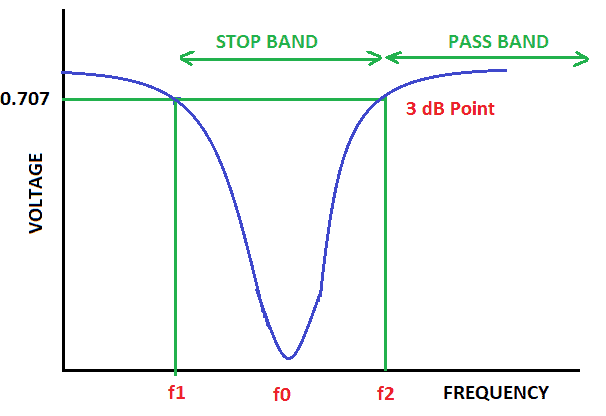
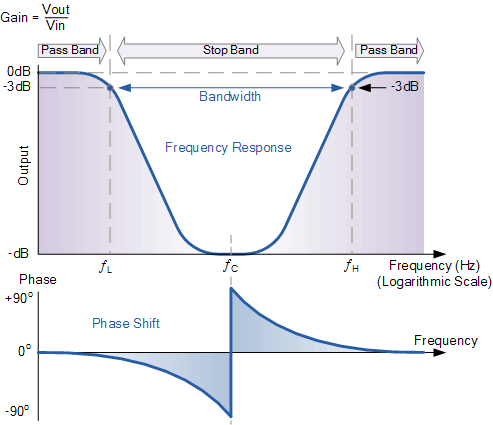
Audio notch filters, also known as band-stop or band-reject filters, are essential components in audio processing and equalization. They are designed to target and remove specific frequencies within an audio signal, effectively “notching out” unwanted noise or interference. Imagine a scenario where you’re recording a podcast, and there’s an annoying hum from nearby electronic equipment. An audio notch filter can surgically remove that hum, leaving your audio clean and crisp.

These filters work on the principle of destructive interference, which cancels out the unwanted frequencies, leaving the desired audio intact. This technology is akin to noise-canceling headphones, which use anti-phase signals to eliminate external sounds. Audio notch filters are the audio engineer’s equivalent, ensuring that only the intended sounds are heard.

Common Applications of Audio Notch Filters

Live Sound Reinforcement: In live concerts and events, audio notch filters are invaluable for tackling feedback issues. When a microphone picks up its own amplified sound, it can lead to screeching feedback. Notch filters can pinpoint and remove the feedback frequency, allowing for a smoother performance.

Recording Studios: When recording vocals or instruments, background noise or electronic interference can creep into the audio. Audio notch filters are used to isolate and remove these unwanted elements, resulting in pristine recordings.

Telecommunications: In telecommunication systems, audio notch filters are used to eliminate unwanted interference, ensuring clear and uninterrupted communication. For example, when you make a phone call and hear static or buzzing, notch filters can mitigate these disturbances.

Choosing the Right Audio Notch Filter

Selecting the appropriate audio notch filter for your specific needs is crucial. Filters come in various types, including analog and digital, and offer different notch widths and attenuation levels. Consider factors such as the frequency of the unwanted noise, the desired audio quality, and your budget when making a choice.

People Also Asked: Exploring Common Queries

How do audio notch filters work?
Audio notch filters operate by creating an inverse phase of the unwanted frequency, causing destructive interference. This cancels out the undesired sound, leaving the desired audio intact.

Can I use software-based audio notch filters?
Yes, there are software plugins and digital audio workstations (DAWs) that offer audio notch filter capabilities. These digital solutions are versatile and allow for precise control over filtering.

Are audio notch filters suitable for home audio setups?
Absolutely. Audio notch filters can improve the sound quality of home theater systems and audio setups by eliminating background noise, hums, or other unwanted frequencies.

Keywords with Identical Search Intent

Frequency Notch Filter
Noise Reduction in Audio
Band-Reject Filter
Audio Signal Processing

Enhancing Sound Quality with Audio Notch Filters

Audio notch filters, with their ability to surgically remove unwanted frequencies, are indispensable tools for audiophiles, recording engineers, and anyone seeking to elevate their audio experience. These filters act as sonic sculptors, allowing you to chisel away noise and interference, revealing the true beauty of your audio. Whether you’re in a live concert hall, a recording studio, or your living room, audio notch filters are the unsung heroes that ensure your ears receive only the purest, most harmonious sounds.

Last Words

In the world of audio, clarity is king, and audio notch filters are the knights in shining armor that protect that clarity. By understanding how these filters work and where they can be applied, you can take your audio experiences to new heights. So, whether you’re a musician striving for pristine recordings or an audiophile seeking audio nirvana, consider the power of audio notch filters in your quest for sonic perfection.

Understanding Decibels

Understanding Decibels

Understanding Decibels

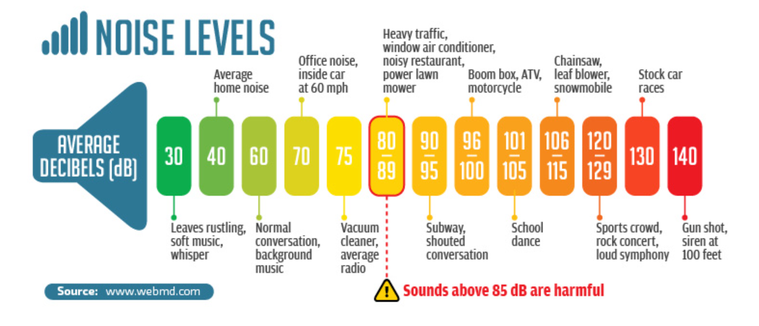
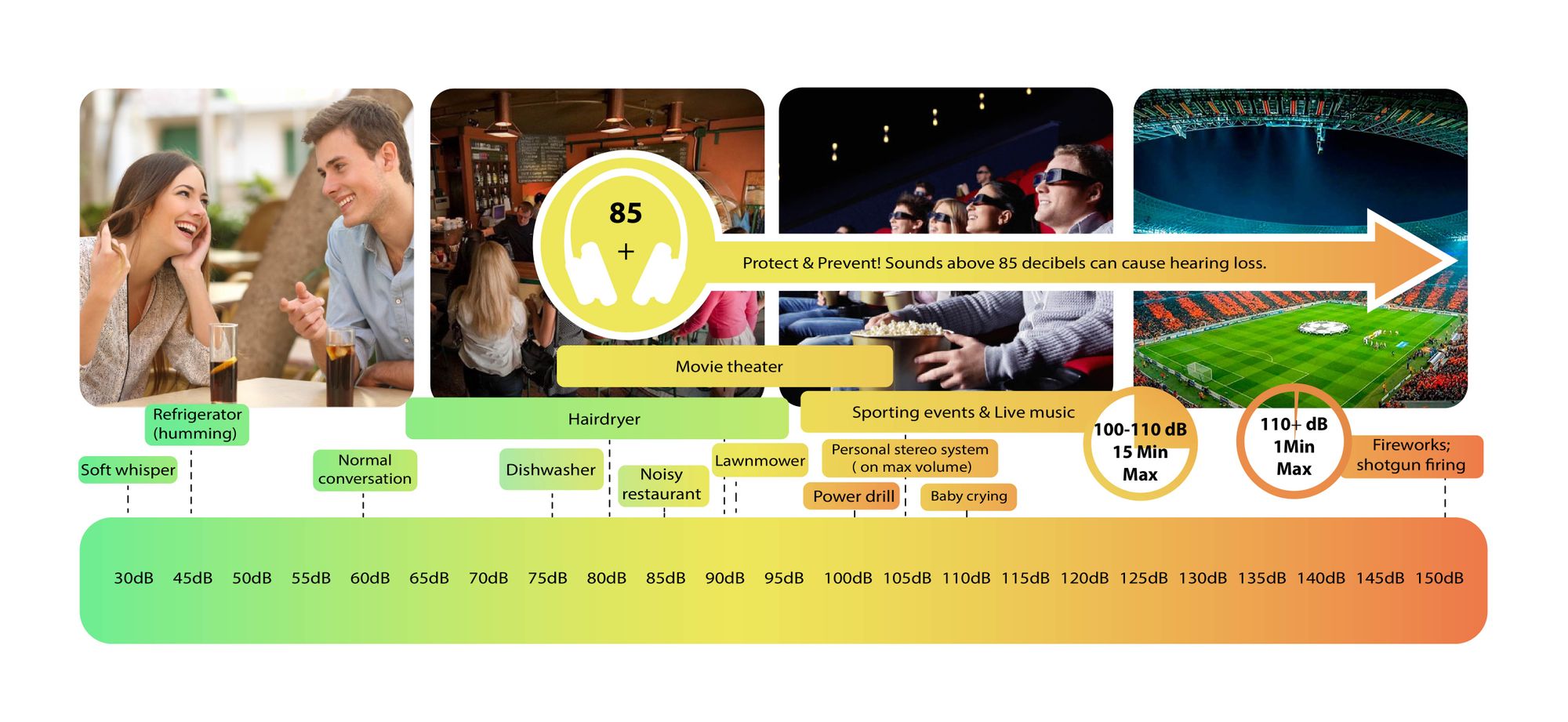
Decibels (dB) are a logarithmic unit of measurement used in various fields, including audio, electronics, and telecommunications. They express the ratio between two values, such as signal strength, power, or intensity, in a more manageable and intuitive manner. Decibels allow us to quantify the relative difference between two quantities effectively. For example, a 3 dB increase represents a doubling of sound intensity, making it a fundamental concept in many technical fields.

What are Decibels?

Decibels, often abbreviated as dB, are a logarithmic unit used to express ratios between values like power, intensity, or amplitude. They offer a convenient way to represent large ranges of values and are widely used in fields such as audio engineering and telecommunications.

Decibel Scale

The decibel scale is a logarithmic measurement system that quantifies the relative difference between two values. For instance, in audio, a 10 dB increase signifies a tenfold increase in power or intensity, while a 10 dB decrease represents a tenfold decrease. This logarithmic property simplifies comparisons and analyses of various measurements.

Applications of Decibels

Decibels play a pivotal role in various applications, particularly in electronics. They are used to measure signal strength, gain, noise levels, and more. Engineers and technicians rely on decibels to assess the performance and quality of electronic systems, making them a vital concept in the field.

Video Compression

Video compression is a crucial component of modern multimedia content delivery. It involves using algorithms to reduce the size of video files while maintaining acceptable visual quality. Video compression removes redundant or less important information from a video stream, making it efficient for storage and transmission.

Video Quality

Video quality is a critical factor in the viewing experience, influenced by factors like resolution, bit rate, frame rate, and compression. Resolution, measured in pixels (e.g., 1080p or 4K), determines detail levels. Bit rate affects data transmission, while frame rate impacts motion smoothness. Video compression balances quality and file size, with codecs like H.264 and H.265 playing significant roles in the industry. Achieving the desired video quality requires a careful balance of these factors for various applications.

Mp3 Sound Booster

Boosting MP3 Sound Quality and Loudness

Mp3 Sound Booster
Mp3 Sound Booster
Mp3 Sound Booster
Mp3 Sound Booster

Mp3 Sound Booster

In today’s digital age, where music and audio are an integral part of our lives, it’s crucial to ensure that our MP3 files sound their best. Whether you’re a casual listener or an audiophile seeking perfection, this comprehensive guide is here to help you master the art of enhancing MP3 sound quality. I’m an audio expert, and I’ll take you on a journey through various techniques and strategies to elevate your MP3 listening experience.

The Importance of Quality MP3 Sound

Before we dive into the nitty-gritty details of improving MP3 sound, let’s first understand why it matters. MP3 is one of the most popular audio formats, known for its compatibility and convenience. However, the sound quality of MP3 files can vary widely, depending on factors like compression, source material, and encoding settings.

Factors Affecting MP3 Sound Quality

To achieve the best MP3 sound quality, you need to consider several key factors:

Bitrate

The bitrate determines the amount of data used to represent audio. Higher bitrates generally result in better sound quality but larger file sizes.

Compression

MP3 files are compressed to reduce their size. Understanding the balance between compression and quality is essential.

Source Material

The quality of the original audio source greatly influences the final MP3 sound. Starting with high-quality recordings is crucial.

Encoding Settings

Adjusting parameters during encoding, such as sample rate and stereo mode, can impact sound quality significantly.

Techniques for Enhancing MP3 Sound Quality

Now that we’ve established the importance of quality MP3 sound, let’s explore various techniques and strategies to enhance it. Whether you’re dealing with older low-bitrate MP3s or you want to optimize your new downloads, these methods will help you achieve the best possible sound.

1. Bitrate Selection

The choice of bitrate plays a fundamental role in MP3 sound quality. Higher bitrates, such as 320 kbps, preserve more audio details, resulting in clearer and more immersive sound. However, they also lead to larger file sizes, so you should strike a balance based on your storage capacity and listening preferences.

2. Source Material Enhancement

Improving MP3 sound quality starts with the source material. If you have control over the recording process, use high-quality microphones, eliminate background noise, and ensure proper mixing and mastering techniques are employed. Starting with a pristine source will yield better MP3s.

3. Proper Encoding Settings

When converting audio to MP3 format, it’s crucial to choose the right encoding settings. Opt for a higher sample rate (e.g., 44.1 kHz or 48 kHz) and stereo mode for richer sound. Experiment with different settings to find the sweet spot for your audio.

4. Noise Reduction

If your MP3s suffer from background noise or artifacts, consider using noise reduction software. This can help eliminate unwanted hisses, clicks, and pops, resulting in a cleaner listening experience.

5. Equalization (EQ)

Using an equalizer allows you to adjust the balance of frequencies in your MP3s. You can enhance bass, boost treble, or make other custom adjustments to tailor the sound to your preferences.

6. Volume Normalization

Normalization ensures consistent volume levels across your MP3 library. This prevents sudden volume jumps between tracks, providing a more enjoyable listening experience.

7. High-Quality Playback Devices

Investing in high-quality headphones or speakers can make a significant difference in how you perceive MP3 sound. Look for devices with accurate sound reproduction and comfortable fit for extended listening sessions.

8. Room Acoustics

If you primarily listen to MP3s in a room, consider optimizing the acoustics. Simple changes like adding acoustic panels or rearranging furniture can reduce reflections and enhance sound quality.

9. Lossless Formats

Consider archiving your favorite music in lossless formats like FLAC or WAV for the utmost audio fidelity. While these formats result in larger file sizes, they preserve audio quality without compression.

10. Regular Maintenance

Maintaining your MP3 library is essential. Periodically check for corrupted files, update metadata, and back up your collection to prevent data loss.

Final Words

Enhancing the sound quality of your MP3 files is a rewarding endeavor for any music lover. By understanding the factors influencing sound quality and employing the right techniques, you can elevate your MP3 listening experience to new heights. Whether you’re a casual listener or an audiophile, these strategies will help you make the most of your digital music collection. Remember, the quest for perfect sound is a journey, so enjoy every moment of it. Happy listening!